Dornier 128-6 Просмотр ZIP-архива
Aircraft/Do_128-6/Documentation/Info.txt
GAUGE: sRadar80: Navigation radar

Features ----------------
> Flight Simulator objects produce screen blips that simulate radar echo returns.
> Aid for navigation and approaches.
> Forward-looking radar in six ranges; 2nm - 80nm
> On-screen scan sweeps 45-degrees left and right of aircraft nose.
> Caution lamp warns of possible radiation hazard if unit is activated when on the ground.
> GAIN controls that limit targets on screen and reduce clutter.
> Push-to-display scale in nm for each individual range button.
> Touch screen target identification to assist in navigation.

NOTE:
A) Radar will paint a target on the display screen relative to the aircraft heading. This means that wind drift will play a roll in the bearing of a echo. The result of a drift angle is that an aircraft can be tracking toward a target even though that target is not displayed along the vertical centerline of the screen.
B)  When sRadar80 is first turned ON, targets may not display in their correct orientation if the aircraft is stationary. See Operation procedure below for activating the radar.

Operation---------------
1. Master Battery Power must be ON before gauge will operate.
2. When battery power is turned ON and aircraft is on the ground, radar will enter CAUTION mode. Orange light will illuminate. The light is a safety warning not to place radar in active mode if near buildings or ground personnel.
3. CAUTION light is lit whenever squat switches are activated (weight is on the landing gear struts).
2. Power Button on gauge must be pressed ON to place radar in active mode. Default range is 20nm.
3. Gauge is normally placed in active mode while taxiing to runway for takeoff.
4. Active mode is normally turned OFF after landing and after turning onto taxiway.
5. Radar beam scans for targets 45-degrees left and right of aircraft nose.
6. The screen scan is ON by default. It can be turned ON/OFF by pressing the round button with the vertical white stripe (right side of gauge).
7. Green buttons (GAIN) will limit which ground targets will be shown on screen. These buttons can help minimize screen clutter. One, two, or three buttons can be ON/OFF in any combination simultaneously.
8. "A" button will echo airports. These are shown in magenta.
9. "V" button will echo VORs. These are shown in yellow.
10. "N" button will echo NDBs. These are shown in green.
11. When applicable, borders will be echoed in magenta.
12. The triangular button below the screen will display the nautical mile scale when pressed. The marker values displayed are dependent upon the range that is currently active. This scale will assist in determining target distance more accurately.
13. The mileage scale can be kept on screen by first pressing the triangular button. While keeping the mouse button down, move the mouse cursor off the triangular button. The mileage scale will remain active until triangular button is clicked again with mouse.
13. Pressing the radar screen near the center will activate the target identification mode. The screen blips will present their IDs according to the GAIN setting in use. Terrain display will also switch to mapping mode.
14. When activating the target ID mode, the mileage scale can be displayed by keeping mouse button pressed while sliding cursor to the triangular mileage button. Then, that button can be pressed to display the nm scale while allowing IDs to remain visible. The target ID mode will remain active until screen is clicked again with mouse.
15. When in target ID mode, airport dots denote the centers of airports.
16. Distances are measured from the nose of the aircraft. This is represented on the radar screen by the protrusion at the bottom center of the screen.
17. A green cursor can be displayed on screen by pressing either the left or right arrow-buttons (right side of gauge). The left arrow will move the cursor in the left half of the screen to 0, 10, 20, 30, 40 degrees. These positions will be repeated if button continues to be pressed.
18. The right arrow displays the cursor in the right half of the screen and operates in similar fashion.
19. The CSR button will turn off the cursor mode.
20. Cursors are useful in approaches. They are used to orient the heading of the runway to the heading of the aircraft as it nears the vicinity of the airport. The cursor indicates when to turn onto the final leg much like an ILS beam. See the illustrated tutorial, RadarApproaches.doc, included with this archive.

Panel installation------------
(For illustrated details on how gauges are located and sized on a panel, please read the Gauge Coordinates.pdf file included with this archive.)

1P. Installing the sRadar80 gauge: The following line should be added to the panel.cfg file of the desired aircraft. The line is added under the [Window00] section:

gaugeXX=sRadar80!sRadar80, LocationX, LocationY, SizeX, SizeY

2P. The two XX's in gaugeXX should be the NEXT consecutive gauge number not currently in use on the panel.cfg file. LocationX and LocationY are values you choose. These coordinates will move the gauge to various positions on a panel bitmap. SizeX and SizeY will determine the gauge size when displayed in flight simulator. See Gauge Coordinates.pdf for more details on how this works.

3P. What size should you make this gauge? Start with these numbers and adjust for your panel.
	X-size of 100; Y-size of 88 (The width:height ratio is 1:0.88)

4P. Place sRadar80.cab into Gauges folder of FS9.

B)Window installation-------------
(Make backup of panel.cfg before using this method)

1W. The following line should be added to the panel.cfg file of the desired aircraft. The line is added under the [Window Titles] section:

[Window Titles]
WindowXX=sRadar80

2W. The two XX's in WindowXX should be the NEXT consecutive Window Titles number shown on the panel.cfg. This entry will allow the gauge to be activated from the FS menu under View/Instrument Panel/sRadar80.

3W. The following section should be also be added to the panel.cfg file.

[WindowXX]
BACKGROUND_COLOR=0,0,0
size_mm=100,88
position=0
visible=0
ident=20511
gauge00=sRadar80!sRadar80, 0, 0, 100, 88

4W. The two XX's in WindowXX should be the same number just used to identify the new window under steps 1W and 2W above.

5W. Place sRadar80.cab into Gauges folder of FS9.

Changing sRadar80 default window size/location--------------------

The default location for the gauge window is the upper, left corner of the screen. This window can be moved and resized manually as needed.
To change the default location, change the "position" value in the line shown below:

[WindowXX]
BACKGROUND_COLOR=0,0,0
size_mm=100,88
position=0 <--Change this value
visible=0
ident=210511

A 0-value locates window in the upper, left corner on your screen; an 8-value will move window to the lower, right corner.
0 1 2
3 4 5
6 7 8
The block of numbers shown above indicates the position sequence. A 9-value equates to a zero and begins the sequence again.

To change the default window/gauge size, two lines must be changed; the "size_mm" line and the gauge line. These are shown below.

[WindowXX]
BACKGROUND_COLOR=0,0,0
size_mm=100,88<------(1)Change these X, Y values in a 1:0.88 proportion
position=0
visible=0
ident=210511
gauge00=sRadar80!sRadar80, 0, 0, 100, 88<-----(2)Change
SizeX, SizeY to the SAME X, Y VALUES just placed in the "size_mm" line.
_______________________________________________________________________

Installation of Icon gauge--------------------
(Not needed if installing gauge into panel or if you prefer to use the FS menu to open/close the gauge window)

This icon will open/close the gauge window.

1. The following line should be added to the same panel.cfg file that contains the sRadar80 installation data. The line will add an icon to your panel that will activate the gauge window. The line is added under the [Window00] section:

gaugeXX=sRadar80!sRadar80_Icon, LocationX, LocationY, SizeX, SizeY

2. The two XX's in gaugeXX should be the NEXT consecutive gauge number shown on the panel.cfg. LocationX and LocationY are values you choose. These coordinates will move the icon to various positions on a panel bitmap. SizeX and SizeY will determine the size of the icon when displayed in flight simulator. See Gauge Coordinates.pdf for more details on how this works.

3. What size should you make this icon gauge? Start with these numbers and adjust for your panel.
	X-size of 19; Y-size of 19

4. The icon gauge is archived inside the sRadar80.cab file and will be accessible to FS when that cab file is placed inside the Gauges folder.
-------------------------

Contact info:
Glenn Copeland
[email protected]
24447-do1286v5.zip
| Имя файла | Дата | Размер |
|---|---|---|
| Aircraft/Do_128-6/ | 23.08.2008 23:03 | |
| Aircraft/Do_128-6/Aircraft.cfg | 23.08.2008 15:53 | 15 KB |
| Aircraft/Do_128-6/DO_128-6_WHEELS_CHECK.htm | 21.08.2008 21:59 | 59 KB |
| Aircraft/Do_128-6/DO_128-6_WHEELS_REF.htm | 21.08.2008 21:28 | 10 KB |
| Aircraft/Do_128-6/Do128-6_FS2004.air | 01.06.2008 03:01 | 15 KB |
| Aircraft/Do_128-6/do1286P5.gif | 23.08.2008 16:41 | 13 KB |
| Aircraft/Do_128-6/do1286V5.gif | 23.08.2008 15:40 | 9 KB |
| Aircraft/Do_128-6/Documentation/ | 23.08.2008 23:03 | |
| Aircraft/Do_128-6/Documentation/Do128-6_D-IBUF_Documentation.htm | 22.12.2006 03:48 | 2 KB |
| Aircraft/Do_128-6/Documentation/F16 Air Show Tour Panel_V2 Instructions.pdf | 29.04.2008 02:19 | 851 KB |
| Aircraft/Do_128-6/Documentation/files/ | 23.08.2008 23:03 | |
| Aircraft/Do_128-6/Documentation/files/Abbreviations_and_Reference.htm | 23.08.2008 20:04 | 106 KB |
| Aircraft/Do_128-6/Documentation/files/airspeed.gif | 09.05.2001 23:31 | 32 KB |
| Aircraft/Do_128-6/Documentation/files/Altmuehltal_digital.jpg | 05.06.2001 12:32 | 8 KB |
| Aircraft/Do_128-6/Documentation/files/anig.gif | 08.03.2000 18:49 | 38 KB |
| Aircraft/Do_128-6/Documentation/files/background.jpg | 11.01.2002 02:53 | 27 KB |
| Aircraft/Do_128-6/Documentation/files/contact.gif | 23.08.2008 18:58 | 2 KB |
| Aircraft/Do_128-6/Documentation/files/D-IBUF_compare.gif | 30.03.2008 03:36 | 183 KB |
| Aircraft/Do_128-6/Documentation/files/D-IBUF_compare_panel.jpg | 04.04.2008 02:43 | 129 KB |
| Aircraft/Do_128-6/Documentation/files/D-IBUF_compare_rollout.jpg | 04.11.2002 01:11 | 78 KB |
| Aircraft/Do_128-6/Documentation/files/D-IBUF_computer_racks.jpg | 27.05.2001 03:35 | 9 KB |
| Aircraft/Do_128-6/Documentation/files/D-IBUF_Demonstrator2.jpg | 13.10.2001 23:23 | 52 KB |
| Aircraft/Do_128-6/Documentation/files/D-IBUF_Homepage_screenshot.jpg | 30.03.2008 01:51 | 27 KB |
| Aircraft/Do_128-6/Documentation/files/D-IBUF_ski.jpg | 30.05.2001 02:59 | 23 KB |
| Aircraft/Do_128-6/Documentation/files/do128_bi.gif | 17.01.2002 05:09 | 161 KB |
| Aircraft/Do_128-6/Documentation/files/Do128-6_annunciator.gif | 06.04.2008 02:27 | 20 KB |
| Aircraft/Do_128-6/Documentation/files/Do128-6_D-IBUF_boost_pump.gif | 17.04.2001 02:27 | 5 KB |
| Aircraft/Do_128-6/Documentation/files/DO128-6_D-IBUF_CHECK_LEGAL_FS9.HTM | 23.08.2008 19:44 | 43 KB |
| Aircraft/Do_128-6/Documentation/files/DO128-6_D-IBUF_CHECK_LEGAL_FS9_d.HTM | 23.08.2008 19:15 | 49 KB |
| Aircraft/Do_128-6/Documentation/files/Do128-6_D-IBUF_cond_lever_range.jpg | 02.11.2002 18:14 | 6 KB |
| Aircraft/Do_128-6/Documentation/files/Do128-6_D-IBUF_crossfeed.gif | 17.04.2001 05:18 | 4 KB |
| Aircraft/Do_128-6/Documentation/files/Do128-6_D-IBUF_flap_handle.jpg | 12.07.2002 21:53 | 8 KB |
| Aircraft/Do_128-6/Documentation/files/Do128-6_D-IBUF_FS9.htm | 23.08.2008 18:49 | 7 KB |
| Aircraft/Do_128-6/Documentation/files/Do128-6_D-IBUF_FS9_d.htm | 23.08.2008 20:00 | 7 KB |
| Aircraft/Do_128-6/Documentation/files/DO128-6_D-IBUF_History_FS9.HTM | 24.08.2008 16:55 | 17 KB |
| Aircraft/Do_128-6/Documentation/files/DO128-6_D-IBUF_History_FS9_d.HTM | 25.08.2008 01:22 | 18 KB |
| Aircraft/Do_128-6/Documentation/files/Do128-6_D-IBUF_LP_cock.gif | 12.07.2002 22:11 | 11 KB |
| Aircraft/Do_128-6/Documentation/files/DO128-6_D-IBUF_Main_Panel_FS9.HTM | 25.08.2008 00:49 | 45 KB |
| Aircraft/Do_128-6/Documentation/files/DO128-6_D-IBUF_Main_Panel_FS9_d.htm | 25.08.2008 01:06 | 50 KB |
| Aircraft/Do_128-6/Documentation/files/Do128-6_D-IBUF_main_panel_overview3.jpg | 25.08.2008 00:05 | 131 KB |
| Aircraft/Do_128-6/Documentation/files/Do128-6_D-IBUF_main_panel_overview3_d.jpg | 25.08.2008 00:34 | 132 KB |
| Aircraft/Do_128-6/Documentation/files/DO128-6_D-IBUF_Pedestal_Panel_FS9.HTM | 09.06.2008 02:20 | 23 KB |
| Aircraft/Do_128-6/Documentation/files/DO128-6_D-IBUF_Pedestal_Panel_FS9_d.HTM | 09.06.2008 02:20 | 26 KB |
| Aircraft/Do_128-6/Documentation/files/Do128-6_D-IBUF_power_lever_range.jpg | 02.11.2002 18:09 | 17 KB |
| Aircraft/Do_128-6/Documentation/files/DO128-6_D-IBUF_PREREQUISITS_FS9.HTM | 22.08.2008 03:09 | 3 KB |
| Aircraft/Do_128-6/Documentation/files/DO128-6_D-IBUF_PREREQUISITS_FS9_d.HTM | 22.08.2008 03:09 | 3 KB |
| Aircraft/Do_128-6/Documentation/files/Do128-6_D-IBUF_prop_lever_range.jpg | 02.11.2002 18:11 | 11 KB |
| Aircraft/Do_128-6/Documentation/files/Do128-6_D-IBUF_Throttle-Fuel-Start.jpg | 05.11.2002 00:40 | 134 KB |
| Aircraft/Do_128-6/Documentation/files/Do128-6_D-IBUF_Throttle-Fuel-Start_d.jpg | 05.11.2002 01:26 | 154 KB |
| Aircraft/Do_128-6/Documentation/files/Do128-6_D-IBUF_transfer_pump.gif | 17.04.2001 02:29 | 5 KB |
| Aircraft/Do_128-6/Documentation/files/DO128-6_D-IBUF_VC_FS9.HTM | 12.05.2008 01:30 | 7 KB |
| Aircraft/Do_128-6/Documentation/files/DO128-6_D-IBUF_VC_FS9_d.HTM | 12.05.2008 01:31 | 8 KB |
| Aircraft/Do_128-6/Documentation/files/DO128-6_D-IBUF_VIRTUAL_HISTORY_FS9.HTM | 12.05.2008 14:21 | 8 KB |
| Aircraft/Do_128-6/Documentation/files/DO128-6_D-IBUF_VIRTUAL_HISTORY_FS9_d.HTM | 12.05.2008 14:20 | 9 KB |
| Aircraft/Do_128-6/Documentation/files/Do128-6_master_warning_lights.gif | 01.03.2003 17:18 | 11 KB |
| Aircraft/Do_128-6/Documentation/files/Do128-6_three_view.jpg | 05.06.2001 23:15 | 52 KB |
| Aircraft/Do_128-6/Documentation/files/Do28B1.jpg | 05.06.2001 23:07 | 16 KB |
| Aircraft/Do_128-6/Documentation/files/Do28D-X5_Turbo-Skyservant.jpg | 05.06.2001 12:38 | 17 KB |
| Aircraft/Do_128-6/Documentation/files/Do28D-X5_Turbo-Skyservant_+_Do28D.jpg | 27.05.2001 03:35 | 27 KB |
| Aircraft/Do_128-6/Documentation/files/Dornier_128-6.gif | 05.06.2001 23:19 | 28 KB |
| Aircraft/Do_128-6/Documentation/files/FF.gif | 13.05.2001 22:10 | 15 KB |
| Aircraft/Do_128-6/Documentation/files/Flapindicator.gif | 02.11.2002 18:20 | 3 KB |
| Aircraft/Do_128-6/Documentation/files/FP.gif | 13.05.2001 22:20 | 15 KB |
| Aircraft/Do_128-6/Documentation/files/fuel_left.gif | 13.07.2002 03:47 | 19 KB |
| Aircraft/Do_128-6/Documentation/files/fueltotalizer.gif | 06.01.2002 19:32 | 35 KB |
| Aircraft/Do_128-6/Documentation/files/germany.gif | 28.08.2002 02:30 | 6 KB |
| Aircraft/Do_128-6/Documentation/files/HSI_overview.gif | 27.05.2001 03:35 | 52 KB |
| Aircraft/Do_128-6/Documentation/files/HSI_Uebersicht.gif | 04.08.2002 02:20 | 57 KB |
| Aircraft/Do_128-6/Documentation/files/Icon_SPEEDS.bmp | 11.08.2008 13:01 | 1 KB |
| Aircraft/Do_128-6/Documentation/files/ITT.gif | 13.05.2001 22:10 | 17 KB |
| Aircraft/Do_128-6/Documentation/files/lb244.gif | 17.12.2002 00:28 | 44 KB |
| Aircraft/Do_128-6/Documentation/files/NG.gif | 25.05.2001 20:46 | 15 KB |
| Aircraft/Do_128-6/Documentation/files/overhead_panel.jpg | 05.04.2008 22:43 | 55 KB |
| Aircraft/Do_128-6/Documentation/files/POH p5-21 Stall speeds engines idling.jpg | 29.07.2008 03:26 | 374 KB |
| Aircraft/Do_128-6/Documentation/files/POH p5-23 Takeoff speeds flaps up.jpg | 29.07.2008 03:36 | 391 KB |
| Aircraft/Do_128-6/Documentation/files/POH p5-24 Takeoff speeds flaps 1.jpg | 29.07.2008 03:42 | 391 KB |
| Aircraft/Do_128-6/Documentation/files/POH p5-41 Best rate-of-climb speeds two engines.jpg | 29.07.2008 03:46 | 338 KB |
| Aircraft/Do_128-6/Documentation/files/POH p5-43 Best rate-of-climb speeds one engine.jpg | 11.08.2008 21:14 | 304 KB |
| Aircraft/Do_128-6/Documentation/files/POH p9-15 VHF Homing System Becker ZVG2002.jpg | 01.05.2008 04:13 | 326 KB |
| Aircraft/Do_128-6/Documentation/files/POH p9-16 VHF Homing System Becker ZVG2002.jpg | 01.05.2008 04:13 | 225 KB |
| Aircraft/Do_128-6/Documentation/files/POH p9-17 VHF Homing System Becker ZVG2002.jpg | 01.05.2008 15:21 | 118 KB |
| Aircraft/Do_128-6/Documentation/files/POH p9-59 Radio Altimeter System Sperry AA-300.jpg | 01.05.2008 03:12 | 245 KB |
| Aircraft/Do_128-6/Documentation/files/POH p9-60 Radio Altimeter System Sperry AA-300.jpg | 01.05.2008 15:45 | 206 KB |
| Aircraft/Do_128-6/Documentation/files/POH Page 7-7 Instrument Panel.jpg | 01.05.2008 21:37 | 344 KB |
| Aircraft/Do_128-6/Documentation/files/PT6A-110.jpg | 05.06.2001 12:46 | 39 KB |
| Aircraft/Do_128-6/Documentation/files/Radar.jpg | 01.05.2008 22:11 | 34 KB |
| Aircraft/Do_128-6/Documentation/files/Radar_d.jpg | 12.05.2008 01:23 | 35 KB |
| Aircraft/Do_128-6/Documentation/files/Realism_Settings.jpg | 04.04.2008 03:10 | 64 KB |
| Aircraft/Do_128-6/Documentation/files/Realism_Settings_d.jpg | 23.06.2008 01:55 | 61 KB |
| Aircraft/Do_128-6/Documentation/files/RPM.gif | 13.05.2001 22:03 | 16 KB |
| Aircraft/Do_128-6/Documentation/files/schema-pt6a.gif | 17.12.2002 00:29 | 7 KB |
| Aircraft/Do_128-6/Documentation/files/Speedcharts.htm | 20.08.2008 16:52 | 2 KB |
| Aircraft/Do_128-6/Documentation/files/start.gif | 08.05.2001 23:34 | 12 KB |
| Aircraft/Do_128-6/Documentation/files/Synthetic_Vision_Approach.jpg | 30.05.2001 02:55 | 40 KB |
| Aircraft/Do_128-6/Documentation/files/torque.gif | 13.05.2001 22:08 | 17 KB |
| Aircraft/Do_128-6/Documentation/files/uk.gif | 28.08.2002 02:30 | 9 KB |
| Aircraft/Do_128-6/Documentation/files/Wiperspeed.gif | 07.01.2002 01:13 | 5 KB |
| Aircraft/Do_128-6/Documentation/Info.txt | 27.04.2006 16:29 | 9 KB |
| Aircraft/Do_128-6/Documentation/Legal Notice.txt | 13.01.2006 18:10 | 608 B |
| Aircraft/Do_128-6/Documentation/RadarApproaches.doc | 27.04.2006 17:29 | 84 KB |
| Aircraft/Do_128-6/INSTALL.txt | 26.08.2008 01:35 | 7 KB |
| Aircraft/Do_128-6/Installation_Deutsch.txt | 26.08.2008 01:35 | 8 KB |
| Aircraft/Do_128-6/model/ | 23.08.2008 23:03 | |
| Aircraft/Do_128-6/model/DO 128-6 D-IBUF FS2K2 v1.mdl | 06.03.2004 19:40 | 2 MB |
| Aircraft/Do_128-6/model/model.cfg | 22.08.2008 22:56 | 43 B |
| Aircraft/Do_128-6/panel/ | 23.08.2008 23:03 | |
| Aircraft/Do_128-6/panel/dfd_hsi70.gau | 07.11.2001 02:35 | 692 KB |
| Aircraft/Do_128-6/panel/dfd_hsi70_0001.GAU | 09.08.2005 01:08 | 692 KB |
| Aircraft/Do_128-6/panel/dfd_i_omi.gau | 02.03.2000 14:09 | 40 KB |
| Aircraft/Do_128-6/panel/dfd_i_omi_0001.GAU | 09.08.2005 01:03 | 40 KB |
| Aircraft/Do_128-6/panel/dfd_i_omi_0002.GAU | 09.08.2005 01:08 | 40 KB |
| Aircraft/Do_128-6/panel/dfd_m_omi.gau | 02.03.2000 14:12 | 40 KB |
| Aircraft/Do_128-6/panel/dfd_m_omi_0001.GAU | 09.08.2005 01:03 | 40 KB |
| Aircraft/Do_128-6/panel/dfd_m_omi_0002.GAU | 09.08.2005 01:08 | 40 KB |
| Aircraft/Do_128-6/panel/dfd_o_omi.gau | 02.03.2000 14:13 | 40 KB |
| Aircraft/Do_128-6/panel/dfd_o_omi_0001.GAU | 09.08.2005 01:03 | 40 KB |
| Aircraft/Do_128-6/panel/dfd_o_omi_0002.GAU | 09.08.2005 01:08 | 40 KB |
| Aircraft/Do_128-6/panel/D-IBUF main.BMP | 15.01.2005 04:29 | 285 KB |
| Aircraft/Do_128-6/panel/D-IBUF overhead complete.bmp | 12.05.2006 01:56 | 1 MB |
| Aircraft/Do_128-6/panel/D-IBUF radio sm.bmp | 31.10.2002 21:04 | 53 KB |
| Aircraft/Do_128-6/panel/D-IBUF throttle-fuel-start.BMP | 21.09.2002 22:44 | 477 KB |
| Aircraft/Do_128-6/panel/D-IBUF upper.BMP | 01.11.2002 13:51 | 204 KB |
| Aircraft/Do_128-6/panel/Do128-6.wiper.gau | 09.09.2002 23:15 | 396 KB |
| Aircraft/Do_128-6/panel/Do128-6_V2.gau | 22.08.2008 02:16 | 2 MB |
| Aircraft/Do_128-6/panel/Do128-6_V2_XML.cab | 11.08.2008 13:27 | 416 KB |
| Aircraft/Do_128-6/panel/F16_AST_Radar80.cab | 22.08.2008 23:03 | 22 KB |
| Aircraft/Do_128-6/panel/hghb.txt | 22.08.2008 23:23 | 4 KB |
| Aircraft/Do_128-6/panel/hghb_bu_brake.gau | 16.03.1998 01:44 | 52 KB |
| Aircraft/Do_128-6/panel/HGHB_HW_ATTITUDE.gau | 07.11.2001 02:34 | 322 KB |
| Aircraft/Do_128-6/panel/HGHB_HW_ATTITUDE_0001.GAU | 09.08.2005 01:08 | 322 KB |
| Aircraft/Do_128-6/panel/HGHB_PC9_STBY_AI.gau | 10.12.1998 19:30 | 303 KB |
| Aircraft/Do_128-6/panel/HGHB_PC9_STBY_AI_0001.GAU | 09.08.2005 01:08 | 303 KB |
| Aircraft/Do_128-6/panel/hghb_uni_altimeter.gau | 18.12.2003 01:15 | 206 KB |
| Aircraft/Do_128-6/panel/Icon_SPEEDS.bmp | 11.08.2008 13:01 | 1 KB |
| Aircraft/Do_128-6/panel/panel.cfg | 22.08.2008 23:18 | 12 KB |
| Aircraft/Do_128-6/panel/VC_CPmain.bmp | 08.08.2005 20:59 | 188 KB |
| Aircraft/Do_128-6/panel/VC_ENGmain.bmp | 08.08.2005 21:01 | 185 KB |
| Aircraft/Do_128-6/panel/VC_Fuel-Start.bmp | 10.08.2005 22:16 | 321 KB |
| Aircraft/Do_128-6/panel/VC_Overhead_panel.bmp | 10.08.2005 15:08 | 821 KB |
| Aircraft/Do_128-6/panel/VC_Pmain.bmp | 08.08.2005 21:00 | 188 KB |
| Aircraft/Do_128-6/panel/VC_Radios.bmp | 08.08.2005 21:01 | 96 KB |
| Aircraft/Do_128-6/panel/ZVG2002.cab | 22.08.2008 23:00 | 21 KB |
| Aircraft/Do_128-6/sound/ | 23.08.2008 23:03 | |
| Aircraft/Do_128-6/sound/CASTALL.WAV | 03.03.2001 03:00 | 80 KB |
| Aircraft/Do_128-6/sound/door_large_close.wav | 10.04.2003 02:06 | 132 KB |
| Aircraft/Do_128-6/sound/door_large_open.wav | 10.04.2003 02:06 | 116 KB |
| Aircraft/Do_128-6/sound/kan1shut.wav | 09.03.2005 22:25 | 341 KB |
| Aircraft/Do_128-6/sound/kan1strt.wav | 09.03.2005 22:25 | 435 KB |
| Aircraft/Do_128-6/sound/kan2strt.wav | 09.03.2005 22:25 | 354 KB |
| Aircraft/Do_128-6/sound/kapr.wav | 18.04.2001 08:19 | 37 KB |
| Aircraft/Do_128-6/sound/kbn1shut.wav | 09.03.2005 22:25 | 341 KB |
| Aircraft/Do_128-6/sound/kbn1strt.wav | 09.03.2005 22:25 | 435 KB |
| Aircraft/Do_128-6/sound/kbn2strt.wav | 09.03.2005 22:25 | 354 KB |
| Aircraft/Do_128-6/sound/kbpr.wav | 18.04.2001 08:19 | 24 KB |
| Aircraft/Do_128-6/sound/left_idle_prop.wav | 05.04.2003 20:35 | 38 KB |
| Aircraft/Do_128-6/sound/left_idle_turb.wav | 05.04.2003 20:35 | 39 KB |
| Aircraft/Do_128-6/sound/leftmax_prop.wav | 05.04.2003 20:36 | 58 KB |
| Aircraft/Do_128-6/sound/leftmax_turb.wav | 05.04.2003 20:36 | 58 KB |
| Aircraft/Do_128-6/sound/mmflaps.wav | 18.04.2001 08:20 | 49 KB |
| Aircraft/Do_128-6/sound/Readme_LM_KASndEnhPck_v31.txt | 13.03.2005 02:46 | 3 KB |
| Aircraft/Do_128-6/sound/right_idle_prop.wav | 21.04.2003 14:32 | 44 KB |
| Aircraft/Do_128-6/sound/right_idle_turb.wav | 21.04.2003 14:33 | 45 KB |
| Aircraft/Do_128-6/sound/rightmax_prop.wav | 21.04.2003 14:33 | 61 KB |
| Aircraft/Do_128-6/sound/rightmax_turb.wav | 21.04.2003 14:33 | 55 KB |
| Aircraft/Do_128-6/sound/sound.cfg | 23.06.2007 03:48 | 6 KB |
| Aircraft/Do_128-6/sound/xkan1shut.wav | 20.02.2005 15:56 | 225 KB |
| Aircraft/Do_128-6/sound/xkan1strt.wav | 20.02.2005 15:56 | 228 KB |
| Aircraft/Do_128-6/sound/xkan2strt.wav | 20.02.2005 15:56 | 81 KB |
| Aircraft/Do_128-6/sound/xleft2.wav | 12.10.2002 01:33 | 65 KB |
| Aircraft/Do_128-6/sound/xleft3.wav | 12.10.2002 01:29 | 97 KB |
| Aircraft/Do_128-6/sound/xright2.wav | 12.10.2002 01:34 | 65 KB |
| Aircraft/Do_128-6/sound/xright3.wav | 12.10.2002 01:30 | 97 KB |
| Aircraft/Do_128-6/texture/ | 23.08.2008 23:03 | |
| Aircraft/Do_128-6/texture/blades_L.bmp | 27.01.2004 03:26 | 512 KB |
| Aircraft/Do_128-6/texture/blades_t.bmp | 08.12.2003 21:15 | 256 KB |
| Aircraft/Do_128-6/texture/Eng_Pylons_L.bmp | 27.01.2004 02:34 | 128 KB |
| Aircraft/Do_128-6/texture/Eng_Pylons_T.bmp | 27.01.2004 02:31 | 64 KB |
| Aircraft/Do_128-6/texture/Engines_L.bmp | 27.01.2004 02:51 | 512 KB |
| Aircraft/Do_128-6/texture/Engines_t.bmp | 16.12.2005 01:51 | 1 MB |
| Aircraft/Do_128-6/texture/EXT_TANKS_L.bmp | 27.01.2004 02:45 | 128 KB |
| Aircraft/Do_128-6/texture/EXT_TANKS_T.bmp | 10.12.2003 23:16 | 64 KB |
| Aircraft/Do_128-6/texture/fuselage_L.bmp | 27.01.2004 01:46 | 2 MB |
| Aircraft/Do_128-6/texture/fuselage_t.bmp | 06.03.2004 20:53 | 1 MB |
| Aircraft/Do_128-6/texture/LDN_GEARS_T.bmp | 11.01.2004 20:30 | 64 KB |
| Aircraft/Do_128-6/texture/LIGHTS_T.bmp | 29.02.2004 21:26 | 16 KB |
| Aircraft/Do_128-6/texture/LND_GEARS_L.bmp | 27.01.2004 03:21 | 128 KB |
| Aircraft/Do_128-6/texture/ROD_T.bmp | 01.03.2004 01:06 | 4 KB |
| Aircraft/Do_128-6/texture/spin_prop.bmp | 17.09.2005 04:20 | 85 KB |
| Aircraft/Do_128-6/texture/Spiner_L.bmp | 31.12.2002 20:24 | 2 KB |
| Aircraft/Do_128-6/texture/Spiner_t.bmp | 24.10.2003 00:12 | 21 KB |
| Aircraft/Do_128-6/texture/Tail_L.bmp | 27.01.2004 02:01 | 2 MB |
| Aircraft/Do_128-6/texture/Tail_T.bmp | 28.01.2004 23:40 | 1 MB |
| Aircraft/Do_128-6/texture/tires_L.bmp | 27.01.2004 03:24 | 128 KB |
| Aircraft/Do_128-6/texture/tires_t.bmp | 08.12.2003 16:04 | 64 KB |
| Aircraft/Do_128-6/texture/WIN_L.bmp | 27.01.2004 03:48 | 8 KB |
| Aircraft/Do_128-6/texture/WIN_L_show.bmp | 01.09.2005 01:41 | 8 KB |
| Aircraft/Do_128-6/texture/WIN_T.bmp | 27.01.2004 03:46 | 4 KB |
| Aircraft/Do_128-6/texture/WIN_T_show.bmp | 01.09.2005 01:44 | 12 KB |
| Aircraft/Do_128-6/texture/WINGS_L.bmp | 29.02.2004 19:39 | 2 MB |
| Aircraft/Do_128-6/texture/WINGS_T.bmp | 06.03.2004 20:17 | 1 MB |
| Effects/fx_CII_wing.fx | 25.07.2005 03:09 | 1 KB |
| Sound/1000Hz.wav | 27.03.2001 00:47 | 15 KB |
| Sound/click.wav | 21.12.1998 17:05 | 2 KB |
| Sound/Click3.wav | 01.04.1999 04:54 | 604 B |
| Sound/Click4.wav | 01.04.1999 04:54 | 680 B |
| Sound/dfd_audiopanel.wav | 14.02.2000 17:47 | 482 B |
| Sound/HGHB_Click2.wav | 08.04.1999 13:45 | 5 KB |
| Sound/HGHB_Click3.wav | 01.04.1999 04:54 | 2 KB |
| Sound/hghb_rsw_cl1.wav | 01.04.1999 04:54 | 1 KB |
| Sound/hghb_rsw_cl2.wav | 01.04.1999 04:54 | 680 B |
| Aircraft/Do_128-6/Documentation/files/audio-control-panel.jpg | 24.08.2008 20:07 | 3 KB |
| avsim_su.diz | 17.10.2009 00:21 | 406 B |
| Итого: | 36 MB | |
Dornier 128-6
| Rating: 5!
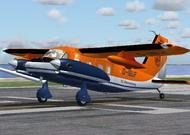
Aircraft used in the armed forces for more than ten countries around the world as a coherent and patrol. Equipped with two Pratt & Whitney turboprop RT6A-110 400 hp In my opinion worthy of attention plane.
→ Size:
12 MB
→ Date:
16 years ago (16.10.2009 20:46)
→ Author:
Mathias Elsaesser
→ Approved by moderator:
Lenya69
→ License:
Freeware - Free version, Unlimited Distribution
→ Downloaded:
2235 time(s)