New files in: 1 day, 3 days, 7 days, 30 days
| Most downloaded for: all time,
year,
half a year,
month,
two weeks,
three days
Most popular by rating | Submit a file
Most popular by rating | Submit a file
| Folder: |

The extreme version of the modification of avionics Aeroworx King Air B200. In addition to the devices RealityXP added options with Honeywell GNS-XLS FMS (Integrated Simavionics) for the EFIS and analog panels. All 2D panel modified in accordance with the style base (added bezel). Challenge 2D panels remained unchanged, except for panel Honeywell GNS-XLS FMS, close / open it can only right click on the radar or a combination of shift +9. Instructions for installing in the archive.
→ Size:
34 MB
→ Date:
16 years ago (17.07.2010 14:36)
→ Author:
Rost
→ Approved by moderator:
SLAVJAN
→ License:
Freeware - Free version, Unlimited Distribution
→ Downloaded:
1406 time(s)
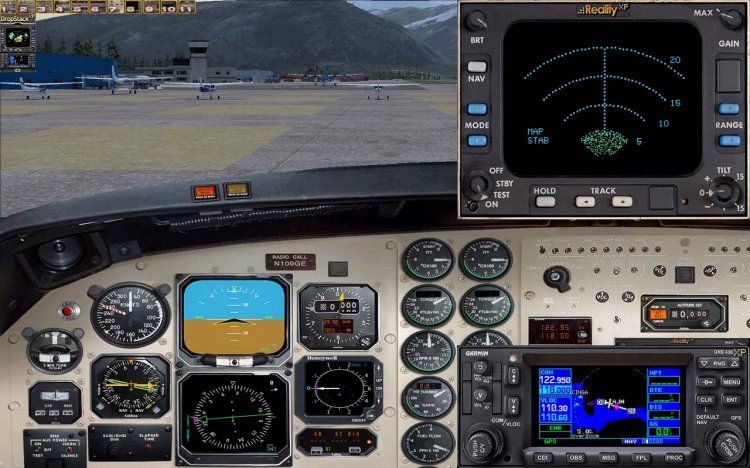
Changed all the main 2D panel (including corrected bitmaps), VC of the two versions - EFIS and analog, for placing devices RealityXP - weather radar Wx500 and GNS 430.
To use this mods, you must have the appropriate equipment RealityXP.
Installation instructions in the archive.
To use this mods, you must have the appropriate equipment RealityXP.
Installation instructions in the archive.
→ Size:
30 MB
→ Date:
16 years ago (15.07.2010 18:11)
→ Author:
Rost
→ Approved by moderator:
SLAVJAN
→ License:
Freeware - Free version, Unlimited Distribution
→ Downloaded:
840 time(s)

The promised panel for wide Monitor Fri Tu-154M 2.03 with vizualkoy PT and with vizualkoy vitamin. Follow the panel in a blue spectrum, as I like it more attractive. The panel was designed to monitor 16:9 (Wide). This panel is the evolution of my ranih works that can be found at www.avsim.su What should be mentioned separately: 1.Magnitny compass (works) on the panel FAC. 2.Vstroeny kinds of ilyuminatorov (numbers 4 +5 and 5 +6 for dop.klaviature, pressed together), with vizualkoy Vitamin without VC a good view of the wing. 4.Bortovoy number is inserted on the panel is automatically the one that is registered in the file Aircraft.cfg section ATC ID. In order to display correctly, register there board a five-digit number. 5.Zadatchik pressure of ARD caused by clicking on the lower right corner of the flight engineer. 6.C courtesy of Paul Kosyakova include a set designed by Paul immediately cover the PIC and the revised upper plate BI and Chapter 8.14 Aeroplane Flight Manual. 7 . Installation: a) Be sure to have ustanovklenny Fri Tu-154 version 2.03, and only put it all. b) replace the corresponding folders on the panel folder from the archive, rename home folder, for example Panel.Wide in Panel.Wide # and so on. c) replace the files and folders in the folder GAUGES, tentatively renamed relatives the same way. Such renaming will provide an opportunity to roll back the panel back to the panel Fri Please do not miss this STEP! D) Do not forget to copy files from a folder testury VC "blue, Copy of each folder with MS Flight Simulator" to VC correctly repainted in blue. 8.Udeleno focus on improving survey on landing ( many got it), and in particular from the cab of the second pilota.Kasatelno cab of the second pilot would like to note that it is more resource-intensive because of design features in a model with VC (FBS sits far) - so the low-end machines offer use the model without VC. I would noted that after the flyby from the place of the second pilot, piloting can assure not cause any problems. 9.Vklyuchit panel co-pilot can click on the fan on the panel, command, and get out of it by pressing the space bar keyboard. 10.Na panel FAC is false panels, closing tachometers 2 nd and third engines, reflecting on their site the most important instruments and displays for the pilot sites with FAC. false panels on and off by clicking on the first engine tachometer. 11.Na panel co-pilot icons are calling doppaneley DDP and ores. Use health. Share them more successful way (doppaneli) pradstavilos not possible. 12.Na panel flight engineer tried to place a maximum of devices, but still not all vlaziet. Therefore, a more detailed top panel BI invoked by clicking on the top left corner of the flight engineer. Authorship: Project Tupolev - appliances, logika.Odnim word basis Alexei Samoshin (NoName) - appliances, bitmaps, Mikhail Mitin (Wishmaster) - compass KI-13 Paul Kosyakov (Paulsoft) - protivoobdledenitelnaya system Mikhail Stepanov - the idea, implementation, bitmaps, assembly Project Tupolev, Alexei Samoshin, Mikhail Mitin, Paul Kosyakov, Mikhail Stepanov NOT place without the consent of the authors on other sites!
→ Size:
54 MB
→ Date:
16 years ago (22.06.2010 04:20)
→ Author:
Project Tupolev,Алексей Самошин,Михаил Митин,Павел Косяков,Михаил Степанов
→ Approved by moderator:
Lenya69
→ License:
Freeware - Free version, Do Not Redistribute
→ Downloaded:
5764 time(s)
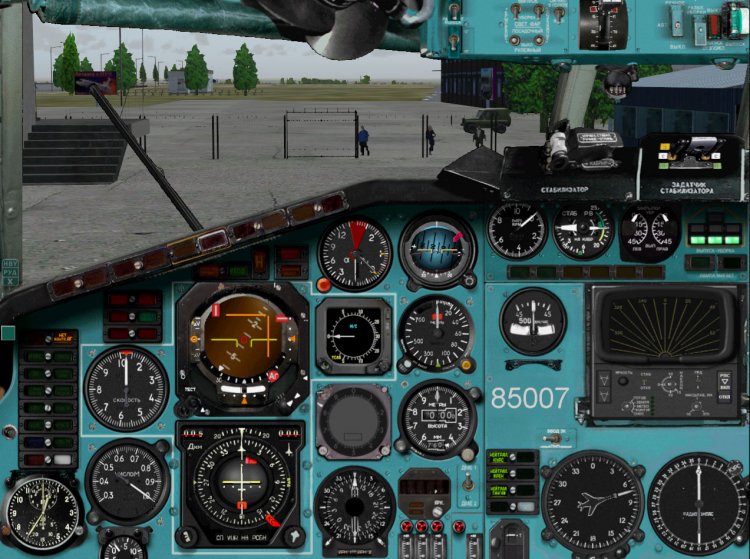
Patch Panel 30322-1-Monitor-154M-2.03.zip "panel for Fri Tu-154 version 2.03" I offer my apologies for incorrect inaccuracy. Unfortunately, in the above archive was not on file repainted fire-fighting system in the blue color panel. I try to check everything before laying, and something still miss unfortunately. PVA_Tu154_0_018.gau Copy the file from the archive to a folder of your simulator Gauges, replacing the underlying there is a file and a panel PPP will be blue and the entire panel. Have a nice flight! Project Tupolev, Alexei Samoshin, Mikhail Mitin, Paul Kosyakov, Mikhail Stepanov
→ Size:
1 MB
→ Date:
16 years ago (13.06.2010 01:36)
→ Author:
Project Tupolev
→ Approved by moderator:
___Yura
→ License:
Freeware - Free version, Do Not Redistribute
→ Downloaded:
1751 time(s)
Panel for Fri Tu-154M version 2.03
| Rating: 5!
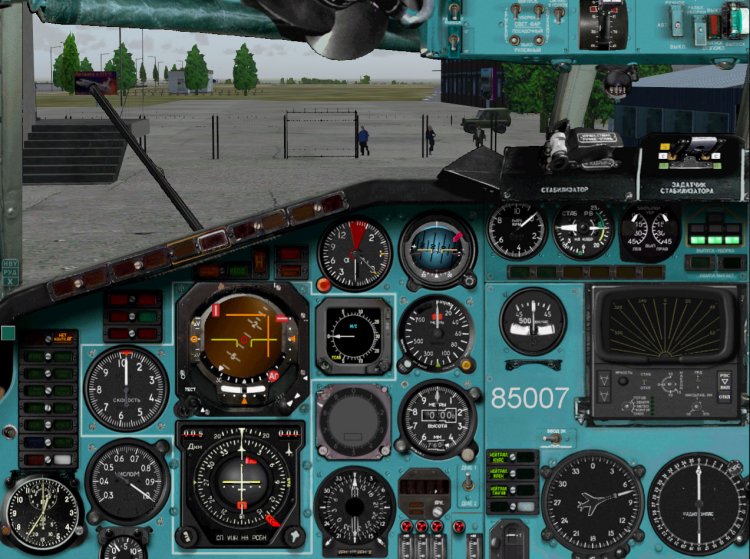
Rewritten by its cover under the Tu-154M Fri 2.03 to vizualkoy PT and with vizualkoy vitamin. At the moment my green bar pretty bored, so made only blue, not a name for the time. The panel is designed for two monitors 19 "4:3. This panel is the development of my ranih works that can be found at www.avsim.ru In the course of adaptation to the panel models Fri 2.03 bar has undergone some changes. In particular, rearrange the middle part of the panel drivers. Given that the upcoming rate TLN-2000 (Trimble) not sufficiently decipherable, it was decided to sacrifice her. Removed bitmap-dummy system SRPPZ, too much has been issues. was based on the panel board 85680. What should be mentioned separately: 1.Magnitny compass (works) 2.Vstroeny species from ilyuminatorov (numbers 4 +5 and 5 +6 for dop.klaviature, pushing together). 4.Bortovoy number is inserted on the panel is automatically the one that is registered in the file section Aircraft.cfg ATC ID. In order to be displayed correctly, register there board a five-digit number. 5.Zadatchik pressure ARD caused by clicking on the lower right corner of the SLE. 6.C courtesy of Paul Kosyakova include a set designed by Paul immediately panel PIC and redesigned the top plate and the head of Bi 8.14 Aeroplane Flight Manual. 7.Ustanovka: a) replace the corresponding folders panel folder from the archive, rename home folder, for example in the Panel Panel #. b) replace the files and folders in the folder GAUGES, tentatively renamed home the same way. Such renaming will provide an opportunity to roll back the panel back to the panel Fri c) Do not forget to copy the files testury VC from 'BLUE, Copy of each folder With MS Flight "to VC correctly repainted in blue. I would like to thank also all the love in this beautiful aircraft. Thanks to those, who actively participates in the development and assistance. Thank you all Virtual Pilots who fly this beautiful aircraft. Authorship: Project Tupolev - appliances, logika.Odnim word basis Alexei Samoshin (NoName) - appliances, bitmaps, Mikhail Mitin (Wishmaster) - compass KI-13 Paul Kosyakov (Paulsoft) - protivoobdledenitelnaya system Mikhail Stepanov - the idea, implementation, bitmaps, assembly Project Tupolev, Alexei Samoshin, Mikhail Mitin, Paul Kosyakov, Mikhail Stepanov NOT place without the consent of the authors on other sites!
→ Size:
46 MB
→ Date:
16 years ago (11.06.2010 20:25)
→ Author:
Project Tupolev,Алексей Самошин,Михаил Митин,Павел Косяков,Михаил Степанов
→ Approved by moderator:
NetHunter
→ License:
Freeware - Free version, Do Not Redistribute
→ Downloaded:
4043 time(s)
Type up the Tu-134 SCS.
| Rating: 4!
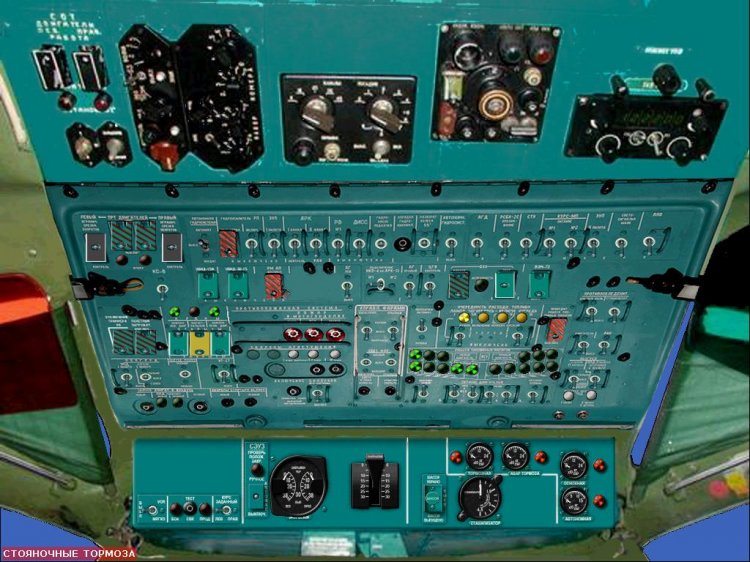
Type up to Tu-134.Ispolzoval work "Upper elektroschitok Tu-134" Paulsoft.Moya first rabota.Proshu criticize.
→ Size:
1 MB
→ Date:
16 years ago (30.05.2010 05:09)
→ Author:
→ Approved by moderator:
Lenya69
→ License:
Freeware - Free version, Unlimited Distribution
→ Downloaded:
750 time(s)
Panel to the Tu-124SH
| Rating: 4.8!
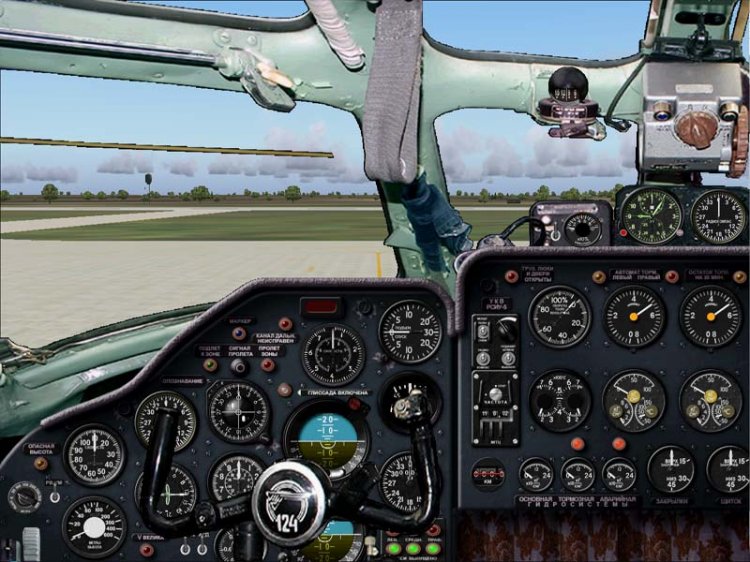
Panel Tu-124SH (Shuttle). We flew cadets Sturmanskie schools in the 70-ies and early 80's, and 1983, 3-and AE Tambov VVAUL, before moving to the Tu-134 UBL. Model: - Dimitri Samborski. Put together the panel: - doson. Thank you all Author devices taken from the set of TU-124, Tu-134! panel with native helm for piloting in 2-D cockpit.
→ Size:
4 MB
→ Date:
16 years ago (19.04.2010 01:43)
→ Author:
перекомпановал doson, спасибо всем авторам!!!
→ Approved by moderator:
Lenya69
→ License:
Freeware - Free version, Unlimited Distribution
→ Downloaded:
1158 time(s)
Panel 16:9 An24RV Samdim
| Rating: 4.5!

The author of this panel, Enrique Del Rosario. With his permission to post the panel for public access. Description of the archive.
→ Size:
9 MB
→ Date:
16 years ago (10.04.2010 17:14)
→ Author:
Enrique Del Rosario
→ Approved by moderator:
___Yura
→ License:
Freeware - Free version, Unlimited Distribution
→ Downloaded:
1661 time(s)
2D panel An-12 16x9
| Rating: 4.8!
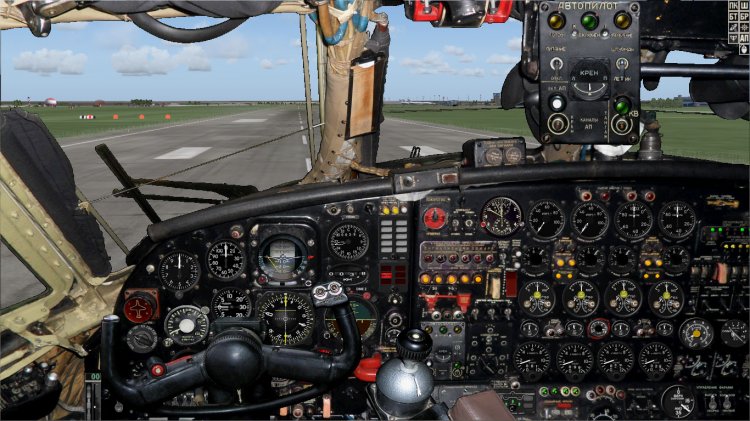
The panels are assembled to model B. Zhigulskaya, but unfortunately I never managed to link it with the VC, so I spread in 2D form with the hope that someone will be able to finish. Although the panel is quite flyable. There are of course "kosyachki" but in my opinion is not global, but I did not have enough knowledge to fix them. So let's get together, someone that can fix and put online. I want to fly to the AN-12 with a beautiful and working panel. Discuss here: http://www.avsim.su/forum/topic/45610-an-12/page__st__880__p__1074780__hl__% d0% bf% d0% b0% d0% bd% d0% b5% d0% bb% d1% 8c% 20% d0% 90% d0% bd-12__fromsearch__1 &
→ Size:
78 MB
→ Date:
16 years ago (04.04.2010 13:19)
→ Author:
vovansvr
→ Approved by moderator:
bazaranet
→ License:
Freeware - Free version, Unlimited Distribution
→ Downloaded:
1128 time(s)
Wide panel 16x10 for aircraft model Il-76
| Rating: 4.9!
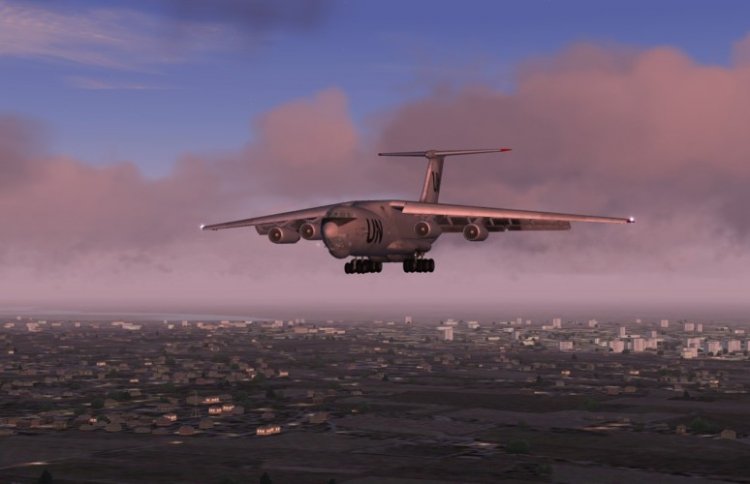
Wide panel format 16h10 for the model of IL-76 Sergei Varnav without VC. We offer you a build pens for the types of CF-and, second, and the navigator 1920h1200 and configuration panel for the IL-76. He did it for myself, the whole need for it, and, actually, the whole function panel - remove the effect of "stretching" in the broad screens. Installation inside.
→ Size:
22 MB
→ Date:
16 years ago (04.04.2010 00:10)
→ Author:
Twister, Alex-76, Director, Navigator77
→ Approved by moderator:
isc
→ License:
Freeware - Free version, Unlimited Distribution
→ Downloaded:
4498 time(s)

Alternative fotopanel navigator (type ahead "W") with "Thunderstorm". For the model of the Tu-134 A SCS 0.9.4?.
→ Size:
1 MB
→ Date:
16 years ago (16.03.2010 18:41)
→ Author:
DIREKTOR
→ Approved by moderator:
___Yura
→ License:
Freeware - Free version, Unlimited Distribution
→ Downloaded:
1240 time(s)
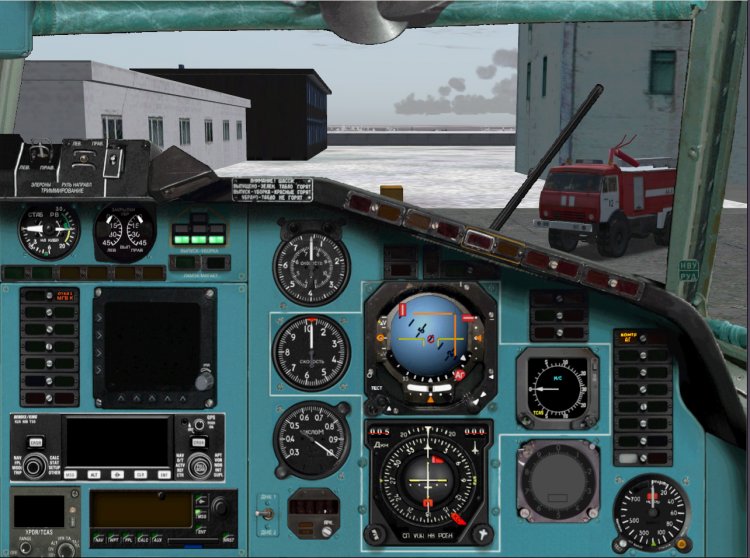
For those who are tired of the green panel. In 2D and VC cockpit painted. Carefully read the section "Installation"! ------------------------ ---------------- Fix-list -------------------------------------------------- -------------------------- 1.Vernul to place a janitor at the second pilot. 2.Dlya ease of piloting done instead of calling the panel of three tachometer pointer position flap, RV, with warning placards chassis panel display production mechanization. 3.Reshena problem of calling the windows from the place of the second pilot. 4.Dobavleny klikspoty DDP and ores from the second pilot. Windows Rudov and DDP with klikspotov caused such a way that stand in their rightful place. 5.Magnitny compass now works 6.Vstroena TLN-2000 courtesy of the authors. On our sides was exactly TLN-2000, so decided to add. The last time was a misunderstanding between devices TLN-2000 (Trimble Approch) and device SRPPZ (Black large square screen). Device SRPPZ not implemented! Just booked a place for him, perhaps when the device - something will. For beginners put my screenshot-shemku TLN-2000 describing the testimony of the display. As and when the shows. It includes: on top of the display is a small round button. Press repeatedly illuminates TRIMBLE APPROCH. Create scheduler simovskom plan, activate it. After that TLN will show a lateral deviation from the route and distance to the next MRP, well and still Coy anything. In Reale shows the same, the only model not implemented the plan hammered by hand well and the other features like Direct To etc. 7.Vstroeny kinds of ilyuminatorov (numbers 4 +5 and 5 +6 for dop.klaviature, go together ). 8.Bortovoy number is inserted on the panel is automatically the one that is registered in the file section Aircraft.cfg ATC ID. In order to display correctly, register there board a five-digit number. 9.Panel second pilot called Tychkov click on the fan! Back to return to the place of the FAC can press space. 10.Paneli for large monitors are not expected, because no wide screen. Maybe someone will try to alter / adapt. 11.Vsya logic Fri kept completely intact. Everything works exactly the same way as before. Just change / add windows and bitmaps. INSTALLATION! Set almost standard. Folders Aircraft, GAUGES copy in the folder of your Sim. Please do not forget to copy files to a folder GAUGES!!! On the question of replacing uterditelno answer "yes." To correctly display the textures VC need I've found in my folder, blue, COPY FOR EACH textured AIRCRAFT FOLDER "copy in each folder with the textures of the aircraft. Otherwise, half the cabin VC did not paint it blue! For Vitaminovskoy model put my file panel.cfg for panel painted with VC and VC textures, others take the files from the panel to Fri The remaining files are still the same, there is no sense to inflate the size of the archive. Enjoy your flight! Authorship: Project Tupolev - devices logika.Odnim words, the basis of Alex Samoshin (NoName) - appliances, bitmaps, Mikhail Mitin (Wishmaster) - compass KI-13, TLN - 2000 Mikhail Stepanov - the idea, implementation, bitmaps, assembled Discussion here: http://www.avsim.su/forum/topic/72983-paneli-dlya-tu-154b-2-im/page__st__200
→ Size:
33 MB
→ Date:
16 years ago (08.03.2010 21:43)
→ Author:
Project Tupolev,Алексей Самошин,Михаил Митин,Михаил Степанов
→ Approved by moderator:
Lenya69
→ License:
Freeware - Free version, Do Not Redistribute
→ Downloaded:
1561 time(s)
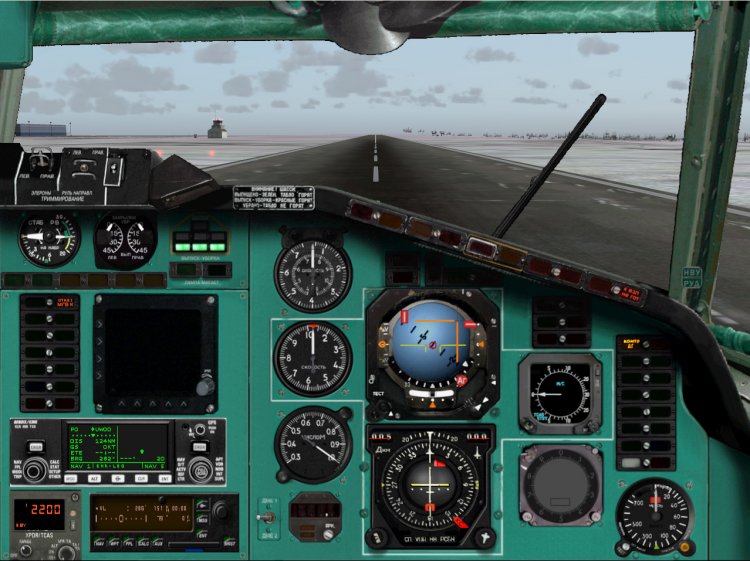
This file replaces the entire file 27841-1-Monitor-154M.zip. Those who rocked it, please uninstall and download this file. What's fixed: 1.Vernul to place a janitor at the second pilot. 2.Dlya ease of piloting done instead of calling the panel of three tachometer pointer position flaps, RV, with warning placards chassis, panel display production mechanization. 3.Reshena problem of calling the windows from the place of the second pilot. 4.Dobavleny klikspoty DDP and ores from the second pilot. Windows Rudov and DDP with klikspotov caused such a way that stand in their rightful place. 5.Popravlen path to the instrument board rooms. ------------------------ -------------------------------------------------- --------------------------------------- What should be noted separately: 1.Magnitny compass now works 2.Vstroena TLN-2000 courtesy of the authors. On our sides was exactly TLN-2000, so decided to add. The last time was a misunderstanding between devices TLN-2000 (Trimble Approch) and device SRPPZ (Black large square screen). Device SRPPZ not implemented! Just booked a place for him, perhaps when the device - something will. For beginners put my screenshot-shemku TLN-2000 describing the testimony of the display. As and when the shows. It includes: on top of the display is a small round button. Press repeatedly illuminates TRIMBLE APPROCH. Create scheduler simovskom plan, activate it. After that TLN will show a lateral deviation from the route and distance to the next MRP, well and still Coy anything. In Reale shows the same, the only model not implemented the plan hammered by hand well and the other features like Direct To etc. 3.Vstroeny kinds of ilyuminatorov (numbers 4 +5 and 5 +6 for dop.klaviature, go together ). 4.Bortovoy number is inserted on the panel is automatically the one that is registered in the file section Aircraft.cfg ATC ID. In order to display correctly, register there board a five-digit number. 5.Panel second pilot called Tychkov click on the fan! Back to return to the place of the FAC can press space. 6.Paneli for large monitors are not expected, because no wide screen. Maybe someone will try to alter / adapt. 7.Vsya logic Fri kept completely intact. Everything works exactly the same way as before. Just change / add windows and bitmaps. Setting the standard. Folders Aircraft, Gauges copy in the folder of your Sim. On the question of replacing uterditelno answer "yes." Vitaminovskoy to put my model file panel.cfg for panel with VC, the other files from the panel to take Fri The remaining files are still the same, there is no sense to inflate the size of the archive. Enjoy your flight! Authorship: Project Tupolev - devices logika.Odnim words, the basis of Alex Samoshin (NoName) - appliances, bitmaps, Mikhail Mitin (Wishmaster) - compass KI-13, TLN - 2000 Mikhail Stepanov - the idea, implementation, bitmaps, assembled
→ Size:
16 MB
→ Date:
16 years ago (07.03.2010 13:15)
→ Author:
Project Tupolev,Алексей Самошин,Михаил Митин,Михаил Степанов
→ Approved by moderator:
omega
→ License:
Freeware - Free version, Do Not Redistribute
→ Downloaded:
1549 time(s)
4 monitor panel for the Yak-40 SD
| Rating: 5!
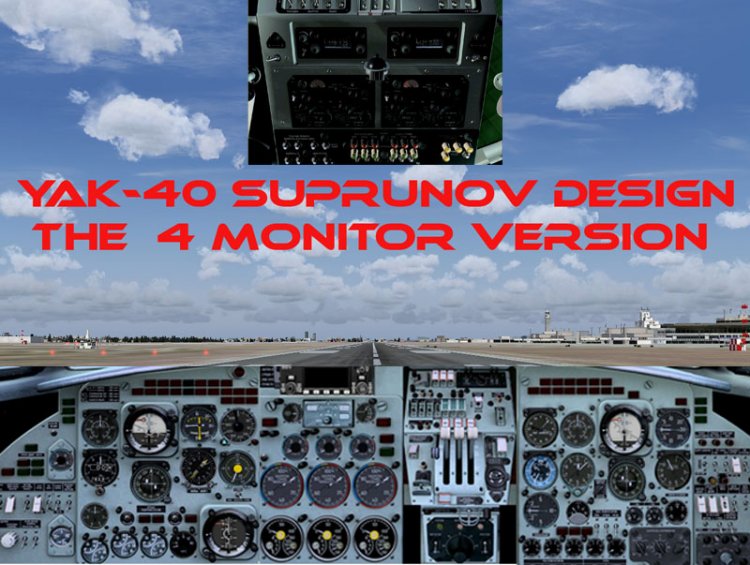
Modified panel CFG file for the possibility of exploitation of the remarkable model YAK-40 Igor Suprunova in 4 a monitor option.
→ Size:
155 KB
→ Date:
16 years ago (03.03.2010 20:10)
→ Author:
модель, панель, приборы-Suprunov Design, модификация файла panel CFG Вадим Ситников
→ Approved by moderator:
omega
→ License:
Freeware - Free version, Unlimited Distribution
→ Downloaded:
632 time(s)
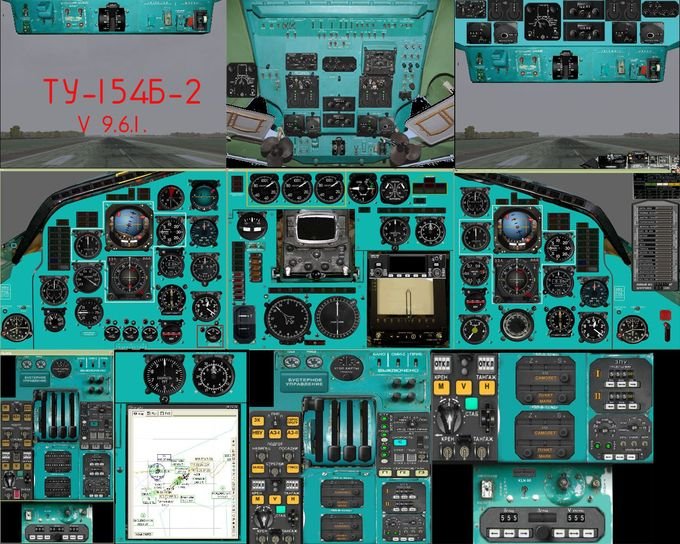
For online pilots. Sources 4 a monitor (added workplace co-pilot) panel model Tu-154B-2 from the team Fri, version 9.6.1. For standard monitors (4 / 3) at 1280x1024. I host "as is", no further work on the final design of the panels are not planned, so that modereneziruyte as you will be comfortable and enjoy the flight network in the crew. Panel can also be used, and in 3 x-variant of a monitor, for this panel of the second pilot spelled separate window.
→ Size:
10 MB
→ Date:
16 years ago (03.03.2010 18:18)
→ Author:
Команда ПТ. Доработал Вадим Ситников
→ Approved by moderator:
bazaranet
→ License:
Freeware - Free version, Unlimited Distribution
→ Downloaded:
522 time(s)