Please help us keep this site up and running!

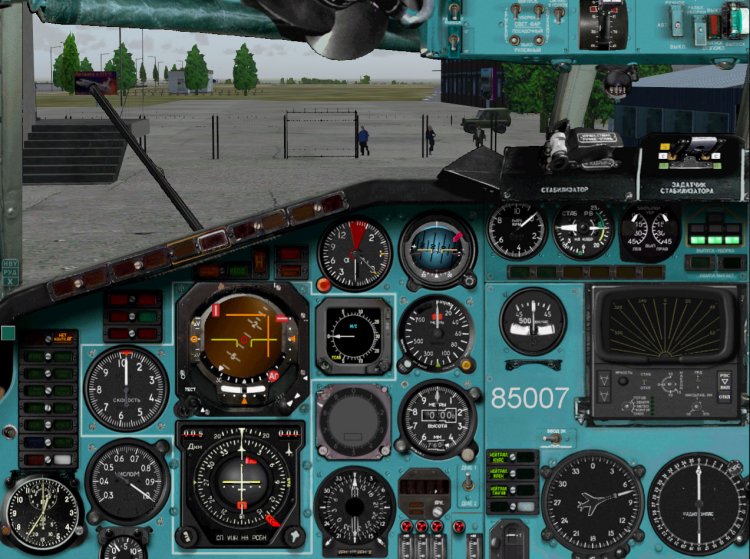
Rewritten by its cover under the Tu-154M Fri 2.03 to vizualkoy PT and with vizualkoy vitamin. At the moment my green bar pretty bored, so made only blue, not a name for the time. The panel is designed for two monitors 19 "4:3. This panel is the development of my ranih works that can be found at www.avsim.ru In the course of adaptation to the panel models Fri 2.03 bar has undergone some changes. In particular, rearrange the middle part of the panel drivers. Given that the upcoming rate TLN-2000 (Trimble) not sufficiently decipherable, it was decided to sacrifice her. Removed bitmap-dummy system SRPPZ, too much has been issues. was based on the panel board 85680. What should be mentioned separately: 1.Magnitny compass (works) 2.Vstroeny species from ilyuminatorov (numbers 4 +5 and 5 +6 for dop.klaviature, pushing together). 4.Bortovoy number is inserted on the panel is automatically the one that is registered in the file section Aircraft.cfg ATC ID. In order to be displayed correctly, register there board a five-digit number. 5.Zadatchik pressure ARD caused by clicking on the lower right corner of the SLE. 6.C courtesy of Paul Kosyakova include a set designed by Paul immediately panel PIC and redesigned the top plate and the head of Bi 8.14 Aeroplane Flight Manual. 7.Ustanovka: a) replace the corresponding folders panel folder from the archive, rename home folder, for example in the Panel Panel #. b) replace the files and folders in the folder GAUGES, tentatively renamed home the same way. Such renaming will provide an opportunity to roll back the panel back to the panel Fri c) Do not forget to copy the files testury VC from 'BLUE, Copy of each folder With MS Flight "to VC correctly repainted in blue. I would like to thank also all the love in this beautiful aircraft. Thanks to those, who actively participates in the development and assistance. Thank you all Virtual Pilots who fly this beautiful aircraft. Authorship: Project Tupolev - appliances, logika.Odnim word basis Alexei Samoshin (NoName) - appliances, bitmaps, Mikhail Mitin (Wishmaster) - compass KI-13 Paul Kosyakov (Paulsoft) - protivoobdledenitelnaya system Mikhail Stepanov - the idea, implementation, bitmaps, assembly Project Tupolev, Alexei Samoshin, Mikhail Mitin, Paul Kosyakov, Mikhail Stepanov NOT place without the consent of the authors on other sites!
→ Size: 46 MB
→ Date: 16 years ago (11.06.2010 20:25)
→ Author: Project Tupolev,Алексей Самошин,Михаил Митин,Павел Косяков,Михаил Степанов
→ Uploaded by: Mihail Stepanov (uploaded 49 files )
→ Approved by moderator: NetHunter
→ License: Freeware - Free version, Do Not Redistribute
→ Downloaded: 4034 time(s)
+1
 5 
All amazing! Thank you very much! Michael, I understand that due to your control panel, in principle can not, but after the installation of aircraft on the ground began to behave like a "mad deer." Wheel almost to "brake", if not kept, the airplane is very smartly picks up speed, Horseradish ostanovish.Estestvenno all this with a small gaze.Chto can it be? in flight like business as usual, but on the ground so here's the problem ... Previously, this had been noticed, manifested in some way after you install this paneli.Mozhet have any thoughts? ROCK_AVIA, 16 years ago, #
Even after landing and a second engine shutdown situation has not changed, still too frisky pret. ROCK_AVIA, 16 years ago, #
The dynamics of the model in 2.3 has changed. The aircraft has become more retractable at a small gas. In any case, check the installation of the service unit, possibly in an instrument registered my settings on my Joy of my coefficients. And since the panel has no effect on the dynamics of the aircraft as changed only bitmaps, and all the logic remains the same. Mihail Stepanov, 16 years ago, #
+1
 5 
Thank you. Jeka_M, 16 years ago, #
 5 
Где найти установки сервисного прибора? Pauk154, 5 years ago, #
 5 
спасибо . оценка отлично. Илья_Омск, 12 years ago, #
 5 
Не нашел "точку" вызова панели СРД. А так - все супер! Спасибо! RA-76842, 14 years ago, #
5.Задатчик давления АРД вызывается кликом по правому нижнему углу панели СКВ. штурмовик, 14 years ago, #
Спасибо! RA-76842, 14 years ago, #
 5 
tell me what is this airport in the image below, like so ВовчикКМВ, 15 years ago, #
На скрине Оренбург... довольно старая версия но другой не имеем , увы Mihail Stepanov, 14 years ago, #
 5 
So I decided to go to your panel (I use the panel without VC), thank you very much, but there is one kosyachok: not spelled out in the right kinds of panel.cfg (R.bmp) and right forward (R_F.bmp), if it is possible that write the coordinates here. Kain, 15 years ago, #
Спасибо. В файле panel.cfg нужно добавить некоторые строки:

В СЕКЦИЮ [Window Titles] добавляем такие строки:
Fixed Window30=Forward Right
Fixed Window31=Right


После окончания секции [Fixed Window33] нужно добавить следующие строки:

//--------------------------------------------------------

[Fixed Window30]
file=R_F.bmp
position=7
visible=0
ident=30
render_3d_window=1
nomenu=1
window_size= 1.000, 1.000
window_pos= 0.000, 0.000

//--------------------------------------------------------
[Fixed Window31]
file=R.bmp
position=7
visible=0
ident=31
render_3d_window=1
nomenu=1
window_size= 1.000, 1.000
window_pos= 0.000, 0.000

//--------------------------------------------------------

Прошу прощения что поздно ответил!
Mihail Stepanov, 14 years ago, #
 5 
Thank you for the work and provided the panel here, so keep, Michael! Waiting panel Wide!!! pavel_pilot, 16 years ago, #
Your try is nice, but with two faults ,
first is the QFE panel for pressurization , on basic panel we can find it by click over the cabin altitude,
second is where is the aileron and rudder trim ?
again thanks for your file
110110, 16 years ago, #
Thank you! Trimmer Eleron and Rudder you possibly found by on panel first officer (click on fan for open panel first officer). Parnay help me understand what people meant about the QFE!!! My inglish is very bad, sorry! Mihail Stepanov, 16 years ago, #
I'll try to translate. Most interesting. "This effort is good, but there are 2 errors: 1-a QFE panel. The ORIGINAL bar we can find it (you know where) And where is THIS? 2-I is where the trimmer and ailerons? Thanks again for that file." PS And how to get out of the panel 2 nd pilot? pautoff, 16 years ago, #
Exit from the panel co-pilot must press the space bar on your keyboard. QFE about how he could write that he clearly expressed in inglishe? Mihail Stepanov, 16 years ago, #
QFE panel for pressurization - it probably is the adjuster SARD SwAct, 16 years ago, #
SwAct, thanks a lot!! 110110, click on right down corner of window cabin conditioning for open QFE panel for pressurization. (Please see this screen http://f01.cdn.avsim.su/forum/​uploads/monthly_06_2010/post-1​3604-1276273858, 25_thumb.jpg) Mihail Stepanov, 16 years ago, #
I know where is the pressurization panel but I said this panel ( check the link : http://www.freeup2.com/images/​dwqpvl8dpx992j8motfh.jpg ) where can find it on this update ? 110110, 16 years ago, #
Please, see this screen very carefully. Yellow rectangle (down right) to represent active click zone for opening required you window. Http://f01.cdn.avsim.su/forum/​uploads/monthly_06_2010/post-1​3604-1276273858, 25_thumb.jpg Mihail Stepanov, 16 years ago, #
Guys, help me to explain to a foreign colleague that on this screen right below the yellow rectangle denotes a click-zone opening setpoint SARD! Who's in English is good eh? Mihail Stepanov, 16 years ago, #
Sir please upload your photos here http://www.freeup2.com/. I can`t open your link 110110, 16 years ago, #
OOOOOOOOOOOOOOK sir . I found it .

Can you make the panel color in polish color ? It`s really beautiful
110110, 16 years ago, #
Maybe, but not very fast. This work need be the match time and photo. On pedestal one should install FMC and other changes. Always is possible. Good Luck! Mihail Stepanov, 16 years ago, #
 5 
Super !!!!! Simpsn, 16 years ago, #
 5 
As you can associate your 2D panel with the VC of the vitamin, now this? ARTMOTO63, 16 years ago, #
Do not have anything to link. Simply put, this panel to Vitaminovskoy models have separate folders in the archive. Here's the place and all. Mihail Stepanov, 16 years ago, #
All excellent! Thank you, this 2D panel for more interesting will ARTMOTO63, 16 years ago, #
And who can tell me how to call the panel second pilot?? ARTMOTO63, 16 years ago, #
Prod at the fan. Back to return to the SPACE A-n-d-r-e-y, 16 years ago, #
Thanks, but now found the problem - the panel of the 2nd Pilot - some devices, without the panel vvozduhe ... What could it be? What I did not add and where? Thanks ARTMOTO63, 16 years ago, #
So something is not on the instructions. Everything should work. A-n-d-r-e-y, 16 years ago, #
Typical error-no copied the files from the archive to a folder Gauges. Mihail Stepanov, 16 years ago, #
Yes, in fact, fix it. BUT! I found another not nice cannot help fix - a panel of the second pilot changes only scale ("-" and "+") but the combination of Clavey Shift + BeckSpeis or Shift + Enter does not work! And I do not really like it when the level of the horizon bar kicked up over the horizon level land on the course! How do I fix this? ARTMOTO63, 16 years ago, #
But no fix. And do not cannot it, especially the simulator. In fact that's a redesigned side view. And they both know is not governed by "the rise of the saddle." So, Aime sorry as they say. Mihail Stepanov, 16 years ago, #
Clearly ... It's a shame ... It appears the panel second pilot only for the beauty ... And fly it only with stiff cabin top, or with scale O-H-O-H-O ... ARTMOTO63, 16 years ago, #
But anyway, thank you for the good work! ARTMOTO63, 16 years ago, #
No, why. You can adjust itself to the slope of editing panel.cfg. Look for this line: VIEW_REAR_RIGHT_UP_WINDOWS = 33 VIEW_REAR_RIGHT_UP_DIR = 9.5, 0.0, 0.0 Increase / decrease in numbers 9.5 achieved the desired result. Mihail Stepanov, 16 years ago, #
Another thing that quickly, in flight, this option has not change. And once and for all, you can. Mihail Stepanov, 16 years ago, #
Well, have at least something;) Thanks! ARTMOTO63, 16 years ago, #
 5 
Well simply no words)))! skill_mihail, 16 years ago, #
 5 
Excellent cover! Misha thanks for your work done! Fencer2, 16 years ago, #
 5 
Guys Thank you very much!. alex19620, 16 years ago, #
 5 
Super! Pitbull_, 16 years ago, #
 5 
Misha, I see you are a good artist. Maybe something will make a pair (for example, finish the cockpit L-410), so I'm doing the technical part, as you design, and indeed in terms of the Russian aviation work no end. Sincerely, Vladimir. VLAZ, 16 years ago, #
Thank you. Destination new to me, so try myself in this field. I also have ideas of mass (in the IL-14, Tu-104 to modify, Tu-114 from scratch, SuperWide for the Tu-134, etc.). But I do not know how everything happens. That's not the photo of the material, time, more of something. Mihail Stepanov, 16 years ago, #
Well, that's wonderful. "Now the truth dis simulation, repairs in the apartment ... then I will contact you at the end of September 2010, when resume work on the cabin L-410. I am very glad that you do not mind! VLAZ, 16 years ago, #
 5 
Panel Super! That would Wide else will? stinger1968, 16 years ago, #
+2
Wide in the work, will later Mihail Stepanov, 16 years ago, #
Thank you very much for the work! stinger1968, 16 years ago, #
 5 
I was waiting for her since, as set himself Version 2.03 A-n-d-r-e-y, 16 years ago, #
But I have fire fighting system of green? All other panels are normal, but this green. A-n-d-r-e-y, 16 years ago, #
In the Repository, you should see the file 30341-1-Monitor-154M-2.03-PVA.zip. This will be a patch to fix this problemu.Starayus check everything before laying, and something still miss unfortunately. PVA_Tu154_0_018.gau Copy the file from the archive Gauges folder of your simulator, replacing the underlying file, and there will be a blue panel PPP and the entire panel. Enjoy your flight! Mihail Stepanov, 16 years ago, #
Thank. But I'm still a little panel under itself over again), a small editing panel.cfg. A-n-d-r-e-y, 16 years ago, #
Thank you for taking the gaps. Pliz tell in detail how the remake, what is missing? Mihail Stepanov, 16 years ago, #
Read personal. Posted by my thoughts. But this is just my opinion. During the panel, you are ready to put 100 pluses. Thank you that they were blue. Good luck. A-n-d-r-e-y, 16 years ago, #
 5 
Thank you very much for the job! Pair voporsov: 1. In the central panel above the number - left bracket of the device - so conceived? 2. What the airport on screen with little men? "And yet, can I change the font numbers on the panel? Shatoux, 16 years ago, #
1.Kronshteyn with illumination from the instrument was so conceived, it is in many photos. 2.Aeroport Orenburg Central (in the file) 3.Shrift can try to change the question to what? Mihail Stepanov, 16 years ago, #
Thank you A font is suitable, but do not know how the inscription, built it, or it should be everyone in the SCS to set ... Shatoux, 16 years ago, #
Open the file FS2004 Gauges NS_TC_154m_25 Call_Sign.xml notepad. We are looking for there line: Mihail Stepanov, 16 years ago, #
Text X = "70" Y = "18" Bright = "No" Length = "7" Font = "ArialNarrow" There is registered font Font = "ArialNarrow". Enter the one that you like (fonts must be installed in the system) and save the file. The results of the experiments, please put in the form of screenshots in the thread: http://www.avsim.su/forum/topi​c/72983-paneli-dlya-tu- 154b-2-im/page__st__460 If your version will be more successful, we all together juzat it! Mihail Stepanov, 16 years ago, #
Thank you both get to com - izladim! Shatoux, 16 years ago, #
Post it. Shatoux, 16 years ago, #
 5 
Simply amazing. Thank you. PS tell my panel and have to 154B2 takoyzhe (clarity or resolution) Know how to call correctly) and you want sometimes and behe fly but as including sgyanu for alarm on the floor screen - hang up immediately. sorry for oftrop Valery, 16 years ago, #
This is not oftop, just in the subject. B-shku the way I love more than the M-ku. Here is the panel (9.6.1: http://www.avsim.su/f/fs2004-p​aneli-samoletov-41/paneltu-154​b-2-noname-dlya -9-6-1-21351.html? action = comments & hl = and here a patch for it to work the window of the second pilot: http://www.avsim.su/f/fs2004-p​aneli-samoletov-41/patch-dlya -odnomonitornoy-panelitu-154b-2-noname-dlya-9-6-1-dlya-fayla-21351-ispravlyayushiy-vid-vtorogo-pilota - 27806.html? action = comments & hl = Thanks for the B-shechku not forget! Mihail Stepanov, 16 years ago, #
 5 
Misha, thank you very much for your work I thought that you will make this panel. Acman, 16 years ago, #
Forgot to add I am only your pad and fly only on Fri 2.02 Acman, 16 years ago, #
A working switches "fasten seat belts", "no smoking" and "exit"? штурмовик, 16 years ago, #
Yes, but that should not? Mihail Stepanov, 16 years ago, #
In the 2.02 worked. In 2.03 stopped. Because of them not working CREW mod (version 1.0.beta) Link: http://www.protu-154.net/forum​/viewtopic.php?t=11142&;postdays=0&postorder=asc&start=75 штурмовик, 16 years ago, #
I work in the other kind too. Correct if I'm wrong. (Who had already set) Mihail Stepanov, 16 years ago, #
I installed, it works thanks. Acman, 16 years ago, #
 5 
Thank you! Wow! Ravnmm, 16 years ago, #
 5 
thanks Zigerdfish, 16 years ago, #
 5 
Thanks very much! Aeromax154, 16 years ago, #
 5 
panel was excellent. I can not "get" the mouse on the setting unit of pressure. right corner did not respond. can be a string or a detail screen, where (near which flip?). Thanks! Rulez, 16 years ago, #
Pressure setting unit ARD opens click on the lower right corner of the SLE. On the screen click-area circled in yellow: http://f01.cdn.avsim.su/forum/​uploads/monthly_06_2010/post-1​3604-1276273858, 25_thumb.jpg If there is no click-zone, then you do not copy a folder from the archive NS_TC_154m_25 folder Gauges. In this version of the panel in this folder add a file ARD_toggl.xml, which implements a clickable area in ottlichie of 2.02. Please think of the installation carefully! Mihail Stepanov, 16 years ago, #
Thank you for razyasneniya.superrr Rulez, 16 years ago, #
 5 
Briskly! Gennn, 16 years ago, #
 5 
Michael, thanks for the panels, especially for the mention Yakutia =), but here are a WIDE to your beauty, eh? Tolimas, 16 years ago, #
There will be a WIDE. Yakutia-beautiful livreyka, sometimes flying them :-))) Mihail Stepanov, 16 years ago, #
 5 
Well, you Misha meteor) dacool, 16 years ago, #
Amendment sealed. The panel of course for a single monitor! Mihail Stepanov, 16 years ago, #
-13
 3 
Why do you endlessly changing these panels .. do something .. Take something useful is better .. Артур, 16 years ago, #
+2
And why team Fri constantly updates its Tu-154M, is releasing new version? You have asked a stupid question, what answer expect? So many people sincerely said thank you, for a really great job, and you? You could even evaluate not set - for which three ways? Protest against something? Do not shame, ask the moderators to delete your assessment. ROCK_AVIA, 16 years ago, #
Gyyy. Q smiled, but answer. First of all I do for myself, I share with others. Second, PT improves its product, and I try to keep pace with a team of PT and also from one version to improve my product. Indeed, go ka I'll do what ever helpful, beer popyu, video shoot so on avsim lay out. Yes, exactly, spleshek done yet. Thanks for the advice, next time will be advised when asked. Mihail Stepanov, 16 years ago, #
Michael - you are good! Meet answer! Why always so - in a barrel of honey is sure to spoon der ... tar? Above all, what would you Michael, and in no case seriously this claim did not fall! Just a shame - and took the overall assessment of spoiled ... ROCK_AVIA, 16 years ago, #
Because people, unlike some, knows how to do something! gloryan, 16 years ago, #
And I do not try to count, but for us with you. Thank you for your support! Mihail Stepanov, 16 years ago, #