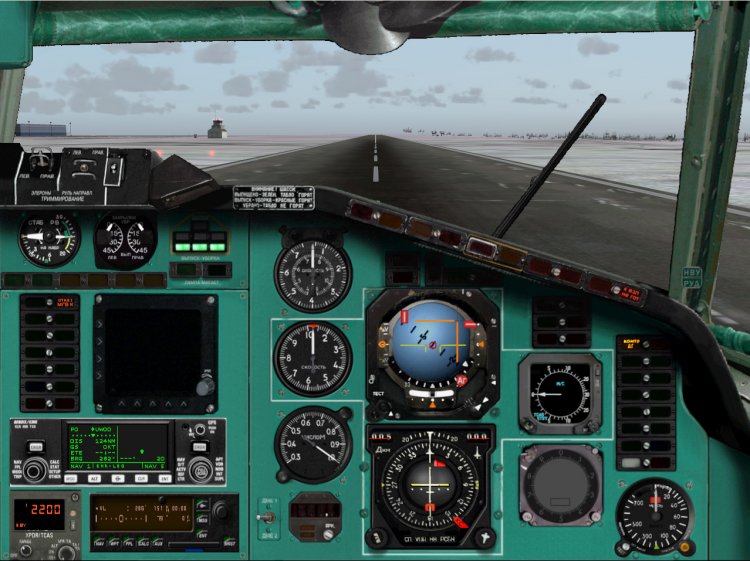
This file replaces the entire file 27841-1-Monitor-154M.zip. Those who rocked it, please uninstall and download this file. What's fixed: 1.Vernul to place a janitor at the second pilot. 2.Dlya ease of piloting done instead of calling the panel of three tachometer pointer position flaps, RV, with warning placards chassis, panel display production mechanization. 3.Reshena problem of calling the windows from the place of the second pilot. 4.Dobavleny klikspoty DDP and ores from the second pilot. Windows Rudov and DDP with klikspotov caused such a way that stand in their rightful place. 5.Popravlen path to the instrument board rooms. ------------------------ -------------------------------------------------- --------------------------------------- What should be noted separately: 1.Magnitny compass now works 2.Vstroena TLN-2000 courtesy of the authors. On our sides was exactly TLN-2000, so decided to add. The last time was a misunderstanding between devices TLN-2000 (Trimble Approch) and device SRPPZ (Black large square screen). Device SRPPZ not implemented! Just booked a place for him, perhaps when the device - something will. For beginners put my screenshot-shemku TLN-2000 describing the testimony of the display. As and when the shows. It includes: on top of the display is a small round button. Press repeatedly illuminates TRIMBLE APPROCH. Create scheduler simovskom plan, activate it. After that TLN will show a lateral deviation from the route and distance to the next MRP, well and still Coy anything. In Reale shows the same, the only model not implemented the plan hammered by hand well and the other features like Direct To etc. 3.Vstroeny kinds of ilyuminatorov (numbers 4 +5 and 5 +6 for dop.klaviature, go together ). 4.Bortovoy number is inserted on the panel is automatically the one that is registered in the file section Aircraft.cfg ATC ID. In order to display correctly, register there board a five-digit number. 5.Panel second pilot called Tychkov click on the fan! Back to return to the place of the FAC can press space. 6.Paneli for large monitors are not expected, because no wide screen. Maybe someone will try to alter / adapt. 7.Vsya logic Fri kept completely intact. Everything works exactly the same way as before. Just change / add windows and bitmaps. Setting the standard. Folders Aircraft, Gauges copy in the folder of your Sim. On the question of replacing uterditelno answer "yes." Vitaminovskoy to put my model file panel.cfg for panel with VC, the other files from the panel to take Fri The remaining files are still the same, there is no sense to inflate the size of the archive. Enjoy your flight! Authorship: Project Tupolev - devices logika.Odnim words, the basis of Alex Samoshin (NoName) - appliances, bitmaps, Mikhail Mitin (Wishmaster) - compass KI-13, TLN - 2000 Mikhail Stepanov - the idea, implementation, bitmaps, assembled
→ Size:
16 MB
→ Date:
16 years ago (07.03.2010 13:15)
→ Author:
Project Tupolev,Алексей Самошин,Михаил Митин,Михаил Степанов
→ Approved by moderator:
omega
→ License:
Freeware - Free version, Do Not Redistribute
→ Downloaded:
1547 time(s)
+1
5
Thank you.
− olega625,
16 years ago,
#
5
Thank you! Great job! So much has come on!
− maximus7373,
15 years ago,
#
5
And it is possible for such a large-screen
− kotey,
16 years ago,
#
5
Thank you for your work!
− Шубин1984,
16 years ago,
#
5
Danke schon!
− stainass,
16 years ago,
#
5
Welcome! And when SRPPZ be? Somehow sad with a black eye on the panel-distracting:)
− Смотрящий,
16 years ago,
#
Well then buy http://www.avia-board.com/board/view.php?id=45042
− NeoHack,
16 years ago,
#
Frankly, there is a crazy idea to write it! But there is no documentation on it, break all the 'Net!
− Mihail Stepanov,
16 years ago,
#
Michael and if his place temporarily USHDB place? How do you think will not cut the eye?
− deltaplan,
16 years ago,
#
I do not know, it infuriates me for some reason :-)) maybe because of our boards do not. In general, bitmap-blende with SRPPZ I did on purpose. To either I or someone else wrote it later :-) If not vpominat about him, nobody did not do.
− Mihail Stepanov,
16 years ago,
#
5
Thank you!
− Dryxa,
16 years ago,
#
5
Thank you!
− Surger,
16 years ago,
#
5
Already thanks for the words do not do your hvataet.A Michael, efficiency can only pozavidovat.Esli no secret to anyone Reale you working?
− deltaplan,
16 years ago,
#
Thank you! And Reale anything interesting. Usual routine engineering work :-(
− Mihail Stepanov,
16 years ago,
#
5
!
− ROCK_AVIA,
16 years ago,
#
5
Now that the panel should be. ofigenno zdorovo.spasibo. may have anticipated the blue socket? I would like once and without the effect of "aging"
− Rulez,
16 years ago,
#
Blue sight. Regards the effect of aging is difficult. I try to do the panel is closer to reality. If the aim is to draw the panel in Photoshop with a perfectly contrasting lines and no shadows, it is not me.
− Mihail Stepanov,
16 years ago,
#
5
Thank you very much.
− CTP_78,
16 years ago,
#
-1
file: / / / C: / Documents% 20and% 20Settings/User /% D0% 9C% D0% BE% D0% B8% 20% D0% B4% D0% BE% D0% BA% D1% 83% D0% BC % D0% B5% D0% BD% D1% 82% D1% 8B /% D0% 9C% D0% BE% D0% B8% 20% D1% 80% D0% B8% D1% 81% D1% 83% D0% BD% D0% BA% D0% B8 /% D0% 91% D0% B5% D0% B7% D1% 8B% D0% BC% D1% 8F% D0% BD% D0% BD% D1% 8B% D0% B9 . bmp
− zoha,
16 years ago,
#
+1
What cheer?
− Sanovich,
16 years ago,
#
No, it's not very interesting. That is much more interesting: C: Documents and Settings Michael Local Settings Temporary Internet Files Content.IE5 C3ARS3MM 4565712j45657s5d2sffdsa.jpg :-)))))
− Mihail Stepanov,
16 years ago,
#