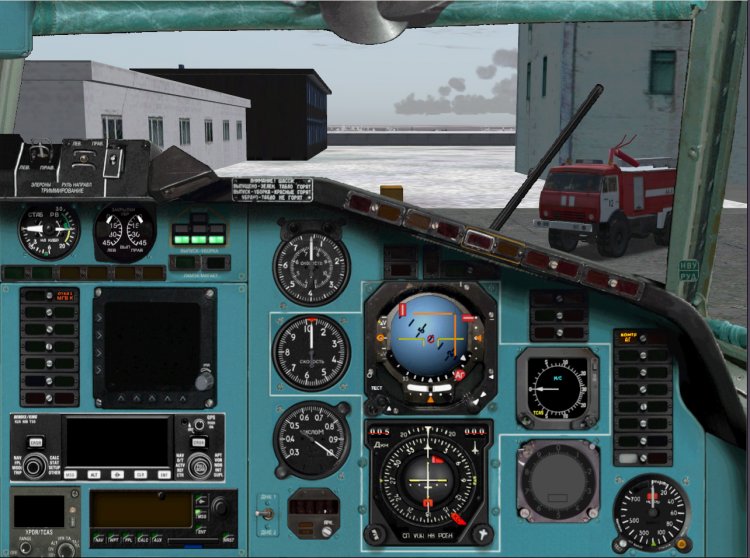
For those who are tired of the green panel. In 2D and VC cockpit painted. Carefully read the section "Installation"! ------------------------ ---------------- Fix-list -------------------------------------------------- -------------------------- 1.Vernul to place a janitor at the second pilot. 2.Dlya ease of piloting done instead of calling the panel of three tachometer pointer position flap, RV, with warning placards chassis panel display production mechanization. 3.Reshena problem of calling the windows from the place of the second pilot. 4.Dobavleny klikspoty DDP and ores from the second pilot. Windows Rudov and DDP with klikspotov caused such a way that stand in their rightful place. 5.Magnitny compass now works 6.Vstroena TLN-2000 courtesy of the authors. On our sides was exactly TLN-2000, so decided to add. The last time was a misunderstanding between devices TLN-2000 (Trimble Approch) and device SRPPZ (Black large square screen). Device SRPPZ not implemented! Just booked a place for him, perhaps when the device - something will. For beginners put my screenshot-shemku TLN-2000 describing the testimony of the display. As and when the shows. It includes: on top of the display is a small round button. Press repeatedly illuminates TRIMBLE APPROCH. Create scheduler simovskom plan, activate it. After that TLN will show a lateral deviation from the route and distance to the next MRP, well and still Coy anything. In Reale shows the same, the only model not implemented the plan hammered by hand well and the other features like Direct To etc. 7.Vstroeny kinds of ilyuminatorov (numbers 4 +5 and 5 +6 for dop.klaviature, go together ). 8.Bortovoy number is inserted on the panel is automatically the one that is registered in the file section Aircraft.cfg ATC ID. In order to display correctly, register there board a five-digit number. 9.Panel second pilot called Tychkov click on the fan! Back to return to the place of the FAC can press space. 10.Paneli for large monitors are not expected, because no wide screen. Maybe someone will try to alter / adapt. 11.Vsya logic Fri kept completely intact. Everything works exactly the same way as before. Just change / add windows and bitmaps. INSTALLATION! Set almost standard. Folders Aircraft, GAUGES copy in the folder of your Sim. Please do not forget to copy files to a folder GAUGES!!! On the question of replacing uterditelno answer "yes." To correctly display the textures VC need I've found in my folder, blue, COPY FOR EACH textured AIRCRAFT FOLDER "copy in each folder with the textures of the aircraft. Otherwise, half the cabin VC did not paint it blue! For Vitaminovskoy model put my file panel.cfg for panel painted with VC and VC textures, others take the files from the panel to Fri The remaining files are still the same, there is no sense to inflate the size of the archive. Enjoy your flight! Authorship: Project Tupolev - devices logika.Odnim words, the basis of Alex Samoshin (NoName) - appliances, bitmaps, Mikhail Mitin (Wishmaster) - compass KI-13, TLN - 2000 Mikhail Stepanov - the idea, implementation, bitmaps, assembled Discussion here: http://www.avsim.su/forum/topic/72983-paneli-dlya-tu-154b-2-im/page__st__200
→ Size:
33 MB
→ Date:
16 years ago (08.03.2010 21:43)
→ Author:
Project Tupolev,Алексей Самошин,Михаил Митин,Михаил Степанов
→ Approved by moderator:
Lenya69
→ License:
Freeware - Free version, Do Not Redistribute
→ Downloaded:
1561 time(s)
5
Michael, Thank you so much for the work done!
− Ant0n1o,
16 years ago,
#
5
Convenient, practical, beautiful! Thank you, Misha!
− Silver,
16 years ago,
#
5
Thanks a lot!
− Nikolay_Sukhikh,
16 years ago,
#
5
Thank you! The luxurious!
− vanyOk,
16 years ago,
#
5
Thank you! Well done! Good luck to those who monitor is 4:3. I (I'm certainly not the only one), 16:9. But there was nothing to be done!
− Antares,
16 years ago,
#
5
pity that such a panel in the X-PLANE 9 no: (and I have to make a choice between ezdboy on the sky and flight :))))).
− AFL336,
16 years ago,
#
5
Pity no 5 + just fine!
− sim,
16 years ago,
#
5
Thank you Michael, beauty!
− olega625,
16 years ago,
#
5
ULLI-UMKK, kaif
− anrep,
16 years ago,
#
5
Very good! "Hey, who else would bitmap brought to full realism. Still, one feels that the basis of a picture made "soap box" with flash. In the real cockpit light falls quite differently. The pilot is no searchlight on his forehead. Therefore glare such as, for example, rolled-up curtain, in Reale could not be ...
− Karadag,
16 years ago,
#
What I had not thought about that shine on the curtain :-)) Yes, the curtain of the pictures, the rest is not ...
− Mihail Stepanov,
16 years ago,
#
5
What comments here!!
− deltaplan,
16 years ago,
#
5
Michael, you have just spoil :-) Many thanks for all your work!
− ROCK_AVIA,
16 years ago,
#
5
Thanks a lot!
− qip88,
16 years ago,
#
5
Installed all rabotaet.Spasibo.
− CTP_78,
16 years ago,
#
5
are more likely to see fyrlinerse
− Rulez,
16 years ago,
#
tried to install 3 times already. I panel 2P still green. all blue. it - green. not so. specify pliz. thanks.
− Rulez,
16 years ago,
#
I've found from my folder in the folder Gauges Gauges Sim to copy. Namely file STT_View_154Mb.gau in the case of Dan.
− Mihail Stepanov,
16 years ago,
#
5
Well unless they are in life.
− zoha,
16 years ago,
#
-1
FFFFFFFFFFFFFFFFFFFFFFFFFFFFFFFFFFFFFFFFUUUUUUUUUUUUUUUUUUUUUUUUUUUUUUCCCCCCCCCCCCCCCCCCCCCCCCCCCCCCCCCC There, I am 15 years old I know!
− CCCP-11156,
16 years ago,
#
5
thanks! And you can still make that board for takeoff NOT READY blinking faster? (In reais)
− BORIS474,
16 years ago,
#
She Reale differently on all sides blinks, looking a relay set-)
− Paulsoft,
16 years ago,
#
5
!
− Accent,
16 years ago,
#
Thank :))))))))))
− pulkovo2,
16 years ago,
#
5, but I have not closed the panel by pressing the 2 nd pilot (SPACE)
− zwcadet,
16 years ago,
#