2-D graphic panels for the IL-18
| Rating: 5!
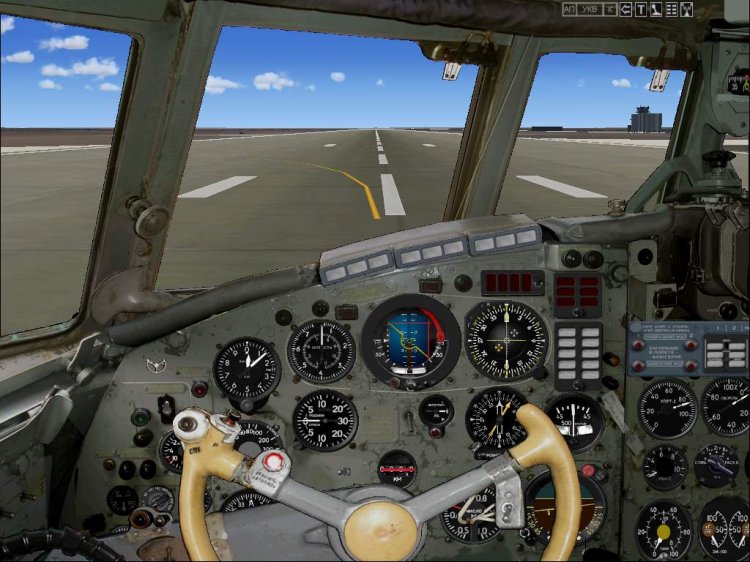
2-D graphic panels for the IL-18: http://www.avsim.su/f/fs2004-originalnie-samoleti-40/il-18-34726.html?action=comments. Panel FAC-Shift +1 panel PAC-Shift +5 Navigator Shift +2 Top Shift +3 Power Shift +5 Service appliance Shift +6 The rest is called icons. To change the panel on the FAC PAC, you should click first Shift +1, then Shift +5. To change the panel on the FAC PAC must first press Shift +5, then Shift +1. In this case, the Shift can not let go.
→ Size:
25 MB
→ Date:
15 years ago (21.12.2010 01:12)
→ Author:
Зеленкевич Петр
→ Approved by moderator:
SLAVJAN
→ License:
Freeware - Free version, Do Not Redistribute
→ Downloaded:
5667 time(s)
+2
5
Forth to on the IL-18 for seven years and flown on this type of 4800 hours. I am very pleased that the silt are interested, it was necessary for the geeks to write a beta version, can soothe.
− VPP,
15 years ago,
#
+2
5
Our response to Chamberlain-Gladkov and others like him! There is a type of people - myself do not have the sense, but others, and criticize.
− Mihalch,
15 years ago,
#
Your response? The answer to that? Yours - is whose? Peter Zelenkevich? And you got to do with it? And Peter, I have no answer - I'm with him no discussion on the model did not lead, and his work is not assessed.
− Gladkov,
15 years ago,
#
In fact, a link to the thread from srachem ...
− Mihail Stepanov,
15 years ago,
#
http://www.avsim.su/f/fs2004-originalnie-samoleti-40/il-18-34726.html?action=comments
− Gladkov,
15 years ago,
#
Do not get fooled by it, and then there prodolzhetsya.
− Сокол,
15 years ago,
#
+1
Falcon, thanks for the warning, but I do not vedus. Just ask Michael Stepanov link to srach, who hosted a flock of stupid - and I gave. A Mihalch there is some crazy nonsense about "their response Gladkov," without explaining what is the answer and for what reason - this despite the fact that I wrote that the model is very good. But I do not vedus, but just the answer.
− Gladkov,
15 years ago,
#
выложили бы фотографии кабины ил 18
− alex2alex2,
9 years ago,
#
ребят у кого есть фотографии кабины пилотов ил 18 в таком же ракурсе как на этой фотопанели ил 18 д петра зеленкевича ?
− alex2alex2,
9 years ago,
#
5
Work velikolepnaya.obletal very ponravilos.pravda with the headlights can not razobratsya.v 2d panel I do not have a toggle switch registration fuselage and landing lights and taxi svet.v VC. integration takes place through time and there is no taxiway lights voobsche.tolko I mean?
− LAKI2106,
15 years ago,
#
People and hde mulberries 2d engineering panel?
− anders,
15 years ago,
#
+6
E. .. LIMITED west. Can not be asked in Russian?
− UHMA,
15 years ago,
#
UHMA, +100500! Soon the Russian even mothers Unlearning ...
− Mihail Stepanov,
15 years ago,
#
Mihail Stepanov, yeah, even "in Russian" will not write in Russian)
− ryabov_912,
15 years ago,
#
Well-geeks Slavophiles, ask your question in Russian specifically for the Anadyr airport (like a real person, and had called the airport): where in this package engineering 2D panel? Just do not try to be clever, let us basically.
− anders,
15 years ago,
#
Anders, derrickman is my nickname, not a real name. Site amateur crochet? At avsime lot of nicknames. But let us not grow srach and I'll answer your question. Maybe this panel does not, because in the readme file says that the aircraft engine starting and TG-16 is possible only from the VC. So that in 2D it is not important.
− UHMA,
15 years ago,
#
5
Thank you!
− ilyatim,
15 years ago,
#
Sorry, forgot to specify that the set of instruments Stepan Gritsevskogo.
− Петр,
15 years ago,
#
5
Thank you so proudly better. For IL-22 fit?
− AND134,
15 years ago,
#
The idea is that it should.
− Ил-86110,
15 years ago,
#
5
Thank you! Good answer Gladkov in today's debate.
− Ил-86110,
15 years ago,
#
+1
And then wonder why no one on the Super Jet hell do not. Perhaps to him the panel also comes in a separate container, along with a hammer and a bucket of bolts.
− Comrade,
15 years ago,
#
Uhh what are you a prankster ...
− OooooO,
15 years ago,
#
And you Comrade, do not be surprised, you fly further on their Cesna do not need to be a conspicuous concern for aircraft that are, in fact, you do not care to large (Stars and Stripes), the belfry. If you spill shit nowhere to go to the toilet
− leksus,
15 years ago,
#
+1
Comrade! :) Cessna taxis! Hearing from you with a Cessna 2d 3d and other panels. Buckets with screws and hammers can keep. :)
− Kostas68,
15 years ago,
#
Let's take you from me better than most safe and competent pilots in the world will have to wait? And then another bucket of screws 5 + out.
− Comrade,
15 years ago,
#
+1
Do not laminate! :) All work by someone. But MSFS - it does not work - it's a fad. :)
− Kostas68,
15 years ago,
#
+1
Comrade, talented person is talented in all => ie if you have a good flight instructor, you should be able to make a cool model for the sim, but if a bucket of nuts, then ...
− Сокол,
15 years ago,
#
-7
3
Alas, though the photo but not the panel .... How devedete to mind as well put 5 .... zvinyayte
− An_Shaitan_24,
15 years ago,
#
And you do better!
− toxin_pilot,
15 years ago,
#
toxin_pilot - namely that pays off every hack. I understand that according to your logic, football fans, for example, have long been over kill myself against the wall. That's when they get "world-class athlete, it was then let and judge how someone is playing, huh? : D
− Freddie,
15 years ago,
#
Freddie, a very good answer.
− Gladkov,
15 years ago,
#
-2
Freddie, join!
− ryabov_912,
15 years ago,
#