The panel Boeing 707-320 Просмотр ZIP-архива
manual/throttles.html
<!DOCTYPE HTML PUBLIC "-//SoftQuad//DTD HoTMetaL PRO 4.0::19971010::extensions to HTML 4.0//EN"
 "hmpro4.dtd">

<HTML>

  <HEAD>
    <META HTTP-EQUIV="Content-Type" CONTENT="text/html; charset=windows-1252">
    <TITLE>Boeing 707-320 Panel for FS2000/FS2002</TITLE>
  </HEAD>

  <BODY LINK="#0000ff" VLINK="#800080" BACKGROUND="clouds.gif">

    <P ALIGN="CENTER"><B><I><FONT FACE="Tahoma" SIZE="6">BOEING 707-320 -
      Throttle Quadrant and Autopilot</FONT></I></B></P>

    <P ALIGN="LEFT"><I><FONT FACE="Tahoma" SIZE="6">The Throttle Quadrant</FONT></I></P>

    <P ALIGN="CENTER"><IMG SRC="throttquad.gif" ALT="707 Throttle Quadrant" WIDTH="371" HEIGHT="367"></P>

    <P ALIGN="LEFT">To display the throttle quadrant, click "THROTTLE
      QUADRANT" on the Captain or First Officer main panel, or press SHIFT
      + 6.</P>

    <P ALIGN="LEFT">The four large handles operate the throttles. Attached to
      these handles are the thrust reverser handles, which move back when
      reversing thrust, as in the real aircraft. Spoiler and flap handles are
      also located on the throttle quadrant. Trim indicators and wheels are
      found at either side (trim may be adjusted by clicking on the wheels). The
      amber light in the lower right comes on while the trim is being adjusted.
      Remember that in a 707 you must mind your own airspeed - there is no
      autothrottle to do this for you!</P>

    <P ALIGN="LEFT">The four levers at the base are the engine start levers.
      Set the levers to the START position to start the engines, once the
      appropriate N2 RPM is reached. The levers automatically move to IDLE once
      the engine is started.</P>

    <P><FONT FACE="Tahoma" SIZE="6"><I>The Autopilot</I></FONT></P>

    <P ALIGN="center"><IMG SRC="autopilot.gif" WIDTH="402" HEIGHT="168" ALT="autopilot.gif"></P>

    <P>The panel is equipped with an authentic 1960's autopilot - no fancy FMS
      or autoland here! It only has a few basic functions, but if used correctly
      will provide an equally smooth ride to your destination. To display the
      autopilot (and VHF radios) click "AUTOPILOT/VHF PANEL" on the
      Captain or First Officer main panel, or press SHIFT + 4.</P>
    <UL>
      <LI><B>The Autopilot Master Switch</B> - the autopilot is ON when the
        switch is up, and OFF when the switch is centred. When the autopilot is
        turned off, the A/P warning light on the main panel comes on. Pushing
        the switch DOWN extinguishes this light.</LI>
      <LI><B>The Altitude Hold Switch</B> - When this switch is ON, the
        autopilot holds the aircraft at its current altitude. When the switch is
        OFF, the aircraft maintains its current rate of climb or descent. The
        rate of clib or descent may be altered using the pitch command wheels.
      </LI>
      <LI><B>The Horizontal Mode Selector</B> - This switch selects between
        the autopilot's various horizontal modes:
        <UL>
          <LI>MAN - bank angle set according to Bank Angle Selector</LI>
          <LI>HDG - finds and holds selected heading (you can alter the
            selected heading using the knob on the HSI)</LI>
          <LI>LOC/VOR - tracks a VOR beam, or an ILS localizer (horizontal
            only) </LI>
          <LI>GS - tracks an ILS beam (horizontal and vertical). Switch off
            before landing - the 707 is not autoland capable!</LI>
          <LI>AUTO - follows the heading given by the Inertial Navigation
            System</LI>
        </UL></LI>
      <LI><B>The Bank Angle Selector</B> - When the horizontal mode is set to
        MAN, you can select the bank angle using this knob. If any other
        horizontal mode is selected, the bank angle selector returns to the zero
        position. </LI>
    </UL>

    <P>If the autopilot Master Switch is OFF, the selected modes are still
      relevant, as they drive the flight director. </P>

    <P ALIGN="LEFT"><A HREF="index.html">Back to Index</A></P>
  </BODY>
</HTML>
7072k2pn.zip
| Имя файла | Дата | Размер |
|---|---|---|
| gauges/ | 05.03.2003 00:35 | |
| gauges/707basics.gau | 08.01.2003 00:32 | 1 MB |
| gauges/707centre.gau | 25.01.2003 22:29 | 893 KB |
| gauges/707ENGINES.GAU | 04.03.2003 01:26 | 688 KB |
| gauges/707ENGINES2.GAU | 04.03.2003 01:26 | 688 KB |
| gauges/707flighteng.gau | 05.03.2003 00:53 | 1 MB |
| gauges/707gear.GAU | 16.08.2002 01:23 | 256 KB |
| gauges/707gear2.gau | 16.08.2002 01:25 | 256 KB |
| gauges/707gyros.gau | 05.01.2003 17:22 | 1 MB |
| gauges/707labels.gau | 25.01.2003 22:32 | 57 KB |
| gauges/707nightlight.gau | 05.01.2003 22:13 | 1019 KB |
| gauges/707nightlight2.gau | 05.01.2003 22:13 | 1016 KB |
| gauges/707omi.gau | 04.01.2003 21:57 | 55 KB |
| gauges/707omi2.gau | 04.01.2003 21:57 | 55 KB |
| gauges/707server.gau | 05.03.2003 00:26 | 1 MB |
| gauges/707wiper.gau | 16.08.2002 01:19 | 218 KB |
| panel/ | 05.03.2003 00:35 | |
| panel/autopilot.bmp | 12.08.2001 18:30 | 63 KB |
| panel/Captain.bmp | 05.01.2003 21:48 | 769 KB |
| panel/First-Officer.bmp | 05.01.2003 21:47 | 395 KB |
| panel/FORWARD_LEFT.BMP | 14.09.1999 07:02 | 341 KB |
| panel/FORWARD_RIGHT.BMP | 31.07.2002 02:16 | 514 KB |
| panel/forwardpanel.bmp | 02.01.2002 16:46 | 99 KB |
| panel/introscreen.bmp | 05.01.2003 15:16 | 351 KB |
| panel/LEFT.BMP | 14.09.1999 07:02 | 232 KB |
| panel/overhead.bmp | 23.02.2002 13:25 | 126 KB |
| panel/panel.cfg | 31.01.2003 23:27 | 6 KB |
| panel/REAR.BMP | 14.09.1999 07:02 | 703 KB |
| panel/REAR_LEFT.BMP | 14.09.1999 07:02 | 626 KB |
| panel/REAR_RIGHT.BMP | 31.07.2002 02:18 | 448 KB |
| panel/RIGHT.BMP | 12.02.2002 00:17 | 485 KB |
| panel/throttles.bmp | 25.09.2001 02:00 | 129 KB |
| panel/UP.BMP | 14.09.1999 07:02 | 289 KB |
| 707panel.jpg | 05.03.2003 01:06 | 306 KB |
| install.txt | 06.03.2003 01:33 | 778 B |
| manual/ | 05.03.2003 00:35 | |
| manual/707panel.jpg | 06.03.2003 01:47 | 106 KB |
| manual/adi.gif | 31.12.2001 00:11 | 18 KB |
| manual/airspeed.gif | 31.12.2001 16:53 | 6 KB |
| manual/altimeter.gif | 31.12.2001 00:15 | 8 KB |
| manual/autopilot.gif | 22.12.2001 14:10 | 15 KB |
| manual/basics.html | 29.07.2002 01:02 | 8 KB |
| manual/centre.html | 05.03.2003 01:02 | 5 KB |
| manual/clock.gif | 31.12.2001 16:54 | 6 KB |
| manual/Clouds.gif | 31.12.2001 21:33 | 74 KB |
| manual/controls.jpg | 31.12.2001 16:41 | 3 KB |
| manual/dme.jpg | 09.06.2002 18:33 | 3 KB |
| manual/electrics.gif | 01.02.2003 22:17 | 27 KB |
| manual/engines.jpg | 05.03.2003 00:58 | 58 KB |
| manual/engines2.jpg | 05.03.2003 00:59 | 32 KB |
| manual/extelectselect.jpg | 01.02.2003 22:17 | 4 KB |
| manual/extinguish.gif | 14.04.2002 18:08 | 8 KB |
| manual/extpoweron.jpg | 01.02.2003 22:19 | 3 KB |
| manual/fireoff.gif | 14.04.2002 18:08 | 7 KB |
| manual/firepulled.gif | 14.04.2002 18:08 | 7 KB |
| manual/flighteng.html | 01.02.2003 21:59 | 6 KB |
| manual/fuelpanel.jpg | 01.02.2003 22:08 | 30 KB |
| manual/hotbuttons.gif | 06.03.2003 01:34 | 126 KB |
| manual/hsi.jpg | 14.04.2002 17:23 | 11 KB |
| manual/index.html | 06.03.2003 01:33 | 7 KB |
| manual/INS.html | 29.07.2002 01:02 | 4 KB |
| manual/ins.jpg | 31.01.2002 00:55 | 18 KB |
| manual/leverstart.jpg | 30.04.2002 02:23 | 1 KB |
| manual/lighting1.jpg | 30.04.2002 00:06 | 33 KB |
| manual/lighting2.jpg | 30.04.2002 00:06 | 36 KB |
| manual/lighting3.jpg | 30.04.2002 00:06 | 36 KB |
| manual/lightswitches.gif | 31.12.2001 17:51 | 5 KB |
| manual/lopress.jpg | 30.04.2002 02:20 | 3 KB |
| manual/mach.gif | 31.12.2001 16:21 | 4 KB |
| manual/overhead.gif | 30.04.2002 00:12 | 36 KB |
| manual/overhead.html | 09.09.2002 01:29 | 5 KB |
| manual/pitotheat.gif | 30.04.2002 00:11 | 4 KB |
| manual/pressurization.jpg | 14.04.2002 17:36 | 34 KB |
| manual/radalt.gif | 31.12.2001 16:54 | 6 KB |
| manual/revclosed.gif | 14.04.2002 18:08 | 1 KB |
| manual/revopen.gif | 14.04.2002 18:07 | 2 KB |
| manual/revopening.gif | 14.04.2002 18:07 | 1 KB |
| manual/rmi1.jpg | 31.12.2001 16:32 | 6 KB |
| manual/rmi2.jpg | 31.12.2001 16:32 | 6 KB |
| manual/rmi3.jpg | 31.12.2001 16:32 | 6 KB |
| manual/rmi4.jpg | 31.12.2001 16:32 | 6 KB |
| manual/speeds.html | 02.02.2003 01:17 | 24 KB |
| manual/starterflt.jpg | 30.04.2002 02:39 | 3 KB |
| manual/startergnd.jpg | 30.04.2002 02:22 | 3 KB |
| manual/starters.gif | 30.04.2002 00:09 | 7 KB |
| manual/starting.html | 01.02.2003 22:26 | 6 KB |
| manual/throttles.html | 01.02.2003 22:36 | 4 KB |
| manual/throttquad.gif | 01.02.2003 22:35 | 66 KB |
| manual/trueairspeed.jpg | 14.04.2002 17:26 | 4 KB |
| manual/turbocompressor.jpg | 30.04.2002 02:33 | 3 KB |
| manual/turncoord.jpg | 14.04.2002 17:17 | 3 KB |
| manual/twoelectselect.jpg | 01.02.2003 22:24 | 4 KB |
| manual/unlit.jpg | 30.04.2002 00:06 | 25 KB |
| avsim_ru.diz | 14.03.2004 00:14 | 457 B |
| Итого: | 16 MB | |
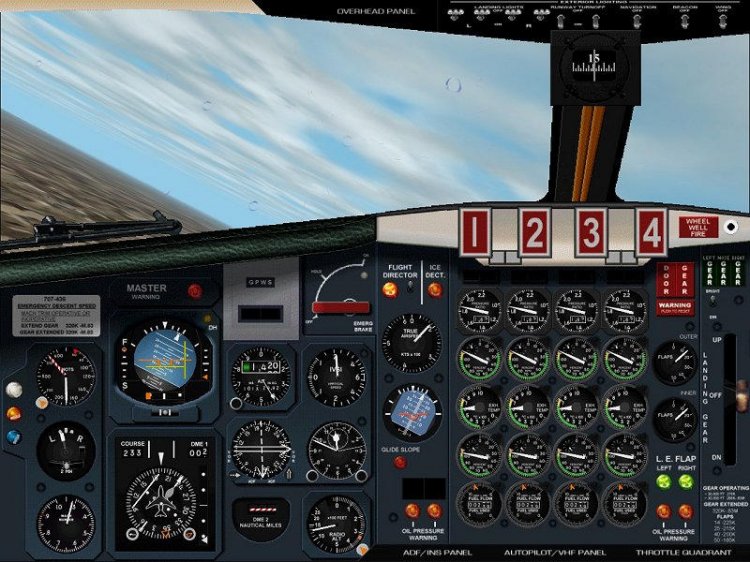
The panel for the Boeing 707-320 aircraft version 3.0. Includes panel captain, second pilot and engineer. Instruction in the archive.
→ Size:
6 MB
→ Date:
23 years ago (07.03.2003 11:58)
→ Author:
George Carty
→ License:
Freeware - Free version, Unlimited Distribution
→ Downloaded:
303 time(s)