The panel Boeing 707-320 Просмотр ZIP-архива
manual/index.html
<!DOCTYPE HTML PUBLIC "-//SoftQuad//DTD HoTMetaL PRO 4.0::19971010::extensions to HTML 4.0//EN"
 "hmpro4.dtd">

<HTML>

  <HEAD>
    <META HTTP-EQUIV="Content-Type" CONTENT="text/html; charset=windows-1252">
    <TITLE>Boeing 707-320 Panel for FS2002 Version 3.0</TITLE>
  </HEAD>

  <BODY LINK="#0000ff" VLINK="#800080" BACKGROUND="clouds.gif">

    <P ALIGN="CENTER"><B><I><FONT FACE="Tahoma" SIZE="6">BOEING 707-320 DUAL
      PANEL circa 1966 version 3.0</FONT></I></B></P>

    <P></P>

    <P ALIGN="CENTER"><IMG SRC="707panel.jpg" ALT="707 panel" WIDTH="810" HEIGHT="410"></P>

    <P></P>

    <P><FONT FACE="Tahoma" SIZE="6"><I>Important</I></FONT></P>

    <P>A minimum resolution of 1024 x 768 is recommended to use this panel.</P>

    <P>It is recommended that NUM LOCK should be turned off while using this
      panel.</P>

    <P><FONT FACE="Tahoma" SIZE="6"><I>Dual Panel - Hot Panel Switching</I></FONT></P>

    <P>The panel package includes both Captain's and First Officer's panels.
      The "WHEEL WELL FIRE" warning lights, to the right of the "1
      2 3 4" fire handles which are the distinguishing characteristic of a
      707 cockpit, are actually hot buttons. Click these to switch between
      Captain and First Officer panels. </P>

    <P ALIGN="CENTER"><IMG SRC="hotbuttons.gif" ALT="Hot Button Switching" WIDTH="830" HEIGHT="340"></P>

    <P>DO NOT use SHIFT + number keys to change between Captain and First
      Officer panels - use the Hot Buttons Only.</P>

    <P><FONT FACE="Tahoma" SIZE="6"><I>Index to other manual pages</I></FONT></P>
    <UL>
      <LI><A HREF="starting.html"><B>Quick guide to Starting the Engines</B></A></LI>
      <LI><A HREF="basics.html">Basic Flight Instruments</A></LI>
      <LI><A HREF="centre.html">Centre Panel</A></LI>
      <LI><A HREF="throttles.html">Throttle Quadrant and Autopilot</A></LI>
      <LI><A HREF="INS.html">Inertial Navigation System</A></LI>
      <LI><A HREF="overhead.html">Overhead Panel</A></LI>
      <LI><A HREF="flighteng.html">Flight Engineer's Panel</A></LI>
      <LI><A HREF="speeds.html">Critical Flying Speeds</A></LI>
    </UL>

    <P><FONT FACE="Tahoma" SIZE="6"><I>Installation Instructions</I></FONT></P>
    <OL>
      <LI>Install a Boeing 707 (This panel does not work
        correctly with FS98 AIR files).</LI>
      <LI>Unzip the zip files <TT>7072K2PN.ZIP</TT> into a temporary directory</LI>
      <LI>Move the contents of Gauges into <TT>FS2002\GAUGES</TT>
        as appropriate.</LI>
      <LI>Move all other contents of Panel into the<TT> \PANEL</TT>
        subdirectory of your Boeing 707 aircraft installation. </LI>
      <LI>Add the lines <TT>use_no_default_bank=1</TT> and <TT>use_no_default_pitch=1</TT>
        to the <TT>[autopilot] </TT>section of the aircraft's <TT>aircraft.cfg</TT></LI>
      <LI>If your <TT>aircraft.cfg</TT> includes a <TT>[Radios]</TT> section,
        adjust lines as necessary to <TT>Com.1=1, 0</TT>, <TT>Nav.1=1, 0, 1</TT>
        and <TT>Nav.2=1, 0, 0</TT>.</LI>
    </OL>

    <P>It is recommended that you download the Boeing 707 sound package by
      Charles Fox. </P>

    <P><FONT FACE="Tahoma" SIZE="6"><I>Troubleshooting</I></FONT></P>
    <UL>
      <LI><B><FONT COLOR="#ff0000">Problem</FONT>: All engine gauges except
        RPM gauges don’t work!</B></LI>
      <LI><FONT COLOR="#CC9900">Cause</FONT>: You are using an FS98 flight
        model. The panel is only for use with true FS2000/2 models.</LI>
      <LI><FONT COLOR="#008000">Solution</FONT>: Replace your flight model
        with a true FS2000/2 flight model.</LI>
      <LI><B><FONT COLOR="#ff0000">Problem</FONT>: Centre Tank Fuel gauge
        always indicates zero!</B></LI>
      <LI><FONT COLOR="#CC9900">Cause</FONT> : Your flight model only has left
        and right fuel tanks fitted.</LI>
      <LI><FONT COLOR="#008000">Solution</FONT> : Edit your file in an AIR
        file editor such as AIRED, to give the correct fuel tank capacities:</LI>
    </UL>
    <BLOCKQUOTE><B>LEFT, RIGHT </B>= 434 US gallons <BR><B>LEFT AUX, RIGHT AUX</B> = 6307 US gallons <BR><B>CENTRE</B> = 7722 US gallons</BLOCKQUOTE>

    <P>Note the inverted MAIN/AUX fuel capacities - these are the result of a
      bug in FS2000, which causes AUX tanks to empty before MAIN tanks. The MAIN
      fuel gauges will display the contents of whichever tank is the larger.
      They will work correctly on panels with conventional FS fuel tank
      capacities, but the emptying sequencing will be wrong.</P>
    <UL>
      <LI><B><FONT COLOR="#ff0000">Problem</FONT>: Flap Indicator Doesn’t
        Read Correctly!</B></LI>
      <LI><FONT COLOR="#CC9900">Cause</FONT>: Wrong number of flap notches in
        flight model.</LI>
      <LI><FONT COLOR="#008000">Solution</FONT>: This panel is designed for ‘6’
        flap positions <FONT FACE="Symbol">-</FONT> change the <TT><FONT>[Flaps.0]</FONT></TT>
        section in the <TT>aircraft.cfg</TT> to the following:</LI>
    </UL>

    <P><TT>
      <MENU>
      <LI>[Flaps.0] </LI>
      <LI>type=1 </LI>
      <LI>span-outboard=0.500000</LI>
      <LI>extending-time=11.000000</LI>
      <LI>system_type=0</LI>
      <LI>flaps-position.0=0.000000,0.000000</LI>
      <LI>flaps-position.1=8,0.000000</LI>
      <LI>flaps-position.2=16,0.000000</LI>
      <LI>flaps-position.3=24,0.000000</LI>
      <LI>flaps-position.4=32,0.000000</LI>
      <LI>flaps-position.5=40,0.000000</LI></MENU></TT></P>
    <UL>
      <LI><B><FONT COLOR="#ff0000">Problem</FONT>: Roll function on Autopilot
        doesn’t work!</B></LI>
      <LI><FONT COLOR="#CC9900">Cause</FONT>: Joystick is interfering with
        autopilot gauge file</LI>
      <LI><FONT COLOR="#008000">Solution</FONT>: Go to ‘Game Controllers’
        Control Panel applet, and disable ‘Poll with interrupts enabled’
        under Controller IDs tab.</LI>
      <LI><B><FONT COLOR="#ff0000">Problem</FONT>: When adjusting the time, simulation restarts!</B></LI>
      <LI><FONT COLOR="#008000">Cause</FONT>: This is a bug in FS2002, and not
        a problem with this panel.</LI>
    </UL>

    <P>If you need any more help, <A HREF="mailto:[email protected]">e-mail
        me</A>.</P>

    <P><FONT FACE="Tahoma" SIZE="6"><I>Acknowledgements</I></FONT></P>

    <P>I would like thank Roy Chaffin of RCS Panels for a considerable degree
      of support concerned with learning the techniques required for the
      construction of this panel, as well as the dual panel idea. I would also
      like to thank Paul Golding for the panel floodlighting idea and help on
      FS2002 panel lighting, Daniel Steiner for help on programming sounds in
      gauges, and Arne Bartels for telling me how to make the autopilot
      FS2002-compatible.</P>

    <P>Hope you enjoy this panel!</P>
  </BODY>
</HTML>
7072k2pn.zip
| Имя файла | Дата | Размер |
|---|---|---|
| gauges/ | 05.03.2003 00:35 | |
| gauges/707basics.gau | 08.01.2003 00:32 | 1 MB |
| gauges/707centre.gau | 25.01.2003 22:29 | 893 KB |
| gauges/707ENGINES.GAU | 04.03.2003 01:26 | 688 KB |
| gauges/707ENGINES2.GAU | 04.03.2003 01:26 | 688 KB |
| gauges/707flighteng.gau | 05.03.2003 00:53 | 1 MB |
| gauges/707gear.GAU | 16.08.2002 01:23 | 256 KB |
| gauges/707gear2.gau | 16.08.2002 01:25 | 256 KB |
| gauges/707gyros.gau | 05.01.2003 17:22 | 1 MB |
| gauges/707labels.gau | 25.01.2003 22:32 | 57 KB |
| gauges/707nightlight.gau | 05.01.2003 22:13 | 1019 KB |
| gauges/707nightlight2.gau | 05.01.2003 22:13 | 1016 KB |
| gauges/707omi.gau | 04.01.2003 21:57 | 55 KB |
| gauges/707omi2.gau | 04.01.2003 21:57 | 55 KB |
| gauges/707server.gau | 05.03.2003 00:26 | 1 MB |
| gauges/707wiper.gau | 16.08.2002 01:19 | 218 KB |
| panel/ | 05.03.2003 00:35 | |
| panel/autopilot.bmp | 12.08.2001 18:30 | 63 KB |
| panel/Captain.bmp | 05.01.2003 21:48 | 769 KB |
| panel/First-Officer.bmp | 05.01.2003 21:47 | 395 KB |
| panel/FORWARD_LEFT.BMP | 14.09.1999 07:02 | 341 KB |
| panel/FORWARD_RIGHT.BMP | 31.07.2002 02:16 | 514 KB |
| panel/forwardpanel.bmp | 02.01.2002 16:46 | 99 KB |
| panel/introscreen.bmp | 05.01.2003 15:16 | 351 KB |
| panel/LEFT.BMP | 14.09.1999 07:02 | 232 KB |
| panel/overhead.bmp | 23.02.2002 13:25 | 126 KB |
| panel/panel.cfg | 31.01.2003 23:27 | 6 KB |
| panel/REAR.BMP | 14.09.1999 07:02 | 703 KB |
| panel/REAR_LEFT.BMP | 14.09.1999 07:02 | 626 KB |
| panel/REAR_RIGHT.BMP | 31.07.2002 02:18 | 448 KB |
| panel/RIGHT.BMP | 12.02.2002 00:17 | 485 KB |
| panel/throttles.bmp | 25.09.2001 02:00 | 129 KB |
| panel/UP.BMP | 14.09.1999 07:02 | 289 KB |
| 707panel.jpg | 05.03.2003 01:06 | 306 KB |
| install.txt | 06.03.2003 01:33 | 778 B |
| manual/ | 05.03.2003 00:35 | |
| manual/707panel.jpg | 06.03.2003 01:47 | 106 KB |
| manual/adi.gif | 31.12.2001 00:11 | 18 KB |
| manual/airspeed.gif | 31.12.2001 16:53 | 6 KB |
| manual/altimeter.gif | 31.12.2001 00:15 | 8 KB |
| manual/autopilot.gif | 22.12.2001 14:10 | 15 KB |
| manual/basics.html | 29.07.2002 01:02 | 8 KB |
| manual/centre.html | 05.03.2003 01:02 | 5 KB |
| manual/clock.gif | 31.12.2001 16:54 | 6 KB |
| manual/Clouds.gif | 31.12.2001 21:33 | 74 KB |
| manual/controls.jpg | 31.12.2001 16:41 | 3 KB |
| manual/dme.jpg | 09.06.2002 18:33 | 3 KB |
| manual/electrics.gif | 01.02.2003 22:17 | 27 KB |
| manual/engines.jpg | 05.03.2003 00:58 | 58 KB |
| manual/engines2.jpg | 05.03.2003 00:59 | 32 KB |
| manual/extelectselect.jpg | 01.02.2003 22:17 | 4 KB |
| manual/extinguish.gif | 14.04.2002 18:08 | 8 KB |
| manual/extpoweron.jpg | 01.02.2003 22:19 | 3 KB |
| manual/fireoff.gif | 14.04.2002 18:08 | 7 KB |
| manual/firepulled.gif | 14.04.2002 18:08 | 7 KB |
| manual/flighteng.html | 01.02.2003 21:59 | 6 KB |
| manual/fuelpanel.jpg | 01.02.2003 22:08 | 30 KB |
| manual/hotbuttons.gif | 06.03.2003 01:34 | 126 KB |
| manual/hsi.jpg | 14.04.2002 17:23 | 11 KB |
| manual/index.html | 06.03.2003 01:33 | 7 KB |
| manual/INS.html | 29.07.2002 01:02 | 4 KB |
| manual/ins.jpg | 31.01.2002 00:55 | 18 KB |
| manual/leverstart.jpg | 30.04.2002 02:23 | 1 KB |
| manual/lighting1.jpg | 30.04.2002 00:06 | 33 KB |
| manual/lighting2.jpg | 30.04.2002 00:06 | 36 KB |
| manual/lighting3.jpg | 30.04.2002 00:06 | 36 KB |
| manual/lightswitches.gif | 31.12.2001 17:51 | 5 KB |
| manual/lopress.jpg | 30.04.2002 02:20 | 3 KB |
| manual/mach.gif | 31.12.2001 16:21 | 4 KB |
| manual/overhead.gif | 30.04.2002 00:12 | 36 KB |
| manual/overhead.html | 09.09.2002 01:29 | 5 KB |
| manual/pitotheat.gif | 30.04.2002 00:11 | 4 KB |
| manual/pressurization.jpg | 14.04.2002 17:36 | 34 KB |
| manual/radalt.gif | 31.12.2001 16:54 | 6 KB |
| manual/revclosed.gif | 14.04.2002 18:08 | 1 KB |
| manual/revopen.gif | 14.04.2002 18:07 | 2 KB |
| manual/revopening.gif | 14.04.2002 18:07 | 1 KB |
| manual/rmi1.jpg | 31.12.2001 16:32 | 6 KB |
| manual/rmi2.jpg | 31.12.2001 16:32 | 6 KB |
| manual/rmi3.jpg | 31.12.2001 16:32 | 6 KB |
| manual/rmi4.jpg | 31.12.2001 16:32 | 6 KB |
| manual/speeds.html | 02.02.2003 01:17 | 24 KB |
| manual/starterflt.jpg | 30.04.2002 02:39 | 3 KB |
| manual/startergnd.jpg | 30.04.2002 02:22 | 3 KB |
| manual/starters.gif | 30.04.2002 00:09 | 7 KB |
| manual/starting.html | 01.02.2003 22:26 | 6 KB |
| manual/throttles.html | 01.02.2003 22:36 | 4 KB |
| manual/throttquad.gif | 01.02.2003 22:35 | 66 KB |
| manual/trueairspeed.jpg | 14.04.2002 17:26 | 4 KB |
| manual/turbocompressor.jpg | 30.04.2002 02:33 | 3 KB |
| manual/turncoord.jpg | 14.04.2002 17:17 | 3 KB |
| manual/twoelectselect.jpg | 01.02.2003 22:24 | 4 KB |
| manual/unlit.jpg | 30.04.2002 00:06 | 25 KB |
| avsim_ru.diz | 14.03.2004 00:14 | 457 B |
| Итого: | 16 MB | |
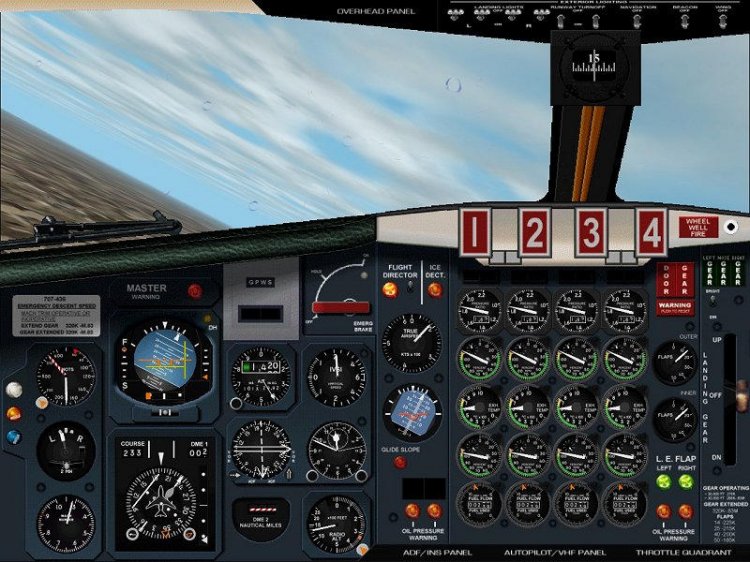
The panel for the Boeing 707-320 aircraft version 3.0. Includes panel captain, second pilot and engineer. Instruction in the archive.
→ Size:
6 MB
→ Date:
23 years ago (07.03.2003 11:58)
→ Author:
George Carty
→ License:
Freeware - Free version, Unlimited Distribution
→ Downloaded:
303 time(s)