Hindenburg Zeppelin Просмотр ZIP-архива
DLZ129/hindenberg/sex_doc/page4.html
<!doctype html public "-//IETF//DTD HTML 2.0//EN">
<html>
<head>
<meta http-equiv="Content-Type" content="text/html; charset=iso-8859-1">
<meta name="Generator" content="Microsoft Publisher 2000">
<title>Simulated Aircraft Bubble Sextant for FS2004 - MAKING A SHOT</title>
</head>
<body bgcolor="#ffffff" link="#0066ff" vlink="#6633cc" text="#000000"  topmargin=0 leftmargin=0>
<a name=top></a>

<table border=0 cellpadding=0 cellspacing=0>
<tr>
<td><img src="_blnk.gif" width=24 height=1></td>
<td><img src="_blnk.gif" width=6 height=1></td>
<td><img src="_blnk.gif" width=23 height=1></td>
<td><img src="_blnk.gif" width=7 height=1></td>
<td><img src="_blnk.gif" width=19 height=1></td>
<td><img src="_blnk.gif" width=5 height=1></td>
<td><img src="_blnk.gif" width=23 height=1></td>
<td><img src="_blnk.gif" width=91 height=1></td>
<td><img src="_blnk.gif" width=162 height=1></td>
<td><img src="_blnk.gif" width=6 height=1></td>
<td><img src="_blnk.gif" width=211 height=1></td>
<td><img src="_blnk.gif" width=113 height=1></td>
<td><img src="_blnk.gif" width=2 height=1></td>
<td><img src="_blnk.gif" width=1 height=1></td>
<td><img src="_blnk.gif" width=1 height=1></td>
<td><img src="_blnk.gif" width=1 height=1></td>
<td><img src="_blnk.gif" width=1 height=1></td>
<td><img src="_blnk.gif" width=6 height=1></td>
<td><img src="_blnk.gif" width=8 height=1></td>
</tr>
<tr>
<td width=24 height=9></td>
<td width=6></td>
<td width=23></td>
<td width=7></td>
<td width=19></td>
<td width=5></td>
<td width=23></td>
<td width=91></td>
<td width=162></td>
<td width=6></td>
<td width=211></td>
<td width=113></td>
<td width=2></td>
<td width=1></td>
<td width=1></td>
<td width=1></td>
<td width=1></td>
<td width=6></td>
<td width=8></td>
</tr>
<tr>
<td height=169></td>
<td width=553 height=169 colspan=10 rowspan=1 valign=top align=left>
<img width=553 height=169 border=0 src="img0.jpg"></td>
<td colspan=8></td>
</tr>
<tr>
<td height=6></td>
<td colspan=18></td>
</tr>
<tr>
<td height=3></td>
<td width=686 height=3 colspan=18 rowspan=1 valign=top align=left>
<img width=686 height=3 border=0 src="img1.gif"></td>
</tr>
<tr>
<td height=11></td>
<td colspan=18></td>
</tr>
<tr>
<td height=36></td>
<td width=686 height=36 colspan=18 rowspan=1 valign=top align=left>

<table border=0 cellpadding=0 cellspacing=0>
<tr>
<td width=3 height=3></td>
<td width=678></td>
<td width=3></td>
</tr>
<tr>
<td height=28></td>
<td width=678 height=28 valign=top align=left>
<BR>
<p align=left><font face="Times New Roman" color=#aa6b13 size=4><B>TO MAKE A STAR SHOT </B></font><font face="Times New Roman" color=#aa6b13 size=4>from an assumed position and time<br><br></font>
</td>
<td></td>
</tr>
<tr>
<td height=3></td>
<td colspan=2></td>
</tr>
</table>


</td>
</tr>
<tr>
<td height=6></td>
<td colspan=18></td>
</tr>
<tr>
<td height=150></td>
<td width=686 height=150 colspan=18 rowspan=1 valign=top align=left>

<table border=0 cellpadding=0 cellspacing=0>
<tr>
<td width=3 height=3></td>
<td width=678></td>
<td width=3></td>
</tr>
<tr>
<td height=142></td>
<td width=678 height=142 valign=top align=left>

<p align=left><font face="Times New Roman" color=#000000 size=3>To help clarify the operational use of this sextant, here is an overview of the main steps involved, without the detail provided in the following section on how to perform each step. <br><br>With the aircraft flying straight, level, and at constant speed, (engage the AP if desired) bring the sextant worksheet on screen (see installation instructions concerning call-up icons). It should pop up near the top left corner of the open window, leaving gauges visible, and room above it for the ATC traffic or other aircraft displays. See the figure below for an example. Note the worksheet is not yet filled in.<br><br></font>
</td>
<td></td>
</tr>
<tr>
<td height=3></td>
<td colspan=2></td>
</tr>
</table>


</td>
</tr>
<tr>
<td height=6></td>
<td colspan=18></td>
</tr>
<tr>
<td height=404></td>
<td width=686 height=404 colspan=18 rowspan=1 valign=top align=left>
<img width=680 height=400 border=1 src="img7.jpg"></td>
</tr>
<tr>
<td height=4></td>
<td colspan=18></td>
</tr>
<tr>
<td height=306></td>
<td width=672 height=306 colspan=16 rowspan=1 valign=top align=left>

<table border=0 cellpadding=0 cellspacing=0>
<tr>
<td width=3 height=3></td>
<td width=664></td>
<td width=3></td>
</tr>
<tr>
<td height=298></td>
<td width=664 height=298 valign=top align=left>

<p align=left><font face="Times New Roman" color=#000000 size=3><I>figure 1 <br></I></font><font face="Times New Roman" size=3><br>Usually you will have a preplanned waypoint with the information needed for the Star shot as listed below, but you may make the information up as you go. <br><br>1. Set the Assumed Latitude at the planned shot time near your position (on the worksheet).<br>2. Set the Assumed Longitude at that time near your position.<br>3. Set the Assumed Azimuth of the Star from your assumed position at the assumed time.<br>4. Set the Assumed Elevation of the Star from your assumed position at the assumed time.<br><br>In this example, the sextant will measure the elevation of the sun, which is only a few degrees to starboard with reference to the airplane heading, and it will give a good "speed" line of position, crossing the course line at close to a right angle. The figure below shows the sextant moved over to aim at the sun, with the data entered, and the navigator is waiting for arrival of the correct time to start the shot. The sextant may be moved by "dragging" it with the mouse. Clicking on the left handle is a good place to grab it.<br></font>
</td>
<td></td>
</tr>
<tr>
<td height=3></td>
<td colspan=2></td>
</tr>
</table>


</td>
<td colspan=2></td>
</tr>
<tr>
<td height=6></td>
<td colspan=18></td>
</tr>
<tr>
<td height=235></td>
<td width=671 height=235 colspan=15 rowspan=1 valign=top align=left>
<img width=680 height=239 border=1 src="img8.jpg"></td>
<td colspan=3></td>
</tr>
<tr>
<td height=5></td>
<td colspan=18></td>
</tr>
<tr>
<td height=204></td>
<td width=672 height=204 colspan=16 rowspan=1 valign=top align=left>

<table border=0 cellpadding=0 cellspacing=0>
<tr>
<td width=3 height=3></td>
<td width=664></td>
<td width=3></td>
</tr>
<tr>
<td height=196></td>
<td width=664 height=196 valign=top align=left>

<p align=left><font face="Times New Roman" color=#000000 size=3><I>figure 2 <br><br></I></font><font face="Times New Roman" size=3>The DC-3 is near KCHS, and heading about 90 degrees True. The sun is barely high enough to get a good reading without the errors associated with being near the horizon.<br><br>5. At the assumed shot time minus thirty seconds, click on the center of the eyepiece to bring up the enlarged eyepiece view, and move the bubble control thumb-wheel on the left side of the sextant to bring a medium size bubble into view. Using the </font><font face="Times New Roman" size=3>fine elevation knob</font><font face="Times New Roman" size=3> on the right side of the sextant, move the sun (or, if at night, the largest star) to the center of the bubble so that it wanders evenly up and down. <I>Figure 3</I> shows what you see during this aiming (averaging) period. <br></font>
</td>
<td></td>
</tr>
<tr>
<td height=3></td>
<td colspan=2></td>
</tr>
</table>


</td>
<td colspan=2></td>
</tr>
<tr>
<td height=6></td>
<td colspan=18></td>
</tr>
<tr>
<td height=228></td>
<td width=336 height=228 colspan=8 rowspan=1 valign=top align=left>
<img width=336 height=225 border=1 src="img9.jpg"></td>
<td></td>
<td width=330 height=228 colspan=7 rowspan=1 valign=top align=left>

<table border=0 cellpadding=0 cellspacing=0>
<tr>
<td width=3 height=3></td>
<td width=322></td>
<td width=3></td>
</tr>
<tr>
<td height=220></td>
<td width=322 height=220 valign=top align=left>

<p align=left><font face="Times New Roman" color=#000000 size=3>Azimuthal (Yaw) corrections to the aim of the sextant are automatic, as is the holding of the sextant vertically (Roll), with the bubble staying within the vertical stripes. <br><br>The eyepiece only shows up during the one minute averaging phase of the shot. There is no preferred position within the vertical stripes for the bubble (Pitch), as long as you keep the bubble away from the top or bottom edge of the display. Use a smaller bubble if the jitter is large.<br></font>
</td>
<td></td>
</tr>
<tr>
<td height=3></td>
<td colspan=2></td>
</tr>
</table>


</td>
<td colspan=2></td>
</tr>
<tr>
<td height=6></td>
<td colspan=18></td>
</tr>
<tr>
<td height=30></td>
<td width=672 height=30 colspan=16 rowspan=1 valign=top align=left>

<table border=0 cellpadding=0 cellspacing=0>
<tr>
<td width=3 height=3></td>
<td width=664></td>
<td width=3></td>
</tr>
<tr>
<td height=22></td>
<td width=664 height=22 valign=top align=left>

<p align=left><font face="Times New Roman" color=#000000 size=3><I>figure 3<br></I></font>
</td>
<td></td>
</tr>
<tr>
<td height=3></td>
<td colspan=2></td>
</tr>
</table>


</td>
<td colspan=2></td>
</tr>
<tr>
<td height=6></td>
<td colspan=18></td>
</tr>
<tr>
<td height=252></td>
<td width=336 height=252 colspan=8 rowspan=1 valign=top align=left>
<img width=336 height=252 border=1 src="img10.jpg"></td>
<td></td>
<td width=330 height=270 colspan=7 rowspan=3 valign=top align=left>

<table border=0 cellpadding=0 cellspacing=0>
<tr>
<td width=3 height=3></td>
<td width=322></td>
<td width=3></td>
</tr>
<tr>
<td height=262></td>
<td width=322 height=262 valign=top align=left>

<p align=left><font face="Times New Roman" color=#000000 size=3>6. At the end of a one minute interval, the enlarged eyepiece will disappear, and the sextant gauge will display the measured elevation angle to the star and the measured distance in NM, which is a function of the accuracy of your star and bubble alignment. <I>Figure 4</I> shows how the gauge looks at the completion of the shot. In this example the plane is directly over KCHS, the elevation angle is only 5 minutes of arc different from the assumed elevation, and so the distance to move the assumed LOP to the real LOP is 5 nm. Since it is a positive number, the plane is 5 nm closer to the sun (on the earth's surface) than the assumed position. <br></font>
</td>
<td></td>
</tr>
<tr>
<td height=3></td>
<td colspan=2></td>
</tr>
</table>


</td>
<td colspan=2></td>
</tr>
<tr>
<td height=6></td>
<td colspan=9></td>
<td colspan=2></td>
</tr>
<tr>
<td height=12></td>
<td width=336 height=24 colspan=8 rowspan=2 valign=top align=left>

<table border=0 cellpadding=0 cellspacing=0>
<tr>
<td width=3 height=3></td>
<td width=328></td>
<td width=3></td>
</tr>
<tr>
<td height=16></td>
<td width=328 height=16 valign=top align=left>

<p align=left><font face="Times New Roman" color=#000000 size=3><I>figure 4<br></I></font>
</td>
<td></td>
</tr>
<tr>
<td height=3></td>
<td colspan=2></td>
</tr>
</table>


</td>
<td></td>
<td colspan=2></td>
</tr>
<tr>
<td height=12></td>
<td colspan=10></td>
</tr>
<tr>
<td height=6></td>
<td colspan=18></td>
</tr>
<tr>
<td height=1338></td>
<td width=686 height=1338 colspan=18 rowspan=1 valign=top align=left>

<table border=0 cellpadding=0 cellspacing=0>
<tr>
<td width=3 height=3></td>
<td width=678></td>
<td width=3></td>
</tr>
<tr>
<td height=1330></td>
<td width=678 height=1330 valign=top align=left>

<p align=left><font face="Times New Roman" color=#000000 size=3>7. After noting the distance, click the eyepiece again to reset the sextant for the next reading. The measured distance should disappear.<br><br>8. Go to your chart and move the marked assumed position </font><font face="Times New Roman" size=3><U>toward</U></font><font face="Times New Roman" size=3> the star the distance displayed, if the measured elevation is greater than the assumed elevation (the displayed distance will be positive). Move the point </font><font face="Times New Roman" size=3><U>away from</U></font><font face="Times New Roman" size=3> the star if the measured elevation angle is smaller than the assumed elevation (the displayed distance will be negative). At that point, draw your line of position at right angles to the direction to the star. Remember that you are using true, not magnetic bearings on the chart.<br><br>Comments to summarize the overview of the main steps involved, above:<br><br>Steps 1 and 2 are where you placed your assumed position on the chart.<br><br>Step 3 is the direction to the star where you plot it on the chart, and is the azimuth where you point the sextant. These are true bearings, not magnetic bearings.<br><br>Step 4 is the elevation to the star from the assumed position.<br><br>At night you generally hold the sextant so more than one star is visible, to give you some re-assurance that you are measuring the correct star. This is not a problem with the sun. In the star case, we may hold the sextant so that you can see the pattern of stars above that help "identify" the correct star.<br> <br>Step 5 gives you exactly one minute to best align the jittering star with the bubble horizon, and automatically cuts off the display. The Mark IX sextant has built in time measurement.<br><br>Step 6 displays the measured elevation angle to the star, and thus the measured distance you are from the assumed position. One degree of sextant angle is always 60 NM of distance.<br><br>Step 7 is self explanatory.<br><br>Step 8 plots the line of position from a single star on your chart. Two intersecting LOPs will give you a GPS-like position, only it will be for a few minutes ago, not real time. <br><br>The problem with more than one celestial position line is that they were obtained at different times, so allowance has to be made on one of them to work out what it would have been had it been made the same time as the other - and then you have the position you estimate you were at a few minutes ago!<br><br>To prepare for celestial navigation using a sextant you must have a chart on which you have plotted your assumed course, and have selected assumed positions where you will be at certain times. You will need to have azimuth and elevation data to the stars available for sextant measurement at the assumed times. It is a good idea to also have data for early/late times of arrival at that waypoint. A lot of this data may be pre-computed and plotted before take-off. In this simulation, no checks are made to confirm that a star exists where you assume there is one. You are expected to use real world star data. During your training, frequent peeks at the map or the Shift+Z heads up display of latitude and longitude will build your confidence (situational awareness).<br><br>Dave Bitzer says:<br><br> "I use FS9's flight planner to get great circle routes, and print out the display as a working chart, or use cross hatch paper with 4 or 5 lines per inch. Then I select waypoints, say every 2 hours planned flight time, and enlarge the plan to show about 4 degrees of latitude (240 NM) along each axis, at the waypoints. I now have a chart with the assumed latitude and longitude for the waypoints, and the assumed time of arrival at each point (which includes winds aloft predictions). Next I go to the Internet and get the position of the sun or stars relative to the assumed positions and time. If it is a night flight, I try to use a star dead ahead, and one at 90 or 270 degrees right of my direction of flight (abeam at port or starboard). This will give me directly my course made good.<br><br>Then I am ready to fly, and to take star shots at the assumed times and assumed locations. As the flight progresses, I may need to adjust my ETA at the waypoints, and use internet data for those adjusted times, so I usually collect data for half hour ahead and behind schedule for every 4 hours elapsed time and re-compute the lines of position as necessary.<br><br>For more realism, to try to maintain situational orientation and awareness, I try to use the front window for the course star, and then I either select a side window and hold it in place with the control key, before I bring the sextant on screen, or I go to VC using the S key, and move the eye point and direction of view to bring the star into view. Then with the sextant worksheet on the correct window, I can drag it to the approximate position of the sun or the star of choice."<br><br>The figure below depicts a VC view of the sun, at about 55 degrees to starboard , as might be suitable for a determining a course line of position. The sextant has been brought on screen. It may need to be "undocked" to remove the window frame and be seen as depicted below.<br></font>
</td>
<td></td>
</tr>
<tr>
<td height=3></td>
<td colspan=2></td>
</tr>
</table>


</td>
</tr>
<tr>
<td height=6></td>
<td colspan=18></td>
</tr>
<tr>
<td height=462></td>
<td width=686 height=462 colspan=18 rowspan=1 valign=top align=left>
<img width=680 height=462 border=1 src="img11.jpg"></td>
</tr>
<tr>
<td height=6></td>
<td colspan=18></td>
</tr>
<tr>
<td height=108></td>
<td width=686 height=108 colspan=18 rowspan=1 valign=top align=left>

<table border=0 cellpadding=0 cellspacing=0>
<tr>
<td width=3 height=3></td>
<td width=678></td>
<td width=3></td>
</tr>
<tr>
<td height=100></td>
<td width=678 height=100 valign=top align=left>

<p align=left><font face="Times New Roman" color=#000000 size=3><I>figure 5<br><br></I></font><font face="Times New Roman" size=3>The figure below shows the sextant moved to cover the sun, for the sun shot. Note further that the data has been entered and the sun shot is in progress. A good place to "grab" the sextant and move it around on the screen is the top of the left handle.<br></font>
</td>
<td></td>
</tr>
<tr>
<td height=3></td>
<td colspan=2></td>
</tr>
</table>


</td>
</tr>
<tr>
<td height=6></td>
<td colspan=18></td>
</tr>
<tr>
<td height=280></td>
<td width=680 height=280 colspan=17 rowspan=1 valign=top align=left>
<img width=680 height=280 border=1 src="img12.jpg"></td>
<td></td>
</tr>
<tr>
<td height=6></td>
<td colspan=18></td>
</tr>
<tr>
<td height=612></td>
<td width=678 height=612 colspan=17 rowspan=1 valign=top align=left>

<table border=0 cellpadding=0 cellspacing=0>
<tr>
<td width=3 height=3></td>
<td width=670></td>
<td width=3></td>
</tr>
<tr>
<td height=604></td>
<td width=670 height=604 valign=top align=left>

<p align=left><font face="Times New Roman" color=#000000 size=3><I>figure 6<br><br></I></font><font face="Times New Roman" size=3><B>Night-time Operations</B>: The sextant automatically recognizes night, and removes the shades that protect the navigator's eyes from the sun. To control whether day or night is "invoked", local time is used. Day, Sun, filter occurs when the local time is between 0600 and 1800. So by selecting times just before or after 6 o'clock you may select a day or a night shot, as appropriate. Recall that a star or sun near the horizon is not suitable for celestial navigation.<br><br>Similar procedures are usable for night-time shots, except that the correct star is much more difficult to find than the sun. FS2004 stars are sometimes difficult to identify, and fortunately the sextant does not depend on your finding and using the correct star. It is sufficient to pick any star in the vicinity of where the correct star should be to take your virtual shot. The sextant does not validate or need to have the star or sun in a particular position, but it definitely adds realism to the game if you can use the correct star. The following figures display the night usage of the sextant. <br><br>The figures below were made while using the freeware by Norbert Pachner (downloadable at <a href="http://www.download.com/
Flight-Simulator-2004-A-Century-of-Flight-Real-Stars-mod/3000-7545_4-1
0292672.html">www.download.com/
Flight-Simulator-2004-A-Century-of-Flight-Real-Stars-mod/3000-7545_4-1
0292672.html</A>) that makes the stars much more identifiable. <br><br>In the first figure, the target star is in the easily recognizable <I>Big Dipper</I>, and specifically <I>Alkaid</I>, in the handle of the <I>Big Dipper. Alkaid</I> is almost directly in front of the aircraft, but too high to see without zooming out to 50%, going to full screen view, (W key), and looking up all 10 steps (Shift+Backspace).<br><br>Bring the sextant and worksheet on screen, and enter data for the next waypoint. Near the correct time of the shot, click on the worksheet and drag it over <I>Alkaid</I>, snapping a screenshot before releasing the mouse key to get the figure below (see the dotted line). When the mouse key was released, the sextant moved over to the outlined area, and it is now ready for the user to click the "mode control" to start the shot at the exact time specified. Note the aircraft is at N47*23', W110*43 and the assumed position is N50,W111*35, and the star shot has completed, with the measured angle at 47*0'. <br><br>This says the measured line of position is 90 NM away from the star than the assumed position. Since the direction to the star is 296 degrees, we need to move our LOP 90 NM to the east south east.<br></font>
</td>
<td></td>
</tr>
<tr>
<td height=3></td>
<td colspan=2></td>
</tr>
</table>


</td>
<td></td>
</tr>
<tr>
<td height=6></td>
<td colspan=18></td>
</tr>
<tr>
<td height=434></td>
<td width=680 height=434 colspan=14 rowspan=1 valign=top align=left>
<img width=680 height=434 border=1 src="img13.jpg"></td>
<td colspan=4></td>
</tr>
<tr>
<td height=5></td>
<td colspan=18></td>
</tr>
<tr>
<td height=126></td>
<td width=672 height=126 colspan=16 rowspan=1 valign=top align=left>

<table border=0 cellpadding=0 cellspacing=0>
<tr>
<td width=3 height=3></td>
<td width=664></td>
<td width=3></td>
</tr>
<tr>
<td height=118></td>
<td width=664 height=118 valign=top align=left>

<p align=left><font face="Times New Roman" color=#000000 size=3><I>figure 7 <br><br></I></font><font face="Times New Roman" size=3>There is a problem with the figure above. On the real computer screen, the stars are a little more visible, especially if you darken the room and wipe the dust off the computer screen. For the purposes of this manual, the figure above has been "photo enhanced" in the figure below to show the <I>Big Dipper</I>'s stars brighter.<br></font>
</td>
<td></td>
</tr>
<tr>
<td height=3></td>
<td colspan=2></td>
</tr>
</table>


</td>
<td colspan=2></td>
</tr>
<tr>
<td height=6></td>
<td colspan=18></td>
</tr>
<tr>
<td height=434></td>
<td width=668 height=434 colspan=12 rowspan=1 valign=top align=left>
<img width=680 height=434 border=1 src="img14.jpg"></td>
<td colspan=6></td>
</tr>
<tr>
<td height=6></td>
<td colspan=18></td>
</tr>
<tr>
<td height=240></td>
<td width=666 height=240 colspan=11 rowspan=1 valign=top align=left>

<table border=0 cellpadding=0 cellspacing=0>
<tr>
<td width=3 height=3></td>
<td width=658></td>
<td width=3></td>
</tr>
<tr>
<td height=232></td>
<td width=658 height=232 valign=top align=left>

<p align=left><font face="Times New Roman" color=#000000 size=3><I>figure 8 <br><br></I></font><font face="Times New Roman" size=3>For another example, below is a screenshot depicting another shot. The date is 26 April, 1945, at 11:14 GMT, and <I>Alphecca</I> is out the left front window, directly above the Moon at an elevation of 53 degrees. Here, the star is too high in the sky to see in the cockpit view, so I went to VC (S key), and moved the eye point forward till it is almost against the window, and zoomed out 2 clicks (- key), then shifted the view up (using the top hat control on the joystick) until the <I>Northern Crown</I> is in view (the target star, <I>Alphecca</I>, is in the <I>Northern Crown</I>). I brought the sextant on screen again, and took a similar screenshot to frame the star. Again, in the figure below it is hard to see the stars. <I>Alphecca</I> is visible, but the rest of the <I>Northern Crown</I> is washed out.  Note that the aircraft's heading is 288 degrees magnetic, corrected to 272 degrees true, and the star is at 246 degrees true, placing it 26 degrees left of the nose of the aircraft.<br></font>
</td>
<td></td>
</tr>
<tr>
<td height=3></td>
<td colspan=2></td>
</tr>
</table>


</td>
<td colspan=7></td>
</tr>
<tr>
<td height=6></td>
<td colspan=18></td>
</tr>
<tr>
<td height=316></td>
<td width=680 height=316 colspan=13 rowspan=1 valign=top align=left>
<img width=680 height=316 border=1 src="img15.jpg"></td>
<td colspan=5></td>
</tr>
<tr>
<td height=6></td>
<td colspan=18></td>
</tr>
<tr>
<td height=96></td>
<td width=666 height=96 colspan=11 rowspan=1 valign=top align=left>

<table border=0 cellpadding=0 cellspacing=0>
<tr>
<td width=3 height=3></td>
<td width=658></td>
<td width=3></td>
</tr>
<tr>
<td height=88></td>
<td width=658 height=88 valign=top align=left>

<p align=left><font face="Times New Roman" color=#000000 size=3><I>figure 9<br></I></font><font face="Times New Roman" size=3><br>In the figure below, again the stars in the <I>Northern Crown</I> are enhanced, so you may easily find the star. The enhanced figure is on this manual only, not on the "in the game" stars.<br></font>
</td>
<td></td>
</tr>
<tr>
<td height=3></td>
<td colspan=2></td>
</tr>
</table>


</td>
<td colspan=7></td>
</tr>
<tr>
<td height=6></td>
<td colspan=18></td>
</tr>
<tr>
<td height=326></td>
<td width=680 height=326 colspan=13 rowspan=1 valign=top align=left>
<img width=680 height=326 border=1 src="img16.jpg"></td>
<td colspan=5></td>
</tr>
<tr>
<td height=3></td>
<td colspan=18></td>
</tr>
<tr>
<td height=30></td>
<td width=174 height=30 colspan=7 rowspan=1 valign=top align=left>

<table border=0 cellpadding=0 cellspacing=0>
<tr>
<td width=3 height=3></td>
<td width=166></td>
<td width=3></td>
</tr>
<tr>
<td height=22></td>
<td width=166 height=22 valign=top align=left>

<p align=left><font face="Times New Roman" color=#000000 size=3><I>figure 10<br></I></font>
</td>
<td></td>
</tr>
<tr>
<td height=3></td>
<td colspan=2></td>
</tr>
</table>


</td>
<td colspan=11></td>
</tr>
<tr>
<td height=18></td>
<td colspan=18></td>
</tr>
<tr>
<td height=2></td>
<td width=686 height=2 colspan=18 rowspan=1 valign=top align=left>
<img width=686 height=2 border=0 src="img2.gif"></td>
</tr>
<tr>
<td height=11></td>
<td colspan=18></td>
</tr>
<tr>
<td height=6></td>
<td colspan=3></td>
<td width=19 height=23 colspan=1 rowspan=2 valign=top align=left>
<map name="map549">
<area shape="rect" coords="0,0,19,23" href="index.html">
</map>
<img width=19 height=23 border=0 src="img6.gif" usemap="#map549" alt="INDEX"></td>
<td colspan=14></td>
</tr>
<tr>
<td height=17></td>
<td></td>
<td width=23 height=19 colspan=1 rowspan=2 valign=top align=left>
<map name="map541">
<area shape="rect" coords="0,0,23,19" href="page3.html">
</map>
<img width=23 height=19 border=0 src="img4.gif" usemap="#map541" alt="BACK"></td>
<td></td>
<td></td>
<td width=23 height=19 colspan=1 rowspan=2 valign=top align=left>
<map name="map545">
<area shape="rect" coords="0,0,23,19" href="page5.html">
</map>
<img width=23 height=19 border=0 src="img5.gif" usemap="#map545" alt="NEXT"></td>
<td colspan=12></td>
</tr>
<tr>
<td height=2></td>
<td></td>
<td colspan=3></td>
<td colspan=12></td>
</tr>
</table>
<BR><BR>
<a name=bottom></a>
</body>
</html>
25717-DLZ129.zip
| Имя файла | Дата | Размер |
|---|---|---|
| DLZ129/ | 11.12.2009 01:10 | |
| DLZ129/screen0.jpg | 10.12.2009 23:30 | 154 KB |
| DLZ129/screen1.jpg | 10.12.2009 23:31 | 195 KB |
| DLZ129/screen2.jpg | 10.12.2009 23:34 | 327 KB |
| DLZ129/screen3.jpg | 10.12.2009 23:35 | 178 KB |
| DLZ129/screen4.jpg | 10.12.2009 23:32 | 197 KB |
| DLZ129/screen5.jpg | 10.12.2009 23:22 | 141 KB |
| DLZ129/screen6.jpg | 10.12.2009 23:33 | 320 KB |
| DLZ129/screen7.jpg | 10.12.2009 23:34 | 248 KB |
| DLZ129/screen8.jpg | 10.12.2009 23:32 | 313 KB |
| DLZ129/screen9.jpg | 10.12.2009 23:33 | 328 KB |
| DLZ129/readme.txt | 11.12.2009 01:09 | 3 KB |
| DLZ129/screen10.jpg | 10.12.2009 23:35 | 119 KB |
| DLZ129/hindenberg/ | 05.05.2006 01:33 | |
| DLZ129/Sound/ | 19.05.2006 21:00 | |
| DLZ129/Gauges/ | 10.12.2009 23:51 | |
| DLZ129/hindenberg/zep_check.htm | 19.05.2006 01:17 | 7 KB |
| DLZ129/hindenberg/zep_ref.htm | 03.05.2006 01:13 | 4 KB |
| DLZ129/hindenberg/Hindenburg.air | 06.04.2006 02:18 | 9 KB |
| DLZ129/hindenberg/Aircraft.cfg | 20.05.2006 15:26 | 11 KB |
| DLZ129/hindenberg/texture/ | 05.05.2006 01:33 | |
| DLZ129/hindenberg/sex_doc/ | 05.05.2006 01:51 | |
| DLZ129/hindenberg/sound/ | 05.05.2006 01:33 | |
| DLZ129/hindenberg/model/ | 05.05.2006 01:33 | |
| DLZ129/hindenberg/Panel/ | 05.05.2006 01:37 | |
| DLZ129/hindenberg/texture/carpet_L.bmp | 14.04.2006 19:26 | 4 KB |
| DLZ129/hindenberg/texture/carpet_T.bmp | 29.03.2006 17:38 | 4 KB |
| DLZ129/hindenberg/texture/engm_L.bmp | 02.03.2006 18:16 | 16 KB |
| DLZ129/hindenberg/texture/wallmat_L.bmp | 28.03.2006 22:23 | 64 KB |
| DLZ129/hindenberg/texture/engm_T.bmp | 02.03.2006 18:16 | 16 KB |
| DLZ129/hindenberg/texture/gagbal_L.bmp | 01.05.2006 00:11 | 256 KB |
| DLZ129/hindenberg/texture/wallmat_T.bmp | 28.03.2006 22:23 | 64 KB |
| DLZ129/hindenberg/texture/gagbal_T.bmp | 01.05.2006 00:11 | 256 KB |
| DLZ129/hindenberg/texture/poster2_L.bmp | 14.04.2006 17:55 | 32 KB |
| DLZ129/hindenberg/texture/crm.bmp | 28.02.2006 20:24 | 16 KB |
| DLZ129/hindenberg/texture/bedmat_L.bmp | 28.03.2006 22:22 | 64 KB |
| DLZ129/hindenberg/texture/poster2_t.bmp | 31.03.2006 10:35 | 32 KB |
| DLZ129/hindenberg/texture/trvl_L.bmp | 14.04.2006 18:04 | 8 KB |
| DLZ129/hindenberg/texture/let_T.bmp | 12.04.2006 19:50 | 16 KB |
| DLZ129/hindenberg/texture/let_l.bmp | 14.04.2006 17:42 | 16 KB |
| DLZ129/hindenberg/texture/girder_L.bmp | 26.03.2006 16:09 | 64 KB |
| DLZ129/hindenberg/texture/trvl_t.bmp | 10.04.2006 16:02 | 8 KB |
| DLZ129/hindenberg/texture/girder.bmp | 26.03.2006 16:09 | 64 KB |
| DLZ129/hindenberg/texture/girder_T.bmp | 30.03.2006 19:57 | 64 KB |
| DLZ129/hindenberg/texture/girdeclr.bmp | 30.03.2006 18:43 | 64 KB |
| DLZ129/hindenberg/texture/poster3_L.bmp | 14.04.2006 17:56 | 32 KB |
| DLZ129/hindenberg/texture/meandude.bmp | 28.04.2006 10:42 | 16 KB |
| DLZ129/hindenberg/texture/dpm_L.bmp | 14.04.2006 18:38 | 32 KB |
| DLZ129/hindenberg/texture/kntxt1.jpg | 27.04.2006 01:33 | 51 KB |
| DLZ129/hindenberg/texture/kntxt2.jpg | 27.04.2006 22:23 | 54 KB |
| DLZ129/hindenberg/texture/kntxt3.jpg | 27.04.2006 23:33 | 53 KB |
| DLZ129/hindenberg/texture/poster3_t.bmp | 31.03.2006 10:36 | 32 KB |
| DLZ129/hindenberg/texture/dpm_t.bmp | 10.04.2006 16:01 | 32 KB |
| DLZ129/hindenberg/texture/posterj_t.bmp | 31.03.2006 10:38 | 128 KB |
| DLZ129/hindenberg/texture/kntxt.jpg | 27.04.2006 01:10 | 53 KB |
| DLZ129/hindenberg/texture/graf_T.bmp | 31.03.2006 10:33 | 32 KB |
| DLZ129/hindenberg/texture/poster4_L.bmp | 14.04.2006 17:58 | 32 KB |
| DLZ129/hindenberg/texture/poof.bmp | 24.03.2006 18:20 | 64 KB |
| DLZ129/hindenberg/texture/alulcov_L.bmp | 10.03.2006 20:13 | 4 KB |
| DLZ129/hindenberg/texture/alulcov_T.bmp | 10.03.2006 20:13 | 4 KB |
| DLZ129/hindenberg/texture/poster4_t.bmp | 31.03.2006 10:37 | 32 KB |
| DLZ129/hindenberg/texture/white_L.bmp | 01.05.2006 00:05 | 8 KB |
| DLZ129/hindenberg/texture/aluminum_L.bmp | 14.04.2006 19:24 | 4 KB |
| DLZ129/hindenberg/texture/alucov_L.bmp | 01.04.2006 22:27 | 4 KB |
| DLZ129/hindenberg/texture/white_T.bmp | 20.02.2006 00:40 | 16 KB |
| DLZ129/hindenberg/texture/aluminum_T.bmp | 14.03.2006 17:42 | 4 KB |
| DLZ129/hindenberg/texture/alucov_T.bmp | 01.04.2006 22:27 | 4 KB |
| DLZ129/hindenberg/texture/compass_L.bmp | 22.04.2006 19:13 | 16 KB |
| DLZ129/hindenberg/texture/bedmat.bmp | 28.03.2006 22:22 | 64 KB |
| DLZ129/hindenberg/texture/sched_L.bmp | 14.04.2006 18:14 | 128 KB |
| DLZ129/hindenberg/texture/compass_T.bmp | 22.04.2006 19:13 | 16 KB |
| DLZ129/hindenberg/texture/sched_T.bmp | 08.04.2006 01:57 | 128 KB |
| DLZ129/hindenberg/texture/poster5_L.bmp | 14.04.2006 17:59 | 32 KB |
| DLZ129/hindenberg/texture/Kitchen_T.bmp | 31.03.2006 12:49 | 128 KB |
| DLZ129/hindenberg/texture/crome_L.bmp | 15.03.2006 23:12 | 16 KB |
| DLZ129/hindenberg/texture/radiorm_T.bmp | 31.03.2006 12:50 | 128 KB |
| DLZ129/hindenberg/texture/crome_T.bmp | 15.03.2006 23:12 | 16 KB |
| DLZ129/hindenberg/texture/map2_L.bmp | 14.04.2006 17:49 | 128 KB |
| DLZ129/hindenberg/texture/map2_T.bmp | 08.04.2006 01:55 | 128 KB |
| DLZ129/hindenberg/texture/brass_L.bmp | 14.04.2006 02:20 | 16 KB |
| DLZ129/hindenberg/texture/blue.bmp | 28.02.2006 19:42 | 16 KB |
| DLZ129/hindenberg/texture/poster5_t.bmp | 31.03.2006 10:37 | 32 KB |
| DLZ129/hindenberg/texture/mrs.bmp | 28.04.2006 10:44 | 64 KB |
| DLZ129/hindenberg/texture/gagcrc_L.bmp | 15.04.2006 00:16 | 256 KB |
| DLZ129/hindenberg/texture/brass_t.bmp | 17.02.2006 09:14 | 16 KB |
| DLZ129/hindenberg/texture/wood_L.bmp | 17.02.2006 09:05 | 256 KB |
| DLZ129/hindenberg/texture/cloth_L.bmp | 14.04.2006 02:16 | 16 KB |
| DLZ129/hindenberg/texture/cloth_T.bmp | 17.02.2006 10:34 | 16 KB |
| DLZ129/hindenberg/texture/wood_t.bmp | 17.02.2006 09:05 | 256 KB |
| DLZ129/hindenberg/texture/ss.bmp | 18.03.2006 12:00 | 64 KB |
| DLZ129/hindenberg/texture/plate_L.bmp | 14.04.2006 18:04 | 64 KB |
| DLZ129/hindenberg/texture/plate_T.bmp | 30.03.2006 01:14 | 64 KB |
| DLZ129/hindenberg/texture/newsppr_L.bmp | 14.04.2006 18:11 | 32 KB |
| DLZ129/hindenberg/texture/map_L.bmp | 14.04.2006 17:51 | 128 KB |
| DLZ129/hindenberg/texture/map_T.bmp | 08.04.2006 01:56 | 128 KB |
| DLZ129/hindenberg/texture/decals.bmp | 05.04.2003 23:02 | 85 KB |
| DLZ129/hindenberg/texture/newsppr_t.bmp | 10.04.2006 16:01 | 32 KB |
| DLZ129/hindenberg/texture/preset_t.bmp | 10.04.2006 16:02 | 32 KB |
| DLZ129/hindenberg/texture/Curtiss_Jenny_D.bmp | 05.04.2003 04:42 | 683 KB |
| DLZ129/hindenberg/texture/worldmap_L.bmp | 01.05.2006 00:03 | 512 KB |
| DLZ129/hindenberg/texture/hind_L.bmp | 14.04.2006 18:22 | 64 KB |
| DLZ129/hindenberg/texture/hind_T.bmp | 31.03.2006 10:34 | 64 KB |
| DLZ129/hindenberg/texture/Curtiss_Jenny_T.bmp | 11.05.2003 00:57 | 1 MB |
| DLZ129/hindenberg/texture/dude.bmp | 28.04.2006 10:40 | 8 KB |
| DLZ129/hindenberg/texture/countz_t.bmp | 31.03.2006 10:32 | 128 KB |
| DLZ129/hindenberg/texture/girdecl_L.bmp | 30.03.2006 18:43 | 64 KB |
| DLZ129/hindenberg/texture/passcab_T.bmp | 31.03.2006 12:49 | 256 KB |
| DLZ129/hindenberg/texture/divider_t.bmp | 10.04.2006 17:22 | 256 KB |
| DLZ129/hindenberg/texture/worldmap_t.bmp | 01.05.2006 00:03 | 512 KB |
| DLZ129/hindenberg/texture/trip_T.bmp | 31.03.2006 10:40 | 32 KB |
| DLZ129/hindenberg/texture/Prop_Jenny.bmp | 26.11.2002 02:59 | 341 KB |
| DLZ129/hindenberg/texture/sws_L.bmp | 16.04.2006 09:38 | 128 KB |
| DLZ129/hindenberg/texture/sws_T.bmp | 16.04.2006 09:37 | 128 KB |
| DLZ129/hindenberg/texture/Curtiss_Jenny_C_1.bmp | 13.05.2003 22:55 | 683 KB |
| DLZ129/hindenberg/texture/Curtiss_Jenny_C_2.bmp | 11.03.2003 22:33 | 171 KB |
| DLZ129/hindenberg/texture/poster1_L.bmp | 14.04.2006 17:53 | 32 KB |
| DLZ129/hindenberg/texture/LZ11_T.bmp | 26.03.2006 15:59 | 2 MB |
| DLZ129/hindenberg/texture/Image2.bmp | 02.05.2006 01:36 | 2 MB |
| DLZ129/hindenberg/texture/cigrm_t.bmp | 13.04.2006 10:35 | 32 KB |
| DLZ129/hindenberg/texture/black.bmp | 28.02.2006 19:41 | 16 KB |
| DLZ129/hindenberg/texture/129_L.bmp | 14.04.2006 18:26 | 8 KB |
| DLZ129/hindenberg/texture/intmap.bmp | 22.03.2006 12:01 | 192 KB |
| DLZ129/hindenberg/texture/intmap.jpg | 26.04.2006 23:49 | 59 KB |
| DLZ129/hindenberg/texture/white.bmp | 16.03.2006 16:06 | 16 KB |
| DLZ129/hindenberg/texture/poster1_t.bmp | 31.03.2006 10:35 | 32 KB |
| DLZ129/hindenberg/texture/129_t.bmp | 31.03.2006 10:32 | 8 KB |
| DLZ129/hindenberg/sex_doc/readme1st.txt | 15.11.2003 12:00 | 6 KB |
| DLZ129/hindenberg/sex_doc/page10.html | 06.12.2004 02:01 | 4 KB |
| DLZ129/hindenberg/sex_doc/page11.html | 06.12.2004 02:01 | 6 KB |
| DLZ129/hindenberg/sex_doc/inst_instr.htm | 14.01.2005 11:29 | 2 KB |
| DLZ129/hindenberg/sex_doc/Read Me.txt | 10.08.2005 09:44 | 3 KB |
| DLZ129/hindenberg/sex_doc/Driftmeter Manual.htm | 18.01.2005 20:21 | 2 KB |
| DLZ129/hindenberg/sex_doc/drift5c.jpg | 09.01.2005 02:13 | 13 KB |
| DLZ129/hindenberg/sex_doc/principles.htm | 14.01.2005 11:43 | 3 KB |
| DLZ129/hindenberg/sex_doc/PREFACE.htm | 14.01.2005 11:36 | 1 KB |
| DLZ129/hindenberg/sex_doc/index.html | 05.12.2004 14:56 | 6 KB |
| DLZ129/hindenberg/sex_doc/Thumbs.db | 05.05.2006 02:30 | 125 KB |
| DLZ129/hindenberg/sex_doc/userguide.gif | 15.11.2003 12:00 | 27 KB |
| DLZ129/hindenberg/sex_doc/drift5.CAB | 09.01.2005 18:43 | 35 KB |
| DLZ129/hindenberg/sex_doc/jon4.gif | 05.12.2004 03:01 | 12 KB |
| DLZ129/hindenberg/sex_doc/img0.jpg | 03.12.2004 03:34 | 16 KB |
| DLZ129/hindenberg/sex_doc/img1.gif | 03.12.2004 03:19 | 907 B |
| DLZ129/hindenberg/sex_doc/img2.gif | 03.12.2004 03:19 | 864 B |
| DLZ129/hindenberg/sex_doc/img3.gif | 03.12.2004 03:19 | 928 B |
| DLZ129/hindenberg/sex_doc/img4.gif | 03.12.2004 03:19 | 923 B |
| DLZ129/hindenberg/sex_doc/img5.gif | 03.12.2004 03:19 | 918 B |
| DLZ129/hindenberg/sex_doc/img6.gif | 03.12.2004 03:19 | 928 B |
| DLZ129/hindenberg/sex_doc/img7.jpg | 03.12.2004 03:51 | 61 KB |
| DLZ129/hindenberg/sex_doc/img8.jpg | 03.12.2004 03:53 | 32 KB |
| DLZ129/hindenberg/sex_doc/img9.jpg | 04.12.2004 19:10 | 16 KB |
| DLZ129/hindenberg/sex_doc/img10.jpg | 03.12.2004 04:00 | 15 KB |
| DLZ129/hindenberg/sex_doc/img11.jpg | 03.12.2004 04:03 | 47 KB |
| DLZ129/hindenberg/sex_doc/img12.jpg | 04.12.2004 19:12 | 30 KB |
| DLZ129/hindenberg/sex_doc/img13.jpg | 03.12.2004 04:08 | 30 KB |
| DLZ129/hindenberg/sex_doc/img14.jpg | 03.12.2004 04:11 | 30 KB |
| DLZ129/hindenberg/sex_doc/img15.jpg | 03.12.2004 04:13 | 22 KB |
| DLZ129/hindenberg/sex_doc/img16.jpg | 03.12.2004 04:14 | 23 KB |
| DLZ129/hindenberg/sex_doc/img17.jpg | 03.12.2004 14:13 | 14 KB |
| DLZ129/hindenberg/sex_doc/img18.jpg | 03.12.2004 14:17 | 15 KB |
| DLZ129/hindenberg/sex_doc/img19.jpg | 03.12.2004 14:18 | 11 KB |
| DLZ129/hindenberg/sex_doc/img20.jpg | 03.12.2004 14:20 | 9 KB |
| DLZ129/hindenberg/sex_doc/img21.jpg | 03.12.2004 14:22 | 43 KB |
| DLZ129/hindenberg/sex_doc/img22.jpg | 03.12.2004 14:29 | 42 KB |
| DLZ129/hindenberg/sex_doc/img23.jpg | 03.12.2004 14:41 | 41 KB |
| DLZ129/hindenberg/sex_doc/img24.gif | 03.12.2004 03:19 | 6 KB |
| DLZ129/hindenberg/sex_doc/img25.gif | 03.12.2004 03:19 | 3 KB |
| DLZ129/hindenberg/sex_doc/page2.html | 06.12.2004 01:57 | 5 KB |
| DLZ129/hindenberg/sex_doc/img26.gif | 03.12.2004 03:19 | 12 KB |
| DLZ129/hindenberg/sex_doc/img27.gif | 03.12.2004 03:19 | 13 KB |
| DLZ129/hindenberg/sex_doc/img28.gif | 03.12.2004 03:19 | 7 KB |
| DLZ129/hindenberg/sex_doc/img29.gif | 03.12.2004 03:19 | 928 B |
| DLZ129/hindenberg/sex_doc/img30.gif | 03.12.2004 03:19 | 923 B |
| DLZ129/hindenberg/sex_doc/img31.gif | 03.12.2004 03:19 | 918 B |
| DLZ129/hindenberg/sex_doc/img32.gif | 03.12.2004 03:19 | 864 B |
| DLZ129/hindenberg/sex_doc/img33.gif | 03.12.2004 03:19 | 4 KB |
| DLZ129/hindenberg/sex_doc/img34.gif | 03.12.2004 03:19 | 6 KB |
| DLZ129/hindenberg/sex_doc/img35.gif | 03.12.2004 03:19 | 928 B |
| DLZ129/hindenberg/sex_doc/page3.html | 06.12.2004 12:15 | 15 KB |
| DLZ129/hindenberg/sex_doc/img36.gif | 03.12.2004 03:19 | 16 KB |
| DLZ129/hindenberg/sex_doc/img37.gif | 03.12.2004 03:19 | 22 KB |
| DLZ129/hindenberg/sex_doc/img38.gif | 03.12.2004 03:19 | 81 KB |
| DLZ129/hindenberg/sex_doc/img39.gif | 03.12.2004 02:59 | 907 B |
| DLZ129/hindenberg/sex_doc/page4.html | 06.12.2004 01:58 | 27 KB |
| DLZ129/hindenberg/sex_doc/page5.html | 06.12.2004 01:58 | 20 KB |
| DLZ129/hindenberg/sex_doc/use.htm | 18.01.2005 11:28 | 6 KB |
| DLZ129/hindenberg/sex_doc/page6.html | 06.12.2004 01:59 | 8 KB |
| DLZ129/hindenberg/sex_doc/page7.html | 06.12.2004 02:02 | 24 KB |
| DLZ129/hindenberg/sex_doc/page8.html | 06.12.2004 02:00 | 13 KB |
| DLZ129/hindenberg/sex_doc/page9.html | 06.12.2004 02:00 | 7 KB |
| DLZ129/hindenberg/sex_doc/Sim_opn_inst.htm | 18.01.2005 10:19 | 3 KB |
| DLZ129/hindenberg/sex_doc/driftmeter.jpg | 16.01.2005 09:34 | 6 KB |
| DLZ129/hindenberg/sex_doc/driftmeter.zip | 21.03.2006 20:09 | 62 KB |
| DLZ129/hindenberg/sex_doc/astrodome.jpg | 05.12.2004 18:28 | 33 KB |
| DLZ129/hindenberg/sound/XCESTRTB.WAV | 17.09.1999 06:36 | 51 KB |
| DLZ129/hindenberg/sound/xme1b.wav | 16.09.1999 22:37 | 49 KB |
| DLZ129/hindenberg/sound/xme2b.wav | 16.09.1999 22:37 | 50 KB |
| DLZ129/hindenberg/sound/CAGEAR.WAV | 17.09.1999 06:36 | 31 KB |
| DLZ129/hindenberg/sound/cmgeardn.wav | 22.12.1999 00:26 | 29 KB |
| DLZ129/hindenberg/sound/me1b.wav | 16.09.1999 22:37 | 100 KB |
| DLZ129/hindenberg/sound/Zeidle.wav | 26.04.2006 00:45 | 378 KB |
| DLZ129/hindenberg/sound/me2b.wav | 16.09.1999 22:37 | 108 KB |
| DLZ129/hindenberg/sound/CASTALL.WAV | 17.09.1999 06:36 | 7 KB |
| DLZ129/hindenberg/sound/Xze1.wav | 26.04.2006 00:45 | 378 KB |
| DLZ129/hindenberg/sound/Xze2.wav | 26.04.2006 00:45 | 378 KB |
| DLZ129/hindenberg/sound/Xze3.wav | 26.04.2006 00:45 | 378 KB |
| DLZ129/hindenberg/sound/cmgearup.wav | 22.12.1999 00:26 | 29 KB |
| DLZ129/hindenberg/sound/Read_Me.txt | 24.12.1999 19:28 | 776 B |
| DLZ129/hindenberg/sound/CEP1A.WAV | 26.04.2006 00:45 | 378 KB |
| DLZ129/hindenberg/sound/CEP1B.WAV | 26.04.2006 00:45 | 378 KB |
| DLZ129/hindenberg/sound/CEP2A.WAV | 26.04.2006 00:45 | 378 KB |
| DLZ129/hindenberg/sound/CEP2B.WAV | 26.04.2006 00:45 | 378 KB |
| DLZ129/hindenberg/sound/bells.wav | 13.09.2004 03:17 | 59 KB |
| DLZ129/hindenberg/sound/Xzeidle.wav | 26.04.2006 00:45 | 378 KB |
| DLZ129/hindenberg/sound/Ze1.wav | 26.04.2006 00:45 | 378 KB |
| DLZ129/hindenberg/sound/horn.wav | 09.09.2004 12:38 | 19 KB |
| DLZ129/hindenberg/sound/Ze2.wav | 26.04.2006 00:45 | 378 KB |
| DLZ129/hindenberg/sound/Ze3.wav | 26.04.2006 00:45 | 378 KB |
| DLZ129/hindenberg/sound/wind.wav | 18.04.2001 00:20 | 26 KB |
| DLZ129/hindenberg/sound/Xzeshutd1.wav | 05.03.2000 01:41 | 83 KB |
| DLZ129/hindenberg/sound/Xzeshutd2.wav | 05.03.2000 01:42 | 83 KB |
| DLZ129/hindenberg/sound/SOUND.CFG | 04.05.2006 21:27 | 12 KB |
| DLZ129/hindenberg/sound/XCEP1A.WAV | 26.04.2006 00:45 | 378 KB |
| DLZ129/hindenberg/sound/XCEP1B.WAV | 26.04.2006 00:45 | 378 KB |
| DLZ129/hindenberg/sound/XCEP2A.WAV | 26.04.2006 00:45 | 378 KB |
| DLZ129/hindenberg/sound/XCEP2B.WAV | 26.04.2006 00:45 | 378 KB |
| DLZ129/hindenberg/sound/CESTRTA.WAV | 17.09.1999 06:36 | 7 KB |
| DLZ129/hindenberg/sound/CESTRTB.WAV | 17.09.1999 06:36 | 83 KB |
| DLZ129/hindenberg/sound/Zeshutd1.wav | 05.03.2000 01:44 | 83 KB |
| DLZ129/hindenberg/sound/welcome.wav | 14.05.2006 12:08 | 739 KB |
| DLZ129/hindenberg/sound/Zeshutd2.wav | 05.03.2000 17:28 | 90 KB |
| DLZ129/hindenberg/sound/CMFLAPS.WAV | 17.09.1999 06:36 | 27 KB |
| DLZ129/hindenberg/sound/XCESTRTA.WAV | 17.09.1999 06:36 | 7 KB |
| DLZ129/hindenberg/model/Model.cfg | 21.12.2004 15:01 | 29 B |
| DLZ129/hindenberg/model/Hindenburg.mdl | 03.05.2006 21:53 | 5 MB |
| DLZ129/hindenberg/Panel/worldmap.bmp | 30.04.2006 23:58 | 2 MB |
| DLZ129/hindenberg/Panel/lakehurst.bmp | 25.04.2006 19:22 | 3 MB |
| DLZ129/hindenberg/Panel/_INTRO.BMP | 11.04.2006 13:45 | 769 KB |
| DLZ129/hindenberg/Panel/europe.bmp | 25.04.2006 19:38 | 2 MB |
| DLZ129/hindenberg/Panel/mpdsk.bmp | 08.04.2006 19:35 | 3 MB |
| DLZ129/hindenberg/Panel/panel.bmp | 25.04.2006 13:13 | 2 MB |
| DLZ129/hindenberg/Panel/map2.bmp | 07.04.2006 12:09 | 384 KB |
| DLZ129/hindenberg/Panel/mapafrica.bmp | 08.04.2006 19:34 | 384 KB |
| DLZ129/hindenberg/Panel/Thumbs.db | 20.05.2006 15:24 | 41 KB |
| DLZ129/hindenberg/Panel/germany.bmp | 25.04.2006 19:39 | 3 MB |
| DLZ129/hindenberg/Panel/Panel_Decal_Lear_2.bmp | 16.02.2006 23:07 | 384 KB |
| DLZ129/hindenberg/Panel/Panel_Decal_Lear_3.bmp | 16.02.2006 23:07 | 384 KB |
| DLZ129/hindenberg/Panel/Panel_Decal_Lear_4.bmp | 16.02.2006 23:07 | 384 KB |
| DLZ129/hindenberg/Panel/_EMPTY.bmp | 15.05.2004 18:25 | 769 KB |
| DLZ129/hindenberg/Panel/Panel.cfg | 20.05.2006 15:27 | 7 KB |
| DLZ129/Sound/song4.wma | 15.07.2003 14:41 | 398 KB |
| DLZ129/Sound/song6.wma | 15.07.2003 15:46 | 280 KB |
| DLZ129/Sound/songd.wma | 30.07.2003 20:44 | 468 KB |
| DLZ129/Gauges/radiocd4.gau | 15.11.2003 12:00 | 368 KB |
| DLZ129/Gauges/BB_sextant.cab | 06.12.2004 10:11 | 150 KB |
| DLZ129/Gauges/FSUIPC_DUMPv2004black.gau | 10.08.2004 20:02 | 21 KB |
| DLZ129/Gauges/Black.bmp | 10.08.2004 19:54 | 13 KB |
| DLZ129/Gauges/drift5.cab | 09.01.2005 18:43 | 35 KB |
| DLZ129/Gauges/RADI.cab | 09.08.2005 11:20 | 13 KB |
| DLZ129/Gauges/fletcher_ship.cab | 08.12.2004 01:57 | 165 KB |
| DLZ129/Gauges/radiocd4/ | 19.05.2006 21:35 | |
| DLZ129/Gauges/VJPL/ | 05.05.2006 01:25 | |
| DLZ129/Gauges/radiocd4/radiocd4.gau | 15.11.2003 12:00 | 368 KB |
| DLZ129/Gauges/radiocd4/radiocd4.gif | 15.11.2003 12:00 | 6 KB |
| DLZ129/Gauges/radiocd4/readme1st.txt | 15.11.2003 12:00 | 6 KB |
| DLZ129/Gauges/radiocd4/2004panel.cfg | 15.11.2003 12:00 | 5 KB |
| DLZ129/Gauges/radiocd4/userguide.gif | 15.11.2003 12:00 | 27 KB |
| DLZ129/Gauges/radiocd4/2002panel.cfg | 15.11.2003 12:00 | 5 KB |
| DLZ129/Gauges/VJPL/pnlts.xml | 13.05.2006 20:48 | 552 B |
| DLZ129/Gauges/VJPL/atof.xml | 10.05.2006 23:24 | 546 B |
| DLZ129/Gauges/VJPL/aton.xml | 13.05.2006 20:53 | 541 B |
| DLZ129/Gauges/VJPL/transp.bmp | 15.12.2003 15:00 | 2 KB |
| DLZ129/Gauges/VJPL/transp.xml | 04.05.2006 11:06 | 229 B |
| DLZ129/Gauges/VJPL/atyd.xml | 10.05.2006 23:29 | 548 B |
| DLZ129/Gauges/VJPL/kod.xml | 04.05.2006 20:00 | 228 B |
| DLZ129/Gauges/VJPL/pnlimbt_10.bmp | 25.04.2006 20:52 | 7 KB |
| DLZ129/Gauges/VJPL/pnlimbt_11.bmp | 25.04.2006 20:56 | 7 KB |
| DLZ129/Gauges/VJPL/buttonZ_off.bmp | 14.05.2006 11:07 | 2 KB |
| DLZ129/Gauges/VJPL/zmap1.xml | 08.04.2006 21:19 | 230 B |
| DLZ129/Gauges/VJPL/zmap2.xml | 08.04.2006 21:17 | 238 B |
| DLZ129/Gauges/VJPL/zmap3.xml | 25.04.2006 19:44 | 235 B |
| DLZ129/Gauges/VJPL/zmap4.xml | 25.04.2006 19:46 | 232 B |
| DLZ129/Gauges/VJPL/zmap5.xml | 25.04.2006 20:23 | 232 B |
| DLZ129/Gauges/VJPL/pnlimbt_1.bmp | 25.04.2006 20:48 | 7 KB |
| DLZ129/Gauges/VJPL/pnlimbt_2.bmp | 25.04.2006 20:47 | 7 KB |
| DLZ129/Gauges/VJPL/pnlimbt_3.bmp | 25.04.2006 20:49 | 7 KB |
| DLZ129/Gauges/VJPL/pnlimbt_4.bmp | 25.04.2006 20:50 | 7 KB |
| DLZ129/Gauges/VJPL/pnlimbt_5.bmp | 04.05.2006 22:02 | 7 KB |
| DLZ129/Gauges/VJPL/pnlimbt_6.bmp | 04.05.2006 22:06 | 7 KB |
| DLZ129/Gauges/VJPL/pnlimbt_7.bmp | 04.05.2006 22:11 | 7 KB |
| DLZ129/Gauges/VJPL/buttonZ_on.bmp | 14.05.2006 11:05 | 2 KB |
| DLZ129/Gauges/VJPL/pnlimbt_8.bmp | 04.05.2006 22:14 | 7 KB |
| DLZ129/Gauges/VJPL/pnlimbt_9.bmp | 04.05.2006 22:15 | 7 KB |
| DLZ129/Gauges/VJPL/zmetr1.xml | 11.04.2006 00:32 | 228 B |
| DLZ129/Gauges/VJPL/zmetr2.xml | 11.04.2006 00:37 | 224 B |
| DLZ129/Gauges/VJPL/zmetr3.xml | 10.04.2006 23:08 | 226 B |
| DLZ129/Gauges/VJPL/zmetr4.xml | 26.04.2006 01:10 | 232 B |
| DLZ129/Gauges/VJPL/zmetr5.xml | 10.04.2006 23:33 | 223 B |
| DLZ129/Gauges/VJPL/joys.xml | 10.05.2006 00:20 | 553 B |
| DLZ129/Gauges/VJPL/zmap.xml | 08.04.2006 20:47 | 230 B |
| DLZ129/Gauges/VJPL/flts.xml | 13.05.2006 20:50 | 553 B |
| avsim_su.diz | 11.12.2009 12:01 | 406 B |
| Итого: | 49 MB | |
Hindenburg Zeppelin
| Rating: 4.6!
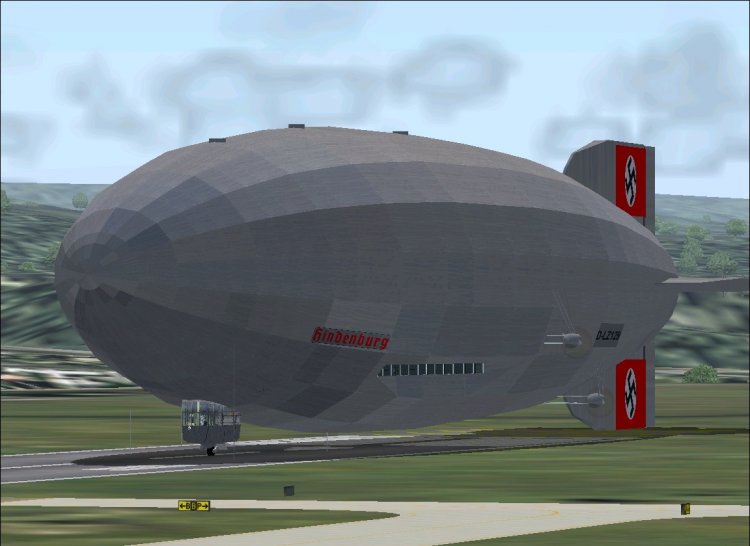
The famous German zeppelin. Largest flying machine ever built. Features fully-working VC, as well as completely modeled virtual cabin. Ton of custom animations, such as walking waiter, functioning toilet, and even individual part of right port engine. Old fashioned navigation by means of instruments such as sextant, driftmeter, etc. Detailed documentation is included. It is necessary to carefully read documentation!
→ Size:
25 MB
→ Date:
16 years ago (11.12.2009 12:11)
→ Author:
VJPL Flight Lab
→ Approved by moderator:
ReDut
→ License:
Freeware - Free version, Unlimited Distribution
→ Downloaded:
3202 time(s)