Hindenburg Zeppelin Просмотр ZIP-архива
DLZ129/hindenberg/sex_doc/page3.html
<!doctype html public "-//IETF//DTD HTML 2.0//EN">
<html>
<head>
<meta http-equiv="Content-Type" content="text/html; charset=iso-8859-1">
<meta name="Generator" content="Microsoft Publisher 2000">
<title>Simulated Aircraft Bubble Sextant for FS2004 - INSTALLATION</title>
</head>
<body bgcolor="#ffffff" link="#0066ff" vlink="#6633cc" text="#000000"  topmargin=0 leftmargin=0>
<a name=top></a>

<table border=0 cellpadding=0 cellspacing=0>
<tr>
<td><img src="_blnk.gif" width=24 height=1></td>
<td><img src="_blnk.gif" width=6 height=1></td>
<td><img src="_blnk.gif" width=23 height=1></td>
<td><img src="_blnk.gif" width=7 height=1></td>
<td><img src="_blnk.gif" width=19 height=1></td>
<td><img src="_blnk.gif" width=5 height=1></td>
<td><img src="_blnk.gif" width=23 height=1></td>
<td><img src="_blnk.gif" width=470 height=1></td>
<td><img src="_blnk.gif" width=133 height=1></td>
</tr>
<tr>
<td width=24 height=9></td>
<td width=6></td>
<td width=23></td>
<td width=7></td>
<td width=19></td>
<td width=5></td>
<td width=23></td>
<td width=470></td>
<td width=133></td>
</tr>
<tr>
<td height=169></td>
<td width=553 height=169 colspan=7 rowspan=1 valign=top align=left>
<img width=553 height=169 border=0 src="img0.jpg"></td>
<td></td>
</tr>
<tr>
<td height=6></td>
<td colspan=8></td>
</tr>
<tr>
<td height=3></td>
<td width=686 height=3 colspan=8 rowspan=1 valign=top align=left>
<img width=686 height=3 border=0 src="img1.gif"></td>
</tr>
<tr>
<td height=11></td>
<td colspan=8></td>
</tr>
<tr>
<td height=36></td>
<td width=686 height=36 colspan=8 rowspan=1 valign=top align=left>

<table border=0 cellpadding=0 cellspacing=0>
<tr>
<td width=3 height=3></td>
<td width=678></td>
<td width=3></td>
</tr>
<tr>
<td height=28></td>
<td width=678 height=28 valign=top align=left>
<BR>
<p align=left><font face="Times New Roman" color=#aa6b13 size=4><B>INSTALLATION INSTRUCTIONS<br><br></B></font>
</td>
<td></td>
</tr>
<tr>
<td height=3></td>
<td colspan=2></td>
</tr>
</table>


</td>
</tr>
<tr>
<td height=6></td>
<td colspan=8></td>
</tr>
<tr>
<td height=1938></td>
<td width=686 height=1938 colspan=8 rowspan=1 valign=top align=left>

<table border=0 cellpadding=0 cellspacing=0>
<tr>
<td width=3 height=3></td>
<td width=678></td>
<td width=3></td>
</tr>
<tr>
<td height=1930></td>
<td width=678 height=1930 valign=top align=left>

<p align=left><font face="Times New Roman" color=#000000 size=3>The sextant should work satisfactorily in any FS2004 aircraft. It will not function correctly in FS2002. Please read this page carefully to ensure correct installation of this gauge. <br><br>Since navigating using the sextant requires frequent access to GMT and Magnetic Deviation Values, a clock showing GMT (Zulu, or UTC) time is very helpful because the "copilot" keeps resetting the time on the cockpit clock to local time as you change time zones. Also, because of the need to switch back and forth often between true bearings and magnetic bearings, a magnetic variation gauge is a time saver. For these reasons, we have included a GMT digital clock and a magnetic variation display in this sextant gauge.<br><br>These particular instructions are for installing the sextant in the stock DC-3 that comes with FS2004, since it is a natural addition for period flying. We note, however, that it works even better with the Beaumont & Bitzer modifications to the stock DC-3, and thus highly recommend that you add the sextant to a DC-3 configured with our 4-tank, autolean and flight dynamics modifications.  See <a href="http://www.swiremariners.com/dc3.html">www.swiremariners.com/dc3.html</a> for details of modifications to date. With these additional modifications, you will be able to experience sextant-based navigation over realistic ranges, speeds, fuel loads, and altitudes. <br><br>


Specific instructions are also included below for installation of this gauge in the MAAM-SIM R4D-6/DC-3A.
<BR><BR>

Note, however, that the sextant can be installed to any FS2004 aircraft.  If installing to another aircraft, or to a modified DC-3 as described above, the [WindowXX] and [gaugeXX] numbers given below (which, we repeat, are for the stock DC-3) may be different. Please be careful to execute any necessary changes.

<br><br></font>

<font face="Times New Roman" size=3><B>INSTALLATION IN THE DEFAULT FS2004 DC-3:  <br></B></font><font face="Times New Roman" size=3><br>

1. Unzip the downloaded file 'DC3_BBSX.zip' into a temporary folder.<br>2. Move the gauge 'BB_sextant.cab' to your 'Flight Simulator 9\Gauges' folder without unzipping it. <br>3. Move the folder 'Sextant Manual' to your 'Flight Simulator 9\Aircraft' folder. <br>4. Move all remaining files to your 'My Documents\Flight Simulator Files' folder. <br>5. Make a copy of whichever aircraft's 'panel.cfg' you intend to edit and name it 'panelBK.cfg' <br>6. If you want to keep the GPS gauge in the aircraft (not recommended), go to step 7. Otherwise, edit the 'panel.cfg' file by replacing the panel window that has the GPS gauge in it with the following: </font><font face="Times New Roman" size=2><br></font><font face="Courier New" size=2><br>[Window02] <br>Background_color=0,0,0 <br>size_mm=386,273 <br>visible=0 <br>window_pos= 0.000, 0.050 <br>ident=225 <br>gauge00=BB_sextant!sextant, 0,0,386,273 <br><br></font><font face="Times New Roman" size=3>NOTE: in the section '[Window Titles]' near the very top of the file, change the descriptive line that says "Window02=GPS" to read "Window02=Sextant". <br><br>The GPS icon on the main panel may now be used to call up the sextant window.  Alternatively, a new sextant icon is provided for your use.  Under the section [Window00], replace:<br> <br></font><font face="Courier New" size=2>gauge38=SimIcons1024!GPS Icon, 106, 725<br><br></font><font face="Times New Roman" size=3>with:<br></font><font face="Courier New" size=2><br>gauge38=BB_sextant!icon, 106,725,19,19<br><br>
</font>
<font face="Times New Roman" size=3>Important: if you use this new icon, change the 'ident=225' line (see window entry, above) to 'ident=18'<BR><BR>
7. Skip this step if you did step 6. If you want to use the sextant in addition to the GPS, or are adding the sextant to a panel with no GPS, then the panel entry should be as follows, where [Window07] is the next higher number at the bottom of the stack of 2D windows:<br></font><font face="Courier New" size=2><br>[Window07] <br>Background_color=0,0,0 <br>size_mm=386,273 <br>visible=0 <br>window_pos= 0.000, 0.050 <br>ident=18 <br>gauge00=BB_sextant!sextant, 0,0,386,273 <br><br></font><font face="Times New Roman" size=3>NOTE: in the section '[Window Titles]' near the very top of the file, add a descriptive line under the other entries that says "Window07=Sextant", the number 07 corresponding to the new window you have configured. </font><font face="Courier New" size=2><br><br></font><font face="Times New Roman" size=3>Given that you are keeping the GPS, you will need to add a sextant icon on the main panel. Add a line at the bottom of section [Window00] that reads <br></font><font face="Courier New" size=2><br>gauge43=BB_sextant!icon,  129,725,19,19 <br></font><font face="Times New Roman" size=3><br>43 being the next number higher than the last gauge number in the section. <br><br>That completes the installation. This position is correct for the stock DC-3. For another example, the correct position for the Lockheed Vega 5C is 685,560 instead of 132,725. <br><br>8.   For those who are interested, a capability exists while flying to call up the sextant manual from the kneeboard or, if you are online, to access the Celestial Navigation Data Base at the US Naval Observatory.  This enables the user to obtain the position of any of the bright stars at any time, without pausing the game.  This simulates a look-up in the astronomical data tables of the information desired. <br><br>With a modified aircraft "reference" file, one may click the kneeboard icon in the main window, select the "reference" option, and click on either the 'Sextant Manual' or the 'Contact USNO' hyperlinks. The
capability exists also to access the 'FAA' site and download the
approach plate to the FS kneeboard while in flight, without pausing the
game. This simulates the user looking up the approach plate after he
determines the active runway on descent/approach.<br><br>To achieve this capability during the installation, again taking the Douglas DC-3 as an example:<br><br>Open that aircraft folder, rename the original 'Douglas_DC3_ref.htm' as 'Douglas_DC3_refBK.htm', and then move the 'Douglas_DC3_ref.htm' file from the "Aircraft\Sextant Manual" folder to the "Aircraft\Douglas_DC3" folder. <br><br>(Note on operation: there is a quirk in the MS software, in that you cannot write a carriage return to the link, so the system will not let you do further editing after you have selected the "Month" from the pull-down menu. So, select the month last, and click the "go" button immediately afterwards). <br><br>The capability may exist in the near future to also use the Beaumont DC-3 Airways kneeboard to access the Sextant Manual, and these sites, from any aircraft. Although the reference file supplied is for the DC-3, it is an example of the type of file that could be made for any of the FS9 aircraft.<br><br></font>

<font face="Times New Roman" size=3><B>INSTALLATION IN THE MAAM-SIM R4D-6 (or DC-3A):  <br></B></font><font face="Times New Roman" size=3><br>

1. Unzip the downloaded file 'DC3_BBSX.zip' into a temporary folder.<br>
2. Move the gauge 'BB_sextant.cab' to your 'Flight Simulator 9\Gauges' folder without unzipping it. <br>
3. Move the folder 'Sextant Manual' to your 'Flight Simulator 9\Aircraft' folder. <br>
4. Move all remaining files to your 'My Documents\Flight Simulator Files' folder. <br>
5. Make a copy of 'MAAM-SIM R4D-6\Panel\panel.cfg' (or, if you are modifying the DC-3A, 'MAAM-SIM DC-3 Passenger\Panel\panel.cfg') and name it 'panelBK.cfg'  <br>
6. If you want to keep the GPS gauge in the aircraft, go to step 7. Otherwise, edit the 'panel.cfg' file by replacing the panel window that has the GPS gauge in it with the following: </font><font face="Times New Roman" size=2><br></font><font face="Courier New" size=2><br>//----------------Sextant<BR>[Window08] <br>Background_color=0,0,0 <br>size_mm=386,273 <br>visible=0 <br>window_pos= 0.000, 0.050 <br>ident=225 <br>gauge00=BB_sextant!sextant, 0,0,386,273 <br><br></font><font face="Times New Roman" size=3>NOTE: in the section '[Window Titles]' near the very top of the file, change the descriptive line that says "Window08=GPS" to read "Window08=Sextant". <br><br>The GPS icon on the main panel may now be used to call up the sextant window.<BR><BR>
7. Skip this step if you did step 6. If you want to use the sextant in addition to the GPS, then the panel entry should be as follows, where [Window11] would be the next higher number at the bottom of the stack of 2D windows:<br></font><font face="Courier New" size=2><br>
//----------------Sextant<BR>
[Window11] <br>Background_color=0,0,0 <br>size_mm=386,273 <br>visible=0 <br>window_pos= 0.000, 0.050 <br>ident=18 <br>gauge00=BB_sextant!sextant, 0,0,386,273 <br><br></font><font face="Times New Roman" size=3>NOTE: in the section '[Window Titles]' near the very top of the file, add a descriptive line under the other entries that says "Window11=Sextant", 11 being the number corresponding to the new window you have configured. </font><font face="Courier New" size=2><br><br></font><font face="Times New Roman" size=3>Given that you are keeping the GPS, you will need to add a sextant icon on the main panel. Add a line at the bottom of section [Window00] that reads <br></font><font face="Courier New" size=2><br>
gauge20=BB_sextant!icon2,  28,749,17,18 <br></font><font face="Times New Roman" size=3><br>where gauge20 would be the next number higher than the last gauge number in the section. We mention this in case you have already made your own gauge additions to the panel. This will place the icon at the bottom right of the icon stack for the MAAM-SIM R4D-6 (or MAAM-SIM DC-3A).  <br><br>That completes the installation.<BR><BR>

One neat thing about using the MAAM-SIM R4D-6 specifically (or, indeed, the freeware add-on XC-47C or other suitable variants) is the astrodome. In the VC mode, you may move your eyepoint into the dome, and then, by clicking on Views, Instrument Panel, and selecting Sextant, you bring the Sextant on screen in the astrodome.  In the sextant window, right click and select "undock window" to uncheck. Then you may drag it wherever you wish, and take sun or star shots.<BR><BR>

<img width=680 height=512 border=0 src="astrodome.jpg">
<BR><BR>
<img width=686 height=2 border=0 src="img2.gif"><BR><BR>

<font face="Times New Roman" size=3><B>UNINSTALL:  <br></B></font><font face="Times New Roman" size=3><br>
If for any reason you want to remove all traces of the sextant from your aircraft:<br><br>1. If you modified the DC-3 aircraft's reference file, delete the "Aircraft\Douglas_DC3\Douglas_DC3_ref.htm" file, and rename the file "Aircraft\Douglas_DC3\Douglas_DC3_refBK.htm" as "Aircraft\Douglas_DC3\Douglas_DC3_ref.htm". If you modified another aircraft's reference file, please do likewise.<br>2. Delete the three AA_113r.* files in the "My Documents\Flight Simulator Files" folder.<br>3. Delete the "Sextant Manual" folder in the "Aircraft" folder<br>4. Delete the "BB_Sextant.cab" file from the "Gauges" folder<br>5. Delete the "panel.cfg" file in the folder of the aircraft you installed the gauge in, and then rename the original file "panelBK.cfg" as "panel.cfg"<br><br>This completes the uninstallation and the removal of the unzipped 'DC3_BBSX' files.<br><BR></font>
</td>
<td></td>
</tr>
<tr>
<td height=3></td>
<td colspan=2></td>
</tr>
</table>


</td>
</tr>
<tr>
<td height=12></td>
<td colspan=8></td>
</tr>
<tr>
<td height=2></td>
<td width=686 height=2 colspan=8 rowspan=1 valign=top align=left>
<img width=686 height=2 border=0 src="img2.gif"></td>
</tr>
<tr>
<td height=11></td>
<td colspan=8></td>
</tr>
<tr>
<td height=6></td>
<td colspan=3></td>
<td width=19 height=23 colspan=1 rowspan=2 valign=top align=left>
<map name="map536">
<area shape="rect" coords="0,0,19,23" href="index.html">
</map>
<img width=19 height=23 border=0 src="img6.gif" usemap="#map536" alt="INDEX"></td>
<td colspan=4></td>
</tr>
<tr>
<td height=17></td>
<td></td>
<td width=23 height=19 colspan=1 rowspan=2 valign=top align=left>
<map name="map453">
<area shape="rect" coords="0,0,23,19" href="page2.html">
</map>
<img width=23 height=19 border=0 src="img4.gif" usemap="#map453" alt="BACK"></td>
<td></td>
<td></td>
<td width=23 height=19 colspan=1 rowspan=2 valign=top align=left>
<map name="map532">
<area shape="rect" coords="0,0,23,19" href="page4.html">
</map>
<img width=23 height=19 border=0 src="img5.gif" usemap="#map532" alt="NEXT"></td>
<td colspan=2></td>
</tr>
<tr>
<td height=2></td>
<td></td>
<td colspan=3></td>
<td colspan=2></td>
</tr>
</table>
<BR><BR>
<a name=bottom></a>
</body>
</html>
25717-DLZ129.zip
| Имя файла | Дата | Размер |
|---|---|---|
| DLZ129/ | 11.12.2009 01:10 | |
| DLZ129/screen0.jpg | 10.12.2009 23:30 | 154 KB |
| DLZ129/screen1.jpg | 10.12.2009 23:31 | 195 KB |
| DLZ129/screen2.jpg | 10.12.2009 23:34 | 327 KB |
| DLZ129/screen3.jpg | 10.12.2009 23:35 | 178 KB |
| DLZ129/screen4.jpg | 10.12.2009 23:32 | 197 KB |
| DLZ129/screen5.jpg | 10.12.2009 23:22 | 141 KB |
| DLZ129/screen6.jpg | 10.12.2009 23:33 | 320 KB |
| DLZ129/screen7.jpg | 10.12.2009 23:34 | 248 KB |
| DLZ129/screen8.jpg | 10.12.2009 23:32 | 313 KB |
| DLZ129/screen9.jpg | 10.12.2009 23:33 | 328 KB |
| DLZ129/readme.txt | 11.12.2009 01:09 | 3 KB |
| DLZ129/screen10.jpg | 10.12.2009 23:35 | 119 KB |
| DLZ129/hindenberg/ | 05.05.2006 01:33 | |
| DLZ129/Sound/ | 19.05.2006 21:00 | |
| DLZ129/Gauges/ | 10.12.2009 23:51 | |
| DLZ129/hindenberg/zep_check.htm | 19.05.2006 01:17 | 7 KB |
| DLZ129/hindenberg/zep_ref.htm | 03.05.2006 01:13 | 4 KB |
| DLZ129/hindenberg/Hindenburg.air | 06.04.2006 02:18 | 9 KB |
| DLZ129/hindenberg/Aircraft.cfg | 20.05.2006 15:26 | 11 KB |
| DLZ129/hindenberg/texture/ | 05.05.2006 01:33 | |
| DLZ129/hindenberg/sex_doc/ | 05.05.2006 01:51 | |
| DLZ129/hindenberg/sound/ | 05.05.2006 01:33 | |
| DLZ129/hindenberg/model/ | 05.05.2006 01:33 | |
| DLZ129/hindenberg/Panel/ | 05.05.2006 01:37 | |
| DLZ129/hindenberg/texture/carpet_L.bmp | 14.04.2006 19:26 | 4 KB |
| DLZ129/hindenberg/texture/carpet_T.bmp | 29.03.2006 17:38 | 4 KB |
| DLZ129/hindenberg/texture/engm_L.bmp | 02.03.2006 18:16 | 16 KB |
| DLZ129/hindenberg/texture/wallmat_L.bmp | 28.03.2006 22:23 | 64 KB |
| DLZ129/hindenberg/texture/engm_T.bmp | 02.03.2006 18:16 | 16 KB |
| DLZ129/hindenberg/texture/gagbal_L.bmp | 01.05.2006 00:11 | 256 KB |
| DLZ129/hindenberg/texture/wallmat_T.bmp | 28.03.2006 22:23 | 64 KB |
| DLZ129/hindenberg/texture/gagbal_T.bmp | 01.05.2006 00:11 | 256 KB |
| DLZ129/hindenberg/texture/poster2_L.bmp | 14.04.2006 17:55 | 32 KB |
| DLZ129/hindenberg/texture/crm.bmp | 28.02.2006 20:24 | 16 KB |
| DLZ129/hindenberg/texture/bedmat_L.bmp | 28.03.2006 22:22 | 64 KB |
| DLZ129/hindenberg/texture/poster2_t.bmp | 31.03.2006 10:35 | 32 KB |
| DLZ129/hindenberg/texture/trvl_L.bmp | 14.04.2006 18:04 | 8 KB |
| DLZ129/hindenberg/texture/let_T.bmp | 12.04.2006 19:50 | 16 KB |
| DLZ129/hindenberg/texture/let_l.bmp | 14.04.2006 17:42 | 16 KB |
| DLZ129/hindenberg/texture/girder_L.bmp | 26.03.2006 16:09 | 64 KB |
| DLZ129/hindenberg/texture/trvl_t.bmp | 10.04.2006 16:02 | 8 KB |
| DLZ129/hindenberg/texture/girder.bmp | 26.03.2006 16:09 | 64 KB |
| DLZ129/hindenberg/texture/girder_T.bmp | 30.03.2006 19:57 | 64 KB |
| DLZ129/hindenberg/texture/girdeclr.bmp | 30.03.2006 18:43 | 64 KB |
| DLZ129/hindenberg/texture/poster3_L.bmp | 14.04.2006 17:56 | 32 KB |
| DLZ129/hindenberg/texture/meandude.bmp | 28.04.2006 10:42 | 16 KB |
| DLZ129/hindenberg/texture/dpm_L.bmp | 14.04.2006 18:38 | 32 KB |
| DLZ129/hindenberg/texture/kntxt1.jpg | 27.04.2006 01:33 | 51 KB |
| DLZ129/hindenberg/texture/kntxt2.jpg | 27.04.2006 22:23 | 54 KB |
| DLZ129/hindenberg/texture/kntxt3.jpg | 27.04.2006 23:33 | 53 KB |
| DLZ129/hindenberg/texture/poster3_t.bmp | 31.03.2006 10:36 | 32 KB |
| DLZ129/hindenberg/texture/dpm_t.bmp | 10.04.2006 16:01 | 32 KB |
| DLZ129/hindenberg/texture/posterj_t.bmp | 31.03.2006 10:38 | 128 KB |
| DLZ129/hindenberg/texture/kntxt.jpg | 27.04.2006 01:10 | 53 KB |
| DLZ129/hindenberg/texture/graf_T.bmp | 31.03.2006 10:33 | 32 KB |
| DLZ129/hindenberg/texture/poster4_L.bmp | 14.04.2006 17:58 | 32 KB |
| DLZ129/hindenberg/texture/poof.bmp | 24.03.2006 18:20 | 64 KB |
| DLZ129/hindenberg/texture/alulcov_L.bmp | 10.03.2006 20:13 | 4 KB |
| DLZ129/hindenberg/texture/alulcov_T.bmp | 10.03.2006 20:13 | 4 KB |
| DLZ129/hindenberg/texture/poster4_t.bmp | 31.03.2006 10:37 | 32 KB |
| DLZ129/hindenberg/texture/white_L.bmp | 01.05.2006 00:05 | 8 KB |
| DLZ129/hindenberg/texture/aluminum_L.bmp | 14.04.2006 19:24 | 4 KB |
| DLZ129/hindenberg/texture/alucov_L.bmp | 01.04.2006 22:27 | 4 KB |
| DLZ129/hindenberg/texture/white_T.bmp | 20.02.2006 00:40 | 16 KB |
| DLZ129/hindenberg/texture/aluminum_T.bmp | 14.03.2006 17:42 | 4 KB |
| DLZ129/hindenberg/texture/alucov_T.bmp | 01.04.2006 22:27 | 4 KB |
| DLZ129/hindenberg/texture/compass_L.bmp | 22.04.2006 19:13 | 16 KB |
| DLZ129/hindenberg/texture/bedmat.bmp | 28.03.2006 22:22 | 64 KB |
| DLZ129/hindenberg/texture/sched_L.bmp | 14.04.2006 18:14 | 128 KB |
| DLZ129/hindenberg/texture/compass_T.bmp | 22.04.2006 19:13 | 16 KB |
| DLZ129/hindenberg/texture/sched_T.bmp | 08.04.2006 01:57 | 128 KB |
| DLZ129/hindenberg/texture/poster5_L.bmp | 14.04.2006 17:59 | 32 KB |
| DLZ129/hindenberg/texture/Kitchen_T.bmp | 31.03.2006 12:49 | 128 KB |
| DLZ129/hindenberg/texture/crome_L.bmp | 15.03.2006 23:12 | 16 KB |
| DLZ129/hindenberg/texture/radiorm_T.bmp | 31.03.2006 12:50 | 128 KB |
| DLZ129/hindenberg/texture/crome_T.bmp | 15.03.2006 23:12 | 16 KB |
| DLZ129/hindenberg/texture/map2_L.bmp | 14.04.2006 17:49 | 128 KB |
| DLZ129/hindenberg/texture/map2_T.bmp | 08.04.2006 01:55 | 128 KB |
| DLZ129/hindenberg/texture/brass_L.bmp | 14.04.2006 02:20 | 16 KB |
| DLZ129/hindenberg/texture/blue.bmp | 28.02.2006 19:42 | 16 KB |
| DLZ129/hindenberg/texture/poster5_t.bmp | 31.03.2006 10:37 | 32 KB |
| DLZ129/hindenberg/texture/mrs.bmp | 28.04.2006 10:44 | 64 KB |
| DLZ129/hindenberg/texture/gagcrc_L.bmp | 15.04.2006 00:16 | 256 KB |
| DLZ129/hindenberg/texture/brass_t.bmp | 17.02.2006 09:14 | 16 KB |
| DLZ129/hindenberg/texture/wood_L.bmp | 17.02.2006 09:05 | 256 KB |
| DLZ129/hindenberg/texture/cloth_L.bmp | 14.04.2006 02:16 | 16 KB |
| DLZ129/hindenberg/texture/cloth_T.bmp | 17.02.2006 10:34 | 16 KB |
| DLZ129/hindenberg/texture/wood_t.bmp | 17.02.2006 09:05 | 256 KB |
| DLZ129/hindenberg/texture/ss.bmp | 18.03.2006 12:00 | 64 KB |
| DLZ129/hindenberg/texture/plate_L.bmp | 14.04.2006 18:04 | 64 KB |
| DLZ129/hindenberg/texture/plate_T.bmp | 30.03.2006 01:14 | 64 KB |
| DLZ129/hindenberg/texture/newsppr_L.bmp | 14.04.2006 18:11 | 32 KB |
| DLZ129/hindenberg/texture/map_L.bmp | 14.04.2006 17:51 | 128 KB |
| DLZ129/hindenberg/texture/map_T.bmp | 08.04.2006 01:56 | 128 KB |
| DLZ129/hindenberg/texture/decals.bmp | 05.04.2003 23:02 | 85 KB |
| DLZ129/hindenberg/texture/newsppr_t.bmp | 10.04.2006 16:01 | 32 KB |
| DLZ129/hindenberg/texture/preset_t.bmp | 10.04.2006 16:02 | 32 KB |
| DLZ129/hindenberg/texture/Curtiss_Jenny_D.bmp | 05.04.2003 04:42 | 683 KB |
| DLZ129/hindenberg/texture/worldmap_L.bmp | 01.05.2006 00:03 | 512 KB |
| DLZ129/hindenberg/texture/hind_L.bmp | 14.04.2006 18:22 | 64 KB |
| DLZ129/hindenberg/texture/hind_T.bmp | 31.03.2006 10:34 | 64 KB |
| DLZ129/hindenberg/texture/Curtiss_Jenny_T.bmp | 11.05.2003 00:57 | 1 MB |
| DLZ129/hindenberg/texture/dude.bmp | 28.04.2006 10:40 | 8 KB |
| DLZ129/hindenberg/texture/countz_t.bmp | 31.03.2006 10:32 | 128 KB |
| DLZ129/hindenberg/texture/girdecl_L.bmp | 30.03.2006 18:43 | 64 KB |
| DLZ129/hindenberg/texture/passcab_T.bmp | 31.03.2006 12:49 | 256 KB |
| DLZ129/hindenberg/texture/divider_t.bmp | 10.04.2006 17:22 | 256 KB |
| DLZ129/hindenberg/texture/worldmap_t.bmp | 01.05.2006 00:03 | 512 KB |
| DLZ129/hindenberg/texture/trip_T.bmp | 31.03.2006 10:40 | 32 KB |
| DLZ129/hindenberg/texture/Prop_Jenny.bmp | 26.11.2002 02:59 | 341 KB |
| DLZ129/hindenberg/texture/sws_L.bmp | 16.04.2006 09:38 | 128 KB |
| DLZ129/hindenberg/texture/sws_T.bmp | 16.04.2006 09:37 | 128 KB |
| DLZ129/hindenberg/texture/Curtiss_Jenny_C_1.bmp | 13.05.2003 22:55 | 683 KB |
| DLZ129/hindenberg/texture/Curtiss_Jenny_C_2.bmp | 11.03.2003 22:33 | 171 KB |
| DLZ129/hindenberg/texture/poster1_L.bmp | 14.04.2006 17:53 | 32 KB |
| DLZ129/hindenberg/texture/LZ11_T.bmp | 26.03.2006 15:59 | 2 MB |
| DLZ129/hindenberg/texture/Image2.bmp | 02.05.2006 01:36 | 2 MB |
| DLZ129/hindenberg/texture/cigrm_t.bmp | 13.04.2006 10:35 | 32 KB |
| DLZ129/hindenberg/texture/black.bmp | 28.02.2006 19:41 | 16 KB |
| DLZ129/hindenberg/texture/129_L.bmp | 14.04.2006 18:26 | 8 KB |
| DLZ129/hindenberg/texture/intmap.bmp | 22.03.2006 12:01 | 192 KB |
| DLZ129/hindenberg/texture/intmap.jpg | 26.04.2006 23:49 | 59 KB |
| DLZ129/hindenberg/texture/white.bmp | 16.03.2006 16:06 | 16 KB |
| DLZ129/hindenberg/texture/poster1_t.bmp | 31.03.2006 10:35 | 32 KB |
| DLZ129/hindenberg/texture/129_t.bmp | 31.03.2006 10:32 | 8 KB |
| DLZ129/hindenberg/sex_doc/readme1st.txt | 15.11.2003 12:00 | 6 KB |
| DLZ129/hindenberg/sex_doc/page10.html | 06.12.2004 02:01 | 4 KB |
| DLZ129/hindenberg/sex_doc/page11.html | 06.12.2004 02:01 | 6 KB |
| DLZ129/hindenberg/sex_doc/inst_instr.htm | 14.01.2005 11:29 | 2 KB |
| DLZ129/hindenberg/sex_doc/Read Me.txt | 10.08.2005 09:44 | 3 KB |
| DLZ129/hindenberg/sex_doc/Driftmeter Manual.htm | 18.01.2005 20:21 | 2 KB |
| DLZ129/hindenberg/sex_doc/drift5c.jpg | 09.01.2005 02:13 | 13 KB |
| DLZ129/hindenberg/sex_doc/principles.htm | 14.01.2005 11:43 | 3 KB |
| DLZ129/hindenberg/sex_doc/PREFACE.htm | 14.01.2005 11:36 | 1 KB |
| DLZ129/hindenberg/sex_doc/index.html | 05.12.2004 14:56 | 6 KB |
| DLZ129/hindenberg/sex_doc/Thumbs.db | 05.05.2006 02:30 | 125 KB |
| DLZ129/hindenberg/sex_doc/userguide.gif | 15.11.2003 12:00 | 27 KB |
| DLZ129/hindenberg/sex_doc/drift5.CAB | 09.01.2005 18:43 | 35 KB |
| DLZ129/hindenberg/sex_doc/jon4.gif | 05.12.2004 03:01 | 12 KB |
| DLZ129/hindenberg/sex_doc/img0.jpg | 03.12.2004 03:34 | 16 KB |
| DLZ129/hindenberg/sex_doc/img1.gif | 03.12.2004 03:19 | 907 B |
| DLZ129/hindenberg/sex_doc/img2.gif | 03.12.2004 03:19 | 864 B |
| DLZ129/hindenberg/sex_doc/img3.gif | 03.12.2004 03:19 | 928 B |
| DLZ129/hindenberg/sex_doc/img4.gif | 03.12.2004 03:19 | 923 B |
| DLZ129/hindenberg/sex_doc/img5.gif | 03.12.2004 03:19 | 918 B |
| DLZ129/hindenberg/sex_doc/img6.gif | 03.12.2004 03:19 | 928 B |
| DLZ129/hindenberg/sex_doc/img7.jpg | 03.12.2004 03:51 | 61 KB |
| DLZ129/hindenberg/sex_doc/img8.jpg | 03.12.2004 03:53 | 32 KB |
| DLZ129/hindenberg/sex_doc/img9.jpg | 04.12.2004 19:10 | 16 KB |
| DLZ129/hindenberg/sex_doc/img10.jpg | 03.12.2004 04:00 | 15 KB |
| DLZ129/hindenberg/sex_doc/img11.jpg | 03.12.2004 04:03 | 47 KB |
| DLZ129/hindenberg/sex_doc/img12.jpg | 04.12.2004 19:12 | 30 KB |
| DLZ129/hindenberg/sex_doc/img13.jpg | 03.12.2004 04:08 | 30 KB |
| DLZ129/hindenberg/sex_doc/img14.jpg | 03.12.2004 04:11 | 30 KB |
| DLZ129/hindenberg/sex_doc/img15.jpg | 03.12.2004 04:13 | 22 KB |
| DLZ129/hindenberg/sex_doc/img16.jpg | 03.12.2004 04:14 | 23 KB |
| DLZ129/hindenberg/sex_doc/img17.jpg | 03.12.2004 14:13 | 14 KB |
| DLZ129/hindenberg/sex_doc/img18.jpg | 03.12.2004 14:17 | 15 KB |
| DLZ129/hindenberg/sex_doc/img19.jpg | 03.12.2004 14:18 | 11 KB |
| DLZ129/hindenberg/sex_doc/img20.jpg | 03.12.2004 14:20 | 9 KB |
| DLZ129/hindenberg/sex_doc/img21.jpg | 03.12.2004 14:22 | 43 KB |
| DLZ129/hindenberg/sex_doc/img22.jpg | 03.12.2004 14:29 | 42 KB |
| DLZ129/hindenberg/sex_doc/img23.jpg | 03.12.2004 14:41 | 41 KB |
| DLZ129/hindenberg/sex_doc/img24.gif | 03.12.2004 03:19 | 6 KB |
| DLZ129/hindenberg/sex_doc/img25.gif | 03.12.2004 03:19 | 3 KB |
| DLZ129/hindenberg/sex_doc/page2.html | 06.12.2004 01:57 | 5 KB |
| DLZ129/hindenberg/sex_doc/img26.gif | 03.12.2004 03:19 | 12 KB |
| DLZ129/hindenberg/sex_doc/img27.gif | 03.12.2004 03:19 | 13 KB |
| DLZ129/hindenberg/sex_doc/img28.gif | 03.12.2004 03:19 | 7 KB |
| DLZ129/hindenberg/sex_doc/img29.gif | 03.12.2004 03:19 | 928 B |
| DLZ129/hindenberg/sex_doc/img30.gif | 03.12.2004 03:19 | 923 B |
| DLZ129/hindenberg/sex_doc/img31.gif | 03.12.2004 03:19 | 918 B |
| DLZ129/hindenberg/sex_doc/img32.gif | 03.12.2004 03:19 | 864 B |
| DLZ129/hindenberg/sex_doc/img33.gif | 03.12.2004 03:19 | 4 KB |
| DLZ129/hindenberg/sex_doc/img34.gif | 03.12.2004 03:19 | 6 KB |
| DLZ129/hindenberg/sex_doc/img35.gif | 03.12.2004 03:19 | 928 B |
| DLZ129/hindenberg/sex_doc/page3.html | 06.12.2004 12:15 | 15 KB |
| DLZ129/hindenberg/sex_doc/img36.gif | 03.12.2004 03:19 | 16 KB |
| DLZ129/hindenberg/sex_doc/img37.gif | 03.12.2004 03:19 | 22 KB |
| DLZ129/hindenberg/sex_doc/img38.gif | 03.12.2004 03:19 | 81 KB |
| DLZ129/hindenberg/sex_doc/img39.gif | 03.12.2004 02:59 | 907 B |
| DLZ129/hindenberg/sex_doc/page4.html | 06.12.2004 01:58 | 27 KB |
| DLZ129/hindenberg/sex_doc/page5.html | 06.12.2004 01:58 | 20 KB |
| DLZ129/hindenberg/sex_doc/use.htm | 18.01.2005 11:28 | 6 KB |
| DLZ129/hindenberg/sex_doc/page6.html | 06.12.2004 01:59 | 8 KB |
| DLZ129/hindenberg/sex_doc/page7.html | 06.12.2004 02:02 | 24 KB |
| DLZ129/hindenberg/sex_doc/page8.html | 06.12.2004 02:00 | 13 KB |
| DLZ129/hindenberg/sex_doc/page9.html | 06.12.2004 02:00 | 7 KB |
| DLZ129/hindenberg/sex_doc/Sim_opn_inst.htm | 18.01.2005 10:19 | 3 KB |
| DLZ129/hindenberg/sex_doc/driftmeter.jpg | 16.01.2005 09:34 | 6 KB |
| DLZ129/hindenberg/sex_doc/driftmeter.zip | 21.03.2006 20:09 | 62 KB |
| DLZ129/hindenberg/sex_doc/astrodome.jpg | 05.12.2004 18:28 | 33 KB |
| DLZ129/hindenberg/sound/XCESTRTB.WAV | 17.09.1999 06:36 | 51 KB |
| DLZ129/hindenberg/sound/xme1b.wav | 16.09.1999 22:37 | 49 KB |
| DLZ129/hindenberg/sound/xme2b.wav | 16.09.1999 22:37 | 50 KB |
| DLZ129/hindenberg/sound/CAGEAR.WAV | 17.09.1999 06:36 | 31 KB |
| DLZ129/hindenberg/sound/cmgeardn.wav | 22.12.1999 00:26 | 29 KB |
| DLZ129/hindenberg/sound/me1b.wav | 16.09.1999 22:37 | 100 KB |
| DLZ129/hindenberg/sound/Zeidle.wav | 26.04.2006 00:45 | 378 KB |
| DLZ129/hindenberg/sound/me2b.wav | 16.09.1999 22:37 | 108 KB |
| DLZ129/hindenberg/sound/CASTALL.WAV | 17.09.1999 06:36 | 7 KB |
| DLZ129/hindenberg/sound/Xze1.wav | 26.04.2006 00:45 | 378 KB |
| DLZ129/hindenberg/sound/Xze2.wav | 26.04.2006 00:45 | 378 KB |
| DLZ129/hindenberg/sound/Xze3.wav | 26.04.2006 00:45 | 378 KB |
| DLZ129/hindenberg/sound/cmgearup.wav | 22.12.1999 00:26 | 29 KB |
| DLZ129/hindenberg/sound/Read_Me.txt | 24.12.1999 19:28 | 776 B |
| DLZ129/hindenberg/sound/CEP1A.WAV | 26.04.2006 00:45 | 378 KB |
| DLZ129/hindenberg/sound/CEP1B.WAV | 26.04.2006 00:45 | 378 KB |
| DLZ129/hindenberg/sound/CEP2A.WAV | 26.04.2006 00:45 | 378 KB |
| DLZ129/hindenberg/sound/CEP2B.WAV | 26.04.2006 00:45 | 378 KB |
| DLZ129/hindenberg/sound/bells.wav | 13.09.2004 03:17 | 59 KB |
| DLZ129/hindenberg/sound/Xzeidle.wav | 26.04.2006 00:45 | 378 KB |
| DLZ129/hindenberg/sound/Ze1.wav | 26.04.2006 00:45 | 378 KB |
| DLZ129/hindenberg/sound/horn.wav | 09.09.2004 12:38 | 19 KB |
| DLZ129/hindenberg/sound/Ze2.wav | 26.04.2006 00:45 | 378 KB |
| DLZ129/hindenberg/sound/Ze3.wav | 26.04.2006 00:45 | 378 KB |
| DLZ129/hindenberg/sound/wind.wav | 18.04.2001 00:20 | 26 KB |
| DLZ129/hindenberg/sound/Xzeshutd1.wav | 05.03.2000 01:41 | 83 KB |
| DLZ129/hindenberg/sound/Xzeshutd2.wav | 05.03.2000 01:42 | 83 KB |
| DLZ129/hindenberg/sound/SOUND.CFG | 04.05.2006 21:27 | 12 KB |
| DLZ129/hindenberg/sound/XCEP1A.WAV | 26.04.2006 00:45 | 378 KB |
| DLZ129/hindenberg/sound/XCEP1B.WAV | 26.04.2006 00:45 | 378 KB |
| DLZ129/hindenberg/sound/XCEP2A.WAV | 26.04.2006 00:45 | 378 KB |
| DLZ129/hindenberg/sound/XCEP2B.WAV | 26.04.2006 00:45 | 378 KB |
| DLZ129/hindenberg/sound/CESTRTA.WAV | 17.09.1999 06:36 | 7 KB |
| DLZ129/hindenberg/sound/CESTRTB.WAV | 17.09.1999 06:36 | 83 KB |
| DLZ129/hindenberg/sound/Zeshutd1.wav | 05.03.2000 01:44 | 83 KB |
| DLZ129/hindenberg/sound/welcome.wav | 14.05.2006 12:08 | 739 KB |
| DLZ129/hindenberg/sound/Zeshutd2.wav | 05.03.2000 17:28 | 90 KB |
| DLZ129/hindenberg/sound/CMFLAPS.WAV | 17.09.1999 06:36 | 27 KB |
| DLZ129/hindenberg/sound/XCESTRTA.WAV | 17.09.1999 06:36 | 7 KB |
| DLZ129/hindenberg/model/Model.cfg | 21.12.2004 15:01 | 29 B |
| DLZ129/hindenberg/model/Hindenburg.mdl | 03.05.2006 21:53 | 5 MB |
| DLZ129/hindenberg/Panel/worldmap.bmp | 30.04.2006 23:58 | 2 MB |
| DLZ129/hindenberg/Panel/lakehurst.bmp | 25.04.2006 19:22 | 3 MB |
| DLZ129/hindenberg/Panel/_INTRO.BMP | 11.04.2006 13:45 | 769 KB |
| DLZ129/hindenberg/Panel/europe.bmp | 25.04.2006 19:38 | 2 MB |
| DLZ129/hindenberg/Panel/mpdsk.bmp | 08.04.2006 19:35 | 3 MB |
| DLZ129/hindenberg/Panel/panel.bmp | 25.04.2006 13:13 | 2 MB |
| DLZ129/hindenberg/Panel/map2.bmp | 07.04.2006 12:09 | 384 KB |
| DLZ129/hindenberg/Panel/mapafrica.bmp | 08.04.2006 19:34 | 384 KB |
| DLZ129/hindenberg/Panel/Thumbs.db | 20.05.2006 15:24 | 41 KB |
| DLZ129/hindenberg/Panel/germany.bmp | 25.04.2006 19:39 | 3 MB |
| DLZ129/hindenberg/Panel/Panel_Decal_Lear_2.bmp | 16.02.2006 23:07 | 384 KB |
| DLZ129/hindenberg/Panel/Panel_Decal_Lear_3.bmp | 16.02.2006 23:07 | 384 KB |
| DLZ129/hindenberg/Panel/Panel_Decal_Lear_4.bmp | 16.02.2006 23:07 | 384 KB |
| DLZ129/hindenberg/Panel/_EMPTY.bmp | 15.05.2004 18:25 | 769 KB |
| DLZ129/hindenberg/Panel/Panel.cfg | 20.05.2006 15:27 | 7 KB |
| DLZ129/Sound/song4.wma | 15.07.2003 14:41 | 398 KB |
| DLZ129/Sound/song6.wma | 15.07.2003 15:46 | 280 KB |
| DLZ129/Sound/songd.wma | 30.07.2003 20:44 | 468 KB |
| DLZ129/Gauges/radiocd4.gau | 15.11.2003 12:00 | 368 KB |
| DLZ129/Gauges/BB_sextant.cab | 06.12.2004 10:11 | 150 KB |
| DLZ129/Gauges/FSUIPC_DUMPv2004black.gau | 10.08.2004 20:02 | 21 KB |
| DLZ129/Gauges/Black.bmp | 10.08.2004 19:54 | 13 KB |
| DLZ129/Gauges/drift5.cab | 09.01.2005 18:43 | 35 KB |
| DLZ129/Gauges/RADI.cab | 09.08.2005 11:20 | 13 KB |
| DLZ129/Gauges/fletcher_ship.cab | 08.12.2004 01:57 | 165 KB |
| DLZ129/Gauges/radiocd4/ | 19.05.2006 21:35 | |
| DLZ129/Gauges/VJPL/ | 05.05.2006 01:25 | |
| DLZ129/Gauges/radiocd4/radiocd4.gau | 15.11.2003 12:00 | 368 KB |
| DLZ129/Gauges/radiocd4/radiocd4.gif | 15.11.2003 12:00 | 6 KB |
| DLZ129/Gauges/radiocd4/readme1st.txt | 15.11.2003 12:00 | 6 KB |
| DLZ129/Gauges/radiocd4/2004panel.cfg | 15.11.2003 12:00 | 5 KB |
| DLZ129/Gauges/radiocd4/userguide.gif | 15.11.2003 12:00 | 27 KB |
| DLZ129/Gauges/radiocd4/2002panel.cfg | 15.11.2003 12:00 | 5 KB |
| DLZ129/Gauges/VJPL/pnlts.xml | 13.05.2006 20:48 | 552 B |
| DLZ129/Gauges/VJPL/atof.xml | 10.05.2006 23:24 | 546 B |
| DLZ129/Gauges/VJPL/aton.xml | 13.05.2006 20:53 | 541 B |
| DLZ129/Gauges/VJPL/transp.bmp | 15.12.2003 15:00 | 2 KB |
| DLZ129/Gauges/VJPL/transp.xml | 04.05.2006 11:06 | 229 B |
| DLZ129/Gauges/VJPL/atyd.xml | 10.05.2006 23:29 | 548 B |
| DLZ129/Gauges/VJPL/kod.xml | 04.05.2006 20:00 | 228 B |
| DLZ129/Gauges/VJPL/pnlimbt_10.bmp | 25.04.2006 20:52 | 7 KB |
| DLZ129/Gauges/VJPL/pnlimbt_11.bmp | 25.04.2006 20:56 | 7 KB |
| DLZ129/Gauges/VJPL/buttonZ_off.bmp | 14.05.2006 11:07 | 2 KB |
| DLZ129/Gauges/VJPL/zmap1.xml | 08.04.2006 21:19 | 230 B |
| DLZ129/Gauges/VJPL/zmap2.xml | 08.04.2006 21:17 | 238 B |
| DLZ129/Gauges/VJPL/zmap3.xml | 25.04.2006 19:44 | 235 B |
| DLZ129/Gauges/VJPL/zmap4.xml | 25.04.2006 19:46 | 232 B |
| DLZ129/Gauges/VJPL/zmap5.xml | 25.04.2006 20:23 | 232 B |
| DLZ129/Gauges/VJPL/pnlimbt_1.bmp | 25.04.2006 20:48 | 7 KB |
| DLZ129/Gauges/VJPL/pnlimbt_2.bmp | 25.04.2006 20:47 | 7 KB |
| DLZ129/Gauges/VJPL/pnlimbt_3.bmp | 25.04.2006 20:49 | 7 KB |
| DLZ129/Gauges/VJPL/pnlimbt_4.bmp | 25.04.2006 20:50 | 7 KB |
| DLZ129/Gauges/VJPL/pnlimbt_5.bmp | 04.05.2006 22:02 | 7 KB |
| DLZ129/Gauges/VJPL/pnlimbt_6.bmp | 04.05.2006 22:06 | 7 KB |
| DLZ129/Gauges/VJPL/pnlimbt_7.bmp | 04.05.2006 22:11 | 7 KB |
| DLZ129/Gauges/VJPL/buttonZ_on.bmp | 14.05.2006 11:05 | 2 KB |
| DLZ129/Gauges/VJPL/pnlimbt_8.bmp | 04.05.2006 22:14 | 7 KB |
| DLZ129/Gauges/VJPL/pnlimbt_9.bmp | 04.05.2006 22:15 | 7 KB |
| DLZ129/Gauges/VJPL/zmetr1.xml | 11.04.2006 00:32 | 228 B |
| DLZ129/Gauges/VJPL/zmetr2.xml | 11.04.2006 00:37 | 224 B |
| DLZ129/Gauges/VJPL/zmetr3.xml | 10.04.2006 23:08 | 226 B |
| DLZ129/Gauges/VJPL/zmetr4.xml | 26.04.2006 01:10 | 232 B |
| DLZ129/Gauges/VJPL/zmetr5.xml | 10.04.2006 23:33 | 223 B |
| DLZ129/Gauges/VJPL/joys.xml | 10.05.2006 00:20 | 553 B |
| DLZ129/Gauges/VJPL/zmap.xml | 08.04.2006 20:47 | 230 B |
| DLZ129/Gauges/VJPL/flts.xml | 13.05.2006 20:50 | 553 B |
| avsim_su.diz | 11.12.2009 12:01 | 406 B |
| Итого: | 49 MB | |
Hindenburg Zeppelin
| Rating: 4.6!
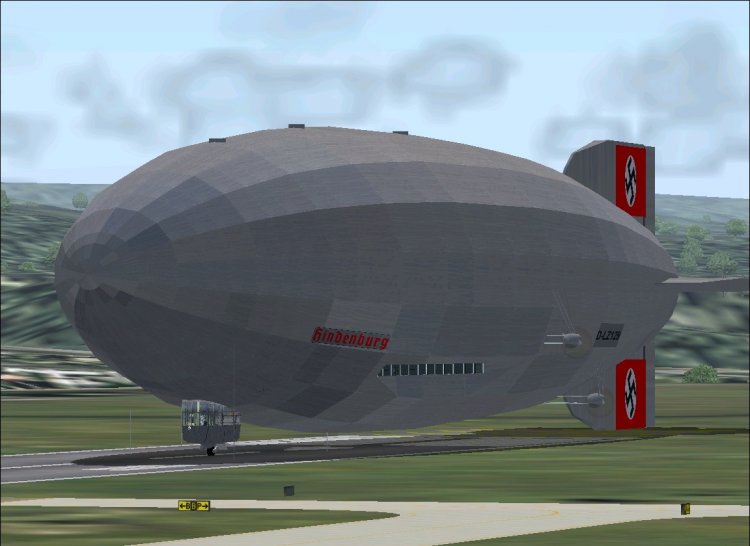
The famous German zeppelin. Largest flying machine ever built. Features fully-working VC, as well as completely modeled virtual cabin. Ton of custom animations, such as walking waiter, functioning toilet, and even individual part of right port engine. Old fashioned navigation by means of instruments such as sextant, driftmeter, etc. Detailed documentation is included. It is necessary to carefully read documentation!
→ Size:
25 MB
→ Date:
16 years ago (11.12.2009 12:11)
→ Author:
VJPL Flight Lab
→ Approved by moderator:
ReDut
→ License:
Freeware - Free version, Unlimited Distribution
→ Downloaded:
3202 time(s)