FS2004 Water Enhancment
| Rating: 5!
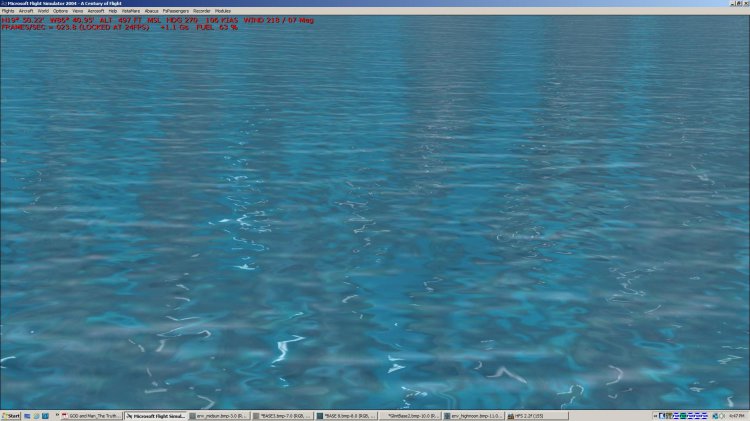
Complete overhaul of FS2004 global waters. New shines, glimmers, and colours, as well as, shallows for in land lakes, colour seperation of fresh/salt waters.
→ Size:
18 MB
→ Date:
13 years ago (29.03.2013 19:20)
→ Author:
Lou McNeil AKA bLouscyyz
→ Approved by moderator:
RAID
→ License:
Freeware - Free version, Unlimited Distribution
→ Downloaded:
3817 time(s)
Замена водных техтур для FS9
сохраните ваши текущие текстуры находящиеся в C/Program Files (x86)/Microsoft games/Fs9/Scenery/Texture
Разорхивируйте архив RAR на ваш рабочий стол, после вы должны обнаружить 2 папки внутри
watwrx2013 с текстурами волн (waves), и отражений (Reflections)
Содержимое этих папок, и основную текстуру,
OceanHeightField.bmp поместить в C:/Program Files (x86)/Microsoft Games/fs9/textures
watwrx0213
волны (waves): поместить в: world/nextures
перезагрузить игру.
the Reflections are left in a seperate folder, because you can use them seperatly
Отражения остаются в отдельной папке, возможно вы сможете исполльзовать их для расширения.
Как то так. − DrunkFlyer, 13 years ago, #
[main_Texture] и [WatWrx0213].Содиржимое папки-[main_Texture] файл с названием [OceanHeightField.bmp] поместить в - FS9/[Texture],согласится с заменой.
Далие заходите в папку с названием [WatWrx0213] там есть 2-ве папки [REFLECTIONS] и [WAVES] содержимое этих папок переместить-FS9/Scenery/World/Texture,согласится с заменой − mark-mark, 13 years ago, #
My humble appoligies if this text makes no sence, but i am Canadian, and using Bing, There seems to be some mis-understanding to the installation of the WaterWorkx503 files.
All files will be found in C:/.../FS2004/Scenery/World/texture
make a copy of this texture folder, and save it somewhere, then just extract the zip file to your desktop, and copy/paste the files into the texture folder stated above.
If You wish to keep your original wa1 files, you can just use the reflection, overwite the old ones, and then change your time of day to activate, if adding the wa1 files, you must restart the game to see them. − Anon5, 13 years ago, #
The "Shallowinlands.zip" contains 4 wa1 files, which will give rivers a slight sandy brown colour.
The OceanHeightField.bmp goes into folder C:/.../FS2004/Textures − Anon5, 13 years ago, #