AMC YS-11 Просмотр ZIP-архива
Documentation/Ys11_manual/pages/notes_e.html
<!doctype html public "-//w3c//dtd html 3.2//en">

<html>

<head>
<title>NAMC YS-11 v2.7 for FS2004</title>
<meta name="GENERATOR" content="Arachnophilia 4.0">
<meta name="FORMATTER" content="Arachnophilia 4.0">
</head>

<body bgcolor="#ffffff" text="#000000" link="#0000ff" vlink="#800080" alink="#ff0000">

<center>
<BR>
<font size="+2" color="#000000" face="Arial">
Additional Notes
</font>
<BR>
<BR>
<img src="../images/additional_info.jpg" width="434" height="325" alt="YS-11">
<BR>
<BR>

<table  width="75%" border="0" cellspacing="0" cellpadding="4">

	<tr>
		<td width=50 valign="top" rowspan="2">
		<b>Panel Initialization</b>
		</td>
		<td>
You should <b>always load the plane into the 2D panel first!</b> This will ensure that all gauges are properly loaded and modeled systems initialized. There are control gauges which are not visible, and they are only loaded with the 2D panel.
		</td>
	<tr>
	</tr>

	<tr>
		<td width=50 valign="top" rowspan="2">
		<b>Autofeather</b>
		</td>
		<td>
The Ys-11 has an autofeather system which activates when throttle-levers are above 12800 RPM position (marked with yellow "FEATH" markers next to the throttle levers), and torque pressure is below 40 PSI. It is important to note that if you move the joystick's throttle too fast, you may initiate autofeather! This is because it is possible to move the throttles faster than on the real plane. You'll have to advance the throttles carefully so you DO NOT exceed the 12800 RPM position BEFORE the torque pressure has reached the minimum of 41 PSI.
		</td>
	<tr>
	</tr>
		<td>
		</td>
		<td>
In the first panel update, a switch was added that allows the autofeather system to be turned on or off. The real YS-11 does not have this kind of a switch. It can be removed from the panel.cfg if you would rather not to have it present.
		</td>

	</tr>
	<tr>
		<td width=50 valign="top">
		<b>Exits</b>
		</td>
		<td>
		To open the main exit press shift+E, the main exit opens and the airstairs are deployed. On the gargo/combi versions of the YS-11 there is an additional gargo door which can be opened. You can also open both main and cargo doors by using the switches on the panel.<BR>
		</td>
	</tr>
	<tr>
		<td width=50 valign="top">
		<b>Hiding the yokes</b>
		</td>
		<td>
		While in VC mode if you feel that the control columns are blocking your view of the instruments, you can hide them with a single mouse click. In both captain's and copilot's instrument panel, there's a single screw above the OMI lights. Click on it to toggle the control columns on and off. Each yoke can be controlled separately.<BR>
		</td>
	</tr>
	<tr>
		<td width=50 valign="top">
		<b>Engine autostart</b>
		</td>
		<td>
Engine autostart sequence (cntrl+e) does not work. This is due to the more detailed and realistic engine start-up sequence, which overrides the default one.

		</td>
	</tr>
	<tr>
		<td width=50 valign="top">
		<b>Radio Callsign</b>
		</td>
		<td>
If you wish to configure the plane to use a correct callsign, please enter it in aircraft.cfg file (by editing the "atc_airline=" line). If the callsign is not part of the stock selection, it can be added. Please download and install free EditVoicePack software if you wish to do so. EditVoicePack is available from <a href="http://www.editvoicepack.com/">http://www.editvoicepack.com/</a>. If you have lots of AI traffic present, it's a highly recommended addon.
		</td>
	</tr>
	<tr>
		<td width=50 valign="top">
		<b>Problems with engine controls?</b>
		</td>
		<td>
We have only tested the YS-11 with standard joystick type controllers, with no separate controls for prop pitch, mixture, reverse etc. If you are using such a controller (like CH Throttle Quadrant), it's possible that you'll encounter problems. It's recommended that you do not try to use any of those advanced features listed above with the YS-11. The plane (like its real world counterpart) has no reverse, mixture and prop pitch controls. As long as you use the controller as standard throttle, you should be OK. However, we don't have a possiblity to test this, so we can't give you any quarantee.

		</td>
	</tr>
</table>

<BR>
<BR>
<BR>
<img src="../images/parked_aircraft.jpg" width="434" height="291" alt="YS-11">
<BR>
<BR>

<table  width="75%" border="0" cellspacing="0" cellpadding="4">
	<tr>
		<td width=50 valign="top">
		<b>Parking Mode</b>
		</td>
		<td>
The model includes a parked aircraft mode. You'll see engine and air intake covers, wheel chocks and remove before flight streamers. To display these, a certain set of conditions has to be met: Both engines must be shut down, aircraft has to be on the ground with parking brake on and all lights (including VC light) must be off. If you feel that everything should be OK, but you still can't see the streamers etc. please press "L" key couple of times. This should ensure that all lights are turned off.

		</td>
	</tr>
</table>

<BR>
<BR>
<BR>
<img src="../images/wingview.jpg" width="434" height="326" alt="YS-11">
<BR>
<BR>
<table  width="75%" border="0" cellspacing="0" cellpadding="4">
	<tr>
		<td width=50 valign="top">
		<b>Static Wing Views</b>
		</td>
		<td>
Static, pre-defined wingviews have been added to the model. These views have been assigned to following views: Forward-Left-Up, Forward-Right-Up, Rear-Left-Up and Rear-Right-Up. If you have trouble getting these views to show up, please check the key assignments for those views. To reset the view back to the captain's seat, press "space" (unless you have assigned the "Reset View" -command somewhere else). When these views are used from within the 2D panel, you'll see a cabin window frame. From the virtual cockpit the views function the same, but without the window frame graphics. (2D window bitmap by courtesy of Mr. Kojiroh Sakamaki)
		</td>
	</tr>
</table>

<BR>
<BR>


</center>
</body>

</html>
23716-ys-11jcg.zip
| Имя файла | Дата | Размер |
|---|---|---|
| aircraft.cfg | 14.11.2006 00:49 | 12 KB |
| Documentation/ | 14.11.2006 00:53 | |
| Documentation/AFG_Readme.txt | 30.10.2006 03:56 | 7 KB |
| Documentation/Checklists/ | 14.11.2006 00:53 | |
| Documentation/Checklists/YS-11_Checklist-1.jpg | 22.10.2002 20:54 | 659 KB |
| Documentation/Checklists/YS-11_Checklist-2.jpg | 22.10.2002 20:58 | 546 KB |
| Documentation/Screenshots/ | 14.11.2006 00:53 | |
| Documentation/Screenshots/JCG_YS-11_01.jpg | 13.11.2006 23:43 | 81 KB |
| Documentation/Screenshots/JCG_YS-11_02.jpg | 13.11.2006 23:42 | 96 KB |
| Documentation/Screenshots/JCG_YS-11_03.jpg | 13.11.2006 23:42 | 112 KB |
| Documentation/Screenshots/JCG_YS-11_04.jpg | 13.11.2006 23:43 | 79 KB |
| Documentation/Screenshots/JCG_YS-11_05.jpg | 13.11.2006 23:43 | 73 KB |
| Documentation/Screenshots/Thumbs.db | 01.11.2006 01:03 | 94 KB |
| Documentation/Screenshots/ys-11_nightlight.jpg | 20.09.2006 19:33 | 149 KB |
| Documentation/Ys11_manual/ | 14.11.2006 00:53 | |
| Documentation/Ys11_manual/images/ | 14.11.2006 00:53 | |
| Documentation/Ys11_manual/images/additional_info.jpg | 01.11.2006 01:06 | 47 KB |
| Documentation/Ys11_manual/images/Autopilot_approach.jpg | 30.04.2003 04:00 | 49 KB |
| Documentation/Ys11_manual/images/autopilot_controls.jpg | 30.04.2003 03:11 | 71 KB |
| Documentation/Ys11_manual/images/flight.jpg | 30.10.2006 04:08 | 32 KB |
| Documentation/Ys11_manual/images/fueldatum.jpg | 08.10.2003 18:33 | 43 KB |
| Documentation/Ys11_manual/images/fuel_numbers.jpg | 09.02.2003 21:53 | 35 KB |
| Documentation/Ys11_manual/images/ilsapp.jpg | 29.08.2006 15:19 | 82 KB |
| Documentation/Ys11_manual/images/mainpanel_numbers.jpg | 30.04.2003 03:16 | 66 KB |
| Documentation/Ys11_manual/images/normapp.jpg | 29.08.2006 15:23 | 85 KB |
| Documentation/Ys11_manual/images/overhead_numbers.jpg | 21.12.2002 21:59 | 26 KB |
| Documentation/Ys11_manual/images/overview.jpg | 01.11.2006 01:17 | 47 KB |
| Documentation/Ys11_manual/images/parked_aircraft.jpg | 01.11.2006 02:09 | 36 KB |
| Documentation/Ys11_manual/images/pedestal.jpg | 08.10.2003 17:40 | 33 KB |
| Documentation/Ys11_manual/images/r-1_flag_nav_off.jpg | 21.12.2002 20:41 | 849 B |
| Documentation/Ys11_manual/images/r-1_flag_nav_on.jpg | 21.12.2002 20:40 | 796 B |
| Documentation/Ys11_manual/images/r-1_flag_nav_vor.jpg | 21.12.2002 20:40 | 1 KB |
| Documentation/Ys11_manual/images/radios.jpg | 13.10.2003 17:25 | 28 KB |
| Documentation/Ys11_manual/images/throttle_numbers.jpg | 21.12.2002 23:57 | 16 KB |
| Documentation/Ys11_manual/images/Thumbs.db | 01.11.2006 02:09 | 73 KB |
| Documentation/Ys11_manual/images/wingview.jpg | 30.10.2006 04:11 | 45 KB |
| Documentation/Ys11_manual/images/wm_numbers.jpg | 21.12.2002 22:25 | 9 KB |
| Documentation/Ys11_manual/index.html | 08.09.2006 00:12 | 544 B |
| Documentation/Ys11_manual/pages/ | 14.11.2006 00:53 | |
| Documentation/Ys11_manual/pages/autopilot.html | 08.09.2006 00:13 | 6 KB |
| Documentation/Ys11_manual/pages/credits_e.html | 01.11.2006 02:12 | 4 KB |
| Documentation/Ys11_manual/pages/flight_e.html | 19.09.2006 01:48 | 7 KB |
| Documentation/Ys11_manual/pages/fuel_e.html | 08.09.2006 00:13 | 6 KB |
| Documentation/Ys11_manual/pages/mainpanel_e.html | 08.09.2006 00:13 | 14 KB |
| Documentation/Ys11_manual/pages/menu_e.html | 23.09.2006 18:46 | 2 KB |
| Documentation/Ys11_manual/pages/notes_e.html | 01.11.2006 02:17 | 6 KB |
| Documentation/Ys11_manual/pages/overhead_e.html | 08.09.2006 00:13 | 3 KB |
| Documentation/Ys11_manual/pages/overview_e.html | 01.11.2006 02:13 | 4 KB |
| Documentation/Ys11_manual/pages/pedestal.html | 19.09.2006 03:53 | 5 KB |
| Documentation/Ys11_manual/pages/radio_e.html | 08.09.2006 00:13 | 2 KB |
| Documentation/Ys11_manual/pages/throttle_e.html | 08.09.2006 00:13 | 4 KB |
| Documentation/Ys11_manual/pages/wm_e.html | 08.09.2006 00:13 | 3 KB |
| Effects/ | 14.11.2006 00:53 | |
| Effects/fx_tchdwn_YS11.fx | 22.05.2002 02:27 | 5 KB |
| Effects/fx_vclight_YS-11.fx | 04.09.2006 03:10 | 1 KB |
| Effects/YS-11_wing_light_fx.fx | 19.08.2006 02:12 | 3 KB |
| Introduction.txt | 13.11.2006 21:18 | 764 B |
| Model/ | 14.11.2006 00:53 | |
| Model/model.cfg | 18.09.2006 06:10 | 34 B |
| Model/ys-11_v27_JCG.mdl | 21.09.2006 14:50 | 2 MB |
| Panel/ | 14.11.2006 00:53 | |
| Panel/autopilot.bmp | 28.04.2003 19:50 | 60 KB |
| Panel/centerpedestal.bmp | 28.09.2003 18:53 | 144 KB |
| Panel/compass.bmp | 07.07.2002 20:16 | 192 KB |
| Panel/electric.bmp | 09.08.2003 20:42 | 327 KB |
| Panel/fuelpanel.bmp | 09.08.2003 20:41 | 161 KB |
| Panel/Main_Panel.bmp | 12.09.2003 01:18 | 769 KB |
| Panel/minipanel.bmp | 13.01.2003 02:19 | 109 KB |
| Panel/overhead.bmp | 09.08.2003 20:41 | 88 KB |
| Panel/panel.cfg | 22.09.2006 04:49 | 14 KB |
| Panel/radiopanel.bmp | 23.08.2003 23:20 | 138 KB |
| Panel/Thumbs.db | 01.01.2003 20:53 | 39 KB |
| Panel/vc_panels.bmp | 09.09.2006 02:35 | 3 MB |
| Panel/wmpanel.bmp | 13.07.2003 05:24 | 117 KB |
| Panel/ys-11_pw_left_front.bmp | 17.09.2006 21:57 | 769 KB |
| Panel/ys-11_pw_left_rear.bmp | 17.09.2006 21:57 | 769 KB |
| Panel/ys11_gauges.CAB | 13.11.2006 23:40 | 2 MB |
| Sound/ | 14.11.2006 00:53 | |
| Sound/afgys-climb.wav | 21.06.2002 12:40 | 592 KB |
| Sound/afgys-flap.wav | 17.03.2002 02:02 | 174 KB |
| Sound/afgys-gear.wav | 17.03.2002 12:36 | 994 KB |
| Sound/afgys-geardn.wav | 06.08.2002 11:26 | 654 KB |
| Sound/afgys-gearup.wav | 27.07.2002 11:29 | 608 KB |
| Sound/afgys-idle.wav | 12.07.2002 11:29 | 2 MB |
| Sound/afgys-kagear.wav | 18.04.2001 14:19 | 88 KB |
| Sound/afgys-kastall.wav | 18.04.2001 14:19 | 23 KB |
| Sound/afgys-over.wav | 18.04.2001 14:21 | 41 KB |
| Sound/afgys-ps.wav | 29.07.2000 21:01 | 184 KB |
| Sound/afgys-shut.wav | 24.04.2002 15:00 | 931 KB |
| Sound/afgys-start1.wav | 24.04.2002 15:16 | 866 KB |
| Sound/afgys-start2.wav | 24.04.2002 15:37 | 4 MB |
| Sound/afgys-taxi.wav | 12.07.2002 11:49 | 472 KB |
| Sound/afgys-touch.wav | 19.03.2002 09:15 | 15 KB |
| Sound/afgys-toucha.wav | 20.06.2002 13:11 | 129 KB |
| Sound/afgys-touchb.wav | 20.06.2002 13:07 | 158 KB |
| Sound/afgys-touchc.wav | 20.06.2002 13:14 | 105 KB |
| Sound/afgys-wind.wav | 21.07.2002 07:38 | 986 KB |
| Sound/afgys-xclimb.wav | 13.11.2002 12:57 | 572 KB |
| Sound/afgys-xidle.wav | 02.09.2000 13:50 | 500 KB |
| Sound/afgys-xshut.wav | 17.03.2002 21:59 | 2 MB |
| Sound/afgys-xstart1.wav | 24.04.2002 15:17 | 864 KB |
| Sound/afgys-xstart2.wav | 24.04.2002 15:18 | 4 MB |
| Sound/afgys-xtaxi.wav | 11.06.2002 16:38 | 848 KB |
| Sound/bnroll.wav | 18.04.2001 14:21 | 370 KB |
| Sound/bnroll2.wav | 18.04.2001 14:21 | 390 KB |
| Sound/kagear.wav | 18.04.2001 14:19 | 88 KB |
| Sound/kastall.wav | 18.04.2001 14:19 | 23 KB |
| Sound/sound.cfg | 24.12.2002 05:36 | 5 KB |
| Texture/ | 14.11.2006 00:54 | |
| Texture/airconditionvents.bmp | 18.09.2006 18:10 | 128 KB |
| Texture/backwall.bmp | 24.08.2006 02:40 | 128 KB |
| Texture/buttonplate.bmp | 18.09.2006 18:14 | 32 KB |
| Texture/cabin_l.bmp | 18.09.2006 18:04 | 256 KB |
| Texture/cabin_t.bmp | 18.09.2006 18:08 | 128 KB |
| Texture/center_pedestal.bmp | 17.09.2006 16:17 | 512 KB |
| Texture/center_pedestal_L.bmp | 19.09.2006 01:55 | 1 MB |
| Texture/cockpitroof.bmp | 18.09.2006 18:10 | 128 KB |
| Texture/cockpit_edge.bmp | 16.09.2006 23:00 | 128 KB |
| Texture/cockpit_exterior.bmp | 22.08.2006 02:05 | 128 KB |
| Texture/cockpit_floor.bmp | 23.09.2006 04:16 | 32 KB |
| Texture/compass.bmp | 18.09.2006 18:12 | 32 KB |
| Texture/decal_warnings.bmp | 23.08.2006 16:40 | 128 KB |
| Texture/decal_warnings_L.bmp | 19.09.2006 01:56 | 256 KB |
| Texture/doorinside_l.bmp | 20.05.2002 03:59 | 85 KB |
| Texture/doorinside_t.bmp | 18.09.2006 18:12 | 32 KB |
| Texture/empty_l.bmp | 02.03.2002 19:33 | 4 KB |
| Texture/entrance_backwall.bmp | 20.08.2006 21:14 | 128 KB |
| Texture/entrance_floor.bmp | 18.09.2006 18:15 | 32 KB |
| Texture/entrance_roof.bmp | 18.09.2006 18:15 | 32 KB |
| Texture/entrance_shelf.bmp | 18.09.2006 18:15 | 32 KB |
| Texture/entrance_sidewalls.bmp | 18.09.2006 18:09 | 128 KB |
| Texture/exhaustnozzle.bmp | 18.09.2006 18:16 | 32 KB |
| Texture/flapedges.bmp | 26.02.2002 17:35 | 64 KB |
| Texture/flapedges_l.bmp | 22.04.2002 18:31 | 64 KB |
| Texture/flapedges_t.bmp | 18.09.2006 18:11 | 32 KB |
| Texture/fuselage_l.bmp | 18.09.2006 17:28 | 1 MB |
| Texture/fuselage_t.bmp | 06.10.2006 15:59 | 1 MB |
| Texture/gearbays_l.bmp | 22.04.2002 18:29 | 64 KB |
| Texture/gearbays_t.bmp | 18.09.2006 18:11 | 32 KB |
| Texture/glareshield.bmp | 22.09.2006 03:55 | 512 KB |
| Texture/glareshield_L.bmp | 19.09.2006 01:55 | 1 MB |
| Texture/glassdome_t.bmp | 27.12.2003 19:40 | 16 KB |
| Texture/glass_edge.bmp | 02.07.2002 21:06 | 4 KB |
| Texture/gustlock.bmp | 18.09.2006 18:15 | 32 KB |
| Texture/lnacelle_l.bmp | 02.03.2002 19:33 | 4 KB |
| Texture/lnacelle_t.bmp | 20.09.2006 03:32 | 256 KB |
| Texture/maingear_l.bmp | 22.04.2002 18:29 | 64 KB |
| Texture/maingear_t.bmp | 18.09.2006 18:11 | 64 KB |
| Texture/nosegeardoor_l.bmp | 02.03.2002 20:33 | 4 KB |
| Texture/nosegeardoor_t.bmp | 18.09.2006 15:43 | 64 KB |
| Texture/nosegear_l.bmp | 18.09.2006 18:11 | 32 KB |
| Texture/nosegear_t.bmp | 18.09.2006 18:11 | 64 KB |
| Texture/overhead.bmp | 22.09.2006 03:23 | 512 KB |
| Texture/overhead_l.bmp | 19.09.2006 01:55 | 1 MB |
| Texture/pedals.bmp | 18.09.2006 18:15 | 32 KB |
| Texture/pilot.bmp | 19.09.2006 17:32 | 32 KB |
| Texture/pitot_l.bmp | 02.03.2002 20:33 | 4 KB |
| Texture/pitot_t.bmp | 13.04.2002 17:05 | 21 KB |
| Texture/plate.bmp | 18.09.2006 18:16 | 32 KB |
| Texture/prop.bmp | 04.06.2003 12:15 | 256 KB |
| Texture/propblade_l.bmp | 21.06.2002 04:06 | 4 KB |
| Texture/propblade_t.bmp | 29.04.2002 23:56 | 85 KB |
| Texture/prop_slow.bmp | 04.06.2003 12:15 | 256 KB |
| Texture/radar_console_sides.bmp | 23.09.2006 04:16 | 32 KB |
| Texture/radar_display.bmp | 23.09.2006 04:15 | 128 KB |
| Texture/radar_display_L.bmp | 19.09.2006 01:56 | 256 KB |
| Texture/radios.bmp | 19.08.2006 16:39 | 128 KB |
| Texture/radios_l.bmp | 19.09.2006 01:56 | 256 KB |
| Texture/rnacelle_l.bmp | 02.03.2002 19:33 | 4 KB |
| Texture/rnacelle_t.bmp | 20.09.2006 03:32 | 256 KB |
| Texture/roof_fillet.bmp | 18.09.2006 18:15 | 32 KB |
| Texture/seat1.bmp | 18.09.2006 18:15 | 32 KB |
| Texture/seat2.bmp | 18.09.2006 18:15 | 32 KB |
| Texture/seatfold.bmp | 18.09.2006 18:16 | 32 KB |
| Texture/sideconsole_1.bmp | 23.09.2006 23:01 | 128 KB |
| Texture/sideconsole_2.bmp | 23.09.2006 02:56 | 512 KB |
| Texture/sidewall.bmp | 16.09.2006 22:52 | 128 KB |
| Texture/stairs_l.bmp | 16.08.2006 21:08 | 64 KB |
| Texture/stairs_t.bmp | 04.09.2006 05:04 | 64 KB |
| Texture/sunscreens.bmp | 18.09.2006 18:16 | 32 KB |
| Texture/tail_l.bmp | 22.04.2002 18:26 | 1 MB |
| Texture/tail_t.bmp | 25.09.2006 14:29 | 1 MB |
| Texture/tires_l.bmp | 18.09.2006 18:14 | 32 KB |
| Texture/tires_t.bmp | 07.05.2002 22:33 | 85 KB |
| Texture/trimwheel.bmp | 29.08.2006 16:32 | 32 KB |
| Texture/trim_knob.bmp | 18.09.2006 18:09 | 128 KB |
| Texture/vc_panels_l.bmp | 24.09.2006 01:13 | 1 MB |
| Texture/VC_windows.bmp | 19.12.2002 03:30 | 1 MB |
| Texture/well_t.bmp | 18.12.2003 15:22 | 32 KB |
| Texture/windows_t.bmp | 25.08.2006 03:48 | 64 KB |
| Texture/window_frames.bmp | 23.09.2006 02:19 | 128 KB |
| Texture/wings_l.bmp | 22.04.2002 18:33 | 1 MB |
| Texture/wings_t.bmp | 18.09.2006 15:39 | 1 MB |
| Texture/winmech.bmp | 18.09.2006 18:16 | 32 KB |
| Texture/yokes.bmp | 18.09.2006 18:16 | 32 KB |
| YS-11JCG.gif | 13.11.2006 23:35 | 11 KB |
| YS11.air | 05.10.2003 20:55 | 15 KB |
| avsim_su.diz | 15.09.2009 00:55 | 406 B |
| Итого: | 53 MB | |
AMC YS-11
| Rating: 5!
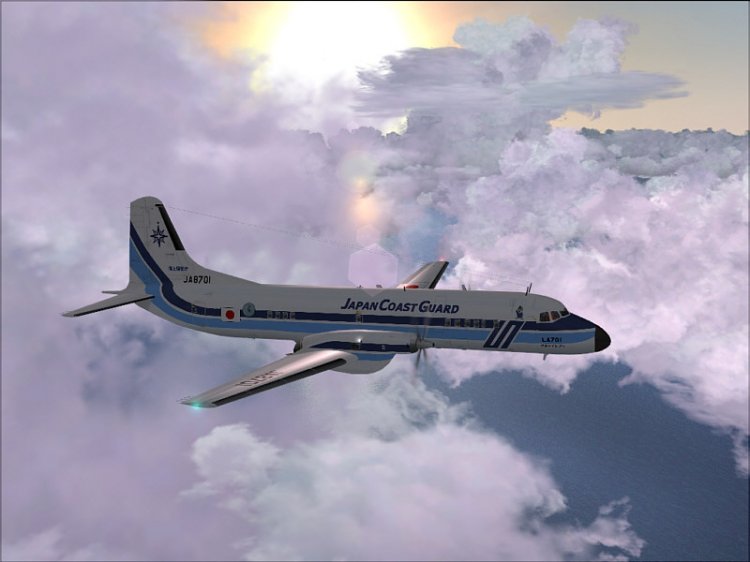
AMC YS-11 (Japanese Coast Guard). In my view an interesting model!
→ Size:
29 MB
→ Date:
16 years ago (14.09.2009 21:13)
→ Author:
Esa Kaihlanen /AFG
→ Approved by moderator:
Lenya69
→ License:
Freeware - Free version, Unlimited Distribution
→ Downloaded:
3441 time(s)