AMC YS-11 Просмотр ZIP-архива
Documentation/Ys11_manual/pages/autopilot.html
<!doctype html public "-//w3c//dtd html 3.2//en">

<html>

<head>
<title>NAMC YS-11 v2.7 for FS2004</title>
<meta name="GENERATOR" content="Arachnophilia 4.0">
<meta name="FORMATTER" content="Arachnophilia 4.0">
</head>

<body bgcolor="#ffffff" text="#000000" link="#0000ff" vlink="#800080" alink="#ff0000">

<center>
<BR>
<font size="+2" color="#000000" face="Arial">
YS-11 Autopilot
</font>
<BR>
<BR>
<img src="../images/autopilot_controls.jpg" width="640" height="480" alt="YS-11 Autopilot">
<BR>
<BR>

<table  width="75%" border="0" cellspacing="0" cellpadding="4">
<tr>
<td>
<b><font size="+2">Important note:</font></b>
<BR><br>
The autopilot we have created for this panel is completely independent from the FS default autopilot. None of the default autopilot commands and their associated keyboard shortcuts do not work. We have simulated the quick disengage switch found in the real aircraft following way:
<BR><br>
We have assigned the FS' "water rudder" function (shift+w) into the autopilot code. This will not operate the water rudder but it will disengage the autopilot. For this reason, there has been a water rudder entry added to the contact points section in the aircraft.cfg file. If you are unable to turn the autopilot on, then the reason most likely is the missing water rudder entry in the aircraft.cfg. By taking this approach, it is now possible for you to assign on of your joystick buttons to the "water rudders" function and use it as a disengagement switch. We chose this function for two reasons: it does not bring up the text message on screen and it has a keyboard command assigned for it by default. But please remember: this can only be used to switch the autopilot off, it can not be used to switch it back on. That has to be made manually by clicking on the Autopilot master switch.
<br>
<br>
If you do have the problem with the autopilot turning on, please ensure the following two lines are present in the aircraft.cfg at the end of the [contact points] section:<br><br>
point.7=5, -30.90, -5.250, -0.300, 1600, 0, 0.00, 50.0, 0.0,  0.0, 1.00, 1.0, 1.2, 0, 0.0, 0.0<br>
point.8=5, -30.90,  5.250, -0.300, 1600, 0, 0.00, 50.0, 0.0,  0.0, 1.00, 1.1, 1.5, 0, 0.0, 0.0
<BR>
<BR>
</td>
</tr>
</table>

<table  width="75%" border="0" cellspacing="0" cellpadding="4">
	<tr>
		<td>
			<b><font size="+1">The YS-11 autopilot has two main operating modes:</size></b>
		</td>
	</tr>
	<tr>
		<td>
			<b>Manual mode:</b>
		</td>
	</tr>
	<tr>
		<td>
			In manual command mode, you will turn the autopilot on with the AP Master Switch, but you will not engage any of the other modes. In this mode, you can use the pitch wheel to set the desired pitch attitude (but please note that this is not a vertical speed hold. You can have the nose at 0 degree pitch, but you can still be climbing or descending). With the turn knob, you can set the desired bank angle and direction of turn. Using these two controls you can for example set the plane to perform a spiralling climb. After you have reached the desired altitude, you can switch on the <b>Altitude hold</b> mode, which will also disable the pitch wheel. To quickly set the wings level, click on the "TURN" label between the arrows, it will set the knob in it's wings level detent.
		</td>
	</tr>
	<tr>
		<td>
			<b>Control modes:</b>
		</td>
	</tr>
	<tr>
		<td>
			These modes are activated by using the row of selection switches on the top of the autopilot. Available modes are <b>PSH (Pre Selected Heading)</b> which holds the heading set with the heading bug in the C-6A indicator (immediately below the artificial horizon on the main panel). To activate this mode, you will have to make sure that the turn knob is in it's wings level detent. <b>VOR</b> mode will follow the selected active vor radial (NAV1 radio). <b>LOC and GS</b> modes will activate the ILS approach modes. You must have LOC mode active before you can switch on the GS mode. Turning off the LOC mode will also automatically disengage the GS mode. Activating the GS mode will automatically disengage the ALT Hold mode.
		</td>
	</tr>
	<tr>
		<td>
For successful localizer capture, the minimum distance from the runway threshold is 6.5 miles, and maximum intercept angle is 45 degrees. Additionally, you should have the airspeed around 130 knots indicated, and flaps 10.  Altitude should be around one dot below glide slope. Once the localizer capture is complete, lower gear and start lowering flaps gradually. Activate GS hold once the plane intercepts it. Please see the picture at the end of this page. Also please note that the step number 4 is not necessary in FS. <font><i>(picture source: YS-11 pilot operating handbook)</i></font>
		</td>
	</tr>
	<tr>
		<td>
			The approach mode is only certified to take the plane down to the decision height (usally above middle marker). It will not perform an autoland. Also, before disengaging the autopilot (by turning the AP Master Switch off), make sure that the plane is stable and not performing a large scale correction. This is because the elevator/aileron trim will be left at the current position when autopilot is disengaged. Not following this guide line can result in unwanted nose up/down tendency. Remember that you can always reset the trim postions by clicking on the trim tab position indicator on the main panel.
		</td>
	</tr>
	<tr>
		<td>
		<b>
		</b>
		</td>
	</tr>
	<tr>
		<td>
		</td>
	</tr>
</table>

<br>
<br>

<img src="../images/autopilot_approach.jpg"  alt="YS-11 Autopilot approach">

</center>
</body>

</html>
23716-ys-11jcg.zip
| Имя файла | Дата | Размер |
|---|---|---|
| aircraft.cfg | 14.11.2006 00:49 | 12 KB |
| Documentation/ | 14.11.2006 00:53 | |
| Documentation/AFG_Readme.txt | 30.10.2006 03:56 | 7 KB |
| Documentation/Checklists/ | 14.11.2006 00:53 | |
| Documentation/Checklists/YS-11_Checklist-1.jpg | 22.10.2002 20:54 | 659 KB |
| Documentation/Checklists/YS-11_Checklist-2.jpg | 22.10.2002 20:58 | 546 KB |
| Documentation/Screenshots/ | 14.11.2006 00:53 | |
| Documentation/Screenshots/JCG_YS-11_01.jpg | 13.11.2006 23:43 | 81 KB |
| Documentation/Screenshots/JCG_YS-11_02.jpg | 13.11.2006 23:42 | 96 KB |
| Documentation/Screenshots/JCG_YS-11_03.jpg | 13.11.2006 23:42 | 112 KB |
| Documentation/Screenshots/JCG_YS-11_04.jpg | 13.11.2006 23:43 | 79 KB |
| Documentation/Screenshots/JCG_YS-11_05.jpg | 13.11.2006 23:43 | 73 KB |
| Documentation/Screenshots/Thumbs.db | 01.11.2006 01:03 | 94 KB |
| Documentation/Screenshots/ys-11_nightlight.jpg | 20.09.2006 19:33 | 149 KB |
| Documentation/Ys11_manual/ | 14.11.2006 00:53 | |
| Documentation/Ys11_manual/images/ | 14.11.2006 00:53 | |
| Documentation/Ys11_manual/images/additional_info.jpg | 01.11.2006 01:06 | 47 KB |
| Documentation/Ys11_manual/images/Autopilot_approach.jpg | 30.04.2003 04:00 | 49 KB |
| Documentation/Ys11_manual/images/autopilot_controls.jpg | 30.04.2003 03:11 | 71 KB |
| Documentation/Ys11_manual/images/flight.jpg | 30.10.2006 04:08 | 32 KB |
| Documentation/Ys11_manual/images/fueldatum.jpg | 08.10.2003 18:33 | 43 KB |
| Documentation/Ys11_manual/images/fuel_numbers.jpg | 09.02.2003 21:53 | 35 KB |
| Documentation/Ys11_manual/images/ilsapp.jpg | 29.08.2006 15:19 | 82 KB |
| Documentation/Ys11_manual/images/mainpanel_numbers.jpg | 30.04.2003 03:16 | 66 KB |
| Documentation/Ys11_manual/images/normapp.jpg | 29.08.2006 15:23 | 85 KB |
| Documentation/Ys11_manual/images/overhead_numbers.jpg | 21.12.2002 21:59 | 26 KB |
| Documentation/Ys11_manual/images/overview.jpg | 01.11.2006 01:17 | 47 KB |
| Documentation/Ys11_manual/images/parked_aircraft.jpg | 01.11.2006 02:09 | 36 KB |
| Documentation/Ys11_manual/images/pedestal.jpg | 08.10.2003 17:40 | 33 KB |
| Documentation/Ys11_manual/images/r-1_flag_nav_off.jpg | 21.12.2002 20:41 | 849 B |
| Documentation/Ys11_manual/images/r-1_flag_nav_on.jpg | 21.12.2002 20:40 | 796 B |
| Documentation/Ys11_manual/images/r-1_flag_nav_vor.jpg | 21.12.2002 20:40 | 1 KB |
| Documentation/Ys11_manual/images/radios.jpg | 13.10.2003 17:25 | 28 KB |
| Documentation/Ys11_manual/images/throttle_numbers.jpg | 21.12.2002 23:57 | 16 KB |
| Documentation/Ys11_manual/images/Thumbs.db | 01.11.2006 02:09 | 73 KB |
| Documentation/Ys11_manual/images/wingview.jpg | 30.10.2006 04:11 | 45 KB |
| Documentation/Ys11_manual/images/wm_numbers.jpg | 21.12.2002 22:25 | 9 KB |
| Documentation/Ys11_manual/index.html | 08.09.2006 00:12 | 544 B |
| Documentation/Ys11_manual/pages/ | 14.11.2006 00:53 | |
| Documentation/Ys11_manual/pages/autopilot.html | 08.09.2006 00:13 | 6 KB |
| Documentation/Ys11_manual/pages/credits_e.html | 01.11.2006 02:12 | 4 KB |
| Documentation/Ys11_manual/pages/flight_e.html | 19.09.2006 01:48 | 7 KB |
| Documentation/Ys11_manual/pages/fuel_e.html | 08.09.2006 00:13 | 6 KB |
| Documentation/Ys11_manual/pages/mainpanel_e.html | 08.09.2006 00:13 | 14 KB |
| Documentation/Ys11_manual/pages/menu_e.html | 23.09.2006 18:46 | 2 KB |
| Documentation/Ys11_manual/pages/notes_e.html | 01.11.2006 02:17 | 6 KB |
| Documentation/Ys11_manual/pages/overhead_e.html | 08.09.2006 00:13 | 3 KB |
| Documentation/Ys11_manual/pages/overview_e.html | 01.11.2006 02:13 | 4 KB |
| Documentation/Ys11_manual/pages/pedestal.html | 19.09.2006 03:53 | 5 KB |
| Documentation/Ys11_manual/pages/radio_e.html | 08.09.2006 00:13 | 2 KB |
| Documentation/Ys11_manual/pages/throttle_e.html | 08.09.2006 00:13 | 4 KB |
| Documentation/Ys11_manual/pages/wm_e.html | 08.09.2006 00:13 | 3 KB |
| Effects/ | 14.11.2006 00:53 | |
| Effects/fx_tchdwn_YS11.fx | 22.05.2002 02:27 | 5 KB |
| Effects/fx_vclight_YS-11.fx | 04.09.2006 03:10 | 1 KB |
| Effects/YS-11_wing_light_fx.fx | 19.08.2006 02:12 | 3 KB |
| Introduction.txt | 13.11.2006 21:18 | 764 B |
| Model/ | 14.11.2006 00:53 | |
| Model/model.cfg | 18.09.2006 06:10 | 34 B |
| Model/ys-11_v27_JCG.mdl | 21.09.2006 14:50 | 2 MB |
| Panel/ | 14.11.2006 00:53 | |
| Panel/autopilot.bmp | 28.04.2003 19:50 | 60 KB |
| Panel/centerpedestal.bmp | 28.09.2003 18:53 | 144 KB |
| Panel/compass.bmp | 07.07.2002 20:16 | 192 KB |
| Panel/electric.bmp | 09.08.2003 20:42 | 327 KB |
| Panel/fuelpanel.bmp | 09.08.2003 20:41 | 161 KB |
| Panel/Main_Panel.bmp | 12.09.2003 01:18 | 769 KB |
| Panel/minipanel.bmp | 13.01.2003 02:19 | 109 KB |
| Panel/overhead.bmp | 09.08.2003 20:41 | 88 KB |
| Panel/panel.cfg | 22.09.2006 04:49 | 14 KB |
| Panel/radiopanel.bmp | 23.08.2003 23:20 | 138 KB |
| Panel/Thumbs.db | 01.01.2003 20:53 | 39 KB |
| Panel/vc_panels.bmp | 09.09.2006 02:35 | 3 MB |
| Panel/wmpanel.bmp | 13.07.2003 05:24 | 117 KB |
| Panel/ys-11_pw_left_front.bmp | 17.09.2006 21:57 | 769 KB |
| Panel/ys-11_pw_left_rear.bmp | 17.09.2006 21:57 | 769 KB |
| Panel/ys11_gauges.CAB | 13.11.2006 23:40 | 2 MB |
| Sound/ | 14.11.2006 00:53 | |
| Sound/afgys-climb.wav | 21.06.2002 12:40 | 592 KB |
| Sound/afgys-flap.wav | 17.03.2002 02:02 | 174 KB |
| Sound/afgys-gear.wav | 17.03.2002 12:36 | 994 KB |
| Sound/afgys-geardn.wav | 06.08.2002 11:26 | 654 KB |
| Sound/afgys-gearup.wav | 27.07.2002 11:29 | 608 KB |
| Sound/afgys-idle.wav | 12.07.2002 11:29 | 2 MB |
| Sound/afgys-kagear.wav | 18.04.2001 14:19 | 88 KB |
| Sound/afgys-kastall.wav | 18.04.2001 14:19 | 23 KB |
| Sound/afgys-over.wav | 18.04.2001 14:21 | 41 KB |
| Sound/afgys-ps.wav | 29.07.2000 21:01 | 184 KB |
| Sound/afgys-shut.wav | 24.04.2002 15:00 | 931 KB |
| Sound/afgys-start1.wav | 24.04.2002 15:16 | 866 KB |
| Sound/afgys-start2.wav | 24.04.2002 15:37 | 4 MB |
| Sound/afgys-taxi.wav | 12.07.2002 11:49 | 472 KB |
| Sound/afgys-touch.wav | 19.03.2002 09:15 | 15 KB |
| Sound/afgys-toucha.wav | 20.06.2002 13:11 | 129 KB |
| Sound/afgys-touchb.wav | 20.06.2002 13:07 | 158 KB |
| Sound/afgys-touchc.wav | 20.06.2002 13:14 | 105 KB |
| Sound/afgys-wind.wav | 21.07.2002 07:38 | 986 KB |
| Sound/afgys-xclimb.wav | 13.11.2002 12:57 | 572 KB |
| Sound/afgys-xidle.wav | 02.09.2000 13:50 | 500 KB |
| Sound/afgys-xshut.wav | 17.03.2002 21:59 | 2 MB |
| Sound/afgys-xstart1.wav | 24.04.2002 15:17 | 864 KB |
| Sound/afgys-xstart2.wav | 24.04.2002 15:18 | 4 MB |
| Sound/afgys-xtaxi.wav | 11.06.2002 16:38 | 848 KB |
| Sound/bnroll.wav | 18.04.2001 14:21 | 370 KB |
| Sound/bnroll2.wav | 18.04.2001 14:21 | 390 KB |
| Sound/kagear.wav | 18.04.2001 14:19 | 88 KB |
| Sound/kastall.wav | 18.04.2001 14:19 | 23 KB |
| Sound/sound.cfg | 24.12.2002 05:36 | 5 KB |
| Texture/ | 14.11.2006 00:54 | |
| Texture/airconditionvents.bmp | 18.09.2006 18:10 | 128 KB |
| Texture/backwall.bmp | 24.08.2006 02:40 | 128 KB |
| Texture/buttonplate.bmp | 18.09.2006 18:14 | 32 KB |
| Texture/cabin_l.bmp | 18.09.2006 18:04 | 256 KB |
| Texture/cabin_t.bmp | 18.09.2006 18:08 | 128 KB |
| Texture/center_pedestal.bmp | 17.09.2006 16:17 | 512 KB |
| Texture/center_pedestal_L.bmp | 19.09.2006 01:55 | 1 MB |
| Texture/cockpitroof.bmp | 18.09.2006 18:10 | 128 KB |
| Texture/cockpit_edge.bmp | 16.09.2006 23:00 | 128 KB |
| Texture/cockpit_exterior.bmp | 22.08.2006 02:05 | 128 KB |
| Texture/cockpit_floor.bmp | 23.09.2006 04:16 | 32 KB |
| Texture/compass.bmp | 18.09.2006 18:12 | 32 KB |
| Texture/decal_warnings.bmp | 23.08.2006 16:40 | 128 KB |
| Texture/decal_warnings_L.bmp | 19.09.2006 01:56 | 256 KB |
| Texture/doorinside_l.bmp | 20.05.2002 03:59 | 85 KB |
| Texture/doorinside_t.bmp | 18.09.2006 18:12 | 32 KB |
| Texture/empty_l.bmp | 02.03.2002 19:33 | 4 KB |
| Texture/entrance_backwall.bmp | 20.08.2006 21:14 | 128 KB |
| Texture/entrance_floor.bmp | 18.09.2006 18:15 | 32 KB |
| Texture/entrance_roof.bmp | 18.09.2006 18:15 | 32 KB |
| Texture/entrance_shelf.bmp | 18.09.2006 18:15 | 32 KB |
| Texture/entrance_sidewalls.bmp | 18.09.2006 18:09 | 128 KB |
| Texture/exhaustnozzle.bmp | 18.09.2006 18:16 | 32 KB |
| Texture/flapedges.bmp | 26.02.2002 17:35 | 64 KB |
| Texture/flapedges_l.bmp | 22.04.2002 18:31 | 64 KB |
| Texture/flapedges_t.bmp | 18.09.2006 18:11 | 32 KB |
| Texture/fuselage_l.bmp | 18.09.2006 17:28 | 1 MB |
| Texture/fuselage_t.bmp | 06.10.2006 15:59 | 1 MB |
| Texture/gearbays_l.bmp | 22.04.2002 18:29 | 64 KB |
| Texture/gearbays_t.bmp | 18.09.2006 18:11 | 32 KB |
| Texture/glareshield.bmp | 22.09.2006 03:55 | 512 KB |
| Texture/glareshield_L.bmp | 19.09.2006 01:55 | 1 MB |
| Texture/glassdome_t.bmp | 27.12.2003 19:40 | 16 KB |
| Texture/glass_edge.bmp | 02.07.2002 21:06 | 4 KB |
| Texture/gustlock.bmp | 18.09.2006 18:15 | 32 KB |
| Texture/lnacelle_l.bmp | 02.03.2002 19:33 | 4 KB |
| Texture/lnacelle_t.bmp | 20.09.2006 03:32 | 256 KB |
| Texture/maingear_l.bmp | 22.04.2002 18:29 | 64 KB |
| Texture/maingear_t.bmp | 18.09.2006 18:11 | 64 KB |
| Texture/nosegeardoor_l.bmp | 02.03.2002 20:33 | 4 KB |
| Texture/nosegeardoor_t.bmp | 18.09.2006 15:43 | 64 KB |
| Texture/nosegear_l.bmp | 18.09.2006 18:11 | 32 KB |
| Texture/nosegear_t.bmp | 18.09.2006 18:11 | 64 KB |
| Texture/overhead.bmp | 22.09.2006 03:23 | 512 KB |
| Texture/overhead_l.bmp | 19.09.2006 01:55 | 1 MB |
| Texture/pedals.bmp | 18.09.2006 18:15 | 32 KB |
| Texture/pilot.bmp | 19.09.2006 17:32 | 32 KB |
| Texture/pitot_l.bmp | 02.03.2002 20:33 | 4 KB |
| Texture/pitot_t.bmp | 13.04.2002 17:05 | 21 KB |
| Texture/plate.bmp | 18.09.2006 18:16 | 32 KB |
| Texture/prop.bmp | 04.06.2003 12:15 | 256 KB |
| Texture/propblade_l.bmp | 21.06.2002 04:06 | 4 KB |
| Texture/propblade_t.bmp | 29.04.2002 23:56 | 85 KB |
| Texture/prop_slow.bmp | 04.06.2003 12:15 | 256 KB |
| Texture/radar_console_sides.bmp | 23.09.2006 04:16 | 32 KB |
| Texture/radar_display.bmp | 23.09.2006 04:15 | 128 KB |
| Texture/radar_display_L.bmp | 19.09.2006 01:56 | 256 KB |
| Texture/radios.bmp | 19.08.2006 16:39 | 128 KB |
| Texture/radios_l.bmp | 19.09.2006 01:56 | 256 KB |
| Texture/rnacelle_l.bmp | 02.03.2002 19:33 | 4 KB |
| Texture/rnacelle_t.bmp | 20.09.2006 03:32 | 256 KB |
| Texture/roof_fillet.bmp | 18.09.2006 18:15 | 32 KB |
| Texture/seat1.bmp | 18.09.2006 18:15 | 32 KB |
| Texture/seat2.bmp | 18.09.2006 18:15 | 32 KB |
| Texture/seatfold.bmp | 18.09.2006 18:16 | 32 KB |
| Texture/sideconsole_1.bmp | 23.09.2006 23:01 | 128 KB |
| Texture/sideconsole_2.bmp | 23.09.2006 02:56 | 512 KB |
| Texture/sidewall.bmp | 16.09.2006 22:52 | 128 KB |
| Texture/stairs_l.bmp | 16.08.2006 21:08 | 64 KB |
| Texture/stairs_t.bmp | 04.09.2006 05:04 | 64 KB |
| Texture/sunscreens.bmp | 18.09.2006 18:16 | 32 KB |
| Texture/tail_l.bmp | 22.04.2002 18:26 | 1 MB |
| Texture/tail_t.bmp | 25.09.2006 14:29 | 1 MB |
| Texture/tires_l.bmp | 18.09.2006 18:14 | 32 KB |
| Texture/tires_t.bmp | 07.05.2002 22:33 | 85 KB |
| Texture/trimwheel.bmp | 29.08.2006 16:32 | 32 KB |
| Texture/trim_knob.bmp | 18.09.2006 18:09 | 128 KB |
| Texture/vc_panels_l.bmp | 24.09.2006 01:13 | 1 MB |
| Texture/VC_windows.bmp | 19.12.2002 03:30 | 1 MB |
| Texture/well_t.bmp | 18.12.2003 15:22 | 32 KB |
| Texture/windows_t.bmp | 25.08.2006 03:48 | 64 KB |
| Texture/window_frames.bmp | 23.09.2006 02:19 | 128 KB |
| Texture/wings_l.bmp | 22.04.2002 18:33 | 1 MB |
| Texture/wings_t.bmp | 18.09.2006 15:39 | 1 MB |
| Texture/winmech.bmp | 18.09.2006 18:16 | 32 KB |
| Texture/yokes.bmp | 18.09.2006 18:16 | 32 KB |
| YS-11JCG.gif | 13.11.2006 23:35 | 11 KB |
| YS11.air | 05.10.2003 20:55 | 15 KB |
| avsim_su.diz | 15.09.2009 00:55 | 406 B |
| Итого: | 53 MB | |
AMC YS-11
| Rating: 5!
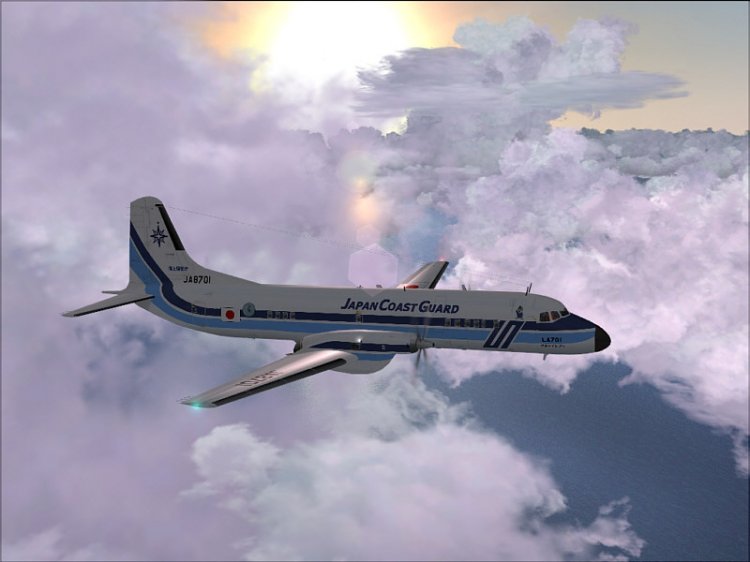
AMC YS-11 (Japanese Coast Guard). In my view an interesting model!
→ Size:
29 MB
→ Date:
16 years ago (14.09.2009 21:13)
→ Author:
Esa Kaihlanen /AFG
→ Approved by moderator:
Lenya69
→ License:
Freeware - Free version, Unlimited Distribution
→ Downloaded:
3441 time(s)