AMC YS-11 Просмотр ZIP-архива
Documentation/Ys11_manual/pages/mainpanel_e.html
<!doctype html public "-//w3c//dtd html 3.2//en">

<html>

<head>
<title>NAMC YS-11 v2.7 for FS2004</title>
<meta name="GENERATOR" content="Arachnophilia 4.0">
<meta name="FORMATTER" content="Arachnophilia 4.0">
</head>

<body bgcolor="#ffffff" text="#000000" link="#0000ff" vlink="#800080" alink="#ff0000">

<center>
<BR>
<font size="+2" color="#000000" face="Arial">
YS-11 main instrument panel
</font>
<BR>
<BR>
<img src="../images/mainpanel_numbers.jpg" width="640" height="480" alt="YS-11 main instrument panel">
<BR>
<BR>
<table  width="75%" border="0" cellspacing="0" cellpadding="4">
	<tr>
		<td width=50 valign="top">
		1.
		</td>
		<td>
Standard magnetic compass
		</td>
	</tr>
	<tr>
		<td width=50 valign="top">
		2.
		</td>
		<td>
IIS mode selector. This instrument is used to select the operating mode for the flight director system. Command bars are part of the HZ-4 Attitude Indicator (10). This instrument has two controls: the large knob selects the mode being used. There are six available modes:
				<center>
				<table border="1" width="75%">
					<tr>
						<td rowspan="2" valign="top">
							SB
						</td>
						<td>
							Stand By
						</td>
					</tr>
					<tr>
						<td>
							Command bars are not active.
						</td>
					</tr>

					<tr>
						<td rowspan="2" valign="top">
							BL
						</td>
						<td>
							Blue Left.
						</td>
					</tr>
					<tr>
						<td>
							Same as VOR/LOC - mode, but roll commands are reversed. Used for back course approaches.
						</td>
					</tr>
					<tr>
						<td rowspan="2" valign="top">
							FI
						</td>
						<td>
							Flight Instruments
						</td>
					</tr>
						<tr>
						<td>
							Trim knob controls the pitch command bar and the roll command bar directs to the heading selected in the C-6A indicator (15).
						</td>
					</tr>
				<tr>
						<td rowspan="2" valign="top">
							VOR/LOC
						</td>
						<td>
							VOR/Localizer based guidance
						</td>
					</tr>
					<tr>
						<td>
							Trim knob controls the pitch command bar and the roll command bar directs to the selected (nav1) vor/localizer from course selected in the R-1 indicator (14).
						</td>
					</tr>
				<tr>
						<td rowspan="2" valign="top">
							APP
						</td>
						<td>
							Approach mode (ILS)
						</td>
					<tr>
						<td>
							Pitch command bar directs to the glide slope and  the roll command bar directs to the localizer beam.
						</td>
					</tr>
				</tr>
					<tr>
						<td rowspan="2" valign="top">
							GA
						</td>
						<td>
							Go around
						</td>
					</tr>
					<tr>
						<td>
							Pitch command bar directs to a seven (7) degree climb, roll command bar directs to the heading selected in the C-6A indicator (15).
						</td>
					</tr>
			</table>
			</center>
The second control on this instrument is the trim knob. Its function is to set pitch command bar's indication when using FI or VOR/LOC modes. You can read the current setting by moving the mouse cursor over the knob and checking out the associated tooltip.
		</td>
	</tr>
	<tr>
		<td width=50 valign="top">
		3.
		</td>
		<td>
Engine overheat warning lights. When either of these lit up, it means you've exceeded the normal operating temperatures for the engines of 915 °C. In such a case, you should reduce power for that engine/engines in order to avoid engine failure.
		</td>
	</tr>
	<tr>
		<td width=50 valign="top">
		4.
		</td>
		<td>
Feather/Unfeather button with built in feather indicator light. If one of these lights is lit up, it means that propeller is currently feathered. To manually feather a prop, you must place the H.P.C lever in the throttle quadrant for that engine into "feather" position, and then click the Feather/Unfeather button for that engine. To unfeather a prop, click the lit-up button. If unfeathering is successful, the light will go out.
		</td>
	</tr>
	<tr>
		<td width=50 valign="top">
		5.
		</td>
		<td>
Prop brake switch. This switch activates the prop brake for No.1 engine. FS2002 does not support actual prop brake, so we have simulated it. In our panel, the prop is slowed down by feathering it. That's why the feather indicator light will lit up when prop brake activates. After the prop brake is turned off, you'll need to unfeather the prop using the feather/unfeather button.
		</td>
	</tr>
	<tr>
		<td width=50 valign="top">
		6.
		</td>
		<td>
Prop indicator lights. A set of six lights, which indicate the status of prop pitch locks. The upper row from left to right: Low Stop Unsafe, Below Low Stop No.1, Below Low Stop No. 2. The lower row from left to right: High Stop Unsafe, High Stop Removed No.1 and High Stop Removed No. 2.
                <center>
				<table border="1" width="75%">
					<tr>
						<td rowspan="1" valign="top">
							Low Stop Unsafe
						</td>
						<td>
							Indicates that the low stop lock has been removed and thus blade angle(s) can decrease below 14 °.
						</td>
					</tr>
					<tr>
						<td rowspan="1" valign="top">
							Below Low Stop No.1
						</td>
						<td>
							Indicates that no1. (left) propeller  blade angle is at 13 ° or below.
						</td>
					</tr>
					<tr>
						<td rowspan="1" valign="top">
							Below Low Stop No.2
						</td>
						<td>
							Indicates that no2. (right) propeller  blade angle is at 13 ° or below.
						</td>
					</tr>
					<tr>
						<td rowspan="1" valign="top">
							High Stop Unsafe
						</td>
						<td>
							Indicates that the blade angle of either propeller, or both, is below 29.5 °.
						</td>
					</tr>
					<tr>
						<td rowspan="1" valign="top">
							High Stop Removed No.1
						</td>
						<td>
							Indicates when no1. propeller safety lock has been withdrawn either manually or automatically when the blade angle of both propellers is below 29.5 degrees, or the right propeller has been feathered and the left is below 29.5 degrees.
						</td>
					</tr>
					<tr>
						<td rowspan="1" valign="top">
							High Stop Removed No.2
						</td>
						<td>
							Same as above but for right hand propeller.
						</td>
					</tr>
			</table>
			</center>
						Note: The low speed lock prevents the propeller from going into the "ground fine pitch" (below 14°) blade angle range during flight (doing so would be disastrous!) and the high stop lock prevents the propeller blade angle from decreasing to a flat-pitch, high-drag condition during cruise flight if the propeller windmills without engine power input for any reason.

		</td>
	</tr>
	<tr>
		<td width=50 valign="top">
		7.
		</td>
		<td>
			Standard inner, middle and outer marker lights.
		</td>
	</tr>
	<tr>
		<td width=50 valign="top">
		8.
		</td>
		<td>
		  Overspeed Warning Light. Activates when indicated airspeed is too high for current altitude. Note that when fs2002 overspeed warning activates you are already flying much too fast and risk fatal airframe failure.
		</td>
	</tr>
	<tr>
		<td width=50 valign="top">
		9.
		</td>
		<td>
		Airspeed Indicator.
		</td>
	</tr>
	<tr>
		<td width=50 valign="top">
		10.
		</td>
		<td>
			Hz-4 Attitude Indicator. Standard artificial horizon. Includes two flight director command bars. Follow the commands by keeping the bars centered. A red/white striped FD flag indicates that the flight director command bars are unavailable.
		</td>
	</tr>
	<tr>
		<td width=50 valign="top">
		11.
		</td>
		<td>
		Altitude Indicator. Includes a Kohlsmann setting knob for altitude calibration in the lower left corner.
		</td>
	</tr>
	<tr>
		<td width=50 valign="top">
		12.
		</td>
		<td>
		Radio Altimeter. Displays the altitude above ground level. A knob on the lower right corner sets the decision height, which is displayed in the small window left of the knob. DH light illuminates on top of the gauge when crossing the set decision height.
		</td>
	</tr>
      <tr>
		<td width=50 valign="top">
		13.
		</td>
		<td>
		DME Indicator. Displays the distances to the tuned in navaids in nautical miles. Upper figure is for NAV1 and lower for NAV2.
		</td>
	</tr>
      <tr>
		<td width=50 valign="top">
		14.
		</td>
		<td>
		R-1 Pictorial Deviation Indicator (PDI). This is essentially a HSI instrument. The knob on the lower left corner set the course (displayed at the top of the gauge). A light at the upper left corner indicates when the R-1 indicator receives a signal. Two needles are displayed at the center of the gauge, one horizontal and one vertical (resembles an upturned V symbol). The horizontal needle displays glide slope deviation and the vertical needle course deviation. There is one of three different flags displayed at the center of the gauge, which mean:
           <center>
				<table border="1" width="75%">
					<tr>
						<td rowspan="1">
							<img src="../images/r-1_flag_nav_off.jpg" width="29" height="13" alt="R-1 Blue left flag">
						</td>
						<td>
							Indicates that the course deviation and glide slope needles are unavailable.
						</td>
					</tr>
					<tr>
						<td rowspan="1">
							<img src="../images/r-1_flag_nav_vor.jpg" width="29" height="13" alt="R-1 Blue left flag">
						</td>
						<td>
							Indicates that the gauge receives only course deviation signal.
						</td>
					</tr>
					<tr>
						<td rowspan="1">
							<img src="../images/r-1_flag_nav_on.jpg" width="29" height="13" alt="R-1 Blue left flag">
						</td>
						<td>
							Indicates that the gauge receives both course deviation and glide slope signal  (ILS mode).
						</td>
					</tr>
				</table>
		</center>
		</td>

	</tr>
      <tr>
		<td width=50 valign="top">
		15.
		</td>
		<td>
		C-6A Gyrocompass. Closely resembles the RMI indicator, but with heading selection. A knob in the lower left corner sets the heading and another knob in the upper left corner toggles between NAV1, NAV2, ADF1 and ADF2 information. Two needles are displayed at the center of the gauge along with compass card. The thin single line needle displays either NAV1 or ADF1 direction and the thicker two line needle displays direction to either NAV2 or ADF2.
		</td>
	</tr>
      <tr>
		<td width=50 valign="top">
		16.
		</td>
		<td>
		Vertical Speed Indicator.
		</td>
	</tr>
      <tr>
		<td width=50 valign="top">
		17.
		</td>
		<td>
		Standard Turn and Slip Indicator.
		</td>
	</tr>
      <tr>
		<td width=50 valign="top">
		18.
		</td>
		<td>
		Turbine Gas Temperatures (or TGT). Displays the temperature of the gas/air mixture in the 3-stage turbine (just after the combustion chambers) in degrees centigrade. Never exceed the TGT value of 940°C for more than 5 seconds or risk engine failure.
		</td>
	</tr>
      <tr>
		<td width=50 valign="top">
		19.
		</td>
		<td>
		Turbine RPM Indicators. Displays the current turbine speed. Note that any rpm over 15000 are considered overspeed and should only be maintained for 20 s. maximum during emergencies.
		</td>
	</tr>
      <tr>
		<td width=50 valign="top">
		20.
		</td>
		<td>
		Fuel Flow Indicators. Displays the fuel flow in PPH
		</td>
	</tr>
      <tr>
		<td width=50 valign="top">
		21.
		</td>
		<td>
		Low Fuel Pressure Warning Lights. Indicates when fuel pressure drops below 9 psi.
		</td>
	</tr>
      <tr>
		<td width=50 valign="top">
		22.
		</td>
		<td>
		Oil Temperature Indicators.
		</td>
	</tr>
     <tr>
		<td width=50 valign="top">
		23.
		</td>
		<td>
		Oil Pressure Indicators.
		</td>
	</tr>
     <tr>
		<td width=50 valign="top">
		24.
		</td>
		<td>
		Low Oil Pressure Warning Lights.
		</td>
	</tr>
     <tr>
		<td width=50 valign="top">
		25.
		</td>
		<td>
		Torque Pressure Indicators. Displays the current torque pressure in psi. Yellow area at the beginning of the scale (below 40 PSI) indicates the area where autofeather system feathers the propeller when the power lever for that engine is set above the "FEATH" markings.
		</td>
	</tr>
     <tr>
		<td width=50 valign="top">
		26.
		</td>
		<td>
		Outside Air Temperature.
		</td>
	</tr>
     <tr>
		<td width=50 valign="top">
		27.
		</td>
		<td>
		Flap Position Indicator.
		</td>
	</tr>
     <tr>
		<td width=50 valign="top">
		28.
		</td>
		<td>
		Gear Lever.
		</td>
	</tr>
     <tr>
		<td width=50 valign="top">
		29.
		</td>
		<td>
		Gear Position Indicator Lights. The three green lights correspond to the left, center and right landing gear and illuminate when they are down and locked. The rightmost red light indicates that the landing gears are in transition or unlocked.
		</td>
	</tr>
     <tr>
		<td width=50 valign="top">
		30.
		</td>
		<td>
		FS2002 Panel Buttons. The three leftmost buttons open the ATC-menu, checklist and flight map. And the remaining six buttons opens the additional panels. They are (from left): Radio, Overhead, Throttle Quadrant, Water/Methanol, Fuel controls and finally Autopilot.
		</td>
	</tr>
     <tr>
		<td width=50 valign="top">
		31.
		</td>
		<td>
This switch can be used to turn the autfeather system on and off. Refer the tooltip text to determine the current position. By default, the autofeather system is active. The real YS-11 does not have this kind of a switch, we have included it to make life easier to those who find it difficult to avoid autofeathring the props. If desired, this switch can be easily removed by deleting or commenting out the gauge (gauge60=YS11_Gauges!AutoFeather) from the panel.cfg.
		</td>
	</tr>
     <tr>
		<td width=50 valign="top">
		32.
		</td>
		<td>
Trim tab position indicator. This small gauge indicates the postion of the rudder (top), aileron (middle) and elevator (bottom) trim tab positions. You can center all trimtabs by clikcing on the gauge with the mouse.
		</td>
	</tr>

</table>


</center>
</body>

</html>
23716-ys-11jcg.zip
| Имя файла | Дата | Размер |
|---|---|---|
| aircraft.cfg | 14.11.2006 00:49 | 12 KB |
| Documentation/ | 14.11.2006 00:53 | |
| Documentation/AFG_Readme.txt | 30.10.2006 03:56 | 7 KB |
| Documentation/Checklists/ | 14.11.2006 00:53 | |
| Documentation/Checklists/YS-11_Checklist-1.jpg | 22.10.2002 20:54 | 659 KB |
| Documentation/Checklists/YS-11_Checklist-2.jpg | 22.10.2002 20:58 | 546 KB |
| Documentation/Screenshots/ | 14.11.2006 00:53 | |
| Documentation/Screenshots/JCG_YS-11_01.jpg | 13.11.2006 23:43 | 81 KB |
| Documentation/Screenshots/JCG_YS-11_02.jpg | 13.11.2006 23:42 | 96 KB |
| Documentation/Screenshots/JCG_YS-11_03.jpg | 13.11.2006 23:42 | 112 KB |
| Documentation/Screenshots/JCG_YS-11_04.jpg | 13.11.2006 23:43 | 79 KB |
| Documentation/Screenshots/JCG_YS-11_05.jpg | 13.11.2006 23:43 | 73 KB |
| Documentation/Screenshots/Thumbs.db | 01.11.2006 01:03 | 94 KB |
| Documentation/Screenshots/ys-11_nightlight.jpg | 20.09.2006 19:33 | 149 KB |
| Documentation/Ys11_manual/ | 14.11.2006 00:53 | |
| Documentation/Ys11_manual/images/ | 14.11.2006 00:53 | |
| Documentation/Ys11_manual/images/additional_info.jpg | 01.11.2006 01:06 | 47 KB |
| Documentation/Ys11_manual/images/Autopilot_approach.jpg | 30.04.2003 04:00 | 49 KB |
| Documentation/Ys11_manual/images/autopilot_controls.jpg | 30.04.2003 03:11 | 71 KB |
| Documentation/Ys11_manual/images/flight.jpg | 30.10.2006 04:08 | 32 KB |
| Documentation/Ys11_manual/images/fueldatum.jpg | 08.10.2003 18:33 | 43 KB |
| Documentation/Ys11_manual/images/fuel_numbers.jpg | 09.02.2003 21:53 | 35 KB |
| Documentation/Ys11_manual/images/ilsapp.jpg | 29.08.2006 15:19 | 82 KB |
| Documentation/Ys11_manual/images/mainpanel_numbers.jpg | 30.04.2003 03:16 | 66 KB |
| Documentation/Ys11_manual/images/normapp.jpg | 29.08.2006 15:23 | 85 KB |
| Documentation/Ys11_manual/images/overhead_numbers.jpg | 21.12.2002 21:59 | 26 KB |
| Documentation/Ys11_manual/images/overview.jpg | 01.11.2006 01:17 | 47 KB |
| Documentation/Ys11_manual/images/parked_aircraft.jpg | 01.11.2006 02:09 | 36 KB |
| Documentation/Ys11_manual/images/pedestal.jpg | 08.10.2003 17:40 | 33 KB |
| Documentation/Ys11_manual/images/r-1_flag_nav_off.jpg | 21.12.2002 20:41 | 849 B |
| Documentation/Ys11_manual/images/r-1_flag_nav_on.jpg | 21.12.2002 20:40 | 796 B |
| Documentation/Ys11_manual/images/r-1_flag_nav_vor.jpg | 21.12.2002 20:40 | 1 KB |
| Documentation/Ys11_manual/images/radios.jpg | 13.10.2003 17:25 | 28 KB |
| Documentation/Ys11_manual/images/throttle_numbers.jpg | 21.12.2002 23:57 | 16 KB |
| Documentation/Ys11_manual/images/Thumbs.db | 01.11.2006 02:09 | 73 KB |
| Documentation/Ys11_manual/images/wingview.jpg | 30.10.2006 04:11 | 45 KB |
| Documentation/Ys11_manual/images/wm_numbers.jpg | 21.12.2002 22:25 | 9 KB |
| Documentation/Ys11_manual/index.html | 08.09.2006 00:12 | 544 B |
| Documentation/Ys11_manual/pages/ | 14.11.2006 00:53 | |
| Documentation/Ys11_manual/pages/autopilot.html | 08.09.2006 00:13 | 6 KB |
| Documentation/Ys11_manual/pages/credits_e.html | 01.11.2006 02:12 | 4 KB |
| Documentation/Ys11_manual/pages/flight_e.html | 19.09.2006 01:48 | 7 KB |
| Documentation/Ys11_manual/pages/fuel_e.html | 08.09.2006 00:13 | 6 KB |
| Documentation/Ys11_manual/pages/mainpanel_e.html | 08.09.2006 00:13 | 14 KB |
| Documentation/Ys11_manual/pages/menu_e.html | 23.09.2006 18:46 | 2 KB |
| Documentation/Ys11_manual/pages/notes_e.html | 01.11.2006 02:17 | 6 KB |
| Documentation/Ys11_manual/pages/overhead_e.html | 08.09.2006 00:13 | 3 KB |
| Documentation/Ys11_manual/pages/overview_e.html | 01.11.2006 02:13 | 4 KB |
| Documentation/Ys11_manual/pages/pedestal.html | 19.09.2006 03:53 | 5 KB |
| Documentation/Ys11_manual/pages/radio_e.html | 08.09.2006 00:13 | 2 KB |
| Documentation/Ys11_manual/pages/throttle_e.html | 08.09.2006 00:13 | 4 KB |
| Documentation/Ys11_manual/pages/wm_e.html | 08.09.2006 00:13 | 3 KB |
| Effects/ | 14.11.2006 00:53 | |
| Effects/fx_tchdwn_YS11.fx | 22.05.2002 02:27 | 5 KB |
| Effects/fx_vclight_YS-11.fx | 04.09.2006 03:10 | 1 KB |
| Effects/YS-11_wing_light_fx.fx | 19.08.2006 02:12 | 3 KB |
| Introduction.txt | 13.11.2006 21:18 | 764 B |
| Model/ | 14.11.2006 00:53 | |
| Model/model.cfg | 18.09.2006 06:10 | 34 B |
| Model/ys-11_v27_JCG.mdl | 21.09.2006 14:50 | 2 MB |
| Panel/ | 14.11.2006 00:53 | |
| Panel/autopilot.bmp | 28.04.2003 19:50 | 60 KB |
| Panel/centerpedestal.bmp | 28.09.2003 18:53 | 144 KB |
| Panel/compass.bmp | 07.07.2002 20:16 | 192 KB |
| Panel/electric.bmp | 09.08.2003 20:42 | 327 KB |
| Panel/fuelpanel.bmp | 09.08.2003 20:41 | 161 KB |
| Panel/Main_Panel.bmp | 12.09.2003 01:18 | 769 KB |
| Panel/minipanel.bmp | 13.01.2003 02:19 | 109 KB |
| Panel/overhead.bmp | 09.08.2003 20:41 | 88 KB |
| Panel/panel.cfg | 22.09.2006 04:49 | 14 KB |
| Panel/radiopanel.bmp | 23.08.2003 23:20 | 138 KB |
| Panel/Thumbs.db | 01.01.2003 20:53 | 39 KB |
| Panel/vc_panels.bmp | 09.09.2006 02:35 | 3 MB |
| Panel/wmpanel.bmp | 13.07.2003 05:24 | 117 KB |
| Panel/ys-11_pw_left_front.bmp | 17.09.2006 21:57 | 769 KB |
| Panel/ys-11_pw_left_rear.bmp | 17.09.2006 21:57 | 769 KB |
| Panel/ys11_gauges.CAB | 13.11.2006 23:40 | 2 MB |
| Sound/ | 14.11.2006 00:53 | |
| Sound/afgys-climb.wav | 21.06.2002 12:40 | 592 KB |
| Sound/afgys-flap.wav | 17.03.2002 02:02 | 174 KB |
| Sound/afgys-gear.wav | 17.03.2002 12:36 | 994 KB |
| Sound/afgys-geardn.wav | 06.08.2002 11:26 | 654 KB |
| Sound/afgys-gearup.wav | 27.07.2002 11:29 | 608 KB |
| Sound/afgys-idle.wav | 12.07.2002 11:29 | 2 MB |
| Sound/afgys-kagear.wav | 18.04.2001 14:19 | 88 KB |
| Sound/afgys-kastall.wav | 18.04.2001 14:19 | 23 KB |
| Sound/afgys-over.wav | 18.04.2001 14:21 | 41 KB |
| Sound/afgys-ps.wav | 29.07.2000 21:01 | 184 KB |
| Sound/afgys-shut.wav | 24.04.2002 15:00 | 931 KB |
| Sound/afgys-start1.wav | 24.04.2002 15:16 | 866 KB |
| Sound/afgys-start2.wav | 24.04.2002 15:37 | 4 MB |
| Sound/afgys-taxi.wav | 12.07.2002 11:49 | 472 KB |
| Sound/afgys-touch.wav | 19.03.2002 09:15 | 15 KB |
| Sound/afgys-toucha.wav | 20.06.2002 13:11 | 129 KB |
| Sound/afgys-touchb.wav | 20.06.2002 13:07 | 158 KB |
| Sound/afgys-touchc.wav | 20.06.2002 13:14 | 105 KB |
| Sound/afgys-wind.wav | 21.07.2002 07:38 | 986 KB |
| Sound/afgys-xclimb.wav | 13.11.2002 12:57 | 572 KB |
| Sound/afgys-xidle.wav | 02.09.2000 13:50 | 500 KB |
| Sound/afgys-xshut.wav | 17.03.2002 21:59 | 2 MB |
| Sound/afgys-xstart1.wav | 24.04.2002 15:17 | 864 KB |
| Sound/afgys-xstart2.wav | 24.04.2002 15:18 | 4 MB |
| Sound/afgys-xtaxi.wav | 11.06.2002 16:38 | 848 KB |
| Sound/bnroll.wav | 18.04.2001 14:21 | 370 KB |
| Sound/bnroll2.wav | 18.04.2001 14:21 | 390 KB |
| Sound/kagear.wav | 18.04.2001 14:19 | 88 KB |
| Sound/kastall.wav | 18.04.2001 14:19 | 23 KB |
| Sound/sound.cfg | 24.12.2002 05:36 | 5 KB |
| Texture/ | 14.11.2006 00:54 | |
| Texture/airconditionvents.bmp | 18.09.2006 18:10 | 128 KB |
| Texture/backwall.bmp | 24.08.2006 02:40 | 128 KB |
| Texture/buttonplate.bmp | 18.09.2006 18:14 | 32 KB |
| Texture/cabin_l.bmp | 18.09.2006 18:04 | 256 KB |
| Texture/cabin_t.bmp | 18.09.2006 18:08 | 128 KB |
| Texture/center_pedestal.bmp | 17.09.2006 16:17 | 512 KB |
| Texture/center_pedestal_L.bmp | 19.09.2006 01:55 | 1 MB |
| Texture/cockpitroof.bmp | 18.09.2006 18:10 | 128 KB |
| Texture/cockpit_edge.bmp | 16.09.2006 23:00 | 128 KB |
| Texture/cockpit_exterior.bmp | 22.08.2006 02:05 | 128 KB |
| Texture/cockpit_floor.bmp | 23.09.2006 04:16 | 32 KB |
| Texture/compass.bmp | 18.09.2006 18:12 | 32 KB |
| Texture/decal_warnings.bmp | 23.08.2006 16:40 | 128 KB |
| Texture/decal_warnings_L.bmp | 19.09.2006 01:56 | 256 KB |
| Texture/doorinside_l.bmp | 20.05.2002 03:59 | 85 KB |
| Texture/doorinside_t.bmp | 18.09.2006 18:12 | 32 KB |
| Texture/empty_l.bmp | 02.03.2002 19:33 | 4 KB |
| Texture/entrance_backwall.bmp | 20.08.2006 21:14 | 128 KB |
| Texture/entrance_floor.bmp | 18.09.2006 18:15 | 32 KB |
| Texture/entrance_roof.bmp | 18.09.2006 18:15 | 32 KB |
| Texture/entrance_shelf.bmp | 18.09.2006 18:15 | 32 KB |
| Texture/entrance_sidewalls.bmp | 18.09.2006 18:09 | 128 KB |
| Texture/exhaustnozzle.bmp | 18.09.2006 18:16 | 32 KB |
| Texture/flapedges.bmp | 26.02.2002 17:35 | 64 KB |
| Texture/flapedges_l.bmp | 22.04.2002 18:31 | 64 KB |
| Texture/flapedges_t.bmp | 18.09.2006 18:11 | 32 KB |
| Texture/fuselage_l.bmp | 18.09.2006 17:28 | 1 MB |
| Texture/fuselage_t.bmp | 06.10.2006 15:59 | 1 MB |
| Texture/gearbays_l.bmp | 22.04.2002 18:29 | 64 KB |
| Texture/gearbays_t.bmp | 18.09.2006 18:11 | 32 KB |
| Texture/glareshield.bmp | 22.09.2006 03:55 | 512 KB |
| Texture/glareshield_L.bmp | 19.09.2006 01:55 | 1 MB |
| Texture/glassdome_t.bmp | 27.12.2003 19:40 | 16 KB |
| Texture/glass_edge.bmp | 02.07.2002 21:06 | 4 KB |
| Texture/gustlock.bmp | 18.09.2006 18:15 | 32 KB |
| Texture/lnacelle_l.bmp | 02.03.2002 19:33 | 4 KB |
| Texture/lnacelle_t.bmp | 20.09.2006 03:32 | 256 KB |
| Texture/maingear_l.bmp | 22.04.2002 18:29 | 64 KB |
| Texture/maingear_t.bmp | 18.09.2006 18:11 | 64 KB |
| Texture/nosegeardoor_l.bmp | 02.03.2002 20:33 | 4 KB |
| Texture/nosegeardoor_t.bmp | 18.09.2006 15:43 | 64 KB |
| Texture/nosegear_l.bmp | 18.09.2006 18:11 | 32 KB |
| Texture/nosegear_t.bmp | 18.09.2006 18:11 | 64 KB |
| Texture/overhead.bmp | 22.09.2006 03:23 | 512 KB |
| Texture/overhead_l.bmp | 19.09.2006 01:55 | 1 MB |
| Texture/pedals.bmp | 18.09.2006 18:15 | 32 KB |
| Texture/pilot.bmp | 19.09.2006 17:32 | 32 KB |
| Texture/pitot_l.bmp | 02.03.2002 20:33 | 4 KB |
| Texture/pitot_t.bmp | 13.04.2002 17:05 | 21 KB |
| Texture/plate.bmp | 18.09.2006 18:16 | 32 KB |
| Texture/prop.bmp | 04.06.2003 12:15 | 256 KB |
| Texture/propblade_l.bmp | 21.06.2002 04:06 | 4 KB |
| Texture/propblade_t.bmp | 29.04.2002 23:56 | 85 KB |
| Texture/prop_slow.bmp | 04.06.2003 12:15 | 256 KB |
| Texture/radar_console_sides.bmp | 23.09.2006 04:16 | 32 KB |
| Texture/radar_display.bmp | 23.09.2006 04:15 | 128 KB |
| Texture/radar_display_L.bmp | 19.09.2006 01:56 | 256 KB |
| Texture/radios.bmp | 19.08.2006 16:39 | 128 KB |
| Texture/radios_l.bmp | 19.09.2006 01:56 | 256 KB |
| Texture/rnacelle_l.bmp | 02.03.2002 19:33 | 4 KB |
| Texture/rnacelle_t.bmp | 20.09.2006 03:32 | 256 KB |
| Texture/roof_fillet.bmp | 18.09.2006 18:15 | 32 KB |
| Texture/seat1.bmp | 18.09.2006 18:15 | 32 KB |
| Texture/seat2.bmp | 18.09.2006 18:15 | 32 KB |
| Texture/seatfold.bmp | 18.09.2006 18:16 | 32 KB |
| Texture/sideconsole_1.bmp | 23.09.2006 23:01 | 128 KB |
| Texture/sideconsole_2.bmp | 23.09.2006 02:56 | 512 KB |
| Texture/sidewall.bmp | 16.09.2006 22:52 | 128 KB |
| Texture/stairs_l.bmp | 16.08.2006 21:08 | 64 KB |
| Texture/stairs_t.bmp | 04.09.2006 05:04 | 64 KB |
| Texture/sunscreens.bmp | 18.09.2006 18:16 | 32 KB |
| Texture/tail_l.bmp | 22.04.2002 18:26 | 1 MB |
| Texture/tail_t.bmp | 25.09.2006 14:29 | 1 MB |
| Texture/tires_l.bmp | 18.09.2006 18:14 | 32 KB |
| Texture/tires_t.bmp | 07.05.2002 22:33 | 85 KB |
| Texture/trimwheel.bmp | 29.08.2006 16:32 | 32 KB |
| Texture/trim_knob.bmp | 18.09.2006 18:09 | 128 KB |
| Texture/vc_panels_l.bmp | 24.09.2006 01:13 | 1 MB |
| Texture/VC_windows.bmp | 19.12.2002 03:30 | 1 MB |
| Texture/well_t.bmp | 18.12.2003 15:22 | 32 KB |
| Texture/windows_t.bmp | 25.08.2006 03:48 | 64 KB |
| Texture/window_frames.bmp | 23.09.2006 02:19 | 128 KB |
| Texture/wings_l.bmp | 22.04.2002 18:33 | 1 MB |
| Texture/wings_t.bmp | 18.09.2006 15:39 | 1 MB |
| Texture/winmech.bmp | 18.09.2006 18:16 | 32 KB |
| Texture/yokes.bmp | 18.09.2006 18:16 | 32 KB |
| YS-11JCG.gif | 13.11.2006 23:35 | 11 KB |
| YS11.air | 05.10.2003 20:55 | 15 KB |
| avsim_su.diz | 15.09.2009 00:55 | 406 B |
| Итого: | 53 MB | |
AMC YS-11
| Rating: 5!
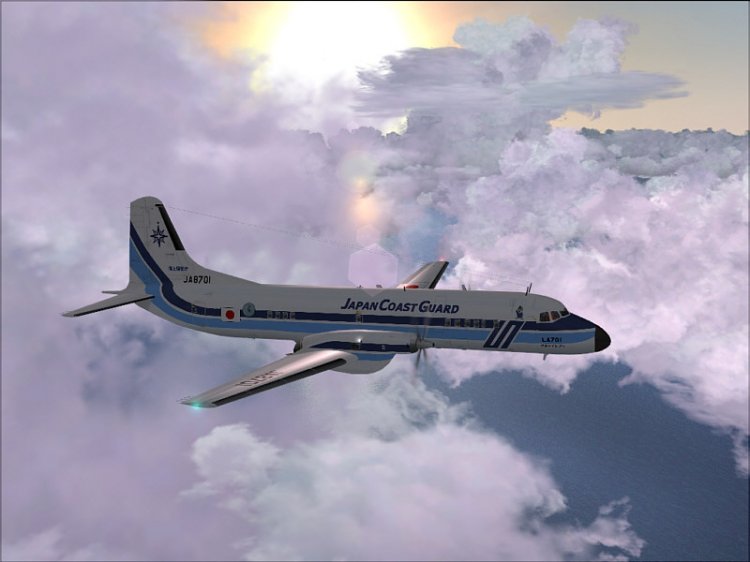
AMC YS-11 (Japanese Coast Guard). In my view an interesting model!
→ Size:
29 MB
→ Date:
16 years ago (14.09.2009 21:13)
→ Author:
Esa Kaihlanen /AFG
→ Approved by moderator:
Lenya69
→ License:
Freeware - Free version, Unlimited Distribution
→ Downloaded:
3441 time(s)