Patch for the tractor and the Project Opensky Panel Towing v2.0 Просмотр ZIP-архива
EXTRAS/REVIEWS/C-130 Hercules/images/c130_2.html
<html><head><title>:: Harrier Panels - [REVIEW] Captain Sim 'Legendary C-130' ::</title>

<meta name="title" content="[REVIEW] Captain Sim 'Legendary C-130'">
<meta name="author" content="Bernardo Srulzon">
<meta name="description" content="The ultimate resource for you to start your virtual pilot career!, A complete and fully illustrated Captain Sim 'Legendary C-130' review! Check it out!">
<meta name="keywords" content="microsoft flight simulator, flight simulator, aviation, aircraft, reviews, weather, flying, pilot, helicopter, jet, ifr, gliders, fear flying, flight, pilot supplies, century flight, airlines, simulation, jumbo">
<meta name="robots" content="index, follow">
	<link rel="stylesheet" href="template_css.css" type="text/css">
<style type="text/css">
<!--
.Stil1 {font-size: xx-small;
	color: #FFFFFF;
}
.style1 {font-size: x-small}
.style3 {
	font-size: 12px;
	color: #000000;
	font-weight: bold;
}
body {
	margin-top: 0px;
}
.style8 {font-family: Arial, Helvetica, sans-serif}
.style9 {
	font-size: 12px;
	color: #333333;
}
-->
</style>
</head>

<body>
<div>
  <table align="center" border="0" cellpadding="0" cellspacing="0" height="20" width="100%">
    <tbody><tr>
      <td class="mt" align="center"><a name="up" id="up"></a><a href="http://www.mamboteam.com/" class="Stil1">www.mamboteam.com</a></td>
    </tr>
  </tbody></table>
  <table align="center" border="0" cellpadding="0" cellspacing="0" width="100%">
    <tbody><tr>
    <td><img src="space.gif" height="1" width="770"></td>
  </tr>
	<tr>
      <td><div class="background">
        <table align="center" border="0" cellpadding="0" cellspacing="0" width="100%">
          <tbody><tr>
            <td background="shadowl.jpg" height="25" width="11"><div>
            </div></td>
            <td style="border-top: 5px solid rgb(255, 255, 255); border-bottom: 1px solid rgb(153, 153, 153);" bgcolor="#f1f1f1" height="25"><span class="pathway"><a href="http://harrierpanels.avsim.ru/" class="pathway">Home</a> <img src="arrow.png" alt="arrow"> <a href="http://harrierpanels.avsim.ru/reviews/eng/" class="pathway">Reviews</a> <img src="arrow.png" alt="arrow">   [REVIEW] Captain Sim 'Legendary C-130' </span></td>

            <td style="border-top: 5px solid rgb(255, 255, 255); border-bottom: 1px solid rgb(153, 153, 153);" align="right" bgcolor="#f1f1f1" height="25"><div class="date">February 2006</div></td>
            <td align="right" background="shadowr.jpg" height="25" width="11"> </td>
          </tr>
        </tbody></table>
        <table align="center" border="0" cellpadding="0" cellspacing="0" width="100%">
          <tbody><tr>
            <td style="padding-left: 8px; background-repeat: repeat-y;" background="shadowl.jpg" valign="top"> </td>
            <td style="background-repeat: repeat-y;" background="lb.gif" valign="top">               </td>
            <td bgcolor="#fafafa" valign="top" width="100%"><div class="" main="">
              <table border="0" cellpadding="0" cellspacing="0" width="100%">
                <tbody><tr bgcolor="#f1f1f1" valign="top">
                                  </tr>
                <tr>
                          </tr>
                <tr align="left" valign="top">
                  <td colspan="3"><div class="main">
                      <table border="0" width="100%">
                        <tbody><tr>
                          <td></td>
                        </tr>
                      </tbody></table>
                      			<table class="contentpaneopen">
			<tbody><tr>
								<td class="contentheading" width="100%">
				[REVIEW] Captain Sim 'Legendary C-130'								</td>
								<td class="buttonheading" align="right" width="100%">
				</td>
							<td class="buttonheading" align="right" width="100%">

			</td>
						</tr>
			</tbody></table>

		<table bgcolor="#FFFFFF" class="contentpaneopen">
				<tbody><tr>
			<td colspan="2" align="left" valign="top" width="70%">
			<span class="small">
			 Written by Bernardo Srulzon			</span>

			</td>
		</tr>
					<tr>
				<td colspan="2" class="createdate" valign="top">
				Monday, 28 November 2005				</td>
			</tr>
					<tr>
			<td colspan="2" valign="top">
			<div class="pagenavcounter">
			  <div class="pagenavcounter">Page 2 of 3</div>
			  <p align="justify"><strong>- 4. 2D Panel and Systems</strong></p>
			  <p align="justify">While the external model is extremely detailed and adds a lot to the package's quality, it is mainly because of the panel and systems that most simmers buy an expensive add-on like the Captain Sim 'Legendary C-130'. If you are one of these simmers, I'm very happy to inform you that the 'Legendary C-130' is a rather complex aircraft with numerous systems and details that will require a few hours of study and many hours of practice to manage completely. Remember what I said about the manual? It will be very useful now!</p>
			  <p align="justify">From the moment you first see the 2D Panel, you realize that all your FMC-configuring abilities will be useless. If you are not used to the good old analog instruments, this can be a scary experience. After a closer look on the panel, the little clocks start making some sense and you should be ready to put in practice what you have read (or not) in the manuals. You may fly the aircraft as the captain or the first officer - the views can be easily changed from a fast-access menu on the right. From the same menu, you have access to most sections of the aircraft: throttle, radio stack, TCAS, overhead, navigator panel, autopilot, doors control, etc.</p>
			  <p align="justify">Captain Sim has obviously put great effort on the panel textures, and the results are impressive. Gauge organization is perfect, lighting is great and the numerous windows provide a large field of vision... the accuracy level of the textures have gone so far that you can actually see the wear and scratches on the instruments' borders! All switches and knobs of the aircraft move, the panels are beautifully painted... it just looks very realistic! Night textures are also perfect, the whole aircraft lights up and it's beautiful to see the shades contrasting with the lights of the panel. You may also choose to test the panel lights and see it all lighted up! To give the panel that incredible look, Captain Sim used many real photographs and designed lots of custom objects - the same visual quality is also present on all other pop-up panels. Whatever they did to make the textures look like worked great, I feel just like I'm flying the aircraft! </p>
			  <p align="center"><a href="http://harrierpanels.avsim.ru/estore/CaptainSim/C-130/C-130.html" target="_blank"><img src="21tb.jpg" border="0" height="143" width="190"></a> <a href="http://harrierpanels.avsim.ru/estore/CaptainSim/C-130/C-130.html" target="_blank"><img src="27tb.jpg" border="0" height="143" width="190"></a> <a href="http://harrierpanels.avsim.ru/estore/CaptainSim/C-130/C-130.html" target="_blank"><img src="23tb.jpg" border="0" height="143" width="190"></a><br>
			      <a href="http://harrierpanels.avsim.ru/estore/CaptainSim/C-130/C-130.html" target="_blank"><img src="25tb.jpg" border="0" height="143" width="190"></a> <a href="http://harrierpanels.avsim.ru/estore/CaptainSim/C-130/C-130.html" target="_blank"><img src="24tb.jpg" border="0" height="143" width="190"></a> <a href="http://harrierpanels.avsim.ru/estore/CaptainSim/C-130/C-130.html" target="_blank"><img src="26tb.jpg" border="0" height="143" width="190"></a></p>
			  <p align="justify"></p>
			  <div style="margin: 0px; float: left;">
                <center>
                  <iframe name="extras336" src="http://harrierpanels.avsim.ru/search/extras300.html" marginwidth="0" marginheight="0" vspace="0" hspace="0" allowtransparency="true" frameborder="0" height="260" scrolling="no" width="350"><img></iframe>
                </center>
                <!-- end of google ads -->
              </div>
			  <span class="style9">With the Aircraft Configurator Editor, you are able to switch between 2D and 3D interior views. That means that you can choose between viewing real pictures (and therefore static) or 3D graphics (and therefore animated) when looking to the sides. From the fast-access menu, you can look through all windows (wingviews included), switch captain/first officer views and even add an approach plate to the panel. However, this aircraft is not meant to be flown entirely in the 2D panel. With the increasingly level of detail and accuracy of systems and gauges, it's been a hard task to find space for all of them. In fact, some important switches and instruments are only available in the virtual cockpit. The captain and first officer views are both very nice and detailed, displaying several different instruments. As a first officer, for example, you can see the flap position indicator, accelerometer, light management panel and the gear handle (that will light up when gear is in transit). The navigator panel basically consists of good looking bitmaps, it serves for no practical purpose and all instruments there are also present in other panels - it could not be ignored, though.
              </span>
			  <p align="justify">Captain Sim has truly done an amazing work with the gauges. There are no default ones and just like all other textures, they are visually excellent. The legibility problem addressed to many of their previous products is fortunately missing in the 'Legendary C-130' - all gauges are fairly legible at 1152x864 resolution. There were tooltips for almost all gauges showing the exact indication on version 1.0, but they seem to have disappeared on version 1.1. Night lighting looks great too, all gauges light up and blend quite nicely with the panel's bitmaps... for my surprise, readability haven't become a problem at night. The gauges themselves work flawlessly, except for the radar altimeter showing heights above 5000 feet and having a little typo - the<strong> 4000ft</strong> marking is written as<strong> 2000ft </strong>on the radar altimeter. Another typo like this one is present on the overhead panel, where "NOT CLOSED" is written as "HOT CLOSED". Navigation is made by VOR's and ADF's. In the HSI, you can track a VOR radial, set the heading bug and course, and it will also show DME information when available. ILS approaches can also be performed, and there is even flight director guidance to help you on keep centered on the localizer and glideslope! Relative VOR and ADF positions are indicated with an arrow on the RMI. A couple of gauges have their positions changed in the 2D panel in relation to the virtual cockpit/real life, mainly because they wouldn't be in the pilot's field of vision but are important enough to be monitored.</p>
              <p align="justify">For those of you who are not familiar with classic instruments (analogic), I'm happy to inform that you may choose to fly the 'Legendary C-130' with digital EICAS engine instruments by selecting this option on the ACE, which should make reading and comprehension of values easier. However, I really prefer to fly the aircraft with the classic instruments... putting digital stuff in such a classic aircraft like the C-130 completely ruins the "magic" for me. The best option is to get used to the old analogic instruments and fly this plane the "right way"! The only problem I could find with the digital EICAS is that it will power up even when there is no power at all. </p>
              <p align="center"><a href="http://harrierpanels.avsim.ru/estore/CaptainSim/C-130/C-130.html" target="_blank"><img src="32tb.jpg" border="0" height="143" width="190"></a> <a href="http://harrierpanels.avsim.ru/estore/CaptainSim/C-130/C-130.html" target="_blank"><img src="33tb.jpg" border="0" height="143" width="190"></a></p>
              <p align="justify">The systems are indeed extremely complex, and this is where the years of reasearch take place. There are over 370 operational elements in the "basic panels" - captain, first officer, overheads and navigator... not to count all pop-up panels included. In the upper part of the overhead, we have the bleed air, air conditioning, pressurization and anti-icing/de-icing systems, plus the GTC (Gas Turbine Compressor)/ATM (Air Turbine Motor). The pressurization system basically allows you to select a cabin altitude and the rate of cabin pressure change for a flight - the pressure is controlled automatically or manually, and an emergency depressurization switch is also available. While the pressurization system seems to work fine, the cabin altitude surpasses the selected one and might get a little too high. The cargo compartment and flight deck temperature can also be controlled. Specific procedures of this systems (and all others) are explained on the manual.</p>
              <p align="justify">Anti-icing/de-icing systems are used to prevent or remove the ice formation on critical areas of the aircraft, either electrically or using heated air. Overheat warning lights are also available, they will illuminate when the temperature has gone too high. There are anti-ice/de-ice systems for the wings, leading edges, propellers... the pitot heat (to prevent ice formation in the two tubes), the windshield anti-ice (for the cockpit's windows) and the nacelle preheat are all modelled. It is very important to set the anti-icing/de-icing systems correctly, you can lose vital instruments like the attitude indicator (artificial horizon) and radar altimeter if ice builds in the pitot tubes. </p>
              <p align="justify">A Gas Turbine Compressor (GTC) is also available in the 'Legendary C-130'. It supplies air for the ground operation of the Air Turbine Motor (ATM) and is necessary for the basic operations of the aircraft such as engine start, nacelle preheat and air-conditioning systems. The electrical power supply systems is what takes the most space in the overhead, it provides power to the aircraft from 5 generators or the battery. Making this complex system look simple, we have primary/secondary AC power and DC power. For easy visualization of the AC and DC systems, the overhead panel is painted in 2 colors, which certainly helps on making the complicated electrical system a little more logical. Several instruments such as voltimeters, loadmeters and frequency meters are installed, and both AC and DC may be powered via external power by selecting this option on the Captain Sim menu. A little glitch on this system shows the "external power on" light every time you have external power connected, even if not using power from the cart. </p>
              <p align="justify">The fuel system has a very nice feature: the ability to dump fuel. In case of an emergency after take-off, it is likely that the aircraft is too heavy for immediate landing... the C-130 can dump the excessive fuel (and thus weight) in a very short time, so that landing can be accomplished as soon as possible. From the outside, you can see a thin trail of white smoke coming from the wingtips - that's your fuel being dumped! Other than that, the fuel system is composed of several crossfeed/bypass valves for fuel management, and some gauges to measure fuel quantity and pressure. The fire detection and extinguishing systems is rather cool. There are fire and overheat warnings all over the panel and you can actually test the system, just like a real fired had occurred! There are five fire emergency control handles (four engines and GTC) that will flash when there's an overheat and light steadily when there is a fire. When pulled, they quickly shut down and feather the respective engine (or GTC). Unfortunately, the audible warning test is not working and I couldn't find a way to make the engine actually catch fire... the fire system is pretty much restricted to testing, then! </p>
              <p align="center"><a href="http://harrierpanels.avsim.ru/estore/CaptainSim/C-130/C-130.html" target="_self"><img src="28tb.jpg" border="0" height="143" width="190"></a> <a href="http://harrierpanels.avsim.ru/estore/CaptainSim/C-130/C-130.html" target="_blank"><img src="29tb.jpg" border="0" height="143" width="190"></a></p>
              <p align="justify">Captain Sim has modelled several other systems for the 'Legendary C-130', including bleed air, hydraulics (for brakes and anti-skid management), flight controls, landing gear and doors operation systems. They make the aircraft a lot more realistic, but are not essential and will not be discussed in this review... the instruments part is a lot more interesting! To start off, we have the communications panel, which allows you to select two VOR stations, two VHF stations and a NDB station for navigation and communication purposes. A transponder is also available, allowing you to select several modes of operation... it's no rocket science, but requires more than just entering squawk number. You may need to read the manual to figure how they work!</p>
              <p align="justify">Throttle and engine condition levers (together with other engine controls) are mounted on the flight controls pedestal. There are, in the left side, markings for maximum reverse, ground idle, flight idle and take-off power settings. On the right side, there are the engine condition levers with feather, ground stop, run and air start markings. In the real aircraft, there are detents in several of these markings, but unfortunately there's no way to model them in a desktop flight simulator. It's worthy to repeat that the textures of this panel are superb, you can clearly see the wear of the markings and the paint! In the lower part of the pedestal and the lower overhead panel, we have prop sync switches, temperature control system, engine start buttons, fuel enrichment system and ground idle low speed buttons (to keep the RPM's low on the ground). </p>
              <p align="justify">I was impressed by two instruments in particular: an autopilot and a TCAS. The TCAS (Traffic Alert and Collision Avoidance System or radar, as one may say) is composed by a small monitor on the top of the panel and its controls. This useful instrument saves lifes everyday by showing other traffic exact position, altitude and providing instructions on how to avoid mid-air collisions. By placing the control switch in the TCAS position, the radar starts showing all surrounding traffic: not-threats, proximity intruders, traffic advisory (TA) and resolution advisory (RA). The traffic color changes accordingly to its position; when it gets closer to your aircraft, it will change to yellow to indicate potential hazard. A collision threat is indicated by a red icon, and is followed by a voice providing vertical manuever instructions: "Climb! Climb!" or "Descent! Descent!"... cool, isn't it?! You can also change the monitor brightness and change the radar's tilt, so that it caan capture traffic above or below you.</p>
              <p align="justify">A Smiths autopilot is modelled in the 'Legendary C-130'. Don't expect a FMC or precise lateral/vertical automatic navigation, this autopilot has limited functions such as holding an altitude, turning, following an ILS and following a VOR track. While it can be somewhat useful for these basic operations, the Smiths autopilot is far from being perfect. I have found that it banks too fast (faster than full manual banking) and the VOR/ILS capture is too slow (as mentioned before), which makes me bounce right and left for several miles before entering the right track. You may also choose to track a GPS route.</p>
              <p align="center"><a href="http://harrierpanels.avsim.ru/estore/CaptainSim/C-130/C-130.html" target="_blank"><img src="22tb.jpg" border="0" height="143" width="190"></a> <a href="http://harrierpanels.avsim.ru/estore/CaptainSim/C-130/C-130.html" target="_blank"><img src="30tb.jpg" border="0" height="143" width="190"></a> <a href="http://harrierpanels.avsim.ru/estore/CaptainSim/C-130/C-130.html" target="_blank"><img src="31tb.jpg" border="0" height="143" width="190"></a></p>
              <p align="justify"><strong><em>Please advance to the next page now...</em></strong></p>
              <strong><em><br></em></strong><strong><br></strong></div><div class="pagenavbar"><strong><em><a href="../C-130.html" class="pagenav" title="first page"><< Start</a> <a href="../C-130.html" class="pagenav" title="previous page">< Prev</a> <a href="../C-130.html" class="pagenav"><strong>1</strong></a> <span class="pagenav">2</span> <a href="c130_3.html" class="pagenav"><strong>3</strong></a> <a href="c130_3.html" class="pagenav" title="next page">Next ></a> <a href="c130_3.html" class="pagenav" title="end page">End >></a></em></strong></div>
<strong><br>			</strong></td>
		</tr>
				</tbody></table>

		<span class="article_seperator"> </span>

		                  </div></td>
                </tr>
                <tr bgcolor="#f1f1f1">
                  <td colspan="3" style="border-top: 3px solid rgb(255, 255, 255);" valign="top"></td>
                  </tr>
              </tbody></table>
             </div></td>
            <td style="background-repeat: repeat-y;" background="rb.gif" valign="top"></td>
            <td style="padding-right: 8px; background-repeat: repeat-y;" background="shadowr.jpg" valign="top"> </td>
          </tr>
        </tbody></table>
        <table background="center2.jpg" border="0" cellpadding="0" cellspacing="0" width="100%">
          <tbody><tr>
            <td width="26"><img src="left2.jpg"></td>
            <td>
              <table border="0" cellpadding="0" cellspacing="0" width="100%">
                <tbody><tr>
                  <td align="left" width="30">  </td>
                  <td align="center"><div class="footer style1">
                    <p class="style3"><span class="style8"><a href="http://harrierpanels.avsim.ru/"><font size="2">Copyright ©2005-2006 Harrier Panels, Inc.</font></a></span><br>
                      </p>
                    </div>
                    </td>
                  <td align="right" width="30"> </td>
                </tr>
            </tbody></table></td>
            <td width="26"><img src="right2.jpg"></td>
          </tr>
        </tbody></table>
      </div></td>
    </tr>
  </tbody></table>
</div>
</body></html>
pb2os.zip
| Имя файла | Дата | Размер |
|---|---|---|
| EXTRAS/ | 17.02.2006 16:18 | |
| EXTRAS/REVIEWS/ | 16.02.2006 18:55 | |
| EXTRAS/REVIEWS/Boeing 727/ | 05.02.2006 15:55 | |
| EXTRAS/REVIEWS/Boeing 727/images/ | 05.02.2006 10:19 | |
| EXTRAS/REVIEWS/Boeing 727/images/reflectiontn.jpg | 01.02.2006 10:57 | 10 KB |
| EXTRAS/REVIEWS/Boeing 727/images/review-w.gif | 01.02.2006 10:59 | 10 KB |
| EXTRAS/REVIEWS/Boeing 727/images/727vccrewpostn.jpg | 01.02.2006 10:57 | 9 KB |
| EXTRAS/REVIEWS/Boeing 727/images/overhead_small.jpg | 01.02.2006 10:57 | 34 KB |
| EXTRAS/REVIEWS/Boeing 727/images/feedback.gif | 01.02.2006 10:57 | 989 B |
| EXTRAS/REVIEWS/Boeing 727/images/rotatetn.jpg | 01.02.2006 10:57 | 6 KB |
| EXTRAS/REVIEWS/Boeing 727/images/727mainofficevctn.jpg | 01.02.2006 10:57 | 10 KB |
| EXTRAS/REVIEWS/Boeing 727/images/luft727tn.jpg | 01.02.2006 10:57 | 6 KB |
| EXTRAS/REVIEWS/Boeing 727/images/tovctn.jpg | 01.02.2006 10:57 | 9 KB |
| EXTRAS/REVIEWS/Boeing 727/images/2d_paneltn.jpg | 01.02.2006 10:57 | 7 KB |
| EXTRAS/REVIEWS/Boeing 727/images/t2.gif | 01.02.2006 10:58 | 115 B |
| EXTRAS/REVIEWS/Boeing 727/images/stars_4.gif | 01.02.2006 10:57 | 3 KB |
| EXTRAS/REVIEWS/Boeing 727/images/727vctn.jpg | 01.02.2006 10:57 | 6 KB |
| EXTRAS/REVIEWS/Boeing 727/images/panam_small.jpg | 01.02.2006 10:58 | 47 KB |
| EXTRAS/REVIEWS/Boeing 727/images/top_img.jpg | 05.02.2006 10:58 | 36 KB |
| EXTRAS/REVIEWS/Boeing 727/images/panel_small.jpg | 01.02.2006 10:57 | 35 KB |
| EXTRAS/REVIEWS/Boeing 727/images/tce_small.jpg | 01.02.2006 10:58 | 49 KB |
| EXTRAS/REVIEWS/Boeing 727/images/pnlnight_small.jpg | 01.02.2006 10:57 | 46 KB |
| EXTRAS/REVIEWS/Boeing 727/images/radiosapuap_small.jpg | 01.02.2006 10:57 | 33 KB |
| EXTRAS/REVIEWS/Boeing 727/images/twa_small.jpg | 01.02.2006 10:57 | 22 KB |
| EXTRAS/REVIEWS/Boeing 727/images/727manpaneltn.jpg | 05.02.2006 11:54 | 13 KB |
| EXTRAS/REVIEWS/Boeing 727/images/a200_9f-1s.jpg | 05.02.2006 13:42 | 6 KB |
| EXTRAS/REVIEWS/Boeing 727/images/an_2f-1s.jpg | 05.02.2006 13:46 | 4 KB |
| EXTRAS/REVIEWS/Boeing 727/images/top.gif | 28.10.2005 15:09 | 350 B |
| EXTRAS/REVIEWS/Boeing 727/images/creditcards5.jpg | 05.02.2006 15:04 | 49 KB |
| EXTRAS/REVIEWS/Boeing 727/images/aircanada_small.jpg | 01.02.2006 10:58 | 36 KB |
| EXTRAS/REVIEWS/Boeing 727/images/ba88_small.jpg | 01.02.2006 10:58 | 25 KB |
| EXTRAS/REVIEWS/Boeing 727/images/cougar_small.jpg | 01.02.2006 10:58 | 33 KB |
| EXTRAS/REVIEWS/Boeing 727/images/fadeorg.gif | 01.02.2006 10:59 | 317 B |
| EXTRAS/REVIEWS/Boeing 727/images/fe_small.jpg | 01.02.2006 10:57 | 34 KB |
| EXTRAS/REVIEWS/Boeing 727/images/finis_small.jpg | 01.02.2006 10:57 | 55 KB |
| EXTRAS/REVIEWS/Boeing 727/images/flap_small.jpg | 01.02.2006 10:58 | 42 KB |
| EXTRAS/REVIEWS/Boeing 727/Review1.html | 16.02.2006 15:06 | 31 KB |
| EXTRAS/REVIEWS/Boeing 727/Review2.html | 17.02.2006 16:14 | 37 KB |
| EXTRAS/REVIEWS/C-130 Hercules/ | 05.02.2006 16:44 | |
| EXTRAS/REVIEWS/C-130 Hercules/images/ | 05.02.2006 16:49 | |
| EXTRAS/REVIEWS/C-130 Hercules/images/shadowr.jpg | 01.02.2006 10:50 | 314 B |
| EXTRAS/REVIEWS/C-130 Hercules/images/arrow.png | 01.02.2006 10:47 | 169 B |
| EXTRAS/REVIEWS/C-130 Hercules/images/center2.jpg | 01.02.2006 10:47 | 526 B |
| EXTRAS/REVIEWS/C-130 Hercules/images/lb.gif | 01.02.2006 10:50 | 99 B |
| EXTRAS/REVIEWS/C-130 Hercules/images/space.gif | 01.02.2006 10:50 | 49 B |
| EXTRAS/REVIEWS/C-130 Hercules/images/icon.ico | 16.02.2006 19:15 | 1 KB |
| EXTRAS/REVIEWS/C-130 Hercules/images/10tb.jpg | 01.02.2006 10:47 | 5 KB |
| EXTRAS/REVIEWS/C-130 Hercules/images/9tb.jpg | 01.02.2006 10:47 | 5 KB |
| EXTRAS/REVIEWS/C-130 Hercules/images/15tb.jpg | 01.02.2006 10:47 | 5 KB |
| EXTRAS/REVIEWS/C-130 Hercules/images/mainlogo.jpg | 01.02.2006 10:47 | 14 KB |
| EXTRAS/REVIEWS/C-130 Hercules/images/2tb.jpg | 01.02.2006 10:47 | 6 KB |
| EXTRAS/REVIEWS/C-130 Hercules/images/tn_11.jpg | 01.02.2006 10:47 | 5 KB |
| EXTRAS/REVIEWS/C-130 Hercules/images/7tb.gif | 01.02.2006 10:47 | 44 KB |
| EXTRAS/REVIEWS/C-130 Hercules/images/6tb.jpg | 01.02.2006 10:47 | 7 KB |
| EXTRAS/REVIEWS/C-130 Hercules/images/c130_3.html | 17.02.2006 16:16 | 20 KB |
| EXTRAS/REVIEWS/C-130 Hercules/images/1tb.jpg | 01.02.2006 10:47 | 6 KB |
| EXTRAS/REVIEWS/C-130 Hercules/images/right2.jpg | 01.02.2006 10:50 | 1 KB |
| EXTRAS/REVIEWS/C-130 Hercules/images/18tb.jpg | 01.02.2006 10:47 | 8 KB |
| EXTRAS/REVIEWS/C-130 Hercules/images/5tb.jpg | 01.02.2006 10:47 | 7 KB |
| EXTRAS/REVIEWS/C-130 Hercules/images/13tb.jpg | 01.02.2006 10:47 | 4 KB |
| EXTRAS/REVIEWS/C-130 Hercules/images/20tb.jpg | 01.02.2006 10:47 | 13 KB |
| EXTRAS/REVIEWS/C-130 Hercules/images/17tb.jpg | 01.02.2006 10:47 | 5 KB |
| EXTRAS/REVIEWS/C-130 Hercules/images/shadowl.jpg | 01.02.2006 10:50 | 303 B |
| EXTRAS/REVIEWS/C-130 Hercules/images/left2.jpg | 01.02.2006 10:50 | 1 KB |
| EXTRAS/REVIEWS/C-130 Hercules/images/rb.gif | 01.02.2006 10:50 | 99 B |
| EXTRAS/REVIEWS/C-130 Hercules/images/4tb.jpg | 01.02.2006 10:47 | 5 KB |
| EXTRAS/REVIEWS/C-130 Hercules/images/12tb.jpg | 01.02.2006 10:47 | 3 KB |
| EXTRAS/REVIEWS/C-130 Hercules/images/16tb.jpg | 01.02.2006 10:47 | 5 KB |
| EXTRAS/REVIEWS/C-130 Hercules/images/19tb.jpg | 01.02.2006 10:47 | 4 KB |
| EXTRAS/REVIEWS/C-130 Hercules/images/3tb.jpg | 01.02.2006 10:47 | 6 KB |
| EXTRAS/REVIEWS/C-130 Hercules/images/11tb.jpg | 01.02.2006 10:47 | 4 KB |
| EXTRAS/REVIEWS/C-130 Hercules/images/21tb.jpg | 01.02.2006 10:48 | 10 KB |
| EXTRAS/REVIEWS/C-130 Hercules/images/22tb.jpg | 01.02.2006 10:48 | 10 KB |
| EXTRAS/REVIEWS/C-130 Hercules/images/23tb.jpg | 01.02.2006 10:48 | 9 KB |
| EXTRAS/REVIEWS/C-130 Hercules/images/24tb.jpg | 01.02.2006 10:48 | 11 KB |
| EXTRAS/REVIEWS/C-130 Hercules/images/25tb.jpg | 01.02.2006 10:48 | 7 KB |
| EXTRAS/REVIEWS/C-130 Hercules/images/26tb.jpg | 01.02.2006 10:48 | 11 KB |
| EXTRAS/REVIEWS/C-130 Hercules/images/27tb.jpg | 01.02.2006 10:48 | 10 KB |
| EXTRAS/REVIEWS/C-130 Hercules/images/28tb.jpg | 01.02.2006 10:48 | 11 KB |
| EXTRAS/REVIEWS/C-130 Hercules/images/29tb.jpg | 01.02.2006 10:48 | 12 KB |
| EXTRAS/REVIEWS/C-130 Hercules/images/30tb.jpg | 01.02.2006 10:48 | 10 KB |
| EXTRAS/REVIEWS/C-130 Hercules/images/31tb.jpg | 01.02.2006 10:48 | 10 KB |
| EXTRAS/REVIEWS/C-130 Hercules/images/32tb.jpg | 01.02.2006 10:48 | 9 KB |
| EXTRAS/REVIEWS/C-130 Hercules/images/33tb.jpg | 01.02.2006 10:48 | 9 KB |
| EXTRAS/REVIEWS/C-130 Hercules/images/tn_final%20app.jpg | 01.02.2006 10:48 | 6 KB |
| EXTRAS/REVIEWS/C-130 Hercules/images/34tb.jpg | 01.02.2006 10:50 | 8 KB |
| EXTRAS/REVIEWS/C-130 Hercules/images/35tb.jpg | 01.02.2006 10:50 | 8 KB |
| EXTRAS/REVIEWS/C-130 Hercules/images/36tb.jpg | 01.02.2006 10:50 | 9 KB |
| EXTRAS/REVIEWS/C-130 Hercules/images/37tb.jpg | 01.02.2006 10:50 | 7 KB |
| EXTRAS/REVIEWS/C-130 Hercules/images/38tb.jpg | 01.02.2006 10:50 | 14 KB |
| EXTRAS/REVIEWS/C-130 Hercules/images/39tb.jpg | 01.02.2006 10:50 | 8 KB |
| EXTRAS/REVIEWS/C-130 Hercules/images/40tb.jpg | 01.02.2006 10:50 | 8 KB |
| EXTRAS/REVIEWS/C-130 Hercules/images/41tb.jpg | 01.02.2006 10:50 | 8 KB |
| EXTRAS/REVIEWS/C-130 Hercules/images/42tb.jpg | 01.02.2006 10:50 | 7 KB |
| EXTRAS/REVIEWS/C-130 Hercules/images/43tb.jpg | 01.02.2006 10:50 | 9 KB |
| EXTRAS/REVIEWS/C-130 Hercules/images/44tb.jpg | 01.02.2006 10:50 | 9 KB |
| EXTRAS/REVIEWS/C-130 Hercules/images/45.jpg | 01.02.2006 10:50 | 50 KB |
| EXTRAS/REVIEWS/C-130 Hercules/images/tn_jpak2.jpg | 01.02.2006 10:50 | 4 KB |
| EXTRAS/REVIEWS/C-130 Hercules/images/template_css.css | 16.02.2006 17:26 | 12 KB |
| EXTRAS/REVIEWS/C-130 Hercules/images/c130_2.html | 16.02.2006 17:56 | 22 KB |
| EXTRAS/REVIEWS/C-130 Hercules/C-130.html | 16.02.2006 17:48 | 22 KB |
| EXTRAS/Desktop.ini | 18.02.2006 19:59 | 81 B |
| Patch.exe | 19.02.2006 11:52 | 172 KB |
| README(ENG).txt | 19.02.2006 11:50 | 5 KB |
| scheme_eng_os.gif | 19.02.2006 13:35 | 12 KB |
| scheme_rus_os.gif | 19.02.2006 14:25 | 10 KB |
| README(RUS).TXT | 19.02.2006 15:20 | 4 KB |
| avsim_ru.diz | 09.02.2003 03:00 | 394 B |
| Итого: | 1 MB | |
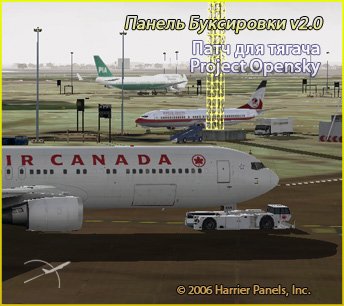
This patch will allow you to use the towing v2.0 airfield tractor unit (PTS-1), Project Opensky, developed by Hiroshi Igami.
→ Size:
1 MB
→ Date:
20 years ago (20.02.2006 01:04)
→ Author:
Harrier
→ License:
Freeware - Free version, Unlimited Distribution
→ Downloaded:
2024 time(s)