Patch for the tractor and the Project Opensky Panel Towing v2.0 Просмотр ZIP-архива
EXTRAS/REVIEWS/C-130 Hercules/images/c130_3.html
<html><head><title>:: Harrier Panels - [REVIEW] Captain Sim 'Legendary C-130' ::</title>

<meta name="title" content="[REVIEW] Captain Sim 'Legendary C-130'">
<meta name="author" content="Bernardo Srulzon">
<meta name="description" content="The ultimate resource for you to start your virtual pilot career!, A complete and fully illustrated Captain Sim 'Legendary C-130' review! Check it out!">
<meta name="keywords" content="microsoft flight simulator, flight simulator, aviation, aircraft, reviews, weather, flying, pilot, helicopter, jet, ifr, gliders, fear flying, flight, pilot supplies, century flight, airlines, simulation, jumbo">
<meta name="robots" content="index, follow">
	<link rel="stylesheet" href="template_css.css" type="text/css">
<style type="text/css">
<!--
.Stil1 {font-size: xx-small;
	color: #FFFFFF;
}
.style1 {font-size: x-small}
.style3 {
	font-size: 12px;
	color: #000000;
	font-weight: bold;
}
body {
	margin-top: 0px;
}
.style8 {font-family: Arial, Helvetica, sans-serif}
.style9 {
	color: #333333;
	font-size: 18px;
	font-family: Arial, Helvetica, sans-serif;
}
.style10 {
	font-size: 12px;
	color: #333333;
}
.style18 {font-size: 16px}
.style22 {font-size: 16px; font-weight: bold; }
.style23 {color: #333333}
-->
</style>
</head>

<body>
<div>
  <table align="center" border="0" cellpadding="0" cellspacing="0" height="20" width="100%">
    <tbody><tr>
      <td class="mt" align="center"><a name="up" id="up"></a><a href="http://www.mamboteam.com/" class="Stil1">www.mamboteam.com</a></td>
    </tr>
  </tbody></table>
  <table align="center" border="0" cellpadding="0" cellspacing="0" width="100%">
    <tbody><tr>
    <td><img src="space.gif" height="1" width="770"></td>
  </tr>
	<tr>
      <td><div class="background">
        <table align="center" border="0" cellpadding="0" cellspacing="0" width="100%">
          <tbody><tr>
            <td background="shadowl.jpg" height="25" width="11"><div>
            </div></td>
            <td style="border-top: 5px solid rgb(255, 255, 255); border-bottom: 1px solid rgb(153, 153, 153);" bgcolor="#f1f1f1" height="25"><span class="pathway"><a href="http://harrierpanels.avsim.ru/" class="pathway">Home</a> <img src="arrow.png" alt="arrow"> <a href="http://harrierpanels.avsim.ru/reviews/eng/" class="pathway">Reviews</a> <img src="arrow.png" alt="arrow">   [REVIEW] Captain Sim 'Legendary C-130' </span></td>

            <td style="border-top: 5px solid rgb(255, 255, 255); border-bottom: 1px solid rgb(153, 153, 153);" align="right" bgcolor="#f1f1f1" height="25"><div class="date">February 2006</div></td>
            <td align="right" background="shadowr.jpg" height="25" width="11"> </td>
          </tr>
        </tbody></table>
        <table align="center" border="0" cellpadding="0" cellspacing="0" width="100%">
          <tbody><tr>
            <td style="padding-left: 8px; background-repeat: repeat-y;" background="shadowl.jpg" valign="top"> </td>
            <td style="background-repeat: repeat-y;" background="lb.gif" valign="top">               </td>
            <td bgcolor="#fafafa" valign="top" width="100%"><div class="" main="">
              <table border="0" cellpadding="0" cellspacing="0" width="100%">
                <tbody><tr bgcolor="#f1f1f1" valign="top">
                                  </tr>
                <tr>
                          </tr>
                <tr align="left" valign="top">
                  <td colspan="3"><div class="main">
                      <table border="0" width="100%">
                        <tbody><tr>
                          <td></td>
                        </tr>
                      </tbody></table>
                      			<table class="contentpaneopen">
			<tbody><tr>
								<td class="contentheading" width="100%">
				[REVIEW] Captain Sim 'Legendary C-130'								</td>
								<td class="buttonheading" align="right" width="100%">
				</td>
							<td class="buttonheading" align="right" width="100%">

			</td>
						</tr>
			</tbody></table>

		<table bgcolor="#FFFFFF" class="contentpaneopen">
				<tbody><tr>
			<td colspan="2" align="left" valign="top" width="70%">
			<span class="small">
			 Written by Bernardo Srulzon			</span>

			</td>
		</tr>
					<tr>
				<td colspan="2" class="createdate" valign="top">
				Monday, 28 November 2005				</td>
			</tr>
					<tr>
			<td colspan="2" valign="top">
			<div class="pagenavcounter">
			  <div class="pagenavcounter">
			    <div class="pagenavcounter">Page 3 of 3</div>
			    <p align="justify"><strong>- 5. Virtual Cockpit</strong></p>
			    <p align="justify">The virtual cockpit has always been a great addition to any Flight Simulator aircraft, as it provides a much better outside view and situation awareness for the pilots. In fact, some developers are choosing to design a virtual cockpit that is more functional than the 2D panel. Since they don't have to place every gauge and instrument in the 2D panel anymore, it ends up looking a lot better and less crowded. As a result, the technology used to develop the virtual cockpit is being greatly improved over the years in order to enhance the functionality and keep the frame rates fair. For the 'Legendary C-130', Captain Sim has chosen to save some 2D panel space and enhance the virtual cockpit by making a few panels and instruments only available there. Important engine indicators, wiper controls and some other gauges/switches can only be seen or managed in the virtual cockpit.</p>
			    <p align="justify">All I can say about the 'Legendary C-130' virtual cockpit is that it's the best one I have ever seen. It is certainly better than many other top quality add-ons in both visual quality and funtionality. Everything in the virtual cockpit blends quite well and the same highly detailed textures of the 2D panel are also present there. It is fully designed in 3D, enabling you to see all the visual details from all angles and heights... the experience gets even more enjoyable when you use ActiveCamera or IGFly Walk&Folow, since you can actually "walk" inside the aircraft's cockpit and cabin! Also, if you have chose the digital EICAS as your engine instrument, it will also show up in the virtual cockpit and work like the 2D instrument. The virtual cockpit looks simply amazing, makes me feel just like I'm flying the plane! </p>
			    <p align="center"><a href="http://harrierpanels.avsim.ru/estore/CaptainSim/C-130/C-130.html" target="_blank"><img src="34tb.jpg" border="0" height="143" width="190"></a> <a href="http://harrierpanels.avsim.ru/estore/CaptainSim/C-130/C-130.html" target="_blank"><img src="35tb.jpg" border="0" height="143" width="190"></a> <a href="http://harrierpanels.avsim.ru/estore/CaptainSim/C-130/C-130.html" target="_blank"><img src="36tb.jpg" border="0" height="143" width="190"></a><br>
			        <a href="http://harrierpanels.avsim.ru/estore/CaptainSim/C-130/C-130.html" target="_blank"><img src="37tb.jpg" border="0" height="143" width="190"></a> <a href="http://harrierpanels.avsim.ru/estore/CaptainSim/C-130/C-130.html" target="_blank"><img src="38tb.jpg" border="0" height="143" width="190"></a> <a href="http://harrierpanels.avsim.ru/estore/CaptainSim/C-130/C-130.html" target="_blank"><img src="39tb.jpg" border="0" height="143" width="190"></a></p>
			    <p align="justify">The cargo bay is also modelled on the 'Legendary C-130', but this time you will need ActiveCamera or Walk&Follow in order to view it. However, no cargo items can be seen from there (nor from the exterior view, for that matter... only the ground vehicle can be moved into the cargo bay). The navigator panel is not modelled. Reflections on the cockpit windows can be enabled, but I have decided to take them off because of their "weird look", composed of static images instead of dynamic ones. Night lighting of the C-130 virtual cockpit is nothing less than incredible. Just as I would expect, you can't see much of the instruments at night with no lighting, but when you turn the cockpit lights on... everything changes! Gauges and instruments start lighting up, shorty followed by the rest of the cockpit - another beautiful sight, as the gauges remain perfectly readable and the virtual cockpit can be zoomed in with no significant loss in quality! Cockpit lighting is available in two colors: white and green (since red isn't working) - this setting can be changed via the Aircraft Configurator Editor (ACE). </p>
			    <p align="center"><a href="http://harrierpanels.avsim.ru/estore/CaptainSim/C-130/C-130.html" target="_blank"><img src="40tb.jpg" border="0" height="143" width="190"></a> <a href="http://harrierpanels.avsim.ru/estore/CaptainSim/C-130/C-130.html" target="_blank"><img src="41tb.jpg" border="0" height="143" width="190"></a> <a href="http://harrierpanels.avsim.ru/estore/CaptainSim/C-130/C-130.html" target="_blank"><img src="42tb.jpg" border="0" height="143" width="190"></a><br>
			        <a href="http://harrierpanels.avsim.ru/estore/CaptainSim/C-130/C-130.html" target="_blank"><img src="43tb.jpg" border="0" height="143" width="190"></a> <a href="http://www.fsstation.com/customlegendaryc130/44.jpg" target="_blank"></a><a href="http://harrierpanels.avsim.ru/estore/CaptainSim/C-130/C-130.html" target="_blank"><img src="44tb.jpg" border="0" height="143" width="190"></a></p>
			    <p align="justify"></p>
			    <div style="margin: 0px; float: right;">

                  <center>
                <iframe name="extras336" src="http://harrierpanels.avsim.ru/search/extras300.html" marginwidth="0" marginheight="0" vspace="0" hspace="0" allowtransparency="true" frameborder="0" height="260" scrolling="no" width="350"><img></iframe>
            </center>
			<!-- end of google ads -->
                </div>
			    <span class="style10">Although the visual quality of the virtual cockpit is truly impressive, it is the fully clickable gauges, switches and knobs that have really surprised me. Every operational element modelled is clickable and reacts to your input by rotating, switching, moving, opening... and obviously performing the correspondent changes in the system. You can see the throttles, propeller condition levers, yoke, rudders and nose wheel steering move in real time, in reaction to your joystick inputs. Another great addition are the moving wipers, which actually work in the virtual cockpit and exterior model with four different speeds, selected on the side panel. The gauges on the virtual cockpit work just like they do in a 2D panel, though sometimes a change in their location (as mentioned before). There is, however, a big difference between the 2D and 3D gauges: the update rate. While the 2D gauges are updated with no delay (continuous movement), 3D gauges may take a short while to update, causing a slight innaccuracy that may be bothersome at times. I'm definitely not saying that the virtual cockpit lower is lagged or unflyable. In fact, it's pretty much flyable and my personal favorite way to fly this aircraft, but the 2D panel is of better use under certain conditions.
                </span>
			    <p align="justify"><strong>- 6. Sounds and Aircraft Configurator Editor (ACE)</strong></p>
			    <p align="justify">A nice, complete and custom soudset has always been a great way to improve the sense of realism of any aircraft. With the improvements made for version 1.1, the 'Legendary C-130' soudset is now one of the best ones out there. There are sounds for everything you can think of: engine, flaps, switches, TCAS, Gas Turbine Compressor (GTC), landing gear and many, many others. It's hard to talk about the soundset, but I can reassure you that the sound quality is amazing... I simply love the noise made by those loud engines, especially when the speakers volume are high and I am concentrated on flying the aircraft. There is really nothing better than that! The sounds are just perfect, except maybe for the engine startup sound being significantly louder than the normal engine sound... but it's not a big issue at all! </p>
			    <p align="justify">The Aircraft Configurator Editor (ACE) is a software that basically allows you to configure your aircraft your way. You can add or modify existing liveries (which can be downloaded for free), enable or disable effects (engine smoke, engine start, fuel dump, IR flares), modify the model shine (semi-gloss or matte), choose a seat (captain or flight officer), instrument style (classic or digital EICAS) and lighting color (white or green), and enable or disable virtual cockpit, 2D interior views and glass reflection. You can also remove the external tanks and easily load containers, tanks, weapons or troops into the aircraft. Changes made to one variation applies to all others, and the ACE indeed saves these changes. I definitely think this software is a great addition! </p>
			    <p align="center"><a href="http://harrierpanels.avsim.ru/estore/CaptainSim/C-130/C-130.html" target="_blank"><img src="45.jpg" border="0" height="351" width="500"></a></p>
			    <p align="justify"><strong>- 8. Conclusion</strong></p>
			    <p align="justify">Soon after the final release, Captain Sim has released an update to the 'Legendary C-130'. This update fixed all major bugs of the aircraft (and some minor too), and also added quite a few interesting new features. Since this review is entirely based on the 1.1 version (after SP1), you may think that I have overlooked some of the issues you may have read somewhere on the internet. That is not true - these issues were not mentioned here because they simply do not exist anymore. </p>
			    <p align="justify">The Captain Sim 'Legendary C-130' is impressive on the level of detail and realism. Everything from the switch caps to the cargo doors are animated, which added to the fact that the textures also look incredibly detailed result in a great sense of realism. Also, the virtual cockpit proved to be very useful, detailed and frame rate friendly, allowing me to use it for the most part of my flights. The C-130 is indeed a very flexible aircraft, it flies smoothly and seems to respond correctly to all my inputs, with no great effort needed to perform a good take-off or landing. The systems and panels have also been given a lot of attention: they are so realistic that you will need to spend quite some time reading the manuals to figure them out, which is great for people interested in the C-130 who are looking forward to flying like the pros. I have also loved the configuration options of the ACE, the soundset and the highly detailed documentation. There are no significant problems with the 'Legendary C-130' - in fact, the remaining problems are so minor that most simmers won't even notice. </p>
			    <p align="justify">The 'Legendary C-130' price of $51.30 can be scary, since it's one of the most expensive FS2004 add-ons to date. However, if you are interested in the Lockheed C-130 or military aircraft in general, there is no better place to spend your money! I highly recommend the Captain Sim 'Legendary C-130' for everyone who wants a faithful reproduction of this truly classic aircraft! If you find the <strong><em>Professional version</em></strong> price too high, I suggest that you wait for the <strong><em>Standard version</em></strong> of this aircaft, which will be released for a price of $41.30. </p>
			    <p align="center"><strong>Check out the </strong><a href="http://harrierpanels.avsim.ru/estore/CaptainSim/C-130/C-130.html" target="_blank">Harrier Panels  website</a><strong> for more details on how to purchase this product.</strong></p>
			    <p align="justify"><strong>PROS:</strong></p>
			    <p align="justify">// Incredibly detailed textures of the inside and outside of the aircraft<br>
			      // Many livery options to choose (plus lots of more available for download)<br>
			      // Extremely realistic panels and systems <br>
			      // Feels great to fly!<br>
			      // Working TCAS<br>
			      // Beautiful night lighting<br>
			      // Good frame rates</p>
			    <p align="justify"><strong>CONS:</strong></p>
			    <p align="justify">// Fuel dump effect look weird at night<br>
			      // Radar altimeter shows altitudes above 5000ft<br>
			      // Gauge tooltips not showing<br>
			      // I have tried hard to find anything that would compromise my overall experience with this aircraft, but I really couldn't find anything but minor issues!</p>
			    <h3 align="center" class="style9"><strong>Final grade: 10/10!</strong></h3>
			    <h3 align="center" class="style9"><strong>Congratulations, Captain Sim!!!</strong></h3>
			    <p align="center" class="style22"><a href="http://harrierpanels.avsim.ru/estore/CaptainSim/C-130/C-130.html" target="_blank">Learn More & Buy it Now!</a></p>
			  </div>
			  <p align="center"><a href="http://harrierpanels.avsim.ru/estore/CaptainSim/C-130/C-130.html" target="_blank"><img src="../../Boeing%20727/images/creditcards5.jpg" width="680" height="48" border="0"></a> </p>
			  <table align="center" border="1" cellpadding="5" width="66%">
                <tbody>
                  <tr>
                    <td height="78"><div align="center">
                        <p><b><font size="2" face="Arial, Helvetica, sans-serif">Standard Disclaimer</font></b></p>
                        <p align="justify"><font color="#000000" face="Arial, Helvetica, sans-serif" size="1"> The review above is a subjective assessment of the product by the author. There is no connection between the producer and the reviewer, and we feel this review is unbiased and truly reflects the performance of the product in the simming environment. This disclaimer is posted here in order provide you with background information on the reviewer and connections that may exist between him/her and the contributing party. </font><font color="#000000" face="Arial, Helvetica, sans-serif" size="1"> </font> </p>
                    </div></td>
                  </tr>
                </tbody>
              </table>
			  <strong><em><br></em></strong><strong><br>
			  </strong></div><div class="pagenavbar"><strong><a href="../C-130.html" class="pagenav" title="first page"><< Start</a> <a href="c130_2.html" class="pagenav" title="previous page">< Prev</a> <a href="../C-130.html" class="pagenav"><strong>1</strong></a> <a href="c130_2.html" class="pagenav"><strong>2</strong></a> <span class="pagenav">3</span> <span class="pagenav">Next ></span> <span class="pagenav">End >></span></strong></div>
<strong><br>			</strong></td>
		</tr>
				</tbody></table>

		<span class="article_seperator"> </span>

		                  </div></td>
                </tr>
                <tr bgcolor="#f1f1f1">
                  <td colspan="3" style="border-top: 3px solid rgb(255, 255, 255);" valign="top"></td>
                  </tr>
              </tbody></table>
             </div></td>
            <td style="background-repeat: repeat-y;" background="rb.gif" valign="top"></td>
            <td style="padding-right: 8px; background-repeat: repeat-y;" background="shadowr.jpg" valign="top"> </td>
          </tr>
        </tbody></table>
        <table background="center2.jpg" border="0" cellpadding="0" cellspacing="0" width="100%">
          <tbody><tr>
            <td width="26"><img src="left2.jpg"></td>
            <td>
              <table border="0" cellpadding="0" cellspacing="0" width="100%">
                <tbody><tr>
                  <td align="left" width="30">  </td>
                  <td align="center"><div class="footer style1">
                    <p class="style3"><span class="style8"><a href="http://harrierpanels.avsim.ru/"><font size="2">Copyright ©2005-2006 Harrier Panels, Inc.</font></a></span><br>
                      </p>
                    </div>
                    </td>
                  <td align="right" width="30"> </td>
                </tr>
            </tbody></table></td>
            <td width="26"><img src="right2.jpg"></td>
          </tr>
        </tbody></table>
      </div></td>
    </tr>
  </tbody></table>
</div>
</body></html>
pb2os.zip
| Имя файла | Дата | Размер |
|---|---|---|
| EXTRAS/ | 17.02.2006 16:18 | |
| EXTRAS/REVIEWS/ | 16.02.2006 18:55 | |
| EXTRAS/REVIEWS/Boeing 727/ | 05.02.2006 15:55 | |
| EXTRAS/REVIEWS/Boeing 727/images/ | 05.02.2006 10:19 | |
| EXTRAS/REVIEWS/Boeing 727/images/reflectiontn.jpg | 01.02.2006 10:57 | 10 KB |
| EXTRAS/REVIEWS/Boeing 727/images/review-w.gif | 01.02.2006 10:59 | 10 KB |
| EXTRAS/REVIEWS/Boeing 727/images/727vccrewpostn.jpg | 01.02.2006 10:57 | 9 KB |
| EXTRAS/REVIEWS/Boeing 727/images/overhead_small.jpg | 01.02.2006 10:57 | 34 KB |
| EXTRAS/REVIEWS/Boeing 727/images/feedback.gif | 01.02.2006 10:57 | 989 B |
| EXTRAS/REVIEWS/Boeing 727/images/rotatetn.jpg | 01.02.2006 10:57 | 6 KB |
| EXTRAS/REVIEWS/Boeing 727/images/727mainofficevctn.jpg | 01.02.2006 10:57 | 10 KB |
| EXTRAS/REVIEWS/Boeing 727/images/luft727tn.jpg | 01.02.2006 10:57 | 6 KB |
| EXTRAS/REVIEWS/Boeing 727/images/tovctn.jpg | 01.02.2006 10:57 | 9 KB |
| EXTRAS/REVIEWS/Boeing 727/images/2d_paneltn.jpg | 01.02.2006 10:57 | 7 KB |
| EXTRAS/REVIEWS/Boeing 727/images/t2.gif | 01.02.2006 10:58 | 115 B |
| EXTRAS/REVIEWS/Boeing 727/images/stars_4.gif | 01.02.2006 10:57 | 3 KB |
| EXTRAS/REVIEWS/Boeing 727/images/727vctn.jpg | 01.02.2006 10:57 | 6 KB |
| EXTRAS/REVIEWS/Boeing 727/images/panam_small.jpg | 01.02.2006 10:58 | 47 KB |
| EXTRAS/REVIEWS/Boeing 727/images/top_img.jpg | 05.02.2006 10:58 | 36 KB |
| EXTRAS/REVIEWS/Boeing 727/images/panel_small.jpg | 01.02.2006 10:57 | 35 KB |
| EXTRAS/REVIEWS/Boeing 727/images/tce_small.jpg | 01.02.2006 10:58 | 49 KB |
| EXTRAS/REVIEWS/Boeing 727/images/pnlnight_small.jpg | 01.02.2006 10:57 | 46 KB |
| EXTRAS/REVIEWS/Boeing 727/images/radiosapuap_small.jpg | 01.02.2006 10:57 | 33 KB |
| EXTRAS/REVIEWS/Boeing 727/images/twa_small.jpg | 01.02.2006 10:57 | 22 KB |
| EXTRAS/REVIEWS/Boeing 727/images/727manpaneltn.jpg | 05.02.2006 11:54 | 13 KB |
| EXTRAS/REVIEWS/Boeing 727/images/a200_9f-1s.jpg | 05.02.2006 13:42 | 6 KB |
| EXTRAS/REVIEWS/Boeing 727/images/an_2f-1s.jpg | 05.02.2006 13:46 | 4 KB |
| EXTRAS/REVIEWS/Boeing 727/images/top.gif | 28.10.2005 15:09 | 350 B |
| EXTRAS/REVIEWS/Boeing 727/images/creditcards5.jpg | 05.02.2006 15:04 | 49 KB |
| EXTRAS/REVIEWS/Boeing 727/images/aircanada_small.jpg | 01.02.2006 10:58 | 36 KB |
| EXTRAS/REVIEWS/Boeing 727/images/ba88_small.jpg | 01.02.2006 10:58 | 25 KB |
| EXTRAS/REVIEWS/Boeing 727/images/cougar_small.jpg | 01.02.2006 10:58 | 33 KB |
| EXTRAS/REVIEWS/Boeing 727/images/fadeorg.gif | 01.02.2006 10:59 | 317 B |
| EXTRAS/REVIEWS/Boeing 727/images/fe_small.jpg | 01.02.2006 10:57 | 34 KB |
| EXTRAS/REVIEWS/Boeing 727/images/finis_small.jpg | 01.02.2006 10:57 | 55 KB |
| EXTRAS/REVIEWS/Boeing 727/images/flap_small.jpg | 01.02.2006 10:58 | 42 KB |
| EXTRAS/REVIEWS/Boeing 727/Review1.html | 16.02.2006 15:06 | 31 KB |
| EXTRAS/REVIEWS/Boeing 727/Review2.html | 17.02.2006 16:14 | 37 KB |
| EXTRAS/REVIEWS/C-130 Hercules/ | 05.02.2006 16:44 | |
| EXTRAS/REVIEWS/C-130 Hercules/images/ | 05.02.2006 16:49 | |
| EXTRAS/REVIEWS/C-130 Hercules/images/shadowr.jpg | 01.02.2006 10:50 | 314 B |
| EXTRAS/REVIEWS/C-130 Hercules/images/arrow.png | 01.02.2006 10:47 | 169 B |
| EXTRAS/REVIEWS/C-130 Hercules/images/center2.jpg | 01.02.2006 10:47 | 526 B |
| EXTRAS/REVIEWS/C-130 Hercules/images/lb.gif | 01.02.2006 10:50 | 99 B |
| EXTRAS/REVIEWS/C-130 Hercules/images/space.gif | 01.02.2006 10:50 | 49 B |
| EXTRAS/REVIEWS/C-130 Hercules/images/icon.ico | 16.02.2006 19:15 | 1 KB |
| EXTRAS/REVIEWS/C-130 Hercules/images/10tb.jpg | 01.02.2006 10:47 | 5 KB |
| EXTRAS/REVIEWS/C-130 Hercules/images/9tb.jpg | 01.02.2006 10:47 | 5 KB |
| EXTRAS/REVIEWS/C-130 Hercules/images/15tb.jpg | 01.02.2006 10:47 | 5 KB |
| EXTRAS/REVIEWS/C-130 Hercules/images/mainlogo.jpg | 01.02.2006 10:47 | 14 KB |
| EXTRAS/REVIEWS/C-130 Hercules/images/2tb.jpg | 01.02.2006 10:47 | 6 KB |
| EXTRAS/REVIEWS/C-130 Hercules/images/tn_11.jpg | 01.02.2006 10:47 | 5 KB |
| EXTRAS/REVIEWS/C-130 Hercules/images/7tb.gif | 01.02.2006 10:47 | 44 KB |
| EXTRAS/REVIEWS/C-130 Hercules/images/6tb.jpg | 01.02.2006 10:47 | 7 KB |
| EXTRAS/REVIEWS/C-130 Hercules/images/c130_3.html | 17.02.2006 16:16 | 20 KB |
| EXTRAS/REVIEWS/C-130 Hercules/images/1tb.jpg | 01.02.2006 10:47 | 6 KB |
| EXTRAS/REVIEWS/C-130 Hercules/images/right2.jpg | 01.02.2006 10:50 | 1 KB |
| EXTRAS/REVIEWS/C-130 Hercules/images/18tb.jpg | 01.02.2006 10:47 | 8 KB |
| EXTRAS/REVIEWS/C-130 Hercules/images/5tb.jpg | 01.02.2006 10:47 | 7 KB |
| EXTRAS/REVIEWS/C-130 Hercules/images/13tb.jpg | 01.02.2006 10:47 | 4 KB |
| EXTRAS/REVIEWS/C-130 Hercules/images/20tb.jpg | 01.02.2006 10:47 | 13 KB |
| EXTRAS/REVIEWS/C-130 Hercules/images/17tb.jpg | 01.02.2006 10:47 | 5 KB |
| EXTRAS/REVIEWS/C-130 Hercules/images/shadowl.jpg | 01.02.2006 10:50 | 303 B |
| EXTRAS/REVIEWS/C-130 Hercules/images/left2.jpg | 01.02.2006 10:50 | 1 KB |
| EXTRAS/REVIEWS/C-130 Hercules/images/rb.gif | 01.02.2006 10:50 | 99 B |
| EXTRAS/REVIEWS/C-130 Hercules/images/4tb.jpg | 01.02.2006 10:47 | 5 KB |
| EXTRAS/REVIEWS/C-130 Hercules/images/12tb.jpg | 01.02.2006 10:47 | 3 KB |
| EXTRAS/REVIEWS/C-130 Hercules/images/16tb.jpg | 01.02.2006 10:47 | 5 KB |
| EXTRAS/REVIEWS/C-130 Hercules/images/19tb.jpg | 01.02.2006 10:47 | 4 KB |
| EXTRAS/REVIEWS/C-130 Hercules/images/3tb.jpg | 01.02.2006 10:47 | 6 KB |
| EXTRAS/REVIEWS/C-130 Hercules/images/11tb.jpg | 01.02.2006 10:47 | 4 KB |
| EXTRAS/REVIEWS/C-130 Hercules/images/21tb.jpg | 01.02.2006 10:48 | 10 KB |
| EXTRAS/REVIEWS/C-130 Hercules/images/22tb.jpg | 01.02.2006 10:48 | 10 KB |
| EXTRAS/REVIEWS/C-130 Hercules/images/23tb.jpg | 01.02.2006 10:48 | 9 KB |
| EXTRAS/REVIEWS/C-130 Hercules/images/24tb.jpg | 01.02.2006 10:48 | 11 KB |
| EXTRAS/REVIEWS/C-130 Hercules/images/25tb.jpg | 01.02.2006 10:48 | 7 KB |
| EXTRAS/REVIEWS/C-130 Hercules/images/26tb.jpg | 01.02.2006 10:48 | 11 KB |
| EXTRAS/REVIEWS/C-130 Hercules/images/27tb.jpg | 01.02.2006 10:48 | 10 KB |
| EXTRAS/REVIEWS/C-130 Hercules/images/28tb.jpg | 01.02.2006 10:48 | 11 KB |
| EXTRAS/REVIEWS/C-130 Hercules/images/29tb.jpg | 01.02.2006 10:48 | 12 KB |
| EXTRAS/REVIEWS/C-130 Hercules/images/30tb.jpg | 01.02.2006 10:48 | 10 KB |
| EXTRAS/REVIEWS/C-130 Hercules/images/31tb.jpg | 01.02.2006 10:48 | 10 KB |
| EXTRAS/REVIEWS/C-130 Hercules/images/32tb.jpg | 01.02.2006 10:48 | 9 KB |
| EXTRAS/REVIEWS/C-130 Hercules/images/33tb.jpg | 01.02.2006 10:48 | 9 KB |
| EXTRAS/REVIEWS/C-130 Hercules/images/tn_final%20app.jpg | 01.02.2006 10:48 | 6 KB |
| EXTRAS/REVIEWS/C-130 Hercules/images/34tb.jpg | 01.02.2006 10:50 | 8 KB |
| EXTRAS/REVIEWS/C-130 Hercules/images/35tb.jpg | 01.02.2006 10:50 | 8 KB |
| EXTRAS/REVIEWS/C-130 Hercules/images/36tb.jpg | 01.02.2006 10:50 | 9 KB |
| EXTRAS/REVIEWS/C-130 Hercules/images/37tb.jpg | 01.02.2006 10:50 | 7 KB |
| EXTRAS/REVIEWS/C-130 Hercules/images/38tb.jpg | 01.02.2006 10:50 | 14 KB |
| EXTRAS/REVIEWS/C-130 Hercules/images/39tb.jpg | 01.02.2006 10:50 | 8 KB |
| EXTRAS/REVIEWS/C-130 Hercules/images/40tb.jpg | 01.02.2006 10:50 | 8 KB |
| EXTRAS/REVIEWS/C-130 Hercules/images/41tb.jpg | 01.02.2006 10:50 | 8 KB |
| EXTRAS/REVIEWS/C-130 Hercules/images/42tb.jpg | 01.02.2006 10:50 | 7 KB |
| EXTRAS/REVIEWS/C-130 Hercules/images/43tb.jpg | 01.02.2006 10:50 | 9 KB |
| EXTRAS/REVIEWS/C-130 Hercules/images/44tb.jpg | 01.02.2006 10:50 | 9 KB |
| EXTRAS/REVIEWS/C-130 Hercules/images/45.jpg | 01.02.2006 10:50 | 50 KB |
| EXTRAS/REVIEWS/C-130 Hercules/images/tn_jpak2.jpg | 01.02.2006 10:50 | 4 KB |
| EXTRAS/REVIEWS/C-130 Hercules/images/template_css.css | 16.02.2006 17:26 | 12 KB |
| EXTRAS/REVIEWS/C-130 Hercules/images/c130_2.html | 16.02.2006 17:56 | 22 KB |
| EXTRAS/REVIEWS/C-130 Hercules/C-130.html | 16.02.2006 17:48 | 22 KB |
| EXTRAS/Desktop.ini | 18.02.2006 19:59 | 81 B |
| Patch.exe | 19.02.2006 11:52 | 172 KB |
| README(ENG).txt | 19.02.2006 11:50 | 5 KB |
| scheme_eng_os.gif | 19.02.2006 13:35 | 12 KB |
| scheme_rus_os.gif | 19.02.2006 14:25 | 10 KB |
| README(RUS).TXT | 19.02.2006 15:20 | 4 KB |
| avsim_ru.diz | 09.02.2003 03:00 | 394 B |
| Итого: | 1 MB | |
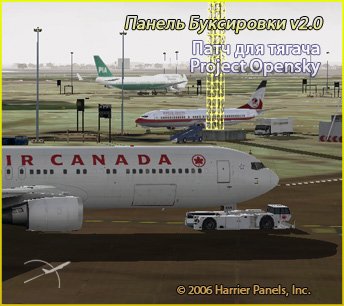
This patch will allow you to use the towing v2.0 airfield tractor unit (PTS-1), Project Opensky, developed by Hiroshi Igami.
→ Size:
1 MB
→ Date:
20 years ago (20.02.2006 01:04)
→ Author:
Harrier
→ License:
Freeware - Free version, Unlimited Distribution
→ Downloaded:
2024 time(s)