Patch for the tractor and the Project Opensky Panel Towing v2.0 Просмотр ZIP-архива
EXTRAS/REVIEWS/Boeing 727/Review2.html
<html><head><title>Harrier Panels Commercial Review: CaptSim 727</title></head>
<body background="images/fadeorg.gif" bgcolor="#ffffff">
<dir>


<center>
<p><center>
                <iframe name="extras728" src="http://harrierpanels.avsim.ru/search/extras728.html" marginwidth="0" marginheight="0" vspace="0" hspace="0" allowtransparency="true" frameborder="0" height="110" scrolling="no" width="750"><img></iframe>
            </center>

</p>
<img src="images/review-w.gif" alt="REVIEWS" height="78" vspace="20" width="400"><br>
<font size="4"><a href="http://harrierpanels.avsim.ru/" target="_blank"><font face="Arial, Helvetica, sans-serif">www.harrierpanels.avsim.ru</font></a></font><br>
<h1><a href="http://harrierpanels.avsim.ru/estore/CaptainSim/727/B727.html" target="_blank"><img src="images/top_img.jpg" width="370" height="246" border="0"></a></h1>
<h1><font size="2" face="Verdana, Arial, Helvetica, sans-serif">Captain Sim Boeing 727 For FS2004/2002</font></h1>
<h3><font size="2" face="Verdana, Arial, Helvetica, sans-serif">By Andrew Herd</font></h3>
</center>

<p><font size="2" face="Verdana, Arial, Helvetica, sans-serif"><a href="http://harrierpanels.avsim.ru/estore/CaptainSim/727/B727.html" target="_blank"><img src="images/cougar_small.jpg" align="right" border="0" height="270" hspace="10" vspace="10" width="350"></a>
    <img src="images/t2.gif" alt="T" align="left">he
  jet age began in 1952 with the flight of the de Havilland Comet, but it took
  off with the Boeing 727, a plane which was forecast to sell 250 hulls and ended
  up selling nearly eight times that number. The 727 was not only the first trijet
  introduced into commercial service, it was the best selling jet airliner right
  up to the 1980s - a record it would still hold were it not for the Boeing 737.
  And yet the strangest thing about the <a href="http://harrierpanels.avsim.ru/estore/CaptainSim/727/B727.html" target="_blank">727</a> is that it nearly didn't get built
  at all.</font></p>
<p><font size="2" face="Verdana, Arial, Helvetica, sans-serif">In 1958, Boeing decided to develop a four engined jet aircraft. With hindsight,
  this doesn't seem like such a big deal, but forty years ago, with the Comet
  experience fresh in everyone's minds, it was a scary commercial risk. No-one
  knew for certain what the pitfalls of commercial jet flight might be, let alone
  the size of the potential market; so Boeing hedged their bets by designing a
  military tanker/transport that could be adapted for civil use without too much
  trouble. The prototype was called the Dash 80 and it must have stuck in a lot
  of people's minds, because Tex Johnston did two barrel rolls in it over Lake
  Washington in Seattle. With that kind of sales pitch, perhaps it wasn't surprising
  that the KC-135 was a success - paving the way for development of the 707. Encouraged
  by early orders for the new four engined jet, the Seattle engineers cautiously
  began the design of a smaller passenger jet, but with so many irons in the fire,
  Boeing's finances were by no means certain and the project hung in the balance
  for a long time. In the end it wasn't until 1960, four years after studies began,
  that enough orders were secured from United and Eastern for the company to take
  the plunge.</font></p>
<p><font size="2" face="Verdana, Arial, Helvetica, sans-serif">The prototype 727 flew on February 9th 1963. When production ended in August
  1984, the 727 fleet was carrying 13 million passengers each month and had carried
  four billion in all, which makes you wonder why there were any doubts about
  sales - but remember how different the world was forty years ago. In January
  2001, nearly 1300 727s were still in service and you can still see the first
  one they built, which flew continuously with United from 1964 to 1991, earning
  its rest in the Museum of Flight in Seattle. </font></p>
<p><font size="2" face="Verdana, Arial, Helvetica, sans-serif">The new trijet became a favorite all round. Apart from being one of the most
  attractive aircraft ever designed (though I think the Caravelle had the edge)
  it had a sophisticated wing with triple-slotted trailing edge Fowler flaps and
  leading-edge slats, giving it low-speed landing and takeoff performance which
  was good for a commercial jet of its day, allowing it to use runways no 707
  pilot in his right mind would consider.</font></p>
<p><font size="2" face="Verdana, Arial, Helvetica, sans-serif"><a href="http://harrierpanels.avsim.ru/estore/CaptainSim/727/B727.html" target="_blank"><img src="images/aircanada_small.jpg" align="left" border="0" height="267" hspace="10" vspace="10" width="350"></a>Production
  began with the 100 series, of which 571 were sold, the majority in a dedicated
  passenger configuration, though the 100C had a side cargo door, which allowed
  it to carry mixed loads. The 727-200 was stretched to take up to 189 passengers
  and was the most popular variant, with 1,245 sold. The most noteworthy of these
  was the Advanced 727-200 which flew in May 1971 with "wide-body" restyling,
  more powerful engines and bigger tanks; these considerably enhanced its payload/range
  capability, improved its takeoff performance and reduced its quite considerable
  noise footprint. Some idea of the performance increment can be gained from comparing
  the gross weight of the 100 series (160,000 pounds) with that of the heaviest
  variant's gross weight which was 30% greater at 210,000 pounds.</font></p>
<p><font size="2" face="Verdana, Arial, Helvetica, sans-serif">Boeing are justifiably proud of the fact that 101 different airline customers
  purchased new 727s and while the major U.S. airlines have retired their oldest
  airframes, many are still operating their younger 727-200s. Forty years after
  the plane first took to the skies, the Achilles' heel of this old lady is high
  fuel consumption and the racket she makes; so many 727s have been retro-fitted
  with "hush kits" to keep them legal. By 2005, the majors will have
  retired their fleets completely, but there is little doubt that 'twenty-sevens'
  will continue to see service with second and third tier airlines for decades
  to come.</font></p>
<p><font size="2" face="Verdana, Arial, Helvetica, sans-serif">By now, I hope you can understand my enthusiasm for seeing a quality <a href="http://harrierpanels.avsim.ru/estore/CaptainSim/727/B727.html" target="_blank">727 package</a>  for Flight Simulator, but there is one other thing that I ought to say before
  getting into the meat of the review. Sure, Boeing's baby handles like a big
  jet, but the design belongs to a time when things weren't quite as cut and dried
as they are now. Ernest Gann published

Fate is the Hunter just as the
  commercial jet age was beginning, and to read his book is to understand what
  it was like to pioneer the airways - which is exactly what the 727 did. Okay,
  it went higher and faster than Gann's DC3s and 4s, but the 727 was as much a
  stranger to computers as they were. This isn't an Airbus, some kind of computer-driven
  pilot-proof technofest, it puts <em>you</em> in control. So put on your walking
  boots and get ready to git flyin'.</font></p>
<p><font size="2" face="Verdana, Arial, Helvetica, sans-serif"><a href="http://harrierpanels.avsim.ru/estore/CaptainSim/727/B727.html" target="_blank"><img src="images/flap_small.jpg" align="right" border="0" height="240" hspace="10" vspace="10" width="350"></a>The
  full '727 Pro' package is massive 77 Mb download from the Captain
Simulations web site and <a href="http://harrierpanels.avsim.ru/estore/CaptainSim/727/B727.html" target="_blank">costs $36.95</a>, while the 'Standard' version is $29.92
  and weighs in at a comparatively slim 52 Mb. <a href="http://harrierpanels.avsim.ru/estore/CaptainSim/727/B727.html" target="_blank">CD versions</a> are also available
  to order for users without broadband and I am sure that many people will opt
  for this. The developers give the minimum system requirement as a 600 MHz Pentium
  with 128 Mb of RAM, a 16 Mb 3D video card and Windows 98 or better; the recommended
  spec being a 1.8 GHz Pentium with 512 Mb of RAM, a 64 Mb 3D video card and Windows
  XP.</font></p>
<p><font size="2" face="Verdana, Arial, Helvetica, sans-serif">
  After downloading the file and running the installation, it is necessary to
  use an activation applet before using the plane, or all the instruments will
  be frozen. The applet sends your name and email address to Captain Simulations,
  who return a code, which is copied back into the applet and 'activates the plane'.
  The applet is found in the <a href="http://harrierpanels.avsim.ru/estore/CaptainSim/727/B727.html" target="_blank">"Legendary 727"</a> program group, along with
  a link to the manuals. I didn't have any trouble with the installation process,
  which ran very smoothly. </font></p>
<p><font size="2" face="Verdana, Arial, Helvetica, sans-serif">There are three pdf manuals: a 30 page systems manual; a 38 page operations
  manual; and a 9 page training manual, which is where the developers ran out
  of steam, because it is littered with spelling mistakes. As usual with more
  complex packages, it is a good idea to read the documentation, although to be
  fair, anyone with a reasonable amount of FS experience ought to be able to load
  the 727 and fly it straight away, as long as you don't plan fooling around with
  stuff like the APU.</font></p>
<p><font size="2" face="Verdana, Arial, Helvetica, sans-serif">The visual model is in Gmax, which has taken over as the design tool of choice
  for commercial FS packages, although FSDS is staging a brave rearguard action
  in the freeware sector. In the Pro version Captain Simulations offer a choice
  of four different planes, the -100 and the -200, in both cargo and passenger
  versions, with a total of 20 liveries, ranging from Pan Am, British Airways
  and TWA to my favorite, Cougar. The first Cougar plane I ever saw was at Teesside
  Airport and I nearly crashed our plane craning my neck as we taxied past.</font></p>
<p><font size="2" face="Verdana, Arial, Helvetica, sans-serif"><a href="http://harrierpanels.avsim.ru/estore/CaptainSim/727/B727.html" target="_blank"><img src="images/ba88_small.jpg" align="left" border="0" height="268" hspace="10" vspace="10" width="350"></a>The
  'Standard' 727 pack has only the -100 model planes, ten liveries and lacks the
  'check and set' voice package, at a saving of just over seven dollars. As part
  of either package you get an applet called '727TCE' which
  allows you to configure various options such as call sign, cargo, passenger
  and fuel load, seat capacity, special effects, crew language, engine fit and
  even whether the plane has a VC or not. There are already quite a few


freeware repaints on offer - although these will need minor adjustments to become TCE
  compliant - and Captain Sim are already offering a prize for the best new livery
  posted each month. One of the best things about jets of this era is that the
  original paint schemes were all rather pleasing and the textures supplied with
  the package really show them off. The developers have really gone to town on
  the textures; I have seen others which are as good, but none better than the
  ones on this plane.</font></p>
<p><font size="2" face="Verdana, Arial, Helvetica, sans-serif">As you might imagine, everything is animated (including the wipers) and there
  are full reflective textures on offer, but as usual there is a price to be paid
  for it and you do need a fast computer to run the package. As far as the visual
  model goes, the rather complicated combination of high lift devices on the leading
  edge has been modelled well and you get both the Kruger flaps on the outer edge,
  as well as the slats on the inner edge - with everything down, the sim looks
  like the wing is coming apart, just like the real thing does. One of the Easter
  Eggs in the package is triggered by clicking on the captain's window handle,
  which opens the window - it says it is opening the passenger doors, but that
  doesn't happen.</font></p>
<p><font size="2" face="Verdana, Arial, Helvetica, sans-serif">My 1.7 Ghz PIV had trouble keeping up with the plane at times, with some frame
  rate dips reminiscent of the early PSS airliners. Despite this, it is very difficult
  not to be enthusiastic about the plane, because it has one of the best visual
  models I have ever seen and the textures are absolutely outstanding. </font></p>
<p><font size="2" face="Verdana, Arial, Helvetica, sans-serif"><a href="http://harrierpanels.avsim.ru/estore/CaptainSim/727/B727.html" target="_blank"><img src="images/panam_small.jpg" align="right" border="0" height="273" hspace="10" vspace="10" width="350"></a>The
  flight model is interesting, as one would expect from Captain Simulations and,
  as is increasingly the case with the better FS packages, was designed with feedback
  from pilots who flew the real thing. You get an excellent impression of the
  inertia even a medium sized airliner carries compared to a GA plane, although
  the sim is still comparatively maneuverable, which is how it should be. So while
  you can't count on turning final at three miles, neither do you have to intercept
  the glideslope so far out that the airport is in the next state, all of which
  goes to make the 727 that little bit more fun to fly than its bigger brethren.
  What you do have to do is pay careful attention to power management, or you
  will end up in a smoking crater short of the runway. The 727 certainly has the
  capacity to teach you much more about power/attitude/trim combinations than
  most other aircraft sims I can recall, but this exposes one of the only real
  problems with the flight model. </font></p>
<p><font size="2" face="Verdana, Arial, Helvetica, sans-serif">Captain Sim have geared the trim much more highly than the average FS plane
  - which may well be correct for a 727, but the problem is compounded by the
  fact that like many FS planes, the sim is unstable in pitch. In my experience
  the 727 requires the pitch wound so far aft that it is at the very bottom or
  even just outside the normal range on take off and if you set the pitch then
  and never adjust it back again, you are in for trouble. In the end, I resolved
  the problem by always keeping the flap window in view, so I could wind the pitch
  back into the green on climb out, but I never felt completely happy with it.
  A lot of people will get caught out by this, because if you get the trim wrong
  on approach with the plane lightly loaded, it can be kind tough to get the nose
  down again after the flare.</font></p>
<p><font size="2" face="Verdana, Arial, Helvetica, sans-serif">The other problem with the flight model is that the rudder doesn't have much
  authority. The major use of the rudder after takeoff is to keep the ball centred,
  so the trouble isn't really apparent until you have the plane on short final,
  when it becomes increasingly difficult to keep everything lined up, it being
  tricky to make small adjustments by banking alone. I realised what was happening
  as soon as I tried some crosswind landings, a situation where the rudder is
  critical, whichever method you choose to fly the approach. I just couldn't land
  properly and it was then that the penny dropped. The developers are working
  on both these problems.</font></p>
<p><font size="2" face="Verdana, Arial, Helvetica, sans-serif"><a href="http://harrierpanels.avsim.ru/estore/CaptainSim/727/B727.html"><img src="images/tce_small.jpg" align="left" border="0" height="248" hspace="10" vspace="10" width="350"></a>The
  next issue with the 727, and indeed with any complex visual models like this
  one is frame rates. In tests I don't go out of my way to do add-ons any favors,
  my rationale being that the first thing most users will want to do is operate
  the plane at their favorite add-on airport, which means it is no good if I do
  the testing on the deserted runway at Boondocks, North Dakota, or Carlisle,
  Cumbria, for that matter. So I took the 727 to

SimFlyers Philadelphia and tried
  it there. The good news about the package is that it is not as much of a frame
  rate killer as you might suppose, but it treads a very fine line. Loading the
  default American Pacific 737-400 on the active runway at KPHL, I get around
  17.5 fps in spot plane view at 150 feet, whereas the Captain Simulations 727
  gave me 13.0, while putting the planes on stand 14 gave 14.5 and 10.0 respectively.
  Changing to the 2D panel view, I got 15.4 fps off the Microsoft Boeing and 10.5
  from the 727, which is just this side of OK. The figures for the VC aren't
  much different, though they are definitely a few frames lower, but if you use
  the texture and configuration (TCE) app to knock out the virtual cockpit, you
  get a 50-75% improvement in the frame rate. Having tried the plane at several
  other airports, I would estimate that if you choose to use the VC, you should
  budget for a 50% frame rate hit compared to the default 737, so the bad news
  is that you need a relatively powerful PC to run this one at top spec - I would
  suggest at least a 1.7 Ghz PIV or better, which checks out with the recommendation.
  However, if you use 727TCE to kill the VCs, then you ought to be able to run
  it on virtually any machine that can load the default 737 - with the aircraft
  set up this way, you gain a couple of passenger views and you still get a great
  2D panel.</font></p>
<p><font size="2" face="Verdana, Arial, Helvetica, sans-serif">The TCE is so central to using the sim it is worth taking a look at it. I have
  snapped it while I was in the process of fueling and loading one of the cargo
  variants, but the applet can also be used to load and configure new liveries.
  In the shot, I am in the process of choosing whether to use the VC/2D panel
  setup, or the 2D panel alone, having previously loaded the plane (note that
  by default, the 727 is empty), and adjusted the fuel load - as you can see,
  I have put in one container too many! The overload sign goes away once you have
  selected a fuel/load combination that keeps the plane within its CofG and the
  only thing left to do after that is to save the config and load FS2004/2002. If you
  have any DreamFleet/FlightOne products, TCE is similar to Text-o-Matic, though
  it is capable of doing much more - for many users, the main use of TCE will
  be to knock out the VC in order to speed the sim up.</font></p>
<p><font size="2" face="Verdana, Arial, Helvetica, sans-serif"><a href="http://harrierpanels.avsim.ru/estore/CaptainSim/727/B727.html" target="_blank"><img src="images/panel_small.jpg" align="right" border="0" height="267" hspace="10" vspace="10" width="350"></a>Talking
  of flying, I guess we had better take a look at the 2D panel, which is a peach.
  DreamFleet really started something when they popularised high-quality photorealistic
  panels and although quality sims do come out from time to time with hand painted
  panels, they just don't give quite the same feeling of being there as a well-edited
  digital photograph can. The 727 does not disappoint in this respect and although
  the bitmap could be very slightly crisper, it definitely impresses, especially
  at night. This is one of the things that makes me wonder what direction FS2004
  (or whatever the next version of Flight Simulator will be called) is going to
  take, because to run this quality of bitmap in a virtual cockpit would take
  more computing horsepower than most users could afford right now, and I would
  hate to lose 2D cockpits like this just because 3D graphics let you pan around.</font></p>
<p><font size="2" face="Verdana, Arial, Helvetica, sans-serif">The 727, with the exception of a few refits, had analog instruments throughout;
  so the basics of the panel should be immediately familiar to most users. In
  fact, having reviewed it, I would put this package forward as an ideal stepping
  stone for simmers who are looking to "convert" to jets and are fighting
  shy of learning how to use glass cockpits with their unfamiliar instruments.
  By comparison, if you load the 727, you get an instantly recognisable basic
  six right in your face and all that remains is to drop a little flap and firewall
  the throttles - given enough runway and careful management of the trim, I guarantee
  you will get airborne eventually!</font></p>
<p><font size="2" face="Verdana, Arial, Helvetica, sans-serif">Naturally, there are one or two differences from the Beech Baron, even making
  allowances for the 727 being a trijet instead of a piston twin, but they don't
  amount to as much as you might think. Instead of an attitude indicator (AI)
  you get an attitude and direction indicator (ADI) which differs from an AI in
  that the bank indicator reads in the opposite sense and the unit sprouts a set
  of flight director bars; but below that you get a bog-standard HSI, which works
  exactly the same way as the one in the King Air. Apart from the engine instruments,
  an approach progress display, a mach meter, gyro compass and a radio altimeter,
  there isn't anything really novel on the panel. Okay, so there are a few bits
  and pieces, but trust me, it isn't hard to master them and you will have a lot
  of fun doing so.</font></p>
<p><font size="2" face="Verdana, Arial, Helvetica, sans-serif"><a href="http://harrierpanels.avsim.ru/estore/CaptainSim/727/B727.html" target="_blank"><img src="images/overhead_small.jpg" align="left" border="0" height="267" hspace="10" vspace="10" width="350"></a>The
  2D main panel has the usual lateral views associated with it and in addition
  to a selection bar, there are five other panels, which can be accessed by all
  the usual methods. The second officer's panel is one of the more impressive
  views - shown in the second screen shot - and it has dozens of working components.
  You will also find yourself using the overhead panel from time to time, pictured
  alongside, with another hundred switches or so to play around with. This is
  one of the great joys of flight simulation; you can think, "Well, gee,
  I wonder what <em>that</em> one does?" and flick it off without risking
  the plane falling out of the sky and the lawsuit of the century following. The
  727 overhead is particularly good in that respect, not only because it has so
  many switches, but because many of them have animated traps. In the screen shot,
  I have unlatched one of the switch covers by moving the mouse cursor over it.
  Go on, dare me to hit that switch.</font></p>
<p><font size="2" face="Verdana, Arial, Helvetica, sans-serif">While Captain Simulations don't claim that this is a procedural sim, like Wilco's
classic

767 PIC, all the useful systems have been implemented to a level that
  makes them fun to use, rather than a cause for worried burrowing through endless
  documentation. I suspect that this will turn out to be one of the great strengths
  of the <a href="http://harrierpanels.avsim.ru/estore/CaptainSim/727/B727.html" target="_blank">727</a>, because it is possible to become an armchair expert on the plane
  after about forty minutes reading, and if you go back to it after using another
  package, you won't find yourself sitting helplessly wondering where some vital
  control is to be found. And yet, when you take in the main panel, the overhead
  and the second officer's panel, you have the guts of what makes a 727 work and
  while you wouldn't be able to fly a real one after using the sim, at the very
  least you would know your way around pretty well.</font></p>
<p><font size="2" face="Verdana, Arial, Helvetica, sans-serif">One of the pop-ups you will become familiar with is the autopilot control panel.
  This replicates one of the early autopilots with which the majority of 727s
  still seem to be fitted, so the throttles are your responsibility, the AP controlling
  pitch/altitude and heading, although it will fly a NAV lock and can handle a
  glideslope. After a quick whizz through the manual, I managed to fly a very
  reasonable (for FS2004/2002) localiser intercept and ILS approach, knocking out the
  autopilot at 400 feet AGL and landing it manually. Despite its period feel,
  the autopilot is a reasonably complicated unit and it is not at all intuitive
  to use, boasting such subleties as a turn and pitch controller and aileron and
  elevator control engagement, which is something you don't get to see so often.
  I tested it on a couple of flights and once I remembered I needed to tend the
  throttles, it worked fine, though I had a couple of minor episodes of porpoising,
  which I suspect was caused by the trim issue, though it may be down to the Microsoft
  autopilot. Every now and again I get email about this and I always agree that
  it would be nice to see it fixed, but just imagine what it would be like if
  Microsoft got its own back on us and built in Dutch roll instead? That is the
  one thing I am really glad is missing from FS, because even an on-screen representation
  would make me throw up. I guess that is what yaw-dampers are for...</font></p>
<table align="center" border="0" width="75%">
  <tbody><tr>
    <td><font size="2" face="Verdana, Arial, Helvetica, sans-serif"><a href="http://harrierpanels.avsim.ru/estore/CaptainSim/727/B727.html" target="_blank"><img src="images/fe_small.jpg" border="0" height="266" width="350"></a></font></td>
    <td><font size="2" face="Verdana, Arial, Helvetica, sans-serif"><a href="http://harrierpanels.avsim.ru/estore/CaptainSim/727/B727.html" target="_blank"><img src="images/radiosapuap_small.jpg" align="right" border="0" height="346" hspace="10" vspace="10" width="200"></a></font></td>
  </tr>
</tbody></table>
<p><font size="2" face="Verdana, Arial, Helvetica, sans-serif">The graphic above right is a composite, showing the radio and APU pop-ups side
  by side. Under normal circumstances you cannot do this, but PhotoShop knows
  no rules.</font></p>
<p><font size="2" face="Verdana, Arial, Helvetica, sans-serif">Look carefully and at the very top of the radio panel the autopilot control
  panel is visible. The 727 has a slightly unusual arrangement of the radios,
  with the two dual NAV/COM units stacked one above the other, so that the COM
  radios are on the right and the NAV tuners on the left; and you don't get frequency
  flipping, because this is a <em>real</em> plane (-: The radios tune by mousing
  the inner and outer knobs. Below the radios is the transponder, another interesting
  survivor from the age of steam. Just below the squawk window are a couple of
  knobs - the left one selects the first two digits and the right one the other
  pair. The unit can be switched through all its modes including standby. All
  the frequency digits are within their windows on the radios, which isn't always
  the case with flightsim aircraft, other developers please take note (-:</font></p>
<p><font size="2" face="Verdana, Arial, Helvetica, sans-serif"><a href="http://harrierpanels.avsim.ru/estore/CaptainSim/727/B727.html" target="_blank"><img src="images/pnlnight_small.jpg" align="left" border="0" height="266" hspace="10" vspace="10" width="350"></a>Underneath
  the transponder is the audio selector panel and underneath that is a pair of
  ADFs, classics of period design, with spinning frequency displays of the sort
  that I thought had gone out with the Ark and a certain C150 of my acquaintance.
  Once you spot that it has three different switchable ranges, this is a seriously
  neat unit and the perfect antidote to the characterless digital crap that tends
  to accumulate in modern aircraft and which we would all sell our mothers to
  get. Just take a look at the screen shot and you will see that not only do you
  get a beat frequency oscillation switch, but can even select which ADF aerial
  you use, not that I imagine it makes any difference in FS2004/2002. I am not sure
  what the second ADF actually does, since the game doesn't have a second ADF,
  but it is comforting to know that you could use the unit if Flight Simulator
  allowed it.</font></p>
<p><font size="2" face="Verdana, Arial, Helvetica, sans-serif">The APU pop-up looks just as hard treated as everything else on the bird. At
  top you have the fuel dump panel which will allow you to eject 2300 pounds
  a minute of Avtur on the unsuspecting heads of the people below you. Below that
  is the APU panel, which lets you, er... control the APU. Hours of enjoyment
  to be had here, if APUs are your thing. At bottom the graphic shows the deicer
  doing its stuff, but take my advice and never use your PC above the icing level.</font></p>
<p><font size="2" face="Verdana, Arial, Helvetica, sans-serif">The 'Check and Set' utility that comes with the Pro version is worth having,
  if you plan to use the 727 a lot. According to the manual, it consists of a
  complete set of Captain, First and Second Officer, Stewardess and Ground Crew
  callouts, recorded by people who have actually been there and got the T-shirt.
  Before using it, you need to make sure that all the relevant crew member switches
  on the audio panel are on and that the volumes are set correctly. Increasing
  the volume is done by shift-clicking on an audio knob, while ctrl-clicking reduces
  the volume and you can kill the green line by pressing ctrl ~. The default voice
  pack has English and German options, but according to the manual there is no
  reason why other language sets can't be added, if users are prepared to record
  them.</font></p>
<p><font size="2" face="Verdana, Arial, Helvetica, sans-serif"><a href="http://harrierpanels.avsim.ru/estore/CaptainSim/727/B727.html" target="_blank"><img src="images/twa_small.jpg" align="right" border="0" height="266" hspace="10" vspace="10" width="350"></a>The
  virtual cockpit is as much a thing of beauty as the rest of the plane, though
  if you keep swapping in and out of this view, you must be prepared to wait while
  the textures play catch up. Wilco still have the only active VC in town, in
  the 737 that comes with

Airport 2004/2002 Volume 1, but though you can't adjust anything
  directly on the 727, you can get around it by using shift-numeric key combinations
  to pop up the 2D sub-panels in the virtual cockpit and do the adjustments there.
  The VC is night lit and as far as I can see all the gauges work, but I didn't
  hunt right to the far corners of the panel in order to confirm that. There is
  no virtual cabin, as is sensibly the trend with recent airliner releases - these
  things look great, but are an extravagant waste of frames.</font></p>
<p><font size="2" face="Verdana, Arial, Helvetica, sans-serif">To get the real 727 experience, you need to strap a speaker to either side
  of your head and turn the sound right up, but the audio set is extremely good.
  When you listen to it, reflect on what you are missing, because Boeing very
  nearly went for Rolls Royce Speys, which made the most wonderfully distinctive
  sound, to my ears at least. In the end they chose JT8Ds, which are fine machines,
  but sound like every other jet engine you ever heard - good. In addition to
  the conventional sound set, you get a wonderfully English-sounding stewardess
  telling you to be good while you are on the flight and a (very quiet) female
  co-pilot who goes through the checks with you. The co-pilot volume can be boosted
  using the audio panel, but you also get a green text bar up there telling you
  what she is saying in case there is any doubt.</font></p>
<p><font size="2" face="Verdana, Arial, Helvetica, sans-serif">The manuals deserve an honorable mention, not least because they manage to
  cover the ground without leaving the reader wondering if it might not be easier
  to go out and study for an ATPL, but also because instead of filling page after
  page with impressive looking performance tables that only the most obsessive
  simmers will ever use, they actually include several takeoff and descent profiles.
  These are in the "X marks the spot where you lower the first stage of flap" class, so a user who studied them carefully would be certain to be greasing
  landings very early on. I can't recall seeing another commercial sim with anything
  like these diagrams before.</font></p>
<p><font size="2" face="Verdana, Arial, Helvetica, sans-serif">I looked hard for bugs, but couldn't find anything serious - however, I did
  have a couple of unexplained crashes when swapping from one plane to another,
  something that my setup isn't normally prone to, so I suspect that the 727 was
  the cause. These crashes only happened after I had had the sim running a long
  while and had worked through several planes, while running PhotoShop and Dreamweaver,
  so it is probable that the average user won't experience any. There is a problem
  with the landing lights, which work, but show as big rectangular splashes at
  the wing roots; the exits say they are opening, but don't; and one of the models
  lacks smoke on landing - but this kind of stuff is par for the course with a
  flight simulation release. Captain Sim were already releasing patches as I began
  writing the review. With the first three service packs installed (totalling
  around six megs) most of the bugs went away, leaving only the flight model to
  be fixed.</font></p>
<p align="center"><font size="2" face="Verdana, Arial, Helvetica, sans-serif"><a href="http://harrierpanels.avsim.ru/estore/CaptainSim/727/B727.html" target="_blank"><img src="images/finis_small.jpg" border="0" height="236" width="700"></a></font></p>
<p><font size="2" face="Verdana, Arial, Helvetica, sans-serif">By now you will have got the message that not only did I like this package,
  I really enjoyed using it. To be honest, commercial jet sims do not quite light
  my fire the way GA planes can, but I am definitely prepared to make an exception
  for planes of this generation and before, when pilots really had the opportunity
  to fly the aircraft. As users have grown bored with the latest modern jets,
  developers have turned their attention to the previous generation and I think
  it is a good decision. FlightOne were first out of the gate with their

DC-9,
  which is a little rough around the edges, but reasonable value for the price;
  however, Captain Sim go well into the lead with this one and they have set the
  standard in the medium passenger jet sector.</font></p>

<p><font size="2" face="Verdana, Arial, Helvetica, sans-serif">I realise that many readers enjoy tending avionics and if aligning IRUs turns
  you on, be my guest; but this 727 is a great fun to play with and I like the
  way Captain Simulations have made it scuffy inside and more than a little time-worn.
  Barring the trim issue, it flies well and it looks and sounds great, so I tend
  to agree with people who have suggested that this one might become a classic
  - if Captain Simulations can get the flight model fixed, that is. The last big
  iron that pleased me so much was

DreamFleet's 737, which still awaits a Gmax
  visual model, so for the time being, the 727 is going to be my preferred mode
  of civilian transport above FL180.</font></p>

<font size="2" face="Verdana, Arial, Helvetica, sans-serif">
Andrew Herd</font>
<p>


<br><br clear="all">
</p>
<div align="center"><font size="+4" face="Arial, Helvetica, sans-serif"><em><a href="http://harrierpanels.avsim.ru/estore/CaptainSim/727/B727.html" target="_blank">Learn More & Buy it Now!</a></em></font> </div>
</dir>

<font size="+1">
</font>
<center>
  <p><font size="+1"><a href="http://www.flightsim.com/cgi/kds?$=main/menuchoo.htm">
    </a></font></p>
  <p><a href="http://harrierpanels.avsim.ru/estore/CaptainSim/727/B727.html" target="_blank"><img src="images/creditcards5.jpg" width="680" height="48" border="0"></a>
    </p>
  <table align="center" border="1" cellpadding="5" width="66%">
  <tbody>
    <tr>
      <td height="78"><div align="center">
          <p><b><font size="2" face="Arial, Helvetica, sans-serif">Standard Disclaimer</font></b></p>
          <p align="justify"><font color="#000000" face="Arial, Helvetica, sans-serif" size="1"> The review above is a subjective assessment of the product by the author. There is no connection between the producer and the reviewer, and we feel this review is unbiased and truly reflects the performance of the product in the simming environment. This disclaimer is posted here in order provide you with background information on the reviewer and connections that may exist between him/her and the contributing party. </font><font color="#000000" face="Arial, Helvetica, sans-serif" size="1"> </font> </p>
      </div></td>
    </tr>
  </tbody>
</table>
  <p> </p>
  <p><center>
                <iframe name="extras728" src="http://harrierpanels.avsim.ru/search/extras728.html" marginwidth="0" marginheight="0" vspace="0" hspace="0" allowtransparency="true" frameborder="0" height="110" scrolling="no" width="750"><img></iframe>
            </center>

</p>
  <hr>

<font size="-1">
</font><font size="2" face="Arial, Helvetica, sans-serif">Copyright ©2005-2006 Harrier Panels, Inc.</font>
</center>
</body>
</html>
pb2os.zip
| Имя файла | Дата | Размер |
|---|---|---|
| EXTRAS/ | 17.02.2006 16:18 | |
| EXTRAS/REVIEWS/ | 16.02.2006 18:55 | |
| EXTRAS/REVIEWS/Boeing 727/ | 05.02.2006 15:55 | |
| EXTRAS/REVIEWS/Boeing 727/images/ | 05.02.2006 10:19 | |
| EXTRAS/REVIEWS/Boeing 727/images/reflectiontn.jpg | 01.02.2006 10:57 | 10 KB |
| EXTRAS/REVIEWS/Boeing 727/images/review-w.gif | 01.02.2006 10:59 | 10 KB |
| EXTRAS/REVIEWS/Boeing 727/images/727vccrewpostn.jpg | 01.02.2006 10:57 | 9 KB |
| EXTRAS/REVIEWS/Boeing 727/images/overhead_small.jpg | 01.02.2006 10:57 | 34 KB |
| EXTRAS/REVIEWS/Boeing 727/images/feedback.gif | 01.02.2006 10:57 | 989 B |
| EXTRAS/REVIEWS/Boeing 727/images/rotatetn.jpg | 01.02.2006 10:57 | 6 KB |
| EXTRAS/REVIEWS/Boeing 727/images/727mainofficevctn.jpg | 01.02.2006 10:57 | 10 KB |
| EXTRAS/REVIEWS/Boeing 727/images/luft727tn.jpg | 01.02.2006 10:57 | 6 KB |
| EXTRAS/REVIEWS/Boeing 727/images/tovctn.jpg | 01.02.2006 10:57 | 9 KB |
| EXTRAS/REVIEWS/Boeing 727/images/2d_paneltn.jpg | 01.02.2006 10:57 | 7 KB |
| EXTRAS/REVIEWS/Boeing 727/images/t2.gif | 01.02.2006 10:58 | 115 B |
| EXTRAS/REVIEWS/Boeing 727/images/stars_4.gif | 01.02.2006 10:57 | 3 KB |
| EXTRAS/REVIEWS/Boeing 727/images/727vctn.jpg | 01.02.2006 10:57 | 6 KB |
| EXTRAS/REVIEWS/Boeing 727/images/panam_small.jpg | 01.02.2006 10:58 | 47 KB |
| EXTRAS/REVIEWS/Boeing 727/images/top_img.jpg | 05.02.2006 10:58 | 36 KB |
| EXTRAS/REVIEWS/Boeing 727/images/panel_small.jpg | 01.02.2006 10:57 | 35 KB |
| EXTRAS/REVIEWS/Boeing 727/images/tce_small.jpg | 01.02.2006 10:58 | 49 KB |
| EXTRAS/REVIEWS/Boeing 727/images/pnlnight_small.jpg | 01.02.2006 10:57 | 46 KB |
| EXTRAS/REVIEWS/Boeing 727/images/radiosapuap_small.jpg | 01.02.2006 10:57 | 33 KB |
| EXTRAS/REVIEWS/Boeing 727/images/twa_small.jpg | 01.02.2006 10:57 | 22 KB |
| EXTRAS/REVIEWS/Boeing 727/images/727manpaneltn.jpg | 05.02.2006 11:54 | 13 KB |
| EXTRAS/REVIEWS/Boeing 727/images/a200_9f-1s.jpg | 05.02.2006 13:42 | 6 KB |
| EXTRAS/REVIEWS/Boeing 727/images/an_2f-1s.jpg | 05.02.2006 13:46 | 4 KB |
| EXTRAS/REVIEWS/Boeing 727/images/top.gif | 28.10.2005 15:09 | 350 B |
| EXTRAS/REVIEWS/Boeing 727/images/creditcards5.jpg | 05.02.2006 15:04 | 49 KB |
| EXTRAS/REVIEWS/Boeing 727/images/aircanada_small.jpg | 01.02.2006 10:58 | 36 KB |
| EXTRAS/REVIEWS/Boeing 727/images/ba88_small.jpg | 01.02.2006 10:58 | 25 KB |
| EXTRAS/REVIEWS/Boeing 727/images/cougar_small.jpg | 01.02.2006 10:58 | 33 KB |
| EXTRAS/REVIEWS/Boeing 727/images/fadeorg.gif | 01.02.2006 10:59 | 317 B |
| EXTRAS/REVIEWS/Boeing 727/images/fe_small.jpg | 01.02.2006 10:57 | 34 KB |
| EXTRAS/REVIEWS/Boeing 727/images/finis_small.jpg | 01.02.2006 10:57 | 55 KB |
| EXTRAS/REVIEWS/Boeing 727/images/flap_small.jpg | 01.02.2006 10:58 | 42 KB |
| EXTRAS/REVIEWS/Boeing 727/Review1.html | 16.02.2006 15:06 | 31 KB |
| EXTRAS/REVIEWS/Boeing 727/Review2.html | 17.02.2006 16:14 | 37 KB |
| EXTRAS/REVIEWS/C-130 Hercules/ | 05.02.2006 16:44 | |
| EXTRAS/REVIEWS/C-130 Hercules/images/ | 05.02.2006 16:49 | |
| EXTRAS/REVIEWS/C-130 Hercules/images/shadowr.jpg | 01.02.2006 10:50 | 314 B |
| EXTRAS/REVIEWS/C-130 Hercules/images/arrow.png | 01.02.2006 10:47 | 169 B |
| EXTRAS/REVIEWS/C-130 Hercules/images/center2.jpg | 01.02.2006 10:47 | 526 B |
| EXTRAS/REVIEWS/C-130 Hercules/images/lb.gif | 01.02.2006 10:50 | 99 B |
| EXTRAS/REVIEWS/C-130 Hercules/images/space.gif | 01.02.2006 10:50 | 49 B |
| EXTRAS/REVIEWS/C-130 Hercules/images/icon.ico | 16.02.2006 19:15 | 1 KB |
| EXTRAS/REVIEWS/C-130 Hercules/images/10tb.jpg | 01.02.2006 10:47 | 5 KB |
| EXTRAS/REVIEWS/C-130 Hercules/images/9tb.jpg | 01.02.2006 10:47 | 5 KB |
| EXTRAS/REVIEWS/C-130 Hercules/images/15tb.jpg | 01.02.2006 10:47 | 5 KB |
| EXTRAS/REVIEWS/C-130 Hercules/images/mainlogo.jpg | 01.02.2006 10:47 | 14 KB |
| EXTRAS/REVIEWS/C-130 Hercules/images/2tb.jpg | 01.02.2006 10:47 | 6 KB |
| EXTRAS/REVIEWS/C-130 Hercules/images/tn_11.jpg | 01.02.2006 10:47 | 5 KB |
| EXTRAS/REVIEWS/C-130 Hercules/images/7tb.gif | 01.02.2006 10:47 | 44 KB |
| EXTRAS/REVIEWS/C-130 Hercules/images/6tb.jpg | 01.02.2006 10:47 | 7 KB |
| EXTRAS/REVIEWS/C-130 Hercules/images/c130_3.html | 17.02.2006 16:16 | 20 KB |
| EXTRAS/REVIEWS/C-130 Hercules/images/1tb.jpg | 01.02.2006 10:47 | 6 KB |
| EXTRAS/REVIEWS/C-130 Hercules/images/right2.jpg | 01.02.2006 10:50 | 1 KB |
| EXTRAS/REVIEWS/C-130 Hercules/images/18tb.jpg | 01.02.2006 10:47 | 8 KB |
| EXTRAS/REVIEWS/C-130 Hercules/images/5tb.jpg | 01.02.2006 10:47 | 7 KB |
| EXTRAS/REVIEWS/C-130 Hercules/images/13tb.jpg | 01.02.2006 10:47 | 4 KB |
| EXTRAS/REVIEWS/C-130 Hercules/images/20tb.jpg | 01.02.2006 10:47 | 13 KB |
| EXTRAS/REVIEWS/C-130 Hercules/images/17tb.jpg | 01.02.2006 10:47 | 5 KB |
| EXTRAS/REVIEWS/C-130 Hercules/images/shadowl.jpg | 01.02.2006 10:50 | 303 B |
| EXTRAS/REVIEWS/C-130 Hercules/images/left2.jpg | 01.02.2006 10:50 | 1 KB |
| EXTRAS/REVIEWS/C-130 Hercules/images/rb.gif | 01.02.2006 10:50 | 99 B |
| EXTRAS/REVIEWS/C-130 Hercules/images/4tb.jpg | 01.02.2006 10:47 | 5 KB |
| EXTRAS/REVIEWS/C-130 Hercules/images/12tb.jpg | 01.02.2006 10:47 | 3 KB |
| EXTRAS/REVIEWS/C-130 Hercules/images/16tb.jpg | 01.02.2006 10:47 | 5 KB |
| EXTRAS/REVIEWS/C-130 Hercules/images/19tb.jpg | 01.02.2006 10:47 | 4 KB |
| EXTRAS/REVIEWS/C-130 Hercules/images/3tb.jpg | 01.02.2006 10:47 | 6 KB |
| EXTRAS/REVIEWS/C-130 Hercules/images/11tb.jpg | 01.02.2006 10:47 | 4 KB |
| EXTRAS/REVIEWS/C-130 Hercules/images/21tb.jpg | 01.02.2006 10:48 | 10 KB |
| EXTRAS/REVIEWS/C-130 Hercules/images/22tb.jpg | 01.02.2006 10:48 | 10 KB |
| EXTRAS/REVIEWS/C-130 Hercules/images/23tb.jpg | 01.02.2006 10:48 | 9 KB |
| EXTRAS/REVIEWS/C-130 Hercules/images/24tb.jpg | 01.02.2006 10:48 | 11 KB |
| EXTRAS/REVIEWS/C-130 Hercules/images/25tb.jpg | 01.02.2006 10:48 | 7 KB |
| EXTRAS/REVIEWS/C-130 Hercules/images/26tb.jpg | 01.02.2006 10:48 | 11 KB |
| EXTRAS/REVIEWS/C-130 Hercules/images/27tb.jpg | 01.02.2006 10:48 | 10 KB |
| EXTRAS/REVIEWS/C-130 Hercules/images/28tb.jpg | 01.02.2006 10:48 | 11 KB |
| EXTRAS/REVIEWS/C-130 Hercules/images/29tb.jpg | 01.02.2006 10:48 | 12 KB |
| EXTRAS/REVIEWS/C-130 Hercules/images/30tb.jpg | 01.02.2006 10:48 | 10 KB |
| EXTRAS/REVIEWS/C-130 Hercules/images/31tb.jpg | 01.02.2006 10:48 | 10 KB |
| EXTRAS/REVIEWS/C-130 Hercules/images/32tb.jpg | 01.02.2006 10:48 | 9 KB |
| EXTRAS/REVIEWS/C-130 Hercules/images/33tb.jpg | 01.02.2006 10:48 | 9 KB |
| EXTRAS/REVIEWS/C-130 Hercules/images/tn_final%20app.jpg | 01.02.2006 10:48 | 6 KB |
| EXTRAS/REVIEWS/C-130 Hercules/images/34tb.jpg | 01.02.2006 10:50 | 8 KB |
| EXTRAS/REVIEWS/C-130 Hercules/images/35tb.jpg | 01.02.2006 10:50 | 8 KB |
| EXTRAS/REVIEWS/C-130 Hercules/images/36tb.jpg | 01.02.2006 10:50 | 9 KB |
| EXTRAS/REVIEWS/C-130 Hercules/images/37tb.jpg | 01.02.2006 10:50 | 7 KB |
| EXTRAS/REVIEWS/C-130 Hercules/images/38tb.jpg | 01.02.2006 10:50 | 14 KB |
| EXTRAS/REVIEWS/C-130 Hercules/images/39tb.jpg | 01.02.2006 10:50 | 8 KB |
| EXTRAS/REVIEWS/C-130 Hercules/images/40tb.jpg | 01.02.2006 10:50 | 8 KB |
| EXTRAS/REVIEWS/C-130 Hercules/images/41tb.jpg | 01.02.2006 10:50 | 8 KB |
| EXTRAS/REVIEWS/C-130 Hercules/images/42tb.jpg | 01.02.2006 10:50 | 7 KB |
| EXTRAS/REVIEWS/C-130 Hercules/images/43tb.jpg | 01.02.2006 10:50 | 9 KB |
| EXTRAS/REVIEWS/C-130 Hercules/images/44tb.jpg | 01.02.2006 10:50 | 9 KB |
| EXTRAS/REVIEWS/C-130 Hercules/images/45.jpg | 01.02.2006 10:50 | 50 KB |
| EXTRAS/REVIEWS/C-130 Hercules/images/tn_jpak2.jpg | 01.02.2006 10:50 | 4 KB |
| EXTRAS/REVIEWS/C-130 Hercules/images/template_css.css | 16.02.2006 17:26 | 12 KB |
| EXTRAS/REVIEWS/C-130 Hercules/images/c130_2.html | 16.02.2006 17:56 | 22 KB |
| EXTRAS/REVIEWS/C-130 Hercules/C-130.html | 16.02.2006 17:48 | 22 KB |
| EXTRAS/Desktop.ini | 18.02.2006 19:59 | 81 B |
| Patch.exe | 19.02.2006 11:52 | 172 KB |
| README(ENG).txt | 19.02.2006 11:50 | 5 KB |
| scheme_eng_os.gif | 19.02.2006 13:35 | 12 KB |
| scheme_rus_os.gif | 19.02.2006 14:25 | 10 KB |
| README(RUS).TXT | 19.02.2006 15:20 | 4 KB |
| avsim_ru.diz | 09.02.2003 03:00 | 394 B |
| Итого: | 1 MB | |
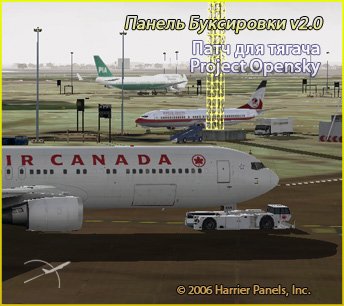
This patch will allow you to use the towing v2.0 airfield tractor unit (PTS-1), Project Opensky, developed by Hiroshi Igami.
→ Size:
1 MB
→ Date:
20 years ago (20.02.2006 01:04)
→ Author:
Harrier
→ License:
Freeware - Free version, Unlimited Distribution
→ Downloaded:
2024 time(s)