AutoCoPilot Просмотр ZIP-архива
readme_en.txt
AutoCoPilot
Plugin for X-Plane 10

Description:
This plugin is very simplified Autopilot emulator/Copilot analog. Plugin dont use the X-plane autopilot and himself manages flight controls.
Program modes: Hold mode a current Course/Constant rate turn. Hold mode a current Altitude/Vertical speed. Hold mode a current Air Speed.
Plugin is suitable for aircrafts not autopilot equipped or some situations when where you need quickly to transfer flight control to the co-pilot.
Also convenient to use only the hold air speed mode for everyone aircrafts not autothrottle equipped.

Installation:
This plugin need FlyWithLua for working. Copy plugin file to X-Plane 10/Resources/plugins/FlyWithLua/Scripts.
After X-plane running you can assign a hot key to the plugin switch toggle. For this you need assign your key to "toggle" value in "autocopilot" category in "SETTINGS -> JOYSTICK & EQUIPMENT -> KEYS".

Interface:
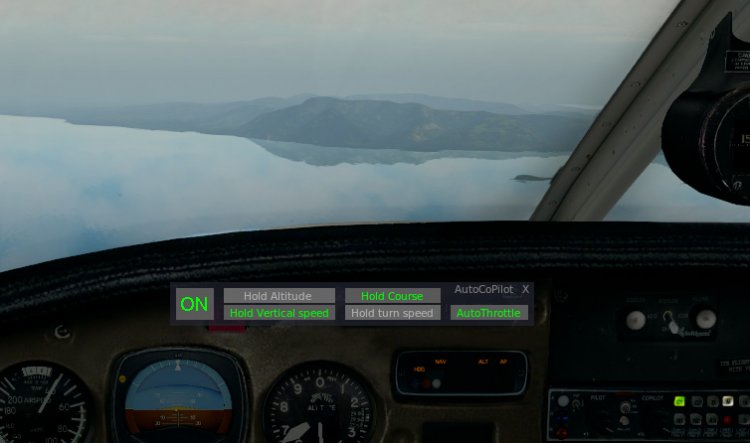
Button "ON" - plugin switch toggle.
Button "Hold Altitude" and "Hold Vertical speed" - to select the needed mode or completely disable altitude control mode.
Button "Hold Course" and "Hold turn speed" - to select the needed mode or completely disable course control mode.
Button "AutoThrottle" switch toggle air speed control mode.
The string "AutoCoPilot" area to hide/show interface.
Also interface can be moved by "drag and drop".

Troubleshooting:
Although the plugin created as a universal, but all aircrafts has unique characteristics, so work of the plugin may be different. But most of the tested aircraft had stable behavior.
For individual aircraft behavior adjustment exist several simple settings - this is values of variables "mcop_yoke_slow_x", "mcop_yoke_slow_y" and "mcop_yoke_slow_z". They affect the smoothness and accuracy controls. "X" is the roll axis, "Y" is the pitch axis and "X" is the throttle axis.
The more this value, the more smooth and accuracy effect on aircraft control, but slow. Valid values from 0 to 100. Optimal values from 30 to 80. Default values from 50 to 60.
If there is oscillation (especially at low speeds, flaps deployed etc.), then you need to increase the needed value.
Also possibly oscillation by pitch-axis with autothrottle enabled. In this case, both systems influence each other and then you need try to change the values for one or the other, or both.
You can set limits to manoeuvres using variables "mcop_yoke_limit_x", "mcop_yoke_limit_y" and "mcop_yoke_limit_z" for the speed rate turn, vertical speed and minimum throttle level. Attention, these values should not be the maximum permissible, because they can be increased by maneuvering.
Also ATTENTION! If you exit to any fullscreen menu (local map, weather etc.), then you need to switch off the plugin or just press "pause" key.

If you have a problem, you detected error, unstable work or you have any ideas and suggestions, please contact me to forums.x-plane.org user IgnatAir, or to avsim.su user Ignatiy.
Have a safe flight!
60840-AutoCoPilot.zip
| Имя файла | Дата | Размер |
|---|---|---|
| autocopilot.lua | 11.05.2017 12:27 | 14 KB |
| readme_en.txt | 11.05.2017 19:19 | 3 KB |
| readme_ru.txt | 11.05.2017 12:30 | 3 KB |
| avsim_su.diz | 12.05.2017 02:33 | 310 B |
| Итого: | 21 KB | |
AutoCoPilot
| Rating: 5!
Description:
This plugin is very simplified Autopilot emulator/Copilot analog. Plugin dont use the X-plane autopilot and himself manages flight controls.
Program modes: Hold mode a current Course/Constant rate turn. Hold mode a current Altitude/Vertical speed. Hold mode a current Air Speed.
Plugin is suitable for aircrafts not autopilot equipped or some situations when where you need quickly to transfer flight control to the co-pilot.
Also convenient to use only the hold air speed mode for everyone aircrafts not autothrottle equipped.
Installation:
This plugin need FlyWithLua for working. Copy plugin file to X-Plane 10/Resources/plugins/FlyWithLua/Scripts.
After X-plane running you can assign a hot key to the plugin switch toggle. For this you need assign your key to "toggle" value in "autocopilot" category in "SETTINGS -> JOYSTICK & EQUIPMENT -> KEYS".
Interface description and adjusting information in Readme.txt
If you have a problem in plugin or you have any suggestions, please contact me in PM.
Have a safe flight!
This plugin is very simplified Autopilot emulator/Copilot analog. Plugin dont use the X-plane autopilot and himself manages flight controls.
Program modes: Hold mode a current Course/Constant rate turn. Hold mode a current Altitude/Vertical speed. Hold mode a current Air Speed.
Plugin is suitable for aircrafts not autopilot equipped or some situations when where you need quickly to transfer flight control to the co-pilot.
Also convenient to use only the hold air speed mode for everyone aircrafts not autothrottle equipped.
Installation:
This plugin need FlyWithLua for working. Copy plugin file to X-Plane 10/Resources/plugins/FlyWithLua/Scripts.
After X-plane running you can assign a hot key to the plugin switch toggle. For this you need assign your key to "toggle" value in "autocopilot" category in "SETTINGS -> JOYSTICK & EQUIPMENT -> KEYS".
Interface description and adjusting information in Readme.txt
If you have a problem in plugin or you have any suggestions, please contact me in PM.
Have a safe flight!
→ Size:
7 KB
→ Date:
9 years ago (12.05.2017 02:52)
→ Author:
Ignatiy
→ Approved by moderator:
aiRoNe
→ License:
Freeware - Free version, Unlimited Distribution
→ Downloaded:
881 time(s)