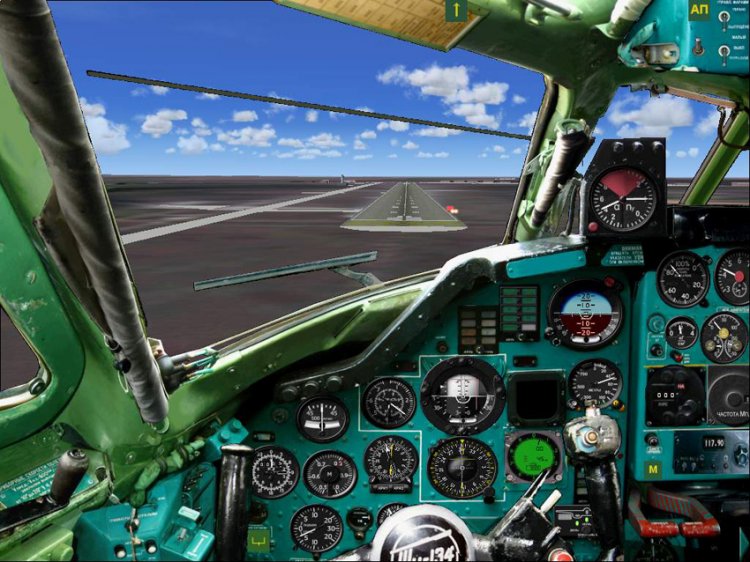
fotopanel Tu-134A-3
| Rating: 5!
+6
5
Peter handsome! Only five
− I29041,
17 years ago,
#
+2
5
Extremely successful photograph has been used for the panel. Although the panel, and 2D, but there is volume. By the way, the cabin Tu-134A, no matter how what the other creates a sense of flight. So any who could not done for "whistle" virtual cockpit. A pity! Thanks to the author for his work, tried to create something extraordinary sense of presence!
− bisley,
17 years ago,
#
+1
That screen "tuning") Och.udobnaya and readable bar. Http://www.avsim.su/forum/topic/72804-scs-tu-134-v-1-2/page__st__540__gopid__1236456 &
− DIREKTOR,
17 years ago,
#
+1
5
Five, but with BAAALshoy club. All fine, except that the machine does not pull ...
− sergey5993,
16 years ago,
#
And the buttons AP + ANU no ...
− sergey5993,
15 years ago,
#
+1
5
The most realistic and convenient 2d cab in my case! It was all very comfortable and beautiful! I really liked! Just overflew ... And taxiing much easier to steer! In a separate wheel Respect developer! The only thing that I can not hack his way TKAS and yet I also black panel supply. And so simple chic! Thank you developer! Five fixed!
− Exeletor,
17 years ago,
#
TKAS ... drawn on a piece of old canvas), do not cut one's way out there.
− DIREKTOR,
17 years ago,
#
and that tie to prevent TKAS ...? seem to be as it is in fact tkas suitable for the whistle ...
− Exeletor,
17 years ago,
#
Who wants to tie TKAS need to register in the section [Window00] panel line: gauge48 = STT_RP_TCAS_V0_19L! IVA_81A, 693,509,78,75 gauge51 = STT_RP_TCAS_V0_19L! TCAS_Sys, 410,0,10,10 gauge52 = STT_RP_TCAS_V0_19L! TCAS_Sound_Sys, 420,0,10, 10, and in [Fixed Window32] prescribe the line: gauge42 = STT_RP_TCAS_V0_19L! IVA_81A, 699,558,91,84.
− Петр,
17 years ago,
#
+1
5
Thank you, variometer had trailers in place of a space
− Tu134,
17 years ago,
#
+1
I will say this: download all the panel, Peter. All tried to overflying. Existing work certainly suggests, but: in favor of a more realistic visual perception by sacrificing size devices, which, alas, is not good. For example, the Ministry of Natural Resources say completing the third turn on the original panel is quite clearly not possible to determine, and on this and even more so. The difficulties in piloting in SMU provided. Therefore, IMHO Penela for visual flights for the most part. And the second. In Reale device dimensions are very large. I am therefore pleased to see them larger.'s Nothing personal to the author did not have, on the contrary, thanks for the work. Just my opinion on these things are somewhat different.
− Mihail Stepanov,
17 years ago,
#
Too small appliances. By CAP not'll come.
− arsiz1984,
17 years ago,
#
+1
So what's the question? Diameter devices in Reale 80 mm-buy a great big screen and get the real size of the devices.
− Петр,
17 years ago,
#
Normal SЂR°R·RјRµSЂS‡RyoRє, and for accurate readings of the navigator panel to you.
− DIREKTOR,
17 years ago,
#
5
looks nice, but as with many shoals of mud 76, the hour in our rytsya (((to fix jambs
− kroll,
15 years ago,
#
Here's an example on this issue http://www.avsim.su/forum/topic/72804-scs-tu-134-v-1-2/page__st__660__gopid__1315922 & # entry1315922 [wrong!] [I agree!], and have not found answer, he spat on the case (
− kroll,
15 years ago,
#
5
and how to tie the wheel to the normal panel?
− xplan96,
16 years ago,
#
5
How to prescribe the correct view of the wing with a porthole in your Panel?
− Air_Afrique,
16 years ago,
#
It is strange only for me with working batteries OFF the plane with the panel?
− Wlad90,
16 years ago,
#
5
1000. Lovely, flying will become even more comfortable and aesthetic. Thanks!
− Ravnmm,
16 years ago,
#
5
Peter, thank you very much for the excellent panel! Only here can not find the automatic throttle would be grateful if someone tell what's what.
− guitarmn,
16 years ago,
#
5
Only 5
− Virpilot,
16 years ago,
#
5
Thank you so much for the work done! There is nothing better than high-quality photo-panel)))
− ARTMOTO63,
16 years ago,
#
5
All excellent! Here are just a place with CF include AP + ANU?
− gaa,
16 years ago,
#
5
Panel is different, thanks! But how to fix it .... http://www.avsim.su/forum/uploads/monthly_12_2009/post-16782-1260354447, 78.jpg
− horseman,
16 years ago,
#
Oops, link here: http://www.avsim.su/forum/topic/72804-scs-tu-134-v-1-2/page__st__660__gopid__1315922 & # entry1315922
− horseman,
16 years ago,
#
5
But can the same for large monitors.
− Gek154,
16 years ago,
#
Not only possible, but very necessary!
− bisley,
16 years ago,
#
5
Excellent!! Only 5!
− pilottt,
16 years ago,
#
By Put please Electro.bmp It lacks the texture package
− ALFER,
17 years ago,
#
rename ele in electro and everything will be ok:)
− qip88,
17 years ago,
#
5
Thank you for the material ...), bitmap-easel. Now it is possible to paint. Finishing bi nidit.
− DIREKTOR,
17 years ago,
#
And do not forget the fact that the use of pens as well as their modifications, for other works without permission from me is prohibited.
− Петр,
17 years ago,
#
Too late ... already used), put it on the An-2))) Yes there is work for the week, all to place, move, grease, for myself, first and foremost, and then agree on what if;) Thanks for BMP, again !
− DIREKTOR,
17 years ago,
#
-1
In fact, I is not funny, looking at how one man's disfigured my panel TU-95, throwing out all the home appliances and do not shove that flag. And the other one took my fotobitmap panels Tu-154B2, dragged there a couple of toggle switches, laid out and I did not even mentioned.
− Петр,
17 years ago,
#
5
So COOL! Thanks author! WeGЎcan And please, the center only for shtrokoformatnyh monitors? With only not pressed, and can not include the center (((Once again, thanks to the author!
− Maverick_515,
17 years ago,
#
5
No words!
− t@r@n,
17 years ago,
#
5
Pyaterik definitely!
− Anatoliy,
17 years ago,
#
5
Peter, thank you, very interesting satisfied. Good job!
− Sima,
17 years ago,
#
5
Excellent work!
− qip88,
17 years ago,
#
+1
only: when a power bar (Shift +6) - a black box with lights, panels are not visible: (Does anyone know what could be the problem?
− qip88,
17 years ago,
#
I have the same problem ..
− Kain,
17 years ago,
#
Well, yes and electronic variometer also black window ...
− stainass,
17 years ago,
#
Turn the toggle switch (near upr.farami)
− Tekhnik,
17 years ago,
#
* I beg your pardon does not Shift +6, and Shift +5.
− qip88,
17 years ago,
#
Tekhnik about VBE I vkurse
− stainass,
17 years ago,
#
In the section panel Window05 = Overhead named bitmap file = overhead.bmp. In the folder panel of a plane should be a file with that name, which is a bitmap Electric panels.
− Петр,
17 years ago,
#
+1
all that you have written is, Dear Peter. A panel is still black ...
− Exeletor,
17 years ago,
#
I understand: in order to properly display the power bar, it is necessary after adding all files from archive 23847-panel-134.zip folder Panel found in the last ele file and rename the electro:) Everything was much simpler! :)
− qip88,
17 years ago,
#
although some of the tumblers a bit biased, but IMHO it's not critical.
− qip88,
17 years ago,
#
5
Tested EXCELLENT THANKS!
− savi72,
17 years ago,
#
5
Thank you very much! Very convenient and more real!
− kupper,
17 years ago,
#
5
Thank you!
− persik,
17 years ago,
#
5
So much has krasivshe! ATP!
− .x.X.x.,
17 years ago,
#
5
...
− armaviaEK,
17 years ago,
#