Boeing 727 panel Просмотр ZIP-архива
aircraft/Panels/Rp727/Manual/misc.htm
<html>

<head>
<meta http-equiv="Content-Language" content="en-us">
<meta http-equiv="Content-Type" content="text/html; charset=windows-1252">
<title>User Guide</title>
<meta name="GENERATOR" content="Microsoft FrontPage 4.0">
<meta name="ProgId" content="FrontPage.Editor.Document">
<meta name="Microsoft Border" content="tl, default">
</head>

<body stylesrc="index.htm" bgcolor="#00003E" text="#C0C0C0" link="#FF0000" vlink="#FF0000" alink="#FF0000" background="images/background.jpg"><!--msnavigation--><table border="0" cellpadding="0" cellspacing="0" width="100%"><tr><td>

<img border="0" src="images/banner4.jpg" width="971" height="144">

</td></tr><!--msnavigation--></table><!--msnavigation--><table border="0" cellpadding="0" cellspacing="0" width="100%"><tr><td valign="top" width="1%">


<p><font size="2" face="Verdana"><b><a href="index.htm">MAIN</a></b></font></p>
<p><font size="2" face="Verdana"><b><a href="installation.htm">INSTALLATION</a>    </b></font></p>
<p><font size="2" face="Verdana"><b><a href="misc.htm">MISCELLANEOUS</a>    </b></font></p>
<p><font size="2" face="Verdana"><b><a href="warnings.htm">WARNINGS </a>   </b></font></p>
<p><font size="2" face="Verdana"><b><a href="autoflight.htm">AUTOPILOT</a></b></font></p>
<p><font size="2" face="Verdana"><b><a href="flightdir.htm">FLIGHT DIRECTOR</a></b></font></p>
<p><font size="2" face="Verdana"><b><a href="radios.htm">RADIOS</a></b></font></p>
<p><font size="2" face="Verdana"><b><a href="lighting.htm">LIGHTS</a></b></font></p>
<p><font size="2" face="Verdana"><b><a href="anti_ice.htm">ANTI-ICE</a></b></font></p>
<p><font size="2" face="Verdana"><b><a href="flying.htm">TAKEOFF SPEEDS</a></b></font></p>
<p><font size="2" face="Verdana"><b><a href="cruise.htm">CRUISE SETTINGS</a></b></font></p>
<p><font size="2" face="Verdana"><b><a href="landing.htm">LANDING SPEEDS</a></b></font></p>
<p><font size="2" face="Verdana"><b><a href="faq.htm">FAQ'S/ISSUES</a></b></font></p>
<p><font size="2" face="Verdana"><b><a href="contact.htm">CONTACT ME</a></b></font></p>

</td><td valign="top" width="24"></td><!--msnavigation--><td valign="top">
<p> </p>
<p><b><font face="Verdana">MISCELLANEOUS</font></b></p>
<p>
<p><font size="2" face="Verdana"><b>COCKPIT VIEWS</b></font>
<p><font size="2" face="Verdana"><b>Cockpit views are activated in the usual
Shift-number pad way.  The upper view is activated by pressing Control-5.</b></font>
<p><font face="Verdana"><img border="0" src="images/goaround.jpg" width="43" height="84"> <img border="0" src="images/landing.jpg" width="150" height="112"></font><p><b><font size="2" face="Verdana">To
switch to landing view, click on the mouse hot spot just below the marker beacon
lights.   This view is handy for landing as it lets you see more of
the scenery and less of the panel.  As you only have a view indicators
available in this view, it might be a good idea if you are fully configured for
landing and have received your landing clearance before engaging this view.  To get back
to normal view, just click on the button again.</font></b><p> <p><b><font size="2" face="Verdana">AUTO
ENGINE SMOKE</font></b><p><img border="0" src="images/smoke.jpg" width="272" height="100"><p><b><font size="2" face="Verdana">The
panel will automatically turn on engine smoke effects at high thrust settings,
such as during takeoff.  You should get those nice smokey
take-offs, but you need to have smoke effects installed (see <a href="installation.htm#Install Smoke Effects"> installation</a>
instructions for more details.)  With this feature, you no longer have the
ability to turn smoke on manually, such as through the menu or with the "i"
key.</font></b><p> <p><b><font size="2" face="Verdana">AUTO
TAXI</font></b><p><img border="0" src="images/autotaxi.jpg" width="21" height="21"><p><b><font size="2" face="Verdana">A
new feature on this panel is automatic taxi speed control.  Pushing the button labeled
"T" located just below the marker beacon indicator will automatically
control thrust and braking to maintain approximately an 11 knot taxi
speed.   This speed was chosen to allow you to keep an exact pace with taxiing AI
traffic.  It also provides an easy means to taxi while in spot plane
view.  The button will flash when Auto Taxi is active.  Pushing
the button again will turn it off.  You will still have to tap the brakes when
turning corners.</font></b><p><i><font size="2" face="Verdana"><img border="0" src="images/727_icon.gif" width="100" height="48">You
should ideally be able to taxi at idle thrust once rolling.  Since there is
an unrealistically high amount of ground friction in FS, this feature was
added as a work-around.  The takeoff configuration warning is
inhibited regardless of EPR reading and flap setting when Auto Taxi is enabled.</font></i><p> <p><b><font size="2" face="Verdana">ATC
QUICK KEYS</font></b><p><img border="0" src="images/atc_hotkeys.jpg" width="214" height="26"><p><b><font face="Verdana" size="2">These
buttons are shortcuts to the ATC menu items.  Push the headset button
as in the default aircraft to bring up the ATC menu, then you can use these buttons
instead of the keyboard.</font></b><p> <p><b><font face="Verdana" size="2">MARKER
BEACON SENSITIVITY SWITCH</font></b><p><img border="0" src="images/marker_switch.jpg" width="35" height="51"><p><b><font face="Verdana" size="2">This
switch controls the sensitivity of your marker beacon receiver.  It's
normally left in the high position until passing the outer marker, then switched
over to low for greater precision.</font></b><p> <p><b><font face="Verdana" size="2">PNEUMATIC
EMERGENCY BRAKE</font></b><p><img border="0" src="images/pneu_handle.jpg" width="119" height="99">
<img border="0" src="images/pnue_gauge.jpg" width="82" height="82"><p><b><font face="Verdana" size="2">This
is not your parking brake.  This handle controls the emergency pneumatic
brake that is available if the regular hydraulic powered brakes should fail.  PSI
on the gauge should normally be 1200, but you will see it drop as you use the
brake.  You get about three stops before you run out of air pressure.
The pressure gauge shares its location with the TAT gauge.  This was a
space saving strategy.  It will automatically show when you
activate the brake handle.  You can also just click on the TAT gauge to
bring it in view.</font></b><p> <p><b><font face="Verdana" size="2">CLOCK/TIMER</font></b><p><img border="0" src="images/clock.jpg" width="106" height="114"><p><b><font face="Verdana" size="2">The
clock has two timers shown as the smaller dials set in the face.  The
bottom on is a minute timer which goes up to 15 minutes then starts over
again.  Pushing once on the brass colored button in the lower right stops the timer.  Pushing it again resets the counter to zero.  The upper
dial is the elapsed time which goes all the way up to 12 hours.  It's
controlled with the black lever on the upper right.  It is in the
"run" position by default.  It can be stopped and zeroed with the
same lever.  I have disabled the ability to set the time with knob in the
lower left due to the long texture loading.  You'll have to set the time
through the FS menu.</font></b><p> <p><b><font face="Verdana" size="2">FIRE
HANDLES</font></b><p><img border="0" src="images/fire_handles.jpg" width="272" height="90"><p><b><font face="Verdana" size="2">What will happen
if you pull these is that
after approximately 25 seconds, your engine bleed air, hydraulic, and fuel lines will be
closed and your engine will quit.  You will not be able to restart.  You'll
have to select a default aircraft then reselect your 727 to clear the
failure.  Engine fire simulations are not available, but you can test the
fire loops and see the handles light up.  See <a href="warnings.htm#Fire Handle Test">warnings</a>
for more details.</font></b><p> <p><b><font face="Verdana" size="2">ALTERNATE
HORIZON SOURCE</font></b><p><img border="0" src="images/mangs.jpg" width="106" height="49"><p><b><font face="Verdana" size="2">If
your gyro fails, you can select the alternate source using the switch located
below the VSI.  Place the switch from Normal to Alt.</font></b><p> <p><b><font face="Verdana" size="2">ALTERNATE
FLAP EXTENSION</font></b><p><img border="0" src="images/alt_flaps.jpg" width="150" height="67"><p><b><font face="Verdana" size="2">These
switches provide an alternate way of extending your flaps.  The red guarded
switch must first be set to on, then the flaps can be extended, retracted, or
halted by clicking on the UP, DN, or OFF switch labels.</font></b><p><i><font face="Verdana" size="2"><img border="0" src="images/727_icon.gif" width="100" height="48">Both
flaps and slats will extend to only to their detents and at normal speed.</font></i><p> <p><b><font face="Verdana" size="2">YAW
DAMPERS AND SURFACE POSITION INDICATOR</font></b><p><img border="0" src="images/surface.jpg" width="115" height="117"><p><b><font face="Verdana" size="2">Yaw
dampers are automatically set with this panel.  In the pictured surface
position indicator, you'll see two red flags when the upper and lower yaw
dampers are not powered.  You'll also see the elevator and rudder position
on this same gauge.</font></b><p> <p><b><font face="Verdana" size="2">FUEL
PANEL</font></b><p><b><font face="Verdana" size="2">The Flight Engineer's fuel
panel is opened using the gas pump icon on the main panel.  </font></b><p><img border="0" src="images/fuel_test.jpg" width="66" height="69"><p><b><font face="Verdana" size="2">Pressing
and holding the Fuel Qty Test button will cause the fuel quantity gauge needle
to slowly spin down to zero.  Release the switch, and they will spin back
up to the normal quantity.</font></b><p><img border="0" src="images/fuel_boost.jpg" width="105" height="72"><p><b><font face="Verdana" size="2">There's
eight electric fuel boost pumps on the panel, two for each wing tank, and four
for the center.  If you are starting with a cold, dark cockpit, you'll have
to turn these on before flight.  Otherwise, they come on
automatically.  Next to each switch is an amber warning light that comes on
when fuel pressure is low, either from a boost pump not being on or from low
fuel quantity.</font></b><p><img border="0" src="images/tank_switch.jpg" width="85" height="114"><p><b><font face="Verdana" size="2">There's
three fuel crossfeed selector knobs.  Due to the inability to get correct
tank to engine settings with MSFS, these switches don't do anything on the
panel.  </font></b><p><img border="0" src="images/fuel_shutoff.jpg" width="109" height="75"><p><b><font face="Verdana" size="2">There's
also three fuel shutoff switches.  Don't touch these.  Next to the
switch, you'll see a blue valve light that will come on if the switch or the
fuel shutoff levers on the throttle quadrant are closed.</font></b><p> <p><b><font face="Verdana" size="2">TRIMMING</font></b><p><img border="0" src="images/trim_rudder.jpg" width="150" height="145">
<img border="0" src="images/trim_elev.jpg" width="86" height="150"><p><b><font face="Verdana" size="2">Rudder
trim is controlled with the large round knob on the second radio stack.
Elevator trim is controlled through the keyboard or joystick buttons (if
programmed).  The elevator trim indicator (above right) is located on the throttle
quadrant.  I have not done anything useful with the aileron trim knob on the
bottom of the second radio stack - it's just a photo.</font></b><p> <p><b><font face="Verdana" size="2">ENGINE
START</font></b><p><b><font face="Verdana" size="2">Engine starter
switches are located on the second overhead panel.  The switch guard is
opened by clicking on the top of it.  This exposes the starter switch,
which is then placed into the Ground position.  At peak N2, you can then
place the fuel shutoff levers on the throttle panel to idle.</font></b><p><img border="0" src="images/727_icon.gif" width="100" height="48"><i><font face="Verdana" size="2">This
is normally a two-handed operation.  On this panel, the starter switches
will hold themselves in the Ground position until approximately 40% N2, then
will automatically shut off.</font></i><p> <p> <!--msnavigation--></td></tr><!--msnavigation--></table></body>

</html>
rp727pn3.zip
| Имя файла | Дата | Размер |
|---|---|---|
| gauges/Rp727.gau | 29.08.2002 01:05 | 12 MB |
| aircraft/Panels/ | 30.08.2002 01:47 | |
| aircraft/Panels/Rp727/ | 30.08.2002 01:47 | |
| aircraft/Panels/Rp727/panel.cfg | 23.08.2002 01:19 | 8 KB |
| aircraft/Panels/Rp727/forward_right.bmp | 15.02.2002 19:49 | 769 KB |
| aircraft/Panels/Rp727/left.bmp | 08.04.2002 06:42 | 769 KB |
| aircraft/Panels/Rp727/main.bmp | 16.07.2002 04:15 | 769 KB |
| aircraft/Panels/Rp727/overhead.bmp | 04.06.2002 18:31 | 222 KB |
| aircraft/Panels/Rp727/forward_left.bmp | 04.06.2002 18:36 | 769 KB |
| aircraft/Panels/Rp727/rear.bmp | 29.01.2002 05:09 | 973 KB |
| aircraft/Panels/Rp727/rear_left.bmp | 29.01.2002 05:09 | 769 KB |
| aircraft/Panels/Rp727/rear_right.bmp | 29.01.2002 05:10 | 769 KB |
| aircraft/Panels/Rp727/right.bmp | 17.03.2002 00:00 | 769 KB |
| aircraft/Panels/Rp727/up.bmp | 29.01.2002 05:11 | 769 KB |
| aircraft/Panels/Rp727/landing.bmp | 06.08.2002 06:07 | 769 KB |
| aircraft/Panels/Rp727/trim.bmp | 13.07.2002 01:37 | 181 KB |
| aircraft/Panels/Rp727/FSSound.txt | 19.09.2000 14:48 | 4 KB |
| aircraft/Panels/Rp727/rp727pn3.jpg | 29.08.2002 02:00 | 9 KB |
| aircraft/Panels/Rp727/screen_night.jpg | 29.08.2002 01:49 | 80 KB |
| aircraft/Panels/Rp727/screen_windows.jpg | 29.08.2002 01:57 | 114 KB |
| aircraft/Panels/Rp727/screen_landing.jpg | 29.08.2002 01:57 | 80 KB |
| aircraft/Panels/Rp727/screen_day.jpg | 29.08.2002 02:00 | 106 KB |
| aircraft/Panels/Rp727/Readme.txt | 30.08.2002 01:35 | 2 KB |
| aircraft/Panels/Rp727/Manual/ | 30.08.2002 01:47 | |
| aircraft/Panels/Rp727/Manual/index.htm | 29.08.2002 17:50 | 5 KB |
| aircraft/Panels/Rp727/Manual/installation.htm | 31.08.2002 15:25 | 6 KB |
| aircraft/Panels/Rp727/Manual/anti_ice.htm | 29.08.2002 17:50 | 7 KB |
| aircraft/Panels/Rp727/Manual/contact.htm | 29.08.2002 17:50 | 3 KB |
| aircraft/Panels/Rp727/Manual/autoflight.htm | 29.08.2002 17:50 | 11 KB |
| aircraft/Panels/Rp727/Manual/flightdir.htm | 29.08.2002 17:50 | 6 KB |
| aircraft/Panels/Rp727/Manual/cruise.htm | 29.08.2002 17:50 | 3 KB |
| aircraft/Panels/Rp727/Manual/lighting.htm | 29.08.2002 17:50 | 8 KB |
| aircraft/Panels/Rp727/Manual/misc.htm | 29.08.2002 17:50 | 13 KB |
| aircraft/Panels/Rp727/Manual/warnings.htm | 29.08.2002 17:50 | 10 KB |
| aircraft/Panels/Rp727/Manual/faq.htm | 29.08.2002 17:50 | 11 KB |
| aircraft/Panels/Rp727/Manual/flying.htm | 29.08.2002 17:50 | 6 KB |
| aircraft/Panels/Rp727/Manual/radios.htm | 29.08.2002 17:50 | 6 KB |
| aircraft/Panels/Rp727/Manual/landing.htm | 29.08.2002 17:50 | 3 KB |
| aircraft/Panels/Rp727/Manual/images/ | 30.08.2002 01:47 | |
| aircraft/Panels/Rp727/Manual/images/winzip.jpg | 04.08.2002 14:52 | 5 KB |
| aircraft/Panels/Rp727/Manual/images/windshield_heat.jpg | 30.07.2002 14:14 | 7 KB |
| aircraft/Panels/Rp727/Manual/images/weight.jpg | 22.07.2002 01:04 | 24 KB |
| aircraft/Panels/Rp727/Manual/images/v_speeds.jpg | 29.07.2002 14:12 | 108 KB |
| aircraft/Panels/Rp727/Manual/images/trim_rudder.jpg | 02.08.2002 01:48 | 7 KB |
| aircraft/Panels/Rp727/Manual/images/trim_elev.jpg | 02.08.2002 01:49 | 5 KB |
| aircraft/Panels/Rp727/Manual/images/transp.jpg | 31.07.2002 05:16 | 6 KB |
| aircraft/Panels/Rp727/Manual/images/tcas_test.jpg | 31.07.2002 05:17 | 5 KB |
| aircraft/Panels/Rp727/Manual/images/tat.jpg | 31.07.2002 09:56 | 3 KB |
| aircraft/Panels/Rp727/Manual/images/tank_switch.jpg | 29.07.2002 15:12 | 4 KB |
| aircraft/Panels/Rp727/Manual/images/surface.jpg | 29.07.2002 14:54 | 5 KB |
| aircraft/Panels/Rp727/Manual/images/start.jpg | 30.07.2002 15:12 | 5 KB |
| aircraft/Panels/Rp727/Manual/images/speed_bugs.jpg | 29.07.2002 14:35 | 6 KB |
| aircraft/Panels/Rp727/Manual/images/smoke_cfg.jpg | 08.08.2002 01:53 | 25 KB |
| aircraft/Panels/Rp727/Manual/images/smoke.jpg | 15.07.2002 06:16 | 3 KB |
| aircraft/Panels/Rp727/Manual/images/radio_cfg.jpg | 06.08.2002 00:39 | 19 KB |
| aircraft/Panels/Rp727/Manual/images/pnue_gauge.jpg | 27.07.2002 18:07 | 3 KB |
| aircraft/Panels/Rp727/Manual/images/pneu_handle.jpg | 27.07.2002 18:06 | 5 KB |
| aircraft/Panels/Rp727/Manual/images/pitot.jpg | 05.08.2002 04:15 | 6 KB |
| aircraft/Panels/Rp727/Manual/images/pitchsys.jpg | 04.07.2002 15:44 | 2 KB |
| aircraft/Panels/Rp727/Manual/images/panelcfg.jpg | 05.07.2002 01:06 | 7 KB |
| aircraft/Panels/Rp727/Manual/images/paddles.jpg | 04.07.2002 15:32 | 4 KB |
| aircraft/Panels/Rp727/Manual/images/oil_lights.jpg | 18.07.2002 01:50 | 3 KB |
| aircraft/Panels/Rp727/Manual/images/oat.jpg | 22.07.2002 01:20 | 2 KB |
| aircraft/Panels/Rp727/Manual/images/nav_com.jpg | 31.07.2002 05:18 | 7 KB |
| aircraft/Panels/Rp727/Manual/images/me.jpg | 25.07.2002 15:44 | 12 KB |
| aircraft/Panels/Rp727/Manual/images/marker_switch.jpg | 18.07.2002 01:46 | 2 KB |
| aircraft/Panels/Rp727/Manual/images/manknob.jpg | 04.07.2002 16:13 | 3 KB |
| aircraft/Panels/Rp727/Manual/images/mangs.jpg | 04.07.2002 16:03 | 3 KB |
| aircraft/Panels/Rp727/Manual/images/lights_ext.jpg | 19.07.2002 01:37 | 16 KB |
| aircraft/Panels/Rp727/Manual/images/light_mouse.jpg | 19.07.2002 01:34 | 920 B |
| aircraft/Panels/Rp727/Manual/images/le_light.jpg | 18.07.2002 01:50 | 8 KB |
| aircraft/Panels/Rp727/Manual/images/landing_speeds.jpg | 31.07.2002 11:16 | 36 KB |
| aircraft/Panels/Rp727/Manual/images/landing.jpg | 09.07.2002 15:18 | 7 KB |
| aircraft/Panels/Rp727/Manual/images/hdgsel.jpg | 04.07.2002 15:36 | 2 KB |
| aircraft/Panels/Rp727/Manual/images/gpws.jpg | 20.07.2002 22:07 | 3 KB |
| aircraft/Panels/Rp727/Manual/images/goaround.jpg | 09.07.2002 14:38 | 2 KB |
| aircraft/Panels/Rp727/Manual/images/fuel_test.jpg | 29.07.2002 15:06 | 2 KB |
| aircraft/Panels/Rp727/Manual/images/fuel_shutoff.jpg | 29.07.2002 15:18 | 4 KB |
| aircraft/Panels/Rp727/Manual/images/fuel_menu.jpg | 22.07.2002 01:09 | 5 KB |
| aircraft/Panels/Rp727/Manual/images/fuel_light.jpg | 19.07.2002 20:26 | 960 B |
| aircraft/Panels/Rp727/Manual/images/fuel_boost.jpg | 29.07.2002 15:09 | 3 KB |
| aircraft/Panels/Rp727/Manual/images/fsuipc_vs_sign.jpg | 06.08.2002 18:08 | 16 KB |
| aircraft/Panels/Rp727/Manual/images/flightdir.jpg | 04.07.2002 15:56 | 9 KB |
| aircraft/Panels/Rp727/Manual/images/flap_cfg.jpg | 06.08.2002 07:33 | 19 KB |
| aircraft/Panels/Rp727/Manual/images/fire_test.jpg | 18.07.2002 01:38 | 13 KB |
| aircraft/Panels/Rp727/Manual/images/fire_handles.jpg | 18.07.2002 17:15 | 10 KB |
| aircraft/Panels/Rp727/Manual/images/eng_fail.jpg | 27.07.2002 18:07 | 1 KB |
| aircraft/Panels/Rp727/Manual/images/cutout.jpg | 15.07.2002 07:40 | 4 KB |
| aircraft/Panels/Rp727/Manual/images/cruise_speeds.jpg | 31.07.2002 06:28 | 68 KB |
| aircraft/Panels/Rp727/Manual/images/console_light.jpg | 25.07.2002 15:32 | 5 KB |
| aircraft/Panels/Rp727/Manual/images/config.jpg | 04.08.2002 14:50 | 10 KB |
| aircraft/Panels/Rp727/Manual/images/comparator.jpg | 09.07.2002 14:38 | 2 KB |
| aircraft/Panels/Rp727/Manual/images/clock.jpg | 20.07.2002 22:35 | 6 KB |
| aircraft/Panels/Rp727/Manual/images/boxes.jpg | 25.07.2002 14:57 | 21 KB |
| aircraft/Panels/Rp727/Manual/images/banner4.jpg | 31.07.2002 17:05 | 47 KB |
| aircraft/Panels/Rp727/Manual/images/background.jpg | 30.07.2002 17:07 | 641 B |
| aircraft/Panels/Rp727/Manual/images/autotaxi.jpg | 10.07.2002 18:31 | 926 B |
| aircraft/Panels/Rp727/Manual/images/autopilot_cfg.jpg | 06.08.2002 00:48 | 24 KB |
| aircraft/Panels/Rp727/Manual/images/atc_hotkeys.jpg | 18.07.2002 01:33 | 4 KB |
| aircraft/Panels/Rp727/Manual/images/artifacts.jpg | 31.07.2002 03:50 | 4 KB |
| aircraft/Panels/Rp727/Manual/images/aprollknob.jpg | 04.07.2002 15:29 | 3 KB |
| aircraft/Panels/Rp727/Manual/images/apdisc.jpg | 04.07.2002 16:24 | 2 KB |
| aircraft/Panels/Rp727/Manual/images/apd.jpg | 04.07.2002 15:49 | 4 KB |
| aircraft/Panels/Rp727/Manual/images/anti_ice.jpg | 30.07.2002 15:00 | 9 KB |
| aircraft/Panels/Rp727/Manual/images/altimeter.jpg | 22.07.2002 01:32 | 6 KB |
| aircraft/Panels/Rp727/Manual/images/altalert.jpg | 10.07.2002 18:41 | 3 KB |
| aircraft/Panels/Rp727/Manual/images/alt_flaps.jpg | 04.08.2002 14:58 | 3 KB |
| aircraft/Panels/Rp727/Manual/images/adf.jpg | 31.07.2002 05:13 | 7 KB |
| aircraft/Panels/Rp727/Manual/images/727_icon.gif | 30.07.2002 12:27 | 4 KB |
| aircraft/Panels/Rp727/Manual/images/cargo_aft.jpg | 18.08.2002 20:38 | 6 KB |
| aircraft/Panels/Rp727/Manual/images/cargo_test.jpg | 18.08.2002 20:36 | 6 KB |
| aircraft/Panels/Rp727/Manual/images/duct_temp.jpg | 18.08.2002 21:00 | 6 KB |
| aircraft/Panels/Rp727/Manual/images/interior_lights.jpg | 25.08.2002 16:13 | 21 KB |
| aircraft/Panels/Rp727/Manual/_borders/ | 30.08.2002 01:47 | |
| aircraft/Panels/Rp727/Manual/_borders/left.htm | 25.08.2002 16:22 | 2 KB |
| aircraft/Panels/Rp727/Manual/_borders/top.htm | 25.08.2002 16:22 | 289 B |
| aircraft/Panels/Rp727/Manual/_borders/right.htm | 03.07.2002 01:46 | 489 B |
| modules/FSSOUND.DLL | 12.11.2001 02:53 | 13 KB |
| sound/rp727_trim_down.wav | 30.03.2002 23:07 | 52 KB |
| sound/rp727_air_cond_run.wav | 12.08.2002 01:47 | 86 KB |
| sound/rp727_air_cond_start.wav | 12.08.2002 01:47 | 16 KB |
| sound/rp727_alt_alert.wav | 18.02.1997 17:59 | 12 KB |
| sound/rp727_alt_flap.wav | 04.08.2002 13:09 | 500 B |
| sound/RP727_AP_DISC.WAV | 08.04.2002 04:56 | 6 KB |
| sound/rp727_ap_mode.wav | 06.04.2002 02:02 | 6 KB |
| sound/rp727_ap_mode_disc.wav | 08.04.2002 04:42 | 990 B |
| sound/rp727_ap_sys.wav | 02.04.2002 08:44 | 5 KB |
| sound/rp727_apd_test.wav | 13.08.2002 06:26 | 4 KB |
| sound/rp727_button.wav | 16.08.2002 16:08 | 512 B |
| sound/rp727_command_bars.wav | 28.03.2002 21:52 | 47 KB |
| sound/rp727_continuous_horn.wav | 14.07.2002 21:50 | 108 KB |
| sound/rp727_crossfeed.wav | 04.08.2002 12:59 | 536 B |
| sound/Rp727_cutout.wav | 16.07.2002 05:04 | 13 KB |
| sound/rp727_ding.wav | 26.07.2002 17:24 | 11 KB |
| sound/rp727_ding_dong.wav | 26.07.2002 17:22 | 24 KB |
| sound/rp727_dme_switch.wav | 30.04.2002 07:59 | 252 B |
| sound/rp727_fire_bell.wav | 14.07.2002 23:10 | 86 KB |
| sound/rp727_fire_in.wav | 09.04.2002 08:00 | 5 KB |
| sound/rp727_fire_out.wav | 09.04.2002 08:00 | 3 KB |
| sound/rp727_fuel_lever_down.wav | 31.07.2002 01:59 | 5 KB |
| sound/rp727_fuel_lever_up.wav | 31.07.2002 01:59 | 6 KB |
| sound/rp727_glideslope.wav | 19.09.2000 14:02 | 21 KB |
| sound/rp727_ground_crew.wav | 26.07.2002 17:12 | 67 KB |
| sound/rp727_guard_close.wav | 04.08.2002 14:37 | 3 KB |
| sound/rp727_guard_open.wav | 04.08.2002 14:37 | 1 KB |
| sound/rp727_horn.wav | 01.04.2002 11:12 | 11 KB |
| sound/rp727_knob.wav | 04.08.2002 13:06 | 250 B |
| sound/rp727_knob_center.wav | 02.04.2002 09:32 | 2 KB |
| sound/rp727_landing.wav | 02.10.2001 03:13 | 4 KB |
| sound/rp727_paddle_on.wav | 07.08.2002 01:29 | 1 KB |
| sound/rp727_park_brake_release.wav | 09.04.2002 07:59 | 5 KB |
| sound/rp727_park_brake_set.wav | 02.04.2002 00:14 | 11 KB |
| sound/rp727_pull_up.wav | 19.09.2000 13:25 | 36 KB |
| sound/rp727_reverse_off.wav | 09.04.2002 07:59 | 21 KB |
| sound/rp727_reverse_on.wav | 08.04.2002 05:58 | 1 KB |
| sound/rp727_rotary_click.wav | 02.05.2002 22:43 | 446 B |
| sound/rp727_selector.wav | 04.08.2002 14:38 | 650 B |
| sound/rp727_stab_brake_release.wav | 16.07.2002 04:52 | 15 KB |
| sound/rp727_strut.wav | 02.04.2002 03:40 | 2 KB |
| sound/rp727_takeoff_config.wav | 25.03.2002 06:42 | 20 KB |
| sound/rp727_tcas_test.wav | 04.08.2002 13:08 | 25 KB |
| sound/rp727_toggle_light.wav | 17.08.2000 19:42 | 2 KB |
| sound/rp727_trim.wav | 26.03.2002 07:08 | 62 KB |
| sound/rp727_400hz.wav | 16.07.2002 05:06 | 81 KB |
| sound/rp727_trim_short.wav | 26.03.2002 07:10 | 16 KB |
| sound/rp727_trim_up.wav | 30.03.2002 23:07 | 60 KB |
| sound/rp727_windshear.wav | 18.09.2001 05:55 | 25 KB |
| avsim_ru.diz | 14.03.2004 00:21 | 407 B |
| Итого: | 22 MB | |
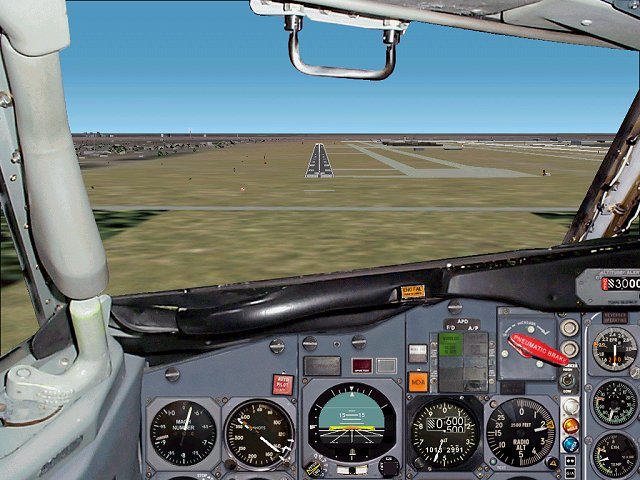
The best frishnaya development. One of the masterpieces panel for B727 Richard Probst.
→ Size:
8 MB
→ Date:
23 years ago (06.02.2003 13:37)
→ Author:
→ License:
License file included in archive
→ Downloaded:
581 time(s)