Addit! Pro For Flight Simulator X V7.3.6 Просмотр ZIP-архива
readme.htm
<html>

<head>
<meta http-equiv="Content-Type" content="text/html; charset=iso-8859-1">
<title>Addit! Pro For Flight Simulator X Readme</title>

<meta name="Microsoft Theme" content="pvamazot 0111, default">
</head>

<body background="" bgcolor="#FFFFFF" text="#000000" link="#0000FF" vlink="#CC0000" alink="#00CC33"><!--mstheme--><font face="Arial, Arial, Helvetica">

<h2 align="center"><!--mstheme--><font face="arial, Arial, Helvetica" color="#D6B874">
<!--webbot bot="Substitution" S-Variable="ap_fsx_product" startspan -->Addit! Pro For Flight Simulator X<!--webbot bot="Substitution" i-checksum="10258" endspan --><!--mstheme--></font></h2>

<h5 align="center"><!--mstheme--><font face="arial, Arial, Helvetica" color="#D6B874">Version
<!--webbot bot="Substitution" S-Variable="ap_fsx_latest_version" startspan -->7.3.6<!--webbot bot="Substitution" i-checksum="1583" endspan --><!--mstheme--></font></h5>

<!--msthemeseparator--><p align="center"><img src="divider.gif" width="240" height="8" alt="horizontal rule"></p>

<h3><!--mstheme--><font face="arial, Arial, Helvetica" color="#0082BF">Introduction<!--mstheme--></font></h3>

<h4><!--mstheme--><font face="arial, Arial, Helvetica" color="#FF8040">Description<!--mstheme--></font></h4>
<!--webbot bot="Include" U-Include="../introduction_ip.htm" TAG="BODY" startspan -->

<p><small>
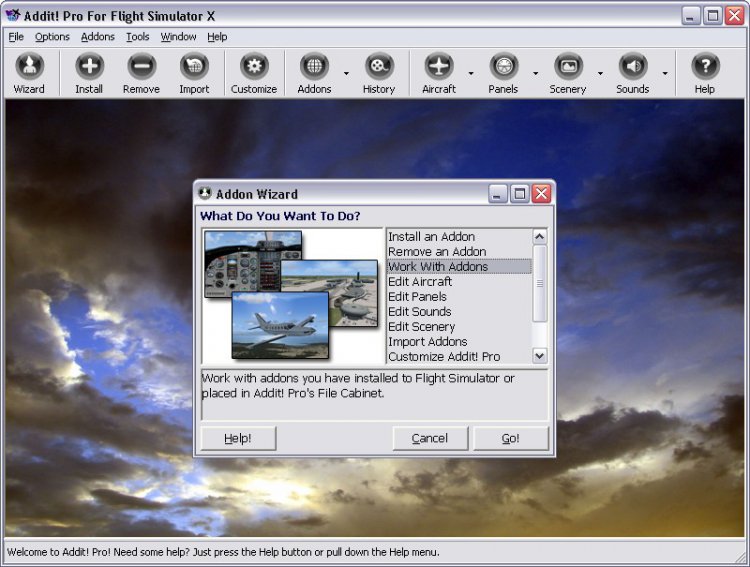
<a href="http://www.byteforge.com/images/apfsx_addon_wizard.jpg"><img border="0" src="apfsx_addon_wizard.jpg" width="360" height="272" align="right" lowsrc="../Addit!%20Pro%20For%20Flight%20Simulator%20X%20Addon%20Wizard" longdesc="Addit! Pro For Flight Simulator X Addon Wizard. Click to expand." alt="Addit! Pro For Flight Simulator X Addon Wizard. Click to expand."></a>Addit! Pro gives you the power to fully manage all of your Flight Simulator
X
addons. Quickly and easily install new addons. Archive addons to Addit! Pro's File Cabinet
or recreate them in folders or zip files. Removing addons is just as effortless. Assign
new panels and sounds to your fleet of aircraft. Conflicts and configuration problems are
identified before they cause any grief. </small></p>
<p><small>When you install scenery, Addit! Pro can automatically update Flight
Simulator's scenery library (Scenery.cfg). </small><font face="Arial" size="2">A
full-featured scenery library editor provides all of
	the functionality of Flight Simulator's scenery library manager plus much
	more! </font><font size="2">
T</font><small>he program handles aircraft, adventures, A.I. airport and facilities data<sup> </sup>flights, flight
plans, gauges, missions, panels, scenery, skins and repaints, sounds, textures, videos, weather and more!</small></p>

<p><small>The Addon Wizard appears when you first start the program. The Addon Wizard
lists all of Addit! Pro's core functions and provides a detailed description of each of
them. Help is always available should you need it. Just press F1 or click on the Help
button. </small></p>

<p><font face="Arial" size="2">The Addon Installation Wizard makes installing addons a
breeze. The Wizard allows you to quickly identify the zip (or rar) file you want
to install. It handles the complicated and time-consuming task of installing files to
their proper locations and configuring </font><small>Flight Simulator</small><font face="Arial" size="2">. Conflicts and problems are identified before they cause trouble.
You will know if any files will be overwritten and may defer the overwrite or accept it.
Addit! Pro keeps track of older files, restoring them later, as necessary to ensure the
integrity of other addons.</font></p>

<p><small>You can import aircraft, panels, sounds and scenery. New addons can
even be imported automatically during startup. Scenery can be
easily installed to custom folders, to your Addon Scenery folder or to Flight
Simulator's general scenery folder. Addit! Pro can update Flight Simulator's
scenery library so you do not need to locate, arrange, prioritize and enable the scenery yourself.
You will always have total control over your scenery library with the robust
scenery library editor.</small></p>

<p><small>Addons are easily managed with Addit! Pro. Rename addons as
you see fit, enter optional descriptions, record the authors and even rate your addons.
Examine addon files in detail, review documentation, view image files and play sound
files, using a convenient central interface. You can move addons to Addit! Pro's File
Cabinet for safe keeping, recreate them in folders or zip files, or delete them. Removing
addons is safe because Addit! Pro knows if other addons depend on the files being removed.
You can even repair addons, finding replacements for damaged or corrupt files.</small></p>
<p><font size="2">
<a href="http://www.byteforge.com/images/apfsx_edit_aircraft.jpg">
<img border="0" src="apfsx_edit_aircraft.jpg" width="360" height="270" align="left" hspace="6" lowsrc="../Addit!%20Pro%20For%20Flight%20Simulator%20X%20Edit%20Aircraft%20Window" longdesc="Addit! Pro For Flight Simulator X Edit Aircraft Window. Click to expand." alt="Addit! Pro For Flight Simulator X Edit Aircraft Window. Click to expand."></a></font><small>The Edit Aircraft window gives you the power to quickly change an aircraft's
panel or sound. Assign pictures to aircraft and panels. Create or remove aircraft
variants. Quickly open configuration files, checklists and reference files. Hide
aircraft to shorten Flight Simulator's in-game aircraft list. Addit! Pro
identifies configuration file errors and can generate a report explaining the problems.
Powerful filtering methods allow you to work with only the addons you wish to see. </small>
<span style="font-size: 10.0pt; font-family: Arial">Select and fly an aircraft
immediately</span><font size="2">, quickly updating the default flight and
starting Flight
	Simulator in one step. </font><small>The
Edit Panels and Edit Sounds windows provide similar functionality for panels and sounds. </small></p>

<p><font size="2">The Addon History shows a log of every addon you import or
install over time. Details like zip/rar filename, size, an author list, rating and
addon description are saved in the History. Use the Addon History window to see
if you have previously installed an addon, look for an addon removed on a
specific date, search for an old addon's zip filename and more! </font></p>

<p><font size="2">Use the FS Configuration Manager </font><small>to perform a variety of tasks
on Flight Simulator's main program
configuration (.cfg) files. Set up a configuration environment to handle certain
scenery, another for helicopters and one for a high screen resolution. Switch
among them with ease.</small></p>
<p><small>The program is very customizable and it remembers your preferences. Sort lists
by any column, show icons and quickly access files. Most lists are searchable by
name or date and you can even create printable reports. You can also automatically optimize
Addit! Pro's database, select a start-up window, set colors and more. Context menus are
available for just about everything so when in doubt, right-click! </small></p>

<p><small>Addit! Pro uses a multiple document interface (MDI). This allows you to work
with several windows simultaneously. While installing an aircraft addon you can also be
examining your existing aircraft and browsing folders. Windows can be resized and
repositioned and the program remembers their configuration for next time. The Toolbar
is customizable with ToolTips and captions.</small></p>

<p><small>With Addit! Pro you will never have to do it the "other" way again!</small></p>

<!--webbot bot="Include" i-checksum="1177" endspan -->


<h4><!--mstheme--><font face="arial, Arial, Helvetica" color="#FF8040">Shareware Notice<!--mstheme--></font></h4>

<p><small>Addit! Pro is shareware. Feel free to evaluate Addit! Pro for 30 days. Once you
discover how easy it is to manage third-party addons with Addit! Pro, you'll never want to
do it "the other way" again! Registration is quick and painless. Go to
<a href="http://www.byteforge.com">www.byteforge.com</a> for product news and upgrades and to
register online. Refer to the accompanying Register.htm file for details.</small></p>

<h4><!--mstheme--><font face="arial, Arial, Helvetica" color="#FF8040">How Does Addit! Pro Work?<!--mstheme--></font></h4>
<!--webbot bot="Include" U-Include="../introduction_how_does_addit_pro_work_ip.htm" TAG="BODY" startspan -->

<p><small>Say you just downloaded an aircraft addon and you want to use it with Flight
Simulator. Just open Addit! Pro's Addon Installation Wizard and select the zip
(or rar) file. The
program analyzes the addon to determine the best installation. Tweak the settings if you
wish then press Finish. Your addon is installed and you can use it immediately. It's
really that simple! </small></p>

<p><small>Managing the addons you install is equally painless. Quickly delete addons, move
those you're not using to Addit! Pro's File Cabinet, and even recreate addons in folders
or zip files. The addons you archive are automatically zipped to save disk space. </small></p>

<p><small>Use the Edit Aircraft display to quickly change any aircraft's panel or sound.
Just pick an aircraft, select Change Panel or Change Sound, and choose a new item from the
list. You can even assign pictures to aircraft and panels - in fact, several pictures are
included to get you started! </small></p>

<p><small>The program is easy to use but if you need assistance, context sensitive help is
only a key press away.</small></p>

<!--webbot bot="Include" i-checksum="46054" endspan -->


<h4><!--mstheme--><font face="arial, Arial, Helvetica" color="#FF8040">Features<!--mstheme--></font></h4>
<!--webbot bot="Include" U-Include="../features_ip.htm" TAG="BODY" startspan -->

<h5><!--mstheme--><font face="arial, Arial, Helvetica" color="#D6B874">Addon Installation<!--mstheme--></font></h5>

<!--mstheme--></font><!--msthemelist--><table border="0" cellpadding="0" cellspacing="0" width="100%">
	<!--msthemelist--><tr><td valign="baseline" width="42"><img src="bull1.gif" width="16" height="16" hspace="13" alt="bullet"></td><td valign="top" width="100%"><!--mstheme--><font face="Arial, Arial, Helvetica"><small>Addon Installation Wizard guides you through the installation process. Install
    from a zip or rar file or from regular files in a folder.</small><!--mstheme--></font><!--msthemelist--></td></tr>
	<!--msthemelist--><tr><td valign="baseline" width="42"><img src="bull1.gif" width="16" height="16" hspace="13" alt="bullet"></td><td valign="top" width="100%"><!--mstheme--><font face="Arial, Arial, Helvetica"><small>Most addons install in just a few mouse clicks. Yes, that fast!</small><font size="2">
	You can even right click on a zip/rar file in Windows Explorer and pick "Install
	to FSX Using Addit! Pro" for very fast results.</font><!--mstheme--></font><!--msthemelist--></td></tr>
	<!--msthemelist--><tr><td valign="baseline" width="42"><img src="bull1.gif" width="16" height="16" hspace="13" alt="bullet"></td><td valign="top" width="100%"><!--mstheme--><font face="Arial, Arial, Helvetica"><small>Tweak the installation to your preferences.</small><!--mstheme--></font><!--msthemelist--></td></tr>
	<!--msthemelist--><tr><td valign="baseline" width="42"><img src="bull1.gif" width="16" height="16" hspace="13" alt="bullet"></td><td valign="top" width="100%"><!--mstheme--><font face="Arial, Arial, Helvetica"><small>Install all types of addon files including aircraft, adventures, A.I. airport and facilities data, flights, flight plans, gauges,
	missions, panels,
	movies, scenery, skins and
    repaints, rewards files, sounds, textures, videos, weather and more! </small>
	<font size="2">Flight Simulator X mission addons are fully supported.</font><!--mstheme--></font><!--msthemelist--></td></tr>
	<!--msthemelist--><tr><td valign="baseline" width="42"><img src="bull1.gif" width="16" height="16" hspace="13" alt="bullet"></td><td valign="top" width="100%"><!--mstheme--><font face="Arial, Arial, Helvetica"><small>Easily apply texture skin/repaints to existing addons. Addit! Pro scans your
    aircraft to find a match and can create new aircraft variants automatically.</small><!--mstheme--></font><!--msthemelist--></td></tr>
<!--msthemelist--></table><!--mstheme--><font face="Arial, Arial, Helvetica">
<!--mstheme--></font><!--msthemelist--><table border="0" cellpadding="0" cellspacing="0" width="100%">
	<!--msthemelist--><tr><td valign="baseline" width="42"><img src="bull1.gif" width="16" height="16" hspace="13" alt="bullet"></td><td valign="top" width="100%"><!--mstheme--><font face="Arial, Arial, Helvetica"><small>Import existing addons with a variety of options, even
	automatically import new addons at startup.</small><!--mstheme--></font><!--msthemelist--></td></tr>
	<!--msthemelist--><tr><td valign="baseline" width="42"><img src="bull1.gif" width="16" height="16" hspace="13" alt="bullet"></td><td valign="top" width="100%"><!--mstheme--><font face="Arial, Arial, Helvetica"><small>Install scenery to Flight Simulator's global scenery folder, addon scenery folder
    or to a folder of your choice. Addit! Pro can automatically update Flight Simulator's
    scenery library, too.</small><!--mstheme--></font><!--msthemelist--></td></tr>
	<!--msthemelist--><tr><td valign="baseline" width="42"><img src="bull1.gif" width="16" height="16" hspace="13" alt="bullet"></td><td valign="top" width="100%"><!--mstheme--><font face="Arial, Arial, Helvetica"><small>Install addons from a zip or rar archive or install files in a
	regular folder. Even zip files within zip files are no
    problem for Addit! Pro. </small><!--mstheme--></font><!--msthemelist--></td></tr>
	<!--msthemelist--><tr><td valign="baseline" width="42"><img src="bull1.gif" width="16" height="16" hspace="13" alt="bullet"></td><td valign="top" width="100%"><!--mstheme--><font face="Arial, Arial, Helvetica"><small>Automatically assign pictures to aircraft, panels and scenery!
	Optionally limit image size for better performance in Addit! Pro and Flight
	Simulator's
	Aircraft List.</small><!--mstheme--></font><!--msthemelist--></td></tr>
	<!--msthemelist--><tr><td valign="baseline" width="42"><img src="bull1.gif" width="16" height="16" hspace="13" alt="bullet"></td><td valign="top" width="100%"><!--mstheme--><font face="Arial, Arial, Helvetica"><font size="2"><span style="font-family: Arial">Quickly change </span>
	</font><span style="font-size: 10.0pt; font-family: Arial">SimObjects categories
	(Airplanes, Rotorcraft, etc.) during aircraft installs in just two clicks!</span><!--mstheme--></font><!--msthemelist--></td></tr>
	<!--msthemelist--><tr><td valign="baseline" width="42"><img src="bull1.gif" width="16" height="16" hspace="13" alt="bullet"></td><td valign="top" width="100%"><!--mstheme--><font face="Arial, Arial, Helvetica"><font size="2">P</font><small>review sounds and image files including </small><span style="font-size: 10.0pt; font-family: Arial">
	Microsoft DirectDraw Surface (DDS) graphics files and Portable Network Graphics (PNG)
	graphics files</span><!--mstheme--></font><!--msthemelist--></td></tr>
	<!--msthemelist--><tr><td valign="baseline" width="42"><img src="bull1.gif" width="16" height="16" hspace="13" alt="bullet"></td><td valign="top" width="100%"><!--mstheme--><font face="Arial, Arial, Helvetica"><font size="2">Addon History logs every addon you install, storing
	addon names, descriptions, zip/rar filenames, your personal rating and more.</font><!--mstheme--></font><!--msthemelist--></td></tr>
	<!--msthemelist--><tr><td valign="baseline" width="42"><img src="bull1.gif" width="16" height="16" hspace="13" alt="bullet"></td><td valign="top" width="100%"><!--mstheme--><font face="Arial, Arial, Helvetica"><small>Install addons directly to Flight Simulator or to Addit! Pro's File Cabinet. </small>
	<!--mstheme--></font><!--msthemelist--></td></tr>
	<!--msthemelist--><tr><td valign="baseline" width="42"><img src="bull1.gif" width="16" height="16" hspace="13" alt="bullet"></td><td valign="top" width="100%"><!--mstheme--><font face="Arial, Arial, Helvetica"><small>Optionally record a description, author's name and assign a rating to the
    addon.</small><!--mstheme--></font><!--msthemelist--></td></tr>
<!--msthemelist--></table><!--mstheme--><font face="Arial, Arial, Helvetica">

<h5><!--mstheme--><font face="arial, Arial, Helvetica" color="#D6B874">Addon Removal<!--mstheme--></font></h5>

<!--mstheme--></font><!--msthemelist--><table border="0" cellpadding="0" cellspacing="0" width="100%">
	<!--msthemelist--><tr><td valign="baseline" width="42"><img src="bull1.gif" width="16" height="16" hspace="13" alt="bullet"></td><td valign="top" width="100%"><!--mstheme--><font face="Arial, Arial, Helvetica"><small>Addon Removal Wizard guides you through the removal process.</small><!--mstheme--></font><!--msthemelist--></td></tr>
	<!--msthemelist--><tr><td valign="baseline" width="42"><img src="bull1.gif" width="16" height="16" hspace="13" alt="bullet"></td><td valign="top" width="100%"><!--mstheme--><font face="Arial, Arial, Helvetica"><small>Fast uninstall process makes rolling back an installation a breeze. </small>
	<!--mstheme--></font><!--msthemelist--></td></tr>
	<!--msthemelist--><tr><td valign="baseline" width="42"><img src="bull1.gif" width="16" height="16" hspace="13" alt="bullet"></td><td valign="top" width="100%"><!--mstheme--><font face="Arial, Arial, Helvetica"><small>Several removal options: delete an addon, move it to Addit! Pro's
    File Cabinet or recreate it in a folder. You can even recreate addons in zip files! </small>
	<!--mstheme--></font><!--msthemelist--></td></tr>
	<!--msthemelist--><tr><td valign="baseline" width="42"><img src="bull1.gif" width="16" height="16" hspace="13" alt="bullet"></td><td valign="top" width="100%"><!--mstheme--><font face="Arial, Arial, Helvetica"><small>Make copies of addons in folders or zip files.</small><!--mstheme--></font><!--msthemelist--></td></tr>
	<!--msthemelist--><tr><td valign="baseline" width="42"><img src="bull1.gif" width="16" height="16" hspace="13" alt="bullet"></td><td valign="top" width="100%"><!--mstheme--><font face="Arial, Arial, Helvetica"><small>Addons placed in the File Cabinet can be reinstalled or deleted at any time. </small>
	<!--mstheme--></font><!--msthemelist--></td></tr>
	<!--msthemelist--><tr><td valign="baseline" width="42"><img src="bull1.gif" width="16" height="16" hspace="13" alt="bullet"></td><td valign="top" width="100%"><!--mstheme--><font face="Arial, Arial, Helvetica"><small>Remove an entire addon, a group of addons or only selected files. </small>
	<!--mstheme--></font><!--msthemelist--></td></tr>
	<!--msthemelist--><tr><td valign="baseline" width="42"><img src="bull1.gif" width="16" height="16" hspace="13" alt="bullet"></td><td valign="top" width="100%"><!--mstheme--><font face="Arial, Arial, Helvetica"><small>Scenery can be automatically removed from Flight Simulator's scenery library!</small><!--mstheme--></font><!--msthemelist--></td></tr>
	<!--msthemelist--><tr><td valign="baseline" width="42"><img src="bull1.gif" width="16" height="16" hspace="13" alt="bullet"></td><td valign="top" width="100%"><!--mstheme--><font face="Arial, Arial, Helvetica"><small>Prevents removal of files used by other addons. </small><!--mstheme--></font><!--msthemelist--></td></tr>
<!--msthemelist--></table><!--mstheme--><font face="Arial, Arial, Helvetica">

<h5><!--mstheme--><font face="arial, Arial, Helvetica" color="#D6B874">Manage Aircraft<!--mstheme--></font></h5>

<!--mstheme--></font><!--msthemelist--><table border="0" cellpadding="0" cellspacing="0" width="100%">
	<!--msthemelist--><tr><td valign="baseline" width="42"><img src="bull1.gif" width="16" height="16" hspace="13" alt="bullet"></td><td valign="top" width="100%"><!--mstheme--><font face="Arial, Arial, Helvetica"><font face="Arial" size="2">Robust aircraft editing features allow you
	to manage your entire suite of aircraft.</font><!--mstheme--></font><!--msthemelist--></td></tr>
	<!--msthemelist--><tr><td valign="baseline" width="42"><img src="bull1.gif" width="16" height="16" hspace="13" alt="bullet"></td><td valign="top" width="100%"><!--mstheme--><font face="Arial, Arial, Helvetica"><font face="Arial" size="2">Quickly hide aircraft to streamline Flight
	Simulator's in-game aircraft list!</font><!--mstheme--></font><!--msthemelist--></td></tr>
	<!--msthemelist--><tr><td valign="baseline" width="42"><img src="bull1.gif" width="16" height="16" hspace="13" alt="bullet"></td><td valign="top" width="100%"><!--mstheme--><font face="Arial, Arial, Helvetica"><font size="2">View and modify</font><small> configuration information, panel and sound assignments and aircraft
    details.</small><!--mstheme--></font><!--msthemelist--></td></tr>
	<!--msthemelist--><tr><td valign="baseline" width="42"><img src="bull1.gif" width="16" height="16" hspace="13" alt="bullet"></td><td valign="top" width="100%"><!--mstheme--><font face="Arial, Arial, Helvetica"><font size="2">Edit performance data, identity and description
	information without using a separate text editor! You can change Title, ATC
	ID, ATC Airline, ATC Flight Number, Manufacturer, Type, Variation, Role,
	Created By and Category.</font><!--mstheme--></font><!--msthemelist--></td></tr>
	<!--msthemelist--><tr><td valign="baseline" width="42"><img src="bull1.gif" width="16" height="16" hspace="13" alt="bullet"></td><td valign="top" width="100%"><!--mstheme--><font face="Arial, Arial, Helvetica"><small>Filter out aircraft you do not wish to see.</small><!--mstheme--></font><!--msthemelist--></td></tr>
	<!--msthemelist--><tr><td valign="baseline" width="42"><img src="bull1.gif" width="16" height="16" hspace="13" alt="bullet"></td><td valign="top" width="100%"><!--mstheme--><font face="Arial, Arial, Helvetica"><small>Easily merge a skin repaint addon into its base aircraft.</small><!--mstheme--></font><!--msthemelist--></td></tr>
	<!--msthemelist--><tr><td valign="baseline" width="42"><img src="bull1.gif" width="16" height="16" hspace="13" alt="bullet"></td><td valign="top" width="100%"><!--mstheme--><font face="Arial, Arial, Helvetica"><font size="2">Create and print an aircraft fleet report.</font><!--mstheme--></font><!--msthemelist--></td></tr>
	<!--msthemelist--><tr><td valign="baseline" width="42"><img src="bull1.gif" width="16" height="16" hspace="13" alt="bullet"></td><td valign="top" width="100%"><!--mstheme--><font face="Arial, Arial, Helvetica"><small>Easily access, open and edit configuration files.</small><!--mstheme--></font><!--msthemelist--></td></tr>
	<!--msthemelist--><tr><td valign="baseline" width="42"><img src="bull1.gif" width="16" height="16" hspace="13" alt="bullet"></td><td valign="top" width="100%"><!--mstheme--><font face="Arial, Arial, Helvetica"><font face="Arial" size="2">A flat list view shows all available aircraft
	with far more information than Flight Simulator, while a tree view hides variants until you reveal them.</font><!--mstheme--></font><!--msthemelist--></td></tr>
	<!--msthemelist--><tr><td valign="baseline" width="42"><img src="bull1.gif" width="16" height="16" hspace="13" alt="bullet"></td><td valign="top" width="100%"><!--mstheme--><font face="Arial, Arial, Helvetica"><small>Change aircraft folder names without breaking dependent addons!</small><!--mstheme--></font><!--msthemelist--></td></tr>
	<!--msthemelist--><tr><td valign="baseline" width="42"><img src="bull1.gif" width="16" height="16" hspace="13" alt="bullet"></td><td valign="top" width="100%"><!--mstheme--><font face="Arial, Arial, Helvetica"><font size="2">Quickly change the aircraft used by your default startup
	flight.</font><!--mstheme--></font><!--msthemelist--></td></tr>
	<!--msthemelist--><tr><td valign="baseline" width="42"><img src="bull1.gif" width="16" height="16" hspace="13" alt="bullet"></td><td valign="top" width="100%"><!--mstheme--><font face="Arial, Arial, Helvetica"><small>Assign pictures to aircraft. Limit thumbnail size for performance
	and copy and paste images to and from
	the Windows Clipboard.</small><!--mstheme--></font><!--msthemelist--></td></tr>
	<!--msthemelist--><tr><td valign="baseline" width="42"><img src="bull1.gif" width="16" height="16" hspace="13" alt="bullet"></td><td valign="top" width="100%"><!--mstheme--><font face="Arial, Arial, Helvetica"><span style="font-size: 10.0pt; font-family: Arial">Select and fly an
	aircraft immediately.</span><!--mstheme--></font><!--msthemelist--></td></tr>
	<!--msthemelist--><tr><td valign="baseline" width="42"><img src="bull1.gif" width="16" height="16" hspace="13" alt="bullet"></td><td valign="top" width="100%"><!--mstheme--><font face="Arial, Arial, Helvetica"><small>Identify and fix configuration problems.</small><!--mstheme--></font><!--msthemelist--></td></tr>
	<!--msthemelist--><tr><td valign="baseline" width="42"><img src="bull1.gif" width="16" height="16" hspace="13" alt="bullet"></td><td valign="top" width="100%"><!--mstheme--><font face="Arial, Arial, Helvetica"><font size="2">Repair damaged or incomplete aircraft.</font><!--mstheme--></font><!--msthemelist--></td></tr>
	<!--msthemelist--><tr><td valign="baseline" width="42"><img src="bull1.gif" width="16" height="16" hspace="13" alt="bullet"></td><td valign="top" width="100%"><!--mstheme--><font face="Arial, Arial, Helvetica"><font size="2">Search for aircraft by name or creation date.</font><!--mstheme--></font><!--msthemelist--></td></tr>
<!--msthemelist--></table><!--mstheme--><font face="Arial, Arial, Helvetica">

<h5><!--mstheme--><font face="arial, Arial, Helvetica" color="#D6B874">Manage Panels<!--mstheme--></font></h5>

<!--mstheme--></font><!--msthemelist--><table border="0" cellpadding="0" cellspacing="0" width="100%">
	<!--msthemelist--><tr><td valign="baseline" width="42"><img src="bull1.gif" width="16" height="16" hspace="13" alt="bullet"></td><td valign="top" width="100%"><!--mstheme--><font face="Arial, Arial, Helvetica"><font face="Arial" size="2">Panel editing features allow you to manage
	your entire collection of panels independently from aircraft.</font><!--mstheme--></font><!--msthemelist--></td></tr>
	<!--msthemelist--><tr><td valign="baseline" width="42"><img src="bull1.gif" width="16" height="16" hspace="13" alt="bullet"></td><td valign="top" width="100%"><!--mstheme--><font face="Arial, Arial, Helvetica"><font face="Arial" size="2">View panels alphabetically or by creation
	date.</font><!--mstheme--></font><!--msthemelist--></td></tr>
	<!--msthemelist--><tr><td valign="baseline" width="42"><img src="bull1.gif" width="16" height="16" hspace="13" alt="bullet"></td><td valign="top" width="100%"><!--mstheme--><font face="Arial, Arial, Helvetica"><small>View configuration information.</small><!--mstheme--></font><!--msthemelist--></td></tr>
	<!--msthemelist--><tr><td valign="baseline" width="42"><img src="bull1.gif" width="16" height="16" hspace="13" alt="bullet"></td><td valign="top" width="100%"><!--mstheme--><font face="Arial, Arial, Helvetica"><small>Filter out panels you do not wish to see.</small><!--mstheme--></font><!--msthemelist--></td></tr>
	<!--msthemelist--><tr><td valign="baseline" width="42"><img src="bull1.gif" width="16" height="16" hspace="13" alt="bullet"></td><td valign="top" width="100%"><!--mstheme--><font face="Arial, Arial, Helvetica"><font size="2">Merge a standalone panel with an aircraft to form a
	complete package.</font><!--mstheme--></font><!--msthemelist--></td></tr>
	<!--msthemelist--><tr><td valign="baseline" width="42"><img src="bull1.gif" width="16" height="16" hspace="13" alt="bullet"></td><td valign="top" width="100%"><!--mstheme--><font face="Arial, Arial, Helvetica"><font size="2">Create and print a panel list report.</font><!--mstheme--></font><!--msthemelist--></td></tr>
	<!--msthemelist--><tr><td valign="baseline" width="42"><img src="bull1.gif" width="16" height="16" hspace="13" alt="bullet"></td><td valign="top" width="100%"><!--mstheme--><font face="Arial, Arial, Helvetica"><small>Easily access and edit configuration files.</small><!--mstheme--></font><!--msthemelist--></td></tr>
	<!--msthemelist--><tr><td valign="baseline" width="42"><img src="bull1.gif" width="16" height="16" hspace="13" alt="bullet"></td><td valign="top" width="100%"><!--mstheme--><font face="Arial, Arial, Helvetica"><small>Change panel folder names without breaking dependent addons!</small><!--mstheme--></font><!--msthemelist--></td></tr>
	<!--msthemelist--><tr><td valign="baseline" width="42"><img src="bull1.gif" width="16" height="16" hspace="13" alt="bullet"></td><td valign="top" width="100%"><!--mstheme--><font face="Arial, Arial, Helvetica"><small>Assign pictures to panels. Limit thumbnail size for performance
	and copy and paste images to and from
	the Windows Clipboard.</small><!--mstheme--></font><!--msthemelist--></td></tr>
	<!--msthemelist--><tr><td valign="baseline" width="42"><img src="bull1.gif" width="16" height="16" hspace="13" alt="bullet"></td><td valign="top" width="100%"><!--mstheme--><font face="Arial, Arial, Helvetica"><small>Identify and fix configuration problems.</small><!--mstheme--></font><!--msthemelist--></td></tr>
	<!--msthemelist--><tr><td valign="baseline" width="42"><img src="bull1.gif" width="16" height="16" hspace="13" alt="bullet"></td><td valign="top" width="100%"><!--mstheme--><font face="Arial, Arial, Helvetica"><font size="2">Repair damaged or incomplete panels.</font><!--mstheme--></font><!--msthemelist--></td></tr>
	<!--msthemelist--><tr><td valign="baseline" width="42"><img src="bull1.gif" width="16" height="16" hspace="13" alt="bullet"></td><td valign="top" width="100%"><!--mstheme--><font face="Arial, Arial, Helvetica"><font size="2">Search for panels by name or creation date.</font><!--mstheme--></font><!--msthemelist--></td></tr>
<!--msthemelist--></table><!--mstheme--><font face="Arial, Arial, Helvetica">

<h5><!--mstheme--><font face="arial, Arial, Helvetica" color="#D6B874">Manage Sounds<!--mstheme--></font></h5>

<!--mstheme--></font><!--msthemelist--><table border="0" cellpadding="0" cellspacing="0" width="100%">
	<!--msthemelist--><tr><td valign="baseline" width="42"><img src="bull1.gif" width="16" height="16" hspace="13" alt="bullet"></td><td valign="top" width="100%"><!--mstheme--><font face="Arial, Arial, Helvetica"><font face="Arial" size="2">Sound package editing features allow you to
	manage your sounds independently from aircraft.</font><!--mstheme--></font><!--msthemelist--></td></tr>
	<!--msthemelist--><tr><td valign="baseline" width="42"><img src="bull1.gif" width="16" height="16" hspace="13" alt="bullet"></td><td valign="top" width="100%"><!--mstheme--><font face="Arial, Arial, Helvetica"><font face="Arial" size="2">View sounds alphabetically or by creation
	date.</font><!--mstheme--></font><!--msthemelist--></td></tr>
	<!--msthemelist--><tr><td valign="baseline" width="42"><img src="bull1.gif" width="16" height="16" hspace="13" alt="bullet"></td><td valign="top" width="100%"><!--mstheme--><font face="Arial, Arial, Helvetica"><small>View configuration information.</small><!--mstheme--></font><!--msthemelist--></td></tr>
	<!--msthemelist--><tr><td valign="baseline" width="42"><img src="bull1.gif" width="16" height="16" hspace="13" alt="bullet"></td><td valign="top" width="100%"><!--mstheme--><font face="Arial, Arial, Helvetica"><small>Filter out sounds you do not wish to see.</small><!--mstheme--></font><!--msthemelist--></td></tr>
	<!--msthemelist--><tr><td valign="baseline" width="42"><img src="bull1.gif" width="16" height="16" hspace="13" alt="bullet"></td><td valign="top" width="100%"><!--mstheme--><font face="Arial, Arial, Helvetica"><font size="2">Create and print a sound package report.</font><!--mstheme--></font><!--msthemelist--></td></tr>
	<!--msthemelist--><tr><td valign="baseline" width="42"><img src="bull1.gif" width="16" height="16" hspace="13" alt="bullet"></td><td valign="top" width="100%"><!--mstheme--><font face="Arial, Arial, Helvetica"><small>Easily access and edit configuration files.</small><!--mstheme--></font><!--msthemelist--></td></tr>
	<!--msthemelist--><tr><td valign="baseline" width="42"><img src="bull1.gif" width="16" height="16" hspace="13" alt="bullet"></td><td valign="top" width="100%"><!--mstheme--><font face="Arial, Arial, Helvetica"><small>Change sound folder names without breaking dependent addons!</small><!--mstheme--></font><!--msthemelist--></td></tr>
	<!--msthemelist--><tr><td valign="baseline" width="42"><img src="bull1.gif" width="16" height="16" hspace="13" alt="bullet"></td><td valign="top" width="100%"><!--mstheme--><font face="Arial, Arial, Helvetica"><small>Identify and fix configuration problems.</small><!--mstheme--></font><!--msthemelist--></td></tr>
	<!--msthemelist--><tr><td valign="baseline" width="42"><img src="bull1.gif" width="16" height="16" hspace="13" alt="bullet"></td><td valign="top" width="100%"><!--mstheme--><font face="Arial, Arial, Helvetica"><font size="2">Repair damaged or incomplete sound packages.</font><!--mstheme--></font><!--msthemelist--></td></tr>
	<!--msthemelist--><tr><td valign="baseline" width="42"><img src="bull1.gif" width="16" height="16" hspace="13" alt="bullet"></td><td valign="top" width="100%"><!--mstheme--><font face="Arial, Arial, Helvetica"><font size="2">Search for sounds by name or creation date.</font><!--mstheme--></font><!--msthemelist--></td></tr>
	<!--msthemelist--><tr><td valign="baseline" width="42"><img src="bull1.gif" width="16" height="16" hspace="13" alt="bullet"></td><td valign="top" width="100%"><!--mstheme--><font face="Arial, Arial, Helvetica"><font size="2">Listen to any wav or mp3 file used in the sound package.</font><!--mstheme--></font><!--msthemelist--></td></tr>
<!--msthemelist--></table><!--mstheme--><font face="Arial, Arial, Helvetica">

<h5><!--mstheme--><font face="arial, Arial, Helvetica" color="#D6B874">Manage Scenery<!--mstheme--></font></h5>

<!--mstheme--></font><!--msthemelist--><table border="0" cellpadding="0" cellspacing="0" width="100%">
	<!--msthemelist--><tr><td valign="baseline" width="42"><img src="bull1.gif" width="16" height="16" hspace="13" alt="bullet"></td><td valign="top" width="100%"><!--mstheme--><font face="Arial, Arial, Helvetica"><font face="Arial" size="2">Full-featured scenery library editor provides all of
	the functionality of Flight Simulator's scenery library manager plus much
	more!</font><!--mstheme--></font><!--msthemelist--></td></tr>
	<!--msthemelist--><tr><td valign="baseline" width="42"><img src="bull1.gif" width="16" height="16" hspace="13" alt="bullet"></td><td valign="top" width="100%"><!--mstheme--><font face="Arial, Arial, Helvetica"><font size="2">View scenery areas by title, priority or creation date.</font><!--mstheme--></font><!--msthemelist--></td></tr>
	<!--msthemelist--><tr><td valign="baseline" width="42"><img src="bull1.gif" width="16" height="16" hspace="13" alt="bullet"></td><td valign="top" width="100%"><!--mstheme--><font face="Arial, Arial, Helvetica"><font size="2">Import scenery from Flight Simulator's scenery library.</font><!--mstheme--></font><!--msthemelist--></td></tr>
	<!--msthemelist--><tr><td valign="baseline" width="42"><img src="bull1.gif" width="16" height="16" hspace="13" alt="bullet"></td><td valign="top" width="100%"><!--mstheme--><font face="Arial, Arial, Helvetica"><font face="Arial" size="2">Rearrange scenery areas, set layer
	priorities, edit areas, add areas and delete them.</font><!--mstheme--></font><!--msthemelist--></td></tr>
	<!--msthemelist--><tr><td valign="baseline" width="42"><img src="bull1.gif" width="16" height="16" hspace="13" alt="bullet"></td><td valign="top" width="100%"><!--mstheme--><font face="Arial, Arial, Helvetica"><font face="Arial" size="2">Create and print a scenery area report.</font><!--mstheme--></font><!--msthemelist--></td></tr>
	<!--msthemelist--><tr><td valign="baseline" width="42"><img src="bull1.gif" width="16" height="16" hspace="13" alt="bullet"></td><td valign="top" width="100%"><!--mstheme--><font face="Arial, Arial, Helvetica"><font size="2">Quickly activate (or deactivate) areas by simply checking a box.</font><!--mstheme--></font><!--msthemelist--></td></tr>
	<!--msthemelist--><tr><td valign="baseline" width="42"><img src="bull1.gif" width="16" height="16" hspace="13" alt="bullet"></td><td valign="top" width="100%"><!--mstheme--><font face="Arial, Arial, Helvetica"><font size="2">Move and rename scenery folders.</font><!--mstheme--></font><!--msthemelist--></td></tr>
	<!--msthemelist--><tr><td valign="baseline" width="42"><img src="bull1.gif" width="16" height="16" hspace="13" alt="bullet"></td><td valign="top" width="100%"><!--mstheme--><font face="Arial, Arial, Helvetica"><font size="2">Quickly open scenery configuration files, make backups
	and
	restore from existing backup files.</font><!--mstheme--></font><!--msthemelist--></td></tr>
	<!--msthemelist--><tr><td valign="baseline" width="42"><img src="bull1.gif" width="16" height="16" hspace="13" alt="bullet"></td><td valign="top" width="100%"><!--mstheme--><font face="Arial, Arial, Helvetica"><small>Assign pictures to scenery. Limit thumbnail size for performance
	and copy and paste images to and from
	the Windows Clipboard.</small><!--mstheme--></font><!--msthemelist--></td></tr>
	<!--msthemelist--><tr><td valign="baseline" width="42"><img src="bull1.gif" width="16" height="16" hspace="13" alt="bullet"></td><td valign="top" width="100%"><!--mstheme--><font face="Arial, Arial, Helvetica"><font size="2">Verify the integrity of path specifications
	and look for missing scenery files.</font><!--mstheme--></font><!--msthemelist--></td></tr>
	<!--msthemelist--><tr><td valign="baseline" width="42"><img src="bull1.gif" width="16" height="16" hspace="13" alt="bullet"></td><td valign="top" width="100%"><!--mstheme--><font face="Arial, Arial, Helvetica"><font size="2">Search for scenery by name, priority # or creation date.</font><!--mstheme--></font><!--msthemelist--></td></tr>
<!--msthemelist--></table><!--mstheme--><font face="Arial, Arial, Helvetica">

<h5><!--mstheme--><font face="arial, Arial, Helvetica" color="#D6B874">Other Features and Highlights<!--mstheme--></font></h5>

<!--mstheme--></font><!--msthemelist--><table border="0" cellpadding="0" cellspacing="0" width="100%">
	<!--msthemelist--><tr><td valign="baseline" width="42"><img src="bull1.gif" width="16" height="16" hspace="13" alt="bullet"></td><td valign="top" width="100%"><!--mstheme--><font face="Arial, Arial, Helvetica"><font size="2">Benefit from multiple Flight Simulator program
	configuration files using the FS Configuration Manager.</font><!--mstheme--></font><!--msthemelist--></td></tr>
	<!--msthemelist--><tr><td valign="baseline" width="42"><img src="bull1.gif" width="16" height="16" hspace="13" alt="bullet"></td><td valign="top" width="100%"><!--mstheme--><font face="Arial, Arial, Helvetica"><small>Addon Wizard gets you going quickly and acts as a central hub for
	all major features.</small><!--mstheme--></font><!--msthemelist--></td></tr>
	<!--msthemelist--><tr><td valign="baseline" width="42"><img src="bull1.gif" width="16" height="16" hspace="13" alt="bullet"></td><td valign="top" width="100%"><!--mstheme--><font face="Arial, Arial, Helvetica"><small>Very easy to use. Context sensitive help is always available.
	</small><!--mstheme--></font><!--msthemelist--></td></tr>
	<!--msthemelist--><tr><td valign="baseline" width="42"><img src="bull1.gif" width="16" height="16" hspace="13" alt="bullet"></td><td valign="top" width="100%"><!--mstheme--><font face="Arial, Arial, Helvetica"><font size="2">Flip bars help you search for items and filter them.</font><!--mstheme--></font><!--msthemelist--></td></tr>
	<!--msthemelist--><tr><td valign="baseline" width="42"><img src="bull1.gif" width="16" height="16" hspace="13" alt="bullet"></td><td valign="top" width="100%"><!--mstheme--><font face="Arial, Arial, Helvetica"><small>Well organized HTML-based help system includes a user's guide, screen reference,
    glossary, helpful tips and a troubleshooting section.</small><!--mstheme--></font><!--msthemelist--></td></tr>
	<!--msthemelist--><tr><td valign="baseline" width="42"><img src="bull1.gif" width="16" height="16" hspace="13" alt="bullet"></td><td valign="top" width="100%"><!--mstheme--><font face="Arial, Arial, Helvetica"><small>Customizable Toolbar with submenus, ToolTips and captions. </small>
	<!--mstheme--></font><!--msthemelist--></td></tr>
	<!--msthemelist--><tr><td valign="baseline" width="42"><img src="bull1.gif" width="16" height="16" hspace="13" alt="bullet"></td><td valign="top" width="100%"><!--mstheme--><font face="Arial, Arial, Helvetica"><small>Change startup options, modify the program's appearance, tweak
	installation and removal behavior and more.</small><!--mstheme--></font><!--msthemelist--></td></tr>
	<!--msthemelist--><tr><td valign="baseline" width="42"><img src="bull1.gif" width="16" height="16" hspace="13" alt="bullet"></td><td valign="top" width="100%"><!--mstheme--><font face="Arial, Arial, Helvetica"><font size="2">Shortcuts to starting Flight Simulator and some of your
	favorite utilities and Windows functions.</font><!--mstheme--></font><!--msthemelist--></td></tr>
	<!--msthemelist--><tr><td valign="baseline" width="42"><img src="bull1.gif" width="16" height="16" hspace="13" alt="bullet"></td><td valign="top" width="100%"><!--mstheme--><font face="Arial, Arial, Helvetica"><small>Context menus for fast access to functions as well as keyboard shortcuts.</small><!--mstheme--></font><!--msthemelist--></td></tr>
	<!--msthemelist--><tr><td valign="baseline" width="42"><img src="bull1.gif" width="16" height="16" hspace="13" alt="bullet"></td><td valign="top" width="100%"><!--mstheme--><font face="Arial, Arial, Helvetica"><small>Highly customizable! Tailor the software to your needs.</small><!--mstheme--></font><!--msthemelist--></td></tr>
	<!--msthemelist--><tr><td valign="baseline" width="42"><img src="bull1.gif" width="16" height="16" hspace="13" alt="bullet"></td><td valign="top" width="100%"><!--mstheme--><font face="Arial, Arial, Helvetica"><small>Work with several windows simultaneously. </small><!--mstheme--></font><!--msthemelist--></td></tr>
	<!--msthemelist--><tr><td valign="baseline" width="42"><img src="bull1.gif" width="16" height="16" hspace="13" alt="bullet"></td><td valign="top" width="100%"><!--mstheme--><font face="Arial, Arial, Helvetica"><font size="2">Produce HTML or text reports, saved to a folder of your
	choice.</font><!--mstheme--></font><!--msthemelist--></td></tr>
	<!--msthemelist--><tr><td valign="baseline" width="42"><img src="bull1.gif" width="16" height="16" hspace="13" alt="bullet"></td><td valign="top" width="100%"><!--mstheme--><font face="Arial, Arial, Helvetica"><font size="2">Supports zip and rar file formats.</font><!--mstheme--></font><!--msthemelist--></td></tr>
	<!--msthemelist--><tr><td valign="baseline" width="42"><img src="bull1.gif" width="16" height="16" hspace="13" alt="bullet"></td><td valign="top" width="100%"><!--mstheme--><font face="Arial, Arial, Helvetica"><font size="2">Online walkthroughs teach you how to use Addit! Pro using
	real, downloadable addons.</font><!--mstheme--></font><!--msthemelist--></td></tr>
<!--msthemelist--></table><!--mstheme--><font face="Arial, Arial, Helvetica">

<!--webbot bot="Include" i-checksum="11648" endspan -->

<h3><!--mstheme--><font face="arial, Arial, Helvetica" color="#0082BF"><br>
Requirements<!--mstheme--></font></h3>
<!--webbot bot="Include" U-Include="../requirements_ip.htm" TAG="BODY" startspan -->
<!--mstheme--></font><!--msthemelist--><table border="0" cellpadding="0" cellspacing="0" width="100%">
	<!--msthemelist--><tr><td valign="baseline" width="42"><img src="bull1.gif" width="16" height="16" hspace="13" alt="bullet"></td><td valign="top" width="100%"><!--mstheme--><font face="Arial, Arial, Helvetica"><small>Windows 8, Windows 7, Windows Vista, Windows XP, Windows 2000, Windows NT 4.0 (SP 3+).</small><!--mstheme--></font><!--msthemelist--></td></tr>
<!--msthemelist--></table><!--mstheme--><font face="Arial, Arial, Helvetica">
<!--mstheme--></font><!--msthemelist--><table border="0" cellpadding="0" cellspacing="0" width="100%">
	<!--msthemelist--><tr><td valign="baseline" width="42"><img src="bull1.gif" width="16" height="16" hspace="13" alt="bullet"></td><td valign="top" width="100%"><!--mstheme--><font face="Arial, Arial, Helvetica"><font face="Arial" size="2">Microsoft Flight Simulator X Standard,
	Deluxe or Gold Edition. Compatible with Acceleration expansion and Service
	Packs.</font><!--mstheme--></font><!--msthemelist--></td></tr>
<!--msthemelist--></table><!--mstheme--><font face="Arial, Arial, Helvetica">
<p><font size="2"><span style="font-family: Arial">Please see
<a href="http://www.byteforge.com/products/ap_fsx/support/article_setup_s10.htm">
Addit! Pro For Flight Simulator X Windows Compatibility</a> for more information.</span></font></p><!--webbot bot="Include" i-checksum="32255" endspan -->

<h3><!--mstheme--><font face="arial, Arial, Helvetica" color="#0082BF"><br>
Installation<!--mstheme--></font></h3>

<h4><!--mstheme--><font face="arial, Arial, Helvetica" color="#FF8040">What does the setup program do?<!--mstheme--></font></h4>

<p><small>The Setup program installs Addit! Pro to a drive and folder of your choice. It
also creates a program group so you can access Addit! Pro from your Start Menu/Programs list. </small></p>

<h4><!--mstheme--><font face="arial, Arial, Helvetica" color="#FF8040">I have Addit! Pro For Flight Simulator 2004 installed. Will this setup program affect
it?<!--mstheme--></font></h4>

<p><small>No. Addit! Pro For Flight Simulator X is a completely separate application.
Be sure to install it to its own folder.</small></p>

<h4><!--mstheme--><font face="arial, Arial, Helvetica" color="#FF8040">I have a previous version of Addit! Pro For Flight Simulator  installed. Can Setup
upgrade it?<!--mstheme--></font></h4>

<p><small>Yes. If Setup prompts you to upgrade, do so and you will be updated
automatically.</small><font size="2"> If Setup does not detect a previous Addit!
Pro For FSX installation, you will need to install this release to the same
folder as your current Addit! Pro in order to upgrade. </font></p>

<p><small>Your addon database will remain intact but consider making a backup first. For
backup instructions read this support article:
<a href="http://www.byteforge.com/products/ap_fsx/support/article_other_o1.htm">
http://www.byteforge.com/products/ap_fsx/support/article_other_o1.htm</a>.</small></p>

<h4><!--mstheme--><font face="arial, Arial, Helvetica" color="#FF8040">OK! Now how do I install it?<!--mstheme--></font></h4>

<p><small>To install the program follow these instructions: </small></p>
<!--webbot bot="Include" U-Include="../support/apfsx_install_instructions.htm" TAG="BODY" startspan -->
<p><small>1. Download
				<a href="http://www.byteforge.com/products/ap_fsx/download/apxv736.zip">
APXV736.ZIP</a> (11.1 MB).
<br>
2. Create an installation folder on your hard drive. </small>
<font face="Arial, Arial, Helvetica"><small>For example, <b>C:\APFSX</b>.</small></font><small><br>
3. Use an unzipping utility to unzip <strong>
APXV736.ZIP</strong>
to that </small><font face="Arial, Arial, Helvetica"><small>installation folder.</small></font><small>
<br>
4. Go to the </small><font face="Arial, Arial, Helvetica"><small>installation
</small></font><small>folder and run Setup.exe. <br>
5. Follow Setup's instructions to complete the installation. </small></p>
<p><small>If you are updating an existing copy of Addit! Pro For Flight Simulator
X,
                Setup may offer to upgrade you automatically. If, however, Setup
does not find your current installation of Addit! Pro, please install this
release to the same folder as your existing copy. </small></p>

<!--webbot bot="Include" i-checksum="8453" endspan --><h4><!--mstheme--><font face="arial, Arial, Helvetica" color="#FF8040">Windows
8, Windows 7 and Windows Vista<!--mstheme--></font></h4>

<p><font size="2"><span style="font-family: Arial">Addit!
Pro is fully compatible with Windows 8, Windows 7 and Windows Vista. Please see
<a href="http://www.byteforge.com/products/ap_fsx/support/article_setup_s10.htm">
Windows Compatibility FAQ</a> for more information.</span></font></p>

<h4><!--mstheme--><font face="arial, Arial, Helvetica" color="#FF8040">Troubleshooting<!--mstheme--></font></h4>

<p><small>If you run into installation problems, please go to the following support site
for the latest information:
<a href="http://www.byteforge.com/products/ap_fsx/support/">http://www.byteforge.com/products/ap_fsx/support</a>.</small></p>

<h3><!--mstheme--><font face="arial, Arial, Helvetica" color="#0082BF"><br>
Removal<!--mstheme--></font></h3>

<h4><!--mstheme--><font face="arial, Arial, Helvetica" color="#FF8040">How do I remove/uninstall Addit! Pro?<!--mstheme--></font></h4>

<p><small>Consider removing all addons first. You may leave them installed but you will
have to remove them manually if you ever want to get rid of them. Then:</small><br>
<small><br>
1. Press the Windows Start button.<br>
2. Go into the Control Panel.<br>
3. Choose Add or Remove Programs.<br>
4. Select <strong>Addit! Pro For Flight Simulator X</strong> and press Yes to confirm
or choose Remove.<br>
If the removal program does not completely uninstall the program, finish the process by
using Windows Explorer to delete the remaining Addit! Pro folders and files from your hard
drive. </small></p>

<h4><!--mstheme--><font face="arial, Arial, Helvetica" color="#FF8040">What's The Best Way to Backup the Program?<!--mstheme--></font></h4>

<p><small>Refer to the application backup instructions at the support site:
<a href="http://www.byteforge.com/products/ap_fsx/support/article_other_o1.htm">
http://www.byteforge.com/products/ap_fsx/support/article_other_o1.htm</a></small>.</p>

<h3><!--mstheme--><font face="arial, Arial, Helvetica" color="#0082BF"><br>
Registration Agreement<!--mstheme--></font></h3>

<p><small>Shareware distribution gives you a chance to try software before buying it. If
you try a shareware program like Addit! Pro and continue using it, you are expected to
register. Because the overhead is low, prices are low. Shareware has the ultimate
money-back guarantee -- if you do not use the product, you do not pay for it. </small></p>

<p><small>Addit! Pro is shareware. You may install and use Addit! Pro for 30 days. Use
this trial period to evaluate the program. If you find Addit! Pro useful and would like to
continue using it beyond the trial period, you must register. Or, if you feel Addit! Pro
does not meet your needs, you must remove it from your system. Registration grants you the
right to install and use a single copy of the program. </small></p>

<p><small>You will be asked to agree to these terms during installation and again when you
run the program. If you are unable to agree to them, the software must not be used and
should not be installed. </small></p>

<p><small>There are <strong>
<a href="http://www.byteforge.com/products/ap_fsx/register/registration_faq.htm">incentives
for registering</a></strong> and <strong>
<a href="http://www.byteforge.com/products/ap_fsx/register/">online registration is
available</a></strong>! Open the Register.htm file for details. <br>
 </small></p>

<h3><!--mstheme--><font face="arial, Arial, Helvetica" color="#0082BF">Distribution<!--mstheme--></font></h3>
<font FACE="Arial" SIZE="2">

<p>You may distribute the shareware version of Addit! Pro For Flight Simulator X only
if all of the original files are included without modification and no new files are added.
You may distribute only the original unmodified self-extracting EXE or ZIP file. However,
you must not represent in any way that you are selling the software yourself. Questions?
Contact </font><a href="mailto:[email protected]"><small>[email protected]</small></a><font FACE="Arial" SIZE="2">.<br>
 </font></p>

<h3><!--mstheme--><font face="arial, Arial, Helvetica" color="#0082BF">Troubleshooting<!--mstheme--></font></h3>

<p><small>If you have any difficulty installing or using Addit! Pro, please go to:
<a href="http://www.byteforge.com/products/ap_fsx/support">http://www.byteforge.com/products/ap_fsx/support</a>.<br>
 </small></p>

<h3><!--mstheme--><font face="arial, Arial, Helvetica" color="#0082BF">Copyrights and Acknowledgements<!--mstheme--></font></h3>

<p><small><!--webbot bot="Substitution" S-Variable="help_productname_long" startspan -->Addit! Pro For Flight Simulator X<!--webbot bot="Substitution" i-checksum="10258" endspan --></small></p>

<p><small>
<!--webbot bot="Substitution" S-Variable="help_ap_current_copyright_line" startspan -->Copyright © 2006-2012 by Joseph Stearns. All rights reserved.<!--webbot bot="Substitution" i-checksum="38854" endspan --></small></p>

<p><small>
<!--webbot bot="Substitution" S-Variable="help_fs_product_copyright" startspan -->Microsoft Flight Simulator 2004 © 1983-2003 Microsoft Corporation.<!--webbot bot="Substitution" i-checksum="43940" endspan --></small></p>
<!--webbot bot="Include" U-Include="../../help/Contact Information/_private/copyrights_afcad.htm" TAG="BODY" startspan -->

<p><small>AFCAD and AFInstaller Copyright © 2003 Lee Swordy.</small></p>
<!--webbot bot="Include" i-checksum="53392" endspan -->
<!--webbot bot="Include" U-Include="../../help/Contact Information/_private/copyrights_traffic_tools.htm" TAG="BODY" startspan -->

<p><small>Traffic Tools was created by Lee Swordy.</small></p>
<!--webbot bot="Include" i-checksum="2478" endspan -->
<!--webbot bot="Include" U-Include="../../help/Contact Information/_private/copyrights_mytraffic.htm" TAG="BODY" startspan -->

<p><small>MyTraffic is copyright 2003 by </small><font size="2">Burkhard Renk</font><small>
and Husain Bengali.</small></p>
<!--webbot bot="Include" i-checksum="32112" endspan -->


<p><a href="mailto:[email protected]"><small>
<!--webbot bot="Substitution" S-Variable="email_primary" startspan -->[email protected]<!--webbot bot="Substitution" i-checksum="10619" endspan --></small></a></p>

<p><small><strong><a href="http://www.byteforge.com">
<!--webbot bot="Substitution" S-Variable="web_address" startspan -->www.byteforge.com<!--webbot bot="Substitution" i-checksum="52338" endspan --></a></strong> </small></p>

<!--mstheme--></font></body>
</html>
48379-apxv736.zip
| Имя файла | Дата | Размер |
|---|---|---|
| apfsx_addon_installation_wizard.jpg | 22.11.2012 10:00 | 121 KB |
| apfsx_addon_wizard.jpg | 22.11.2012 10:00 | 124 KB |
| apfsx_edit_aircraft.jpg | 22.11.2012 10:00 | 165 KB |
| apfsx_edit_scenery.jpg | 22.11.2012 10:00 | 136 KB |
| apxv736.txt | 22.11.2012 10:00 | 710 B |
| bull1.gif | 22.11.2012 10:00 | 292 B |
| bull2.gif | 22.11.2012 10:00 | 264 B |
| divider.gif | 22.11.2012 10:00 | 318 B |
| EULA.rtf | 22.11.2012 10:00 | 14 KB |
| readme.htm | 22.11.2012 10:00 | 54 KB |
| register.htm | 22.11.2012 10:00 | 16 KB |
| setup.exe | 22.11.2012 10:00 | 11 MB |
| whatsnew.htm | 22.11.2012 10:00 | 148 KB |
| avsim_su.diz | 31.01.2013 08:52 | 406 B |
| Итого: | 12 MB | |
Addit! Pro For Flight Simulator X V7.3.6
| Rating: 5!
Addit! Pro is a comprehensive addon manager for Flight Simulator X. Easily install, manage and remove aircraft, adventures, flights, flight plans, gauges, missions, panels, A.I. airport and facilities data, scenery, sounds, textures, videos, weather and more! Archive add-ons to Addit! Pro's File Cabinet or recreate them in zip files. Modify your aircraft, panels and sounds. Automatically update FS's Scenery Library. Includes FS Configuration Manager, complete scenery library editor, ZIP/RAR support and much more! See Readme.htm for details. Requires Flight Simulator X: Standard or Deluxe Edition. By Joseph Stearns.
→ Size:
11 MB
→ Date:
13 years ago (31.01.2013 06:39)
→ Author:
Joseph Stearns
→ Approved by moderator:
UEMJ
→ License:
License file included in archive
→ Downloaded:
1750 time(s)