Airbus A340-600
| Rating: 5!
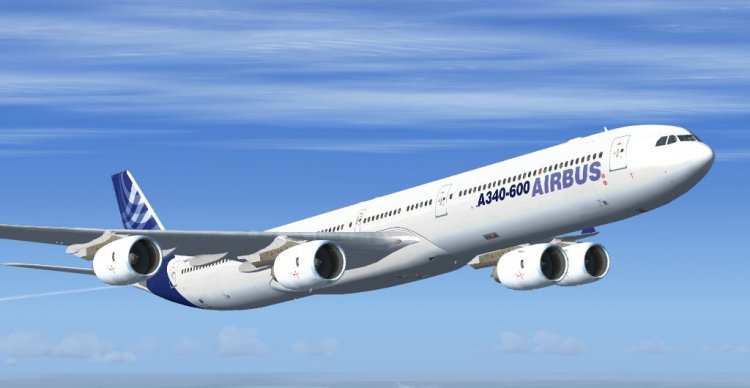
FSX Airbus A340-600. Model with diffuse, bump spec and nightmap in Airbus livery. Comes with working virtual cockpit and repainted FSX default 4-engine gauges. Works with SP1 and SP2. Not tested with DX10. By Thomas Ruth.
→ Size:
17 MB
→ Date:
16 years ago (01.09.2010 17:58)
→ Author:
Tomas Ruth
→ Approved by moderator:
omega
→ License:
Freeware - Free version, Unlimited Distribution
→ Downloaded:
12293 time(s)
+7
Transfer the installation instructions. I advise everyone to pay attention to it - to set fishing rod is not easy, but the result is worth it. Without exaggeration to say that this is the best A340 for FSX. 1. Unzip the archive to a convenient place on the desktop, for example. Copy the folder Tom_A340-600 in the Microsoft Games / Flight Simulator X / SimObjects / Airplanes ie in the folder where are all my fishing rod. 2. Go to the folder with Sim (Microsoft Games / Flight Simulator X), open the folder SimObjects, then folder Airplanes, open the folder Airbus_A321. There is the sound folder and soundai, copy them to a new folder Tom_A340-600 (more here - the folder which Airplanes and not the one that on the desktop). 3. From the folder, copy the files Airbus_A321/panel airbus_a321_panel_background.bmp airbus_a321_panel_background_night.bmp Airbus_A321.cab folder Tom_A340-600/panel.340. Copy only those files! 4. From the folder, copy the files Airbus_A321/texture Airbus_A321_1_C.dds Airbus_A321_2_C.dds Airbus_A321_3_C.dds Airbus_A321_4_C.dds folder Tom_A340-600/texture.AB. Similarly, - copy only the specified files, it is important. 5. Create a new folder in Flight Simulator X / gauges and name it tom340. (No points). 6. Copy the file to a folder Airbus_A321.cab Flight Simulator X/gauges/tom340 7. Copy all files from folder to folder Tom_A340-600/gauges/tom340 Flight Simulator X/gauges/tom340. If the offer to overwrite files, agree. 8. Copy all files from a folder lighteffects (she was in the downloaded folder toma346) in the folder Flight Simulator X / effects. Everything! Enjoy your flight!
− Snail,
16 years ago,
#
+1
Explain please p.3 "Airbus_A321.cab" I have such a folder does not exist. And another claim 5, etc. - Folder "Simulator XX" also need to create? Or please explain for dummies. Thanks in advance ...
− steinev,
16 years ago,
#
+2
Fault, Simulator XX is a typo, create this folder is not necessary. Airbus_A321.cab is not a folder, and file.
− Snail,
15 years ago,
#
+2
5
good~~~
− ahnjh64,
16 years ago,
#
+1
While no evaluation, but fly for free instruments and sound as it seems that something wrong has installed because of bad angliyskogo.Esli can lay out the Readme file in Russian. A plane like and try to put again.
− steinev,
16 years ago,
#
+1
5
And how long to wait for textures?
− xplan96,
16 years ago,
#
Textures Singapore Airlines and AirIndia already flooded, now appear. More tomorrow, after tomorrow.
− Snail,
16 years ago,
#
thanks
− xplan96,
16 years ago,
#
Папки Airbus_A321.cab так и не нашёл. Получается самолёт без приборов.
− ~Anonymous~,
9 years ago,
#
5
Great airplane! very often it fly, I downloaded the textures, too respectable for that and thank you!
− _777_,
15 years ago,
#
5
NormaTelno heard in the air ...
− Pasnik,
16 years ago,
#
both at the expense of work in FS9???
− Singapore,
16 years ago,
#
In FS9 not tested, but is unlikely to work on it - too complex model.
− Snail,
16 years ago,
#