Active Camera fix for iFly Boeing 737NG Просмотр ZIP-архива
readme.txt
Active Camera fix for iFly Boeing 737NG
=======================================

This tool removes zorder lines from all iFly Boeing 737NG aircrafts panel.cfg files,
so you can use active camera with your favorite aircraft.

Installation:
-------------

You need to install .NET Framework 2.0 before you run this application.

Just unpack the archive to any directory and run the exe file. It will ask for administrative
privileges under Windows Vista / Windows 7, because most people install the sim to the Program
Files directory and under these OSs you need admin privileges to write or edit files in that
directory.

The tool can create backup before edits anything in the cfg files. Compatible with all versions
of iFly B737NG.

Special thanks to:
------------------

- iFly for this great aircraft
- Tibor Kуkai for the icon and the thumbnail

Fixed in Version 1.01:
----------------------
- Added Error and Completion Message Boxes to the fix routine

Fixed in Version 1.02:
----------------------
- If the program can't find fs9 path in the registry,
  the fix button is disabled even if the user browsed it, fixed


Бdбm Szцrйnyi
[email protected]
2011. 06. 19.
40526-iFlyACFix102.zip
| Имя файла | Дата | Размер |
|---|---|---|
| iFlyACFix.exe | 19.06.2011 18:56 | 351 KB |
| readme.txt | 19.06.2011 19:00 | 1 KB |
| screenshot.png | 15.01.2011 04:23 | 29 KB |
| thumbnail.png | 15.01.2011 04:24 | 6 KB |
| avsim_su.diz | 13.09.2011 23:07 | 406 B |
| Итого: | 388 KB | |
Active Camera fix for iFly Boeing 737NG
| Rating: 5!
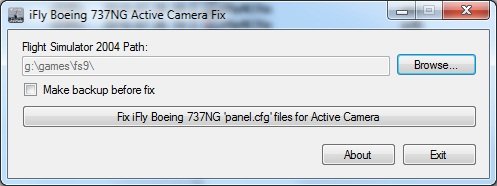
The program removes the string "zorder" that would work in the Active Camera iFly Boeing 737NG
→ Size:
209 KB
→ Date:
14 years ago (14.09.2011 00:33)
→ Author:
fatal07
→ Approved by moderator:
Jhenya
→ License:
Freeware - Free version, Unlimited Distribution
→ Downloaded:
2018 time(s)