Anemometer ARI-49 Просмотр ZIP-архива
readme_e.txt
Anemometer ARI-49 gauge for MSFS2004

2012© Freeware, Alexander Belov <[email protected]>

Anemometer allows to measure wind speed on ground before take-off in areas where no other data are avaliable. This gauge was developed for bush-pilots and adventurers.

Installation:

- Copy ARI-49.cab to the GAUGES folder of your MSFS2004 installation.

- Open panel.cfg and insert in the windows declaration section following line:

WindowXX=ARI-49

where XX is the number of new window.

Also insert a description for the new window as follows:


[WindowXX]
Background_color=0,0,0
size_mm=1024,768
window_size_ratio=1.000
position=0
visible=0
ident=30
window_size= 1.000, 1.000
window_pos= 0.000, 0.000

gauge00=Anemometer!ARI-49, 0,0,400,400


While aircraft is on ground call this window and press <Shift>+E to open cockpit to start measurements. Wait about 10 seconds before take readings of wind speed. Red arrow will appears to show relative wind direction.
43227-ARI-49.zip
| Имя файла | Дата | Размер |
|---|---|---|
| ARI-49.cab | 16.02.2012 17:24 | 20 KB |
| readme_e.txt | 16.02.2012 18:09 | 990 B |
| readme_r.txt | 16.02.2012 18:11 | 340 B |
| Анемометр ручной АРИ-49.jpg | 08.11.2011 19:26 | 16 KB |
| Анемометр ручной АРИ-49.pdf | 16.02.2012 17:26 | 163 KB |
| avsim_su.diz | 18.02.2012 18:06 | 406 B |
| Итого: | 200 KB | |
Anemometer ARI-49
| Rating: 5!
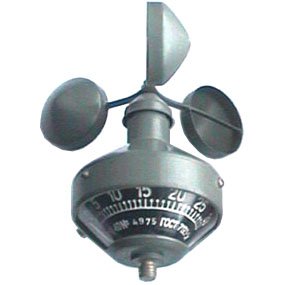
Anemometer ARI-49 gauge for MSFS2004
2012© Freeware, Alexander Belov
Anemometer allows to measure wind speed on ground before take-off in areas where no other data are avaliable. This gauge was developed for bush-pilots and adventurers.
2012© Freeware, Alexander Belov
Anemometer allows to measure wind speed on ground before take-off in areas where no other data are avaliable. This gauge was developed for bush-pilots and adventurers.
→ Size:
187 KB
→ Date:
14 years ago (16.02.2012 15:49)
→ Author:
Александр Белов
→ Approved by moderator:
Jeka_M
→ License:
Freeware - Free version, Do Not Redistribute
→ Downloaded:
271 time(s)