Britten Norman Просмотр ZIP-архива
Britten Norman/Documentation/Manual_English.htm
<html>

<head>
<meta http-equiv="Content-Language" content="en-us">
<meta name="GENERATOR" content="Microsoft FrontPage 5.0">
<meta name="ProgId" content="FrontPage.Editor.Document">
<meta http-equiv="Content-Type" content="text/html; charset=windows-1252">
<title>BN</title>
<style>
<!--
p.MsoTitle
	{margin-top:12.0pt;
	margin-right:0cm;
	margin-bottom:3.0pt;
	margin-left:0cm;
	text-align:center;
	font-size:16.0pt;
	font-family:Arial;
	font-weight:bold}
h1
	{margin-top:12.0pt;
	margin-right:0cm;
	margin-bottom:3.0pt;
	margin-left:0cm;
	page-break-after:avoid;
	font-size:16.0pt;
	font-family:Arial;
	}
 p.MsoNormal
	{mso-style-parent:"";
	margin-bottom:.0001pt;
	font-size:12.0pt;
	font-family:"Times New Roman";
	margin-left:0cm; margin-right:0cm; margin-top:0cm}
 li.MsoNormal
	{mso-style-parent:"";
	margin-bottom:.0001pt;
	font-size:12.0pt;
	font-family:"Times New Roman";
	margin-left:0cm; margin-right:0cm; margin-top:0cm}
span.MsoEndnoteReference
	{vertical-align:super}
p.MsoEndnoteText
	{margin-bottom:.0001pt;
	font-size:10.0pt;
	font-family:"Times New Roman";
	margin-left:0cm; margin-right:0cm; margin-top:0cm}
table.MsoTableGrid
	{border:1.0pt solid windowtext;
	font-size:10.0pt;
	font-family:"Times New Roman"}
-->
</style>
</head>

<body>

<p class="MsoTitle"><img border="0" src="Titel.jpg" width="800" height="371"></p>

<p class="MsoTitle"><span lang="de">version 3.2.1 including Trislander and Fans
Islander</span></p>

<p>(c) 2004 by Marcel Kuhnt</p>
<h1>Installation</h1>
<p>See readme.txt.</p>
<h1 dir="ltr" align="justify">The visual model</h1>
<p class="MsoNormal" dir="ltr" align="justify">The following models are
currently available or in development:</p>
<ul style="margin-top: 0cm; margin-bottom: 0cm" type="disc" dir="ltr">
  <li class="MsoNormal" dir="ltr">
  <p dir="ltr" align="justify">BN-2A 2 bladed with HF-Antenne</li>
  <li class="MsoNormal" dir="ltr">
  <p dir="ltr" align="justify">BN-2A 2 bladed without HF-Antenne</li>
  <li class="MsoNormal" dir="ltr">
  <p dir="ltr" align="justify">BN-2B 2 bladed</li>
  <li class="MsoNormal" dir="ltr">
  <p dir="ltr" align="justify">BN-2B 2 bladed with sharp nose</li>
  <li class="MsoNormal" dir="ltr">
  <p dir="ltr" align="justify">BN-2B 2 bladed with sharp nose and long exhausts</li>
  <li class="MsoNormal" dir="ltr">
  <p dir="ltr" align="justify">BN-2B 3 bladed</li>
  <li class="MsoNormal" dir="ltr">
  <p dir="ltr" align="justify">BN-2B 4 bladed</li>
  <li class="MsoNormal" dir="ltr">
  <p dir="ltr" align="justify">BN-2A Mk. III-2 Trislander</li>
  <li class="MsoNormal" dir="ltr">
  <p dir="ltr" align="justify">BN-2A Inducted Fans</li>
  <li class="MsoNormal" dir="ltr">
  <p dir="ltr" align="justify">BN-2B 2 bladed with magneto phone (to play CDs
  in the first CD-ROM drive)</li>
  <li class="MsoNormal" dir="ltr">
  <p dir="ltr" align="justify"><i>BN-2T</i></li>
</ul>
  <p dir="ltr" align="justify"><i>(models written in italics are currently not
  available)</i><p dir="ltr" align="justify">The model (inside and outside view)
is made with GMax 1.2 and FS2004 Gmax SDK. The outside view model consist of an
as most as possible rebuilt fuselage, wings with new-made ailerons and flaps and
a new made vertical stabilizer, many details (e.g. antennas, pitot head,
exhausts, beacons, nav lights) and many animations: flight controls, trim tabs,
flaps, doors (pilot, two passenger and a cargo bay door;
<span style="background-color: #FFFF00"><b>please mind, that if you open the
door with magnetos left in the on position, you will hear an audible warning!)</b></span>,
wheels, gear struts, you can activate the maintenance mode by using the "folding
wings" function to open the engine cowling, the nose and the avionic compartment
and to advise a mechanic to repair the left engine. Also, you can put stairs to
the door and fit the pitot head and the ailerons with security items.; you have
to click on the "remove before flight" item to activate this and you have to
click on the "Treppe" (German for stairs) or "Stairs" sheet to activate the
stairs. If you push the aircraft back, you will see the "truck" to push back.<p dir="ltr" align="justify">
You can now board passengers into the aircraft if you use the special gauge (see
under the headline "Panel"). Please mind, that the flightsim internal payload
won't change with this gauge, usually it is loaded with 8 passengers a 75 kilos.<p dir="ltr" align="justify">
At night, you will see the complete lighting, including nav lights, beacon,
landing lights and (in the BN-2A) ice inspection lamps, these are lights at the
engines, which illuminate the wings to inspect if there is ice.<p dir="ltr" align="justify">
The inside view model or virtual cockpit is now fitted with new, sharper gauges
and "clickable" 3D switches. Now, you can feather the propellers via drag and
drop and you see the passengers, too. If you fly bad or there are turbulences in
the air, you can see them as a relative moving of the view! Even if you touch
down especially on an uneven surface, you will see this! You will find several
new animations here, too, like adjustable sun glasses and an operable DV window.<p dir="ltr" align="justify">
If you switch the carburetor heat on if you have full throttle and rich mixture,
you will see a smoke (because of the too rich mix).<h2>Repaints</h2>
<p class="MsoNormal">I will release a repaint kit for everyone of you, who want
to make a repaint of the islander. Please mind, that this software is NOT PUBLIC
DOMAIN but FREEWARE, that means, you have to ask me for permission to upload a
modified aircraft!</p>
<h1 dir="ltr" align="justify">The Panel</h1>
<p class="MsoNormal" dir="ltr" align="justify">The 2D panel includes 5
additional sub panels; to switch on press [Shift] +  </p>
<p class="MsoNormal" style="text-indent: -18.0pt; margin-left: 36.0pt" dir="ltr" align="justify">
[2]<span style="font-style: normal; font-variant: normal; font-weight: normal; font-size: 7.0pt; font-family: Times New Roman">
</span>
<span style="font-style: normal; font-variant: normal; font-weight: normal; font-family: Times New Roman" dir="LTR">
GPS panel</span></p>
<p class="MsoNormal" style="text-indent: -18.0pt; margin-left: 36.0pt" dir="ltr" align="justify">
[3]<span style="font-style: normal; font-variant: normal; font-weight: normal; font-size: 7.0pt; font-family: Times New Roman">
</span><span dir="LTR">Lower part of the panel (switches, throttles)</span></p>
<p class="MsoNormal" style="text-indent: -18.0pt; margin-left: 36.0pt" dir="ltr" align="justify">
[4]<span style="font-style: normal; font-variant: normal; font-weight: normal; font-size: 7.0pt; font-family: Times New Roman">
</span>
<span style="font-style: normal; font-variant: normal; font-weight: normal; font-family: Times New Roman" dir="LTR">
U</span><span dir="LTR">pper part of the panel (magnetos, flaps & fuel)</span></p>
<p class="MsoNormal" style="text-indent: -18.0pt; margin-left: 36.0pt" dir="ltr" align="justify">
[5]<span style="font-style: normal; font-variant: normal; font-weight: normal; font-size: 7.0pt; font-family: Times New Roman">
</span><span dir="LTR">Throttle quadrant (including flaps switch, carburetor
heat & parking brake)</span></p>
<p class="MsoNormal" style="text-indent: -18.0pt; margin-left: 36.0pt" dir="ltr" align="justify">
[6]<span style="font-style: normal; font-variant: normal; font-weight: normal; font-size: 7.0pt; font-family: Times New Roman">
</span><span dir="LTR">Overhead (rudder trim tab and fuel selectors)</span></p>
<p class="MsoNormal" dir="ltr" align="justify"> </p>
<p class="MsoNormal" dir="ltr" align="justify">If you press [5] (or, if Numlock
is OFF, press [Shift] + [5]) on the numeric keyboard, you can look from
passenger view and you can check if the passenger notices are working!</p>
<h2 dir="ltr" align="justify">Main Panel (BN-2A)</h2>
<p dir="ltr" align="justify">
<img border="0" src="Panel_A_Main.jpg" width="1024" height="768"></p>
<p dir="ltr" align="justify"><span lang="en-us">The main flight instruments (attitude indicator,
altitude indicator,
vertical speed indicator, heading indicator and turn coordinator) are like the
same instruments in the Cessna 172. Only the airspeed indicator has other color
markings. Further gauges are a VOR1, VOR2, an ADF, a clock and a GPS/NAV switch.
The radio stack should not make problems, too. Then there are some new
instruments, which are described following:</span></p>
<h3 dir="ltr" align="justify"><span lang="en-us">Engine Gauges</span></h3>
<p dir="ltr" align="justify"><span lang="en-us">First, there are the "primary"
gauges, which are installed left of the radio stack and the EGT, which is
installed left of the yoke:</span></p>
<table border="1" cellspacing="1" width="100%" id="AutoNumber3" dir="ltr">
  <tr>
    <td width="16%" align="center" dir="ltr">
    <p dir="ltr"><span lang="en-us">
    <img border="0" src="Panel_A_Main_RPM.jpg" width="109" height="110"></span></td>
    <td width="16%" align="center" dir="ltr">
    <p dir="ltr"><span lang="en-us">
    <img border="0" src="Panel_A_Main_ManPress.jpg" width="108" height="108"></span></td>
    <td width="17%" align="center" dir="ltr">
    <p dir="ltr"><span lang="en-us">
    <img border="0" src="Panel_A_Main_CarbTemp.jpg" width="104" height="105"></span></td>
    <td width="17%" align="center" dir="ltr">
    <p dir="ltr"><span lang="en-us">
    <img border="0" src="Panel_A_Main_EGT.jpg" width="105" height="106"></span></td>
  </tr>
  <tr>
    <td width="16%" align="center" dir="ltr">
    <p dir="ltr"><span lang="en-us">Revolutions per minute x 1000</span></td>
    <td width="16%" align="center" dir="ltr">
    <p dir="ltr"><span lang="en-us">Manifold pressure in inch mercury</span></td>
    <td width="17%" align="center" dir="ltr">
    <p dir="ltr"><span lang="en-us">Carburetor temperature in °C</span></td>
    <td width="17%" align="center" dir="ltr">
    <p dir="ltr"><span lang="en-us">Exhaust gas temperature in °C</span></td>
  </tr>
</table>
<p dir="ltr"><span lang="en-us">...followed by the "secondary" gauges, from up
to down:</span></p>
<p dir="ltr">
<span lang="en-us">
<img border="0" src="Panel_A_Main_Eng.jpg" align="left" width="110" height="177">Cylinder
head temperature
in °C</span></p>
<p dir="ltr"> </p>
<p dir="ltr"><span lang="en-us">Oil temperature in °C</span></p>
<p dir="ltr"><span lang="en-us">Oil pressure in PSI</span></p>
<p dir="ltr"><span lang="en-us">Fuel pressure in PSI</span></p>
<h3 dir="ltr"><span lang="en-us">Further Gauges</span></h3>
<table border="1" cellspacing="1" width="100%" id="AutoNumber4" dir="ltr">
  <tr>
    <td width="13%" align="center" dir="ltr">
    <p dir="ltr"><span lang="en-us">
    <img border="0" src="Panel_A_Main_GenUndVolt.jpg" width="73" height="51"></span></td>
    <td width="87%" align="justify" dir="ltr">
    <p dir="ltr"><span lang="en-us">These lamps display if each generator
    produces not enough electricity (not enough volts)</span></td>
  </tr>
  <tr>
    <td width="13%" align="center" dir="ltr">
    <p dir="ltr"><span lang="en-us">
    <img border="0" src="Panel_Main_Gyrosuction.jpg" width="92" height="91"></span></td>
    <td width="87%" align="justify" dir="ltr">
    <p align="justify" dir="ltr"><span lang="en-us">Here, you can see the gyro
    suction in inch mercury. If one of the pumps is not working, its button will
    show red.</span></td>
  </tr>
  <tr>
    <td width="13%" align="center" dir="ltr">
    <p dir="ltr"><span lang="en-us">
    <img border="0" src="Panel_A_Main_Pass_Stall.jpg" width="118" height="49"></span></td>
    <td width="87%" align="justify" dir="ltr">
    <p dir="ltr"><span lang="en-us">At the button, you can adjust the number of
    passengers, the red lamp lights if you will get into stall.</span></td>
  </tr>
  <tr>
    <td width="13%" align="center" dir="ltr">
    <p dir="ltr"><span lang="en-us">
    <img border="0" src="Panel_A_Main_Door_ID.jpg" width="131" height="58"></span></td>
    <td width="87%" align="justify" dir="ltr">
    <p dir="ltr"><span lang="en-us">The warning lamp lights if the pilots door
    is open; left of it, you will find the ident of the aircraft.</span></td>
  </tr>
</table>
<h2 dir="ltr" align="justify"><span lang="en-us">Main Panel (BN-2B)</span></h2>
<p dir="ltr" align="justify">
<span lang="en-us">
<img border="0" src="Panel_Main.jpg" width="1024" height="768"></span></p>
<p dir="ltr" align="justify"><span lang="en-us">The flight instruments (attitude
indicator, altitude indicator, vertical speed indicator and turn coordinator)
are like those instruments in the Cessna 172. Only the airspeed indicator has
other colored markings. Further gauges are a horizontal situation indicator, an
ADF, a VOR 2, two clocks, the GPS/NAV switch and a radio altitude indicator. The
radio stack is the same like in the Ce172, just the autopilot differs. New
instruments are:</span></p>
<h3 dir="ltr" align="justify"><span lang="en-us">GPS</span></h3>
<p dir="ltr" align="justify"><span lang="en-us">Normally, BN2B Islander and
especially those flying in the LFH, do not have an autopilot; at this place is a
Trimble 2000 GPS. But because I had neither time nor the know-how to build up a
complete Trimble 2000, I made a combination of both.</span></p>
<p dir="ltr" align="justify">
<span lang="en-us">
<img border="0" src="Panel_Main_AP.jpg" align="left" width="224" height="74"></span></p>
<p dir="ltr" align="justify"><span lang="en-us">Usually, you are in autopilot
mode. Then you can see the following information: in the first line the adjusted
altitude (ALT) (in the example 01000 feet) and the vertical speed of 0000 feet
per minute. In the second line, you can see the heading (HDG) of 062°. If you
change via press on the "GPS" button the mode...</span></p>
<p dir="ltr" align="justify"> </p>
<p dir="ltr" align="justify">
<span lang="en-us">
<img border="0" src="Panel_Main_GPS.jpg" align="left" width="224" height="74"></span></p>
<p dir="ltr" align="justify"><span lang="en-us">...into the GPS mode, you will
see the following data which can only be changed by the included Garmin GPS:
first line: you fly now directly to EDDT and this airport is "in 106" degrees
(that's not the radial, but the direct course!). The second line has information
about reaching this aim: it is 178 NM away and will be reached in 1:07 hours. If
there is not an M but an S behind the time information, then this means not 1
hour and 7 minutes but 1 minute and 7 seconds. If the value is not possible to
calculate, you will find there --:--E (error).</span></p>
<h3 dir="ltr" align="justify"><span lang="en-us">Engine Gauges</span></h3>
<p dir="ltr" align="justify"><span lang="en-us">From left to right means
installed in the panel from upper to lower:</span></p>
<table border="1" cellspacing="1" width="100%" id="AutoNumber1" dir="ltr">
  <tr>
    <td width="16%" align="center" dir="ltr">
    <p dir="ltr"><span lang="en-us">
    <img border="0" src="Panel_Main_RPM.jpg" width="78" height="76"></span></td>
    <td width="16%" align="center" dir="ltr">
    <p dir="ltr"><span lang="en-us">
    <img border="0" src="Panel_Main_ManPress.jpg" width="78" height="74"></span></td>
    <td width="17%" align="center" dir="ltr">
    <p dir="ltr"><span lang="en-us">
    <img border="0" src="Panel_Main_FuelPress.jpg" width="78" height="75"></span></td>
    <td width="17%" align="center" dir="ltr">
    <p dir="ltr"><span lang="en-us">
    <img border="0" src="Panel_Main_Oil.jpg" width="77" height="75"></span></td>
    <td width="17%" align="center" dir="ltr">
    <p dir="ltr"><span lang="en-us">
    <img border="0" src="Panel_Main_EGTCHT.jpg" width="76" height="75"></span></td>
    <td width="17%" align="center" dir="ltr">
    <p dir="ltr"><span lang="en-us">
    <img border="0" src="Panel_Main_CarbTemp.jpg" width="78" height="73"></span></td>
  </tr>
  <tr>
    <td width="16%" align="center" dir="ltr">
    <p dir="ltr"><span lang="en-us">Revolutions per Minute x 100</span></td>
    <td width="16%" align="center" dir="ltr">
    <p dir="ltr"><span lang="en-us">Manifold pressure in inch mercury</span></td>
    <td width="17%" align="center" dir="ltr">
    <p dir="ltr"><span lang="en-us">Fuel pressure in psi</span></td>
    <td width="17%" align="center" dir="ltr">
    <p dir="ltr"><span lang="en-us">Oil temperature in x10 °C and pressure in
    psi</span></td>
    <td width="17%" align="center" dir="ltr">
    <p dir="ltr"><span lang="en-us">EGT and CHT each in
    x10 °C</span></td>
    <td width="17%" align="center" dir="ltr">
    <p dir="ltr"><span lang="en-us">Carburetor heat in x10 °C</span></td>
  </tr>
</table>
<h3 dir="ltr"><span lang="en-us">Further Gauges</span></h3>
<table border="1" cellspacing="1" width="100%" id="AutoNumber2" dir="ltr">
  <tr>
    <td width="13%" align="center" dir="ltr">
    <p dir="ltr"><span lang="en-us">
    <img border="0" src="Panel_Main_Annunc.jpg" width="78" height="115"></span></td>
    <td width="87%" align="justify" dir="ltr">
    <p dir="ltr"><span lang="en-us">The Central Annunciator Panel (CAP). From
    left to right and from upper to lower: STALL, BUS BAR = at least one
    generator produces too less energy, GEN = this generator produces not enough
    volts, HEATER = overheat, is not implemented, DOORS = the pilot door is not
    closed correctly; both lamps in the last line are not used. At the bottom,
    you will find a bright / dim switch and a test button.</span></td>
  </tr>
  <tr>
    <td width="13%" align="center" dir="ltr">
    <p dir="ltr"><span lang="en-us">
    <img border="0" src="Panel_Main_Gyrosuction.jpg" width="92" height="91"></span></td>
    <td width="87%" align="justify" dir="ltr">
    <p align="justify" dir="ltr"><span lang="en-us">Here, you can see the
    suction gauge which is driven by the suction pumps at the engines. It is
    displayed in inch mercury. If a pump is not working, each of the warn
    buttons will be extended.</span></td>
  </tr>
  <tr>
    <td width="13%" align="center" dir="ltr">
    <p dir="ltr"><span lang="en-us">
    <img border="0" src="Panel_Main_Director.jpg" width="70" height="85"></span></td>
    <td width="87%" align="justify" dir="ltr">
    <p align="justify" dir="ltr"><span lang="en-us">Here, you can adjust the
    heading gyros. If the upper switch is in the "SLAVE" position, the gyros
    will automatically be adjusted regularly to the right value. It won't be
    adjusted if the switch is in the "FREE" position. With the lower switch, you
    can adjust the gyros manually, either clockwise (cw) or counter-clockwise
    (ccw).</span></td>
  </tr>
  <tr>
    <td width="13%" align="center" dir="ltr">
    <p dir="ltr"><span lang="en-us">
    <img border="0" src="Panel_Main_Passenger.jpg" width="109" height="108"></span></td>
    <td width="87%" align="justify" dir="ltr">
    <p dir="ltr"><span lang="en-us">Here, you can adjust the number of
    passengers; you have to adjust the right number to change it. The left
    number is inactive, it is used in the real gauge to adjust the airport code.
    Please mind, that this number of passengers won't influence the payload
    data, you have to adjust them manually.</span></td>
  </tr>
</table>
<h2 align="justify" dir="ltr"><span lang="en-us">Lower Panel</span></h2>
<p align="justify" dir="ltr">
<span lang="en-us">
<img border="0" src="Panel_Lower.jpg" width="1024" height="218"></span></p>
<p align="justify" dir="ltr"><span lang="en-us">At the left side, you will find
the synchronic switching avionic main switches, right of this: in the first line
are the pitot heat, nav lights, left and right landing light, left generator,
master/battery switch, right generator. In the next line you will find in the
BN-2A the structural anti ice, the cabin lights, passenger notices, rotating
beacon and external supply/starter isol. (inactive). In the third row are in the
BN-2A the propeller anti ice, and the panel lights switch. The rotating switches
do not have any function. Right of this switches console, you have the throttle
quadrant which is later described detailed.</span></p>
<h2 align="justify" dir="ltr"><span lang="en-us">Upper Panel (BN-2A)</span></h2>
<p align="justify" dir="ltr">
<span lang="en-us">
<img border="0" src="Panel_A_Upper.jpg" width="909" height="226"></span></p>
<p align="justify" dir="ltr"><span lang="en-us">Here are the magnetos and the
starter. <span style="background-color: #FFFF00">ATTENTION! If one of the left
engine magnetos is on and you open the pilot's door, you will hear an audible
warning.</span> This is implemented also in the real islander, because the
engine must not start if you rotate it per hand. Left of these is the flaps
gauge, which is displaying if the flaps are up, on take-off position (T.O.) or
down. Under this gauge you will find the magnetic compass and the OAT gauge.
Left of the flaps gauge are the fuel indicators with the electrical fuel pumps.
The voltmeter and the ammeter are only in the virtual cockpit on the right side.</span></p>
<h2 align="justify" dir="ltr"><span lang="en-us">Upper Panel (BN-2B)</span></h2>
<p align="justify" dir="ltr">
<span lang="en-us">
<img border="0" src="Panel_Upper.jpg" width="917" height="213"></span></p>
<p align="justify" dir="ltr"><span lang="en-us">Here are the magnetos and the
starter. <span style="background-color: #FFFF00">ATTENTION! If one of the left
engine magnetos is on and you open the pilot's door, you will hear an audible
warning.</span> This is implemented also in the real islander, because the
engine must not start if you rotate it per hand. Left of these is the flaps
gauge, which is displaying if the flaps are up, on take-off position (T.O.) or
down. Under this gauge you will find the magnetic compass and the OAT gauge.
Left of the flaps gauge are the fuel indicators with the electrical fuel pumps.
On the right side are the voltmeter and the ammeter.</span></p>
<h2 align="justify" dir="ltr"><span lang="en-us">Throttle Quadrant and Overhead Panel</span></h2>
<p align="justify" dir="ltr">
<span lang="en-us">
<img border="0" src="Panel_Throttle.jpg" width="239" height="482">
<img border="0" src="Panel_Overhead.jpg" width="395" height="394"></span></p>
<p align="justify" dir="ltr"><span lang="en-us">On the throttle console you will
find the throttle quadrant with each two throttle, prop pitch and mixture levers
and the elevator trim tab gauge, followed by the flaps switch, which is a rocker
switch. At the bottom are the carburetor heat levers and the parking brake
lever.</span></p>
<p align="justify" dir="ltr"><span lang="en-us">Please mind the different areas
on the throttle quadrant:</span></p>
<p align="justify" dir="ltr"><span lang="en-us">Each lever pair has a left, a
mid and a right area: the left and the right area are for dragging the levers
each alone, the mid is for dragging both. To feather the props, you have to drag
the left or the right prop pitch lever, if you drag in the middle for both, you
won't get into the feather area.</span></p>
<p align="justify" dir="ltr"><span lang="en-us">On the overhead panel you will
find the rudder trim tab wheel and gauge and the two fuel cocks or fuel
selectors.</span></p>
<h2 align="justify" dir="ltr">Trislander Cockpit</h2>
<p align="justify" dir="ltr">
<img border="0" src="Panel_Tri_Main.jpg" width="1024" height="768"></p>
<p align="justify" dir="ltr"><span lang="de">The basics of the trislander
cockpit are the same of the BN-2A cockpit, but includes of course engine gauges
and levers three times. You find at the right upper edge the three mixture
levers (you can only pull one of them at the same time; pull = lean), at the
left below them you have the three RPM gauges; the upper one is the back engine,
below of them are the three manifold pressure gauges. Right of the upper one you
have a switch to control which engine is displayed in both EGT- and carburettor
temperature gauges. These gauges are both at the bottom right of the yoke.</span></p>
<h3 align="justify" dir="ltr"><span lang="de">Upper panel</span></h3>
<p align="justify" dir="ltr">
<img border="0" src="Panel_Tri_Upper.jpg" width="788" height="207"></p>
<p align="justify" dir="ltr"><span lang="de">Here you will find three times the
magneto and starter switches for the three engines. The fuel transfer switches
are not (yet) active, also the fourth of the switches below of the fuel contents
gauges; I do not know its function. If YOU know: please write me an e-mail! The
other three switches are the three fuel pumps.</span></p>
<h3 align="justify" dir="ltr"><span lang="de">Throttle Quadrant</span></h3>
<p align="justify" dir="ltr"><span lang="de">You have the three throttle and the
three propeller levers. If you want to drag all together, please drag left or
right of the center lever between them. Also you have three carburettor heat
levers.</span></p>
<h2 align="justify" dir="ltr"><span lang="en-us">Virtual Cockpit</span></h2>
<p align="justify" dir="ltr"><span lang="en-us">The virtual cockpit includes the
nearly the same gauges and levers as the 2d cockpit. Then, there are several
additional animations: you can lower the sun glasses via mouse click, the window
in the pilot's door, the dw window, is operable and if you click on the remove
before flight unit in the compartment of the pilot's door, you will see these
units on the pitot head and the ailerons outside. If you click on the "stairs"
or "Treppe" item, the ground workers will add stairs to the door.<span style="background-color: #FFFF00"> In the special
magneto phone model, you can switch on the magneto phone on the copilot's seat
and you can switch on the fan on the panel</span>...</span><span lang="de"> If
you want to play music, just insert a music CD in the primary drive and press
the "play" button on the magneto phone.</span></p>
<p align="justify" dir="ltr"><span lang="en-us">In the BN-2A you get a
additional light switch left of the switches console: this is for the light on
the left engine to illuminate the left wing to check if there is ice.</span></p>
<h1 align="justify" dir="ltr"><span lang="en-us">Flight Praxis</span></h1>
<p align="justify" dir="ltr"><span lang="en-us">If can fly Cessna, you will
easily fly Islander, too, but you should know a few things:</span></p>
<ul dir="ltr">
  <li dir="ltr">
<p align="justify" dir="ltr"><span lang="en-us">For take-off, you should extend
the flaps to the position T.O.. The take-off should be done with full throttle,
max pitch and max mixture. If you take-off on higher runways, you should lean
the mix a bit. The trim tabs are neutral and vr is 60 KIAS. After air-born, you
have to trim a bit nose heavy, because the climb rate should not exceed 1000
feet per minute.</span></p>
  </li>
  <li dir="ltr">
<p align="justify" dir="ltr"><span lang="en-us">The climb rate is regularly 700
ft/min with 26 inch mercury manifold pressure and a bit reduced rev/min (2600
RPM).</span></p>
  </li>
  <li dir="ltr">
<p align="justify" dir="ltr"><span lang="en-us">The cruising is proceed with 23
inch mercury manifold pressure and 2300 RPM, and a reduced mixture. The aircraft
will fly at 1000 ft a bit less than 120 KIAS.</span></p>
  </li>
  <li dir="ltr">
<p align="justify" dir="ltr"><span lang="en-us">At the beginning of descent with
700 ft/min, you should richen the mixture, reduce the manifold pressure to
around 16 inch mercury and switch the carburetor heat on.</span></p>
  </li>
  <li dir="ltr">
<p align="justify" dir="ltr"><span lang="en-us">If the airspeed sinks under 110
KIAS, you can extend the flaps to the T.O. position. If the RPM sinks under the
adjusted 2300 RPM, pull the prop pitch levers forward to 100%. The second flaps
position DOWN should be extended around 80 KIAS.</span></p>
  </li>
  <li dir="ltr">
<p align="justify" dir="ltr"><span lang="de">Because of the higher mass of the
Trislander it has a longer take-off and landing run length.</span></p>
  </li>
</ul>
<h1 dir="ltr"><span lang="en-us">Speeds</span><span lang="de"> (for the "normal"
Islander)</span></h1>
<h3 dir="ltr"><span lang="en-us">Stall speeds</span></h3>
<table class="MsoTableGrid" border="1" cellspacing="0" cellpadding="0" style="border-collapse: collapse; border: medium none" dir="ltr">
  <tr>
    <td width="123" valign="top" style="width: 92.1pt; border: 1.0pt solid windowtext; padding-left: 5.4pt; padding-right: 5.4pt; padding-top: 0cm; padding-bottom: 0cm" dir="ltr">
    <p class="MsoNormal" dir="ltr"><i><span lang="en-us">Flaps | Payload:</span></i></td>
    <td width="123" valign="top" style="width: 92.1pt; border-left: medium none; border-right: 1.0pt solid windowtext; border-top: 1.0pt solid windowtext; border-bottom: 1.0pt solid windowtext; padding-left: 5.4pt; padding-right: 5.4pt; padding-top: 0cm; padding-bottom: 0cm" dir="ltr">
    <p class="MsoNormal" dir="ltr"><i><span lang="en-us">4000 lb</span></i></td>
    <td width="123" valign="top" style="width: 92.1pt; border-left: medium none; border-right: 1.0pt solid windowtext; border-top: 1.0pt solid windowtext; border-bottom: 1.0pt solid windowtext; padding-left: 5.4pt; padding-right: 5.4pt; padding-top: 0cm; padding-bottom: 0cm" dir="ltr">
    <p class="MsoNormal" dir="ltr"><i><span lang="en-us">5000 lb</span></i></td>
    <td width="123" valign="top" style="width: 92.15pt; border-left: medium none; border-right: 1.0pt solid windowtext; border-top: 1.0pt solid windowtext; border-bottom: 1.0pt solid windowtext; padding-left: 5.4pt; padding-right: 5.4pt; padding-top: 0cm; padding-bottom: 0cm" dir="ltr">
    <p class="MsoNormal" dir="ltr"><i><span lang="en-us">6000 lb</span></i></td>
    <td width="123" valign="top" style="width: 92.15pt; border-left: medium none; border-right: 1.0pt solid windowtext; border-top: 1.0pt solid windowtext; border-bottom: 1.0pt solid windowtext; padding-left: 5.4pt; padding-right: 5.4pt; padding-top: 0cm; padding-bottom: 0cm" dir="ltr">
    <p class="MsoNormal" dir="ltr"><i><span lang="en-us">6200 lb</span></i></td>
  </tr>
  <tr>
    <td width="123" valign="top" style="width: 92.1pt; border-left: 1.0pt solid windowtext; border-right: 1.0pt solid windowtext; border-top: medium none; border-bottom: 1.0pt solid windowtext; padding-left: 5.4pt; padding-right: 5.4pt; padding-top: 0cm; padding-bottom: 0cm" dir="ltr">
    <p class="MsoNormal" dir="ltr"><span lang="en-us">UP</span></td>
    <td width="123" valign="top" style="width: 92.1pt; border-left: medium none; border-right: 1.0pt solid windowtext; border-top: medium none; border-bottom: 1.0pt solid windowtext; padding-left: 5.4pt; padding-right: 5.4pt; padding-top: 0cm; padding-bottom: 0cm" dir="ltr">
    <p class="MsoNormal" dir="ltr"><span lang="en-us">42 kt</span></td>
    <td width="123" valign="top" style="width: 92.1pt; border-left: medium none; border-right: 1.0pt solid windowtext; border-top: medium none; border-bottom: 1.0pt solid windowtext; padding-left: 5.4pt; padding-right: 5.4pt; padding-top: 0cm; padding-bottom: 0cm" dir="ltr">
    <p class="MsoNormal" dir="ltr"><span lang="en-us">45 kt</span></td>
    <td width="123" valign="top" style="width: 92.15pt; border-left: medium none; border-right: 1.0pt solid windowtext; border-top: medium none; border-bottom: 1.0pt solid windowtext; padding-left: 5.4pt; padding-right: 5.4pt; padding-top: 0cm; padding-bottom: 0cm" dir="ltr">
    <p class="MsoNormal" dir="ltr"><span lang="en-us">48 kt</span></td>
    <td width="123" valign="top" style="width: 92.15pt; border-left: medium none; border-right: 1.0pt solid windowtext; border-top: medium none; border-bottom: 1.0pt solid windowtext; padding-left: 5.4pt; padding-right: 5.4pt; padding-top: 0cm; padding-bottom: 0cm" dir="ltr">
    <p class="MsoNormal" dir="ltr"><span lang="en-us">49 kt</span></td>
  </tr>
  <tr>
    <td width="123" valign="top" style="width: 92.1pt; border-left: 1.0pt solid windowtext; border-right: 1.0pt solid windowtext; border-top: medium none; border-bottom: 1.0pt solid windowtext; padding-left: 5.4pt; padding-right: 5.4pt; padding-top: 0cm; padding-bottom: 0cm" dir="ltr">
    <p class="MsoNormal" dir="ltr"><span lang="en-us">T.O. (25°)</span></td>
    <td width="123" valign="top" style="width: 92.1pt; border-left: medium none; border-right: 1.0pt solid windowtext; border-top: medium none; border-bottom: 1.0pt solid windowtext; padding-left: 5.4pt; padding-right: 5.4pt; padding-top: 0cm; padding-bottom: 0cm" dir="ltr">
    <p class="MsoNormal" dir="ltr"><span lang="en-us">37 kt</span></td>
    <td width="123" valign="top" style="width: 92.1pt; border-left: medium none; border-right: 1.0pt solid windowtext; border-top: medium none; border-bottom: 1.0pt solid windowtext; padding-left: 5.4pt; padding-right: 5.4pt; padding-top: 0cm; padding-bottom: 0cm" dir="ltr">
    <p class="MsoNormal" dir="ltr"><span lang="en-us">39 kt</span></td>
    <td width="123" valign="top" style="width: 92.15pt; border-left: medium none; border-right: 1.0pt solid windowtext; border-top: medium none; border-bottom: 1.0pt solid windowtext; padding-left: 5.4pt; padding-right: 5.4pt; padding-top: 0cm; padding-bottom: 0cm" dir="ltr">
    <p class="MsoNormal" dir="ltr"><span lang="en-us">42 kt</span></td>
    <td width="123" valign="top" style="width: 92.15pt; border-left: medium none; border-right: 1.0pt solid windowtext; border-top: medium none; border-bottom: 1.0pt solid windowtext; padding-left: 5.4pt; padding-right: 5.4pt; padding-top: 0cm; padding-bottom: 0cm" dir="ltr">
    <p class="MsoNormal" dir="ltr"><span lang="en-us">42 kt</span></td>
  </tr>
  <tr>
    <td width="123" valign="top" style="width: 92.1pt; border-left: 1.0pt solid windowtext; border-right: 1.0pt solid windowtext; border-top: medium none; border-bottom: 1.0pt solid windowtext; padding-left: 5.4pt; padding-right: 5.4pt; padding-top: 0cm; padding-bottom: 0cm" dir="ltr">
    <p class="MsoNormal" dir="ltr"><span lang="en-us">DOWN (56°)</span></td>
    <td width="123" valign="top" style="width: 92.1pt; border-left: medium none; border-right: 1.0pt solid windowtext; border-top: medium none; border-bottom: 1.0pt solid windowtext; padding-left: 5.4pt; padding-right: 5.4pt; padding-top: 0cm; padding-bottom: 0cm" dir="ltr">
    <p class="MsoNormal" dir="ltr"><span lang="en-us">34 kt</span></td>
    <td width="123" valign="top" style="width: 92.1pt; border-left: medium none; border-right: 1.0pt solid windowtext; border-top: medium none; border-bottom: 1.0pt solid windowtext; padding-left: 5.4pt; padding-right: 5.4pt; padding-top: 0cm; padding-bottom: 0cm" dir="ltr">
    <p class="MsoNormal" dir="ltr"><span lang="en-us">36 kt</span></td>
    <td width="123" valign="top" style="width: 92.15pt; border-left: medium none; border-right: 1.0pt solid windowtext; border-top: medium none; border-bottom: 1.0pt solid windowtext; padding-left: 5.4pt; padding-right: 5.4pt; padding-top: 0cm; padding-bottom: 0cm" dir="ltr">
    <p class="MsoNormal" dir="ltr"><span lang="en-us">38 kt</span></td>
    <td width="123" valign="top" style="width: 92.15pt; border-left: medium none; border-right: 1.0pt solid windowtext; border-top: medium none; border-bottom: 1.0pt solid windowtext; padding-left: 5.4pt; padding-right: 5.4pt; padding-top: 0cm; padding-bottom: 0cm" dir="ltr">
    <p class="MsoNormal" dir="ltr"><span lang="en-us">39 kt</span></td>
  </tr>
</table>
<p class="MsoNormal" style="text-indent: -212.65pt; margin-left: 212.65pt" dir="ltr"> </p>
<p class="MsoNormal" style="text-indent: -212.65pt; margin-left: 212.65pt" dir="ltr">
<span lang="en-us"><b>Further speeds:</b></span></p>
<p class="MsoNormal" style="text-indent: -212.65pt; margin-left: 212.65pt" dir="ltr"> </p>
<p class="MsoNormal" style="text-indent: -212.65pt; margin-left: 212.65pt" dir="ltr">
<span lang="en-us">Minimum Control (V<sub>MC</sub>)...................................
40 kt IAS</span></p>
<p class="MsoNormal" style="text-indent: -212.65pt; margin-left: 212.65pt" dir="ltr">
<span lang="en-us">Flaps T.O. min secure.......................................
61 kt IAS</span></p>
<p class="MsoNormal" style="text-indent: -212.65pt; margin-left: 212.65pt" dir="ltr">
<span lang="en-us">Flaps UP min. secure........................................
65 kt IAS</span></p>
<p class="MsoNormal" style="text-indent: -212.65pt; margin-left: 212.65pt" dir="ltr">
<span lang="en-us">One engine inoperative en-route best gradient of climb speed:
65 kt IAS</span></p>
<p class="MsoNormal" style="text-indent: -212.65pt; margin-left: 212.65pt" dir="ltr">
<span lang="en-us">Rough air & Flaps DOWN max (V<sub>FE</sub>).............. 88
kt IAS</span></p>
<p class="MsoNormal" style="text-indent: -212.65pt; margin-left: 212.65pt" dir="ltr">
<span lang="en-us">Design Maneuvering (V<sub>A</sub>)...............................
107 kt IAS</span></p>
<p class="MsoNormal" style="text-indent: -212.65pt; margin-left: 212.65pt" dir="ltr">
<span lang="en-us">Flaps T.O. max...............................................
114 kt IAS</span></p>
<p class="MsoNormal" style="text-indent: -212.65pt; margin-left: 212.65pt" dir="ltr">
<span lang="en-us">Normal Operating Limit (V<sub>NO</sub>)........................
141 kt IAS</span></p>
<p class="MsoNormal" style="text-indent: -212.65pt; margin-left: 212.65pt" dir="ltr">
<span lang="en-us">Never Exceed (V<sub>NE</sub>).......................................
184 kt IAS</span></p>
<p class="MsoNormal" style="text-indent: -212.65pt; margin-left: 212.65pt" dir="ltr"> </p>
<p class="MsoNormal" style="text-indent: -212.65pt; margin-left: 212.65pt" dir="ltr">
<span lang="en-us"><b>Color markings on ASI:</b></span></p>
<p class="MsoNormal" style="text-indent: -212.65pt; margin-left: 212.65pt" dir="ltr">
<span lang="en-us">V<sub>MC</sub>
red line</span></p>
<p class="MsoNormal" style="text-indent: -212.65pt; margin-left: 212.65pt" dir="ltr">
<span lang="en-us">Flap Operating Range (43-88kt)
white arc</span></p>
<p class="MsoNormal" style="text-indent: -212.65pt; margin-left: 212.65pt" dir="ltr">
<span lang="en-us">Normal Operating Range (51-141)
green arc</span></p>
<p class="MsoNormal" style="text-indent: -212.65pt; margin-left: 212.65pt" dir="ltr">
<span lang="en-us">One Engine Inoperative Best Gradient of Climb
blue line</span></p>
<p class="MsoNormal" style="text-indent: -212.65pt; margin-left: 212.65pt" dir="ltr">
<span lang="en-us">Caution Range (141-184)
yellow arc</span></p>
<p class="MsoNormal" style="text-indent: -212.65pt; margin-left: 212.65pt" dir="ltr">
<span lang="en-us">V<sub>NE</sub>
red line</span></p>
<h1 align="justify" dir="ltr"><span lang="en-us">Checklists</span></h1>
<p align="justify" dir="ltr"><span lang="en-us">There are three different
checklists:</span></p>
<p align="justify" dir="ltr"><span lang="en-us">BN-2_Original.doc
...a very detailed of the real BN-2 Islander.</span></p>
<p align="justify" dir="ltr"><span lang="en-us">BN-2_Original_easy.doc    ...a
real, but for the praxis shortened checklist.</span></p>
<p align="justify" dir="ltr"><span lang="en-us">BN-2_FS.doc    ...a
checklist for the flightsim praxis.</span></p>
<h1 dir="ltr"><span lang="en-us">Frequently asked Questions (FAQ)</span></h1>
<p class="MsoNormal" style="text-indent: -45.0pt; margin-left: 45.0pt" dir="ltr"><i>
<span lang="en-us">Q:
Every time I <span style="background-color: #FFFF00">open the door, I hear a warning tone</span>! How can I switch it off?</span></i></p>
<p class="MsoNormal" style="text-indent: -45.0pt; margin-left: 45.0pt" dir="ltr">
<span lang="en-us">A:        This warning is
on if you open the door with on switched left magnetos. Just switch off the
magnetos.</span></p>
<p class="MsoNormal" style="text-indent: -45.0pt; margin-left: 45.0pt" dir="ltr"><i>
<span lang="en-us">Q:
There are <span style="background-color: #FFFF00">some important gauges missing</span> (like the engine gauges, the airspeed
gauge, the switches panel). What did I wrong?</span></i></p>
<p class="MsoNormal" style="text-indent: -45.0pt; margin-left: 45.0pt" dir="ltr">
<span lang="en-us">A:        Obviously, you
have not installed the BN32Rest.zip correctly. This gauges are in this archive.</span></p>
<p class="MsoNormal" style="text-indent: -45.0pt; margin-left: 45.0pt" dir="ltr">
<span lang="en-us"><i>Q:        How can I
<span style="background-color: #FFFF00">get
into the maintenance mode</span>?</i></span></p>
<p class="MsoNormal" style="text-indent: -45.0pt; margin-left: 45.0pt" dir="ltr">
<span lang="en-us">A:        Therefore, you
have to add a key combination to the function "folding wings" and press then
this combination.</span></p>
<p class="MsoNormal" style="text-indent: -45.0pt; margin-left: 45.0pt" dir="ltr">
<span lang="de"><i>Q:        I have installed
the new version <span style="background-color: #FFFF00">in FS2002 but cannot
find the aircraft</span>!</i></span></p>
<p class="MsoNormal" style="text-indent: -45.0pt; margin-left: 45.0pt" dir="ltr">
<span lang="de">A:        Unfortunately, the
new 3.2 version is not compatible to the FS2002!</span></p>
<h1 dir="ltr"><span lang="en-us">License Information</span></h1>
<p class="MsoNormal" dir="ltr"><span lang="en-us">See  License.txt.</span></p>
<h1 dir="ltr"><span lang="en-us">Thanks to...</span></h1>
<ul style="margin-top: 0cm; margin-bottom: 0cm" type="disc" dir="ltr">
  <li class="MsoNormal" dir="ltr">
  <p dir="ltr"><span lang="en-us">Of course</span><span lang="de"> to</span><span lang="en-us"> the passengers, which are boarded in
  my uploads: from nose to tail and from left to right: the pilot is
  "anonymous", right of him sits my sister Ronja Kuhnt, second row: Ulfert Post
  (tower on Wangerooge) and Bodo Hundorf (baggage service Wangerooge), third
  row: Nico Hoffmann and Dirk Uloth (LFH pilot), fourth row: Josh Pinkenburg
  (son of Axel Giese) and I (Marcel Kuhnt), fives row: Doris Lindner (LFH base
  ops Wangerooge) and Karl Oltmanns (LFH pilot).</span></li>
  <li class="MsoNormal" dir="ltr">
  <p dir="ltr"><span lang="en-us">The developers of gMax and of the MS-SDK's</span></li>
  <li class="MsoNormal" dir="ltr">
  <p dir="ltr"><span lang="en-us">Jan Brunzema, the chief of the Airline LFH
  (Luftverkehr Friesland Harle, "airline Friesland-Harle"
  <a href="http://www.inselflieger.de">www.inselflieger.de</a>), the pilots
  (Karl Oltmanns, Klaas Tjarks, Dirk Uloth, Olaf Klьhn, Carsten Vogt, Sven
  Wagner) and the people of the LFH's base ops (Helge Hinrichs, Hans-Jьrgen
  Baldeus, Doris Lindner, Anne Aneken, Diana Pozimsky, Britta Schrцder, Hendrik
  Brunzema, I hope I haven't forgot somebody...), who gave me much detailed
  information about how to fly these aircrafts, the gauges and who tested "my"
  islanders. Karl Oltmanns also made open engine photos.</span></li>
  <li class="MsoNormal" dir="ltr">
  <p dir="ltr"><span lang="en-us">My brother and my father, both aircraft
  spotter and flightsim pilots, who gave me many tips and criticism and helped
  me in this kind to make my software better. My brother flew in the Islanders
  of Aer Arann, Ireland and made the row material for my 2 blade sounds.</span></li>
  <li class="MsoNormal" dir="ltr">
  <p dir="ltr"><span lang="en-us">Nico Hoffmann, who gave me many tips and
  criticism and who made the very nice Trislander textures of Aurigny (G-XTOR).</span></li>
  <li class="MsoNormal" dir="ltr">
  <p dir="ltr"><span lang="en-us">Marcel Ritzema for his very nice BN-2T paint
  scheme (PH-RPM)</span></li>
  <li class="MsoNormal" dir="ltr">
  <p dir="ltr"><span lang="en-us">Very many others (Axel Giese, Uwe Kipp, Horst
  Weingдrtner, Ulfert Post ( <a href="http://www.edwg.de">www.edwg.de</a> ),
  Nils Brunzema, Holger Reimann, Holger Schwede and so on ...)</span></li>
  <li class="MsoNormal" dir="ltr">
  <p dir="ltr"><span lang="en-us">Britten Norman, who made the base of one part
  of my hobby... <span style="font-family: Wingdings">J</span></span></li>
</ul>
<p class="MsoNormal" dir="ltr"> </p>
<p class="MsoNormal" dir="ltr"><span lang="en-us">(If somebody doesn't want to
see his or her name on this list, please send me a short E-Mail.)</span></p>
<h1 dir="ltr"><a name="Zum Handbuch und zum Flugzeug"><span lang="en-us">To the
manual and to the aircraft</span></a></h1>
<p class="MsoNormal" dir="ltr"><span lang="en-us">If you have anything to tell
me to the aircraft and/or the manual, you can send your comments to this
address:</span></p>
<p class="MsoNormal" dir="ltr"> </p>
<p class="MsoNormal" dir="ltr"><span lang="en-us"><a href="mailto:[email protected]">
[email protected]</a></span></p>
<p class="MsoNormal" dir="ltr"> </p>
<p class="MsoNormal" dir="ltr"><span lang="en-us">Please visit my homepage:</span></p>
<p class="MsoNormal" dir="ltr"> </p>
<p class="MsoNormal" dir="ltr"><span lang="en-us"><a href="http://www.m-r-software.de/">www.m-r-software.de</a></span></p>
<p class="MsoNormal" dir="ltr"> </p>
<p class="MsoNormal" dir="ltr"><span lang="en-us">(c) 2004 by Marcel Kuhnt</span></p>

</body>

</html>
47334-Britten-Norman.zip
| Имя файла | Дата | Размер |
|---|---|---|
| Britten Norman/ | 02.12.2012 23:25 | |
| Britten Norman/Bn2-a_pn/ | 02.12.2012 23:25 | |
| Britten Norman/Bn2-a_pn/aircraft.cfg | 25.10.2012 15:58 | 13 KB |
| Britten Norman/Bn2-a_pn/BN2 ISLANDER.txt | 06.06.2010 14:58 | 3 KB |
| Britten Norman/Bn2-a_pn/BN2.air | 14.02.2005 18:47 | 9 KB |
| Britten Norman/Bn2-a_pn/BN2BAReadme.txt | 06.06.2010 15:05 | 2 KB |
| Britten Norman/Bn2-a_pn/model/ | 02.12.2012 23:18 | |
| Britten Norman/Bn2-a_pn/model/bn2.mdl | 13.08.2006 16:08 | 2 MB |
| Britten Norman/Bn2-a_pn/model/Model.cfg | 13.08.2006 16:08 | 22 B |
| Britten Norman/Bn2-a_pn/model.pn/ | 02.12.2012 23:18 | |
| Britten Norman/Bn2-a_pn/model.pn/bn2.mdl | 13.08.2006 16:08 | 2 MB |
| Britten Norman/Bn2-a_pn/model.pn/Model.cfg | 13.08.2006 16:08 | 22 B |
| Britten Norman/Bn2-a_pn/panel/ | 02.12.2012 23:18 | |
| Britten Norman/Bn2-a_pn/panel/INSTRUMENTS.bmp | 02.12.2003 05:08 | 801 KB |
| Britten Norman/Bn2-a_pn/panel/MAIN.bmp | 03.12.2003 01:11 | 6 MB |
| Britten Norman/Bn2-a_pn/panel/panel.cfg | 03.12.2003 01:26 | 5 KB |
| Britten Norman/Bn2-a_pn/panel/Panel_FS2K2.cfg | 03.12.2003 01:33 | 5 KB |
| Britten Norman/Bn2-a_pn/panel/RADIO.bmp | 30.11.2003 22:14 | 801 KB |
| Britten Norman/Bn2-a_pn/panel/THROTTLE.bmp | 02.12.2003 23:09 | 801 KB |
| Britten Norman/Bn2-a_pn/panel/Thumbs.db | 03.12.2003 01:33 | 20 KB |
| Britten Norman/Bn2-a_pn/Panel.a/ | 02.12.2012 23:18 | |
| Britten Norman/Bn2-a_pn/Panel.a/BN.bmp | 01.12.2006 15:42 | 2 MB |
| Britten Norman/Bn2-a_pn/Panel.a/BN.GAU | 13.08.2006 16:11 | 3 MB |
| Britten Norman/Bn2-a_pn/Panel.a/BN_BOT.bmp | 13.08.2006 16:08 | 129 KB |
| Britten Norman/Bn2-a_pn/Panel.a/BN_Cons.bmp | 13.08.2006 16:08 | 110 KB |
| Britten Norman/Bn2-a_pn/Panel.a/BN_New_MC.CAB | 13.08.2006 16:11 | 1 MB |
| Britten Norman/Bn2-a_pn/Panel.a/BN_TOP.bmp | 13.08.2006 16:08 | 228 KB |
| Britten Norman/Bn2-a_pn/Panel.a/BN_UP.bmp | 13.08.2006 16:08 | 1 MB |
| Britten Norman/Bn2-a_pn/Panel.a/Panel.cfg | 12.12.2006 03:47 | 8 KB |
| Britten Norman/Bn2-a_pn/Panel.a/Thumbs.db | 02.12.2012 23:18 | 56 KB |
| Britten Norman/Bn2-a_pn/Panel.a/vc.bmp | 13.08.2006 16:08 | 1 MB |
| Britten Norman/Bn2-a_pn/sound/ | 02.12.2012 23:18 | |
| Britten Norman/Bn2-a_pn/sound/c182_gyro.wav | 20.08.2006 21:28 | 3 MB |
| Britten Norman/Bn2-a_pn/sound/CASTALL.wav | 20.08.2006 21:28 | 37 KB |
| Britten Norman/Bn2-a_pn/sound/CE1A.wav | 20.08.2006 21:28 | 365 KB |
| Britten Norman/Bn2-a_pn/sound/CE1B.wav | 20.08.2006 21:28 | 56 KB |
| Britten Norman/Bn2-a_pn/sound/CE2A.wav | 20.08.2006 21:28 | 897 KB |
| Britten Norman/Bn2-a_pn/sound/CE2B.wav | 20.08.2006 21:28 | 56 KB |
| Britten Norman/Bn2-a_pn/sound/CE3A.wav | 20.08.2006 21:28 | 258 KB |
| Britten Norman/Bn2-a_pn/sound/CE4A.wav | 20.08.2006 21:28 | 495 KB |
| Britten Norman/Bn2-a_pn/sound/CEP1A.wav | 20.08.2006 21:28 | 59 KB |
| Britten Norman/Bn2-a_pn/sound/CEP1B.wav | 20.08.2006 21:28 | 64 KB |
| Britten Norman/Bn2-a_pn/sound/CEP2A.wav | 20.08.2006 21:28 | 65 KB |
| Britten Norman/Bn2-a_pn/sound/CEP2B.wav | 20.08.2006 21:28 | 87 KB |
| Britten Norman/Bn2-a_pn/sound/CESHUTA.wav | 20.08.2006 21:28 | 34 KB |
| Britten Norman/Bn2-a_pn/sound/CESHUTB.wav | 20.08.2006 21:28 | 403 KB |
| Britten Norman/Bn2-a_pn/sound/CESTRTA.wav | 20.08.2006 21:28 | 228 KB |
| Britten Norman/Bn2-a_pn/sound/CESTRTB.wav | 20.08.2006 21:28 | 55 KB |
| Britten Norman/Bn2-a_pn/sound/cmflaps.wav | 20.08.2006 21:28 | 176 KB |
| Britten Norman/Bn2-a_pn/sound/door_small_close.wav | 20.08.2006 21:28 | 56 KB |
| Britten Norman/Bn2-a_pn/sound/door_small_open.wav | 20.08.2006 21:28 | 60 KB |
| Britten Norman/Bn2-a_pn/sound/sound.cfg | 20.08.2006 21:28 | 7 KB |
| Britten Norman/Bn2-a_pn/sound/XCE1A.wav | 20.08.2006 21:28 | 572 KB |
| Britten Norman/Bn2-a_pn/sound/XCE1B.wav | 20.08.2006 21:28 | 56 KB |
| Britten Norman/Bn2-a_pn/sound/XCE2A.wav | 20.08.2006 21:28 | 425 KB |
| Britten Norman/Bn2-a_pn/sound/XCE2B.wav | 20.08.2006 21:28 | 52 KB |
| Britten Norman/Bn2-a_pn/sound/XCE3A.wav | 20.08.2006 21:28 | 132 KB |
| Britten Norman/Bn2-a_pn/sound/XCE4A.wav | 20.08.2006 21:28 | 166 KB |
| Britten Norman/Bn2-a_pn/sound/XCEP1A.wav | 20.08.2006 21:28 | 78 KB |
| Britten Norman/Bn2-a_pn/sound/XCEP1B.wav | 20.08.2006 21:28 | 67 KB |
| Britten Norman/Bn2-a_pn/sound/XCEP2A.wav | 20.08.2006 21:28 | 70 KB |
| Britten Norman/Bn2-a_pn/sound/XCEP2B.wav | 20.08.2006 21:28 | 87 KB |
| Britten Norman/Bn2-a_pn/sound/XCESHUTA.wav | 20.08.2006 21:28 | 34 KB |
| Britten Norman/Bn2-a_pn/sound/XCESHUTB.wav | 20.08.2006 21:28 | 442 KB |
| Britten Norman/Bn2-a_pn/sound/XCESTRTA.wav | 20.08.2006 21:28 | 73 KB |
| Britten Norman/Bn2-a_pn/sound/XCESTRTB.wav | 20.08.2006 21:28 | 193 KB |
| Britten Norman/Bn2-a_pn/texture.PN2/ | 02.12.2012 23:18 | |
| Britten Norman/Bn2-a_pn/texture.PN2/blende_t.bmp | 14.02.2005 21:35 | 442 B |
| Britten Norman/Bn2-a_pn/texture.PN2/bn2_c.bmp | 04.05.2004 00:09 | 1 MB |
| Britten Norman/Bn2-a_pn/texture.PN2/bn2_i.bmp | 24.06.2006 15:59 | 512 KB |
| Britten Norman/Bn2-a_pn/texture.PN2/bn2_t.ace | 27.06.2006 16:32 | 683 KB |
| Britten Norman/Bn2-a_pn/texture.PN2/bn2_t.bmp | 06.06.2010 14:31 | 1 MB |
| Britten Norman/Bn2-a_pn/texture.PN2/decals_1.bmp | 09.05.2004 20:14 | 257 KB |
| Britten Norman/Bn2-a_pn/texture.PN2/engine.bmp | 14.02.2004 20:38 | 171 KB |
| Britten Norman/Bn2-a_pn/texture.PN2/Face.bmp | 31.07.2005 02:36 | 8 KB |
| Britten Norman/Bn2-a_pn/texture.PN2/Fenst.bmp | 30.01.2002 00:22 | 1 KB |
| Britten Norman/Bn2-a_pn/texture.PN2/mechaniker.bmp | 03.04.2004 12:40 | 65 KB |
| Britten Norman/Bn2-a_pn/texture.PN2/Misc1.bmp | 09.05.2004 19:53 | 17 KB |
| Britten Norman/Bn2-a_pn/texture.PN2/Misc2.bmp | 16.03.2004 01:32 | 65 KB |
| Britten Norman/Bn2-a_pn/texture.PN2/Misc3.bmp | 18.02.2003 01:57 | 17 KB |
| Britten Norman/Bn2-a_pn/texture.PN2/Misc4.bmp | 04.03.2004 01:15 | 65 KB |
| Britten Norman/Bn2-a_pn/texture.PN2/passenger.bmp | 02.08.2005 20:07 | 512 KB |
| Britten Norman/Bn2-a_pn/texture.PN2/Props.bmp | 07.12.2001 20:06 | 341 KB |
| Britten Norman/Bn2-a_pn/texture.PN2/Stairs.bmp | 06.04.2004 13:07 | 4 KB |
| Britten Norman/Bn2-a_pn/texture.PN2/Thumbs.db | 06.06.2010 14:33 | 87 KB |
| Britten Norman/Bn2-a_pn/Thumbs.db | 02.12.2012 23:21 | 234 KB |
| Britten Norman/Documentation/ | 02.12.2012 23:18 | |
| Britten Norman/Documentation/Backgro.jpg | 06.05.2006 10:19 | 665 B |
| Britten Norman/Documentation/BN-2_FS.doc | 06.05.2006 10:19 | 33 KB |
| Britten Norman/Documentation/BN-2_Original.doc | 06.05.2006 10:19 | 50 KB |
| Britten Norman/Documentation/BN-2_Original_easy.doc | 06.05.2006 10:19 | 51 KB |
| Britten Norman/Documentation/Manual_English.htm | 06.05.2006 10:19 | 47 KB |
| Britten Norman/Documentation/Panel_A_Main.jpg | 06.05.2006 10:19 | 200 KB |
| Britten Norman/Documentation/Panel_A_Main_CarbTemp.jpg | 06.05.2006 10:19 | 5 KB |
| Britten Norman/Documentation/Panel_A_Main_Door_ID.jpg | 06.05.2006 10:19 | 3 KB |
| Britten Norman/Documentation/Panel_A_Main_EGT.jpg | 06.05.2006 10:19 | 5 KB |
| Britten Norman/Documentation/Panel_A_Main_Eng.jpg | 06.05.2006 10:19 | 10 KB |
| Britten Norman/Documentation/Panel_A_Main_GenUndVolt.jpg | 06.05.2006 10:19 | 3 KB |
| Britten Norman/Documentation/Panel_A_Main_ManPress.jpg | 06.05.2006 10:19 | 5 KB |
| Britten Norman/Documentation/Panel_A_Main_Pass_Stall.jpg | 06.05.2006 10:19 | 2 KB |
| Britten Norman/Documentation/Panel_A_Main_RPM.jpg | 06.05.2006 10:19 | 5 KB |
| Britten Norman/Documentation/Panel_A_Upper.jpg | 06.05.2006 10:19 | 66 KB |
| Britten Norman/Documentation/Panel_Lower.jpg | 06.05.2006 10:19 | 45 KB |
| Britten Norman/Documentation/Panel_Main.jpg | 06.05.2006 10:19 | 185 KB |
| Britten Norman/Documentation/Panel_Main_Annunc.jpg | 06.05.2006 10:19 | 3 KB |
| Britten Norman/Documentation/Panel_Main_AP.jpg | 06.05.2006 10:19 | 5 KB |
| Britten Norman/Documentation/Panel_Main_CarbTemp.jpg | 06.05.2006 10:19 | 3 KB |
| Britten Norman/Documentation/Panel_Main_Director.jpg | 06.05.2006 10:19 | 2 KB |
| Britten Norman/Documentation/Panel_Main_EGTCHT.jpg | 06.05.2006 10:19 | 3 KB |
| Britten Norman/Documentation/Panel_Main_FuelPress.jpg | 06.05.2006 10:19 | 3 KB |
| Britten Norman/Documentation/Panel_Main_GPS.jpg | 06.05.2006 10:19 | 5 KB |
| Britten Norman/Documentation/Panel_Main_Gyrosuction.jpg | 06.05.2006 10:19 | 3 KB |
| Britten Norman/Documentation/Panel_Main_ManPress.jpg | 06.05.2006 10:19 | 3 KB |
| Britten Norman/Documentation/Panel_Main_Oil.jpg | 06.05.2006 10:19 | 3 KB |
| Britten Norman/Documentation/Panel_Main_Passenger.jpg | 06.05.2006 10:19 | 3 KB |
| Britten Norman/Documentation/Panel_Main_RPM.jpg | 06.05.2006 10:19 | 3 KB |
| Britten Norman/Documentation/Panel_Overhead.jpg | 06.05.2006 10:19 | 20 KB |
| Britten Norman/Documentation/Panel_Throttle.jpg | 06.05.2006 10:19 | 36 KB |
| Britten Norman/Documentation/Panel_Tri_Main.jpg | 06.05.2006 10:19 | 203 KB |
| Britten Norman/Documentation/Panel_Tri_Upper.jpg | 06.05.2006 10:19 | 35 KB |
| Britten Norman/Documentation/Panel_Upper.jpg | 06.05.2006 10:19 | 35 KB |
| Britten Norman/Documentation/Thumbs.db | 02.12.2012 23:26 | 297 KB |
| Britten Norman/Documentation/Titel.jpg | 06.05.2006 10:19 | 66 KB |
| Britten Norman/effects/ | 02.12.2012 23:18 | |
| Britten Norman/effects/bn_engstrt.fx | 06.05.2006 10:19 | 1 KB |
| Britten Norman/effects/BN_iceinspect.fx | 06.05.2006 10:19 | 1 KB |
| Britten Norman/effects/BN_passenger.fx | 06.05.2006 10:19 | 1 KB |
| Britten Norman/effects/BN_smoke.fx | 06.05.2006 10:19 | 1 KB |
| Britten Norman/effects/fx_contrail_320_9.fx | 09.10.2006 18:17 | 1 KB |
| Britten Norman/effects/fx_contrail_320_x.fx | 09.10.2006 18:17 | 1 KB |
| avsim_su.diz | 03.12.2012 05:04 | 406 B |
| Итого: | 35 MB | |
Britten Norman
| Rating: 5!
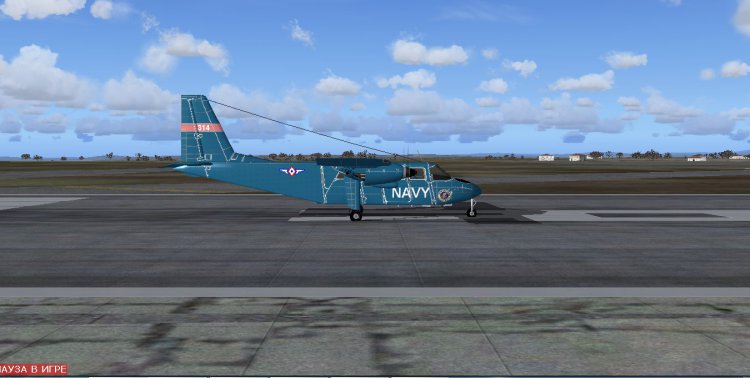
Не помню откуда скачал, но самолет неплохой. 2Д и 3Д кабины, пассажирский салон, все приборы работают, нормальная динамика. Можно заходить по минимуму, ИЛС работает как надо.
→ Size:
13 MB
→ Date:
13 years ago (03.12.2012 02:07)
→ Author:
Неизвестно
→ Approved by moderator:
Stakan
→ License:
Freeware - Free version, Unlimited Distribution
→ Downloaded:
1780 time(s)