Douglas DC-3 Просмотр ZIP-архива
Aircraft/MAAM-SIM DC-3 IFR/docs/Radio CD Player/readme1st.txt
FS2002/FS2004 Gauge -- AM/FM Radio CD Player MP3/WMA/WAV/MID -- By R.L. Clark 11/15/2003


PRODUCT DESCRIPTION

A simulated six-channel push button AM/FM Radio for playback of music, recorded broadcasts and the like for ambiance and general entertainment while flying FS2002/2004 or CFS2/3 aircraft. Playback of mp3/wma/wav/mid audio files using DirectShow technology. On-off, relative volume and channel selection controls are included. New features allow users to right click channel presets to program up to 12 songs using a Windows common dialog interface.  Song selections and volume settings are "remembered" across FS sessions. Unit also controls audio CD player playback from within the FS cockpit. This gauge product version does not work with FS2000/FS98/CFS and earlier flight simulator versions.

INSTALLATION

1. You should first have installed Microsoft's DirectX v9.0b or higher drivers. You can download these free at: http://www.microsoft.com/directx/homeuser/downloads/default.asp If you don't have them these drivers should probably be installed in any event for optimal graphics card performance and FS frame rates. You should also have installed Microsoft's latest Windows Media Player version 9 Series or higher for your operating system, which you can download at http://www.microsoft.com/windows/windowsmedia/9series/player.asp Make sure your Windows systray volume controls are not muted for the Play, Wave, MIDI and CD Audio controls. Also make sure your "Auto insert notification" box is unchecked in the \Properties\Settings for your CD/DVD ROM drive set through your Windows Control Panel System Device Manager.


2. Add the accompanying gauge file, radiocd4.gau, to the \Gauges directory of your FS2002/FS2004/CFS2/CFS3 program.


3. To use the gauge with a selected aircraft you need to edit (add lines to) the aircraft's panel.cfg file as you would to install any other gauge file. (E.g., call out the gauge as "radiocd4!radiocd" in your panel.cfg, e.g., as in the following call out: gaugeXX=radiocd4!radiocd,0,0,200)

The panel.cfg file is found in the \panel folder in your aircraft folder found in the main \aircraft folder in your main FS program directory. The simplest way of doing the editiing is with a text editing program such as "Notepad". *** BE SURE TO MAKE A BACKUP COPY OF YOUR ORIGINAL panel.cfg FILE FIRST ***

The following is an example of what to do:


- In the [Window Titles] section of the panel.cfg, add the line:

Window**=Radio/CD Player

where '**' is the next free window number.
For the default FS2004 Cessna 172 ONLY !!: '**' is 06


- After the last [Window..] section of the panel.cfg, add the lines (use copy/paste to avoid typing errors):

[Window**]
size_mm=300,93
position=2
visible=1
ident=60
sizeable=1
window_size= 0.293, 0.121
window_pos= 0.707, 0.000

gauge00=radiocd4!radiocd, 0, 0, 300

For a more complete explanation of how to edit/modify panel.cfg files see "Panelcf2.zip" by Dai Griffiths, available from www.FlightSim.com.

Sample edited panel.cfg files (2002panel.cfg and 2004panel.cfg) for the FS2002 and FS2004 default Cessna 172 are enclosed. E.g., for FS2002, just rename 2002panel.cfg to panel.cfg and add it to your \aircraft\c172\panel folder after backing up your original panel.cfg file. Similarly rename and use 2004panel.cfg with FS2004 after your original file backup.


USING THE RADIO (VOLUME CONTROL, CHANNEL SELECTION, ETC.)

The accompanying graphic "userguide.gif" illustrates the icons and mouse click points used for controlling the CD player and "radio" functioning. Use of mouseable "tooltips" hopefully makes use of the gauge relatively intuitive. Functioning of the gauge generally requires that it first be turned "on" which is done by mouse clicking it's upper right hand corner.

Clicking one of the three areas marked CD/FM/AM on the right side of the radio effects mode selection. Clicking on the upper left hand corner of the radio opens and closes your CD ROM tray on your computer, when the radio is on and in the CD mode.

Unlike earlier AM/FM Radio CD Player versions it is no longer necessary to have specially named sound files in a specific sound directory. To program songs (user selected mp3/wma/wav/mid audio files) using the FM/AM radio mode functioning, with the player "on", just right click the channel selection/preset buttons to program up to 12 songs using a Windows common dialog interface (6 songs for FM mode and 6 different songs for AM mode). The preset programming and song selections are indicated by tooltips when the mouse cursor is passed over the channel selection/preset buttons in the different modes.

Different songs are selected by mouse clicking on one of the six push buttons in lower the center of the radio, as on a real radio. Selected "radio" songs play in loop mode until switched off or changed. Different CD tracks can also be selected using the next and previous track select buttons provided, where the current track is shown on the display. CD playback continuously cycles through all channels starting with the channel selected.

The relative sound volume control area is to the left of the knob/wheel on the left side of the radio; a movable white dot on the knob/wheel indicates the radio off position and the volume control level position when the radio is on. Mouse click to the upper (+) lightened control pad area to raise the volume (white dot turns clockwise), and click the lower (-) control pad area to decrease the volume (white dot turns counter-clockwise). A pause button has been added to the left of the six channel selection/preset buttons on the gauge.


TROUBLESHOOTING

Problems experienced will most likely be due to inattention to the installation steps (most often step 1) above. But if you have a problem you can't fix email me and I'll try to help.

AKNOWLEDGEMENT

Many thanks go to Roger Gaylor and Rob Barendregt for general encouragement and contributing ideas incorporated in this product upgrade.

DISCLAIMER & COPYRIGHT

Copyright (C) 2001-2003 R.L. Clark. The accompanying files should not harm your computer in any way but, if you believe they have, I accept no liability. The files are released as "freeware" only and are not to be used or re-distributed commercially in exchange for any payment, fee or other value.

R.L. Clark
[email protected]
dcamaam4.zip
| Имя файла | Дата | Размер |
|---|---|---|
| Aircraft/MAAM-SIM DC-3 IFR/ | 10.07.2004 00:52 | |
| Aircraft/MAAM-SIM DC-3 IFR/alt 'speeds' bitmap/ | 10.07.2004 00:34 | |
| Aircraft/MAAM-SIM DC-3 IFR/alt 'speeds' bitmap/speeds.bmp | 09.07.2004 14:55 | 616 KB |
| Aircraft/MAAM-SIM DC-3 IFR/docs/ | 10.07.2004 01:04 | |
| Aircraft/MAAM-SIM DC-3 IFR/docs/ATC-Panel/ | 07.07.2004 15:09 | |
| Aircraft/MAAM-SIM DC-3 IFR/docs/ATC-Panel/Bitmap/ | 07.07.2004 15:09 | |
| Aircraft/MAAM-SIM DC-3 IFR/docs/ATC-Panel/Bitmap/atc-win orig.bmp | 23.05.2002 15:10 | 77 KB |
| Aircraft/MAAM-SIM DC-3 IFR/docs/ATC-Panel/Cut&Paste/ | 07.07.2004 15:09 | |
| Aircraft/MAAM-SIM DC-3 IFR/docs/ATC-Panel/Cut&Paste/Gauge Information.txt | 27.05.2002 11:17 | 49 B |
| Aircraft/MAAM-SIM DC-3 IFR/docs/ATC-Panel/Cut&Paste/Windows Information.txt | 24.05.2002 21:50 | 702 B |
| Aircraft/MAAM-SIM DC-3 IFR/docs/ATC-Panel/Cut&Paste/Windows Title.txt | 24.05.2002 21:49 | 18 B |
| Aircraft/MAAM-SIM DC-3 IFR/docs/ATC-Panel/Readme.htm | 28.05.2002 21:16 | 92 KB |
| Aircraft/MAAM-SIM DC-3 IFR/docs/ATC-Panel/Readme_files/ | 07.07.2004 15:09 | |
| Aircraft/MAAM-SIM DC-3 IFR/docs/ATC-Panel/Readme_files/filelist.xml | 28.05.2002 21:16 | 577 B |
| Aircraft/MAAM-SIM DC-3 IFR/docs/ATC-Panel/Readme_files/header.htm | 28.05.2002 21:16 | 2 KB |
| Aircraft/MAAM-SIM DC-3 IFR/docs/ATC-Panel/Readme_files/image001.png | 28.05.2002 21:16 | 5 KB |
| Aircraft/MAAM-SIM DC-3 IFR/docs/ATC-Panel/Readme_files/image002.jpg | 28.05.2002 21:16 | 6 KB |
| Aircraft/MAAM-SIM DC-3 IFR/docs/ATC-Panel/Readme_files/image003.png | 28.05.2002 21:16 | 613 B |
| Aircraft/MAAM-SIM DC-3 IFR/docs/ATC-Panel/Readme_files/image004.jpg | 28.05.2002 21:16 | 780 B |
| Aircraft/MAAM-SIM DC-3 IFR/docs/ATC-Panel/Readme_files/image005.png | 28.05.2002 21:16 | 13 KB |
| Aircraft/MAAM-SIM DC-3 IFR/docs/ATC-Panel/Readme_files/image006.jpg | 28.05.2002 21:16 | 20 KB |
| Aircraft/MAAM-SIM DC-3 IFR/docs/ATC-Panel/Readme_files/image007.png | 28.05.2002 21:16 | 598 B |
| Aircraft/MAAM-SIM DC-3 IFR/docs/ATC-Panel/Readme_files/image008.jpg | 28.05.2002 21:16 | 2 KB |
| Aircraft/MAAM-SIM DC-3 IFR/docs/ATC-Panel/Readme_files/image009.png | 28.05.2002 21:16 | 147 KB |
| Aircraft/MAAM-SIM DC-3 IFR/docs/ATC-Panel/Readme_files/image010.jpg | 28.05.2002 21:16 | 36 KB |
| Aircraft/MAAM-SIM DC-3 IFR/docs/ATC-Panel/Readme_files/image011.png | 28.05.2002 21:16 | 325 B |
| Aircraft/MAAM-SIM DC-3 IFR/docs/ATC-Panel/Readme_files/image012.jpg | 28.05.2002 21:16 | 838 B |
| Aircraft/MAAM-SIM DC-3 IFR/docs/ATC-Panel/Readme_files/oledata.mso | 28.05.2002 21:16 | 135 KB |
| Aircraft/MAAM-SIM DC-3 IFR/docs/cad_legal.txt | 27.01.2003 16:19 | 819 B |
| Aircraft/MAAM-SIM DC-3 IFR/docs/fuelstatus_readme.txt | 28.10.2002 21:03 | 7 KB |
| Aircraft/MAAM-SIM DC-3 IFR/docs/Garmin 530/ | 07.07.2004 15:09 | |
| Aircraft/MAAM-SIM DC-3 IFR/docs/Garmin 530/530 430 desc.txt | 17.10.2003 08:57 | 4 KB |
| Aircraft/MAAM-SIM DC-3 IFR/docs/Garmin 530/530 Default Nav Page.doc | 09.11.2003 18:34 | 98 KB |
| Aircraft/MAAM-SIM DC-3 IFR/docs/Garmin 530/530 Nav Bar Page.doc | 17.10.2003 12:39 | 90 KB |
| Aircraft/MAAM-SIM DC-3 IFR/docs/Garmin 530/GNS530 default nav page.jpg | 17.10.2003 09:41 | 69 KB |
| Aircraft/MAAM-SIM DC-3 IFR/docs/Garmin 530/GNS530 default nav terr.jpg | 05.11.2003 06:42 | 67 KB |
| Aircraft/MAAM-SIM DC-3 IFR/docs/Garmin 530/GNS530 map page.jpg | 17.10.2003 09:46 | 59 KB |
| Aircraft/MAAM-SIM DC-3 IFR/docs/Garmin 530/GNS530 nav bar.jpg | 17.10.2003 09:44 | 70 KB |
| Aircraft/MAAM-SIM DC-3 IFR/docs/Garmin 530/Intro and Directions.txt | 09.11.2003 18:32 | 3 KB |
| Aircraft/MAAM-SIM DC-3 IFR/docs/nightview.jpg | 07.07.2004 01:46 | 122 KB |
| Aircraft/MAAM-SIM DC-3 IFR/docs/openview.jpg | 07.07.2004 01:46 | 202 KB |
| Aircraft/MAAM-SIM DC-3 IFR/docs/popupview.jpg | 10.07.2004 01:04 | 219 KB |
| Aircraft/MAAM-SIM DC-3 IFR/docs/Radio CD Player/ | 07.07.2004 15:09 | |
| Aircraft/MAAM-SIM DC-3 IFR/docs/Radio CD Player/2002panel.cfg | 15.11.2003 13:00 | 5 KB |
| Aircraft/MAAM-SIM DC-3 IFR/docs/Radio CD Player/2004panel.cfg | 15.11.2003 13:00 | 5 KB |
| Aircraft/MAAM-SIM DC-3 IFR/docs/Radio CD Player/md5.exe | 17.11.2003 20:38 | 248 KB |
| Aircraft/MAAM-SIM DC-3 IFR/docs/Radio CD Player/radiocd4.gif | 15.11.2003 13:00 | 6 KB |
| Aircraft/MAAM-SIM DC-3 IFR/docs/Radio CD Player/readme1st.txt | 15.11.2003 13:00 | 6 KB |
| Aircraft/MAAM-SIM DC-3 IFR/docs/Radio CD Player/userguide.gif | 15.11.2003 13:00 | 27 KB |
| Aircraft/MAAM-SIM DC-3 IFR/docs/vcview.jpg | 07.07.2004 01:45 | 134 KB |
| Aircraft/MAAM-SIM DC-3 IFR/panel/ | 10.07.2004 00:32 | |
| Aircraft/MAAM-SIM DC-3 IFR/panel/atc-win.bmp | 17.01.2004 02:22 | 77 KB |
| Aircraft/MAAM-SIM DC-3 IFR/panel/DC3_PILOT.bmp | 01.07.2004 14:46 | 769 KB |
| Aircraft/MAAM-SIM DC-3 IFR/panel/deice.bmp | 09.07.2004 17:53 | 114 KB |
| Aircraft/MAAM-SIM DC-3 IFR/panel/Panel.cfg | 10.07.2004 01:23 | 14 KB |
| Aircraft/MAAM-SIM DC-3 IFR/panel/Sims.bmp | 09.07.2004 19:14 | 100 KB |
| Aircraft/MAAM-SIM DC-3 IFR/panel/speeds.bmp | 06.07.2004 17:21 | 616 KB |
| Aircraft/MAAM-SIM DC-3 IFR/panel.sperry/ | 10.07.2004 00:32 | |
| Aircraft/MAAM-SIM DC-3 IFR/panel.sperry/atc-win.bmp | 17.01.2004 02:22 | 77 KB |
| Aircraft/MAAM-SIM DC-3 IFR/panel.sperry/DC3_PILOT.bmp | 01.07.2004 14:46 | 769 KB |
| Aircraft/MAAM-SIM DC-3 IFR/panel.sperry/deice.bmp | 09.07.2004 17:53 | 114 KB |
| Aircraft/MAAM-SIM DC-3 IFR/panel.sperry/Panel.cfg | 10.07.2004 01:23 | 13 KB |
| Aircraft/MAAM-SIM DC-3 IFR/panel.sperry/Sims.bmp | 09.07.2004 19:14 | 100 KB |
| Aircraft/MAAM-SIM DC-3 IFR/panel.sperry/speeds.bmp | 06.07.2004 17:21 | 616 KB |
| Aircraft/MAAM-SIM DC-3 IFR/README_DC3_MAAM_PANEL.txt | 10.07.2004 00:58 | 22 KB |
| Aircraft/ | 22.06.2004 03:52 | |
| Gauges/as532_map.gau | 11.10.2002 16:05 | 168 KB |
| Gauges/ATC-WHM.gau | 28.05.2002 20:06 | 64 KB |
| Gauges/cad_fs2k2dcagauges.gau | 17.05.2003 11:31 | 80 KB |
| Gauges/cpt.DC3A.icons.CAB | 09.07.2004 19:29 | 11 KB |
| Gauges/DC3_HSI_RMI.cab | 29.06.2004 18:59 | 61 KB |
| Gauges/DC3_reg.CAB | 08.07.2004 04:07 | 820 B |
| Gauges/FS9Garmin530_R1.cab | 08.11.2003 03:45 | 188 KB |
| Gauges/Propliner.Gyro.gau | 05.02.2000 00:04 | 238 KB |
| Gauges/radiocd4.gau | 15.11.2003 13:00 | 368 KB |
| Gauges/RKG_fuelstat.gau | 29.05.2004 22:24 | 578 KB |
| Gauges/rwswitch.gau | 01.04.2004 20:45 | 56 KB |
| Gauges/rwswitch.ini | 07.07.2004 14:42 | 115 B |
| Gauges/servinfo.gau | 15.12.2003 04:15 | 683 KB |
| Gauges/Windspeed.CAB | 07.07.2004 17:16 | 359 B |
| Gauges/ | 08.07.2004 04:10 | |
| Sound/click.wav | 26.01.2002 21:18 | 3 KB |
| Sound/ | 22.06.2004 03:52 | |
| README_DC3_MAAM_PANEL.txt | 10.07.2004 00:58 | 22 KB |
| dc3maam.gif | 07.07.2004 15:22 | 15 KB |
| avsim_ru.diz | 09.02.2003 03:00 | 394 B |
| Итого: | 8 MB | |
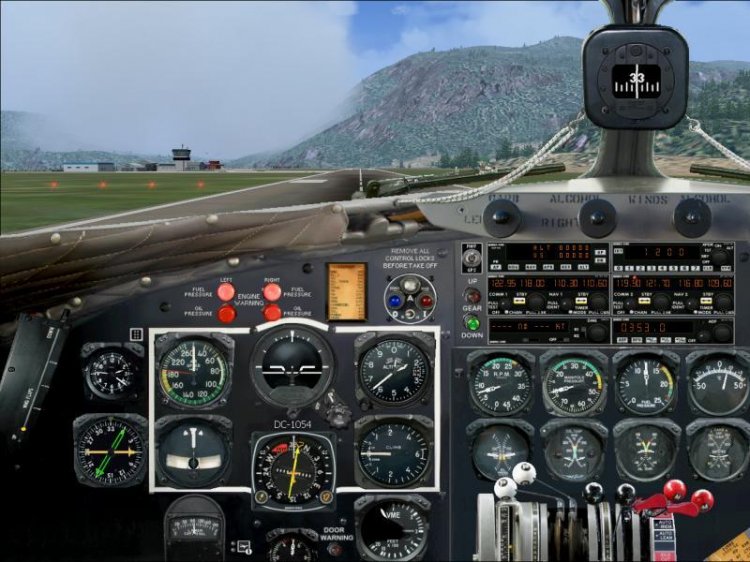
The panel for the plane Douglas DC-3, excellent quality.
→ Size:
3 MB
→ Date:
22 years ago (10.07.2004 14:17)
→ Author:
Mark Beaumont
→ License:
Freeware - Free version, Unlimited Distribution
→ Downloaded:
1611 time(s)