Learjet 45 v.2 Просмотр ZIP-архива
Lear45CX/READMETOO! Panel modifications.txt
PANEL MODIFICATIONS

Here are a couple of modifications that make Microsoft's default panel a little prettier.  This download does not contain a modified panel for copyright reasons, but read below to make these changes to your own personal aircraft:

_______________________________________________________

HONEYWELL GPS by Ike H. Slack of Coyote Avionics Design

If, like me, you prefer a neat GPS that snaps tidily into place on your panel, then I recommend installing this modification by Ike Slack.

INSTALLATION:

Open the folder HONEYWELLGPS.  Place the gauge HONEYWELLGPS.GAU in your FS2002/GAUGES folder: this is the latest version (at time of writing) with nightlighting. Backup your PANEL.CFG file (in the aircraft's PANEL folder) as PANELBK.CFG and create a copy of it within the PANEL folder. Rename this copy to PANEL.CFG. Open this file using Windows Notepad and replace the entry under[Window02] with the following:

[Window02]
size_mm=299,408
position=6
Background_color=16,16,16
window_size_ratio=1.00
visible=0
ident=GPS_PANEL
window_size= 0.289, 0.533
window_pos= 0.400, 0.465

gauge00=honeywellgps!gps,  0,0,299,408

That's it!  You can toggle your new GPS on and off with SHIFT/2 or the panel icon.  Please also read Ike's notes about this gauge.

_____________________________________________________

COMPASS POST

Bothered by Microsoft's boxy compass popping into view in mid-air?  This change adds a rudimentary centerpost so that now the compass is at least fixed to something.

INSTALLATION:

Make the following change to your PANEL.CFG file (as outlined above, backup the original if you have not already done so) under [Window05]:

[Window05]
file=centerpost.bmp
size_mm=77
position=2
visible=0
ident=COMPASS_PANEL

gauge00=Magnetic_Compass!Magnetic-Compass,5,0

That's all.  The relevant bitmap is already hiding in your panel folder.

___________________________

Have fun!  For me, the above mods make the default panel very workable and good for training.  Please note that Rick Sasala's GMAX Lear 45 has a virtual cockpit, so be wary of adding other 3rd party panels that have no VC section in the PANEL.CFG and have additional interior views. It can be done - my own favourites are FS2002 panels by David Durst, Allen Lavigne and Tom Dennis - but you'll need to modify your configuration files.

One other small point - do not try to alias the textures in this download to the default Lear45 or to Rick Sasala's original gmax aircraft: they will not function correctly, if at all.  Rick has made many improvements to his Lear in this Version 2.

If you like this aircraft, you might enjoy the British Airways Virtual Lear 45: Lear45BA.zip

Mark "Dark Moment" Beaumont
[email protected]
www.swiremariners.com/cxkaitak.html

5 July 2002
lear45cx.zip
| Имя файла | Дата | Размер |
|---|---|---|
| Lear45CX/aircraft.cfg | 05.07.2002 20:50 | 9 KB |
| Lear45CX/Bombardier_Learjet45_Readme.txt | 05.07.2002 21:06 | 4 KB |
| Lear45CX/HoneywellGPS/ | 05.07.2002 20:52 | |
| Lear45CX/HoneywellGPS/hgps.txt | 28.12.2001 00:57 | 284 B |
| Lear45CX/HoneywellGPS/Honeywellgps.gau | 21.12.2001 16:43 | 320 KB |
| Lear45CX/HoneywellGPS/honeywellgps.gif | 18.12.2001 18:32 | 39 KB |
| Lear45CX/HoneywellGPS/honeywellgps.txt | 28.12.2001 01:24 | 3 KB |
| Lear45CX/HoneywellGPS/install.txt | 25.12.2001 03:20 | 1 KB |
| Lear45CX/learcx.gif | 06.07.2002 01:29 | 10 KB |
| Lear45CX/learcx.jpg | 06.07.2002 01:02 | 61 KB |
| Lear45CX/learcx1.jpg | 06.07.2002 01:05 | 21 KB |
| Lear45CX/Learjet45.air | 24.06.2002 02:05 | 11 KB |
| Lear45CX/learjet45_check.txt | 20.06.2001 15:54 | 5 KB |
| Lear45CX/learjet45_notes.txt | 25.06.2002 20:30 | 128 B |
| Lear45CX/learjet45_ref.txt | 20.06.2001 15:54 | 2 KB |
| Lear45CX/model/ | 05.07.2002 19:56 | |
| Lear45CX/model/learjet45.mdl | 05.07.2002 15:21 | 2 MB |
| Lear45CX/model/model.cfg | 01.07.2002 09:02 | 30 B |
| Lear45CX/panel/ | 05.07.2002 19:56 | |
| Lear45CX/panel/annunciator_640.bmp | 17.04.2001 22:20 | 7 KB |
| Lear45CX/panel/centerpost.bmp | 05.07.2002 17:06 | 36 KB |
| Lear45CX/panel/forward_1024.bmp | 23.07.2001 19:01 | 534 KB |
| Lear45CX/panel/forward_640.bmp | 23.07.2001 19:01 | 209 KB |
| Lear45CX/panel/lear45.bmp | 17.04.2001 22:20 | 221 KB |
| Lear45CX/panel/lear45_thrust_levers.bmp | 17.04.2001 22:20 | 85 KB |
| Lear45CX/panel/Lear_compass.BMP | 17.04.2001 22:20 | 96 KB |
| Lear45CX/panel/minicontrols.bmp | 17.04.2001 22:20 | 20 KB |
| Lear45CX/panel/panel.cfg | 26.06.2002 03:28 | 4 KB |
| Lear45CX/panel/throttle_quadrant_640.bmp | 17.04.2001 22:20 | 43 KB |
| Lear45CX/READMETOO! Panel modifications.txt | 06.07.2002 01:36 | 3 KB |
| Lear45CX/sound/ | 05.07.2002 19:56 | |
| Lear45CX/sound/Sound.cfg | 05.07.2002 20:40 | 30 B |
| Lear45CX/texture/ | 05.07.2002 20:49 | |
| Lear45CX/texture/$Lear_45_Left.bmp | 21.06.2002 22:47 | 257 KB |
| Lear45CX/texture/$Lear_45_Right.bmp | 21.06.2002 22:48 | 257 KB |
| Lear45CX/texture/104-6pilot.bmp | 22.06.2002 15:45 | 65 KB |
| Lear45CX/texture/Controls.bmp | 22.06.2002 00:34 | 65 KB |
| Lear45CX/texture/ds_tire.bmp | 02.07.2002 12:50 | 171 KB |
| Lear45CX/texture/forward_640.bmp | 22.06.2002 00:35 | 65 KB |
| Lear45CX/texture/gear.bmp | 02.07.2002 12:50 | 3 MB |
| Lear45CX/texture/gear1.bmp | 22.06.2002 16:24 | 65 KB |
| Lear45CX/texture/lear45_t1.bmp | 05.07.2002 12:00 | 341 KB |
| Lear45CX/texture/panel.bmp | 10.04.2002 18:16 | 257 KB |
| Lear45CX/texture/Parts.bmp | 22.04.2002 13:40 | 65 KB |
| Lear45CX/texture/Parts1.bmp | 03.07.2002 15:15 | 11 KB |
| Lear45CX/texture/prop_turbine1.bmp | 08.06.2002 13:28 | 65 KB |
| Lear45CX/texture/prop_turbine2.bmp | 08.06.2002 13:28 | 65 KB |
| Lear45CX/texture/throttle_quadrant_640.bmp | 03.04.2002 15:19 | 65 KB |
| Lear45CX/texture/Thumbs.db | 27.06.2002 01:02 | 60 KB |
| Lear45CX/Thumbs.db | 06.07.2002 01:31 | 48 KB |
| Lear45CX/ | 06.07.2002 01:31 | |
| LearCX.txt | 06.07.2002 01:43 | 769 B |
| avsim_ru.diz | 14.03.2004 00:19 | 483 B |
| Итого: | 8 MB | |
Learjet 45 v.2
| Rating: 4!
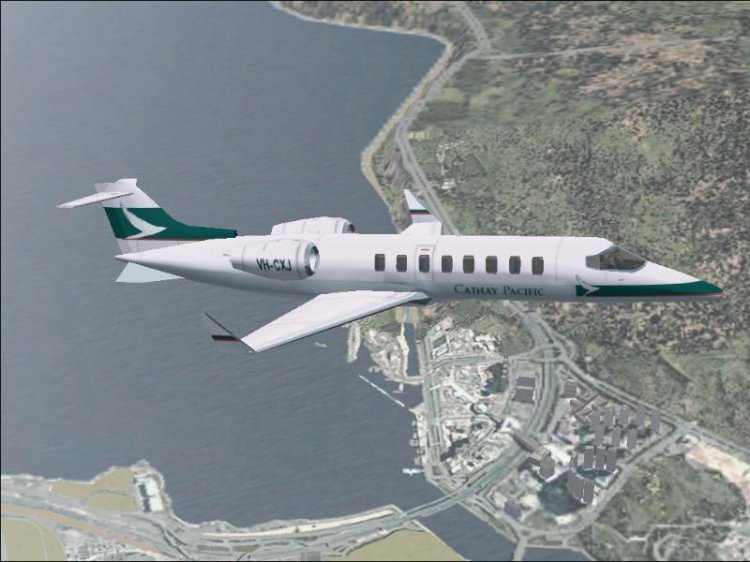
Airplane Learjet 45 v.2 Gmax livery in Cathay Pacific. Complete VC, salon, full animation, advanced night-effects + GPS Honeywell.
→ Size:
2 MB
→ Date:
23 years ago (16.02.2003 13:09)
→ Author:
Rick Sasala, Mark Beaumont
→ License:
Freeware - Free version, Unlimited Distribution
→ Downloaded:
564 time(s)