Learjet 45 v.2 Просмотр ZIP-архива
Lear45CX/Bombardier_Learjet45_Readme.txt
Freeware GMAX Bombardier Learjet45 (Version 2) Cathay Pacific Airways for FS2002 Standard or Pro Version. Uses the Lear45 panel and sounds (sounds aliased). Cathay Pacific paint scheme by Mark Beaumont. Honeywell GPS option by Ike H. Slack of Coyote Avionics Design.

Description:
VH-CXJ is the first of Cathay Pacific's Lear 45 training aircraft. The Model 45 is Learjet's first all-new aircraft since Bill Lear's first Model 23. Although it looks like a Learjet, it has only half the parts of a Model 35, reflecting a significant design progression. The parameters set down for the 45 called for it to have the performance of the Learjet 35, the handling of the Learjet 31A, and greater cabin space than the competition.

Features:
Full Virtual Cockpit and Virtual Cabin with night lighting, Thrust Reversers, Passenger door, Nose wheel steering, Spoilerons, Main gear taxi Lights and Underbelly landing lights that can be controlled separately. Full animation using GMAX.

Features new to Version 2: Reflective textures, new nose and tail areas and additional touch-ups here and there.

***Virtual Cockpits note....By using (CTRL + ENTER) and (CTRL + BACKSPACE) you can move your view forward or backward. Although you can only go so far backwards until you run into the seat.

Light Controls:
Turn the White Strobes Lights on/off with "O". Use the Strobes during the day "O" only, Beacons and Nav lights at night ("L" to turn on all lights, then press "O" to turn off the Strobes.

"L"................All Lights on/off
"Shift L"..........Panel Lights on/off
"CTRL L"...........Underbelly Landing Lights on/off
"O"................White Strobe Lights on/off

****This aircraft is equipped with Main Gear Mounted Taxi Lights in addition to Underbelly Landing Lights. Both Taxi and Landing Lights come on when the Landing Lights are turned on (CTRL L or just L). To get just the Taxi lights on, first turn on all Lights "L", then turn off the Underbelly Landing Lights (CTRL + L). The Main Gear Taxi Lights will stay on and the Underbelly Landing Lights will go off (Main Gear Lights will also turn off when gear is raised). The Taxi Lights can only be turned off with the "L" key. To get just the Landing Lights (Underbelly) on (No beacons,navs or strobes) turn off all lights "L", then press "CTRL L".

Installation:
Unzip lear45cx.zip to a temporary folder, check that folder names are intact, then move the unzipped folder (Lear45CX) to your FS2002\AIRCRAFT folder. This aircraft will appear in your Aircraft Selection list under Bombardier, not Learjet45. This is for ATC purposes. This aircraft will not overwrite the default Lear45 and uses the sounds from the Lear45.
****Important Note**** The sounds are aliased from the Lear45. You cannot alias the Lear45 panel as you will lose your virtual cockpit gauges.

Thanks:
Mark Beaumont for the excellent paint scheme!
Ike H. Slack of Coyote Avionics Design
Frans Vranken, for the original FSC/Aircraft (Lear35).
Ben Beverly for getting me started!
FreeFlight Design Forum (A wealth of information)!
Abacus & Louis Sinclair/Tom Greenwalt for FS Design Studio
Felix/FFDS (for his patience and knowledge)
Viking for his "Making an Aircraft" tutorial
David Eckert (daviator) For his FSC Pilot
Chris Cookson for Autocad .DXF Model Importer v1.0 for gmax
...and Microsoft and Discreet for GMAX

If I forgot anyone....Sorry, my mind isn't what it use to be.

Disclaimer:
If this A/C dumps your computer, I am not responsible. I have tested this aircraft and have never had a lock-up or any other problem. My system configuration is WinME, PIII 700E with 384MB SDRAM, GeForce2 MX400.

5th July 2002

Copyright 2002 Rick Sasala (Aircraft)
E-mail: [email protected]

Copyright 2002 Mark Beaumont (Textures)
E-mail: [email protected]
www.swiremariners.com/cxkaitak.html
lear45cx.zip
| Имя файла | Дата | Размер |
|---|---|---|
| Lear45CX/aircraft.cfg | 05.07.2002 20:50 | 9 KB |
| Lear45CX/Bombardier_Learjet45_Readme.txt | 05.07.2002 21:06 | 4 KB |
| Lear45CX/HoneywellGPS/ | 05.07.2002 20:52 | |
| Lear45CX/HoneywellGPS/hgps.txt | 28.12.2001 00:57 | 284 B |
| Lear45CX/HoneywellGPS/Honeywellgps.gau | 21.12.2001 16:43 | 320 KB |
| Lear45CX/HoneywellGPS/honeywellgps.gif | 18.12.2001 18:32 | 39 KB |
| Lear45CX/HoneywellGPS/honeywellgps.txt | 28.12.2001 01:24 | 3 KB |
| Lear45CX/HoneywellGPS/install.txt | 25.12.2001 03:20 | 1 KB |
| Lear45CX/learcx.gif | 06.07.2002 01:29 | 10 KB |
| Lear45CX/learcx.jpg | 06.07.2002 01:02 | 61 KB |
| Lear45CX/learcx1.jpg | 06.07.2002 01:05 | 21 KB |
| Lear45CX/Learjet45.air | 24.06.2002 02:05 | 11 KB |
| Lear45CX/learjet45_check.txt | 20.06.2001 15:54 | 5 KB |
| Lear45CX/learjet45_notes.txt | 25.06.2002 20:30 | 128 B |
| Lear45CX/learjet45_ref.txt | 20.06.2001 15:54 | 2 KB |
| Lear45CX/model/ | 05.07.2002 19:56 | |
| Lear45CX/model/learjet45.mdl | 05.07.2002 15:21 | 2 MB |
| Lear45CX/model/model.cfg | 01.07.2002 09:02 | 30 B |
| Lear45CX/panel/ | 05.07.2002 19:56 | |
| Lear45CX/panel/annunciator_640.bmp | 17.04.2001 22:20 | 7 KB |
| Lear45CX/panel/centerpost.bmp | 05.07.2002 17:06 | 36 KB |
| Lear45CX/panel/forward_1024.bmp | 23.07.2001 19:01 | 534 KB |
| Lear45CX/panel/forward_640.bmp | 23.07.2001 19:01 | 209 KB |
| Lear45CX/panel/lear45.bmp | 17.04.2001 22:20 | 221 KB |
| Lear45CX/panel/lear45_thrust_levers.bmp | 17.04.2001 22:20 | 85 KB |
| Lear45CX/panel/Lear_compass.BMP | 17.04.2001 22:20 | 96 KB |
| Lear45CX/panel/minicontrols.bmp | 17.04.2001 22:20 | 20 KB |
| Lear45CX/panel/panel.cfg | 26.06.2002 03:28 | 4 KB |
| Lear45CX/panel/throttle_quadrant_640.bmp | 17.04.2001 22:20 | 43 KB |
| Lear45CX/READMETOO! Panel modifications.txt | 06.07.2002 01:36 | 3 KB |
| Lear45CX/sound/ | 05.07.2002 19:56 | |
| Lear45CX/sound/Sound.cfg | 05.07.2002 20:40 | 30 B |
| Lear45CX/texture/ | 05.07.2002 20:49 | |
| Lear45CX/texture/$Lear_45_Left.bmp | 21.06.2002 22:47 | 257 KB |
| Lear45CX/texture/$Lear_45_Right.bmp | 21.06.2002 22:48 | 257 KB |
| Lear45CX/texture/104-6pilot.bmp | 22.06.2002 15:45 | 65 KB |
| Lear45CX/texture/Controls.bmp | 22.06.2002 00:34 | 65 KB |
| Lear45CX/texture/ds_tire.bmp | 02.07.2002 12:50 | 171 KB |
| Lear45CX/texture/forward_640.bmp | 22.06.2002 00:35 | 65 KB |
| Lear45CX/texture/gear.bmp | 02.07.2002 12:50 | 3 MB |
| Lear45CX/texture/gear1.bmp | 22.06.2002 16:24 | 65 KB |
| Lear45CX/texture/lear45_t1.bmp | 05.07.2002 12:00 | 341 KB |
| Lear45CX/texture/panel.bmp | 10.04.2002 18:16 | 257 KB |
| Lear45CX/texture/Parts.bmp | 22.04.2002 13:40 | 65 KB |
| Lear45CX/texture/Parts1.bmp | 03.07.2002 15:15 | 11 KB |
| Lear45CX/texture/prop_turbine1.bmp | 08.06.2002 13:28 | 65 KB |
| Lear45CX/texture/prop_turbine2.bmp | 08.06.2002 13:28 | 65 KB |
| Lear45CX/texture/throttle_quadrant_640.bmp | 03.04.2002 15:19 | 65 KB |
| Lear45CX/texture/Thumbs.db | 27.06.2002 01:02 | 60 KB |
| Lear45CX/Thumbs.db | 06.07.2002 01:31 | 48 KB |
| Lear45CX/ | 06.07.2002 01:31 | |
| LearCX.txt | 06.07.2002 01:43 | 769 B |
| avsim_ru.diz | 14.03.2004 00:19 | 483 B |
| Итого: | 8 MB | |
Learjet 45 v.2
| Rating: 4!
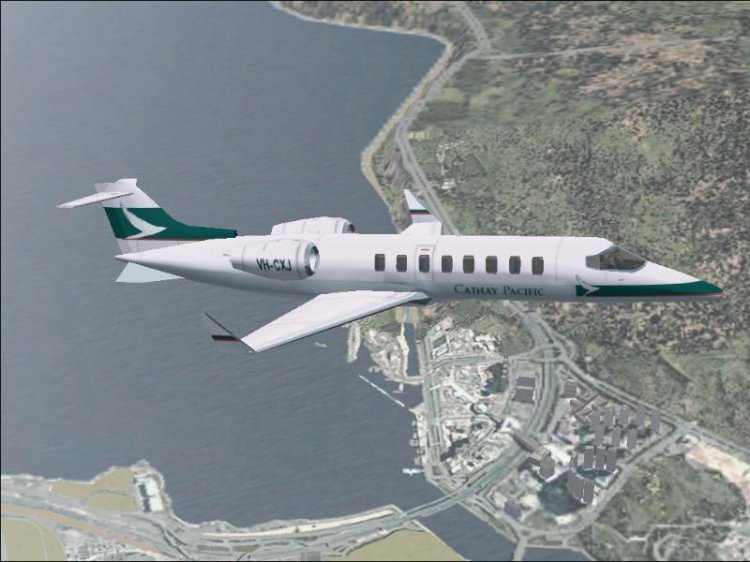
Airplane Learjet 45 v.2 Gmax livery in Cathay Pacific. Complete VC, salon, full animation, advanced night-effects + GPS Honeywell.
→ Size:
2 MB
→ Date:
23 years ago (16.02.2003 13:09)
→ Author:
Rick Sasala, Mark Beaumont
→ License:
Freeware - Free version, Unlimited Distribution
→ Downloaded:
564 time(s)