Gulfstream G100 Просмотр ZIP-архива
G100 INTER/INSTALL & Copyrights/README Taxispeed.txt
####################################################################
#                                                                  #
# RCBts-10.zip:  A Taxispeed Gauge for FS20002 aircraft            #
#                                                                  #
#                      By Rob Barendregt            23 febr. 2003  #
#                                                     Release 1.0  #
####################################################################


INSTALLATION OF THIS GAUGE ASSUMES THAT YOU ALREADY HAVE MY PUSHBACK GAUGE INSTALLED !
This Pushback gauge is available as file RCBpb-20.zip at flightsim.com and avsim.com.


1. Introduction
===============
I find that maintaining a proper, constant speed when taxiing on an airport
is one of the most difficult things in FS2K2, especially for heavy jets and
when making sharp turns on taxiways.

This gauge will help you solve that.

Features:
- The target taxispeed can be adjusted from 3 - 40 knots.
  Note: based on actual groundspeed, so will also work with wind enabled.
- The actual taxispeed is kept constant within 1-2 knots of the set target speed.
- Indicator light, that shows whether the gauge is on or off.
- Click sounds.
- Auto-shutoff when the Parking Brakes are set.


2. Installation
===============
This description assumes that you also use my Pushback gauge, and it places the
Taxispeed gauge in the same Window; this seems a logical place for it :-).

1. Extract the files in this archive to your main \FS2002 folder, with Winzip's
option "use folder names" enabled.
This results in the files being placed in folder ...\FS2002\GAUGES\RCB-GAUGES\
(DON'T PUT THEM IN THE MAIN \GAUGES FOLDER !!)
Just overwrite any files, if asked.

2. Add the Taxispeed gauge to the panel of your aircraft(s).

Placing the gauge in your panel is done by adding some lines to the panel.cfg
file of your aircraft, located in the ...\FS2002\AIRCRAFT\"your aircraft"\PANEL
folder. The simplest way of doing that is by using Notepad.
*** MAKE A BACKUP OF YOUR panel.cfg FIRST ***

- Find the [Window**] section where the Pushback gauge is defined.
- Change the line size_mm=86,64 into size_mm=145,64
- Add the line:
     gauge03=rcb-gauges!taxispeed, 85,0,60,64

That's it.
When you click the Pushback Icon on your panel, the Taxispeed gauge appears
next to the Pushback gauge.


3. Taxispeed gauge indicators
=============================
The gauge consists of 3 areas (see also their Tooltips):
- A button, to activate/deactivate the gauge.
  This button has an indicator light, colored:
  - RED: Gauge cannot be activated.
    The gauge can only be active when:
    - The Parking Brakes are released.
    - The aircraft is on the ground.
    - The sim is not in Slew mode.
  - OFF: Click button to activate the gauge.
  - GREEN: The gauge is operative.
- The Target Taxispeed (3 - 40 knots, the left two digits). Default: 10 knots.
  Click to increment or decrement the value.
  You can change the target speed at any time, even if the gauge is operative.
- The Actual Groundspeed (the right two digits)


4. How the gauge works ....
===========================
The gauge operates by setting the throttles to a specific value, according
to the following algoritme:
- If ActualSpeed is smaller then 1 knots:
  Throttles are set to 70%
- If ActualSpeed is between 1 knots and (TargetSpeed-2):
  Throttles are set to 40%
- If ActualSpeed is between (TargetSpeed-2) and TargetSpeed:
  - If ActualSpeed is increasing: Throttles are set to 20%
  - If ActualSpeed is decreasing: Throttles are set to 40%
- If ActualSpeed is between TargetSpeed and (TargetSpeed+2):
  - If ActualSpeed is increasing: Throttles are set to 0%
  - If ActualSpeed is decreasing: Throttles are set to 20%
- If ActualSpeed is greater then (TargetSpeed+2):
  Throttles are set to 0%

Obviously such an algoritme is a compromise, influenced by the following factors:
- The weight of the aircraft
- Spoolup/spooldown times of the engine(s).
- Smooth throttle behaviour vs. accurate speed control.

But with this algoritme it should work for any aircraft.


5. Frequently Asked Questions (FAQ)
===================================
Q1: Can I use this gauge without having the Pushback gauge installed ?
A1: Yes, you can.
    With one exception: for aircraft of which Engine-3 has Magneto's.
    Plus: the click-sounds won't work.
    You can add the gauge to any panel (either on the main panel window, or as overlay),
    but you have to figure out yourself how to place the gauge; the Readme
    of the Pushback gauge gives a lot of info on how-to do this.
    PLEASE DON'T AS ME FOR SUPPORT IF YOU WANT TO USE IT THIS WAY !!

Q2: When the gauge is active, the Thottle levers on my panel are very 'jumpy' even
    when the throttle levers should be steady (ActualSpeed < Targetspeed-2 or
    > Targetspeed+2).
A2: This means that the throttle axis of your yoke/joystick 'jitters' a bit, which
    makes FS2K2 continously responding to changes of your throttle axis.
    Remedy: set the throttles on your controller to 'idle'.
    If this doesn't work (then you will also have problems with Reverse Thrusters !):
    Create a small deadzone, either by increasing the Nullzone for the Throttle axis
    in Options-Controls-Sensitivities or use FSUIPC for this.
    I recommend using FSUIPC for controller calibration anyway, since this is IMHO
    the ONLY way to accurately calibrate all your controller axis in FS2K2.
    You can download FSUIPC (made by Pete Dowson) a.o. from flightsim.com and avsim.com

Q3: Can I use this gauge to adjust the taxispeed of my AI aircraft ?
A3: No, just for the aircraft YOU are flying.


6. Copyrights and Disclaimer
============================
This gauge is freeware, and is available for your personal use.
It may NOT be sold, re-distributed, or (re-)uploaded to another website
(in ANY shape or form) without my explicite, written permission.

If you want to bundle this gauge with your (freeware !!) panel, you
may do so AFTER my written permission, provided you include this
README file AS-IS, without modification.

And obviously, installing & using this Taxispeed gauge is at your own risk !!


7. History
==========
Rel. 1.0: Initial release


I hope you enjoy using this gauge.
And I'm always open to questions, or suggestions for improvement.
(no guarantee that I will make them though).
But PLEASE, before asking me questions, make sure that the answer can not
be found in this Readme file.

Rob Barendregt, The Netherlands
Email: [email protected]

               **************************************
g100-moz.zip
| Имя файла | Дата | Размер |
|---|---|---|
| G100 INTER/model/ | 28.03.2003 11:55 | |
| G100 INTER/model/model.cfg | 19.02.2003 00:05 | 38 B |
| G100 INTER/model/gulfstream_g100.mdl | 29.03.2003 12:53 | 727 KB |
| G100 INTER/panel/ | 14.03.2003 04:22 | |
| G100 INTER/panel/Thumbs.db | 10.03.2003 23:01 | 27 KB |
| G100 INTER/panel/Panel.cfg | 27.03.2003 19:32 | 8 KB |
| G100 INTER/panel/Beck-Left.bmp | 24.02.2003 18:08 | 769 KB |
| G100 INTER/panel/Beck-right.bmp | 24.02.2003 19:03 | 769 KB |
| G100 INTER/panel/BECK.bmp | 24.02.2003 13:54 | 769 KB |
| G100 INTER/panel/CD_Player.bmp | 12.08.2002 21:06 | 69 KB |
| G100 INTER/panel/Front-Left.bmp | 01.03.2003 03:19 | 769 KB |
| G100 INTER/panel/Front-Right.bmp | 01.03.2003 19:35 | 769 KB |
| G100 INTER/panel/HUD.bmp | 17.03.2003 14:53 | 121 KB |
| G100 INTER/panel/Attendant.bmp | 11.03.2003 03:02 | 77 KB |
| G100 INTER/panel/G100-UP.bmp | 16.03.2003 20:00 | 769 KB |
| G100 INTER/panel/Left.bmp | 01.03.2003 20:39 | 769 KB |
| G100 INTER/panel/Gulf-Blue.bmp | 16.03.2003 02:45 | 769 KB |
| G100 INTER/panel/Right.bmp | 24.02.2003 19:28 | 769 KB |
| G100 INTER/panel/G100-Throttle.bmp | 01.03.2003 20:30 | 168 KB |
| G100 INTER/texture/ | 28.03.2003 11:58 | |
| G100 INTER/texture/Thumbs.db | 14.03.2003 00:06 | 23 KB |
| G100 INTER/texture/G100Partes_t.bmp | 22.03.2003 04:15 | 341 KB |
| G100 INTER/texture/cromo_t.bmp | 11.08.2002 15:33 | 21 KB |
| G100 INTER/texture/cromo_L.bmp | 11.08.2002 15:21 | 21 KB |
| G100 INTER/texture/spoilers.bmp | 20.03.2001 03:35 | 257 KB |
| G100 INTER/texture/cockpit_t.bmp | 21.09.2002 14:17 | 257 KB |
| G100 INTER/texture/cockpit_l.bmp | 21.09.2002 14:16 | 257 KB |
| G100 INTER/texture/G100Base_T.bmp | 28.03.2003 14:07 | 1 MB |
| G100 INTER/texture/fusint_t.bmp | 21.09.2002 15:03 | 341 KB |
| G100 INTER/texture/fusint_l.bmp | 21.09.2002 15:04 | 341 KB |
| G100 INTER/texture/pilotos.bmp | 27.03.2003 00:47 | 257 KB |
| G100 INTER/texture/G100Base_l.bmp | 27.03.2003 01:38 | 1 MB |
| G100 INTER/G100MOZp.jpg | 28.03.2003 14:49 | 45 KB |
| G100 INTER/gulfstream_g100_CHECK.CFG | 04.06.1999 01:44 | 1 KB |
| G100 INTER/INSTALL & Copyrights/ | 11.03.2003 14:41 | |
| G100 INTER/INSTALL & Copyrights/ACS-GPS/ | 09.02.2003 15:12 | |
| G100 INTER/INSTALL & Copyrights/ACS-GPS/ACS Read 2.txt | 31.01.2003 03:06 | 447 B |
| G100 INTER/INSTALL & Copyrights/ACS-GPS/ACS_exe.zip | 05.01.2003 20:51 | 50 KB |
| G100 INTER/INSTALL & Copyrights/ACS-GPS/MOZ.prg | 20.01.2003 19:03 | 379 B |
| G100 INTER/INSTALL & Copyrights/ACS-GPS/MOZBIQUE.prg | 22.03.2001 14:57 | 952 B |
| G100 INTER/INSTALL & Copyrights/CD Muzik/ | 09.02.2003 15:12 | |
| G100 INTER/INSTALL & Copyrights/CD Muzik/readme-cd.1st | 30.09.2001 12:38 | 4 KB |
| G100 INTER/INSTALL & Copyrights/CD Muzik/userguide.gif | 30.09.2001 11:44 | 26 KB |
| G100 INTER/INSTALL & Copyrights/CD Muzik/CD-musik.jpg | 09.02.2003 16:10 | 70 KB |
| G100 INTER/INSTALL & Copyrights/Effects/ | 09.02.2003 15:12 | |
| G100 INTER/INSTALL & Copyrights/Effects/fx_Falc.fx | 04.09.2002 19:27 | 1 KB |
| G100 INTER/INSTALL & Copyrights/Effects/install2.txt | 01.02.2003 15:01 | 27 B |
| G100 INTER/INSTALL & Copyrights/Modules/ | 11.03.2003 14:14 | |
| G100 INTER/INSTALL & Copyrights/Modules/readme.txt | 15.05.2001 05:44 | 5 KB |
| G100 INTER/INSTALL & Copyrights/Modules/FSSound.dll | 15.05.2001 05:48 | 13 KB |
| G100 INTER/INSTALL & Copyrights/Modules/Modlule Install.txt | 11.03.2003 14:47 | 27 B |
| G100 INTER/INSTALL & Copyrights/sound/ | 11.03.2003 14:40 | |
| G100 INTER/INSTALL & Copyrights/sound/OUTERMK.WAV | 14.11.1999 21:57 | 22 KB |
| G100 INTER/INSTALL & Copyrights/sound/APU-SND.WAV | 13.03.2000 01:31 | 105 KB |
| G100 INTER/INSTALL & Copyrights/sound/click.wav | 26.01.2002 21:18 | 3 KB |
| G100 INTER/INSTALL & Copyrights/sound/sound install.txt | 11.03.2003 14:46 | 25 B |
| G100 INTER/INSTALL & Copyrights/sound/Signs.wav | 26.09.2000 10:14 | 17 KB |
| G100 INTER/INSTALL & Copyrights/sound/SWITCH.wav | 26.01.2002 21:23 | 652 B |
| G100 INTER/INSTALL & Copyrights/recommended-soundsettings.jpg | 23.04.2002 02:52 | 172 KB |
| G100 INTER/INSTALL & Copyrights/README Taxispeed.txt | 23.02.2003 06:37 | 7 KB |
| G100 INTER/INSTALL & Copyrights/GAUGES CREDITS.txt | 11.03.2003 15:16 | 653 B |
| G100 INTER/INSTALL & Copyrights/gauge.zip | 17.03.2003 21:30 | 3 MB |
| G100 INTER/INSTALL & Copyrights/How To.jpg | 18.04.2002 14:55 | 47 KB |
| G100 INTER/INSTALL & Copyrights/FSNAV readme.txt | 17.12.2001 19:31 | 3 KB |
| G100 INTER/INSTALL & Copyrights/G100 - INTER.doc | 28.03.2003 16:54 | 1 MB |
| G100 INTER/gulfstream_g100V1.air | 19.03.2003 19:32 | 13 KB |
| G100 INTER/AIRCRAFT.CFG | 28.03.2003 16:56 | 8 KB |
| G100 INTER/G100MOZ.jpg | 28.03.2003 14:48 | 18 KB |
| G100 INTER/G100MOZpn.jpg | 28.03.2003 14:51 | 46 KB |
| G100 INTER/Sound/ | 29.03.2003 13:11 | |
| G100 INTER/Sound/Sound.cfg | 01.09.2002 14:21 | 32 B |
| G100 INTER/Gulfstream_g100V1_notes.txt | 20.03.2003 02:25 | |
| G100 INTER/ | 14.03.2003 04:22 | |
| avsim_ru.diz | 14.03.2004 00:18 | 425 B |
| Итого: | 17 MB | |
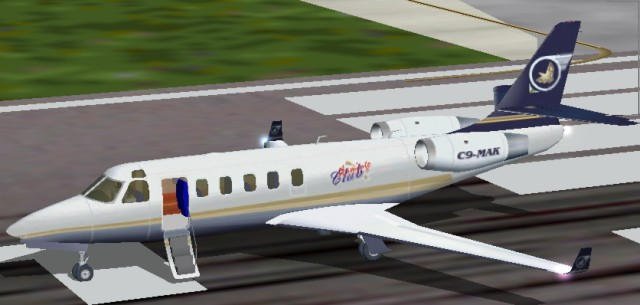
Airplane Gulfstream G100 Gmax. Complete VC, interior, bar and full animation.
→ Size:
8 MB
→ Date:
23 years ago (31.03.2003 10:14)
→ Author:
Peter Brun, Mario Coelho
→ License:
Freeware - Free version, Unlimited Distribution
→ Downloaded:
856 time(s)