GAF Nomad VH-MSF Просмотр ZIP-архива
Nomad_N22C/Read_me_first.txt
NOMAD N22C OF THE ROYAL FLYING DOCTOR SERVICE OF AUSTRALIA

VH-MSF in medical configuration.


All new GMAX model for FS2002. Includes full medical interior. Stretcher off loads and ambulance arrives to pick up your patient! Fully animated landing gear, flaps and flaperons. All new panel created includes overhead panel. Does not require any other files to operate.


INSTALLATION

1/ unzip all files to a temporary folder.
2/ Move the entire folder "Nomad_N22C" to the main aircraft folder of flight sim
(usually C:\Program files\Microsoft Games\FS2002\aircraft)
3/Move the contents of the gauges folder (C:\Program files\Microsoft GAmes\FS2002\aircraft\Nomad_N22B\Gauges) to the main gauges folder of the program (C:\Program Files\Microsoft Games\FS2002\Gauges).

It should then open in the main aircraft directory under G.A.F.


ANIMATIONS

Flight control surfaces should work as per normal. In the real aircraft, the outer rear set flaps worked as flaperons, but at full flap setting did not move so well. At this point roll was effected by spoilerons. Unfortunately I was unable to model this due to limitations in the animation modelling of the program. So the flaperons / spoilerons work at all settings.
Opening doors; Use the standard door opening keystroke (Normally shift+E). Please open the doors before getting the patient out!! Taking the stretcher out and making the ambulance show up is by hitting the "Wingfold" keystroke (note that normally there is no keystroke assigned to this). I use "Shift + T".

To assign a keystroke
At the main menu, select Settings, then in the controls section select assignments.
This normally opens on the Buttons/ keys tab. Scroll down till wing fold/ unfold shows up. Select it to highlight it. Then click "change assignment". Type in the key combo you want (I use shift +T). Click OK and Bob's your uncle.


KNOWN ISSUES

The engine indicating gauge for no 2 engine N2%RPM indicates from the no1 engine. I have tried to contact as many people as I know to try and fix it, but alas I am not able to do it. Small issue, but should not stop the thing flying.
The visuals are best seen with the trifiltering enabled in display. Because the fuselage is box section, when one point is even fractionally low, it shades it in dark shadows. This was very difficult to adjust and find the offending points. It annoys me no end, so please don't point it out to me, I know it is like that.
The flaps indicating gauge was repainted from the 737 one, but indicates only 10 degrees and 40 which is incorrect. It should indicate 10, 20, 38 degrees.  If anyone can suggest a fix to me I would like to hear it.
Currently the aircraft puts its nose wheel into the ground if landed on something other than a runway. You can fix this by changing the static compression ratio in the aircraft .cfg. Just open it with notepad, go to this area

[contact_points]
point.0= 1.000, -5.280, 0.000, 0.400, 11814.196, 0.000, 0.750, 49.000, 0.125, 2.500, 0.950, 5.000, 7.000, 0.000, 0.000, 0.000

and change it to this
[contact_points]
point.0= 1.000, -5.280, 0.000, 0.400, 11814.196, 0.000, 0.750, 49.000, 0.200, 2.500, 0.950, 5.000, 7.000, 0.000, 0.000, 0.000

I have not used this compression ratio as default, as it seems too soft on the suspension, and looks unsightly in the model. If you want to land on dirt, it is needed however to stop the nose wheel braking off.


CREDITS
This was my first aircraft build. I have built it all from scratch which took many hours/ months of learning animation and GMAX (having never done 3d modelling before). I know there are things I would do differently next time and perhaps could be better next time. Constructive comments are always welcome, but you can keep any negative ones to yourself if you don't mind. The project was 3/4 finished when Joe Binka published his Nomad files. It did give me the opportunity to see how another designer approached the aircraft, and gave me some ideas to adjust mine. Great model Joe. While on the topic of other Nomads, the original one was done by Mick Williams for FS98. I have used some of his gauges on this panel (especially the fuel ones).
Thanks to Rhys Eddy for the original artwork on the nomad panel background which saved me a lot of time. Also to Brad Disher and Dave Friswell from www.aussim.com for advice and help with many bugs. Also to the forum people at simviation.com for what often must seem simple things, but to someone starting out is quite difficult. Thanks to Rob Danaher from Boeing Australia who helped out with the aerodynamic info. Also thanks to Capt Magnus Badger from the RFDS Broken Hill for fine tuning the flight characteristics. Magnus is a legend as anyone who has heard his area calls on MBZ frequencies will attest! Mags also flew this very aircraft, as well as lending me all his operations manuals to make it in the first place. His picture graces (?) the pilot in the exterior model (I know it is crap, but I can’t make people).
Panel and gauges; Many gauges I used are reworked default MS ones. However, some came from freeware aircraft downloaded over the years. When reworking them, I have tried to find the origins of them, but looking at the files, it seems I am not the first to rework them, and the origins are lost in time. If you recognise any, Thanks for your efforts and I trust that my reworking of them hasn't caused you grief.


LEGAL BIT

 This project is the property of Mike Hill. By downloading these files you agree to the following terms and conditions.

1. This product cannot be uploaded to any site without express written consent.
2. These files are free of charge, any attempt to collect a fee or charge to obtain the files herein is a direct breech of this agreement.
3. Do not include these files on a compilation CD in any form without prior consent.
4. Do not post these files in any form on online auction site.
5. If you charge a fee in any way in conjunction with these files, Compensatory damages will be demanded by a very mean person.
6. These files have been thoroughly tested and function properly. However, I can not be held responsible if for what ever reason this causes a problem on your system (which it should not anyway). You agree to use this file at your own risk.


 If you agree to these terms then feel free to enjoy. Also consider a donation to the RFDS! Address is Royal Flying Doctor Service, GPO Box 3537, Sydney NSW 2001, Australia.

 If you do not agree with the above terms, kindly remove all included files from you hard drive.


COMING SOON

I am nearing completion of scenery objects of the Broken Hill airport (YBHI). This will include the Flying Doctor Hangar. I will upload this soon. Following that, there will be some other local outback airports as well as missions.


Thanks for downloading this aircraft
Mike Hill
[email protected]
March 2002.
nomad_n22c.zip
| Имя файла | Дата | Размер |
|---|---|---|
| Nomad_N22C/aircraft.cfg | 10.03.2003 09:40 | 7 KB |
| Nomad_N22C/gauges/ | 01.03.2003 13:43 | |
| Nomad_N22C/gauges/Gauge000.gau | 22.02.2003 20:27 | 52 KB |
| Nomad_N22C/gauges/nomad-altimeter.gau | 02.02.2003 17:58 | 202 KB |
| Nomad_N22C/gauges/nomad-clock.gau | 02.05.1998 15:28 | 132 KB |
| Nomad_N22C/gauges/nomad-lauxfuel.gau | 20.12.1999 10:33 | 118 KB |
| Nomad_N22C/gauges/nomad-lmainfuel.gau | 20.12.1999 10:34 | 118 KB |
| Nomad_N22C/gauges/Nomad-N22_fuel_L.gau | 22.02.2003 12:00 | 19 KB |
| Nomad_N22C/gauges/Nomad-N22_fuel_R.gau | 22.02.2003 14:03 | 19 KB |
| Nomad_N22C/gauges/nomad-rauxfuel.gau | 20.12.1999 10:36 | 118 KB |
| Nomad_N22C/gauges/nomad-rmainfuel.gau | 20.12.1999 10:37 | 118 KB |
| Nomad_N22C/gauges/nomad-turn_coordinator.gau | 08.02.2003 11:45 | 107 KB |
| Nomad_N22C/gauges/NOMAD22.engine.gau | 02.10.2001 02:37 | 382 KB |
| Nomad_N22C/gauges/NOMAD22.engine2.gau | 22.02.2003 15:47 | 386 KB |
| Nomad_N22C/gauges/nomad_n22.airspeed.gau | 08.02.2003 11:10 | 100 KB |
| Nomad_N22C/gauges/NOMAD_N22.vertical_speed.gau | 08.02.2003 11:37 | 103 KB |
| Nomad_N22C/gauges/Nomad_N22c.directional-gyro.gau | 08.02.2003 11:50 | 242 KB |
| Nomad_N22C/gauges/Nomad_N22C.flaps.gau | 26.02.2003 00:04 | 15 KB |
| Nomad_N22C/gauges/nomad_N22C.gau | 01.03.2003 11:41 | 2 MB |
| Nomad_N22C/model/ | 01.03.2003 13:28 | |
| Nomad_N22C/model/model.cfg | 27.09.2002 04:33 | 24 B |
| Nomad_N22C/model/nomad.mdl | 02.02.2003 15:14 | 1 MB |
| Nomad_N22C/nomad & ambulance.gif | 01.03.2003 14:07 | 13 KB |
| Nomad_N22C/nomad & ambulance.jpg | 01.03.2003 14:05 | 42 KB |
| Nomad_N22C/nomad & ambulance255.jpg | 01.03.2003 14:06 | 13 KB |
| Nomad_N22C/nomad panel.jpg | 01.03.2003 14:02 | 67 KB |
| Nomad_N22C/NOMAD_N22C.air | 01.03.2003 11:33 | 16 KB |
| Nomad_N22C/Nomad_N22C_check.txt | 01.03.2003 16:27 | 6 KB |
| Nomad_N22C/Nomad_N22C_notes.txt | 02.03.2003 19:53 | 5 KB |
| Nomad_N22C/Nomad_N22C_ref.txt | 01.03.2003 16:35 | 2 KB |
| Nomad_N22C/panel/ | 01.03.2003 13:27 | |
| Nomad_N22C/panel/MAIN_PANEL.bmp | 25.02.2003 23:31 | 769 KB |
| Nomad_N22C/panel/Panel.cfg | 01.03.2003 13:14 | 5 KB |
| Nomad_N22C/panel/roofpanel.bmp | 25.02.2003 23:02 | 589 KB |
| Nomad_N22C/panel/THROTTLE_QUADRANT_BACK.bmp | 22.02.2003 18:31 | 234 KB |
| Nomad_N22C/panel/Thumbs.db | 01.03.2003 13:26 | 81 KB |
| Nomad_N22C/Read_me_first.txt | 10.03.2003 09:09 | 7 KB |
| Nomad_N22C/sound/ | 01.03.2003 13:23 | |
| Nomad_N22C/sound/sound.cfg | 27.09.2002 04:14 | 61 B |
| Nomad_N22C/texture/ | 01.03.2003 13:27 | |
| Nomad_N22C/texture/ambulance.bmp | 01.03.2003 21:23 | 341 KB |
| Nomad_N22C/texture/nomad_in_l.bmp | 27.02.2003 00:48 | 1 MB |
| Nomad_N22C/texture/nomad_in_t.bmp | 01.03.2003 21:22 | 1 MB |
| Nomad_N22C/texture/nomad_l.bmp | 01.03.2003 13:09 | 1 MB |
| Nomad_N22C/texture/nomad_t.bmp | 01.03.2003 21:21 | 1 MB |
| Nomad_N22C/texture/Thumbs.db | 02.03.2003 20:53 | 113 KB |
| Nomad_N22C/Thumbs.db | 01.03.2003 14:07 | 33 KB |
| Nomad_N22C/ | 10.03.2003 09:09 | |
| avsim_ru.diz | 14.03.2004 00:20 | 409 B |
| Итого: | 13 MB | |
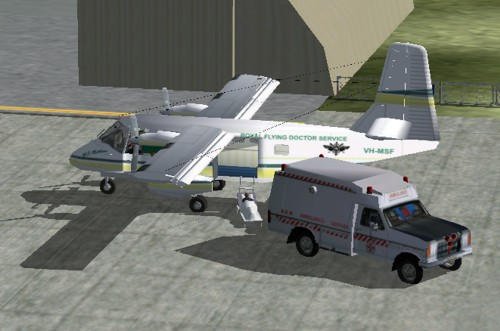
Aircraft VH-MSF Gmax. Complete medical version, interior, everything is animated.
→ Size:
3 MB
→ Date:
23 years ago (10.03.2003 12:03)
→ Author:
Mike Hill
→ License:
Freeware - Free version, Unlimited Distribution
→ Downloaded:
713 time(s)