AutoCoPilot v2.0 Просмотр ZIP-архива
readme_en.txt
AutoCoPilot
Plugin for X-Plane 10, 11

Description:
This plugin is simplified Autopilot emulator/Copilot analog. Plugin dont use the X-plane autopilot and himself manages flight controls.
Program modes: Hold mode a current Course/Constant rate turn. Hold mode a current Altitude/Vertical speed. Hold mode a current Air Speed.

Since version 2.0, added navigation menu that allows to select the source navigation data. After selection the plugin will be flying according of your choice, in "HOLD COURSE" mode.

It is possible to fly along the route obtained from the GPS430/450, FMC, and also from the KLN-90b.
There is also a flight on VOR and ADF, and using autopilot Flight Directors.

Plugin is suitable for aircrafts not autopilot and GPS-navigation equipped or some situations when where you need quickly to transfer flight control to the co-pilot.
Also convenient to use only the hold air speed mode for everyone aircrafts not autothrottle equipped.

Installation:
This plugin need FlyWithLua for working. Copy plugin file to [X-Plane folder]/Resources/plugins/FlyWithLua/Scripts.
After X-plane running you can assign a hot key to the plugin switch toggle. For this you need assign your key to "toggle" value in "autocopilot" category in "SETTINGS -> JOYSTICK & EQUIPMENT -> KEYS".

Interface:
Button "ON" - plugin switch toggle.
Button "Hold Altitude" and "Hold Vertical speed" - to select the needed mode or completely disable altitude control mode.
Button "Hold Course" and "Hold turn speed" - to select the needed mode or completely disable course control mode.
Button "AutoThrottle" switch toggle air speed control mode.
The string "AutoCoPilot" area to hide/show interface.
Also interface can be moved by "drag and drop".

Navigation menu:
VOR 1/2: Hold heading according to NAV 1/2 settings.
ADF: Heading to ADF. 3 position switch: ADF 1, ADF 2 and switch off
FMC: The plugin uses the flight plan obtained from GPS430/450, FMC, 124thATC, etc. Then the plugin itself flies the route regardless of this equipments. If the flightplan has been changed, then it is necessary switch off/on "FMC" button.
BendixKing KLN-90b: flies on this instrument.
Autopilot output: The plugin uses the autopilot Flight Directors. Even if it is powered on but not activated, data is received.

Adjustments and Limits:
Pitch and Roll accuracy: The higher the value, the higher the sensitivity to changes in flight parameters. For small values, the control is not frequent, but sharper. this setting allows you to set the character of piloting, and helps to adapt to turbulence conditions and gusts of wind.
Throttle accuracy: similar but for throttle
Heading limit (deg/sec) and Bank angle limit (degrees): sets a limit for the rate of turn and bank angle. One or both can be used.
V/Speed limit (meters/sec: vertical speed limitation.
Min throttle level (percent): engine power does not decrease below this percent.

SAVE button: save settings.
RESET button: reset to saved settings.

----------------
v 1.0.1
In this update has been implemented the additional menu with settings. For different aircrafts, you can adjust the accuracy for the pitch and roll axis, and accuracy for the throttle.You can also set limits on the speed rate turn, vertical speed and the minimum allowable throttle level.
This settings now can be saved.
Also, performed the full hide interface function. This toggle can be used in the menu "Plugins -> FlyWithLua Macros", or you can assign the "hotkey" for this.

----------------
v 2.0
Added navigation menu with the ability to hold the course for VOR and ADF beacons, flight along the route obtained from GPS430 / 450, FMC and KLN-90b. Updated logic and mathematics. Now the plugin adjusts itself to the aircraft type, so the user needs a minimum settings.

If you have a problem, you detected error, unstable work or you have any ideas and suggestions, please contact me to forums.x-plane.org user IgnatAir, or to avsim.su user Ignatiy.

You can assistance me in my works:
https://paypal.me/IgnatAir
or
MasterCard: 5559 4937 1944 4987
I'll be grateful!

Have a safe flight!
70000-AutoCoPilot-v2.0.zip
| Имя файла | Дата | Размер |
|---|---|---|
| autocopilot.lua | 07.11.2020 16:08 | 46 KB |
| readme_en.txt | 07.11.2020 16:09 | 4 KB |
| readme_ru.txt | 07.11.2020 12:30 | 4 KB |
| avsim_su.diz | 08.11.2020 19:21 | 310 B |
| Итого: | 54 KB | |
AutoCoPilot v2.0
| Rating: 5!
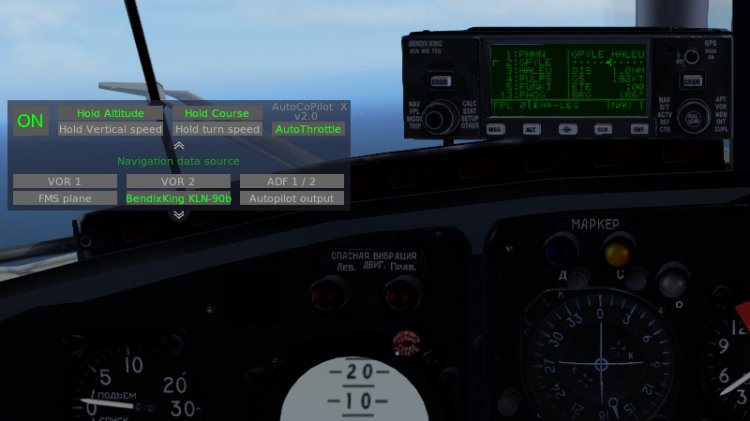
This plugin is simplified Autopilot emulator/Copilot analog. Plugin dont use the X-plane autopilot and himself manages flight controls.
Program modes: Hold mode a current Course/Constant rate turn. Hold mode a current Altitude/Vertical speed. Hold mode a current Air Speed.
Plugin is suitable for aircrafts not autopilot and GPS-navigation equipped or some situations when where you need quickly to transfer flight control to the co-pilot.
Also convenient to use only the hold air speed mode for everyone aircrafts not autothrottle equipped.
Since version 2.0, added navigation menu with the ability to fly along the route obtained from the GPS430/530, FMC, and also from the KLN-90b.
There is also a flight on VOR and ADF, and using autopilot Flight Directors.
Installation:
This plugin need FlyWithLua for working. Copy plugin file to [X-Plane folder]/Resources/plugins/FlyWithLua/Scripts.
After X-plane running you can assign a hot key to the plugin switch toggle. For this you need assign your key to "toggle" value in "autocopilot" category in "SETTINGS -> KEYBOARD". Here is the toggle interface switch.
Full Interface description and adjusting information in Readme.txt
If you have a problem in plugin or you have any suggestions, please contact me.
My theme on x-plane.org - https://forums.x-plane.org/index.php?/files/file/37735-autocopilot/ You can assistance me there. I'll be grateful!
Have a safe flight!
Program modes: Hold mode a current Course/Constant rate turn. Hold mode a current Altitude/Vertical speed. Hold mode a current Air Speed.
Plugin is suitable for aircrafts not autopilot and GPS-navigation equipped or some situations when where you need quickly to transfer flight control to the co-pilot.
Also convenient to use only the hold air speed mode for everyone aircrafts not autothrottle equipped.
Since version 2.0, added navigation menu with the ability to fly along the route obtained from the GPS430/530, FMC, and also from the KLN-90b.
There is also a flight on VOR and ADF, and using autopilot Flight Directors.
Installation:
This plugin need FlyWithLua for working. Copy plugin file to [X-Plane folder]/Resources/plugins/FlyWithLua/Scripts.
After X-plane running you can assign a hot key to the plugin switch toggle. For this you need assign your key to "toggle" value in "autocopilot" category in "SETTINGS -> KEYBOARD". Here is the toggle interface switch.
Full Interface description and adjusting information in Readme.txt
If you have a problem in plugin or you have any suggestions, please contact me.
My theme on x-plane.org - https://forums.x-plane.org/index.php?/files/file/37735-autocopilot/ You can assistance me there. I'll be grateful!
Have a safe flight!
→ Size:
13 KB
→ Date:
5 years ago (08.11.2020 17:20)
→ Author:
Ignatiy
→ Approved by moderator:
Lenya69
→ License:
Freeware - Free version, Unlimited Distribution
→ Downloaded:
674 time(s)