FS2004/FSX/Prepar3D Flight Analyzer/Logbook Utility V6.14 Просмотр ZIP-архива
readme.txt
Thank you for downloading FsQC.

see the website fsqc.eu/faq.php for changes in the versions
look at www.FsQC.eu for the manual and more information.

Automaticallly new versions are notifying to you when you start FsQC.

Unzip the file in any folder of your choise.(except windows folder)


**********************************************************************
**********************************************************************


When you first time start the program, a window will popup and asking for locating your FS files, this is very important!!
Without this the program can't work properly!!!!


**********************************************************************
**********************************************************************


MAKERUNWAYS,

you can download MakeRunways FREE from the internet on: www.schiratti.com/dowson.html.
After downloading extract the MakeRwys.zip file in the folder where fsx.exe or fs9.exe or P3D is present.
Run MakeRwys.exe, after that you will find there 2 files: 'runways.xml' and 'f4.csv' copy the files to your FsQC folder.
Without these two files the program can't work properly!!!!


**********************************************************************
**********************************************************************


Start the simulator load a flight, when flight is loaded start FsQC, that's all.


**********************************************************************
******                                                         *******
******  Sometimes it's necessary to start FsQC as admistrator. *******
******                                                         *******
**********************************************************************


****************************************
**                                    **
** Troubleshoot: www.fsqc.eu/faq.html **
**                                    **
****************************************


**********************************************************************
******                                                         *******
****** Thanks to Paul Henty for the FSUIPC Client DLL for .net.*******
******                                                         *******
**********************************************************************


Requirements:

Computer with windows 7 or higher and internet access.
Microsoft .net framework 4.6 or higher.(free dowload on microsft.com)
flightsimulator FSX (Steam) or 2004 or P3D installed.
FSUIPC installed, you can download FSUIPC free from the internet on:
http://wwww.schiratti.com/dowson.html ".
If you run FsQC on a network computer (not the computer where p3D/FSX/FS2004 is running) you need to register WideFs in FSUIPC.
For xp users look fsqc.eu/manual.php and look for: xp computer


What this program do:

- quickly change the settings of FSX/Fs2004/P3D, such as time, date, fuel, weight, traffic etc.
- start a failure sytem, such as gear, flaps, engine, etc.
- freeze the time, so you can fly in a for everlasting sunset.
- runway detecting system to see wich runways are in use.
- a flight analysis system, this is automaticly started when you start FsQC.
- When flight analysis is finished you can print a report, the report is automaticly saved as pdf File.
- flight analysis is finished when you parked your aicraft with the parking brakes set for more then 5 seconds.
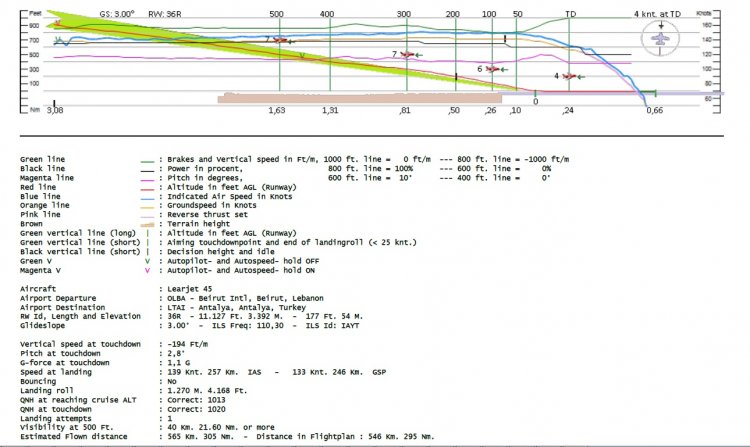
- graphical landingchart.
- load a existing flight or flightplan.
- quickly look to your CFG (settings) files (only FSX) and change them even before the flight simulator is running.
- After a flight is finished FsQC saves your flight automaticly as 'FsQC last Flight', so you can continue the next day or hour.
- for properly working, flight analysis require a fsx/fs2004 flightplan, or use the flight planner in FsQc.


Flight analysis:

Flight analysis start recording at the moment when you begin taxiing.
It gives you huge information such as:

- takeoff- and landing-weight
- takeoff roll in m. and ft.
- separate fuel consumption in taxi, climb, cruise and descent.
- maximum banking in flight
- which speed you using the flaps and gear
- when autopilot on or off
- vertical speed on touchdown
- reverser set after landing
- wich speed you cancel reverser
- bouncing at landing
- graphical landingchart.
- and lots of more
You can better look the example of the pdf document.


Airport information:

Fill in the ICAO and you have info such as:

- number of runways
- runway ID and heading
- runway length
- Ils ID and frq
- glideslope degrees
- surface runway
- radio freq, Tower, Ground, etc., etc.


Logbook:

- record all flights
- quickly see your flight report file
- quickly see touchdown wind info in a picture

it logs:
- fuel consumption
- payload
- distance
- number of different airports
- flight hours
- landings
- flaps
- and lots of more
- statistics: top 5 Countries, Cities and Airports

Click on the cells for more info


You can also transfer all your FSX flights to this logbook:

download this file: littlelogbook-1_5_0.zip  on flightsim.com,
run it and load the logbook.bin, you can find this file in your FSX flight folder,
after that sort the row 'Start Time' by clicking on it be sure that the oldest date be on top, then export as csv file,
you must give the file this name: logbookfsx.csv, save this file in your FSX flightfolder.
Open your logbook and click button Transfer FSX logbook.


Failures:

In the settings menu you can select the kind of failures you want to occur and when they must occur.
At this moment 10 failures are possible:
-altitude
-attitude
-heading
-airspeed
-vertical speed
-pitot
-fuelleak
-flaps
-engine
-gear


Flight Planner:

A very quickly flight planner, when you not use the FS flight planner you must use the small flight planner in FsQC.
Only fill in the departure and destination ICAO.
After that click the button calculate, it calculates the distance, course and cruise altitude.
This is very handy if you use other flight planners, plan you flight with your favorite planner and after that start the flight planner of FsQC.
The departure ICAO is automaticly filled in by FsQC. (the airport where your aircraft is parked)


Limited working:

FsQC is limited, you can only fly maximum 180 nm. from Greece Irakilon, LGIR, and maximum 180 Nm. from Greece Athene, LGAV.
When you are not in the limits, the program warns you with a messagebox and flight analyzer will s1top.
So you can test the program fully before activate.
After activate there are no limits.


Free activation:

When you register with only your email address in the activation menu you will get 15 free startups or 30 days without limitations.
So you can test the program fully before activation. After activation there are no limits.
See the activation menu.


Activated:

When activated, the program runs only on the computer where it was activated.
You can easily change this when you want it running on another computer.
You can change this for maximum 10 times.
So when you buy another computer there's no problem at all.
You can buy a license key at www.fsqc.eu


Reset activation:

When you run FsQC on another computer you get a message that it can only run on 1 computer, when that happens you must reset the activation, this is verry simple to do.
Go to the activate menu reset with your email and code, follow instructions given by the program, within 1 minut it's done.


Recommended:

For more easy use, run this program on a second monitor or much better on a second computer(laptop) where FSUIPC-client is running in the same network where p3D/FSX/FS2004 is running and FSUIPC WideFs is registered.


look at www.FsQC.eu for the manual and more information.
If you have a problem look first on www.fsqc.eu/faq.html
If you have questions please contact [email protected]
67022-fsqc614.zip
| Имя файла | Дата | Размер |
|---|---|---|
| landingchart.gif | 13.02.2018 23:20 | 16 KB |
| logbook.jpg | 02.03.2019 22:20 | 618 KB |
| main screen.jpg | 13.12.2018 17:57 | 225 KB |
| PdfSharp-WPF.dll | 24.11.2009 20:40 | 624 KB |
| pilotlogbook.db | 19.01.2020 20:33 | 12 KB |
| readme.txt | 19.01.2020 20:55 | 8 KB |
| RR.jpg | 11.04.2017 21:54 | 15 KB |
| settings.ini | 19.01.2020 20:27 | 129 B |
| System.Data.SQLite.dll | 02.03.2018 11:51 | 338 KB |
| Flight Reports/ | 19.01.2020 20:34 | |
| Flight Reports/Atc/ | 19.01.2020 20:34 | |
| Flight Reports/Pictures/ | 24.12.2018 20:00 | |
| temp/ | 19.01.2020 20:34 | |
| updates/ | 28.02.2019 17:21 | |
| x64/ | 24.12.2018 19:30 | |
| x64/SQLite.Interop.dll | 02.03.2018 11:51 | 1 MB |
| x86/ | 24.12.2018 19:30 | |
| x86/SQLite.Interop.dll | 02.03.2018 11:51 | 1 MB |
| airport info.jpg | 13.12.2018 01:31 | 75 KB |
| description.txt | 19.01.2020 21:05 | 2 KB |
| Example flight Report.pdf | 13.12.2018 17:23 | 77 KB |
| failuresettings.ini | 22.12.2018 00:30 | 156 B |
| flight analysis.jpg | 02.03.2019 22:18 | 318 KB |
| flightplanner.png | 29.04.2019 22:44 | 27 KB |
| FsQC.CFG | 22.12.2018 00:34 | 898 B |
| FsQC.gif | 14.02.2018 00:16 | 11 KB |
| FsQuickChange.exe | 19.01.2020 20:16 | 1 MB |
| FSUIPCClient.dll | 12.06.2013 04:13 | 64 KB |
| landing.jpg | 02.03.2019 22:13 | 252 KB |
| fsqc614.gif | 14.02.2018 00:16 | 11 KB |
| avsim_su.diz | 20.01.2020 22:57 | 310 B |
| Итого: | 6 MB | |
FS2004/FSX/Prepar3D Flight Analyzer/Logbook Utility V5.10 - limited demo. Flight Data Recorder - Logbook. Now a few bugs are fixed. Very easy to use, just make a flight plan in the simulator or in this utility. What this program does: quickly change the settings of P3D/FSX/Fs2004, such as time, date, fuel, weight, traffic etc.; start a failure sytem, such as gear, flaps, engine, etc.; freeze the time, so you can fly in a for everlasting sunset; runway detecting system to see wich runways are in use; flight analyzing/data recording from departure to parking at the gate; When flight analysis is finished you can print a report, the report is automaticly saved as pdf File. By Evander Tholen.
→ Size:
3 MB
→ Date:
6 years ago (22.01.2020 22:40)
→ Author:
Evander Tholen
→ Approved by moderator:
seric76
→ License:
License file included in archive
→ Downloaded:
92 time(s)