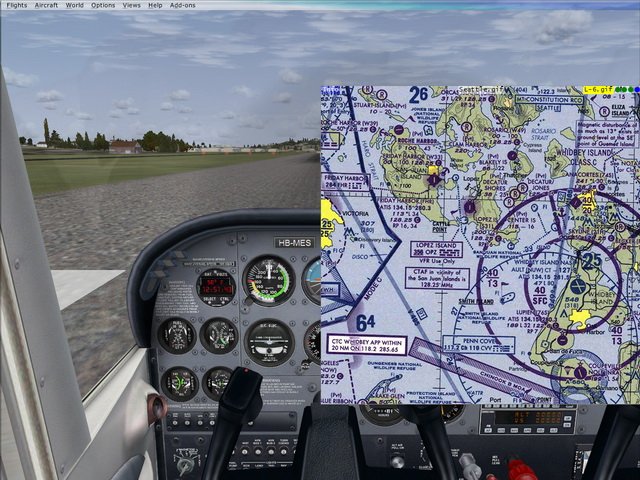
FSXControls is a set of programs for FSX.
(1) GUI multifunction application for:
* set up button & keyboard FSX controls;
* set up an unique GhostMouse technology;
* set some parameters of FSX cameras system.
(2) Chart viewer gauge with nearest airport
info (ILS & weather station).
(3) GhostMouse driver module for FSX.
See file "What's new.htm" for version 1.1 changes.
(1) GUI multifunction application for:
* set up button & keyboard FSX controls;
* set up an unique GhostMouse technology;
* set some parameters of FSX cameras system.
(2) Chart viewer gauge with nearest airport
info (ILS & weather station).
(3) GhostMouse driver module for FSX.
See file "What's new.htm" for version 1.1 changes.
→ Size:
770 KB
→ Date:
17 years ago (19.09.2008 15:35)
→ Author:
Eugene Motorny
→ Approved by moderator:
ReDut
→ License:
Freeware - Free version, Do Not Redistribute
→ Downloaded:
5103 time(s)
5
Что сказать? Круто. Освоить и можно летать)
− All_HafRA,
8 years ago,
#
5
Colleagues, this is the only prog, lets you view maps in the format jpg bmp from the comfort of a Sim in the form of a tablet and the tablet display to hang on any key. Works instantly. From buns - displays a list of the nearest port with the frequencies of both radio and ILS WOR When thinking through flight Jeppview open the desired map SID STAR PVP, I press ALT + Print Scrn and paste into Notepad, save it. In the end, getting the necessary maps for the entire flight. In the prog one click to zoom, flip image. Must Have!!. On the installation - in PM. Tested on win7-32 and XP.
− LDemon,
15 years ago,
#
Excuse me - do not pad and Paint. SID-STAR-card ETA - here does not reflect the slash
− LDemon,
15 years ago,
#
Thr is not working.
− Voron777,
17 years ago,
#
Well, someone prevedite to russuky! What the crap is this? How to use it?
− PilotBoy,
17 years ago,
#
Do not start me FSXControls.exe (
− Artoor,
17 years ago,
#
I never realized that it was ... Not enough knowledge of English ... As the author wished to ridmi, WMS who will transfer?
− Махони,
17 years ago,
#
+2
Installation Requirements * Windows XP SP2 or SP3. (Should work on Vista, but it tolerate hate and not even try). * Properly installed MS FSX SP2 with SimConnect. (FSX SP1 is supported as well, but need a different module EQmodule.dll see below). I do not have FSX Acceleration Pack - can not say anything, but in theory it should work. "Properly installed" means the installation of an honest native installers. The program did not check on piracy, but enjoys registry and SimConnect (FSX SDK is not required). For all installations of the Left - this is your problem to get everything to work. *. NET 2.0 with the latest service pack. Ask at Microsoft.com. * The latest version of DirectX 9c. (DirectX 10 for Vista). Program managed libraries need DirectX. The theory is that they go on distributions DirecX. As in life - just do not know, but no problems were observed. * Full access (read, write, create) a directory and all subdirectories, where installed FSX. Particularly significant for paranoid Vista. Actually installation FSXControls.exe * We place much like it. I lay right on the desktop. * EQgauges.dll is in the directory Gauges folder where installed FSX. * EQmodule.dll is in the directory Modules folder where installed FSX. Important: EQmodule.dll of root distribution - only for FSX SP2! If you have FSX SP1 take EQmodule.dll from Daddy SP1. * Run FSXControls.exe and click the mouse buttons. * In the menu Tools-> Setup runtime modules. * Install EQmodule. * Install ChartViewer (a synonym for life EQgauges.dll) . Choose any value "Panel ID" but remember it for a couple of minutes or record. Oh please! * To create a database navigation kopochku click Scan now!!!. * Close the dialog. * Assign keys or buttons for the team PANEL_ID_TOGGLE (or similar). Value "Panel ID" for EQgauges must be entered in the field of Command Parameter command. You have not forgotten? Lost --
− mike334nn,
16 years ago,
#