Project LKPR X Просмотр ZIP-архива
readme.txt
Project LKPR X - ver 080605
Scenery of Praha Ruzyne Airport for FS2004/FSX
----------------------------------------------

Content:

1 Project
 1.1 Version
2 Instalation
 2.1 Base
 2.2 Extensions
  2.2.1 Update of navigation data in LKAA FIR
  2.2.2 Aerial photos
   2.2.2.1 Detail ortophoto 1m/pix + autogen (FSX only)
   2.2.2.2 Correction of Prague ortophoto by Petr Bednar
  2.2.3 DC3 in CSA livrey in front of the APC building
  2.2.4 Bridge over the highway in front of the treshold of runway 24
  2.2.5 Docking system (experimental version)
  2.2.6 3D apron lights (FSX only)
3 Usage
 3.1 Stands
 3.2 Runway lights
 3.3 Docking system
 3.4 Optimalization
4 Future developement
 4.1 Changelog
 4.2 All 3Ds are done, what next?
5 Authors, copyrights, thanks

1 Project

The Project LKPR includes a model of Praha Ruzyne airport, its infrastructure, buildings and navaids closely related, simmilar to its real state at November the 1st 2008. The whole scenery is made  using BGLC code only, first presented in FS2002 and further developed in FS2004 and FSX. All 3D models are created and animated using Gmax program or made by direct editing of BGLC code. This version of the scenery is made primary for FSX, it can be used with both in FS2004 and FSX, but in FS2004 you will miss some features.

 1.1 Version
This version (080605) is Release Candidate 2 version for LKPR X.

2 Instalation
 2.1 Base

Description:
Base instalation contains taxiway system, navaids, all 3D models of buildings on airfield and all neccesary textures. This step is the only necessary part of the instalation, all others are optional, according to user preferences. If you dont like difficult instalations and you dont want to bother yourself with nonstandard instalation steps or to help with development of experimental parts of LKPR, jump after the instalation directly to paragraph 3, you will stil have full graphics of a scenery LKPR an you will miss just a few very special features.


Instalation:
Copy the content of BASE directory, where you place your sceneries (fe.: "Flight Simulator 9\Addon Scenery\LKPR2004"). Pick directory including AFD data according to your FS version (if you have FSX, use AFD_TSX, if you have FS2004, use AFD_FS2004) and copy included data into your LKPR X instalation directory. ATTANTION! Always use only one version of this file, suitable for your FS version. Run FS, choose Settings, Scenery Library, Add, and choose directory, you placed your BASE directory in.

 2.2 Extensions
  2.2.1 Navigation data update in LKAA FIR

Description:
Update of navigation data in LKAA FIR (fixes, their position, navaids) valid at 1.1.2008

Instalation:
Copy content of following directory to your LKPR X instalation directory. If you have FSX, use LKAANAV_FSX, if you have FS2004, use LKAANAV_FS2004).
Uninstalation:
Remove file stated above from directory SCENERY directory of your LKPR X instalation.

  2.2.2 Aerial photos
Description:
Scenery contains two versions of aerial photos. If you have FSX, it is recomended to use detail ortophoto with 1m/pixel resolution. If you own FS2004 oryou dont want to use detail ortophoto, and you do use Peter Bednar's ortophoto of Prague, fix for this scenery is included. ATTENTION! Only one of mentioned upgrades is neccesary, as they are overlaping.
  2.2.2.1 Detail ortophoto in 1m/pixel resolution (FSX only)
Description: Detail ortophoto of area surrounding the aerodrom, including FSX autogen, at high resolution 1m/pix supported by FSX.

Instalation:
Copy content of ORTO_FSX directory into your LKPR X instalation.
Uninstalaton:
Remove file lkpr_orto.bgl from SCENERY directory and *.ang files from TEXTURE directory of your LKPR X instalation.

  2.2.2.2 Corection of ortophoto of Prague by Peter Bednar

Description:
If you use ortophoto of Prague by Peter Bednar and you can't or don't want to use detail ortophoto, you have probably noticed, that it does not fit precisely. Because LKPR X scenery contains a huge amount of details, that copy their real life positions and they slightly differs from the nowadays Prague ortophoto, it is recomended to either (if you have FSX) use detailed ortophoto or to update ortophoto using textures attached, that fit exactly according to their real positions.

Instalation:
Copy the content of directory ORTO_VFRPraha_FIX\TEXTURE to a directory where your ortophoto by Peter Bednar is placed, and overwrite all existing files.
Uninstalation:
Overwrite textures in your scenery again with originals.

  2.2.3 DC3 in CSA livrey in fornt of the APC building

Description:
There is a DC3 in historical CSA livrey in front of APC building. If you want to see it on the same place during your offline flights, use this extensions.The aircraft is placed as an AI flight, which can be never executed, so that DC3 will be always standing there.

Instalation:
Install a repaint of default DC3 - Czech airlines. (it can be downloaded fe.: http://flightsim.periskop.cz). Copy the file Traffic_DC3_LKPR.bgl from directory DC3\SCENERY to SCENERY directory of your scenery.
Uninstalation:
Delete file Traffic_DC3_LKPR.bgl from SCENERY directory of your scenery.

  2.2.4 Bridge over the highway in front of treshold runway 24

Description:
The highway to Slany is below the level of the surrounding fields and lights for runway 24 are built on the bridge over the highway. Without this extension, the landscape is going to be flat and the rail will be the only thing visible, the contruction of the bridge will remain hidden. For correct display, it is necessary to make following steps:
Instalation:
Copy the file flatten_dalnice.bgl form HIGHWAY/SCENERY directory to SCENERY directory of your scenery. Open the file FS9.CFG (stored in directory "C:\Documents and Settings\Your username\Aplication Data\Microsoft\FS9") and change the line TERRAIN_MAX_VERTEX_LEVEL to a value at least 19.
Uninstalation:
Record TERRAIN_MAX_VERTEX_LEVEL change back to its previous value. Delete file flatten_dalnice.bgl from SCENERY directory of your scenery.

WARNING! The bigger number you set, the more exact will be the profile of the highway. But it will also lower a range, your FS will see a detail landscape. Because optimal settings of  these values differs from computer to computer, it is necessary to tweak this value a bit to achieve an optimal result.

  2.2.5 Docking system
Description:
Experimental version of docking system, used on real LKPR. If you want to be guided to stands 1-23 by the same docking system as on real LKPR, install this extension. Docking system is now universal for most of the stands, so it can happen that even thought your aircraft is placed correctly according to docking, the position is a bit aside. Updating to more precise version will be included to future versions.
Instalation:
Copy content of DOCKING directory to your scenery directory.
Uninstalation:
Erase file lkpr_docking.bgl from SCENERY directory of your scenery and also files dock-body.bmp, dock-napis.bmp, dock-pruh.bmp and dock-side.bmp from TEXTURE directory of your scenery.

WARNING: This version of docking system is made by a completely new method of editing of the BGLC code inside the library object. It contains a bug causing spawning invisible crash boxes all around apron North. In case of problems, remove this extension first.

  2.2.6 3D apron lightning (FSX only)
Description:
Experimental version of apron lightening. If you want to try a working lights, that throw light not only on the ground, but even on aircrafts taxiing/standing below it, use this extension.

Instalation:
Copy content of LIGHTS_FSX directory into your LKPR X instalation directory.
Unsinstalation:
Remove file lights.bgl from your SCENERY directory of your LKPR X.
WARNING: Do not try to use this file in FS2004. It is causing crash to desktop when flying inbound Praha.


3 Usage
 3.1 Stands

Stands are divided by their placement. Their sizes and types are set, to accept the same size of aircraft as they do in reality. ProjectAI/UltimateTraffic standards are used. Stands are divided into following groups:

Real stands                                            / Stands in FS

Apron North 1-23, nose-in stand by the piers           / GATE 1-23
Apron North 30-38, stands on the apron                 / GATE 30-38
Apron North 40-47, nose-in stand on the apron          / GATE 40-47
Apron North 50-57, nose-in stand on the apron          / GATE 50-57
Apron East E1-E7                                       / Parking - Ramp Cargo 1-7
Apron South B1-B14                                     / South Parking 1-14
Apron South B20                                        / South Parking 20
Apron in front of hangar C B51-56                      / South Parking 51-56
Runway 04/22 stands V1-V19                             / East Parking 1-19
Apron Aviation Service 1-3                             / SouthEast Parking 1-3
other, not marked stands in airport space              / Parkings with numbers greater than 100

The airport also contains few stands with specific usage, not for normal traffic.

Position for IVAI Tower for IVAO network               / Parking 255
Position for DC3 CSA in front of the APC building     / Parking 199

 3.2 Runway lights

Runway lights are working while the following criteria are filled:

From dusk to dawn, the base lights are always on from the direction the pilot approaches.
During low visibility, all lights, including strobes, are on, regardless the daytime.

 3.3 Docking system

Docking system is a copy of some functions, that are provided by the real docking system on Ruzyne airport. Two features are simulated - side diversion and distance. Docking system is turning on automatically by entering its vicinity. Its power on is signalized by lightening up a green strip on the left side. The distance is indicated by length of this strip. At the moment the aircraft reaches its position, the strip is the shortest and an the sign STOP/OK appears on the top display. If the aircraft overtakes the position, the strip disappears at all, and the sign TOO/FAR starts to blink. Side diversion is indicated by a yellow mark, showing >> or << if the aircraft is to much left or right, or showing || if the aircraft is correctly.

 3.4 Optimalisation

In a case, that you have a framerate problems, you can make the scenery "lighter" by deleting some of the BGL files, that contains just the "eyecandy". It means objects, that are present on the airfield, but they are not neccesary to be present for flying. A list of BGL files follows, including hteir content. BGLs marked with * are not neccesary and can be erased. We are talking about Base install BGLS.

lkpr_afd/lkpr_afdx    - Taxiways, stands, navaids, taxiway markings
lkpr_abc             *- Airport Busines Center
lkpr_apron_lines      - Markings on Apron North
lkpr_benzina         *- Gas station on airport entryway
lkpr_budky           *- 3D models of navaids
lkpr_cargo            - Cargo terminal
lkpr_catering        *- building of CSA catering
lkpr_csa             *- building of CSA APC
lkpr_deice           *- deice near taxiway AA
lkpr_flatten          - surface modification around LKPR
lkpr_hangarF          - hangar F
lkpr_hangary          - hangars A, B, C on apron south
lkpr_jih_rlp         *- buildings of ANS nearby terminal South
lkpr_jih1             - part of terminбl South
lkpr_jih2             - hangars and building of terminal South
lkpr_jih2_lampy      *- lamps around hangars around terminal South
lkpr_jih3             - hangars and building of terminal South
lkpr_light_north     *- light polec on apron north
lkpr_logistic        *- logistic building
lkpr_marriot          - Marriot hotel
lkpr_most24          *- bridge near treshold of runway 24
lkpr_parkingA        *- parking A
lkpr_parkingC        *- parking C
lkpr_parkingD        *- parking D
lkpr_policie         *- building of police
lkpr_vytopna         *- heating plant
lkpr_prstA            - pier A terminбl North
lkpr_prstB            - pier B terminбl North
lkpr_prstC            - pier C terminбl North
lkpr_radar           *- objects of radar
lkpr_radnav          *- 3D models of navaids
lkpr_rentacar        *- rent a car building
lkpr_silnice         *- elevated way to new terminal Sever2
lkpr_smoke           *- smoke from heating plant
lkpr_terminal_north   - terminal North
lkpr_terminal_south   - terminal South


4 Future development

Scenery at its curent state is not a terminated project, we expect further evolution according to the development of the real Ruzyne ariport (new buildings in Cargo space,planed buildup of the runway 06R/24L) and also depending on how the knowledge and possibilities of FS internals will develop (tuning up lights and docking from experimental to fully working version). The further developement also depends on you, users, on your reactions and help in case of problems. But at the same time, authors like to state, that even thought this development is expected, they are not promising it, because not only their will but more elements are involved too.

 4.1 Changelog

Changes and solved bugs:
ver 080605
lkpr_afx,lkpr_afd     - corrected taxiway signs
		      - corrected incorect position of blue apron lights
                      - consturction site of longer taxiway delta
                      - added/changed some roads to be used by FSX aerodrome cars
lkpr_nav	      - opravena chyba ve frekvenci a oznaиenн VOR OKL
	              - navigaиnн data aktualizovбna aby odpovнdala AIRAC 0805


ver 071224
lkpr_afd	      - added/corrected taxiways reflecting the situation 1.1.2008, navigation database update separated, temporarily suspended multirunway due stability problems
lkpr_afdx             - new AFD version fro FSX, added/corrected taxiways reflection the situtation 1.1.2008, stands are corrected to allow FSX airport traffic to be used
lkpr_rlp              - combined with terminal North during optimalisation
lkpr_terminal_north   - combined with tower during optimalisation
lkaa_nav              - separated update of navigation data
lkpr_marriot          - new building
lkpr_parkingD         - new building
lkpr_apron_lines      - corrected to reflect changes of taxiways
lkpr_orto             - new aerial photo

ver 071224

ver 070123
lkpr_terminal_north   - crashboxes removed
lkpr_rlp              - crashboxes removed
lkpr_policie          - crashboxes removed, optimalisation and LODs added
lkpr_vytopna          - crashboxes removed
lkpr_catering         - crashboxes removed, texture updates
AF2_LKPR              - updated positions of route intersections in  LKAA FIR (AIRAC 0623)


ver 060613
lkpr_prstA,prstB,prstC- crashboxes removed
lkpr_cargo            - crashboxes removed
lkpr_jih1,jih2,jih3   - crashboxes removed
AF2_LKPR              - change of taxiway H1, new stands 50-57
                      - new stands on apron cargo (east)
                      - corrected runway lightning
                      - corrected taxiway markings
                      - corrected/added positions of route intersections in LKAA FIR ( AIRAC 0603 )
                      - corrected/added positions of RNAV points in TMA Praha ( AIRAC 0603 )
                      - corrected range for DME PSK and VOR/DME NER
                      - corrected position of helipads
                      - added new service roads
lkpr_radnav           - added 3D models of ILS equipment
lkpr_cargo,jih2,jih3  - optimalized and added LODs


ver 050930
lkpr_apron_lines      - crashboxes removed ( there are still some on the apron )
AF2_LKPR              - corrected position of helipads
                      - corrected/added missing frequencies (DELIVERY/DEPARTURE/APPROACH)
                      - corrected/added new approaches
                      - corrected/added positions of route intersections in LKAA FIR
                      - corrected/added positions of RNAV points in TMA Praha
                      - added exit/entry points to CTR Ruzyne for VFR
                      - added DME PSK (Pisek)
                      - corrected position of VOR/DME NER (Neratovice)


 4.2 All 3Ds are done, what next?

Beside the fact, that there is always something beeing build on LKPR airpot, we are planning few "candies", that will be aviable in the future. We will not introduce them all, but there are foew examples:
 - finishing the docking system and its placing on exact stands with exacts sizes and types of aircrafts
 - marshals where no docking is aviable
 - tweaking of the light system, and later light up whole airfiled, not just the aprons
 - 3D approach lights, fully controled from the cocpit.
 - "live" enviroment on the airfiled, including changing parking places, moving busses and more small tweaks
Unfortunately a lot of those functions are close connected with FS internals, and because FSX is offering native support of these features, they will be made for FSX version only.


5 Authors, copytright, thanks.

Authors
Pavel Benes, Filip Dvorak, Karel Kriz

Copyrights:
This scenery can be used and distributed for free, as following criteria will remain met:
a) It will be done without any profit
b) The scenery will be distributed as is, without changes of the package, including documentation attached
It is neccesary to have a written premission of the authors for any other usage (like commercial presentation, distribution for sale, etc... )

Thanks:
We would like to thak to all peaople, that participated in the development of LKPR2004 project by their support, materials, knowledge. Without their help, there will be no scenery at all.

Vladimнr Synek - for knowledge, consultation about FS internals, materials about buildings
Tomбљ Lainka - for fotodocumentation
David Dosoudil - for materials about exact geographical positions, consultations about K-JSTK transformations ;)
Michal Krechowski - for knowledge, consultations, intensive betatesting and correction of numerous errors, especially in facts
Roman Kolbбbek - for consultations about lights
Lukбљ Svatoт - for betatesting and correction of errors
Libor Urbбnek - for betatesting
Libor Kurzwail - for consultations regarding airfield procedures
Lee Swordy - for AFCAD
Arno Gerretsen - for consultations about direct editing of BGLC code
Rhumbaflappy - for consultations about BGLC 3D lights
33446-LKPR-X-RC2.zip
| Имя файла | Дата | Размер |
|---|---|---|
| AFD_FS2004/ | 24.12.2007 18:12 | |
| AFD_FS2004/Scenery/ | 24.12.2007 18:12 | |
| AFD_FS2004/Scenery/lkpr_afd.bgl | 06.06.2008 02:31 | 86 KB |
| AFD_FSX/ | 24.12.2007 18:12 | |
| AFD_FSX/Scenery/ | 24.12.2007 18:12 | |
| AFD_FSX/Scenery/lkpr_afdx.bgl | 06.06.2008 01:54 | 77 KB |
| BASE/ | 24.12.2007 18:11 | |
| BASE/Scenery/ | 24.12.2007 18:11 | |
| BASE/Scenery/lkpr_abc.bgl | 25.02.2005 09:43 | 71 KB |
| BASE/Scenery/lkpr_Apron_Lines.bgl | 23.11.2007 02:44 | 284 KB |
| BASE/Scenery/lkpr_Benzina.bgl | 25.02.2005 09:42 | 22 KB |
| BASE/Scenery/lkpr_budky.bgl | 19.02.2006 22:13 | 53 KB |
| BASE/Scenery/lkpr_cargo.bgl | 13.04.2006 00:55 | 213 KB |
| BASE/Scenery/lkpr_catering.bgl | 24.12.2006 03:05 | 22 KB |
| BASE/Scenery/lkpr_csa.bgl | 25.02.2005 09:43 | 24 KB |
| BASE/Scenery/lkpr_DeIce.bgl | 25.02.2005 09:43 | 22 KB |
| BASE/Scenery/lkpr_docking.bgl | 02.08.2005 02:40 | 11 KB |
| BASE/Scenery/lkpr_flatten.bgl | 02.08.2005 01:55 | 3 KB |
| BASE/Scenery/lkpr_hangarF.bgl | 25.02.2005 09:43 | 193 KB |
| BASE/Scenery/lkpr_hangary.bgl | 03.07.2005 23:17 | 552 KB |
| BASE/Scenery/lkpr_jih1.bgl | 03.07.2005 23:18 | 59 KB |
| BASE/Scenery/lkpr_jih2.bgl | 13.04.2006 01:19 | 54 KB |
| BASE/Scenery/lkpr_jih2_lampy.bgl | 13.04.2006 01:43 | 19 KB |
| BASE/Scenery/lkpr_jih3.bgl | 13.04.2006 01:41 | 26 KB |
| BASE/Scenery/lkpr_jih_rlp.bgl | 03.07.2005 23:17 | 43 KB |
| BASE/Scenery/lkpr_light_north.bgl | 24.12.2005 21:28 | 146 KB |
| BASE/Scenery/lkpr_logistic.bgl | 25.02.2005 09:43 | 21 KB |
| BASE/Scenery/lkpr_marriot.bgl | 28.03.2007 21:30 | 1 KB |
| BASE/Scenery/lkpr_most24.bgl | 01.08.2005 22:53 | 28 KB |
| BASE/Scenery/lkpr_parkingA.bgl | 25.02.2005 09:43 | 48 KB |
| BASE/Scenery/lkpr_parkingC.bgl | 25.02.2005 09:43 | 96 KB |
| BASE/Scenery/lkpr_parkingD.bgl | 28.03.2007 20:47 | 5 KB |
| BASE/Scenery/lkpr_policie.bgl | 24.12.2006 02:43 | 161 KB |
| BASE/Scenery/lkpr_prstA.bgl | 24.12.2005 21:28 | 1 MB |
| BASE/Scenery/lkpr_prstB.bgl | 24.12.2005 21:28 | 1 MB |
| BASE/Scenery/lkpr_prstC.bgl | 24.12.2005 21:28 | 1 MB |
| BASE/Scenery/lkpr_radar.bgl | 03.07.2005 23:02 | 159 KB |
| BASE/Scenery/lkpr_radnav.bgl | 21.03.2006 01:36 | 26 KB |
| BASE/Scenery/lkpr_RentACar.bgl | 25.02.2005 09:43 | 5 KB |
| BASE/Scenery/lkpr_silnice.bgl | 25.02.2005 09:43 | 27 KB |
| BASE/Scenery/lkpr_smoke.bgl | 25.02.2005 09:43 | 201 B |
| BASE/Scenery/lkpr_terminal_north.bgl | 25.02.2005 09:43 | 713 KB |
| BASE/Scenery/lkpr_terminal_south.bgl | 25.02.2005 09:43 | 679 KB |
| BASE/Scenery/lkpr_tranzit.bgl | 25.02.2005 09:43 | 33 KB |
| BASE/Scenery/lkpr_vytopna.bgl | 24.12.2006 02:33 | 245 KB |
| BASE/Texture/ | 24.12.2007 17:36 | |
| BASE/Texture/$Asphalt.r8 | 19.12.2004 21:24 | 64 KB |
| BASE/Texture/ABC.bmp | 03.04.2005 17:29 | 171 KB |
| BASE/Texture/ABC1.BMP | 03.04.2005 17:29 | 171 KB |
| BASE/Texture/ABC1_lm.bmp | 03.04.2005 17:29 | 171 KB |
| BASE/Texture/ABC_lm.bmp | 03.04.2005 17:29 | 171 KB |
| BASE/Texture/Antena.bmp | 30.07.2005 11:58 | 3 KB |
| BASE/Texture/asfalt.bmp | 25.02.2005 09:43 | 8 KB |
| BASE/Texture/autobus.bmp | 19.12.2004 21:24 | 171 KB |
| BASE/Texture/autobus_lm.BMP | 19.12.2004 21:24 | 171 KB |
| BASE/Texture/balon.bmp | 19.12.2004 21:24 | 171 KB |
| BASE/Texture/balon_lm.bmp | 19.12.2004 21:24 | 171 KB |
| BASE/Texture/BlueDesignators.bmp | 28.06.2005 03:43 | 43 KB |
| BASE/Texture/Budky.bmp | 30.07.2005 23:33 | 43 KB |
| BASE/Texture/cargo.bmp | 19.12.2004 21:24 | 171 KB |
| BASE/Texture/cargo1.bmp | 19.12.2004 21:24 | 171 KB |
| BASE/Texture/cargo1_lm.bmp | 19.12.2004 21:24 | 171 KB |
| BASE/Texture/cargo_lm.bmp | 19.12.2004 21:24 | 171 KB |
| BASE/Texture/catering.bmp | 19.12.2004 21:24 | 171 KB |
| BASE/Texture/catering_lm.bmp | 19.12.2004 21:24 | 171 KB |
| BASE/Texture/csa.bmp | 03.04.2005 17:29 | 171 KB |
| BASE/Texture/csa_lm.bmp | 03.04.2005 17:29 | 171 KB |
| BASE/Texture/csl.bmp | 31.07.2005 19:53 | 171 KB |
| BASE/Texture/csl_lm.bmp | 31.07.2005 19:53 | 171 KB |
| BASE/Texture/dock-body.bmp | 11.01.2005 01:21 | 43 KB |
| BASE/Texture/dock-napis.bmp | 11.01.2005 01:20 | 43 KB |
| BASE/Texture/dock-pruh.bmp | 07.01.2005 12:36 | 43 KB |
| BASE/Texture/dock-side.bmp | 11.01.2005 01:20 | 11 KB |
| BASE/Texture/halaA.bmp | 03.04.2005 17:29 | 43 KB |
| BASE/Texture/halaA_lm.bmp | 03.04.2005 17:29 | 43 KB |
| BASE/Texture/halaB.bmp | 03.04.2005 17:29 | 43 KB |
| BASE/Texture/halaB_lm.bmp | 03.04.2005 17:29 | 43 KB |
| BASE/Texture/hangar_atr.bmp | 01.08.2005 02:34 | 171 KB |
| BASE/Texture/Hangar_F.bmp | 03.04.2005 17:29 | 171 KB |
| BASE/Texture/Hangar_F_lm.bmp | 03.04.2005 17:29 | 171 KB |
| BASE/Texture/hangar_heli.bmp | 01.08.2005 02:09 | 171 KB |
| BASE/Texture/hotel_tranzit.bmp | 19.12.2004 21:24 | 171 KB |
| BASE/Texture/hotel_tranzit_lm.bmp | 19.12.2004 21:24 | 171 KB |
| BASE/Texture/jih10.bmp | 06.04.2005 15:42 | 171 KB |
| BASE/Texture/jih10_lm.bmp | 06.04.2005 15:42 | 171 KB |
| BASE/Texture/jih11.bmp | 06.04.2005 15:42 | 171 KB |
| BASE/Texture/jih12.bmp | 06.04.2005 15:42 | 171 KB |
| BASE/Texture/jih13.bmp | 03.07.2005 23:20 | 171 KB |
| BASE/Texture/jih13_lm.bmp | 03.07.2005 23:20 | 171 KB |
| BASE/Texture/jih14.bmp | 19.02.2006 22:13 | 171 KB |
| BASE/Texture/jih14_lm.bmp | 19.02.2006 22:13 | 171 KB |
| BASE/Texture/jih16.bmp | 19.02.2006 22:13 | 171 KB |
| BASE/Texture/jih16_lm.bmp | 19.02.2006 22:13 | 171 KB |
| BASE/Texture/jih17.bmp | 19.02.2006 22:13 | 171 KB |
| BASE/Texture/jih17_lm.bmp | 19.02.2006 22:13 | 171 KB |
| BASE/Texture/jih2.bmp | 25.02.2005 09:43 | 171 KB |
| BASE/Texture/jih2_1.bmp | 31.07.2005 19:53 | 171 KB |
| BASE/Texture/jih2_lm.bmp | 25.02.2005 09:43 | 171 KB |
| BASE/Texture/jih3.bmp | 25.02.2005 09:43 | 171 KB |
| BASE/Texture/jih3_lm.bmp | 25.02.2005 09:43 | 171 KB |
| BASE/Texture/jih4.bmp | 25.02.2005 09:43 | 171 KB |
| BASE/Texture/jih4_lm.bmp | 25.02.2005 09:43 | 171 KB |
| BASE/Texture/jih5.bmp | 25.02.2005 09:43 | 171 KB |
| BASE/Texture/jih5_lm.bmp | 25.02.2005 09:43 | 171 KB |
| BASE/Texture/jih6.bmp | 25.02.2005 09:43 | 171 KB |
| BASE/Texture/jih6_lm.bmp | 25.02.2005 09:43 | 171 KB |
| BASE/Texture/jih7.bmp | 25.02.2005 09:43 | 171 KB |
| BASE/Texture/jih7_lm.bmp | 25.02.2005 09:43 | 171 KB |
| BASE/Texture/jih8.bmp | 25.02.2005 09:43 | 171 KB |
| BASE/Texture/jih8_lm.bmp | 25.02.2005 09:43 | 171 KB |
| BASE/Texture/jih9.bmp | 06.04.2005 15:42 | 171 KB |
| BASE/Texture/jih_1.bmp | 25.02.2005 09:43 | 171 KB |
| BASE/Texture/jih_1_lm.bmp | 25.02.2005 09:43 | 171 KB |
| BASE/Texture/lkpr1.bmp | 03.04.2005 17:29 | 171 KB |
| BASE/Texture/lkpr1_lm.bmp | 03.04.2005 17:29 | 171 KB |
| BASE/Texture/lkpr2.bmp | 03.04.2005 17:29 | 171 KB |
| BASE/Texture/lkpr2_lm.bmp | 03.04.2005 17:29 | 171 KB |
| BASE/Texture/lkpr3.bmp | 03.04.2005 17:29 | 171 KB |
| BASE/Texture/lkpr3_lm.bmp | 03.04.2005 17:29 | 171 KB |
| BASE/Texture/lkpr_bok.bmp | 28.06.2005 18:29 | 171 KB |
| BASE/Texture/lkpr_bok_lm.BMP | 28.06.2005 18:29 | 171 KB |
| BASE/Texture/lkpr_hala1.bmp | 03.04.2005 17:29 | 171 KB |
| BASE/Texture/lkpr_hala1_lm.bmp | 03.04.2005 17:29 | 171 KB |
| BASE/Texture/logistic1.bmp | 19.12.2004 21:24 | 171 KB |
| BASE/Texture/logistic1_lm.bmp | 19.12.2004 21:24 | 171 KB |
| BASE/Texture/logistic2.bmp | 19.12.2004 21:24 | 171 KB |
| BASE/Texture/logistic2_lm.bmp | 19.12.2004 21:24 | 171 KB |
| BASE/Texture/mapka.bmp | 03.04.2005 17:29 | 171 KB |
| BASE/Texture/mapka_lm.BMP | 03.04.2005 17:29 | 171 KB |
| BASE/Texture/marriott.bmp | 28.03.2007 20:36 | 171 KB |
| BASE/Texture/menzies.bmp | 19.12.2004 21:24 | 171 KB |
| BASE/Texture/menzies_lm.bmp | 19.12.2004 21:24 | 171 KB |
| BASE/Texture/most24.bmp | 23.01.2005 18:19 | 85 KB |
| BASE/Texture/NDB1.bmp | 03.04.2005 17:29 | 341 KB |
| BASE/Texture/parking.bmp | 03.04.2005 17:29 | 171 KB |
| BASE/Texture/parkingA.bmp | 03.04.2005 17:29 | 171 KB |
| BASE/Texture/parkingA_lm.bmp | 03.04.2005 17:29 | 171 KB |
| BASE/Texture/parkingD.BMP | 28.03.2007 20:35 | 171 KB |
| BASE/Texture/parking_lm.bmp | 03.04.2005 17:29 | 171 KB |
| BASE/Texture/plot.bmp | 19.12.2004 21:24 | 171 KB |
| BASE/Texture/plot_lm.bmp | 19.12.2004 21:24 | 171 KB |
| BASE/Texture/policie.bmp | 03.04.2005 17:29 | 171 KB |
| BASE/Texture/policie_lm.bmp | 03.04.2005 17:29 | 171 KB |
| BASE/Texture/prst2.bmp | 30.07.2005 11:59 | 171 KB |
| BASE/Texture/prst2_lm.bmp | 30.07.2005 11:59 | 171 KB |
| BASE/Texture/pst1.bmp | 03.04.2005 17:29 | 171 KB |
| BASE/Texture/pst1_lm.bmp | 03.04.2005 17:29 | 171 KB |
| BASE/Texture/RentACar.bmp | 03.04.2005 17:29 | 171 KB |
| BASE/Texture/rukav2.bmp | 03.04.2005 17:29 | 43 KB |
| BASE/Texture/rukav2_lm.bmp | 03.04.2005 17:29 | 43 KB |
| BASE/Texture/rukav3.bmp | 03.04.2005 17:29 | 171 KB |
| BASE/Texture/rukav5.bmp | 03.04.2005 17:29 | 43 KB |
| BASE/Texture/rukav5_lm.bmp | 03.04.2005 17:29 | 43 KB |
| BASE/Texture/rukav6.bmp | 03.04.2005 17:29 | 43 KB |
| BASE/Texture/rukav6_lm.bmp | 03.04.2005 17:29 | 43 KB |
| BASE/Texture/rukav7.bmp | 03.04.2005 17:29 | 43 KB |
| BASE/Texture/rukav7_lm.bmp | 03.04.2005 17:29 | 43 KB |
| BASE/Texture/rukav8.BMP | 03.04.2005 17:29 | 43 KB |
| BASE/Texture/rukav8_lm.bmp | 03.04.2005 17:29 | 43 KB |
| BASE/Texture/sca_lm.bmp | 25.02.2005 09:43 | 171 KB |
| BASE/Texture/shell.bmp | 18.01.2005 21:20 | 341 KB |
| BASE/Texture/shell_lm.bmp | 19.01.2005 16:49 | 341 KB |
| BASE/Texture/silnicelkpr.bmp | 03.04.2005 17:29 | 171 KB |
| BASE/Texture/silnicelkpr_lm.bmp | 03.04.2005 17:29 | 171 KB |
| BASE/Texture/SSR.bmp | 30.07.2005 23:50 | 171 KB |
| BASE/Texture/tower.bmp | 03.04.2005 17:29 | 341 KB |
| BASE/Texture/tower_lm.bmp | 03.04.2005 17:29 | 171 KB |
| BASE/Texture/travel.bmp | 19.12.2004 21:24 | 171 KB |
| BASE/Texture/travelserviceair.bmp | 25.02.2005 09:43 | 171 KB |
| BASE/Texture/travel_lm.bmp | 19.12.2004 21:24 | 171 KB |
| BASE/Texture/twy_blue.bmp | 23.01.2007 13:41 | 3 KB |
| BASE/Texture/twy_orange.bmp | 23.01.2007 13:41 | 3 KB |
| BASE/Texture/twy_red.bmp | 23.01.2007 13:41 | 3 KB |
| BASE/Texture/twy_white.bmp | 23.01.2007 13:41 | 3 KB |
| BASE/Texture/twy_yellow.bmp | 23.01.2007 13:40 | 3 KB |
| BASE/Texture/vf_tree1.bmp | 03.04.2005 17:29 | 43 KB |
| BASE/Texture/vf_tree1_lm.bmp | 03.04.2005 17:29 | 43 KB |
| BASE/Texture/vf_tree_SP.bmp | 03.04.2005 17:29 | 43 KB |
| BASE/Texture/vytopna.bmp | 03.04.2005 17:29 | 171 KB |
| BASE/Texture/vytopna_lm.bmp | 03.04.2005 17:29 | 171 KB |
| BASE/Texture/YellowDesignators.bmp | 23.11.2007 02:27 | 85 KB |
| DC3/ | 24.12.2007 17:35 | |
| DC3/Scenery/ | 24.12.2007 17:35 | |
| DC3/Scenery/Traffic_DC3_LKPR.bgl | 06.04.2005 16:43 | 392 B |
| DOCKING/ | 24.12.2007 17:35 | |
| DOCKING/Scenery/ | 24.12.2007 17:35 | |
| DOCKING/Scenery/lkpr_docking.BGL | 02.08.2005 03:40 | 11 KB |
| DOCKING/Texture/ | 24.12.2007 17:35 | |
| DOCKING/Texture/dock-body.bmp | 11.01.2005 02:21 | 43 KB |
| DOCKING/Texture/dock-napis.bmp | 11.01.2005 02:20 | 43 KB |
| DOCKING/Texture/dock-pruh.bmp | 07.01.2005 13:36 | 43 KB |
| DOCKING/Texture/dock-side.bmp | 11.01.2005 02:20 | 11 KB |
| HIGHWAY/ | 24.12.2007 17:35 | |
| HIGHWAY/Scenery/ | 24.12.2007 17:35 | |
| HIGHWAY/Scenery/flatten_dalnice.bgl | 02.08.2005 02:30 | 332 B |
| LIGHTS_FSX/ | 24.12.2007 17:35 | |
| LIGHTS_FSX/Scenery/ | 24.12.2007 17:37 | |
| LIGHTS_FSX/Scenery/lights.bgl | 29.09.2005 00:40 | 7 KB |
| LKAANAV_FS2004/ | 24.12.2007 18:12 | |
| LKAANAV_FS2004/Scenery/ | 24.12.2007 18:12 | |
| LKAANAV_FS2004/Scenery/LKAA_NAV.BGL | 06.06.2008 02:32 | 6 KB |
| LKAANAV_FSX/ | 24.12.2007 18:12 | |
| LKAANAV_FSX/Scenery/ | 24.12.2007 18:12 | |
| LKAANAV_FSX/Scenery/LKAA_NAV.BGL | 05.05.2008 16:35 | 6 KB |
| ORTO_FSX/ | 24.12.2007 17:37 | |
| ORTO_FSX/Scenery/ | 24.12.2007 17:37 | |
| ORTO_FSX/Scenery/lkpr_Orto.bgl | 23.12.2006 22:00 | 41 MB |
| ORTO_FSX/Texture/ | 24.12.2007 17:37 | |
| ORTO_FSX/Texture/011223111203212an.agn | 24.12.2006 13:39 | 372 B |
| ORTO_FSX/Texture/011223111203230an.agn | 24.12.2006 13:39 | 124 B |
| ORTO_FSX/Texture/011223111203231an.agn | 24.12.2006 13:39 | 132 B |
| ORTO_FSX/Texture/011223111203232an.agn | 24.12.2006 13:39 | 140 B |
| ORTO_FSX/Texture/011223111203311an.agn | 24.12.2006 13:39 | 396 B |
| ORTO_FSX/Texture/011223111203312an.agn | 24.12.2006 13:39 | 492 B |
| ORTO_FSX/Texture/011223111203313an.agn | 24.12.2006 13:39 | 792 B |
| ORTO_FSX/Texture/011223111203321an.agn | 24.12.2006 13:39 | 316 B |
| ORTO_FSX/Texture/011223111203331an.agn | 24.12.2006 13:39 | 4 KB |
| ORTO_FSX/Texture/011223111203333an.agn | 24.12.2006 13:39 | 400 B |
| ORTO_FSX/Texture/011223111212200an.agn | 24.12.2006 13:39 | 676 B |
| ORTO_FSX/Texture/011223111212202an.agn | 24.12.2006 13:39 | 4 KB |
| ORTO_FSX/Texture/011223111212220an.agn | 24.12.2006 13:39 | 3 KB |
| ORTO_FSX/Texture/011223111212222an.agn | 24.12.2006 13:39 | 1 KB |
| ORTO_FSX/Texture/011223111212223an.agn | 24.12.2006 13:39 | 692 B |
| ORTO_FSX/Texture/011223111230000an.agn | 24.12.2006 13:39 | 7 KB |
| ORTO_FSX/Texture/011223111230001an.agn | 24.12.2006 13:39 | 4 KB |
| ORTO_FSX/Texture/011223111230002an.agn | 24.12.2006 13:39 | 176 B |
| ORTO_VFRPraha_FIX/ | 24.12.2007 18:22 | |
| ORTO_VFRPraha_FIX/Texture/ | 24.12.2007 18:22 | |
| ORTO_VFRPraha_FIX/Texture/011223111203231Su.bmp | 23.06.2005 06:25 | 43 KB |
| ORTO_VFRPraha_FIX/Texture/011223111203233Su.bmp | 23.06.2005 06:25 | 43 KB |
| ORTO_VFRPraha_FIX/Texture/011223111203320Su.bmp | 23.06.2005 06:25 | 43 KB |
| ORTO_VFRPraha_FIX/Texture/011223111203321Su.bmp | 23.06.2005 06:25 | 43 KB |
| ORTO_VFRPraha_FIX/Texture/011223111203322Su.bmp | 23.06.2005 06:25 | 43 KB |
| ORTO_VFRPraha_FIX/Texture/011223111203323Su.bmp | 23.06.2005 06:24 | 43 KB |
| ORTO_VFRPraha_FIX/Texture/011223111203330Su.bmp | 23.06.2005 06:24 | 43 KB |
| ORTO_VFRPraha_FIX/Texture/011223111203331Su.bmp | 23.06.2005 06:24 | 43 KB |
| ORTO_VFRPraha_FIX/Texture/011223111203332Su.bmp | 23.06.2005 06:23 | 43 KB |
| ORTO_VFRPraha_FIX/Texture/011223111203333Su.bmp | 23.06.2005 06:22 | 43 KB |
| ORTO_VFRPraha_FIX/Texture/011223111221011Su.bmp | 23.06.2005 06:22 | 43 KB |
| ORTO_VFRPraha_FIX/Texture/011223111221100Su.bmp | 23.06.2005 06:21 | 43 KB |
| ORTO_VFRPraha_FIX/Texture/011223111221101Su.bmp | 23.06.2005 06:20 | 43 KB |
| ORTO_VFRPraha_FIX/Texture/011223111221110Su.bmp | 23.06.2005 06:20 | 43 KB |
| ORTO_VFRPraha_FIX/Texture/011223111221111Su.bmp | 23.06.2005 06:21 | 43 KB |
| ctimne.txt | 06.06.2008 02:23 | 18 KB |
| readme.txt | 06.06.2008 02:22 | 18 KB |
| avsim_su.diz | 28.06.2012 08:42 | 406 B |
| Итого: | 68 MB | |
Project LKPR X
| Rating: 4!
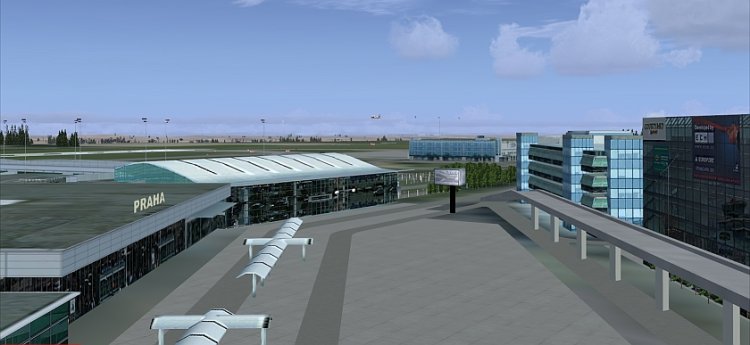
Scenery of Praha Ruzyne Airport for FS2004/FSX
→ Size:
51 MB
→ Date:
15 years ago (26.10.2010 07:05)
→ Author:
Pavel Benes, Filip Dvorak, Karel Kriz
→ Approved by moderator:
omega
→ License:
Freeware - Free version, Unlimited Distribution
→ Downloaded:
3810 time(s)