IL-76 td Просмотр ZIP-архива
Aircraft/Il-76TD Aeroflot/Docs TCAS/README.htm
<!DOCTYPE html PUBLIC "-//W3C//DTD HTML 4.01 Transitional//EN">
<html>
<head>
  <meta http-equiv="content-type"
 content="text/html; charset=ISO-8859-1">
  <title>TCAS II v7 IVSI and Transponder</title>
</head>
<body>
<h1 style="text-align: center;">IVSI with TCAS II v7.0<br>
</h1>
<div style="text-align: center;">
<div style="text-align: center;"><img src="pics/sample-multi.gif" alt=""
 style="width: 151px; height: 148px;"><br>
<br>
<img src="pics/xpdr.gif" alt="" style="width: 227px; height: 87px;"><br>
</div>
</div>
<div style="text-align: center;"><span style="font-weight: bold;"><br>
version </span><span style="font-weight: bold;">4.0.1<br>
24 May 2004<br style="font-weight: bold;">
</span><br style="font-weight: bold;">
<span style="font-weight: bold;">Lee Hetherington
<[email protected]></span></div>
<hr
 style="width: 100%; height: 2px; margin-left: auto; margin-right: auto;">
<h3>Introduction</h3>
This gauge now contains a full-fledged implementation of TCAS II
version 7.0 (aka change 7.0 aka MOPS 7.0) logic, as specified by <a
 href="http://www.rtca.org/onlinecart/product.cfm?id=112">RTCA document
DO-185A</a> plus its amendments approved by <a
 href="http://adsb.tc.faa.gov/SC-147.htm">SC-147A</a>.  Literally
all <span style="font-style: italic;"></span>features of the logic are
implemented with the exception of TCAS/TCAS resolution advisory (RA)
negotiation and Mode S ground stations.  In fact, I have gone to
great lengths to verify the correctness of this logic by testing
against 250 actual TCAS logic encounters and verifying correctness
second by second and state by state versus <a
 href="http://adsb.tc.faa.gov/SC-147.htm">MOD 2 TSIM</a>.  It is
believed this is the most advanced TCAS II version 7.0 logic simulation
in Flight Simulator.  The logic is packaged into a DLL that can be
used by other panel developers with written permission.<span
 style="font-weight: bold;"><br>
<br>
</span>In FS2002, this gauge requires <a
 href="http://www.schiratti.com/dowson.html">FSUIPC</a> for traffic
data.  In FS2004, either FSUIPC or TrafficInfo.dll can be
used.  This package contains a freeware license for FSUIPC 3.x and
should operate properly without you having to register FSUIPC<span
 style="font-weight: bold;">.<br>
</span><br>
Finally, the transponder has been integrated with Squawkbox 3 (alpha),
enabling the control of squawk standby, squawk ident, squawn code, and
indication of ATC radar by the flickering of the ident light.<span
 style="font-weight: bold;"></span><span style="font-weight: bold;">
<br>
</span><span style="font-weight: bold;"></span>
<hr style="width: 100%; height: 2px;">
<h3>Installation in 767PIC in FS2002</h3>
<ol>
  <li>Copy the file <span style="font-style: italic;">TCAS2v7.dll</span>
to the main FS folder.  If you already have a TCAS2v7.dll in your
main FS folder, it is recommended that you compare the versions and
keep the newest.  (You can do this with Windows Explorer, clicking
right and choosing Properties.  Then select the Version
tab.)  TCAS2v7.dll contains the TCAS II version 7 logic.</li>
  <li><span style="font-style: italic;"></span>Copy the file <span
 style="font-style: italic;">TCAS2v7.ini</span> to the main FS folder.<br>
  </li>
  <li>Copy the file <span style="font-style: italic;">ILH_TCAS.gau</span>
to the Gauges subfolder within the main FS folder.  This GAU file
contains the IVSI, transponder, and (hidden) logic gauges.</li>
  <li>Go the the <span style="font-style: italic;">FS\Aircraft\767 PIC
Wilco Publishing\Panel</span> and make a backup copy of your current <span
 style="font-style: italic;">Panel.cfg</span> file.  <span
 style="font-weight: bold;">This is
important in case your editing goes poorly.</span></li>
  <li>If you are still using an unchanged, original panel.cfg from
767PIC, you can copy the file <span style="font-style: italic;">ILH_TCAS_767PIC_Panel.cfg</span>
included in this package to <span style="font-style: italic;">Panel.cfg</span>.
However, if you have edited this file in any way, you can manually
install the gauges as follows:</li>
  <ol>
    <li>Open <span style="font-style: italic;">Panel.cfg</span> in a
text editor such as Notepad.</li>
    <li>To install the IVSI gauge, under the <span
 style="font-style: italic;">Main Panel [Window 01]</span> section,
find and replace the line that reads<br>
      <pre>gauge14=B767Wvsi, 556, 406, 136<br></pre>
with<br>
      <pre>//gauge14=B767Wvsi, 556, 406, 136<br>gauge14=ILH_TCAS!IVSI, 545, 391, 158, 158,<br></pre>
Please note the final comma.  It is useful to add this here so
that you can later add gauge parameters.  Such parameters will be
described below in the Gauge Options section.</li>
    <li>To install the hidden logic gauge (required), under the <span
 style="font-style: italic;">Main Panel [Window 01]</span> section,
find the last gauge line and note its number (e.g., 29).  Add the
following line, setting the gauge number to one higher (e.g., 30):<br>
      <pre>gauge30=ILH_TCAS!Logic, 0, 0, 1, 1,<br><br></pre>
    </li>
    <li>To install the transponder gauge, under the <span
 style="font-style: italic;">pedestal [Window04]</span> section, find
and replace the line that reads<br>
      <pre>gauge06=B767Wxpdr, 205, 586<br></pre>
with<br>
      <pre>//gauge06=B767Wxpdr, 205, 586<br>gauge06=ILH_TCAS!Transponder, 204, 586, 228, 89,</pre>
    </li>
  </ol>
</ol>
<br>
<hr style="width: 100%; height: 2px;">
<h3>Installation in FS2004</h3>
Note that as of the time this document was written, 767PIC is not
supported in FS2004.  However, the IVSI and Transponder gauges can
be used in other aircraft in FS2004.  The general installation is
similar to above.  You need to have a hidden <span
 style="font-style: italic;">ILH_TCAS!Logic</span> gauge installed on
the main panel.  With FS2004 comes the option to use Microsoft's <span
 style="font-style: italic;">TrafficInfo.dll</span> for traffic
gathering as opposed to FSUIPC.  At this point, I am not sure what
the relative advantages are, but the option is there.  In order to
use TrafficInfo, you must install <span style="font-style: italic;">TrafficInfo.dll</span>
into the <span style="font-style: italic;">Modules</span> subfolder of
FS2004.  You also need to add <span style="font-style: italic;">trafficinfo:yes</span>
parameter to the <span style="font-style: italic;">ILH_TCAS!Logic </span>gauge
line.  More on parameters below.<br>
<br>
Note: installing <span style="font-style: italic;">TrafficInfo.dll</span>
into FS2002 will crash FS2002 upon startup.<br>
<br>
<hr style="width: 100%; height: 2px;">
<h3>IVSI Usage</h3>
The IVSI has four hidden click spots that are sensitive to both left <span
 style="font-style: italic;">and</span> right mouse clicks:<br>
<br>
<div style="text-align: center;"><img
 style="width: 151px; height: 148px;" alt=""
 src="pics/ivsi-click-spots.gif"><br>
</div>
<ol>
  <li>cycles the TCAS mode selector between the modes TEST, STBY
(standby: not displayed), XPDR (transponder only: not displayed), TA,
and RA;</li>
  <li>cycles the TCAS forward range between 6, 12, 18, 24, and 40nm;</li>
  <li>cycles the TCAS "other" vertical range control between BLW
(below), N (normal: hidden), and ABV (above); and</li>
  <li>toggles the TCAS altitude display between relative (blank, +/-
two-digit altitudes) and absolute (own flight level, three digit flight
levels).</li>
</ol>
All of these can also be controlled using the transponder.<br>
<br>
Note that when below approximately 1000' AGL, even when the TCAS mode
selector is positioned for RA, the IVSI will display TA.  The
reason is
that below this altitude, RAs are suppressed, and TCAS operates in TA
Only mode.<br>
<br>
<hr style="width: 100%; height: 2px;">
<h3>Transponder Usage</h3>
The following displays the click spots for the transponder gauge:<br>
<br>
<div style="text-align: center;"><img src="pics/xpdr-click-spots.gif"
 alt="" style="width: 227px; height: 87px;"><br>
<br>
<div style="text-align: left;">Like the IVSI click spots, these are all
sensitive to both left and right mouse clicks.  Left cycles one
direction, and right the other direction.  The right
ABOVE/N/BELOW, right ABS/REL, and ATC FAIL functions are not
implemented.<br>
<h4>Squawkbox 3<br>
</h4>
The transponder has been integrated with Squawkbox 3 (alpha).  The
MODE controls SB3's squawk vs. squawk standby.  The IDENT
button/light serves two purposes: squawk ident if you push it and
periodic flashing to indicate the presence of ATC in range.<br>
</div>
</div>
<br>
<hr style="width: 100%; height: 2px;">
<h3>Verifying Installation</h3>
To verify proper installation fire up Flight Simulator and choose
aircraft whose panel.cfg you modified.  If the installation
succeeded, you should see<br>
<br>
<div style="text-align: center;"><img src="pics/tcas-off.gif" alt=""
 style="width: 151px; height: 148px;"><br>
</div>
<br>
and if it failed you should see TCAS flagged<br>
<br>
<div style="text-align: center;"><img src="pics/tcas-flagged.gif" alt=""
 style="width: 151px; height: 148px;"><br>
</div>
<br>
You can then enter TEST mode.  For a successful self test, you
should see<br>
<br>
<div style="text-align: center;"><img src="pics/test-succeed.gif" alt=""
 style="width: 151px; height: 148px;"><br>
</div>
<br>
with the aural alert "TCAS System Test OK."  If the test fails with<br>
<br>
<div style="text-align: center;"><img src="pics/test-fail-logic.gif"
 alt="" style="width: 151px; height: 148px;"><br>
</div>
<br>
it means you have not properly installed the <span
 style="font-style: italic;">ILH_TCAS!Logic</span> gauge within your
panel.cfg, and in this case you will not get an aural alert of any kind
(because that is contained within the <span style="font-style: italic;">ILH_TCAS!Logic</span>
gauge).  If the test fails with<br>
<br>
<div style="text-align: center;"><img src="pics/test-fail-fsuipc.gif"
 alt="" style="width: 151px; height: 148px;" align="middle">
or   <img src="pics/test-fail-trafficinfo.gif" alt=""
 style="width: 151px; height: 148px;" align="middle"><br>
</div>
<br>
it means a connection to FSUIPC or TrafficInfo, respectively, could not
be established and you should hear the aural alert "TCAS System Test
Fail."  This means that <span style="font-style: italic;">FSUIPC.dll</span>
or <span style="font-style: italic;">TrafficInfo.dll</span> were not
properly installed.<br>
<br>
<hr style="width: 100%; height: 2px;">
<h3>IVSI TCAS Symbology</h3>
<h4>Altitudes</h4>
Traffic is displayed with one of four symbols, a two-digit relative
altitude (e.g., +03 or -07) or a three-digit flight level (e.g., 250),
and an arrow indicating a vertical rate of at least +/- 500fpm.
The altitude is indicated in units of 100ft, with a + indicating above
ourself and a - indicating below for relative altitudes.  The
altitude tag, relative or absolute, will be positioned above the symbol
if the intruder is above own altitude or below the symbol if the
intruder is below own altitude.<br>
<br>
<div style="text-align: center;"><img src="pics/sample-rel.gif" alt=""
 style="width: 151px; height: 148px;"><br>
Relative Altitudes<br>
<br>
<img src="pics/sample-abs.gif" alt=""
 style="width: 151px; height: 148px;"><br>
Absolute Altitudes (Flight Levels)<br>
</div>
<br>
<h4>Resolution Advisory (RA)<br>
</h4>
A red square indicates a Threat and is accompanied by an aural warning
and red/green vertical speed constraints along the VSI scale for a
Resolution Advisory (RA):<br>
<br>
<div style="text-align: center;"><img src="pics/sample-ra.gif" alt=""
 style="width: 151px; height: 148px;"><br>
Resolution Advisory (RA): "Climb, Climb"<br>
</div>
<br>
You must be in RA mode to get an RA.  Any time an intruder is
labelled a Threat, a vertical speed command will be present.  All
RAs include at least one red "don't fly" band.  If an RA is
corrective, meaning current vertical speed is in a red band at time of
issuance, then there will also be a green "do fly" band.  It is
expected that within 5 seconds for an initial RA (or 2.5 seconds for a
strength increase or reversal) that a 0.25g vertical speed change will
be enacted to fly out of the red band.  Note that strength of an
RA can increase or decrease throughout an encounter.  An RA
concludes with a "Clear of Conflict" aural alert.<br>
<h4>Traffic Advisory (TA)<br>
</h4>
A yellow circle indicates a Potential Threat and is accompanied by the
aural warning "Traffic, Traffic" for a Traffic Advisory (TA):<br>
<br>
<div style="text-align: center;"><img src="pics/sample-ta.gif" alt=""
 style="width: 151px; height: 148px;"><br>
Traffic Advisory (TA): "Traffic, Traffic"<br>
</div>
<br>
A TA generally precedes an RA by 15-20 seconds.  If an RA or TA is
already active and a new TA appears, the aural warning will be a single
"Traffic."<br>
<br>
<h4>Proximate Traffic</h4>
A blue or white solid diamond indicates Proximate Traffic that is
within 6nm and +/- 1200ft vertically and is not an RA or TA:<br>
<br>
<div style="text-align: center;"><img src="pics/sample-pa.gif" alt=""
 style="width: 151px; height: 148px;"><br>
Proximate Traffic<br>
</div>
<br>
<h4>Other Traffic<br>
</h4>
A blue or white hollow diamond indicates Other Traffic that is within a
settable vertical range of own aircraft:<br>
<br>
<div style="text-align: center;"><img src="pics/sample-other.gif" alt=""
 style="width: 151px; height: 148px;"><br>
Other Traffic<br>
</div>
<br>
See the option "other" below for this setting, and the setting of
ABOVE/N/BELOW on the transponder gauge for exceptions to this
range.  Note that for the duration of an RA, all Other Traffic is
removed from the screen so as to remove clutter during a potentially
critical encounter.<br>
<br>
The blue/white color for Proximate and Other Traffic vs. own airplane
is settable via gauge options, as described below.<br>
<h4>Off-screen RA and TA Traffic<br>
</h4>
Note that Potential Threat and Threat traffic that would otherwise be
off-screen is drawn right at the edge so it can be seen.  In this
case, the range is incorrectly displayed, but the bearing is correct:<br>
<br>
<div style="text-align: center;"><img src="pics/sample-offscreen-6.gif"
 alt="" style="width: 151px; height: 148px;">
<img src="pics/sample-offscreen-12.gif" alt=""
 style="width: 151px; height: 148px;"><br>
</div>
<br>
Also note that the traffic is displayed with heading and not track up.<br>
<h4>Ground Traffic</h4>
Based on the fact that most transponders are turned to standby while an
aircraft is on the ground, I have tried to filter out ground traffic
from the display.  For AI traffic, I do not access the separate
ground
traffic table.  For Multiplayer and Squawkbox traffic, I filter
out
traffic that is within a threshold (default 100ft, see <span
 style="font-style: italic;">ground:</span>
parameter below) of own aircraft's ground level and who's groundspeed
is less than 30kts.  This heuristic seems to work fairly
well.  Believe
me, you don't want your display cluttered with ground traffic.<br>
<br>
<hr style="width: 100%; height: 2px;">
<h3>TCAS II version 7.0 Advisory Thresholds<br>
</h3>
Please note that ranges for a TA or RA are not fixed.  TCAS
fundamentally
operates on the concept of time to closest point of approach (<small>TAU</small>),
which is estimated by range divided by rate of closure.  There is
a distance threshold (<small>DMOD</small>) factored in for low closure
rate encounters (e.g., overtaking another aircraft).  Both the <small>TAU<big>
and <small>DMOD<big> thresholds are dependent on own altitude.  <small>TAU<big>
ranges from 20-45s for TAs and 15-35s for RAs.  <small>DMOD<big>
ranges from 0.3-1.3nm for TAs and 0.2-1.1nm for RAs.  What this
all
means is that with low closure rates and low altitudes, you could be
flying as close as
0.3nm from another aircraft and receive no TA or RA.<br>
<br>
The following tables detail the various range and altitude thresholds
for RAs and TAs.  <small>ZT<big> is the altitude threshold at
closest point of approach.  <small>TAU<big> is the time
threshold.  <small>DMOD<big>
is the distance threshold for low-closure-rate encounters.  <small>AL<big>
is the minimum goal separation altitude for an RA.</big></small></big></small></big></small></big></small><br>
<br>
</big></small></big></small></big></small></big></small>
<table cellpadding="2" cellspacing="2" border="1"
 style="width: 80%; text-align: left; margin-left: auto; margin-right: auto;">
  <tbody>
    <tr>
      <td colspan="1" rowspan="2"
 style="text-align: center; vertical-align: bottom; white-space: nowrap;"><span
 style="font-style: italic;">altitude</span><br>
      </td>
      <td colspan="4" rowspan="1"
 style="vertical-align: top; text-align: center; white-space: nowrap;"><span
 style="font-style: italic;"><span style="font-weight: bold;">RA
Thresholds</span></span><br>
      </td>
    </tr>
    <tr>
      <td
 style="vertical-align: top; text-align: center; font-style: italic; white-space: nowrap;">ZT<br>
      </td>
      <td
 style="vertical-align: top; text-align: center; font-style: italic; white-space: nowrap;">TAU<br>
      </td>
      <td
 style="vertical-align: top; text-align: center; font-style: italic; white-space: nowrap;">DMOD<br>
      </td>
      <td
 style="vertical-align: top; text-align: center; font-style: italic; white-space: nowrap;">AL<br>
      </td>
    </tr>
    <tr>
      <td
 style="vertical-align: top; text-align: center; white-space: nowrap;"><
2200
radio<br>
      </td>
      <td
 style="vertical-align: top; text-align: center; white-space: nowrap;">600ft<br>
      </td>
      <td
 style="vertical-align: top; text-align: center; white-space: nowrap;">15sec<br>
      </td>
      <td
 style="vertical-align: top; text-align: center; white-space: nowrap;">0.20nm<br>
      </td>
      <td
 style="vertical-align: top; text-align: center; white-space: nowrap;">300ft<br>
      </td>
    </tr>
    <tr>
      <td
 style="vertical-align: top; text-align: center; white-space: nowrap;">2200-5000<br>
      </td>
      <td
 style="vertical-align: top; text-align: center; white-space: nowrap;">600ft<br>
      </td>
      <td
 style="vertical-align: top; text-align: center; white-space: nowrap;">15sec<br>
      </td>
      <td
 style="vertical-align: top; text-align: center; white-space: nowrap;">0.20nm<br>
      </td>
      <td
 style="vertical-align: top; text-align: center; white-space: nowrap;">300ft<br>
      </td>
    </tr>
    <tr>
      <td
 style="vertical-align: top; text-align: center; white-space: nowrap;">5000-10000<br>
      </td>
      <td
 style="vertical-align: top; text-align: center; white-space: nowrap;">600ft<br>
      </td>
      <td
 style="vertical-align: top; text-align: center; white-space: nowrap;">20sec<br>
      </td>
      <td
 style="vertical-align: top; text-align: center; white-space: nowrap;">0.35nm<br>
      </td>
      <td
 style="vertical-align: top; text-align: center; white-space: nowrap;">350ft<br>
      </td>
    </tr>
    <tr>
      <td
 style="vertical-align: top; text-align: center; white-space: nowrap;">10000-20000<br>
      </td>
      <td
 style="vertical-align: top; text-align: center; white-space: nowrap;">600ft<br>
      </td>
      <td
 style="vertical-align: top; text-align: center; white-space: nowrap;">25sec<br>
      </td>
      <td
 style="vertical-align: top; text-align: center; white-space: nowrap;">0.55nm<br>
      </td>
      <td
 style="vertical-align: top; text-align: center; white-space: nowrap;">400ft<br>
      </td>
    </tr>
    <tr>
      <td
 style="vertical-align: top; text-align: center; white-space: nowrap;">20000-42000<br>
      </td>
      <td
 style="vertical-align: top; text-align: center; white-space: nowrap;">700ft<br>
      </td>
      <td
 style="vertical-align: top; text-align: center; white-space: nowrap;">30sec<br>
      </td>
      <td
 style="vertical-align: top; text-align: center; white-space: nowrap;">0.85nm<br>
      </td>
      <td
 style="vertical-align: top; text-align: center; white-space: nowrap;">600ft<br>
      </td>
    </tr>
    <tr>
      <td
 style="vertical-align: top; text-align: center; white-space: nowrap;">>
42000<br>
      </td>
      <td
 style="vertical-align: top; text-align: center; white-space: nowrap;">800ft<br>
      </td>
      <td
 style="vertical-align: top; text-align: center; white-space: nowrap;">35sec<br>
      </td>
      <td
 style="vertical-align: top; text-align: center; white-space: nowrap;">1.10nm<br>
      </td>
      <td
 style="vertical-align: top; text-align: center; white-space: nowrap;">700ft<br>
      </td>
    </tr>
  </tbody>
</table>
<br>
<table cellpadding="2" cellspacing="2" border="1"
 style="width: 80%; text-align: left; margin-left: auto; margin-right: auto;">
  <tbody>
    <tr align="center">
      <td
 style="text-align: center; vertical-align: bottom; white-space: nowrap;"
 rowspan="2" colspan="1"><span
 style="font-style: italic; font-weight: bold;"></span><br
 style="font-style: italic;">
      <span style="font-style: italic;">altitude</span><br>
      </td>
      <td rowspan="1" colspan="3"
 style="vertical-align: top; white-space: nowrap;"><span
 style="font-style: italic; font-weight: bold;">TA
Thresholds</span></td>
    </tr>
    <tr>
      <td
 style="vertical-align: top; text-align: center; font-style: italic; white-space: nowrap;">ZT<br>
      </td>
      <td
 style="vertical-align: top; text-align: center; font-style: italic; white-space: nowrap;">TAU<br>
      </td>
      <td
 style="vertical-align: top; text-align: center; font-style: italic; white-space: nowrap;">DMOD<br>
      </td>
    </tr>
    <tr>
      <td
 style="vertical-align: top; text-align: center; white-space: nowrap;"><
2200
radio<br>
      </td>
      <td
 style="vertical-align: top; text-align: center; white-space: nowrap;">850ft<br>
      </td>
      <td
 style="vertical-align: top; text-align: center; white-space: nowrap;">20sec<br>
      </td>
      <td
 style="vertical-align: top; text-align: center; white-space: nowrap;">0.30nm<br>
      </td>
    </tr>
    <tr>
      <td
 style="vertical-align: top; text-align: center; white-space: nowrap;">2200-5000<br>
      </td>
      <td
 style="vertical-align: top; text-align: center; white-space: nowrap;">850ft<br>
      </td>
      <td
 style="vertical-align: top; text-align: center; white-space: nowrap;">25sec<br>
      </td>
      <td
 style="vertical-align: top; text-align: center; white-space: nowrap;">0.33nm<br>
      </td>
    </tr>
    <tr>
      <td
 style="vertical-align: top; text-align: center; white-space: nowrap;">5000-10000<br>
      </td>
      <td
 style="vertical-align: top; text-align: center; white-space: nowrap;">850ft<br>
      </td>
      <td
 style="vertical-align: top; text-align: center; white-space: nowrap;">30sec<br>
      </td>
      <td
 style="vertical-align: top; text-align: center; white-space: nowrap;">0.48nm<br>
      </td>
    </tr>
    <tr>
      <td
 style="vertical-align: top; text-align: center; white-space: nowrap;">10000-20000<br>
      </td>
      <td
 style="vertical-align: top; text-align: center; white-space: nowrap;">850ft<br>
      </td>
      <td
 style="vertical-align: top; text-align: center; white-space: nowrap;">40sec<br>
      </td>
      <td
 style="vertical-align: top; text-align: center; white-space: nowrap;">0.75nm<br>
      </td>
    </tr>
    <tr>
      <td
 style="vertical-align: top; text-align: center; white-space: nowrap;">20000-42000<br>
      </td>
      <td
 style="vertical-align: top; text-align: center; white-space: nowrap;">850ft<br>
      </td>
      <td
 style="vertical-align: top; text-align: center; white-space: nowrap;">45sec<br>
      </td>
      <td
 style="vertical-align: top; text-align: center; white-space: nowrap;">1.00nm<br>
      </td>
    </tr>
    <tr>
      <td
 style="vertical-align: top; text-align: center; white-space: nowrap;">>
42000<br>
      </td>
      <td
 style="vertical-align: top; text-align: center; white-space: nowrap;">1200ft<br>
      </td>
      <td
 style="vertical-align: top; text-align: center; white-space: nowrap;">48sec<br>
      </td>
      <td
 style="vertical-align: top; text-align: center; white-space: nowrap;">1.30nm<br>
      </td>
    </tr>
  </tbody>
</table>
<br>
Note that the <span style="font-style: italic;">altitude</span>
thresholds above actually have hysteresis.  This means that the
precise value of a given threshold is different when climbing vs.
descending in order to reduce sensitivity changes when flying right at
a threshold (e.g., 10000) with small altitude fluctuations.<br>
<br>
Note that RAs are suppressed below about 1000 feet radio altitude, and
all aural
alerts are suppressed below 500 feet.  TAs will be visually
displayed below this altitude and even on the ground.  When RAs
are suppressed due to ground proximity, the IVSI will display mode "TA"
even if the selected mode is "TA/RA". <br>
<br>
<hr style="width: 100%; height: 2px;">
<h3>767PIC Specifics</h3>
These gauges provide proper integration with 767PIC's power busses and
intertial reference units (IRUs).  The IVSI gauge will get its
power from the left main bus, as do the EADI, EHSI, and upper
EICAS.  If for any reason the left main bus does not have power,
the IVSI gauge will be completely blank.  The IVSI gauge will only
be able to display the VSI needle if the IRU selected on the captain's
instrument source selector is aligned.  If it is not aligned, the
VSI needle will not be displayed and an amber V/S "flag" will be
displayed in the lower left of the IVSI/TCAS gauge.  TCAS will
continue to function, although if in RA mode, you will see an amber RA
"flag" since RA vertical commands would not be possible without V/S
data.  Note that several folks have told me that V/S data
continues to work if the selected IRU is in ATT mode, unlike the
original PIC VSI gauge, and I have implemented this functionality.<br>
<br>
<hr style="width: 100%; height: 2px;">
<h3>Online Traffic (Multiplayer and Squawkbox)</h3>
In order to see Multiplayer (MP) and Squawkbox (SB) traffic in FS2002,
you will have to use AIBridge from Jóse Oliveira.  Some
have had luck with AIBridge 2.x, but some have had to go back to
1.0.  AIBridge reads MP aircraft positions and relays them to
FSUIPC, allowing my TCAS to retrieve them.<br>
<br>
In FS2004, with SB you will need to use SBRelay to link SB's MP with
FS2004's MP session.  You can then use the TrafficInfo interface
of <span style="font-style: italic;">ILH_TCAS!Logic</span> to access
the MP traffic.  Alternatively, you can run AIBridge 3.x to relay
this traffic to FSUIPC.<br>
<br>
I caution you that SB2 traffic seems to be rather jumpy due to low
update rate and incorrect velocities.  For this reason, the <span
 style="font-style: italic;">ILH_TCAS!Logic </span>gauge performs
alpha-beta-gamma smoothing of intruder altitudes, latitudes, and
longitudes in an attempt to smooth out the jumpiness.  It isn't
perfect, but it helps.  The jumpiness is visible on the IVSI
display, and it does effect the reliability of TAs and RAs.  I
wish there was more I could do, but the old saying "garbage in, garbage
out" springs to mind.  "Garbage" is too harsh, as TCAS generally
works OK.<br>
<br>
The upcoming SB3 should improve this situation appreciably.  I
keep hearing that its traffic is much smoother.  SB3 injects
traffic directly into FSUIPC separately from the MP session.  This
should work around any MP maximum player limits as well.  I have
no personal experience with SB3 as of the time of this writing.<br>
<br>
<hr style="width: 100%; height: 2px;">
<h3>Gauge Parameters</h3>
The following gauge parameters are available and are specified in the <span
 style="font-style: italic;">Panel.cfg</span> file.  Note that
parameters are separated from eachother by one or more spaces.  Do
not use commas as they confuse the FS parser.  Do not insert
spaces around the colons.<br>
<br>
<span style="font-style: italic;"></span>
<table cellpadding="2" cellspacing="2" border="1"
 style="width: 80%; text-align: left; margin-left: auto; margin-right: auto;">
  <tbody>
    <tr>
      <td
 style="vertical-align: top; font-style: italic; text-align: center; white-space: nowrap;">parameter<br>
      </td>
      <td
 style="vertical-align: top; font-style: italic; text-align: center; white-space: nowrap;">default<br>
      </td>
      <td
 style="vertical-align: top; font-style: italic; text-align: center; white-space: nowrap;">description<br>
      </td>
    </tr>
    <tr>
      <td style="vertical-align: top;">trafficinfo:<span
 style="font-style: italic;">yes|no</span><br>
      </td>
      <td style="vertical-align: top; text-align: center;">no<br>
      </td>
      <td style="vertical-align: top;">Whether to use TrafficInfo for
traffic.  Otherwise, traffic is obtained from FSUIPC.<br>
      </td>
    </tr>
    <tr>
      <td style="vertical-align: top;">volume:<span
 style="font-style: italic;">N</span><br>
      </td>
      <td style="vertical-align: top; text-align: center;">-300<br>
      </td>
      <td style="vertical-align: top;">Set the volume of TCAS
alerts.  0 and -100 are louder, and -500 is softer.<br>
      </td>
    </tr>
  </tbody>
</table>
<div style="text-align: center;"><span style="font-style: italic;">ILH_TCAS!Logic</span>
gauge parameters<br>
<div style="text-align: center;"><br>
</div>
<table cellpadding="2" cellspacing="2" border="1"
 style="width: 80%; text-align: left; margin-left: auto; margin-right: auto;">
  <tbody>
    <tr>
      <td
 style="vertical-align: top; text-align: center; white-space: nowrap; font-style: italic;">parameter<br>
      </td>
      <td
 style="vertical-align: top; font-style: italic; text-align: center; white-space: nowrap;">default<br>
      </td>
      <td
 style="vertical-align: top; text-align: center; white-space: nowrap; font-style: italic;">description<br>
      </td>
    </tr>
    <tr>
      <td style="vertical-align: top;">blueplane:<span
 style="font-style: italic;">yes|no</span><br>
      </td>
      <td
 style="vertical-align: top; text-align: center; white-space: nowrap;">yes<br>
      </td>
      <td style="vertical-align: top;">Whether own aircraft should be
blue.  If it is blue, then other and proximate traffic will be
white.<br>
      </td>
    </tr>
    <tr>
      <td style="vertical-align: top;">other:<span
 style="font-style: italic;">N</span><br>
      </td>
      <td
 style="vertical-align: top; text-align: center; white-space: nowrap;">999<br>
      </td>
      <td style="vertical-align: top;">Vertical range in hundreds of
feet for displaying other traffic.  With the default value, all
other traffic will be displayed, although if using a relative altitude
display the values will be clipped at +/- 99.<br>
      <br>
A more realistic value is 45 or 27.<br>
      </td>
    </tr>
    <tr>
      <td style="vertical-align: top;">fontscale:<span
 style="font-style: italic;">N</span><br>
      </td>
      <td
 style="vertical-align: top; text-align: center; white-space: nowrap;">1.0<br>
      </td>
      <td style="vertical-align: top;">Scale factor for TCAS altitude
font.  Depending on your display and eyesight, you can adjust this
(e.g., 0.9 or 1.1).<br>
      </td>
    </tr>
    <tr>
      <td style="vertical-align: top;">pic:<span
 style="font-style: italic;">yes|no</span><br>
      </td>
      <td
 style="vertical-align: top; text-align: center; white-space: nowrap;">yes<br>
      </td>
      <td style="vertical-align: top;">Whether to try and access 767PIC
internal values for panel lighting state, IRU state, and power
state.  Leaving this on outside of 767PIC is probably not a
problem.<br>
      </td>
    </tr>
  </tbody>
</table>
<div style="text-align: center;"><span style="font-style: italic;">ILH_TCAS!IVSI</span>
gauge parameters<br>
<br>
<table cellpadding="2" cellspacing="2" border="1"
 style="width: 80%; text-align: left; margin-left: auto; margin-right: auto;">
  <tbody>
    <tr>
      <td
 style="vertical-align: top; text-align: center; white-space: nowrap; font-style: italic;">parameter<br>
      </td>
      <td
 style="vertical-align: top; text-align: center; white-space: nowrap; font-style: italic;">default<br>
      </td>
      <td
 style="vertical-align: top; text-align: center; white-space: nowrap; font-style: italic;">description<br>
      </td>
    </tr>
    <tr>
      <td style="vertical-align: top;">pic:<span
 style="font-style: italic;">yes|no</span></td>
      <td style="vertical-align: top;">yes</td>
      <td style="vertical-align: top;">Whether to try and access 767PIC
internal values for panel lighting
state, IRU state, and power state.  Leaving this on outside of
767PIC
is probably not a problem.</td>
    </tr>
  </tbody>
</table>
<span style="font-style: italic;">ILH_TCAS!Transponder</span> gauge
parameters<br>
</div>
<div style="text-align: left;"><br>
The following are sample <span style="font-style: italic;">Panel.cfg</span>
lines with some parameters, showing how they must be formatted:<br>
<pre style="margin-left: 40px;">gaugeXX=ILH_TCAS!Logic, 0, 0, 1, 1, trafficinfo:yes volume:-200<br>gaugeYY=ILH_TCAS!IVSI, 545, 391, 158, 158, fontscale:1.1 other:45<br><br></pre>
</div>
<div style="text-align: left;">
<hr style="width: 100%; height: 2px;">
<h3>Logic Parameters</h3>
The file FS\TCAS2v7.ini contains parameters for the TCAS logic (where
FS is Flight Simulator's main folder).  You likely don't need to
edit anything in this file.<br>
<br>
<table cellpadding="2" cellspacing="2" border="1"
 style="width: 80%; text-align: left; margin-left: auto; margin-right: auto;">
  <tbody>
    <tr>
      <td style="vertical-align: top;">[Filtering]<br>
      </td>
      <td style="vertical-align: top;"><br>
      </td>
    </tr>
    <tr>
      <td style="vertical-align: top;">Range=100<br>
      </td>
      <td style="vertical-align: top;">Range [feet] below which
intruders are filtered.  Default 100.<br>
      </td>
    </tr>
    <tr>
      <td style="vertical-align: top;">Altitude=100<br>
      </td>
      <td style="vertical-align: top;">Altitude [feet] relative to
ground altitude below own aircraft below which intruders are considered
on the ground.  Default 100.<br>
      </td>
    </tr>
    <tr>
      <td style="vertical-align: top;">Speed=30<br>
      </td>
      <td style="vertical-align: top;">Groundspeed [kts] below which
intruders are considered on the ground.  Default 30.<br>
      </td>
    </tr>
    <tr>
      <td style="vertical-align: top;">[Smoothing]<br>
      </td>
      <td style="vertical-align: top;"><br>
      </td>
    </tr>
    <tr>
      <td style="vertical-align: top;">Enabled=1<br>
      </td>
      <td style="vertical-align: top;">Enabled (=1) or disabled
(=0).  Default 1.  This must be enabled for groundspeed-based
filtering above to be in effect.<br>
      </td>
    </tr>
    <tr>
      <td style="vertical-align: top;">MaxCoast=20<br>
      </td>
      <td style="vertical-align: top;">Maximum seconds of no position
update before an intruder's track is discarded.  The default of 20
seems to work OK with the sometimes infrequent position updates seen
with Squawkbox 2 plus SBRelay and/or AIBridge.<br>
      </td>
    </tr>
    <tr>
      <td style="vertical-align: top;">Alpha=0.4<br>
      </td>
      <td style="vertical-align: top;">Smoothing parameter.
Useful values are between 0.4 and 1.0, with 1.0 meaning no smoothing.<br>
      </td>
    </tr>
  </tbody>
</table>
<br>
An intruder is filtered out if it is below the altitude threshold <span
 style="font-style: italic;">and</span> its groundspeed is below the
speed threshold.  To eliminate ground-based filtering, you could
use Altitude=-100000 and Speed=-1 (no intruder could satisfy either of
those thresholds).<br>
<br>
If you remove this TCAS2v7.ini file, it will be recreated with default
values the next time the TCAS logic is utilized.<br>
<br>
The smoothing can be particularly useful with online traffic (e.g.,
Squawkbox or Multiplayer, utilizing AIBridge and/or SBRelay).<br>
<br>
Note that as of the time of this writing, PMDG's 737-800/900 upgrade
package is not capable of utlizing the smoothing, because it is using a
different internal logic interface.<br>
<br>
<hr style="width: 100%; height: 2px;"><br>
<h3>Advanced (for Panel Designers)</h3>
Support is available for multiple IVSI displays sharing a single logic
gauge.  The gauges<br>
<ul>
  <li><span style="font-style: italic;">ILH_TCAS!IVSI</span>,<br>
  </li>
  <li><span style="font-style: italic;">ILH_TCAS!IVSI2</span>, and<br>
  </li>
  <li><span style="font-style: italic;"><span
 style="font-style: italic;">ILH_TCAS!IVSI3</span></span></li>
</ul>
are available and all share the same frame bitmap.  Their mode and
range
settings will remain in sync at all times.<br>
<br>
The following gauges are similar, except there is no frame:<br>
<ul>
  <li><span style="font-style: italic;">ILH_TCAS!IVSIb</span>,</li>
  <li><span style="font-style: italic;">ILH_TCAS!IVSI2b</span>, and</li>
  <li><span style="font-style: italic;">ILH_TCAS!IVSI3b</span>.</li>
</ul>
The IVSI modes and range are controllable via Flight Simulator <span
 style="font-style: italic;">named variables</span> in case you want to
write your own control gauge<span style="font-style: italic;">.</span>
The followind named variables are supported:<br>
<ul>
  <li><span style="font-style: italic;">ILH_TCAS!IVSI.power</span>,
BOOL32, whether power is on.</li>
  <li><span style="font-style: italic;">ILH_TCAS!IVSI.lit</span>,
BOOL32, whether to display the lit frame bitmap.</li>
  <li><span style="font-style: italic;">ILH_TCAS!IVSI.vsi_flag</span>,
BOOL32, whether to flag the V/S indicator.</li>
  <li><span style="font-style: italic;">ILH_TCAS!IVSI.range_index</span>,
UINT32 (0..4), TCAS range (6,12,18,24,40nm).</li>
  <li><span style="font-style: italic;">ILH_TCAS!IVSI.mode_index</span>,
UINT32 (0..4), mode (TEST, STBY, XPDR, TA, TA/RA).</li>
  <li><span style="font-style: italic;">ILH_TCAS!IVSI.above_below</span>,
UINT32 (0..2), ABV/N/BLW.</li>
  <li><span style="font-style: italic;">ILH_TCAS!IVSI.absolute_relative</span>,
UINT32 (0..1), ABS/REL.</li>
  <li><span style="font-style: italic;">ILH_TCAS!IVSI.redraw</span>,
BOOL32, whether to redraw immediately.  Set this whenever you
change anything above.<br>
  </li>
  <li><span style="font-style: italic;">ILH_TCAS!Transponder.power</span>,
BOOL32, whether power is on.</li>
  <li><span style="font-style: italic;">ILH_TCAS!Transponder.lit</span>,
BOOL32, whether to display the lit bitmap.</li>
</ul>
Important: You must specify the option <span
 style="font-style: italic;">pic:no</span> in the Panel.cfg gauge
options for these named variables to work properly.<br>
<br>
The TCAS II version 7.0 logic, as implemented in <span
 style="font-style: italic;">TCAS2v7.dll</span>, is available for use
within custom TCAS displays.  Email me for more details.
It's first use outside of my own gauges is in PMDG's 737-800/900 panel
upgrade.<br>
<br>
<hr style="width: 100%; height: 2px;">
<h3>TCAS II Version 7.0 Logic Validation</h3>
During development, at all times I strove to pass real-world TCAS logic
validation tests.  The tests are publically available as part of <a
 href="http://adsb.tc.faa.gov/SC-147.htm">MOD 2 TSIM</a>.  The
logic contained within <span style="font-style: italic;">TCAS2v7.dll</span>
was able to pass all 250 test encounters that do not involve TCAS/TCAS
negotiation or Mode S Ground Station communications, neither of which
are appropriate within Flight Simulator (at this point).  Care was
taken to ensure that all of the internal logic states are matched
against TSIM state by state and second by second.  The logic can
produce all types of RAs including corrective, preventive, crossing,
reversal, multi-aircraft composite, etc.  It is capable of
producing all of the aural alerts as well:<br>
<ul>
  <li>Climb, Climb</li>
  <li>Descend, Descend</li>
  <li>Climb, Crossing Climb -- Climb, Crossing Climb</li>
  <li>Descend, Crossing Descend -- Descend, Crossing Descend</li>
  <li>Adjust Vertical Speed, Adjust</li>
  <li>Climb, Climb NOW -- Climb, Climb NOW</li>
  <li>Descend, Descend NOW -- Descend, Descend NOW</li>
  <li>Increase Climb, Increase Climb</li>
  <li>Increase Descent, Increase Descent</li>
  <li>Maintain Vertical Speed, Maintain</li>
  <li>Maintain Vertical Speed, Crossing, Maintain</li>
  <li>Monitor Vertical Speed</li>
  <li>Clear of Conflict</li>
  <li>Traffic, Traffic</li>
  <li>Traffic</li>
  <li>TCAS System Test OK</li>
  <li>TCAS System Test Fail<br>
  </li>
</ul>
<hr style="width: 100%; height: 2px;">
<h3>Legal</h3>
This package is a freeware product and a labor of love and may <span
 style="font-weight: bold;">not </span>be
included in any commercial package or website without written
permission. These gauges are an add-on to Wilco Publishing's 767PIC and
is not
endorsed, part of, or related to Wilco Publishing in any way.<br>
<br>
<span style="font-style: italic;">If you decide to use any part of this
package, whether it is for
freeware use or commercial, you must obtain prior written permission
from me, the author.  This includes altering the bitmaps for use
with other panels.</span><br>
<br>
Should there be any damage done to your
system after using this package, I and all parties involved will not be
held responsible.<br>
<br>
<hr style="width: 100%; height: 2px;">
<h3>Acknowledgements</h3>
For the first version of this gauge, I received help from many
sources.  Nick Jacobs of Dreamfleet gave me several pointers on
general gauge programming that proved invaluable.  Mark McGrath,
Ryan O'Malley, and John Selph provided me with TCAS documentation that
was very helpful in developing my threat classification and display
code.  Claude Troncy provided guidance on a technique to read the
main panel lighting status through an offset into 767PIC's APS.dll for
the 1.2 patch.  I have since figured out many other offsets for
the 1.2 and 1.3 patches.  Ian Riddell provided much technical help
and even provided a photograph that was the basis for the transponder
bitmaps.<br>
<br>
For this version of the gauge, Lefteris Kalamaras of PMDG provided the
motivation to finish up my full-fledged TCAS II version 7.0 logic so
they could make use of it within their 737-800/900 panel.  Without
the motivation, I doubt it would be finished at this point.
Lefteris and PMDG
also provided me with the real-world TCAS aural alerts.  Thanks!<br>
</div>
</div>
<br>
<div style="text-align: center;">
<hr style="width: 100%; height: 2px;">Copyright © 2004 I. Lee
Hetherington, All Rights Reserved.<br>
</div>
</body>
</html>
35716-IL-76td-aeroflot-pack-CCCP-76467.zip
| Имя файла | Дата | Размер |
|---|---|---|
| Aircraft/ | 22.02.2005 16:42 | |
| Aircraft/Il-76TD Aeroflot/ | 22.02.2005 16:42 | |
| Aircraft/Il-76TD Aeroflot/AIRCRAFT.CFG | 22.02.2005 07:57 | 8 KB |
| Aircraft/Il-76TD Aeroflot/Docs I-21/ | 22.02.2005 07:58 | |
| Aircraft/Il-76TD Aeroflot/Docs I-21/INS.txt | 06.06.2004 18:53 | 751 B |
| Aircraft/Il-76TD Aeroflot/Docs I-21/И_21.doc | 07.06.2004 10:21 | 290 KB |
| Aircraft/Il-76TD Aeroflot/Docs I-21/ИНС.djvu | 30.03.2004 11:45 | 150 KB |
| Aircraft/Il-76TD Aeroflot/Docs I-21/ИНС21.djvu | 30.03.2004 11:45 | 129 KB |
| Aircraft/Il-76TD Aeroflot/Docs I-21/ИСН.djvu | 30.03.2004 11:45 | 35 KB |
| Aircraft/Il-76TD Aeroflot/Docs I-21/РЛЭ ИНС21.djvu | 01.04.2004 10:06 | 241 KB |
| Aircraft/Il-76TD Aeroflot/Docs TCAS/ | 18.02.2005 03:54 | |
| Aircraft/Il-76TD Aeroflot/Docs TCAS/pics/ | 16.02.2005 02:09 | |
| Aircraft/Il-76TD Aeroflot/Docs TCAS/pics/ivsi-click-spots.gif | 21.03.2004 15:02 | 7 KB |
| Aircraft/Il-76TD Aeroflot/Docs TCAS/pics/sample-abs.gif | 21.03.2004 15:02 | 6 KB |
| Aircraft/Il-76TD Aeroflot/Docs TCAS/pics/sample-multi.gif | 21.03.2004 15:02 | 6 KB |
| Aircraft/Il-76TD Aeroflot/Docs TCAS/pics/sample-offscreen-12.gif | 21.03.2004 15:02 | 6 KB |
| Aircraft/Il-76TD Aeroflot/Docs TCAS/pics/sample-offscreen-6.gif | 21.03.2004 15:02 | 5 KB |
| Aircraft/Il-76TD Aeroflot/Docs TCAS/pics/sample-other.gif | 21.03.2004 15:02 | 6 KB |
| Aircraft/Il-76TD Aeroflot/Docs TCAS/pics/sample-pa.gif | 21.03.2004 15:02 | 6 KB |
| Aircraft/Il-76TD Aeroflot/Docs TCAS/pics/sample-ra.gif | 21.03.2004 15:02 | 8 KB |
| Aircraft/Il-76TD Aeroflot/Docs TCAS/pics/sample-rel.gif | 21.03.2004 15:02 | 6 KB |
| Aircraft/Il-76TD Aeroflot/Docs TCAS/pics/sample-ta.gif | 21.03.2004 15:02 | 6 KB |
| Aircraft/Il-76TD Aeroflot/Docs TCAS/pics/tcas-flagged.gif | 21.03.2004 15:02 | 5 KB |
| Aircraft/Il-76TD Aeroflot/Docs TCAS/pics/tcas-off.gif | 21.03.2004 15:02 | 5 KB |
| Aircraft/Il-76TD Aeroflot/Docs TCAS/pics/test-fail-fsuipc.gif | 21.03.2004 15:02 | 5 KB |
| Aircraft/Il-76TD Aeroflot/Docs TCAS/pics/test-fail-logic.gif | 21.03.2004 15:02 | 6 KB |
| Aircraft/Il-76TD Aeroflot/Docs TCAS/pics/test-fail-trafficinfo.gif | 21.03.2004 15:02 | 6 KB |
| Aircraft/Il-76TD Aeroflot/Docs TCAS/pics/test-succeed.gif | 01.05.2004 02:22 | 7 KB |
| Aircraft/Il-76TD Aeroflot/Docs TCAS/pics/xpdr-click-spots.gif | 23.05.2004 20:15 | 14 KB |
| Aircraft/Il-76TD Aeroflot/Docs TCAS/pics/xpdr.gif | 21.03.2004 15:02 | 13 KB |
| Aircraft/Il-76TD Aeroflot/Docs TCAS/README.htm | 24.05.2004 23:42 | 43 KB |
| Aircraft/Il-76TD Aeroflot/IL-76TD.AIR | 24.02.2003 21:29 | 8 KB |
| Aircraft/Il-76TD Aeroflot/model/ | 15.02.2005 23:41 | |
| Aircraft/Il-76TD Aeroflot/model/il-76td.mdl | 15.10.2004 17:05 | 4 MB |
| Aircraft/Il-76TD Aeroflot/model/model.cfg | 21.01.2003 22:28 | 28 B |
| Aircraft/Il-76TD Aeroflot/Panel/ | 22.02.2005 07:55 | |
| Aircraft/Il-76TD Aeroflot/Panel/FLIGHT ENGENEER.bmp | 18.02.2005 03:53 | 769 KB |
| Aircraft/Il-76TD Aeroflot/Panel/Il-76TD/ | 15.02.2005 23:41 | |
| Aircraft/Il-76TD Aeroflot/Panel/Il-76TD/Eng1 Revers On.xml | 29.01.2004 02:48 | 599 B |
| Aircraft/Il-76TD Aeroflot/Panel/Il-76TD/Eng1 Revers Unlocked.xml | 29.01.2004 02:49 | 521 B |
| Aircraft/Il-76TD Aeroflot/Panel/Il-76TD/Eng_Revers_Off.bmp | 01.02.2004 17:20 | 1 KB |
| Aircraft/Il-76TD Aeroflot/Panel/Il-76TD/Eng_Revers_On.bmp | 28.01.2004 01:24 | 1 KB |
| Aircraft/Il-76TD Aeroflot/Panel/Il-76TD/Eng_RevUnl_Off.bmp | 28.01.2004 01:15 | 1 KB |
| Aircraft/Il-76TD Aeroflot/Panel/Il-76TD/Eng_RevUnl_On.bmp | 28.01.2004 01:17 | 1 KB |
| Aircraft/Il-76TD Aeroflot/Panel/MAIN_PANEL.bmp | 15.02.2005 20:34 | 769 KB |
| Aircraft/Il-76TD Aeroflot/Panel/Navigator.bmp | 02.02.2005 23:56 | 769 KB |
| Aircraft/Il-76TD Aeroflot/Panel/Navigator_Front.bmp | 18.02.2005 00:51 | 769 KB |
| Aircraft/Il-76TD Aeroflot/Panel/Panel.cfg | 22.02.2005 07:56 | 12 KB |
| Aircraft/Il-76TD Aeroflot/Panel/PULT_SAU.bmp | 08.09.2003 21:49 | 112 KB |
| Aircraft/Il-76TD Aeroflot/Panel.TCAS/ | 22.02.2005 07:54 | |
| Aircraft/Il-76TD Aeroflot/Panel.TCAS/FLIGHT ENGENEER.bmp | 18.02.2005 03:53 | 769 KB |
| Aircraft/Il-76TD Aeroflot/Panel.TCAS/Il-76TD/ | 22.02.2005 07:54 | |
| Aircraft/Il-76TD Aeroflot/Panel.TCAS/Il-76TD/Eng1 Revers On.xml | 29.01.2004 02:48 | 599 B |
| Aircraft/Il-76TD Aeroflot/Panel.TCAS/Il-76TD/Eng1 Revers Unlocked.xml | 29.01.2004 02:49 | 521 B |
| Aircraft/Il-76TD Aeroflot/Panel.TCAS/Il-76TD/Eng_Revers_Off.bmp | 01.02.2004 17:20 | 1 KB |
| Aircraft/Il-76TD Aeroflot/Panel.TCAS/Il-76TD/Eng_Revers_On.bmp | 28.01.2004 01:24 | 1 KB |
| Aircraft/Il-76TD Aeroflot/Panel.TCAS/Il-76TD/Eng_RevUnl_Off.bmp | 28.01.2004 01:15 | 1 KB |
| Aircraft/Il-76TD Aeroflot/Panel.TCAS/Il-76TD/Eng_RevUnl_On.bmp | 28.01.2004 01:17 | 1 KB |
| Aircraft/Il-76TD Aeroflot/Panel.TCAS/MAIN_PANEL.bmp | 16.02.2005 02:19 | 769 KB |
| Aircraft/Il-76TD Aeroflot/Panel.TCAS/Navigator.bmp | 02.02.2005 23:56 | 769 KB |
| Aircraft/Il-76TD Aeroflot/Panel.TCAS/Navigator_Front.bmp | 18.02.2005 00:51 | 769 KB |
| Aircraft/Il-76TD Aeroflot/Panel.TCAS/Panel.cfg | 22.02.2005 07:55 | 12 KB |
| Aircraft/Il-76TD Aeroflot/Panel.TCAS/PULT_SAU.bmp | 08.09.2003 21:49 | 112 KB |
| Aircraft/Il-76TD Aeroflot/Readme_First.rtf | 22.02.2005 15:50 | 31 KB |
| Aircraft/Il-76TD Aeroflot/Screenshot1.jpg | 22.02.2005 16:24 | 97 KB |
| Aircraft/Il-76TD Aeroflot/Screenshot2.jpg | 22.02.2005 16:35 | 107 KB |
| Aircraft/Il-76TD Aeroflot/Screenshot3.jpg | 22.02.2005 16:38 | 148 KB |
| Aircraft/Il-76TD Aeroflot/sound/ | 15.02.2005 23:49 | |
| Aircraft/Il-76TD Aeroflot/sound/154wind.wav | 20.01.2002 01:31 | 101 KB |
| Aircraft/Il-76TD Aeroflot/sound/BAAPDIS.wav | 12.02.2001 18:55 | 53 KB |
| Aircraft/Il-76TD Aeroflot/sound/BAGLIDE.wav | 12.02.2001 18:54 | 26 KB |
| Aircraft/Il-76TD Aeroflot/sound/BAN11.wav | 20.01.2002 00:00 | 49 KB |
| Aircraft/Il-76TD Aeroflot/sound/BAN12.wav | 20.01.2002 00:01 | 47 KB |
| Aircraft/Il-76TD Aeroflot/sound/BAN13.wav | 20.01.2002 00:03 | 36 KB |
| Aircraft/Il-76TD Aeroflot/sound/BAN14.wav | 20.01.2002 00:10 | 25 KB |
| Aircraft/Il-76TD Aeroflot/sound/BAN1SHUT.WAV | 20.01.2002 00:17 | 159 KB |
| Aircraft/Il-76TD Aeroflot/sound/BAN1STRT.WAV | 20.01.2002 00:39 | 605 KB |
| Aircraft/Il-76TD Aeroflot/sound/BAN21.wav | 20.01.2002 00:08 | 97 KB |
| Aircraft/Il-76TD Aeroflot/sound/BAN22.wav | 20.01.2002 00:11 | 74 KB |
| Aircraft/Il-76TD Aeroflot/sound/BAN23.wav | 20.01.2002 00:12 | 63 KB |
| Aircraft/Il-76TD Aeroflot/sound/BAN24.wav | 20.01.2002 01:33 | 40 KB |
| Aircraft/Il-76TD Aeroflot/sound/BAN2SHUT.WAV | 20.01.2002 00:17 | 159 KB |
| Aircraft/Il-76TD Aeroflot/sound/BAN2STRT.WAV | 28.06.2001 19:26 | 30 KB |
| Aircraft/Il-76TD Aeroflot/sound/BAN2T.WAV | 20.01.2002 04:46 | 400 KB |
| Aircraft/Il-76TD Aeroflot/sound/BAOVER.wav | 02.09.1999 14:44 | 86 KB |
| Aircraft/Il-76TD Aeroflot/sound/BBN11.wav | 20.01.2002 00:00 | 49 KB |
| Aircraft/Il-76TD Aeroflot/sound/BBN12.wav | 20.01.2002 00:01 | 47 KB |
| Aircraft/Il-76TD Aeroflot/sound/BBN13.wav | 20.01.2002 00:03 | 36 KB |
| Aircraft/Il-76TD Aeroflot/sound/BBN14.wav | 20.01.2002 00:10 | 25 KB |
| Aircraft/Il-76TD Aeroflot/sound/BBN1SHUT.WAV | 20.01.2002 00:17 | 159 KB |
| Aircraft/Il-76TD Aeroflot/sound/BBN1STRT.WAV | 20.01.2002 00:39 | 605 KB |
| Aircraft/Il-76TD Aeroflot/sound/BBN21.wav | 20.01.2002 00:08 | 97 KB |
| Aircraft/Il-76TD Aeroflot/sound/BBN22.wav | 20.01.2002 00:11 | 74 KB |
| Aircraft/Il-76TD Aeroflot/sound/BBN23.wav | 20.01.2002 00:12 | 63 KB |
| Aircraft/Il-76TD Aeroflot/sound/BBN24.wav | 20.01.2002 01:33 | 40 KB |
| Aircraft/Il-76TD Aeroflot/sound/BBN2SHUT.WAV | 20.01.2002 00:17 | 159 KB |
| Aircraft/Il-76TD Aeroflot/sound/BBN2STRT.WAV | 28.06.2001 19:28 | 58 KB |
| Aircraft/Il-76TD Aeroflot/sound/BBN2T.WAV | 20.01.2002 04:46 | 400 KB |
| Aircraft/Il-76TD Aeroflot/sound/BMFLAPS.WAV | 20.01.2002 01:54 | 113 KB |
| Aircraft/Il-76TD Aeroflot/sound/BMGEARDN.wav | 20.01.2002 01:53 | 145 KB |
| Aircraft/Il-76TD Aeroflot/sound/BMGEARUP.wav | 20.01.2002 01:53 | 145 KB |
| Aircraft/Il-76TD Aeroflot/sound/BMGWARN.wav | 02.09.1999 14:45 | 56 KB |
| Aircraft/Il-76TD Aeroflot/sound/BMTOUCHC.wav | 20.01.2002 01:31 | 49 KB |
| Aircraft/Il-76TD Aeroflot/sound/BMTOUCHL.wav | 25.05.2001 18:08 | 59 KB |
| Aircraft/Il-76TD Aeroflot/sound/BMTOUCHR.wav | 20.01.2002 01:55 | 36 KB |
| Aircraft/Il-76TD Aeroflot/sound/C.wav | 20.01.2002 01:31 | 49 KB |
| Aircraft/Il-76TD Aeroflot/sound/IL76_WIND.wav | 20.01.2002 01:31 | 101 KB |
| Aircraft/Il-76TD Aeroflot/sound/L.wav | 25.05.2001 18:08 | 59 KB |
| Aircraft/Il-76TD Aeroflot/sound/R.wav | 20.01.2002 01:55 | 36 KB |
| Aircraft/Il-76TD Aeroflot/sound/Sound.cfg | 20.01.2002 02:21 | 13 KB |
| Aircraft/Il-76TD Aeroflot/sound/XBAN11.wav | 20.01.2002 01:32 | 80 KB |
| Aircraft/Il-76TD Aeroflot/sound/XBAN12.wav | 20.01.2002 00:21 | 78 KB |
| Aircraft/Il-76TD Aeroflot/sound/XBAN13.wav | 20.01.2002 00:22 | 77 KB |
| Aircraft/Il-76TD Aeroflot/sound/XBAN14.wav | 20.01.2002 00:22 | 75 KB |
| Aircraft/Il-76TD Aeroflot/sound/XBAN1SHUT.WAV | 20.01.2002 00:16 | 159 KB |
| Aircraft/Il-76TD Aeroflot/sound/XBAN1STRT.WAV | 20.01.2002 02:10 | 428 KB |
| Aircraft/Il-76TD Aeroflot/sound/XBAN21.WAV | 20.01.2002 00:23 | 75 KB |
| Aircraft/Il-76TD Aeroflot/sound/XBAN22.WAV | 20.01.2002 00:24 | 62 KB |
| Aircraft/Il-76TD Aeroflot/sound/XBAN23.WAV | 20.01.2002 00:30 | 140 KB |
| Aircraft/Il-76TD Aeroflot/sound/XBAN24.wav | 20.01.2002 04:37 | 76 KB |
| Aircraft/Il-76TD Aeroflot/sound/XBAN2SHUT.WAV | 20.01.2002 00:16 | 159 KB |
| Aircraft/Il-76TD Aeroflot/sound/XBAN2STRT.WAV | 28.06.2001 19:49 | 30 KB |
| Aircraft/Il-76TD Aeroflot/sound/XBAN2T.WAV | 20.01.2002 04:48 | 480 KB |
| Aircraft/Il-76TD Aeroflot/sound/XBBN11.wav | 20.01.2002 01:32 | 80 KB |
| Aircraft/Il-76TD Aeroflot/sound/XBBN12.wav | 20.01.2002 00:21 | 78 KB |
| Aircraft/Il-76TD Aeroflot/sound/XBBN13.wav | 20.01.2002 00:22 | 77 KB |
| Aircraft/Il-76TD Aeroflot/sound/XBBN14.wav | 20.01.2002 00:23 | 75 KB |
| Aircraft/Il-76TD Aeroflot/sound/XBBN1SHUT.WAV | 20.01.2002 00:16 | 159 KB |
| Aircraft/Il-76TD Aeroflot/sound/XBBN1STRT.WAV | 20.01.2002 02:09 | 428 KB |
| Aircraft/Il-76TD Aeroflot/sound/XBBN21.WAV | 20.01.2002 00:23 | 75 KB |
| Aircraft/Il-76TD Aeroflot/sound/XBBN22.WAV | 20.01.2002 00:24 | 62 KB |
| Aircraft/Il-76TD Aeroflot/sound/XBBN23.WAV | 20.01.2002 00:30 | 140 KB |
| Aircraft/Il-76TD Aeroflot/sound/XBBN24.wav | 20.01.2002 04:36 | 76 KB |
| Aircraft/Il-76TD Aeroflot/sound/XBBN2SHUT.WAV | 20.01.2002 00:16 | 159 KB |
| Aircraft/Il-76TD Aeroflot/sound/XBBN2STRT.WAV | 28.06.2001 19:52 | 30 KB |
| Aircraft/Il-76TD Aeroflot/sound/XBBN2T.WAV | 20.01.2002 04:47 | 480 KB |
| Aircraft/Il-76TD Aeroflot/texture.AFL/ | 22.02.2005 07:52 | |
| Aircraft/Il-76TD Aeroflot/texture.AFL/cargobay_t.bmp | 04.08.2004 05:37 | 1 MB |
| Aircraft/Il-76TD Aeroflot/texture.AFL/e1_t.bmp | 09.12.2004 02:34 | 512 KB |
| Aircraft/Il-76TD Aeroflot/texture.AFL/e2_t.bmp | 09.12.2004 02:35 | 512 KB |
| Aircraft/Il-76TD Aeroflot/texture.AFL/f1_t.bmp | 05.12.2004 23:03 | 4 MB |
| Aircraft/Il-76TD Aeroflot/texture.AFL/f2_t.bmp | 14.12.2004 23:55 | 4 MB |
| Aircraft/Il-76TD Aeroflot/texture.AFL/f3_t.bmp | 12.12.2004 19:18 | 4 MB |
| Aircraft/Il-76TD Aeroflot/texture.AFL/in1_t.bmp | 04.08.2004 05:38 | 129 KB |
| Aircraft/Il-76TD Aeroflot/texture.AFL/in2_t.bmp | 04.08.2004 05:38 | 2 KB |
| Aircraft/Il-76TD Aeroflot/texture.AFL/in3_t.bmp | 04.08.2004 05:38 | 3 KB |
| Aircraft/Il-76TD Aeroflot/texture.AFL/in4_t.bmp | 04.08.2004 05:38 | 5 KB |
| Aircraft/Il-76TD Aeroflot/texture.AFL/in5_t.bmp | 04.08.2004 05:38 | 33 KB |
| Aircraft/Il-76TD Aeroflot/texture.AFL/in6_t.bmp | 04.08.2004 05:38 | 65 KB |
| Aircraft/Il-76TD Aeroflot/texture.AFL/in7_t.bmp | 04.08.2004 05:38 | 5 KB |
| Aircraft/Il-76TD Aeroflot/texture.AFL/in8_t.bmp | 04.08.2004 05:38 | 5 KB |
| Aircraft/Il-76TD Aeroflot/texture.AFL/in9_t.bmp | 04.08.2004 05:38 | 2 KB |
| Aircraft/Il-76TD Aeroflot/texture.AFL/net.bmp | 06.01.2004 19:16 | 85 KB |
| Aircraft/Il-76TD Aeroflot/texture.AFL/p1_t.bmp | 10.12.2004 03:20 | 4 MB |
| Aircraft/Il-76TD Aeroflot/texture.AFL/p2_t.bmp | 04.08.2004 05:38 | 1 MB |
| Aircraft/Il-76TD Aeroflot/texture.AFL/p3_t.bmp | 04.08.2004 05:37 | 1 MB |
| Aircraft/Il-76TD Aeroflot/texture.AFL/p4_t.bmp | 04.08.2004 05:37 | 1 MB |
| Aircraft/Il-76TD Aeroflot/texture.AFL/p5_t.bmp | 04.08.2004 05:37 | 1 MB |
| Aircraft/Il-76TD Aeroflot/texture.AFL/p6_t.bmp | 04.08.2004 05:37 | 257 KB |
| Aircraft/Il-76TD Aeroflot/texture.AFL/t1_t.bmp | 22.02.2005 07:37 | 1 MB |
| Aircraft/Il-76TD Aeroflot/texture.AFL/w1_t.bmp | 22.02.2005 07:12 | 4 MB |
| Gauges/ | 18.02.2005 03:08 | |
| Gauges/CONCORDE.gau | 16.06.2003 04:37 | 4 MB |
| Gauges/copilot.gau | 24.12.2002 01:51 | 60 KB |
| Gauges/F16.gau | 26.06.2002 21:09 | 2 MB |
| Gauges/i21_cfg/ | 03.02.2005 06:50 | |
| Gauges/i21_cfg/I21_PPM.CFG | 14.01.2005 01:16 | 1 KB |
| Gauges/il76.apu.gau | 08.12.2003 21:15 | 640 KB |
| Gauges/IL76.electro.gau | 10.11.2003 00:08 | 248 KB |
| Gauges/IL76.GAU1.gau | 08.12.2003 20:12 | 2 MB |
| Gauges/IL76.PNO1.gau | 10.11.2003 00:23 | 1 MB |
| Gauges/IL76.RADIO.gau | 08.12.2003 17:14 | 2 MB |
| Gauges/IL76.sau.gau | 08.12.2003 21:08 | 2 MB |
| Gauges/ILH_TCAS.gau | 24.05.2004 23:42 | 696 KB |
| Gauges/RSBN.csv | 28.11.2003 23:59 | 5 KB |
| Gauges/STT_Clock_IL_V1_0.gau | 16.11.2002 04:09 | 164 KB |
| Gauges/STT_I21_N2_V1_02.gau | 06.06.2004 14:44 | 740 KB |
| Gauges/STT_I21_V1_02.gau | 06.06.2004 14:43 | 740 KB |
| Gauges/STT_I21_VarTest.gau | 05.05.2004 00:46 | 60 KB |
| Gauges/STT_Tu154_t2_V1_0.gau | 17.09.2003 00:26 | 932 KB |
| Gauges/STT_Tu154_V2_29.gau | 11.10.2004 02:50 | 9 MB |
| Gauges/Tu154_cfg/ | 03.02.2005 06:50 | |
| Gauges/Tu154_cfg/Ap/ | 03.02.2005 06:50 | |
| Gauges/Tu154_cfg/Ap/AP_K.DAT | 06.10.2004 03:01 | 640 B |
| Gauges/Tu154_cfg/Flight/ | 03.02.2005 06:50 | |
| Gauges/Tu154_cfg/Flight/description.txt | 26.10.2004 23:35 | 35 B |
| Gauges/Tu154_cfg/MSRP/ | 03.02.2005 06:50 | |
| Gauges/Tu154_cfg/MSRP/description.txt | 26.10.2004 23:34 | 49 B |
| Gauges/Tu154_cfg/SOUND/ | 03.02.2005 06:50 | |
| Gauges/Tu154_cfg/SOUND/Copilot/ | 03.02.2005 06:50 | |
| Gauges/Tu154_cfg/SOUND/Copilot/2P_G_down.wav | 26.12.2003 00:16 | 20 KB |
| Gauges/Tu154_cfg/SOUND/Copilot/2P_G_up.wav | 26.12.2003 00:18 | 19 KB |
| Gauges/Tu154_cfg/SOUND/Copilot/2P_Neutr.wav | 26.12.2003 00:19 | 20 KB |
| Gauges/Tu154_cfg/SOUND/Copilot/2P_Ready.wav | 26.12.2003 00:21 | 10 KB |
| Gauges/Tu154_cfg/SOUND/Copilot/Eng_1_m.wav | 26.12.2003 00:31 | 9 KB |
| Gauges/Tu154_cfg/SOUND/Copilot/Eng_2_m.wav | 26.12.2003 00:33 | 11 KB |
| Gauges/Tu154_cfg/SOUND/Copilot/Eng_3_m.wav | 26.12.2003 00:34 | 10 KB |
| Gauges/Tu154_cfg/SOUND/Copilot/Eng_gen.wav | 26.12.2003 00:36 | 15 KB |
| Gauges/Tu154_cfg/SOUND/Copilot/Eng_min.wav | 26.12.2003 00:37 | 12 KB |
| Gauges/Tu154_cfg/SOUND/Copilot/Eng_off.wav | 26.12.2003 00:38 | 9 KB |
| Gauges/Tu154_cfg/SOUND/Copilot/Eng_otk1.wav | 26.12.2003 00:39 | 10 KB |
| Gauges/Tu154_cfg/SOUND/Copilot/Eng_otk2.wav | 26.12.2003 00:40 | 10 KB |
| Gauges/Tu154_cfg/SOUND/Copilot/Eng_otk3.wav | 26.12.2003 00:40 | 10 KB |
| Gauges/Tu154_cfg/SOUND/Copilot/Eng_prgr.wav | 26.12.2003 00:42 | 12 KB |
| Gauges/Tu154_cfg/SOUND/Copilot/Eng_Ready.wav | 26.12.2003 00:46 | 9 KB |
| Gauges/Tu154_cfg/SOUND/Copilot/Eng_vsu.wav | 26.12.2003 00:47 | 11 KB |
| Gauges/Tu154_cfg/SOUND/Copilot/Eng_vzl.wav | 26.12.2003 00:48 | 23 KB |
| Gauges/Tu154_cfg/SOUND/Copilot/St_F_L.wav | 26.12.2003 00:50 | 11 KB |
| Gauges/Tu154_cfg/SOUND/Copilot/St_F_ub.wav | 26.12.2003 00:51 | 17 KB |
| Gauges/Tu154_cfg/SOUND/Copilot/St_F_vyp.wav | 26.12.2003 00:53 | 11 KB |
| Gauges/Tu154_cfg/SOUND/Copilot/St_H_1.wav | 26.12.2003 01:02 | 8 KB |
| Gauges/Tu154_cfg/SOUND/Copilot/St_H_10.wav | 26.12.2003 01:03 | 6 KB |
| Gauges/Tu154_cfg/SOUND/Copilot/St_H_100.wav | 26.12.2003 01:04 | 8 KB |
| Gauges/Tu154_cfg/SOUND/Copilot/St_H_120.wav | 26.12.2003 01:04 | 11 KB |
| Gauges/Tu154_cfg/SOUND/Copilot/St_H_150.wav | 26.12.2003 01:06 | 13 KB |
| Gauges/Tu154_cfg/SOUND/Copilot/St_H_20.wav | 26.12.2003 01:06 | 10 KB |
| Gauges/Tu154_cfg/SOUND/Copilot/St_H_200.wav | 26.12.2003 01:08 | 9 KB |
| Gauges/Tu154_cfg/SOUND/Copilot/St_H_250.wav | 26.12.2003 01:09 | 16 KB |
| Gauges/Tu154_cfg/SOUND/Copilot/St_H_3.wav | 26.12.2003 01:09 | 7 KB |
| Gauges/Tu154_cfg/SOUND/Copilot/St_H_30.wav | 26.12.2003 01:10 | 6 KB |
| Gauges/Tu154_cfg/SOUND/Copilot/St_H_40.wav | 26.12.2003 01:11 | 10 KB |
| Gauges/Tu154_cfg/SOUND/Copilot/St_H_6.wav | 26.12.2003 01:12 | 9 KB |
| Gauges/Tu154_cfg/SOUND/Copilot/St_H_60.wav | 26.12.2003 01:13 | 8 KB |
| Gauges/Tu154_cfg/SOUND/Copilot/St_H_80.wav | 26.12.2003 01:13 | 11 KB |
| Gauges/Tu154_cfg/SOUND/Copilot/St_H_oz.wav | 26.12.2003 01:14 | 7 KB |
| Gauges/Tu154_cfg/SOUND/Copilot/St_H_vpr.wav | 26.12.2003 01:15 | 7 KB |
| Gauges/Tu154_cfg/SOUND/Copilot/St_PPM.wav | 26.12.2003 00:54 | 12 KB |
| Gauges/Tu154_cfg/SOUND/Copilot/St_Ready.wav | 26.12.2003 00:55 | 9 KB |
| Gauges/Tu154_cfg/SOUND/Copilot/St_V1.wav | 26.12.2003 01:20 | 6 KB |
| Gauges/Tu154_cfg/SOUND/Copilot/St_V2.wav | 26.12.2003 01:20 | 9 KB |
| Gauges/Tu154_cfg/SOUND/Copilot/St_VR.wav | 26.12.2003 01:21 | 5 KB |
| Gauges/Tu154_cfg/SOUND/Copilot/St_V_140.wav | 26.12.2003 01:16 | 10 KB |
| Gauges/Tu154_cfg/SOUND/Copilot/St_V_160.wav | 26.12.2003 01:16 | 9 KB |
| Gauges/Tu154_cfg/SOUND/Copilot/St_V_180.wav | 26.12.2003 01:17 | 10 KB |
| Gauges/Tu154_cfg/SOUND/Copilot/St_V_200.wav | 26.12.2003 01:18 | 6 KB |
| Gauges/Tu154_cfg/SOUND/Copilot/St_V_220.wav | 26.12.2003 01:19 | 9 KB |
| Gauges/Tu154_cfg/SOUND/Copilot/St_V_up.wav | 26.12.2003 01:19 | 9 KB |
| Gauges/Tu154_cfg/SOUND/Copilot/St_z_28.wav | 26.12.2003 00:56 | 13 KB |
| Gauges/Tu154_cfg/SOUND/Copilot/St_z_Full.wav | 26.12.2003 01:23 | 14 KB |
| Gauges/Tu154_cfg/SOUND/Copilot/St_z_ubir.wav | 26.12.2003 00:59 | 45 KB |
| Gauges/Tu154_cfg/SOUND/Copilot/St_z_vyp.wav | 26.12.2003 01:00 | 46 KB |
| Gauges/Tu154_cfg/SOUND/DINAMIK.WAV | 18.10.2003 14:50 | 345 KB |
| Gauges/Tu154_cfg/SOUND/dinamik_pr.wav | 18.10.2003 14:44 | 347 KB |
| Gauges/Tu154_cfg/SOUND/Hol_VSU.wav | 02.05.2003 20:37 | 652 KB |
| Gauges/Tu154_cfg/SOUND/OMI_1.WAV | 18.10.2003 13:12 | 47 KB |
| Gauges/Tu154_cfg/SOUND/OMI_2.WAV | 18.10.2003 13:12 | 21 KB |
| Gauges/Tu154_cfg/SOUND/OMI_3.WAV | 18.10.2003 13:12 | 21 KB |
| Gauges/Tu154_cfg/SOUND/SIRENA.WAV | 04.12.2003 13:01 | 223 KB |
| Gauges/Tu154_cfg/SOUND/sirena_pr.wav | 18.10.2003 14:56 | 278 KB |
| Gauges/Tu154_cfg/SOUND/TELEFONY.WAV | 18.10.2003 13:12 | 44 KB |
| Gauges/Tu154_cfg/SOUND/VSU_Act.wav | 02.05.2003 20:44 | 124 KB |
| Gauges/Tu154_cfg/SOUND/VSU_Shut.wav | 02.05.2003 20:43 | 237 KB |
| Gauges/Tu154_cfg/SOUND/VSU_Strt.wav | 02.05.2003 20:44 | 474 KB |
| Gauges/Tu154_cfg/tu154_gau.cfg | 22.10.2004 03:13 | 2 KB |
| Modules/ | 16.02.2005 02:08 | |
| Modules/FSSound.dll | 12.11.2001 03:53 | 13 KB |
| Modules/TrafficInfo.dll | 21.03.2004 19:52 | 8 KB |
| Sound/ | 03.02.2005 06:50 | |
| Sound/Copilot/ | 22.02.2005 07:51 | |
| Sound/Copilot/Anounce.wav | 07.12.2002 16:29 | 25 KB |
| Sound/Copilot/decision.wav | 07.12.2002 16:29 | 20 KB |
| Sound/Copilot/DecisionSpeed.wav | 07.12.2002 16:29 | 17 KB |
| Sound/Copilot/DPRM.wav | 07.12.2002 16:30 | 18 KB |
| Sound/Copilot/Flaps0.wav | 07.12.2002 15:01 | 27 KB |
| Sound/Copilot/Flaps20Int.wav | 09.12.2002 16:56 | 51 KB |
| Sound/Copilot/Flaps30.wav | 09.12.2002 17:02 | 31 KB |
| Sound/Copilot/FlapsDown.wav | 09.12.2002 19:53 | 85 KB |
| Sound/Copilot/FlapsUp.wav | 07.12.2002 16:30 | 30 KB |
| Sound/Copilot/FlapsUpCommand.wav | 07.12.2002 15:04 | 26 KB |
| Sound/Copilot/FlapsUpInt.wav | 09.12.2002 16:46 | 78 KB |
| Sound/Copilot/FullThrottle.wav | 07.12.2002 15:57 | 37 KB |
| Sound/Copilot/FullThrottleOk.wav | 09.12.2002 18:11 | 42 KB |
| Sound/Copilot/FullThrottleOk_alt.wav | 07.12.2002 16:32 | 59 KB |
| Sound/Copilot/GearDown.wav | 07.12.2002 16:33 | 40 KB |
| Sound/Copilot/GearDownCommand.wav | 07.12.2002 14:58 | 27 KB |
| Sound/Copilot/GearUp.wav | 07.12.2002 16:33 | 41 KB |
| Sound/Copilot/GearUpCommand.wav | 07.12.2002 15:07 | 24 KB |
| Sound/Copilot/Glidslope2.wav | 07.12.2002 16:34 | 20 KB |
| Sound/Copilot/GoAround.wav | 07.12.2002 15:08 | 17 KB |
| Sound/Copilot/higher.wav | 07.12.2002 16:34 | 17 KB |
| Sound/Copilot/IdlePower.wav | 07.12.2002 15:16 | 15 KB |
| Sound/Copilot/land.wav | 07.12.2002 15:16 | 13 KB |
| Sound/Copilot/landing.wav | 07.12.2002 16:34 | 14 KB |
| Sound/Copilot/left.wav | 07.12.2002 16:35 | 19 KB |
| Sound/Copilot/LightOff.wav | 07.12.2002 15:18 | 27 KB |
| Sound/Copilot/LightOff_alt.wav | 07.12.2002 15:18 | 22 KB |
| Sound/Copilot/LightOn.wav | 07.12.2002 15:19 | 30 KB |
| Sound/Copilot/LightUp.wav | 07.12.2002 16:35 | 34 KB |
| Sound/Copilot/lower.wav | 07.12.2002 16:36 | 22 KB |
| Sound/Copilot/M100.wav | 07.12.2002 16:36 | 21 KB |
| Sound/Copilot/M150.wav | 07.12.2002 16:37 | 33 KB |
| Sound/Copilot/M200.wav | 07.12.2002 16:37 | 23 KB |
| Sound/Copilot/M250.wav | 07.12.2002 16:37 | 29 KB |
| Sound/Copilot/N001.wav | 07.12.2002 16:37 | 7 KB |
| Sound/Copilot/N002.wav | 07.12.2002 16:38 | 6 KB |
| Sound/Copilot/N003.wav | 07.12.2002 16:38 | 5 KB |
| Sound/Copilot/N004.wav | 07.12.2002 16:38 | 11 KB |
| Sound/Copilot/N005.wav | 07.12.2002 16:39 | 8 KB |
| Sound/Copilot/N007.wav | 07.12.2002 16:39 | 8 KB |
| Sound/Copilot/N010.wav | 07.12.2002 16:39 | 10 KB |
| Sound/Copilot/N015.wav | 07.12.2002 16:40 | 12 KB |
| Sound/Copilot/N020.wav | 07.12.2002 16:40 | 15 KB |
| Sound/Copilot/N030.wav | 07.12.2002 16:40 | 12 KB |
| Sound/Copilot/N040.wav | 07.12.2002 16:40 | 13 KB |
| Sound/Copilot/N050.wav | 07.12.2002 16:41 | 14 KB |
| Sound/Copilot/N060.wav | 07.12.2002 16:41 | 20 KB |
| Sound/Copilot/N080.wav | 07.12.2002 16:41 | 18 KB |
| Sound/Copilot/N100.wav | 07.12.2002 16:42 | 13 KB |
| Sound/Copilot/N120.wav | 07.12.2002 16:42 | 21 KB |
| Sound/Copilot/N140.wav | 07.12.2002 16:42 | 19 KB |
| Sound/Copilot/N150.wav | 07.12.2002 16:42 | 21 KB |
| Sound/Copilot/N160.wav | 07.12.2002 16:43 | 20 KB |
| Sound/Copilot/N170.wav | 07.12.2002 16:43 | 21 KB |
| Sound/Copilot/N180.wav | 07.12.2002 16:43 | 24 KB |
| Sound/Copilot/N190.wav | 07.12.2002 16:44 | 22 KB |
| Sound/Copilot/N200.wav | 07.12.2002 16:44 | 15 KB |
| Sound/Copilot/N210.wav | 07.12.2002 16:44 | 21 KB |
| Sound/Copilot/N220.wav | 07.12.2002 16:44 | 21 KB |
| Sound/Copilot/N230.wav | 07.12.2002 16:45 | 20 KB |
| Sound/Copilot/N240.wav | 07.12.2002 16:45 | 18 KB |
| Sound/Copilot/N250.wav | 07.12.2002 16:45 | 18 KB |
| Sound/Copilot/NormThrottle.wav | 07.12.2002 15:34 | 26 KB |
| Sound/Copilot/NormThrottleOk.wav | 07.12.2002 16:46 | 25 KB |
| Sound/Copilot/Reverse.wav | 07.12.2002 16:02 | 25 KB |
| Sound/Copilot/ReverseOff.wav | 07.12.2002 16:46 | 25 KB |
| Sound/Copilot/ReverseOffCommand.wav | 07.12.2002 16:03 | 26 KB |
| Sound/Copilot/ReverseOn.wav | 07.12.2002 16:47 | 26 KB |
| Sound/Copilot/right.wav | 07.12.2002 16:47 | 23 KB |
| Sound/Copilot/RotationSpeed.wav | 07.12.2002 16:47 | 16 KB |
| Sound/Copilot/SpeedHigh.wav | 09.12.2002 18:15 | 21 KB |
| Sound/Copilot/SpeedInc.wav | 07.12.2002 16:48 | 27 KB |
| Sound/Copilot/SpeedLow.wav | 07.12.2002 16:48 | 21 KB |
| Sound/Copilot/steep.wav | 07.12.2002 16:49 | 27 KB |
| Sound/Copilot/TakeoffContinue.wav | 07.12.2002 16:03 | 19 KB |
| Sound/Copilot/TakeoffSpeed.wav | 07.12.2002 16:49 | 20 KB |
| Sound/Copilot/TakeoffStop.wav | 07.12.2002 15:41 | 28 KB |
| Sound/Copilot/VPP500.wav | 07.12.2002 16:49 | 25 KB |
| Sound/IL76/ | 15.02.2005 23:42 | |
| Sound/IL76/AGR_CLICK.WAV | 10.11.2003 03:59 | 890 B |
| Sound/IL76/AGR_COVER.WAV | 10.11.2003 03:59 | 824 B |
| Sound/IL76/ssos.wav | 10.11.2003 03:59 | 54 KB |
| Sound/VVS/ | 22.02.2005 07:51 | |
| Sound/VVS/003M.wav | 21.12.2002 20:17 | 152 B |
| Sound/VVS/007M.wav | 21.12.2002 20:17 | 152 B |
| Sound/VVS/010M.wav | 21.12.2002 20:17 | 152 B |
| Sound/VVS/020M.wav | 21.12.2002 20:17 | 152 B |
| Sound/VVS/030M.wav | 21.12.2002 20:17 | 152 B |
| Sound/VVS/100M.wav | 21.12.2002 20:17 | 152 B |
| Sound/VVS/130M.wav | 21.12.2002 20:17 | 152 B |
| Sound/VVS/GearDn.wav | 21.12.2002 20:17 | 152 B |
| Sound/VVS/GearUp.wav | 21.12.2002 20:17 | 152 B |
| Sound/VVS/talkdn.wav | 21.12.2002 20:17 | 152 B |
| Sound/VVS/talkup.wav | 21.12.2002 20:17 | 152 B |
| Sound/VVS/Tu-134/ | 22.02.2005 07:51 | |
| Sound/VVS/Tu-134/F10.wav | 21.12.2002 20:17 | 152 B |
| Sound/VVS/Tu-134/F20.wav | 21.12.2002 20:17 | 152 B |
| Sound/VVS/Tu-134/F30.wav | 21.12.2002 20:17 | 152 B |
| Sound/VVS/Tu-134/FUP.wav | 21.12.2002 20:17 | 152 B |
| Sound/VVS/Tu-134/TKOF Annonce.wav | 21.12.2002 20:17 | 152 B |
| TCAS2v7.dll | 23.05.2004 20:10 | 152 KB |
| TCAS2v7.ini | 16.05.2004 22:58 | 98 B |
| avsim_su.diz | 29.01.2011 16:44 | 406 B |
| Итого: | 79 MB | |
IL-76 td
| Rating: 3.6!
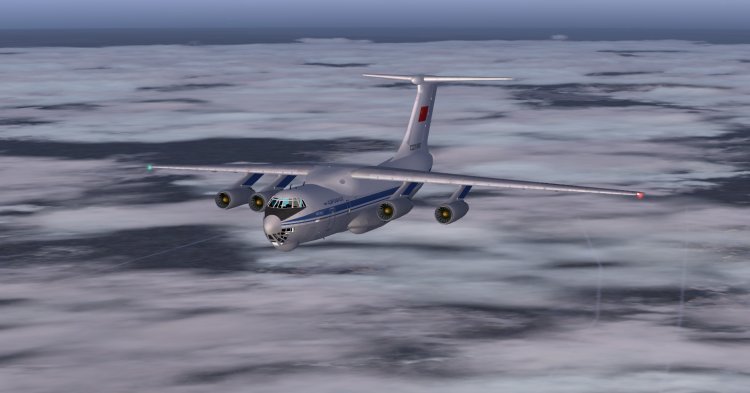
Veteran military transport aircraft. This craft was created under FS2004 and FSX adapted for aviation enthusiasts symmetry, for which he thanks a lot.
→ Size:
25 MB
→ Date:
15 years ago (29.01.2011 17:43)
→ Author:
Георгий Сухих
→ Approved by moderator:
Tim24
→ License:
Freeware - Free version, Do Not Redistribute
→ Downloaded:
24604 time(s)