Skysoft Simulation ZSOF - Hefei Luogang Int'l Просмотр ZIP-архива
Readme-ENU.txt
Welcome to install Skysoft Simulation ZSOF 2011

This readme contains FAQs in installing and uninstalling.


Installation:

The install wizard will automatically search the flight simulation folder. If the search was not successful, the install wizard will prompt for you and you have to select the folder manually.

Once the prompt occurred, please select the FLIGHT SIMULATION INSTALLATION folder.

Install this add-on will also add the configuration below to your scenery.cfg in flight simulation installation folder.

[Area.X]
Title = Skysoft Simulation - ZSOF
Local = Skysoft Simulation\ZSOF - Hefei Luogang Int'l
Active = TRUE
Layer = X
Required = FALSE

Uninstall:

X in this section stands for the sequence of this plugin. If you are going to uninstall this add-on, please change the configuration Active = TRUE to Active = FALSE.


*** NOTE ***
If the installation failed to add scenery configure to your scenery.cfg, please add them manually.

You may open <FS9 Installation Folder>\Scenery.cfg, then add following line to the end of file.


[Area.X]
Title = Skysoft Simulation - ZSOF
Local = Skysoft Simulation\ZSOF - Hefei Luogang Int'l
Active = TRUE
Layer = X
Required = FALSE

Please change the letter 'X' to proper number that exists in scenery.cfg file.


Version History:

------------------------------
Version 1.0 - 2011.09.28
------------------------------
Scenery published.
40815-zsof-2011-setup.zip
| Имя файла | Дата | Размер |
|---|---|---|
| Readme-ENU.txt | 28.09.2011 16:58 | 1 KB |
| Readme-CHS.txt | 28.09.2011 16:56 | 1 KB |
| setup.exe | 28.09.2011 22:54 | 61 MB |
| avsim_su.diz | 29.09.2011 05:09 | 406 B |
| Итого: | 61 MB | |
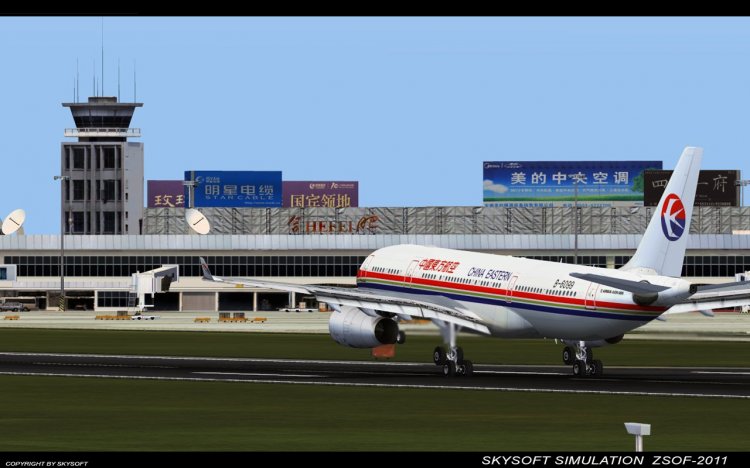
Hefei Luogang Int’l (ICAO:ZSOF, IATA:HFE) is a main airport of Anhui Province, PR China. It's located at Luogang County, Hefei City.
The airport is a hub of Anhui Province. Completed in year 1977, it provides a 3000-meter runway with 60 meter wide. With the completion of the expansion project which finished in 2009, the airport provides a capacity as much as 1.5 million passengers.
The airport is a hub of Anhui Province. Completed in year 1977, it provides a 3000-meter runway with 60 meter wide. With the completion of the expansion project which finished in 2009, the airport provides a capacity as much as 1.5 million passengers.
→ Size:
61 MB
→ Date:
14 years ago (29.09.2011 01:09)
→ Author:
Skysoft Simulation
→ Approved by moderator:
SLAVJAN
→ License:
License file included in archive
→ Downloaded:
2160 time(s)