Curtiss C-46 Просмотр ZIP-архива
C46 v2 Readme.txt
*******************************
Curtiss C-46 v2
*******************************

Version 2  3/2011  for FS9 and FSX

Original Aircraft by Libardo Guzman Garcнa, with assistance from Greg Pepper and Tom Gibson
Version 2 modifications by Tom Gibson
Other credits - see below.

This is a modification of Libardo's great C-46 version 1.

Updates:

1.  VC panel is now in 2 sections, and is sharper.  Yes, the overhead panel is still blurry - I did the best I could.  There are two eyepoint positions in the aircraft.cfg files - sitting further aft to better see the panel (default) or close to the panel (probably more realistic).  To switch just swap the // at the beginning of the lines.

2.  VC levers now operate properly, and include mixture and cowl flap levers

3.  Door Controls:
Passenger Door:  SHIFT + E
Underfloor and Cockpit Cargo Door:  SHIFT + E, then 2
Main Cargo Doors:  SHIFT + E, then 3
Right Hand Cargo Door: SHIFT + E, then 4
Crew's movements can be seen in exterior view by operating rudder and landing gear, and in the VC with the landing gear.

4.  VC without crew is available in the model.nocrew folder in the GA C46 folder.  If you wish to use it for the other versions copy this folder to the GA C46 MIL and GA C46 SA folders as well.  Then use model=nocrew in the aircraft.cfg file.  This version has 3 bladed props.

5.  Versions with 4 bladed props (both VC crew and without crew) are available in the GA C46 MIL folder (model.4blade and model.4blade_nocrew folders).  If you wish to use them for the other versions copy these folders to the GA C46 and/or GA C46 SA folders.  Use model=4blade and model=4blade_nocrew in the aircraft.cfg file(s).  There is a replacement 4 bladed blurred prop texture in the texture.USAAF folder.  Copy this BMP file into any livery's texture folder that you have specified a 4 bladed prop, overwriting the 3 bladed prop texture.

6.  Views from numeric keypad (FS2004 only, with numlock on) include:
Ctrl Shift 1/3:  Cockpit views back along the fuselage
Ctrl Shift 7/9:  Passenger wing views

7.  Updated Flight Dynamics.  There are now 3 separate versions of the plane:
    a.  GA C46 folder:  Classic era US and European version (no high blower)
    b.  GA C46 MIL folder:  WWII era USAAF version (vintage panel, high blower, higher weights)
    c.  GA C46 SA folder:  Modern era South American version (high blower, strobes, etc.) Modern panel available.

NOTE:  Please add repaints to the proper folder.

8.  There is a modern panel available for those who wish to fly in modern times (typically in South America).  This panel.cfg file is by Pete Ham.  Please refer to the readme.txt file in the GA C46 SA/panel.modern file for further installation instructions, including several other downloads to get the gauges.

9.  You can load cargo into the fuselage hold, if you wish.  Use the Tailhook key to load the cargo.
    You must have a key assigned for the tailhook, however:
      a.  In FS2004 go to Options/Controls/Assignments
      b.  Scroll down to Tailhook up/down
      c.  If there is a keystroke already listed there, use it.  Click Cancel.
      d.  If not, click the line to highlight it.
      e.  Click Change Assignment.  Press the keystroke you want to use.  I use Shift T.  Note if you use it for something else.
      f.  Once you have the key you want entered, click OK, and OK.

10.  There are exhaust flames when the throttle is increased - blue for medium throttle, orange/red for high throttle.  They will also show up when looking back at the cargo hold from the cockpit - I don't know how to fix that.

11.  The main wheels have been enlarged slightly.

12.  NOTE:  The WWII era Sperry autopilot in the USAAF version (GA C46 MIL folder) does *not* have an adjustable heading hold (as in real life).  You must turn off the AP, turn to the new heading, and turn the AP back on.

13.  OPTIONAL (FS2004 ONLY): The panels are set up for the Radio Range 4.1 program.  If you already have RR4.1 installed, you can remove the // in front of the RR41 gauges in the plane's panel.cfg file to activate them.  They are located in two places, the Window00 and the VCockpit02 sections.  You can download RR4.1 from:  http://www.flightsim.com/kdl.php?fid=152194

14.  OPTIONAL (FS2004 ONLY):  You can activate the supercharger switches in the MIL and SA versions (ONLY), forcing you to throw them to HIGH position after you run out of MAP while you are climbing (or taking off at a high altitude airport).  Do NOT try to activate the base GA C46 aircraft, since high blowers were disconnected in that case.  NOTE:  This will not give you any more power at altitude, just require you to throw these switches at high altitudes to get that power back.

In the aircraft.cfg files inside the GA C46 MIL and GA C46 SA aircraft folders you will find:

critical_altitude=8500	 //High blowers retained
emergency_boost_type=0
emergency_boost_mp_offset=0.000000
emergency_boost_gain_offset=0.000000
//lines below can be used if supercharger gauge is activated (FS2004 only!)
//critical_altitude=5000
//emergency_boost_type=1
//emergency_boost_mp_offset=0.000000
//emergency_boost_gain_offset=0.300
// make sure to put // in front of the original lines above!

To activate the supercharger switches change this to:

//critical_altitude=8500	 //High blowers retained
//emergency_boost_type=0
//emergency_boost_mp_offset=0.000000
//emergency_boost_gain_offset=0.000000
//lines below can be used if supercharger gauge is activated (FS2004 only!)
critical_altitude=5000
emergency_boost_type=1
emergency_boost_mp_offset=0.000000
emergency_boost_gain_offset=0.300
// make sure to put // in front of the original lines above!

Note:  this might work in FSX without Acceleration installed, but has not been tested.

------------------------
This plane will steer with your yoke. If you want to have a non-steerable castoring tailwheel, change the number 55 to 180 in this line of the aircraft.cfg file:

[contact points]

point.0 = 1, -39.9,  0.00, -3.7, 1200, 0, 1.1,55, 0.5  , 5.28, 0.5 , 10, 10, 0, 131,131

There is a tailwheel lock switch on the main panel.

There are two types of blurred prop textures included.  The one by BananaBob is used in the Aerocondor and USAAF liveries.  The original one by Greg Pepper is a "smoother" disk, and is in the other liveries.  If you prefer one over the other, copy the correct spin_prop.bmp file into the other texture folders.  Note that the 4 bladed blurred prop texture (see above) is a modified version of BananaBob's.

Mark Cranston's sounds (by Aeromusica) included for this model.  There can be a problem in FSX where the sound "sticks" in full throttle (FSX bug, apparently).  Just increase throttle to max and back to fix that (until you change views again).

Hope you will enjoy it

INSTALLATION

WARNING!  This file will overwrite version 1 of the C-46.  See step 1 below.

NOTE!  This panel expects the default Douglas DC-3 (and default Lockheed Vega in FS9) to be present in their default locations.  You will have missing gauges if they are not there.

1.  Using My Computer or Windows Explorer, examine your FS2004/Aircraft (or FSX/SimObjects/Airplanes) folder for a folder called GA C46.  If you find it, rename the aircraft.cfg file inside it to aircraft_old.cfg.  If you have added any extra liveries, you will use this backup file to add the extra  livery sections to the new aircraft.cfg file.  YOU WILL LOSE YOUR ADDED LIVERY SECTIONS (if any) IF YOU DO NOT BACK UP THIS FILE.

2.  Double click this zip file archive to open it.  You will find this text file and a file called Setup.exe.

3.  Double click the Setup.exe file to start the installation.  Press the Run button at the warning screen.  If it doesn't find your main FS2004 folder automatically, press the ... button and browse to it.  If you are installing into FSX it will NOT find your main FSX folder.  Press the ... button and browse to it.  If you prefer, press the ... button and install to a temporary folder.  Then copy the files and folders manually into FS.  Follow the instructions on the screen to finish the installation.

4.  If you are installing into FSX, copy the folders now found in the FSX/Aircraft folder into the FSX/SimObjects/Airplanes folder.

5.  If you are installing into FSX, copy the panel.cfg files found in the FSX Panels folder into their proper folders inside your SimObjects/Airplanes folder.

6.  If you had other repaints installed in version 1, copy the extra fltsim (livery) sections from the old aircraft_orig.cfg file into the new ones.  Renumber them if necessary into numerical order.

NOTE:  Please add repaints to the proper folder.  There are now 3 separate versions of the plane:
    a.  GA C46 folder:  Classic era US and European version (no high blower)
    b.  GA C46 MIL folder:  WWII era USAAF version (vintage panel, high blower, higher weights)
    c.  GA C46 SA folder:  Modern era South American version (high blower, strobes, etc.)

Also edit them as follows:

[fltsim.0]
title = C46A Flying Tiger
sim = C-46A  <-----------------change this to match the first livery listed (default livery)
model =      <-----------------see above in Modifications for different versions (no VC crew, 4 bladed props)
panel =      <-----------------see above in Modifications for a modern panel
sound =
texture = Flying Tigers  <--------------should match the name of the livery's texture folder (i.e. texture.Flying Tigers)
kb_checklists =  <---------------------should be blank
kb_reference = C-46A_FAA_Ref  <-----------change this to match the first livery listed (default livery)
atc_id_enable = 1
atc_id = N67981
atc_id_color = 0x00000000
atc_id_font = Verdana, -11, 1, 600, 0
atc_flight_number = 7981
atc_airline =Tiger
atc_heavy = 0
atc_parking_types =CARGO
atc_parking_code =FTR
ui_manufacturer = "Curtiss"
ui_type = "C-46A Commando"
ui_variation = "Flying Tiger"
description=US/Europe version without high speed blowers
prop_anim_ratio=0.9

CREDITS

VISUAL MODEL:  Master work: Libardo Guzman, Program support: Luis Felipe Abad, Details and instructions: Tom Gibson and Greg Pepper  Version 2 modifications:  Tom Gibson

TEXTURES.

AEROCONODOR: Main work by Greg Pepper . Crew and other small work by Libardo Guzman and Camilo Luengas, who made some reworks for this livery.  Blurred prop by BananaBob.

BASE MODEL: Main work by Greg Pepper. Repaint by LIBARDO GUZMAN.

FLYING TIGERS: Main work by Greg Pepper. Repaint by LIBARDO GUZMAN

AERONORTE: Main work by Greg Pepper. Repaint by LIBARDO GUZMAN

EVERTS AIR FUEL:  Repaint by Brian Gladden

USAAF repaint and texture improvements by Cliff Presley.  Blurred prop by BananaBob.

ANIMATION. Libardo Guzman, Tom Gibson and Greg Pepper.

PANEL AND V.C. PANEL: Libardo Guzman and Willy McCoy.  Version 2 mods by Tom Gibson, modern cfg file by Pete Ham

Some GAUGES by Doug Dawson

-------------------------------------------------
COPYRIGHT 2011 BY LIBARDO GUZMAN, GREG PEPPER, AND TOM GIBSON, ALL RIGHTS RESERVED

REPAINTS:  REPAINTS ARE ALLOWED WITHOUT FURTHER PERMISSION, BUT WE PREFER THAT THEY ONLY BE UPLOADED TO TOTALLY FREE SITES - I.E. NO CHARGES OR SUBSCRIPTION FEES FOR INCREASED ACCESS.  HOWEVER, IF YOU REPAINT THE PLANE YOU MUST CREDIT ALL OF THE ORIGINAL AUTHORS IN YOUR TEXT FILE AND INCLUDE THIS TEXT FILE.  YOU MUST ALSO REMOVE ANY EMAIL ADDRESSES FOUND IN THIS FILE, AND NOT INCLUDE THEM IN YOUR FILE.  WE DO NOT SUPPORT REPAINTS.  PLEASE INCLUDE YOUR EMAIL ADDRESS IN YOUR TEXT FILE.

THIS AIRPLANE IS THE PROPERTY OF THE AUTHOR, AND CANNOT BE RE-SOLD OR PACKAGED WITH ANY PRODUCT FOR SALE, WITHOUT THE EXPRESS WRITTEN PERMISSION OF THE AUTHORS.  THIS INCLUDES "FREE" CD COMPILATIONS WITH A CHARGE OF ANY KIND.  THIS IS FREEWARE!!

THIS FILE ARCHIVE OR ANY REPAINTS MUST NOT BE UPLOADED TO A SITE OR LOCATION THAT CLAIMS ANY SORT OF COPYRIGHT ON THE FILE; COPYRIGHT REMAINS WITH THE ORIGINAL AUTHOR.  UPLOADING OF THIS FILE TO SUCH A SITE DOES NOT CONSTITUTE PERMISSION OF THE AUTHORS TO VIOLATE THESE TERMS BY THAT SITE.

THIS FILE ARCHIVE MUST REMAIN INTACT; YOU MAY NOT REMOVE OR UPLOAD PARTS OF THIS ARCHIVE.  THIS ENTIRE TEXT FILE MUST BE INCLUDED IN ANY DISTRIBUTION.

THE AUTHORS ARE NOT LIABLE FOR ANY DAMAGE THAT YOU MIGHT INCUR AS A RESULT OF USING THESE PRODUCTS.  YOU ASSUME THE RISK OF USE.

Libardo Guzman Garcнa
Tom Gibson
[email protected]
47527-gac46v2.zip
| Имя файла | Дата | Размер |
|---|---|---|
| C46 v2 Readme.txt | 30.03.2011 12:27 | 12 KB |
| FSX Panels/GA C46 MIL/ | 29.03.2011 12:42 | |
| FSX Panels/GA C46 MIL/panel/ | 29.03.2011 12:42 | |
| FSX Panels/GA C46 MIL/panel/Panel.cfg | 04.04.2011 01:24 | 14 KB |
| FSX Panels/GA C46/ | 29.03.2011 12:42 | |
| FSX Panels/GA C46/panel/ | 29.03.2011 12:42 | |
| FSX Panels/GA C46/panel/Panel.cfg | 01.04.2011 13:29 | 15 KB |
| Setup.exe | 04.04.2011 12:00 | 24 MB |
| c46_thumb.gif | 04.04.2011 11:43 | 8 KB |
| avsim_su.diz | 19.12.2012 02:21 | 406 B |
| Итого: | 24 MB | |
Curtiss C-46
| Rating: 4!
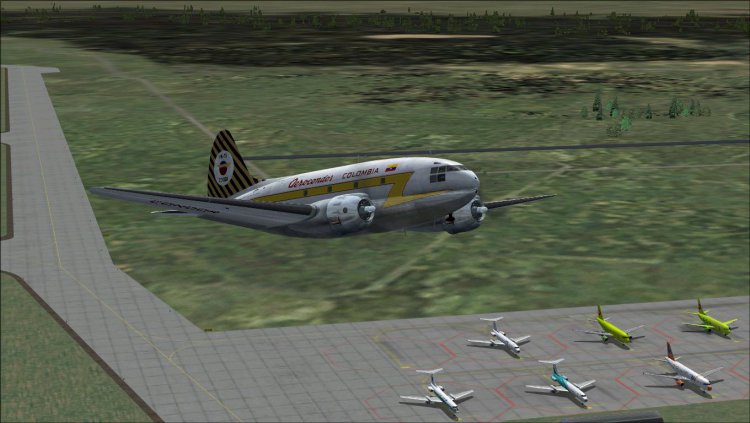
Curtiss C-46.
→ Size:
24 MB
→ Date:
13 years ago (18.12.2012 21:26)
→ Author:
Aircraft by Libardo Guzman Garcнa, with assistance from Greg Pepper and Tom Gibson
→ Approved by moderator:
RAID
→ License:
Freeware - Free version, Unlimited Distribution
→ Downloaded:
1230 time(s)