Boeing 767-300 Tarom Просмотр ZIP-архива
OS763V4_TAROM/FAQ/faq.html
<!DOCTYPE HTML PUBLIC "-//W3C//DTD HTML 4.01 Transitional//EN">

<HTML><HEAD>

<TITLE>FAQ Project Opensky 767-300v4</TITLE>

</HEAD>
<BODY BGCOLOR="#FFFFFF" LINK=#000000 VLINK=#000000>
<center>
<img src="image/title.bmp">
</center>
<br>
<br>

  <TABLE border=2 bgcolor=#9DB6E0 CELLPADDING="2" ALIGN="Center">
    <TR>
      <TD width=700><font size=3 face="Times New Roman" color=#000000>

Here you can find alot answers to questions about the POSKY 767v4. Please read this document , if you still dont have your answer, please search on our
<a href="http://www.projectopensky.com" target="_new"> forum. </a><br>
<br>

<a href="#keys">1. General Commands</a><br>
<a href="#load">2. Texture Load time</a><br>
<a href="#transparant">3. Transparant texture</a><br>
<a href="#cockpit">4. Virtual Cockpit</a><br>
<a href="#wingview">5. Wingview</a><br>
<a href="#repaint">6. Repainting</a><br>
<a href="#merge">7. Merge panel</a><br>
<a href="#paint">8. Painters</a><br>

   </font></TD>
    </TR>
     </TABLE>
      <TABLE CELLPADDING="0" ALIGN="Center">
       <TR>
        <TD width=700><p align=center><br><br></TD>
         </TR>
          <TR>

<a name="keys"></a>
<TABLE border=2 bgcolor=#9DB6E0 CELLPADDING="2" ALIGN="Center">
 <TR>
  <TD width=700><font size=3 face="Times New Roman" color=#000000>

<B>General Commands</B>
<br><br>
The following key assignments are for our model: <br>
<br>
PAX doors:	 	Shift + E    <br>
Cargo doors:	 	Shift + E (both pax and cargo will open)  <br>
APU:			Tailhook  <br>
Cockpit window:	        Shift + E + 2  <br>
Big cargo door: 	Shift + E (cargo models only)  <br>
RAT:			Concorde nose command  <br>
Pushbacktruck:          Wingfold command <br><br>

If shift + E + 2 doesn’t work, than make sure you are doing it right. First press
shift+E, than release them, and press 2. Dont hurry, but dont be slow either.


   </font></TD>
    </TR>
     </TABLE>
      <TABLE CELLPADDING="0" ALIGN="Center">
       <TR>
        <TD width=700><p align=center><br><br></TD>
         </TR>
          <TR>

<TABLE border=2 bgcolor=#9DB6E0 CELLPADDING="2" ALIGN="Center">
 <TR>
  <TD width=700><font size=3 face="Times New Roman" color=#000000>


<a name="load"></a>
<B>Texture load time</B>
<br><br>
Our textures are in 32 bit, which gives us the highest quality. However this also results in larger textures. If your pc cannot handle them, our suggestion is that you convert the textures to DXT3 format. How? We have a tutorial at our <a href="http://forum.projectopensky.com/index.php?s=ea0465371394ab095147dd49663cb4f1&showforum=27" target="_new"> Painters Learning Center </a>.


   </font></TD>
    </TR>
     </TABLE>
      <TABLE CELLPADDING="0" ALIGN="Center">
       <TR>
        <TD width=700><p align=center><br><br></TD>
         </TR>
          <TR>


<a name="transparant"></a>
<TABLE border=2 bgcolor=#9DB6E0 CELLPADDING="2" ALIGN="Center">
 <TR>
  <TD width=700><font size=3 face="Times New Roman" color=#000000>

<B>Transparant textures</B>
<br><br>
If you have the problem of transparant textures at nighttime, you need to check if the certain part has a nightmap. Go into the texture folder, and check if there is an _l texture for every _t texture. _l means night, the _t is for daylight. If the _l texture is missing, make a black texture of exactly the same size (most likely 1024x1024 pixels) and name it after the _t texture, but the _l extension instead of the _t extension.


   </font></TD>
    </TR>
     </TABLE>
      <TABLE CELLPADDING="0" ALIGN="Center">
       <TR>
        <TD width=700><p align=center><br><br></TD>
         </TR>
          <TR>


<a name="cockpit"></a>
<TABLE border=2 bgcolor=#9DB6E0 CELLPADDING="2" ALIGN="Center">
 <TR>
  <TD width=700><font size=3 face="Times New Roman" color=#000000>

<B>Virtual cockpit</B>
<br><br>
The 767v4 will first be released without virtual cockpit. Simply because she isnt done yet. The virtual cockpit will be added later.


   </font></TD>
    </TR>
     </TABLE>
      <TABLE CELLPADDING="0" ALIGN="Center">
       <TR>
        <TD width=700><p align=center><br><br></TD>
         </TR>
          <TR>


<a name="wingview"></a>
<TABLE border=2 bgcolor=#9DB6E0 CELLPADDING="2" ALIGN="Center">
 <TR>
  <TD width=700><font size=3 face="Times New Roman" color=#000000>

<B>Wingview</B>
<br><br>
The wingview is integrated in the model. If you do not have the wingview yet, or the opposite, you want to remove it, go to the aircrafts folder. Look for the Aircraft.cfg, open it with notepad and look for the lines 'model='. if the wv extensions is added than the wingview model will be displayed. If not, than no wingview will be displayed. If this technique doesn't work, please check if there is a folder named: 'model.wv", this folder is needed for the wingview model to display!

   </font></TD>
    </TR>
     </TABLE>
      <TABLE CELLPADDING="0" ALIGN="Center">
       <TR>
        <TD width=700><p align=center><br><br></TD>
         </TR>
          <TR>


<a name="repaint"></a>
<TABLE border=2 bgcolor=#9DB6E0 CELLPADDING="2" ALIGN="Center">
 <TR>
  <TD width=700><font size=3 face="Times New Roman" color=#000000>

<B>Repaints</B>
<br><br>
You are allowed to repaint our models. However, when you dont use the paint kit, make sure you have all permissions for use of textures made by someone else. If you do use the paint kit, please post a screenshot on our repainting discussion forum. Whatever you paint, this model needs to stay freeware, and may not be used in an package where money is asked for. Also all original documents need to be included.

   </font></TD>
    </TR>
     </TABLE>
      <TABLE CELLPADDING="0" ALIGN="Center">
       <TR>
        <TD width=700><p align=center><br><br></TD>
         </TR>
          <TR>


<a name="merge"></a>
<TABLE border=2 bgcolor=#9DB6E0 CELLPADDING="2" ALIGN="Center">
 <TR>
  <TD width=700><font size=3 face="Times New Roman" color=#000000>

<B>Merge of panels</B>
<br><br>
We cannot support merges with other panels, normally it is more usefull to ask the designer of the panel.<br>
For a merge with the LDS 767, again we cannot support it. But our suggestion is to search with google for a merge.

   </font></TD>
    </TR>
     </TABLE>
      <TABLE CELLPADDING="0" ALIGN="Center">
       <TR>
        <TD width=700><p align=center><br><br></TD>
         </TR>
          <TR>


<a name="paint"></a>
<TABLE border=2 bgcolor=#9DB6E0 CELLPADDING="2" ALIGN="Center">
 <TR>
  <TD width=700><font size=3 face="Times New Roman" color=#000000>

<B>Painting</B>
<br><br>
We try to make our models repaint friendly. However sometimes it still may be hard to repaint the paint kit. A few tips: <br>
1. Dont forget the flag, which you see when you use the wingfold command<br>
2. Dont forget the "wingconnextion" part, which is painted in the fuselage colors most of the times! <br>
3. Dont forget the flight attendant! <br>
<br>
Have fun!


   </font></TD>
    </TR>
     </TABLE>
      <TABLE CELLPADDING="0" ALIGN="Center">
       <TR>
        <TD width=700><p align=center><br><br></TD>
         </TR>
          <TR>


<BR>

<BR>
<p align=center>
<B>Copyrighted by Project OpenSky</B>
</p>
</BODY></HTML>
35418-OS763V4-TAROM.zip
| Имя файла | Дата | Размер |
|---|---|---|
| OS763V4_TAROM/ | 16.01.2011 10:44 | |
| OS763V4_TAROM/767-300ER-GE-CF6-80C2.air | 08.08.2007 20:30 | 9 KB |
| OS763V4_TAROM/Aircraft.cfg | 20.11.2010 18:10 | 24 KB |
| OS763V4_TAROM/Effects.zip | 08.08.2007 20:30 | 15 KB |
| OS763V4_TAROM/FAQ/ | 16.01.2011 10:44 | |
| OS763V4_TAROM/FAQ/Desktop.ini | 08.08.2007 20:30 | 77 B |
| OS763V4_TAROM/FAQ/faq.html | 08.08.2007 20:30 | 7 KB |
| OS763V4_TAROM/FAQ/image/ | 16.01.2011 10:44 | |
| OS763V4_TAROM/FAQ/image/Thumbs.db | 08.08.2007 20:30 | 4 KB |
| OS763V4_TAROM/FAQ/image/title.bmp | 08.08.2007 20:30 | 43 KB |
| OS763V4_TAROM/model.nowv/ | 16.01.2011 10:44 | |
| OS763V4_TAROM/model.nowv/Model.cfg | 08.08.2007 20:30 | 31 B |
| OS763V4_TAROM/model.nowv/OS763_GE_large.mdl | 08.08.2007 20:30 | 2 MB |
| OS763V4_TAROM/model.wv/ | 16.01.2011 10:44 | |
| OS763V4_TAROM/model.wv/Model.cfg | 08.08.2007 20:30 | 34 B |
| OS763V4_TAROM/model.wv/OS763_GE_large_wv.mdl | 08.08.2007 20:30 | 2 MB |
| OS763V4_TAROM/panel/ | 16.01.2011 10:44 | |
| OS763V4_TAROM/panel/panel.cfg | 08.08.2007 20:30 | 30 B |
| OS763V4_TAROM/panel/Thumbs.db | 08.08.2007 20:30 | 47 KB |
| OS763V4_TAROM/readme.txt | 08.08.2007 20:32 | 2 KB |
| OS763V4_TAROM/sound/ | 16.01.2011 10:44 | |
| OS763V4_TAROM/sound/sound.cfg | 08.08.2007 20:30 | 30 B |
| OS763V4_TAROM/texture.tarom/ | 16.01.2011 10:44 | |
| OS763V4_TAROM/texture.tarom/antenna.bmp | 08.08.2007 23:30 | 256 KB |
| OS763V4_TAROM/texture.tarom/os767v4fuse1_l.bmp | 09.08.2007 02:14 | 1 MB |
| OS763V4_TAROM/texture.tarom/os767v4fuse1_t.bmp | 08.08.2007 22:04 | 4 MB |
| OS763V4_TAROM/texture.tarom/os767v4fuse2_l.bmp | 09.08.2007 02:17 | 1 MB |
| OS763V4_TAROM/texture.tarom/os767v4fuse2_t.bmp | 08.08.2007 23:00 | 4 MB |
| OS763V4_TAROM/texture.tarom/os767v4gear_l.bmp | 08.08.2007 20:30 | 64 KB |
| OS763V4_TAROM/texture.tarom/os767v4gear_t.bmp | 08.08.2007 20:30 | 4 MB |
| OS763V4_TAROM/texture.tarom/os767v4ge_l.bmp | 08.08.2007 20:30 | 64 KB |
| OS763V4_TAROM/texture.tarom/os767v4ge_t.bmp | 08.08.2007 23:19 | 4 MB |
| OS763V4_TAROM/texture.tarom/os767v4interior_l.bmp | 08.08.2007 20:30 | 64 KB |
| OS763V4_TAROM/texture.tarom/os767v4interior_t.bmp | 08.08.2007 20:30 | 4 MB |
| OS763V4_TAROM/texture.tarom/os767v4lwing_l.bmp | 08.08.2007 20:30 | 256 KB |
| OS763V4_TAROM/texture.tarom/os767v4lwing_t.bmp | 08.08.2007 23:21 | 4 MB |
| OS763V4_TAROM/texture.tarom/os767v4rwing_l.bmp | 08.08.2007 20:30 | 256 KB |
| OS763V4_TAROM/texture.tarom/os767v4rwing_t.bmp | 08.08.2007 23:22 | 4 MB |
| OS763V4_TAROM/texture.tarom/Os_PTC1_l.BMP | 08.08.2007 20:30 | 1 MB |
| OS763V4_TAROM/texture.tarom/Os_PTC1_t.bmp | 08.08.2007 23:28 | 1 MB |
| OS763V4_TAROM/texture.tarom/Thumbs.db | 08.08.2007 20:30 | 173 KB |
| avsim_su.diz | 16.01.2011 14:50 | 406 B |
| Итого: | 37 MB | |
Boeing 767-300 Tarom
| Rating: 4.5!
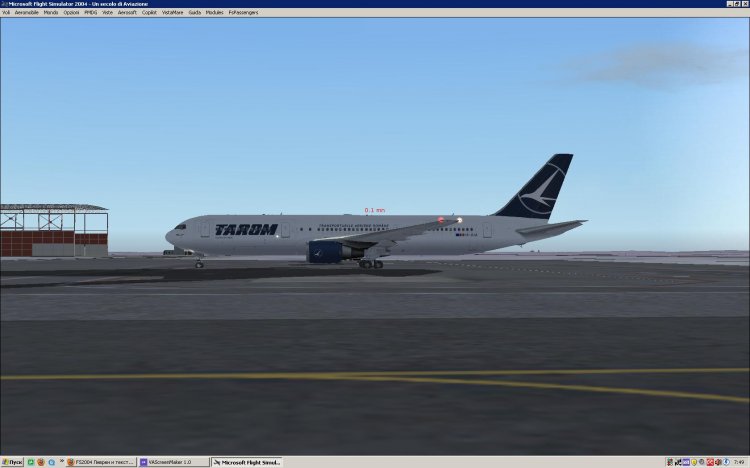
Boeing 767-300 Tarom
→ Size:
9 MB
→ Date:
15 years ago (16.01.2011 14:18)
→ Author:
MLD101
→ Approved by moderator:
Tim24
→ License:
Freeware - Free version, Unlimited Distribution
→ Downloaded:
1414 time(s)