Panel F14B Просмотр ZIP-архива
se.f14bv2/Readme.txt
FS2004 F-14B Panel and FDE package ver 2.
This package upgrades Dino Cattaneo's F14B model for FS2004.
The panel features Heads Up, Heads Down and RIO views with catapult & arrestor cables control.
Uses a custom FSNavigator interface for IFR, Tactical, and Aircraft Carrier Autoland.
The package Includes Fuel Computer, Apollo GPS, TCAS Radar, TCAS HUD, Meatball HUD, Mini Panel, and GPWS pull-up Warnings.
All HUD funtions work togeather with collective intigration.

The F-14B FDE is refit from my previous F-14A FDE that was with Dino Cattaneo's visual model for FS2002.
The new FDE features real world F-14B specifications, editable ordinance weights, and has all specifications listed in the FS09 Kneeboard. The autopilot is updated for fighter models with tighter turns, and minimal overshoot. The FDE also includes the latest effects for the model. Credit is given to many authors who have taken an interest in fighter aircraft.

By John J Schumacher / Schu Engineering 2/16/04

____________________________________________________________________________
Usage Notes

Gauge ID :

Be sure to turn Tool Tips on in your FS2004 general options menu.
This will identify most of the gauges.
Documents for Flight Deck intigration, and other gauges are provided in docs.zip.

Transparent Hotspots :

The HUD's Pitch Ladder, Brightness, and Meatball displays are selected by red button controls to the right of the HUD.
The Canopy controls are over the canapoy switch images on the right of all 3 panels.

FSNavigator :

The FSNavigator control switches are in the Heads Down and RIO panels with active lights on all 3 panels in the autopilot section. The FSNavigator HSI and 3 way GPS switch can be used in FS2004 GPS mode, and FSNavigator modes.
They will act as dumb switches if FSNavigator is not present. In my personal model. I have Mode 1 set for lateral flight only. I have Mode 2 set to override all other funtions and operate airspeed, with lateral and verticle control.
To program carrier landings you should scecify a waypoint for the location of the aresstor cables set to 70ft.

Air to Air, and Air to Ground Visual ID :

In addition to an aircraft labels switch that toggles the ATC ID of AI aircraft, I have included a chase view switch that opens a spot view window that can be moved to anywhere on the panel. Click on the new window and use CTR W to toggle AI aircraft. Also when in Multi Player or flying online, you can use multiplayer commands to show MP aircraft in the same window. Use the right mouse key to select map and other views. Both of these switches are located above the HUD.

Trade Off - Ordinance vs Sonic Effects :

I have included ordinance in the Smoke Section of the aircraft.cfg file, but have it turned off by default ( // ).
You will have to turn off (,) se.f14!SonicBoomControl in the panel.cfg file in order to gain back control of the smoke switch (I) that fires the ordinance. The aircraft.cfg contains notes for this option as well.
The effects files for both options are included with the installation.


_____________________________________________________________________________

Install :

 1. Install the latest version of FSUIPC from - http://www.schiratti.com/files/dowson/FSUIPC.zip

 2. Install Dino Cattaneo's F-14B for FS2004 (No need to install the gauges).

 3. Unzip this package (se.f14bv2.zip) to a new folder on your desktop.

 4. Unzip fs9.zip to your main FS2004 folder.

 5. Unzip fde.zip to your F-14 main folder.

 6. Unzip panel.zip to your F-14 panel folder.

 7. Unzip gauges.zip to your FS2004\gauges folder.

 8. Unzip effects.zip to your FS2004\effects folder.

 9. Unzip sound.zip to your main FS2004\sound folder.

10. Tip : (Optional)

>> Edit the fs9.cfg file to read:

(CONTROLS)
KBDAIL=46
KBDELEV=46
KBDRUD=64
PAN_RATE=400 <----------- incrrease it to 950


11. Open docs.zip and look over the documents for various systems.


____________________________________________________________________________

Support :

[email protected]

All emails asking for support should include in the subject (Yes I have read the readme file).
I do not mean to insult anybody's inteligence but, I do get emails from people who should have read the docs.
This will also help me to sort any emails that might appear in my spam mail box.

Thank You
____________________________________________________________________________


COPYRIGHT NOTICE

Please remember : this work is FREEWARE and all restrictions of distributing
it in full or in part, apply. Parts of it may be used for creating FREEWARE products only.
In this case, unless listed as Public Domain, permission must be seeked from the respective authors:

F-14B FDE & 2D Panel Package
John J Schumacher 2/16/04

Special Thanks to the following authors who have contributed to the F-14 project.


M.A.T.S.
for
Panel Images & FDE Specifications


Chris Willis
for
FS9.cfg tips


Jeff Dobbing
for
Original Gmax F-14 geometry

Dino Cattaneo
for
F-14 Package, V-Cockpit & Textures


Doug Dawson & Rob Barengdregt
for
Carrier Intigration Gauges
Meatball HUD
XML Gauges & Special Effects


Keith Giveans
for
Apollo GPS


Nick Needham & Jan Rosenberg
for
Special Effects


Aaron Swindle
for
Sound Effects


Bluesky
for
GaugeSound.dll


Chris Trotter
for
Ordinance Effects


Flight Sim Developers
for
fsd_egt 1
fsd_egt 2
fsd_f84.tc
fsd_fuelflow 1
fsd_fuelflow 2
fsd_generic.flaps
fsd_rf4.adi
FSD_RF4.Alt
FSD_RF4.gmeter
FSD_RF4.Hsi
FSD_RF4.radalt
FSD_RF4.RPM.1
FSD_RF4.RPM.2
FSD_RF4.SAdi
FSD_RF4.Vsi
FSD_Tdo.Asi
fsd_tdo.reheat.1
fsd_tdo.reheat.2
fsd_warn.dh
fsd_warn.gear
fsd_warn.overspeed
fsd_warn.parkbrake
fsd_warn.stall
nl_fsd_f84.clock


Peter Beddig
for
se.clr.fsnav.hold (Modified)
se.clr.fsnav.light (Modified)
se.clr.fsnav.mode1 (Modified)
se.clr.fsnav.mode2 (Modified)
se.clr.fsnav.next (Modified)
se.clr.fsnav.plan (Modified)
se.clr.fsnav.prev (Modified)
FSNAV.EHSI


Eric Marciano
for
F16 TCAS Radar & TCAS HUD


Richard Probst
for
rp_trim


Robert K. Guy
for
RKG_buttons


Atsushi Terui
for
Fuel XML Code


Kari Virtanen
for
Mirror XML code

Chuck Dome
for
fighter gauges (Modified)


Tony D'Ambrosio
for
se.ta.clr.fmc (Modified)


Jorge Sales
for
cpt.toggles


Tom Corson & Roy Chaffin
for
Fuel Status Computer


Roy Chaffin
for
JS-Switches


Wade C. Chafe
for
737.WCGPWS


Tony Bolton
for
TAB-SPOILER (Modified)


Erasmo Mazzeo
for
MILITARY.CONFIG


Melville Consulting
for
aa5_oat


Fernando Almeida
for
MACH3D


FPDA
for
FPDA.FLSW
fpda.fire


Dragon Flight Design
for
Generator Lights (Modified)
se.f14bv2.zip
| Имя файла | Дата | Размер |
|---|---|---|
| se.f14bv2/ | 16.02.2004 06:59 | |
| se.f14bv2/docs.zip | 15.02.2004 18:41 | 761 KB |
| se.f14bv2/effects.zip | 15.02.2004 18:46 | 12 KB |
| se.f14bv2/fde.zip | 16.02.2004 06:53 | 12 KB |
| se.f14bv2/fs09.zip | 09.02.2004 01:31 | 16 KB |
| se.f14bv2/gauges.zip | 16.02.2004 06:43 | 3 MB |
| se.f14bv2/panel.zip | 16.02.2004 06:59 | 419 KB |
| se.f14bv2/Readme.txt | 16.02.2004 02:41 | 7 KB |
| se.f14bv2/se.f14bv2a.gif | 16.02.2004 02:12 | 114 KB |
| se.f14bv2/se.f14bv2a.jpg | 16.02.2004 02:12 | 53 KB |
| se.f14bv2/se.f14bv2b.jpg | 16.02.2004 02:14 | 57 KB |
| se.f14bv2/se.f14bv2c.jpg | 16.02.2004 02:14 | 52 KB |
| se.f14bv2/se.f14bv2d.jpg | 16.02.2004 02:15 | 22 KB |
| se.f14bv2/sound.zip | 09.02.2004 01:29 | 704 KB |
| avsim_ru.diz | 14.03.2004 00:22 | 382 B |
| Итого: | 5 MB | |
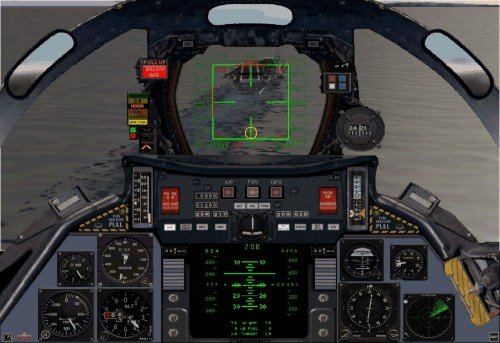
The panel for the aircraft F14B + dynamics in the kit.
→ Size:
5 MB
→ Date:
22 years ago (17.02.2004 10:31)
→ Author:
John J Schumacher
→ License:
Freeware - Free version, Unlimited Distribution
→ Downloaded:
581 time(s)