The loader for PIC767. Version 1.5 Просмотр ZIP-архива
readme.html
<html>
<head>
	<title>Load Manager version 1.5 Readme File</title>
</head>
<body>
<center>
<h3>Данная программа предназначена для имитирования загрузки самолета Boeing 767-300ER PIC.</h3>
</center>
<h4><p align=justify>
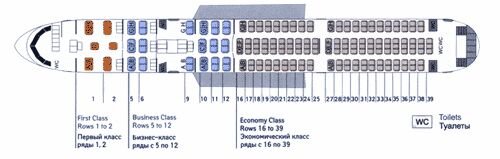
Пользователь может выбрать любое количество пассажиров в любой компоновке.
Пропорционально количеству пассажиров увеличивается и пассажирский багаж из
расчета 20 кг багажа на одного пассажира, который вы можете загрузить.
Например, если у вас 50 пассажиров, то вы не можете загрузить багажа больше чем 1000 килограмм.
Если вы считаете, что на вашем рейсе пассажиры
берут с собой больше чем 20 кг, например, на рейсе Пекин-Москва :), то весь дополнительный
багаж, а также груз вы можете заполнить в пункте Груз. Учитывайте, что самолет рассчитан на
определенную максимальную платную нагрузку, соответственно чем больше мы возьмем  пассажиров
и багажа, тем меньше мы можем загрузить груза и наоборот.
</p>
<p align=justify>
Пункт топливо нужен, для того чтобы пользователь мог
видеть сколько он может максимально залить топлива, чтобы при данной коммерческой загрузке не
превысить максимальный взлётный вес самолета. Как только максимальный взлетный
вес превышен, цифры, показывающие текущий взлётный вес, отображаются красным цветом.</p>
<p align=justify>
Помимо ручной загрузки самолета, можно смоделировать одну из трех версий загрузки самолета<br>
для трёхклассной компоновки :<br>
- почти полный борт (130-197 человек)<br>
- средняя загрузка (70-130 человек)<br>
- полупустой борт (30-70 человек)<br>
<br>
для двухклассной компоновки :<br>
- почти полный борт (150-222 человек)<br>
- средняя загрузка (90-150 человек)<br>
- полупустой борт (60-90 человек).<br><br>
Кнопка Загрузить, активна только когда выбран один из вариантов загрузки. Автоматическая загрузка только
рассаживает пассажиров и грузит пассажирский багаж. Пункт Груз остаётся пустым, заполняйте его по необходимости вручную.
</p>
<p align=justify>
Пользователь может также сохранить результат загрузки самолета в текстовый файл. После нажатия кнопки Сохранить отчет,
в корне программы создается файл report.txt с отчётом, а при существовании файла report.txt, отчет дописывается в конец
файла.
</p>
<p align=justify>
Кнопка Открыть AirCraft.cfg предназначена для того, чтобы пользователь мог указать программе где находится файл
AirCraft.cfg, в который нужно ввести изменения. Достаточно указать путь к файлу только один раз, далее программа
будет вносить информацию в тот AirCraft.cfg, который был указан в предыдущий раз. Кнопка Сохранить предназначена для
внесения информации в файл AirCraft.cfg. Внимание !!! Кнопка Сохранить активна только когда программе указан путь
к AirCraft.cfg и выбрана система мер lbs (фунты).
</p>
<p align=justify>
Меню Language позволяет сменить язык, доступны Английский и Русский языки.
</p>
<p align=justify>
Особенности программы :<br>
- два вида компоновки пассажирского салона<br>
- динамически изменяемые итоговые данные<br>
- работа с килограммами и фунтами, автоматический пересчет<br>
- интерфейс на двух языках<br>
- сохранение отчета итоговых данных на жестком диске компьютера<br>
- автоматическая загрузка самолета<br>
- сохранение загрузки самолета в файл AirCraft.cfg для дальнейшего использования<br>
</p>
<p align=justify>
Данные, которые были использованы для расчётов :<br>
- вес одного пассажира - 80 кг<br>
- вес багажа для каждого пассажира - 20 кг<br>
- максимальная платная нагрузка самолета - 38100 кг<br>
- сухой вес самолета - 82000 кг<br>
- максимальный взлётный вес самолета - 159755 кг<br>
</p>
<hr>
<p align=justify>
ЛИЦЕНЗИОННОЕ СОГЛАШЕНИЕ.
Данная программа распространяется бесплатно. В оригинальный пакет программы
входят файлы: loadmanager.exe, manager.dll, WhatsNew.Eng.txt, WhatsNew.Rus.txt, readme.html. Любое
коммерческое использование данного продукта или распространение его в
измененном пакете является нарушением авторских прав.
</p>
<hr>
По всем вопросам, замечаниям и пожеланиям пишите:
<A href="mailto:[email protected]">[email protected]</a>.<br>
Автор - <A href="mailto:[email protected]">Егор Харченко</a>.<br>
Тестирование - Антон Пыжев, Юрий Кириллов, Тарас Шелест, Егор Харченко.
</h4>
<center>
<h3>This program is intended for imitation of loading the plane Boeing  767-300ER PIC.</h3>
</center>
<h4><p align=justify>
User can choose any amount of passengers in any configuration of a  cabin. Proportionally to the amount of
passengers the passengers'  luggage that you can load is increasing, 20 kgs(44 lbs) of luggage for  one passenger.
For example, for 50 passengers you can't load luggage  more than 1000 kgs (2200 lbs). If you consider, that on your
flight  passengers can take more than 20 kgs (44 lbs), you can fill all additional  luggage and cargo in field a Cargo.
Don't forget that the aircraft is  designed for given payload, so the more we'll take passengers and  luggage the less
we can load cargo and vice versa.
</p>
<p align=justify>
The item Fuel is necessary for the user could see what quantity of fuel  he can fill not to exceed the maximal take-off
weight of the plane. As  soon as maximal take-off weight is exceeded figures showing current  take-off weight are displayed
in colour.</p>
<p align=justify>
Besides hand-operated loading of the plane, it is possible to simulate  one of three versions of loading plane
for three-class cabin :
<br>
- Full Load (130-197 passangers)<br>
- Middle Load (70-130 passangers)<br>
- Half Empty Load (30-70 passangers)<br>
<br>
for two-class cabin :<br>
- Full Load (150-222 passangers)<br>
- Middle Load (90-150 passangers)<br>
- Half Empty Load (60-90 passangers).<br><br>
The button Load is active only when one of variants of loading is  chosen. Automatic loading only transplants the
passengers and  passengers' luggage. The item Cargo remains empty, fill it manually if  necessary.
</p>
<p align=justify>
User can also save the result of loading of the plane in a text-file. After  pressing the button Save report, there is a
file report.txt with the report. If  the file report.txt already exists, the new report is inserted to the end file.
</p>
<p align=justify>
The button Open AirCraft.cfg is for specifying the program where is a file  AirCraft.cfg, in which is necessary to enter
changes. It is enough to  specify a way to a file only once, further program will bring in the  information to that of
AirCraft.cfg, which was specified in previous time.  The button Save AirCraft.cfg is intended for entering the information
into  a file AirCraft.cfg. Attention!!! The button Save AirCraft.cfg is active only  when the program knows the wayto
AirCraft.cfg and units are lbs.
</p>
<p align=justify>
The menu Language allows to change language, English and Russian  languages are accessible.
</p>
<p align=justify>
Features of the program :<br>
- two types of passanger cabin<br>
- Dynamically changeable total data<br>
- Work with kgs and pounds, automatic recalculation<br>
- The interface in two languages<br>
- Save the report of a total data on a hard disk of the computer<br>
- Automatic loading of the plane<br>
- Save loading of the plane in a file AirCraft.cfg for further use<br>
</p>
<p align=justify>
The data, which were used for accounts :<br>
- Weight of one passenger - 80 kg (176 lbs)<br>
- Luggage for one passanger - 20 kg (44 lbs)<br>
- Payload - 38100 kg (83920 lbs)<br>
- Empty aircraft weight - 82000 kg (180600 lbs)<br>
- MTOW - 159755 kg (351800 lbs)<br>
</p>
<hr>
<p align=justify>
THE LICENSE AGREEMENT.
The given program is distributed freeware. Original package of the program
consist of five files. They are : loadmanager.exe, manager.dll, WhatsNew.Eng.txt, WhatsNew.Rus.txt, readme.html. Any
commercial use of the given product or distributing it in  changed package is infringement of the copyrights.
</p>
<hr>
Any comments and wish mail to:
<A href="mailto:[email protected]">[email protected]</a>.<br>
Author - <A href="mailto:[email protected]">Egor Harchenko</a>.<br>
Testers - Anton Pyzhev, Uriy Kirillov, Taras Shelest, Egor Harchenko.
</h4>


</body>
</html>
loadmanager[1].zip
| Имя файла | Дата | Размер |
|---|---|---|
| WhatsNew.Eng.txt | 23.07.2004 22:31 | 1 KB |
| WhatsNew.Rus.txt | 23.07.2004 22:29 | 1 KB |
| load_manager.exe | 27.07.2004 00:23 | 540 KB |
| Manager.dll | 19.07.2004 20:06 | 263 KB |
| readme.html | 26.07.2004 01:35 | 8 KB |
| avsim_ru.diz | 27.07.2004 03:08 | 1 KB |
| Итого: | 814 KB | |
[+] Added ability to save the download to a file Aircraft.cfg [+] Added the second arrangement of the passenger compartment, without first-class. Now there are two options for the layout of the cabin. [+] The program is available in English. Now you can work in English and Russian. [+] Added the ability to save multiple records in the file report.txt, and not one as previously. Reports appended to the end of the file. [*] Changed arbitrary loading. Now the number of passengers in first and business class is not constant as it was before. [*] Changed some of the inscriptions on the form. [*] Change the shape About. [-] Fixed bug with transfer baggage weight pounds to kilograms. [-] Fixed error transfer of fuel from pounds to kilograms.
→ Size:
376 KB
→ Date:
21 years ago (26.07.2004 23:07)
→ Author:
→ License:
Freeware - Free version, Unlimited Distribution
→ Downloaded:
122 time(s)