P-38L-5 Просмотр ZIP-архива
readme_first.txt
"P-38L-5 The Difinitive Lightning"
by David C. Copley
Version 2.0.0 (Project XP-38N ver. 4.L.2.0)
16 Aug 2003

Installation

1) Unzip the file P-38L.zip in FS2002's 'Aircraft' folder. A folder named P-38L_Lightning and many sub-folders will be created.
2) Copy the file in the gauges subfolder to FS2002's gauges folder
3) Copy the files in the effects subfolder to FS2002's effects folder


Important Notes

1) This model is intended for FS2002.

2) The visual model makes extensive use of so-called 'reflective textures.'  Be sure this setting is ON in FS2002.  The setting can be found through the main menu by selecting Options / Settings / Display ... / Aircraft tab, "Reflections."

This setting may adversely affect display performance, but is required for the model to look as intended.  I also recommend setting the aircraft textures size to Massive to see the details, but again, this affects display performance.

3) Landing light: Use the standard Landing Light command (Ctrl+L) to turn it on/off. Note that you can adjust the aim of the beam with ctrl+shift+[num pad number] (Num lock must be off).

4) Occasionally I experience unpredictable behavior with these light switches.  If you have any trouble with them (such as the panel lights being turned off when you turn the landing lights on, or the tail strobe is not illuminating the tails) try the the all-lights-on command (typically the 'L' key) and then use the switches.

5) There are two visual models -- with and without external tanks. In order to use the external tanks, follow the instructions in the [fuel] section of aircraft.cfg file.

Be sure to visit www.kazoku.org/xp-38n for the latest updates, other P-38 models, and lots of P-38 pictures!


--

Usage / Distribution / Permissions etc.

This model is released as FREEWARE.  If Freeware can be copyrighted, then I claim Copyright © 1998-2003 David C. Copley.  This package, including each and every file, may NOT be included in a commercial package.

You may modify and distribute textures (aka, 'skins' or repaints) of this plane without asking my permission.  However, please distribute REPAINTS ONLY (not the entire model) and please clearly state in the file description that it is a REPAINT.  I have posted my PSP source files on my web site for your convenience in repainting the model.

Please DO NOT modify and distribute any other part of this model, including but not limited to the flight model, sound package, damage profile, etc. without my permission.  Please do not upload/distribute this package or any file therein as is (unmodified).

In other words, I want to retain control of all aspects of the model.  I am especially sensitive about the engine/propeller sounds.  I invested a bit of my free time and money to travel to south eastern Kentucky to acquire those sounds and I hope the flight sim community will respect my wishes to maintain control over them.
p38tdl2.zip
| Имя файла | Дата | Размер |
|---|---|---|
| readme_first.txt | 13.08.2003 23:31 | 3 KB |
| P-38L.zip | 16.08.2003 00:20 | 12 MB |
| avsim_ru.diz | 14.03.2004 00:21 | 361 B |
| Итого: | 12 MB | |
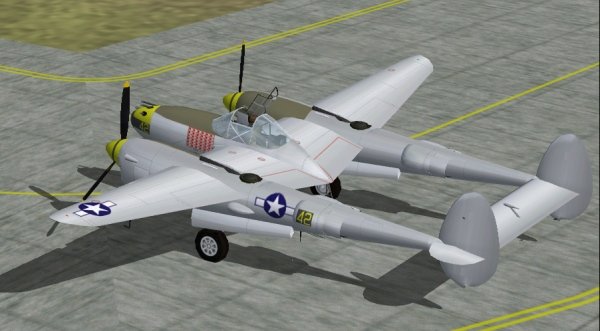
Airplane P-38L-5. The set all.
→ Size:
12 MB
→ Date:
23 years ago (16.08.2003 23:21)
→ Author:
David C. Copley
→ License:
Freeware - Free version, Unlimited Distribution
→ Downloaded:
1028 time(s)