Gulfstream IV Просмотр ZIP-архива
Gulf IV/Gulfstream_IV_Readme.txt
Freeware Gulfstream IV for FS2002. Uses a custom panel (Some FS2002 Pro Gauges Needed) and sounds (Lear45 sounds aliased).
By Rick Sasala and Mark "Dark Moment" Beaumont

Description:
The Gulfstream IV is still the best-selling large cabin, long-range business jet in the market. It is the aircraft chosen by nine of the top ten Fortune 500 companies and more than 30 world governments including the President of the United States. The Gulfstream IV has a range of 4,220 nautical miles and a cruising speed of 560 miles per hour. The Gulfstream IV operates efficiently at altitudes as high as 45,000 feet, enabling it to fly above commercial airline traffic and adverse weather.

Features:
Created with GMAX, Full animation. Full Virtual Cockpit and Virtual Cabin with night lighting, Gauge Backlighting, Thrust Reverser's, Passenger door, Nose wheel steering, Spoilerons, Nose Gear Taxi Lights and UnderWing Landing Lights, Changeable Tail Number, Reflections, Engine Smoke etc, etc.

Installation:
Unzip to a temporary folder, then move the unzipped folder (GulfIV) to your FS2002\Aircraft folder. This aircraft will appear in your Aircraft Selection list under Gulfstream. This is for ATC purposes. Put the contents of the Effects folder in the Main Effects folder, then delete folder. Put the contents of the Gauges folder in the Main Gauges folder, then delete folder. If asked to overwrite in either cause, it should'nt be necessary but that's up to you.

****Important Notes**** The sounds are aliased from the Lear45. You cannot alias the Lear45 panel as you will lose your virtual cockpit gauges. Some of the gauges are from FS98 and although they work with WINME, they might not work with WINXP. Also, I'm no aeronautical engineer by any means, if you can make it fly better...please do so!

***Virtual Cockpits note....By using (CTRL + ENTER) and (CTRL + BACKSPACE) you can move your view forward or backward. Although you can only go so far backwards until you run into the seat. You can also use SHIFT Minus (-) and SHIFT Plus (+) to control the VC Zoom level. Or just use Active Camera (I do).

Light Controls:
!!!!!Special Note!!!!!
All lights can be controlled from the 2D overhead panel switches!

Turn the White Strobes Lights on/off with "O". Turn the Beacons and Nav lights on with ("L"). You can then press "O" to turn off the Strobes.

"L"................All Lights on/off
"Shift L"..........Panel Lights on/off
"CTRL L"...........UnderWing Landing Lights on/off
"O"................White Strobe Lights on/off


****This aircraft is equipped with Nose Gear Mounted Taxi Lights in addition to UnderWing Landing Lights. The Landing Lights come on when the Landing Lights are turned on (CTRL L, just L or 2D panel switch). The Nose Gear Taxi Lights come on when the gear is lowered and go off when the gear is raised (or can be controlled from the 2D panel switch). To have just the Taxi lights on (when gear is down), turn off the UnderWing Landing Lights (CTRL + L or 2D panel switch). The Nose Gear Taxi Lights will stay on and the UnderWing Landing Lights will go off.

****Other Controls:
Passenger Door......SHIFT + E + 1 (Don't press all 3 at the same time)
Smoke...............I
Spoiler.............(/)
Thrust Reversers....F2

Thanks:
Mark "Dark Moment" Beaumont without his help and keen eye and sense of humor, I wouldn't have even attempted this!
Max Jaques for pointing out some obvious flaws on the Cargo version and providing the real world Checklist.
Matthias Lieberecht for the original panel (used and modified with his permission)!
FS Panel Studio
Christian Koegler for his Standby Attitude Gauge!
The FPDA Team for a lot of the Gauges!
Paul Golding and Eric Ernst for the Engine Oil Gauges!
Chuck Dome for something, but I'm not sure what?
Chris London for the original FSDS file!
Ben Beverly for getting me started!
FreeFlight Design Forum (A wealth of information)!
Abacus & Louis Sinclair/Tom Greenwalt for FS Design Studio
Felix/FFDS (for his patience and knowledge)
Viking for his "Making an Aircraft" tutorial
David Eckert (daviator) For his FSC Pilot
Chris Cookson for Autocad .DXF Model Importer v1.0 for gmax
...and Microsoft and Discreet for GMAX

If I forgot anyone....Sorry, my mind isn't what it use to be.

Disclaimer:
If this A/C dumps your computer, I am not responsible. I have tested this aircraft and have never had a lock-up or any other problem. My system configuration is WinME, PIII 700E with 384MB SDRAM, GeForce2 MX400.

This aircraft can not be posted or uploaded where a fee of any kind is required. This includes disk distribution or any other kind of fees. This may not be uploaded to www.fsplanet.com. It can not be included in any commercial package. Any requests can be sent to the e-mail address below, I check my e-mail on an hourly basis and all requests will be answered....


Copyright 2002 Rick Sasala and Mark "Dark Moment" Beaumont.
E-mail Rick Sasala at: [email protected]
gulfstream-iv.zip
| Имя файла | Дата | Размер |
|---|---|---|
| Gulf IV/Gulf_IV.air | 05.12.2002 01:22 | 10 KB |
| Gulf IV/aircraft.cfg | 05.12.2002 00:23 | 10 KB |
| Gulf IV/Gulf_IV_notes.txt | 25.11.2002 17:23 | |
| Gulf IV/Gulf_IV_ref.txt | 02.12.2002 17:21 | 1 KB |
| Gulf IV/Gulfstream_IV_Readme.txt | 05.12.2002 10:21 | 5 KB |
| Gulf IV/Gulf_IV_check.txt | 02.12.2002 16:36 | 14 KB |
| Gulf IV/texture/ | 05.12.2002 10:07 | |
| Gulf IV/texture/chrome_t.bmp | 05.12.2002 00:56 | 5 KB |
| Gulf IV/texture/chrome_l.bmp | 15.07.2002 14:11 | 5 KB |
| Gulf IV/texture/glass_l.bmp | 12.11.2002 20:06 | 1 KB |
| Gulf IV/texture/Controls.bmp | 13.11.2002 20:24 | 43 KB |
| Gulf IV/texture/panel_l.bmp | 19.07.2002 01:49 | 85 KB |
| Gulf IV/texture/ds_tire.bmp | 13.10.2002 13:28 | 43 KB |
| Gulf IV/texture/104-6pilot.bmp | 22.06.2002 15:45 | 65 KB |
| Gulf IV/texture/Image3.bmp | 11.11.2002 14:43 | 171 KB |
| Gulf IV/texture/gear.bmp | 04.12.2002 14:48 | 683 KB |
| Gulf IV/texture/glass_t.bmp | 19.11.2002 20:00 | 1 KB |
| Gulf IV/texture/panel.bmp | 11.11.2002 18:13 | 171 KB |
| Gulf IV/texture/panel2.bmp | 19.11.2002 16:56 | 43 KB |
| Gulf IV/texture/Parts.bmp | 10.11.2002 16:29 | 43 KB |
| Gulf IV/texture/Parts1.bmp | 03.07.2002 21:27 | 11 KB |
| Gulf IV/texture/prop_turbine1.bmp | 08.06.2002 13:28 | 65 KB |
| Gulf IV/texture/prop_turbine2.bmp | 08.06.2002 13:28 | 65 KB |
| Gulf IV/texture/Throttle.bmp | 13.11.2002 19:14 | 43 KB |
| Gulf IV/texture/lear45_l1.bmp | 26.09.2002 14:04 | 2 KB |
| Gulf IV/texture/Image4.bmp | 11.11.2002 14:44 | 171 KB |
| Gulf IV/texture/gear1.bmp | 18.11.2002 14:24 | 43 KB |
| Gulf IV/texture/numbers_t.bmp | 05.12.2002 00:45 | 21 KB |
| Gulf IV/texture/Image2.bmp | 01.12.2002 10:13 | 11 KB |
| Gulf IV/texture/Image1.bmp | 01.12.2002 10:24 | 11 KB |
| Gulf IV/texture/comp.bmp | 01.12.2002 14:45 | 11 KB |
| Gulf IV/texture/exit.bmp | 01.12.2002 23:58 | 11 KB |
| Gulf IV/texture/lear45_t1.bmp | 04.12.2002 01:31 | 341 KB |
| Gulf IV/texture/numbers_l.bmp | 03.12.2002 11:17 | 21 KB |
| Gulf IV/sound/ | 05.12.2002 10:07 | |
| Gulf IV/sound/Sound.cfg | 02.12.2002 17:12 | 30 B |
| Gulf IV/panel/ | 05.12.2002 10:07 | |
| Gulf IV/panel/Gulf.bmp | 04.12.2002 09:31 | 769 KB |
| Gulf IV/panel/panel.cfg | 04.12.2002 09:47 | 9 KB |
| Gulf IV/panel/annunciator_640.bmp | 17.04.2001 22:20 | 7 KB |
| Gulf IV/panel/radio_stack_bg.bmp | 03.07.2001 01:33 | 68 KB |
| Gulf IV/panel/compass.bmp | 17.04.2001 22:19 | 96 KB |
| Gulf IV/model/ | 05.12.2002 10:07 | |
| Gulf IV/model/model.cfg | 02.12.2002 17:05 | 28 B |
| Gulf IV/model/Gulf_IV.mdl | 05.12.2002 01:42 | 2 MB |
| Gulf IV/gauges/ | 05.12.2002 10:07 | |
| Gulf IV/gauges/GM_STBYATTITUDE.gau | 25.07.1998 23:34 | 203 KB |
| Gulf IV/gauges/GV.APANUN.gau | 01.10.1999 17:05 | 82 KB |
| Gulf IV/gauges/BAC111.SLIPSKID.gau | 03.04.1998 22:07 | 107 KB |
| Gulf IV/gauges/737-200.altimeter.gau | 05.11.2000 17:53 | 31 KB |
| Gulf IV/gauges/S20EE.MAIN1.gau | 03.04.1998 12:16 | 112 KB |
| Gulf IV/gauges/767PG.OIL90.gau | 06.10.1998 15:52 | 57 KB |
| Gulf IV/gauges/cj1en.gau | 05.05.2002 23:44 | 105 KB |
| Gulf IV/gauges/737-200.RP_REVERSE1.gau | 03.12.2000 02:31 | 72 KB |
| Gulf IV/gauges/737-200.rp_reverse2.gau | 31.12.1998 14:51 | 72 KB |
| Gulf IV/gauges/A2-autopilot.1.gau | 22.11.1996 22:12 | 44 KB |
| Gulf IV/gauges/gulf.cab | 22.11.2002 21:33 | 9 KB |
| Gulf IV/gauges/AUTOTRIM.gau | 03.12.2000 02:31 | 49 KB |
| Gulf IV/gauges/magnetic_compass.gau | 19.09.2001 20:00 | 124 KB |
| Gulf IV/gauges/jt_citation_airspd.gau | 05.11.2000 23:08 | 100 KB |
| Gulf IV/gauges/rp_1_ff.gau | 24.07.2001 21:29 | 84 KB |
| Gulf IV/gauges/rp_2_ff.gau | 25.07.2001 03:29 | 84 KB |
| Gulf IV/gauges/IJD.C182S.OAT.gau | 27.10.1997 21:20 | 17 KB |
| Gulf IV/effects/ | 05.12.2002 10:07 | |
| Gulf IV/effects/fx_smoke_rxS3.fx | 16.04.2002 16:54 | 1 KB |
| Gulf IV/effects/fx_beaconbGulf.fx | 26.03.2002 21:48 | 3 KB |
| Gulf IV/ | 05.12.2002 10:07 | |
| avsim_ru.diz | 14.03.2004 00:19 | 425 B |
| Итого: | 7 MB | |
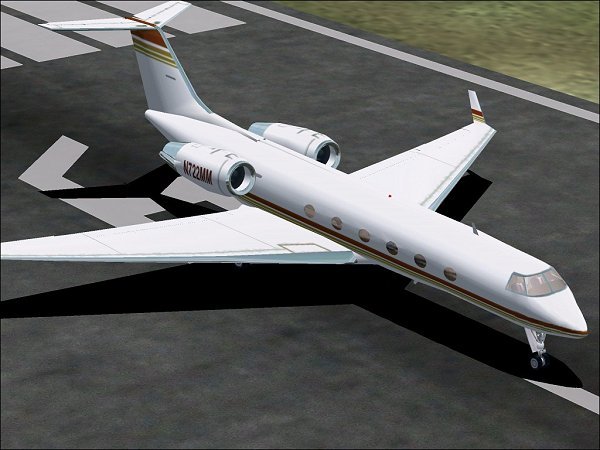
Model airplane Gulfstream IV GMax. Complete VC, panel. Fully animated.
→ Size:
2 MB
→ Date:
23 years ago (07.02.2003 18:29)
→ Author:
Rick Sasala, Mark Beaumont
→ License:
License file included in archive
→ Downloaded:
949 time(s)