Douglas R4D-6 (DC-3) Просмотр ZIP-архива
r4d_2k2/readme.txt
(Turn On Word Wrap)

R4D-6 VERSION 4.75 PANEL, SOUND, and FLIGHT DYNAMICS for FS2002


Update by Roy Chaffin, Bill Rambow, Alan Landsburgh, and Brian Withers

RCS_Register program by Roy Chaffin and Tony D'Ambrosio

Additional Beta Testing by Bob Guzman

_________________________________________________________________


WHAT IS INCLUDED


Set of gauges and panel configuration, and new graphics to make the FS2000 R4D panel and all its gauges FS2002 compatible.
New air file and aircraft configuration to adapt the R4D flight dynamics to FS2002.
New sound configuration file to make the sound suite operate in FS2002.
New version of the R4D Checklist and a new Reference page for use with the FS2002 Kneeboard.
A folder, "r4d_docs" will be installed to your FS2002 root directory containing:
	The Adobe PDF format version of the v4 R4D manual. (see MANUAL section, below)
	A readme.txt file (this document).
"fsuipc.zip", the "essential" utility program by Peter Dowson (see known issues, below)

The R4D looks wonderful in FS2002, flies like a dream, and all the instruments and controls work, after installation of this update.
_________________________________________________________________


WHAT IS NOT INCLUDED


This version does not contain any changes to the physical aircraft model (***.mdl or Model.cfg files) This means it does NOT include a virtual cockpit, rolling wheels, telescoping struts, or working landing lights.  It was never the intent of the team to produce a complete redesign of the entire package for FS2002 at this time.  We have too many other pots on the fire and deadlines are looming. This is not to say Jan Visser won't update the aircraft model files at a later date.  If and when he does, we promise not to charge anything for it! :-)
_________________________________________________________________


REQUIREMENTS - WHAT YOU NEED


Microsoft FS2002, Professional or Standard Edition installed on a system that will adequately run it.

The FS2000 NATS Douglas R4D-6 Visual Update, "r4dv40up.zip", installed in FS2002.  (See installation section for important note)

or...

The FS2000 version 4 package from the R4D Donationware CD, "r4d_fs2k.exe".  (Thanks again for your generosity to MAAM, you are about to be rewarded! (read on)

__________________________________________________________________


WHAT YOU DO NOT NEED


You do NOT need either part of the two parts which constitute the FS2000 NATS Douglas R4D-6 (DC-3), file names: "wjrdc34a.zip" and "wjrdc34b.zip".

Nor do you need any of the three R4D patches that have been issued over time.

Everything you will need is included in the Visual Update and this new package.

If you were one of the curious, impatient, intrepid types who went ahead and installed the FS2000 R4D into FS2002 and have been living with the limitations, glitches and missing features, skip the following installation procedures and proceed to the Alternate Installation, below.
__________________________________________________________________


INSTALLATION FOR DONATIONWARE CD OWNERS, EDITIONS TWO THROUGH FIVE (Edition 1 Owners see note at the bottom of this section)


1.  Load and open the CD (if you need help, there are instructions inside the jewel case cover).

2.  Select "r4d_fs2k.exe" and double-click it.

3.  Proceed with the installation, just as you did for FS2000, EXCEPT!!!...

4.  When you get to the "Directory" page of the installation routine, insert "FS2002" in place of "FS2000" in the path.

5.  Push the "Start" button. Everything will be installed to the correct folders, providing you followed the instructions, of course.  You now have a partially functional Gooney Bird in FS2002.  Now we'll repair her and get her flying.

6.  If you haven't already done so (because you are previewing this readme), unzip "r4d_2k2.zip" to a temporary folder.

7.  Click on the enclosed, self-extracting archive, "r4d_2k2.exe" and follow the instructions in the installation routine.  Remember to change the path IF you used a non-default installation path for FS2002.

8.  To prevent a "not in library" flag from appearing every time you load your R4D from the Aircraft menu, you'll need to rename its folder, using Windows Explorer.  Open the FS2000/Aircraft folder and change the name of the R4D folder from "Douglas R4D-6 NATS v4.0" to "Douglas R4D-6".  If you do not want to, or feel uncomfortable doing this, skipping it will not affect anything.  You'll just have to live with that warning.  Hit the button or Enter and the R4D will load properly.

Congratulations!  You now have the whole kit and caboodle, ready to fly and try. (see below)  As a CD owner, you are entitled to a FREE unlock code.  See the section further along in this document on how to obtain it by e-mail.

                                **********

NOTE TO OWNERS OF THE ORIGINAL, FIRST-EDITION, DONATIONWARE CD:  If you are an R4D old-timer, and bought the Donationware CD shortly after it was first issued in June of 2000, the following applies only to you.

How do you know yours is a First Edition?  There are two quick ways. Load your CD and open it with Windows Explorer.  The CD's title will read, "NATS_R4D". Also, there will be only two executable files (exe extension) - "R4d_fs2k.exe" and "R4d_fs98.exe".

OK, now that you have confirmed you have a First Edition, there is one additional step you must take, just as you should have in your FS2000 installation. That is to add the FS2000 NATS Douglas R4D-6 Visual Update, "r4dv40up.zip" (often called the Visual Model Upgrade, or VMU).  If you still have it on your hard drive, go ahead and install it, immediately after step 6, above.  If you can't find it, download it from RCS or your favorite FS site.  Just remember to change the path in the "Directory" page to FS2002.  Then proceed with the remainder of the steps.  You will NOT need to apply any of the three R4D patches, as their files are either superceded or included by the FS2002 update.

Oh, and thanks for being an early and loyal MAAM supporter. :-))


__________________________________________________________________


BASIC INSTALLATION FOR DOWNLOADERS (I did not say freeloaders!;-)


1.  Download the FS2000 NATS Douglas R4D-6 Visual Update, "r4dv40up.zip" from the same site where you obtained this file, or from RCS Panels (http://www.roychaffin.com/rcs-panels.html) Packages Department.

2.  Unzip "r4dv40up.zip" to a temporary folder, then double-click on the enclosed, self-installing archive, "R4Dv40up.exe".  (CAUTION!  Be sure you install this first, and the FS2002 update second, or you will be overwriting the new files and things will go badly wrong!)

3.  Read the "Welcome" page of the installation program and heed the instructions, then click "Next".

4.  Read the "Information" page, but disregard the first four paragraphs about FS2000 installation, etc.  Hit "Next".

5.  IMPORTANT!!!  On the "Directory" page, even if you used the default path for your FS2002, you obviously must change FS2000 to read FS2002.  Then click "Next".

6.  Push the "Start" button. Everything will be installed to the correct folders, providing you followed the instructions, of course. You now have part of an airplane.  Now we'll assemble the rest of it...

7.  If you haven't already done so (because you are previewing this readme), unzip "r4d_2k2.zip" to a temporary folder.

8.  Click on the enclosed, self-extracting archive, "r4d_2k2.exe" and follow the instructions as above.  Remember to change the path IF you used a non-default installation path for FS2002.

9.  To prevent a "not in library" flag from appearing every time you load your R4D from the Aircraft menu, you'll need to rename its folder, using Windows Explorer.  Open the FS2000/Aircraft folder and change the name of the R4D folder from "Douglas R4D-6 NATS v4.0" to "Douglas R4D-6".  If you do not want to, or feel uncomfortable doing this, skipping it will not affect anything.  You'll just have to live with that warning.  Hit the button or Enter and the R4D will load properly.

Congratulations!  You now have the whole kit and caboodle, ready to fly and try. (see below)

__________________________________________________________________


ALTERNATE INSTALLATION FOR THOSE WHO HAVE ALREADY INSTALLED THE FS2000 R4D TO FS2002


1.  Make sure you have installed both "wjrdc34a.zip" and "wjrdc34b.zip", the two parts of the Freeware version 4 R4D, and also the FS2000 NATS Douglas R4D-6 Visual Update, "r4dv40up.zip". If you have not done ALL of this, I would suggest you delete the R4D from your FS2002 Aircraft folder and follow the Basic Installation Procedures above.  It will save you download time and work.  Got it all?  Continue...

2.  If you haven't already done so (because you are previewing this readme), unzip "r4d_2k2.zip" to a temporary folder.

3.  Click on the enclosed, self-extracting archive, "r4d_2k2.exe" and follow the instructions as above.  Remember to change the path IF you used a non-default installation path for FS2002.

4.  To prevent a "not in library" flag from appearing every time you load your R4D from the Aircraft menu, you'll need to rename its folder, using Windows Explorer.  Open the FS2000/Aircraft folder and change the name of the R4D folder from "Douglas R4D-6 NATS v4.0" to "Douglas R4D-6".  If you do not want to, or feel uncomfortable doing this, skipping it will not affect anything.  You'll just have to live with that warning.  Hit the button or Enter and the R4D will load properly.

Congratulations!  You now have the whole kit and caboodle, ready to fly and try. (see below)
__________________________________________________________________


FLY and TRY?


You are probably aware by now that this is not Freeware, but a time-limited, donationware package.  Why, you may ask, have the developers of the most widely downloaded Freeware package in the world gone this route? Is it GREED?  Crass commercialism?  Well, considering we never have and never will make a penny for ourselves from the MAAM donationware project, I hazard to say these don't apply.  The sad truth is, that despite numerous appeals to the generosity and sense of fairness of the tens, perhaps hundreds of thousands of down-loaders of the various incarnations of the R4D for FS98, FS2000, CFS, and CFS2, only a tiny percentage of them came through for the Mid Atlantic Air Museum by donating even a dollar, pound, franc, etc.  After two and a half years of work and numerous packages, improvements and versions, the real R4D #50819 is still on the ground, lacking an engine.  We have raised over $35,000 on the Donationware CD, every penny of which went to MAAM, but the donations from down-loaders have only been about $5,000 in that period.  Do the calculations and you can't help being a bit depressed.  We get hundreds and hundreds of wonderful e-mails from grateful FS flyers, and very gratifying reviews and awards from the on-line flightsim community -- but our Gooney Bird is still grounded and collecting bird crap on her silver surfaces!

So, we have chosen to go another way, this time...

Upon loading the aircraft into the sim, you will have five minutes of trial period, enough time to take her around the circuit at the field of your choice.  No, it's not "cripple-ware", in that everything is fully functional for your trial period.  But after the elapse of your five minutes the panel will black out and you will be prompted to register for your personal, unique (sorry, sharing won't work!;-) unlock-code.  The cost?  $5.OO U.S.!  That's all.  A "finn", a "sawbuck", a "fiver".  What else can you buy for FS or your computer for a lousy $5 bucks that will give you anywhere near as much pleasure?

There are a number of ways to pay your fair share, too.  Some we probably haven't even thought of yet, but suffice it to say we'll work with you.  The object is to get the money to MAAM, one way or another, and get the R4D re-engined.
If you have already done the right and proper thing, by donating as we have repeatedly asked, then you are covered, dude!  You get the code FREE!  This applies to all R4D Donationware CD owners, all MAAM members, and everyone who has donated at least $5.  We'll cover you good guys first, then get to the new folks...
__________________________________________________________________


HOW TO CLAIM YOUR FREE UNLOCK CODE - FOR CD OWNERS, MAAM MEMBERS, AND PREVIOUS DONORS, ONLY


1.  After installation of the aircraft and this FS2002 update...

2.  Open the FS2002/Gauges folder

3.  Locate the file "RCS_Register.exe" and double-click it.

4.  Fill in your first and last names in the designated blocks.

5.  You will see your unique Serial Number (only works on your installation) in the next block.  Hit the "copy" button next to it and your SN will automatically be copied to the clipboard (for cut and paste use).

6.  E-mail me at [email protected], copying your Serial Number, exactly as it is wriiten, into the mail (use Ctrl+v to paste it from the clipboard, if you like).


CD OWNERS:

7.  If you are a CD owner, state that.  By return e-mail we will ask for a password that will be the answer to a question found in a part of your CD.  Respond with the answer by e-mail.


MAAM MEMBERS:

7.  Write your MAAM membership card number and expiration date in the e-mail, then send it priority.


PREVIOUS MAAM ENGINE REPLACEMENT FUND DONORS:

7.  Fill in, then copy and paste the following form into the e-mail, then send it priority to:

[email protected]


********************************************
NAME________________________________________

NATION OF RESIDENCE_________________________

APPROXIMATE DATE OF DONATION________________

AMOUNT OF DONATION _________________________

I PAID BY - (MARK ONE)
CREDIT CARD, 0N-LINE ______
CHECK / CHEQUE       ______
MONEY ORDER          ______
CASH (RISKY!)        ______
********************************************


EVERYONE (CD OWNERS, MEMBERS, DONORS, AFTER COMPLETING THE APPLICABLE STEPS ABOVE)


REMEMBER!  You must include your Registration Serial Number, or we will not be able to generate your personal key code!

8.  After certifying you as a legitimate good guy, I will take your Registration Serial Number and generate your personal key code, returning it to you by priority e-mail.

9.  Copy the key code (Ctrl+c)

10. Open the "RCS_Register.exe" file again in your FS2002/Gauges folder and paste (Ctrl+v) or type it into the appropriate block, then push the "Register" button, and finally the "Quit" button.

NOTE:  It is IMPORTANT that you actually write down your serial number and key when prompted by the program.  Put these in a safe place (not on the same hard drive as your FS2002 installation).  In the case of a hard drive failure, or upgrade requiring a re-installation of the R4D, just overwrite any new serial number with your saved one and enter the key.  Preto!  You are back in business without having to go through the e-mail process again.

Hurrah!!  You are done, the dreaded black panel and nagging text has been banished forever, and you have done a good thing for a great organization.  MAAM thanks you, and we thank you!

Ideally, if you catch me at the computer (where I seem to spend most of my waking hours!), the whole transaction can be accomplished in a few minutes.  In any event, I check my mail frequently and answer as promptly as possible, so it should not take too long.  If you do not get a response in a reasonable time (days, not hours or minutes!;-), I may be out of town or otherwise unavailable.  Or, you might get a bounced message because of server problems or some such glitch. In either case, try e-mailing [email protected] at the museum. Please, though, only do this as a last resort, and try to be a little patient.  Pete is a busy man (program coordinator) at MAAM.  Also, please remember, I don't get paid for any of this and I still have real career and family which occasionally demand a few paltry minutes of my time, unreasonable as that seems to us all! ;-)

_________________________________________________________________
NOT ENTITLED TO A FREE CODE?  HERE'S HOW TO REGISTER FOR YOUR $5.00 KEY CODE.


OK, you are not one of the previous Donationware purchasers, MAAM members, or donors.  Here's how you can support this worthy cause and get your own personal key code:

1.  After installation of the aircraft and this FS2002 update...

2.  Open the FS2002/Gauges folder

3.  Locate the file "RCS_Register.exe" and double-click it.

4.  Fill in your first and last names in the designated blocks.

5.  You will see your unique serial number (only works on your installation) in the next block.  Hit the "copy" button next to it and your SN will automatically be copied to the clipboard (for cut and paste).

6.  Send your $5.00 Engine Replacement Fund donation to the Mid Atlantic Air Museum.

Here are several options for you:


A.  The easiest way is to use a credit card and go to the special page of the MAAM On-Line store. Go to http://www.avialantic.com/shop/entrypage.html, follow the links, then fill in the blanks.  (You will note there is a $1.00 surcharge for the credit card transaction, because they charge MAAM a fee.)

NOTE!  Until the special link is set up for this upgrade, you can use the regular donation link to the Engine Fund.  YOU WILL NOT BE CHARGED THE $3.95 SHIPPING FEE, even though it will show up on the total.  It says that right on the main donation page.  You WILL be charged the $1 CC fee mentioned here.  The charge to your card is not done automatically by the browser. Pete will do it and he'll only charge you $6.00 - honest!!  If you add any merchandise to your order (the store has some cool stuff!) then, and only then will the shipping charge be billed to your card.


B.  You can mail a check or money order, or if you are a gambler, cash.  Be warned, that if you do send currency, while it is not illegal, it is risky.  Their are thieves among the good people of the world's post offices, some of whom seem to be able to sniff out cash,  Disguise it inside an advertisement of the sort you get in junk mail everyday, so that a crook can't hold it up to a strong light and see the bill.

The mailing address is:

MID ATLANTIC AIR MUSEUM
11 MUSEUM DRIVE
ATTN: R4D REGISTRATION
READING, PA 19605

If you want to get your code back by snail mail (I can't see why!), enclose a self-addressed stamped envelope.  Otherwise, include your e-mail address and Pete will send the key code and you'll be in business.


C.  Pete Malashavitz, the MAAM Program Coordinator, has even agreed to accept e-mail credit card orders.  MAAM can accept VISA, MasterCard, Discover, and American Express.  Fill in the following form (just type at the end of each line), then cut and paste it in the e-mail and send to [email protected]  (NOT TO BILL RAMBOW)


*************cut & paste here***************

NAME (same as on credit card you are using)
______________________

ADDRESS (same as credit card billing address)
STREET:_______________
CITY:_________________
STATE/PROVINCE:_______
COUNTRY:______________

CREDIT CARD TYPE (X one)
VISA__________________
MasterCard____________
Discover______________
American Express______

CREDIT CARD NUMBER:___
EXPIRATION DATE:______

R4D SERIAL NUMBER:____


*************cut & paste here***************

You will be charged $5 plus a $1 credit card surcharge for a total of $6.00 US.  Pete will generate and send your key code by return e-mail.


D.  For the truly impatient, or in the event the web-page is not working, you can do it by phone. (No collect calls, please!) Have your Registration Serial Number and credit card at hand, and ask to speak to Pete.  He is the only person at the museum who has the program to generate the Key Codes, but he's almost always there during museum office hours, which are Monday through Friday, 9:30 AM to 4:00 PM, Eastern Standard Time.  Pete will copy your credit card info and your Serial Number, then generate your Key Code.  The whole thing will take a minute or two.  What can be easier than that?

IMPORTANT!! Whichever method you choose, be sure to INCLUDE YOUR SERIAL NUMBER so Pete can generate your key code.

_________________________________________________________________

MANUAL

IMPORTANT!  READ THE MANUAL, PLEASE!

You will find a fully illustrated manual in Adobe PDF format in a new folder, "r4d_docs", within your FS2002 directory.  Time did not allow me to rewrite the manual for FS2002 in time to release this update as promised before Christmas.  I hope to do so for the new edition of the CD.  This readme, in particular the Known Issues section, contains many of the changes between the FS2000 and the FS2002 version of the R4D.

So, it's an "old" manual, why should you read it?  Well, reading the manual in its entirety is essential, especially for new R4D users.  Most of the information in the manual still applies to the FS2002 version, including all of the panel diagrams and operating instructions. If you do notread it, you will probably miss features, have problems, or both.  You may get the engines started using the FS2002 shortcut, but you will never get them started using our realistic starting procedure, unless you have done it before.  Besides, I've been told it's really quite bearable. Convinced?  Atta boy!  Here's how...

Open the "FS2002/r4d_docs" folder and you'll find a file called "manual.pdf" Double-click on it, and if you have the free Adobe Acrobat reader on your sytem, it will automatically open.  If not, get it at: http://www.adobe.com/products/acrobat/readstep.html

Sorry, no music on this one!  If you want to hear our R4D theme song, Glenn Miller's "In the Mood", you'll have to get a copy of the html version of the manual.  It's on the CD or the two-part download.  It was just too big to include in this archive.

_________________________________________________________________


KNOWN ISSUES (and DIFFERENCES FROM R4D v4.0 for FS2000)

1. The installation program of this update will install Peter Dowson's great "must-have" utility, fsuipc.dll into the FS2002/MODULES folder.  It assists the Autopilot in working in the R4D.  The entire, unmodified FSUIPC archive will also be found in the same folder.  Please open this zip and read Peter's great documentation. This little gem of a program will greatly enhance your FS experience, if you take advantage of its features. WARNING!  Peter updates this program frequently, so the copy of FUIPC installed with this R4D update will eventually be superceded by a newer one, so check the site that carries Peter's work,  http://www.schiratti.com/dowson.html If you experience any difficulties with the autopilot, use Windows Explorer and delete the "FSUIPC.ini" file from the FS2002/MODULES folder and reload FS2002. This often solves problems.

2. The original R4D (FS2000) panel lighting system has also been a victim of "progress".  The panel light function has been tied to the navigation light function.  No more separate panel light switch.  Also, there is a whole new system of night lighting in FS2002.  We have tried to maintain the general look of the FS2000 night panel, as closely as could be done with the new parameters.  Gone, sadly, is the switchable "spot lighting" that caused such a stir when we introduced it in version 4.  Turning on the Navigation Light switch will turn on the marker lights, close the passenger door, and bring the pilots to the cockpit, as before.  It will also turn on the panel lights.  The good news is, the panel lighting will not be visible until dusk.  Another compromise we must live with.

3. You may note an apparent, if slight "levitation" of the plane on landing.  The gear seems to touch down about a foot in the air.  As you brake and slow, the plane gradually settles to a "true landing".  The phenomenon is really only noticeable from low outside viewing angles and with aircraft shadows turned on.  The fix would have involved having a natural looking touchdown and very flat tires as the roll out progresses.  You may have noticed this in other aircraft in FS2002.  We decided the sunken wheels were the worse of the two choices.

4. If you are an experienced R4D flyer from previous versions, you should note that the old girl does not want to slow down nearly as easily when going downhill with everything hanging out.  This is NOT a glitch, it's an intentional refinement of the flight model resulting from Brian Wither's conversations with Dakota pilots at the Battle of Britain Memorial Flight of the RAF.  The flap and extended gear drag is much more realistic now, and you will find you do not need nearly as much throttle to maintain a proper approach speed now.

5.  With some systems, on some occasions, when moving the R4D to a new location on the ground you may find the tail sunken under ground and the nose pointed about 45 degrees skyward. This might happen, as it has to me (but not to Roy) when using the "Go To Airport", or "Flight Planner" features of FS2002.  Besides being startling, not to mention disconcerting to your stewardess as she ends up pinned in the tail lavatory by gravity, it makes seeing the runway even more difficult than usual. ;-)  The solution is quick and easy, though. Just hit the key sequence: Alt-a-a-Enter, quick as you like.  This will place the R4D back on an even keel -- well, as level as a Goon on the ground ever gets ;-)  Now go pick Trixie up from the corner of the "head" (it's a Naval aircraft, after all ;-)

6.  You will no longer have to use a special start-up flight in order for the magnetos to work properly.  (See, not all known issues are bad things!)  Therefore, the start-up flight has been left out of this issue.  You should be able to load the R4D into the sim in anyway you like without a problem.  It is still a good practice to start FS with one of the default flights, such as Meigs, to make sure everything is properly enabled.  Also, if you are having problems with a particular system in the R4D that used to work properly, try briefly switching to a default plane, then back. (you may want to hit P for pause, first;-) This usually will put things right.  If you have left your switches on after shut-down and exhausted your batteries, for instance, a quick switch to the Meigs start-up will recharge them for you.

7.  To enable the OMI sounds and the morse identifiers for the radios, start FS2002 with the Cessna, and bring up its radio stack.  Push the Marker button (MKR) on the top row.  Now, when you load the R4D, the sounds will be active in the R4D.  Also, any R4D start-up flight you create after performing this function with the Cessna will retain the ability to play these sounds.

__________________________________________________________________


SECURITY


Each Serial Number and Key Code is unique and will only work on your installation.  Roy and Tony put much thought and work into this system to make it hard to cheat.  If that sounds like a challenge, and you are tempted -- shame on you!  Yeah, we know, everything can be hacked, given enough time, effort, brains, and computer power.  But it's a non-profit institution you are robbing! Why don't you go rip off an orphanage, while you're at it! ;-)

Don't have a credit card?  Give your buddy six bucks and borrow his.  You can let him fly your nice Gooney Bird in payment.  Can't afford to pay for a plane when there are so many free ones about?  Give me a break!  You managed to obtain some sort of computer, the electricity to run it, and an ISP.  What's five bucks in the scheme of things.  You have probably bought pay-ware packages for much, much more and probably of lesser quality.  None of these arguments sway you?  To paraphrase a popular TV figure of the moment, "You ARE the cheapest fink! Goodbye!"  Go reload the R4D every five minutes, or better yet, go fly someone else's airplane.  And if you are tempted to complain on the forums about this highway robbery, be prepared to be blasted by some of our many, many loyal supporters. :-))

__________________________________________________________________


COPYRIGHT AND DISTRIBUTION


This archive is copyright 2001 (C) Roy Chaffin and W.J. (Bill) Rambow.  You are permitted to distribute this archive subject to the following conditions:

- The archive must be distributed without modification to the contents of the archive.  Redistributing this archive with any files added, removed or modified is prohibited.

- No files may be removed, added, or modified except for your own personal use.  Distribution by any means of any modified or original files that are part of this package is strictly prohibited without the prior expressed permission of the authors.

- The inclusion of any individual file from this archive in another archive without the prior permission of the author is prohibited. Nor may individual files from this archive be removed and distributed, modified or not.

- No charge may be made for this archive or any of its contents, other than the $5 donation/registration to MAAM included in the package.

- The authors' rights and wishes concerning this archive must be respected.  Legal action against violators of these provisions will be pursued vigorously.

__________________________________________________________________


If you have read this far, congratulations!  You, sir, are a pro!  You know, there is another, simpler, better way to do all this, if you are not already a CD owner, or if you are having problems with the installation or registration procedures above.  Want everything right at the push of a button?  Order the new, 7th Edition of the R4D DONATIONWARE CD.  CD#7 includes all the great features of the previous ones (see this press release for details: http://www.roychaffin.com/vmupr.htm ) plus everything in this FS2002 package, already packed in a single automatic installation program (self-extracting archive).  This means NO DOWNLOADS and goof-proof Gooney Bird installation to FS2002 Pro or Standard.  Convinced?  Want it NOW? Go...  www.maam.org

We also would like to invite you to join us as MAAM members.  It costs just $45 a year and the benefits are truly great.  How about free air-show tickets at Reading, or a working trip as a crew member on a B-25 or other museum aircraft flying to an air-show away from the home field, for example?  Read all about it and join here: http://www.maam.org/members.html

__________________________________________________________________


Comments are always welcome, questions are always answered (but PLEASE read the docs first!)


Bill Rambow [email protected]


Thanks, and Happy Landings - Tail Low

Bill Rambow for the R4D Team
December 2001
r4d_2k2_101814.zip
| Имя файла | Дата | Размер |
|---|---|---|
| r4d_2k2/readme.txt | 29.07.2002 03:46 | 31 KB |
| r4d_2k2/r4d_2k2.gif | 25.07.2002 01:13 | 12 KB |
| r4d_2k2/Thumbs.db | 25.07.2002 01:13 | 8 KB |
| r4d_2k2/r4d_2k2.exe | 30.12.2001 02:26 | 17 MB |
| r4d_2k2/ | 25.07.2002 01:10 | |
| avsim_ru.diz | 14.03.2004 00:21 | 373 B |
| Итого: | 17 MB | |
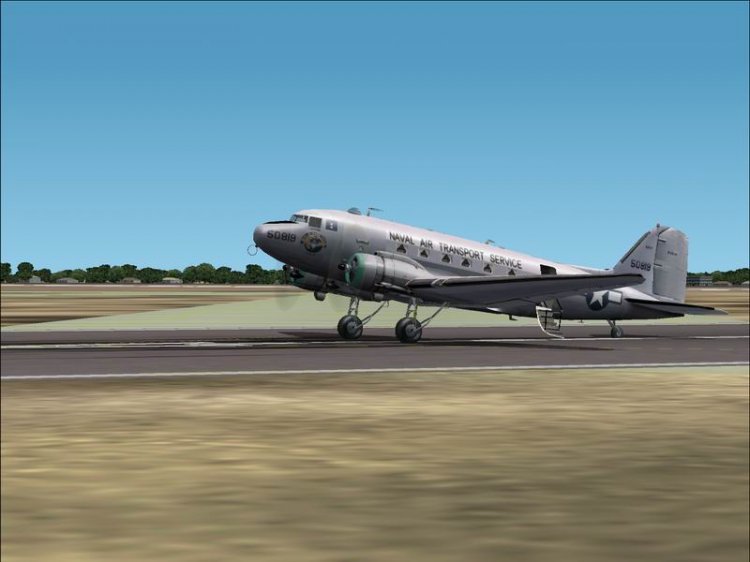
Douglas DC-3 airliner, the United States.
→ Size:
17 MB
→ Date:
23 years ago (27.02.2003 23:19)
→ Author:
→ License:
License file included in archive
→ Downloaded:
669 time(s)