Convair CV-440 Просмотр ZIP-архива
RDS440readme.txt
TURN ON WORD WRAP

**********************************************************
FS2002  Convair C-131F(CV-440) Rhoades Aviation

a "FREEWARE" file

Version 1  3/2003
**********************************************************
Unzip the file "Unzip into main FS folder.zip" into your main FS2002 folder using the "stored folders" option of your unzip program. If you are asked to overwrite files say no.  Detailed installation instructions below.
****************************************************************************
When the Navy started retiring C-131F's in the early 90's, most of them were sold off to civilian operators. With minor demilitarization changes, the airplane could be converted to a civilian freighter. One such airplane, BuNo 141001 was purchased in the mid 1990's by Rhoades Aviation of Columbus, IN. The airplane was re-regestered as N157JR, JR standing for "Jack Rhoades"(the owner of the company). The airplane still wears the basic USN livery, albiet not near as clean as it was in USN service! This airplane is still active with Rhoades, doing ad-hoc freight charters. N157JR was the last of Rhoades' Piston Convairs(N147JR-N157RJ). After this, Rhoades bought Kitty Hawk's turbine Convair 600's and 640's. Rhoades is the only operator of Cv-600's, the CV-240 converted to RR Dart turboprop.

I painted this airplane because of my involvement with the pilots at Rhoades! In the comming weeks, I will paint the entire fleet of remaining Rhoades' Piston Convairs(CV-240 N152JR, CV-340 N156JR, and this one, CV-440 N157JR). After conning Greg and Tom outta doing the Pistons, I MIGHT get lucky and talk them out of doing the 600/640's. I would love to have one airplane of Rhoades' fleet.

This airplane is dedicated to Jeff, Ed, Pete, Charlie, and the REAL Dick Peacock ;-). These are the guys over at Rhoades that I have flew beisde so many hours and so many nights. These guys are some of my best friends in aviation, and the airline has a special place in my heart! A special dedication goes out to Jim, who has taught me how to REALLY fly Piston Convairs! Jim flew 157 for many years, and has some real good stories about the bird.

Steve

************************************************************************
Built by Greg Pepper and Tom Gibson, [email protected]

Painted by Steve Mathis, bare metal by Greg Pepper

Many textures based on photos provided by Steve Mathis.

Panel by Greg Pepper, panel bitmap by Allen Jennings, gauge bitmaps by Allen Jennings and Greg Pepper, gauges by Greg Pepper and Tom Gibson.

Flight dynamics by FSAviator (true FS2002 flight model with dynamics derived from actual flight manual information), correct within 3% of the real flying characteristics - see Reference file (F10).  This FDE is not designed for AI use - it will not work.  Download AI propliners at http://www.calclassic.com/.

Beta tested by Steve Mathis (CV-240 pilot), Tom Gibson, Allen Jennings, and Greg Pepper.

FS2002 FEATURES:

AIRCRAFT

1.  Virtual Cockpit

2.  Prop reverse (throttle to idle, click reverse lever, allow plane to slow down, throttle to idle to go back to forward thrust)

3.  The passenger door will open and airstairs will extend when you press Shift-E.  Press Shift-E again to close the door for flight.

4.  The working cowl flaps are opened by Ctrl-Shift-V, and closed by Ctrl-Shift-C (both in increments).

5.  The plane is complete with reflective and night textures (turn on lights with L key, then turn Landing Lights off and on with Ctrl-L).

6.  The landing gear has working compression struts, and retracts as seen in vintage video.

7.  The landing lights light the ground properly, and must be extended before use (press the L key, and then press Shift-W).  There is a separate taxi light on the nose strut (turns off with the rest of the lights using the L key, or use the switch on the panel).

8.  The prop blades actually rotate when you change the pitch or feather them; to feather the prop select engine by E1 or E2, then press and hold Ctrl-F2.  Press M--- and Ctrl-Shift-F1 to shut down the ignition and mixture.  Then press E2 or E1 so you can operate the other engine.

9.  Contrails whenever you want them (press the I key)

10. FS2002 style nav, landing, and beacon lights (press the L key)

11. FS2002 style visual effects, including touchdown smoke

12. Working NAV2 radio

This plane also features animated landing gear, Fowler flaps, ailerons, elevators, and rudder.

REALISTIC ENGINE START

To start the engines realistically and individually, do this:

1.  Go to Options/Controls/Assignments and set the 4 starters to
Ctrl-1 through Ctrl-4 (or other keys of your choice).
2.  Go to spot view (Shift-S)
3.  Press E2 to select engine #2.
4.  Tap the Ctrl-2 key just enough to keep the prop moving slowly.
5.  Wait for 6 prop blades to pass by.
6.  Quickly press M+++: engine 2 will start.
7.  Press E1 to select engine #1.
8.  Repeat steps 4-6 to start engine #1.
9.  Press E12 to get control of both engines back.
10. Normal start sequence is 2-1.

CHECKLISTS

Included are Before Starting Engines, Starting Engines, Engine Run-up, Before Takeoff, Takeoff Data (V speeds), Climb, Cruise, Before Landing, and After Landing.
Also included is FSAviator's Reference file, with speed limits and climb/cruise powers, among lots of other info.

PANEL:

Please download the CV-340 panel from www.calclassic.com.  Otherwise you must edit the panel.cfg file to have a panel.

SOUND:

Please download the Prop Sounds from www.calclassic.com. Otherwise you must edit the sound.cfg file to have sound.

FLIGHT DYNAMICS

Press F10 to bring up the checklist and FSAviator's Reference file.

Installation:

1.  Use an unzipper that keeps stored folders intact.  Unzip the file "Unzip this to the main FS2002 folder.zip" into your main FS2002 folder (the one with FS2002.exe in it).

2.  Refer to the Docs folder found inside the FS2002/AIRCRAFT/CV340xxx/DOCS folder (where xxx are the
initials of the plane's airline) for details on the panel, etc.

3.  If you want a smokey engine start, read the fx_engstrtreadme.txt file (improved!  Now has a shorter duration and doesn't include the flames (causes VC flashing).

**************************************************************************
Now the legal stuff:

COPYRIGHT 2003 BY TOM GIBSON, GREG PEPPER, ALLEN JENNINGS, FSAVIATOR, AND STEVE MATHIS.  ALL RIGHTS RESERVED

REPAINTS:  REPAINTS ARE ALLOWED WITHOUT FURTHER PERMISSION, BUT WE PREFER THAT THEY ONLY BE UPLOADED TO TOTALLY FREE SITES - I.E. NO CHARGES OR SUBSCRIPTION FEES FOR INCREASED ACCESS.  HOWEVER, IF YOU REPAINT THE PLANE YOU MUST CREDIT ALL OF THE ORIGINAL AUTHORS IN YOUR TEXT FILE AND INCLUDE THIS TEXT FILE.

THIS AIRPLANE IS THE PROPERTY OF THE AUTHOR, AND CANNOT BE RE-SOLD OR PACKAGED WITH ANY PRODUCT FOR SALE, WITHOUT THE EXPRESS WRITTEN PERMISSION OF THE AUTHORS.  THIS INCLUDES "FREE" CD COMPILATIONS WITH A CHARGE OF ANY KIND.  THIS IS FREEWARE!!

YOU MAY NOT UPLOAD THIS PLANE TO ANY OTHER SERVER, IT MUST REMAIN ON THE ORIGINAL SERVER.

THIS FILE ARCHIVE OR ANY REPAINTS MUST NOT BE UPLOADED TO A SITE OR LOCATION THAT CLAIMS ANY SORT OF COPYRIGHT ON THE FILE; COPYRIGHT REMAINS WITH THE ORIGINAL AUTHOR.  UPLOADING OF THIS FILE TO SUCH A SITE DOES NOT CONSTITUTE PERMISSION OF THE AUTHORS TO VIOLATE THESE TERMS BY THAT SITE.

THIS FILE ARCHIVE MUST REMAIN INTACT; YOU MAY NOT REMOVE OR UPLOAD PARTS OF THIS ARCHIVE.  THIS ENTIRE TEXT FILE MUST BE INCLUDED IN ANY DISTRIBUTION.

THE AUTHORS ARE NOT LIABLE FOR ANY DAMAGE THAT YOU MIGHT INCUR AS A RESULT OF USING THESE PRODUCTS.  YOU ASSUME THE RISK OF USE.
cv440rhoades.zip
| Имя файла | Дата | Размер |
|---|---|---|
| RDS440readme.txt | 23.03.2003 12:11 | 8 KB |
| Unzip into Main FS2002 Folder.zip | 24.03.2003 10:34 | 3 MB |
| avsim_ru.diz | 14.03.2004 00:17 | 428 B |
| Итого: | 3 MB | |
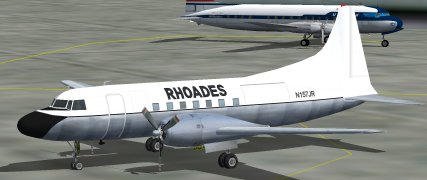
Airplane Convair CV-440 Gmax kit full animations and VC.
→ Size:
3 MB
→ Date:
23 years ago (25.03.2003 09:44)
→ Author:
Steve Mathis, Greg Pepper, Tom Gibson, FSAviator
→ License:
Freeware - Free version, Do Not Redistribute
→ Downloaded:
491 time(s)