AN-28 Просмотр ZIP-архива
aircraft/an28/an28_check.txt
AN-28 PROCEDURES

For detailed instructions on how to fly this aircraft, see the Aircraft Handbook. For suggested speeds, see the Reference tab.

____________________________________
BEFORE STARTING ENGINE

[ ] Parking Brake -- SET
     (press CTRL+PERIOD key)
[ ] Switches -- OFF
[ ] Fuel Tank Selector -- BOTH
[ ] Emergency Power Lever -- NORMAL
[ ] Power Lever -- IDLE
     (press F2 as necessary)
[ ] Propeller Control Lever -- MAX (fully forward)
     (press CTRL+F3 as necessary)
[ ] Fuel Condition Lever -- CUTOFF
     (press CTRL+SHIFT+F2 as necessary)
[ ] Fuel Shutoff -- ON (push in)
[ ] Battery Switch -- ON
[ ] Wing Flaps -- UP
     (press F2 as necessary)

____________________________________
ENGINE START

Press CTRL+E to initiate engine autostart sequence, or:

[ ] Battery Switch -- ON
[ ] Emergency Power Lever -- NORMAL (full aft) position
    (press xx as necessary)
[ ] Propeller Area -- CLEAR
[ ] Fuel Boost Switch -- ON
[ ] "AUX FUEL PUMP ON" Annunciator -- ON
     (press SHIFT+5 to display annunciator panel)
[ ] "FUEL PRESS LOW" Annunciator -- OFF
     (press SHIFT+5 to display annunciator panel)
[ ] No Fuel Flow -- CONFIRM
[ ] Starter Switch -- START
     (click switch and hold until engine starts)
[ ] "IGNITION ON" Annunciator -- CHECK ON
     (press SHIFT+5 to display annunciator panel)
[ ] Engine Oil Pressure -- CHECK for indication
[ ] Ng -- STABLE (12% minimum)
[ ] Fuel Condition Lever -- LOW IDLE
     (press CTRL+SHIFT+F2 or CTRL+SHIFT+F3 as necessary)
[ ] Fuel Flow -- CHECK for 80 to 110 pph
[ ] ITT -- MONITOR (1,090 degrees C max)
[ ] Ng -- 52% MINIMUM
[ ] Starter Switch -- OFF (check "STARTER ENERGIZED"
     annunciator OFF)
[ ] Engine Instruments -- CHECK
[ ] Generator -- CHECK "GENERATOR OFF" annunciator OFF
[ ] Fuel Boost Switch -- NORM (check "AUX FUEL PUMP ON"
     annunciator OFF)
[ ] Avionics Master Switch -- ON
[ ] Navigation Lights and Flashing Beacon -- ON as required
[ ] Suction Gauge -- CHECK
[ ] Radios -- AS REQUIRED
     (press SHIFT+2 to display radio stack)

____________________________________
TAXIING

[ ] Brakes -- CHECK
[ ] Flight Instruments -- CHECK

____________________________________
BEFORE TAKEOFF

[ ] Parking Brake -- SET
     (press CTRL+PERIOD key)
[ ] Flight Controls -- FREE AND CORRECT
[ ] Flight Instruments -- CHECK and SET
[ ] Fuel Boost Switch -- RECHECK NORM
[ ] Fuel Tank Selector -- RECHECK BOTH
[ ] Fuel Quantity -- RECHECK
[ ] Fuel Shutoff -- RECHECK FULLY ON
[ ] Elevator Trim Controls -- SET for takeoff
     (with Num Lock off, press Num Pad 1 or
      Num Pad 7 as necessary)
[ ] Aileron Trim Controls -- SET for takeoff
     (with Num Lock off, press Num Pad 4 or
      Num Pad 6 as necessary)
[ ] Rudder Trim Controls -- SET for takeoff
     (with Num Lock off, press Num Pad 0 or
      Num Pad ENTER as necessary)
[ ] Power Lever -- 400 FT-LBS
     (press F2 or F3 as necessary)
[ ] Suction Gauge -- CHECK
[ ] "VOLTAGE LOW" annunciator -- CHECK OFF
[ ] Inertial Separator -- CHECK
[ ] Engine Instruments -- CHECK
[ ] Overspeed Governor -- CHECK
     (stabilized at 1750 +/- 60 RPM)
[ ] Power Lever -- IDLE
     (press F2 as necessary)
[ ] Pitot/Static Heat -- ON when OAT is below 4 degrees C
     (40 degrees F)
[ ] Ice Protection -- AS REQUIRED
[ ] Avionics -- CHECK and SET
     (press SHIFT+2 to display radio stack)
[ ] GPS/NAV Switch -- SET
[ ] Strobe Lights -- AS REQUIRED
[ ] Annunciators -- EXTINGUISHED or considered
[ ] Wing Flaps -- SET at 20 degrees
     (press F7 or F6 as necessary)
[ ] Brakes -- RELEASE
     (press PERIOD key)
[ ] Fuel Condition Lever -- HIGH IDLE
     (press CTRL+SHIFT+F2 or CTRL+SHIFT+F3 as necessary)

____________________________________
TAKEOFF

[ ] Wing Flaps -- 20 degrees
     (press F7 or F6 as necessary)
[ ] Power -- SET FOR TAKEOFF (1900 RPM)
     (press F3 or F2 as necessary)
[ ] Annunciators -- CHECK
[ ] Rotate -- 70-75 KIAS
[ ] Climb Speed -- 85-95 KIAS
[ ] Wing Flaps -- RETRACT to 10 degrees after reaching 85
     KIAS and 0 degrees after reaching 95 KIAS)

____________________________________
EN ROUTE CLIMB

CRUISE CLIMB

[ ] Ice Protection -- AS REQUIRED
[ ] Pitot/Static Heat -- ON when OAT is below 4 degrees C
     (40 degrees F)
[ ] Airspeed -- 110-120 KIAS
[ ] Propeller -- 1600-1900 RPM
     (press CTRL+F2 or CTRL+F3 as necessary)
[ ] Torque -- AS DESIRED

MAXIMUM PERFORMANCE CLIMB

[ ] Ice Protection -- AS REQUIRED
[ ] Pitot/Static Heat -- ON when OAT is below 4 degrees C
     (40 degrees F)
[ ] Airspeed -- 104 KIAS (sea level to 10,000 feet MSL)
                      87 KIAS (20,000 feet MSL)
[ ] Propeller -- 1900 RPM
     (press CTRL+F2 or CTRL+F3 as necessary)
[ ] Torque -- AS DESIRED (1865 FT-LBS MAXIMUM)

____________________________________
CRUISE

[ ] Ice Protection -- AS REQUIRED
[ ] Pitot/Static Heat -- ON when OAT is below 4 degrees C
     (40 degrees F)
[ ] Propeller -- 1600-1900 RPM
     (press CTRL+F2 or CTRL+F3 as necessary)
[ ] Power -- AS DESIRED
     (press F2 or F3 as necessary)

____________________________________
BEFORE LANDING

[ ] Fuel Selector -- BOTH
[ ] Fuel Condition Lever -- HIGH IDLE
     (press CTRL+SHIFT+F2 or CTRL+SHIFT+F3 as necessary)
[ ] Propeller Control Lever -- MAX (full forward)
     (press CTRL+F3 as necessary)
[ ] Autopilot -- OFF
[ ] Wing Flaps -- AS DESIRED
     0-10 degrees <175 KIAS
     10-20 degrees <150 KIAS
     20-30 degrees <125 KIAS
      (press F7 as necessary)

____________________________________
NORMAL LANDING

[ ] Wing Flaps -- FULL DOWN
     (press F7 until DOWN)
[ ] Airspeed -- 75-85 KIAS
[ ] Touchdown -- MAIN WHEELS FIRST
[ ] Power Lever -- BETA range after TOUCHDOWN
     (press F2 as necessary)
[ ] Brakes -- AS REQUIRED
     (press PERIOD key)

____________________________________
SHORT FIELD LANDING

[ ] Wing Flaps -- FULL DOWN
     (press F7 as necessary)
[ ] Airspeed -- 78 KIAS
[ ] Power Lever -- REDUCE to IDLE after clearing obstacles
     (press F2 as necessary)
[ ] Touchdown -- MAIN WHEELS FIRST
[ ] Power Lever -- BETA range after TOUCHDOWN
     (press F2 as necessary)
[ ] Brakes -- APPLY HEAVILY while holding elevator control
     full aft
     (press PERIOD key)
[ ] Wing Flaps -- RETRACT for maximum brake effectiveness at
     light weights
     (press F6 as necessary)

____________________________________
BALKED LANDING (GO-AROUND)

[ ] Power Lever -- ADVANCE for takeoff power (1900 RPM)
     (press F3 as necessary)
[ ] Wing Flaps -- RETRACT to 20 degrees
     (press F6 as necessary)
[ ] Climb Speed -- 80 KIAS MINIMUM until obstacles
     are cleared
[ ] Wing Flaps -- RETRACT after reaching safe altitude and
     airspeed
     (press F6 as necessary)

____________________________________
AFTER LANDING

[ ] Wing Flaps -- UP
     (press F6 as necessary until UP)
[ ] Ice Protection Equipment -- OFF
[ ] Strobe Lights -- OFF
[ ] Landing and Taxi Lights -- AS REQUIRED
[ ] Fuel Condition Lever -- LOW IDLE when clear of the runway
     (press CTRL+SHIFT+F2 or CTRL+SHIFT+F3 as necessary)

____________________________________
SHUTDOWN AND SECURING AIRPLANE

[ ] Parking Brake -- SET
     (press CTRL+PERIOD key)
[ ] Avionics Switches -- OFF
[ ] Fuel Boost Switch -- OFF
[ ] Power Lever -- IDLE
     (press F2 or F3 as necessary)
[ ] ITT -- STABILIZED at minimum temperature for one minute
[ ] Propeller Control Lever -- FEATHER
     (press CTRL+F2 or CTRL+F3 as necessary)
[ ] Fuel Condition Lever -- CUTOFF
     (press CTRL+SHIFT+F2 or CTRL+SHIFT+F3 as necessary)
[ ] Lighting Switches -- OFF
[ ] Battery Switch -- OFF
[ ] Fuel Tank Selector -- LEFT OFF or RIGHT OFF


NOTE: This aircraft's real-world checklists have been modified for use with Flight Simulator 2002. To learn about using, printing, and customizing checklists, see Help.
bfu-an28.zip
| Имя файла | Дата | Размер |
|---|---|---|
| aircraft/ | 25.02.2002 19:25 | |
| aircraft/an28/ | 16.07.2002 20:52 | |
| aircraft/an28/an28_check.txt | 21.02.2002 22:33 | 8 KB |
| aircraft/an28/an28_notes.txt | 17.07.2002 05:40 | 128 B |
| aircraft/an28/an28_ref.txt | 21.02.2002 22:32 | 1 KB |
| aircraft/an28/an28.air | 25.02.2002 21:25 | 13 KB |
| aircraft/an28/an28.jpg | 16.07.2002 19:19 | 35 KB |
| aircraft/an28/an28p.jpg | 25.02.2002 16:32 | 45 KB |
| aircraft/an28/aircraft.cfg | 19.07.2002 04:19 | 13 KB |
| aircraft/an28/Texture/ | 10.07.2002 16:51 | |
| aircraft/an28/Texture/anspn.bmp | 23.01.2002 15:48 | 16 KB |
| aircraft/an28/Texture/anwht.bmp | 23.02.2002 14:06 | 5 KB |
| aircraft/an28/Texture/anfus.bmp | 24.02.2002 19:45 | 257 KB |
| aircraft/an28/Texture/anblu.bmp | 23.02.2002 15:19 | 5 KB |
| aircraft/an28/Texture/anred.bmp | 24.02.2002 19:45 | 5 KB |
| aircraft/an28/Texture/anwhl.bmp | 01.07.2001 22:17 | 5 KB |
| aircraft/an28/Texture/anchr.bmp | 20.01.2001 23:42 | 5 KB |
| aircraft/an28/Texture/anpan.bmp | 25.02.2002 21:23 | 257 KB |
| aircraft/an28/Texture/anpan_lm.bmp | 25.02.2002 18:35 | 257 KB |
| aircraft/an28/Texture/andib.bmp | 24.02.2002 12:37 | 5 KB |
| aircraft/an28/Texture/ancrt.bmp | 18.01.2002 20:42 | 17 KB |
| aircraft/an28/Texture/anwnd.bmp | 25.02.2002 16:18 | 5 KB |
| aircraft/an28/sound/ | 10.07.2002 16:51 | |
| aircraft/an28/sound/SOUND.CFG | 21.02.2002 22:14 | 26 B |
| aircraft/an28/panel/ | 10.07.2002 16:51 | |
| aircraft/an28/panel/an28pan.bmp | 24.02.2002 20:17 | 769 KB |
| aircraft/an28/panel/PANEL.CFG | 25.02.2002 18:26 | 3 KB |
| aircraft/an28/model/ | 10.07.2002 16:51 | |
| aircraft/an28/model/model.cfg | 24.02.2002 12:02 | 23 B |
| aircraft/an28/model/an28.mdl | 25.02.2002 18:49 | 133 KB |
| aircraft/an28/an28.txt | 19.07.2002 04:20 | 2 KB |
| gauges/ | 25.02.2002 19:25 | |
| gauges/altgps2.gau | 10.12.2001 11:46 | 321 KB |
| gauges/hudcmpm3.gau | 13.12.2000 14:51 | 37 KB |
| gauges/hudasp2.gau | 21.02.2002 00:20 | 37 KB |
| gauges/radalt2.gau | 10.07.2000 00:58 | 37 KB |
| gauges/engswit.gau | 10.09.2000 15:41 | 39 KB |
| gauges/atron.gau | 20.02.2002 20:29 | 49 KB |
| gauges/nd.gau | 27.10.2001 00:02 | 23 KB |
| gauges/twtbfuel.gau | 21.02.2002 15:17 | 51 KB |
| aircraft/an28/Texture.bfu/anspn.bmp | 23.01.2002 15:48 | 16 KB |
| aircraft/an28/Texture.bfu/anwht.bmp | 10.07.2002 17:58 | 5 KB |
| aircraft/an28/Texture.bfu/anfus.bmp | 17.07.2002 05:56 | 257 KB |
| aircraft/an28/Texture.bfu/anblu.bmp | 10.07.2002 18:02 | 5 KB |
| aircraft/an28/Texture.bfu/anred.bmp | 10.07.2002 18:00 | 5 KB |
| aircraft/an28/Texture.bfu/anwhl.bmp | 01.07.2001 22:17 | 5 KB |
| aircraft/an28/Texture.bfu/anchr.bmp | 20.01.2001 23:42 | 5 KB |
| aircraft/an28/Texture.bfu/anpan.bmp | 25.02.2002 21:23 | 257 KB |
| aircraft/an28/Texture.bfu/anpan_lm.bmp | 25.02.2002 18:35 | 257 KB |
| aircraft/an28/Texture.bfu/andib.bmp | 10.07.2002 17:00 | 5 KB |
| aircraft/an28/Texture.bfu/ancrt.bmp | 18.01.2002 20:42 | 17 KB |
| aircraft/an28/Texture.bfu/anwnd.bmp | 25.02.2002 16:18 | 5 KB |
| avsim_ru.diz | 14.03.2004 00:16 | 410 B |
| Итого: | 3 MB | |
AN-28
| Rating: 4!
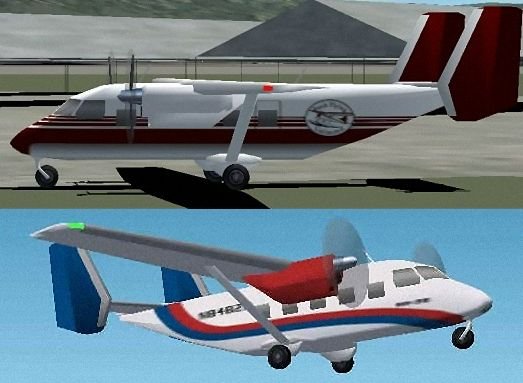
Ан-28 от Chuck Dome's и оригинальными текстурами. Панель в комплекте.
→ Size:
738 KB
→ Date:
23 years ago (05.02.2003 12:39)
→ Author:
Peter Ridge, Chuck Dome, Lizardo
→ License:
Freeware - Free version, Unlimited Distribution
→ Downloaded:
1135 time(s)